EmailListValidation vs FindThatLead: Which Tool Wins in 2026?
One tool cleans lists, the other builds them. We compared EmailListValidation and FindThatLead on accuracy, pricing, credits, and API depth to show which one you actually need — and when neither is enough.
EmailListValidation vs FindThatLead is an odd matchup. One tool cleans lists. The other builds them. Here is the short version first, then the detail.
TL;DR
- These two tools do different jobs. EmailListValidation is a bulk email verifier. It cleans lists you already own. FindThatLead is a prospecting tool. It finds emails and runs cold campaigns. Comparing them straight up is like comparing a dishwasher to a grocery store.
- Pick EmailListValidation if you have a large, aging list (10k+ contacts) and one job to do: cut the bounce rate before your next send. Credits are pay-as-you-go, so there is no subscription pressure.
- Pick FindThatLead if you start from zero contacts. You get find, verify, and send in one dashboard. It suits SMB-volume outbound, especially in Spanish-speaking markets.
- Pick neither if you want one API that finds, verifies, and enriches. That is where Tomba and similar unified platforms beat two subscriptions.
- Real cost check: running both tools costs about $60–$120 a month at modest volume. One unified plan usually covers the same work for less.
What are EmailListValidation and FindThatLead?#
Start with the honest framing. You are comparing a verifier to a finder and sender. That single difference drives most of this article.
EmailListValidation is a bulk email verification service. You upload a CSV, or you call the API. It returns a status for each address: valid, invalid, unknown, disposable, role-based, or catch-all. It does not source contacts. It does not send anything. It is a filter you run before the send, and it has done that one job since 2016.
FindThatLead is a prospecting suite out of Spain. The core is a domain-based email finder. A Chrome extension pulls contacts from LinkedIn. On top of that sit lead search by location and job title, a light verification step, and a built-in cold email sender. It finds contacts and mails them.
So the real question is simple. Do you need to clean a list, or build one? If you already know the answer, skip to the pricing table. If you don't, keep reading. The wrong pick costs you either bounces or an empty pipeline.
EmailListValidation vs FindThatLead: how do they compare head-to-head?#
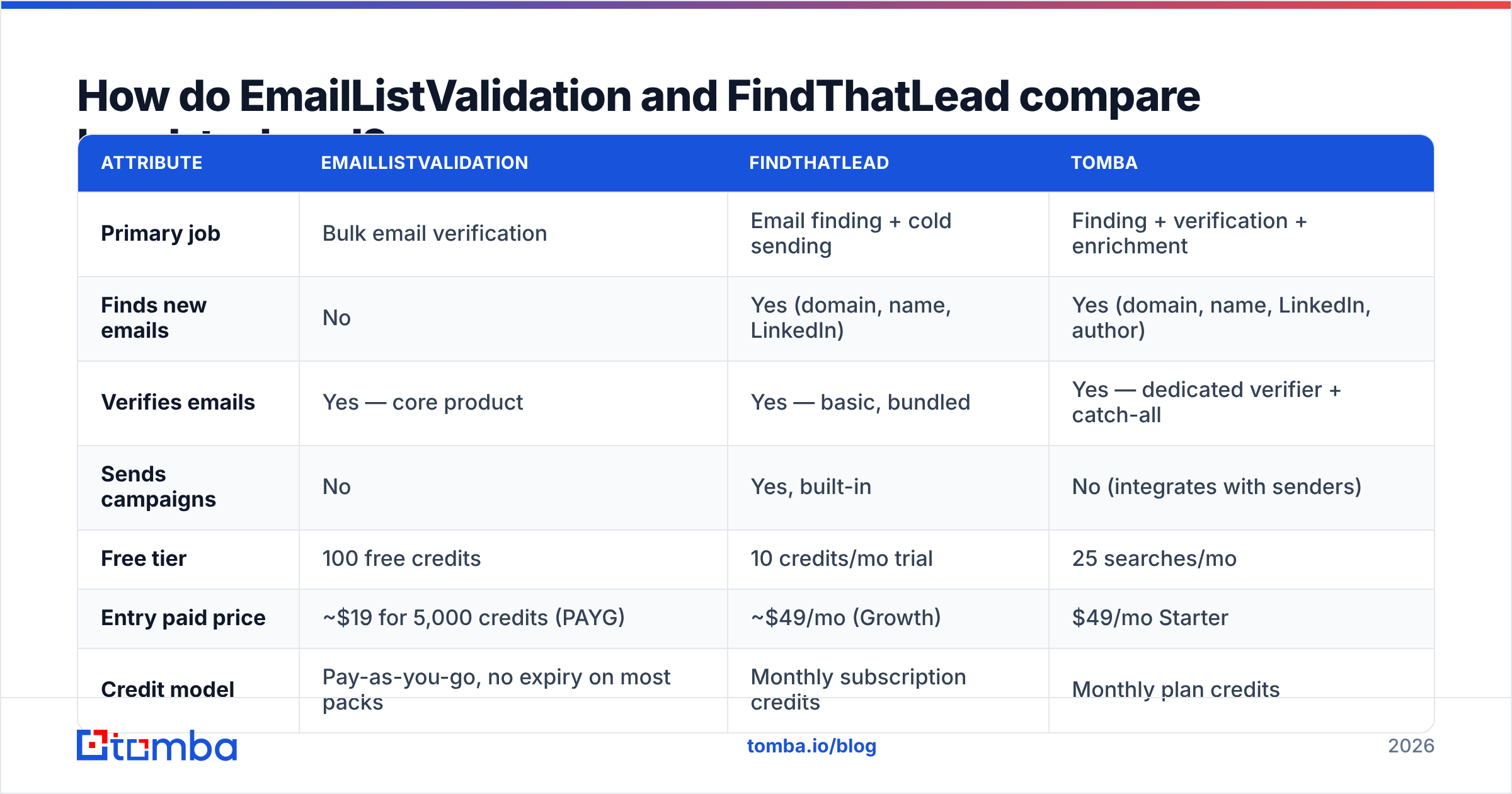
Here is the concrete comparison. Prices reflect public rates at the time of writing. Both vendors adjust tiers, so check their pricing pages before you commit.
| Attribute | EmailListValidation | FindThatLead | Tomba |
|---|---|---|---|
| Primary job | Bulk email verification | Email finding + cold sending | Finding + verification + enrichment |
| Finds new emails | No | Yes (domain, name, LinkedIn) | Yes (domain, name, LinkedIn, author) |
| Verifies emails | Yes — core product | Yes — basic, bundled | Yes — dedicated verifier + catch-all |
| Sends campaigns | No | Yes, built-in | No (integrates with senders) |
| Free tier | 100 free credits | 10 credits/mo trial | 25 searches/mo |
| Entry paid price | ~$19 for 5,000 credits (PAYG) | ~$49/mo (Growth) | $49/mo Starter |
| Credit model | Pay-as-you-go, no expiry on most packs | Monthly subscription credits | Monthly plan credits |
| Catch-all handling | Flags as "unknown"/catch-all | Limited | Dedicated catch-all verifier |
| API | REST, single + bulk | REST, finder endpoints | REST, full API + CLI + MCP |
| Native integrations | Zapier, Mailchimp, HubSpot | Zapier, HubSpot, Salesforce | Zapier, HubSpot, Salesforce, Sheets, Airtable |
| Best for | Cleaning an existing list | SMB outbound from scratch | Teams wanting one data layer |
Two things stand out. First, the products barely overlap — only the verification row is shared. Second, FindThatLead bundles verification as a convenience, while verification is EmailListValidation. That gap matters when your list is large or old.

How accurate is each tool in practice?#
Accuracy claims in this category mean little without context. Treat vendor numbers with care, including ours.
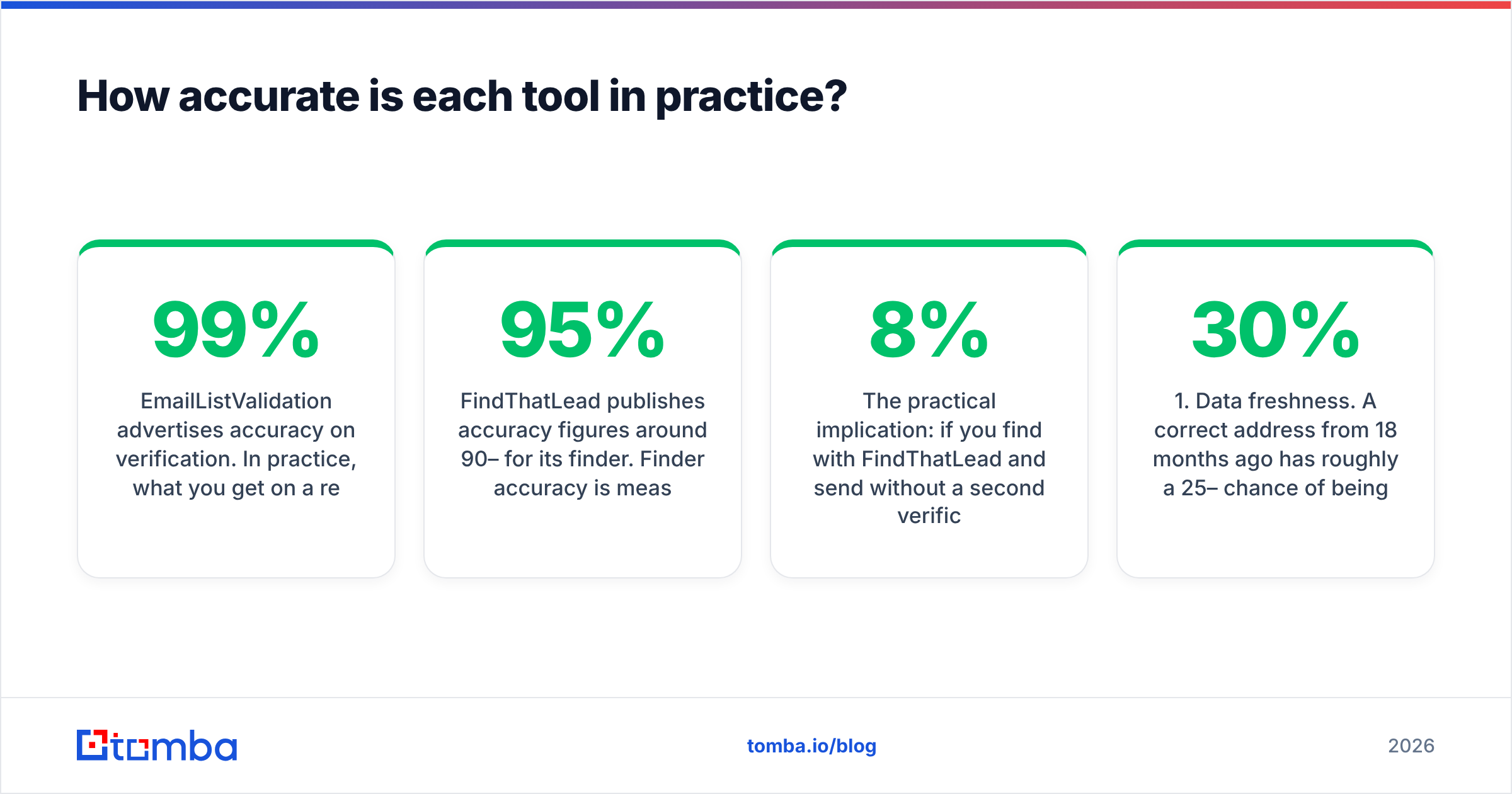
EmailListValidation advertises 99% accuracy. On a real B2B list, expect something closer to 95–98% correct classification on standard mailboxes. You will also get a sizeable "unknown" bucket for catch-all domains.
That bucket is the honest part. A verifier that reports zero unknowns on catch-all domains is guessing, and charging you for the guess. EmailListValidation's SMTP checks, plus syntax, MX, disposable, and role detection, cover the standard cases well.
FindThatLead publishes finder accuracy around 90–95%. Finder accuracy is a different measure from verifier accuracy. It is the share of returned addresses that actually deliver.
Pattern-based finders guess formats like first.last@ or f.last@. They do well when a company uses a public pattern. They do poorly when the format is unusual or hidden. FindThatLead's bundled verification catches some misses. It is not a substitute for a real verification pass on a big list.
The practical implication is easy to state. Find with FindThatLead, send without a second check, and expect a bounce rate of 3–8%. Your target segment decides where you land. Most inbox providers treat anything above 2% as a reputation warning. Google's sender guidelines say plainly that high bounce and complaint rates hurt delivery.
Three factors move accuracy more than the logo on your invoice:
- Data freshness. An address from 18 months ago has a 25–30% chance of being dead. People change jobs. Only re-verifying close to send time fixes that.
- Catch-all density in your segment. Enterprise and security-minded industries run catch-all far more often. If 40% of your list is catch-all, your verified share will look bad with any tool. That is the domain's doing, not the verifier's.
- Role-based addresses. info@, sales@, and support@ are valid but useless for most outbound. Both tools flag them. Make sure you actually filter them.
Which one is cheaper for real workloads?#
Cost only makes sense per scenario. Here are three.
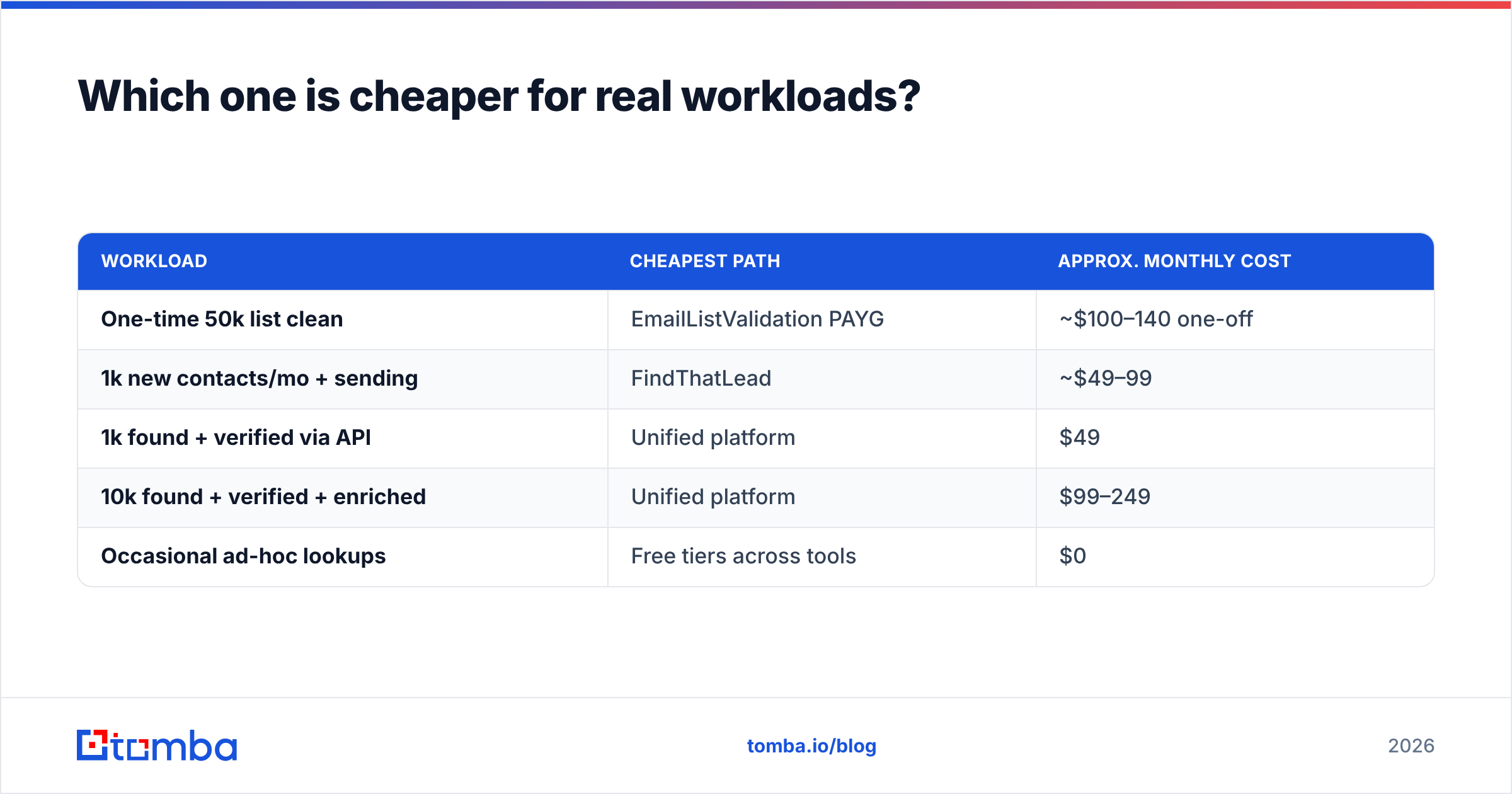
Scenario A — you have a 50,000-contact list to clean once. Pay-as-you-go pricing puts a one-off 50k verification at roughly $100–$140, with no monthly commitment. FindThatLead cannot do this job at that volume. Its credits are built for finding, not bulk cleaning. Winner: EmailListValidation, by a wide margin.
Scenario B — you need 1,000 new verified contacts a month. FindThatLead's mid tiers run about $49–$99 a month. That covers finder credits and the campaign sender. EmailListValidation adds nothing here, because it cannot source contacts. Want a second verification pass? Add another $10–$20 a month. Total: roughly $60–$120 across two vendors.
Scenario C — you need find, verify, and enrich through an API. Neither tool is built for this. FindThatLead's API is thinner than its UI. EmailListValidation's API is solid but single-purpose. A unified provider wins here on setup effort and on total spend. Tomba pricing puts finding, verification, and enrichment on one plan: $49/mo Starter, $99/mo Growth, $249/mo Pro. The free tier gives 25 searches a month for testing.
| Workload | Cheapest path | Approx. monthly cost |
|---|---|---|
| One-time 50k list clean | EmailListValidation PAYG | ~$100–140 one-off |
| 1k new contacts/mo + sending | FindThatLead | ~$49–99 |
| 1k found + verified via API | Unified platform | $49 |
| 10k found + verified + enriched | Unified platform | $99–249 |
| Occasional ad-hoc lookups | Free tiers across tools | $0 |
The pattern holds. Single-job workloads favor the specialist. Multi-job workloads favor consolidation. Paying two subscriptions to cover one pipeline is the most common overspend we see in early-stage outbound stacks.
When should you choose EmailListValidation?#
Choose it when all of these are true:
- You already have the contacts. Maybe you bought a list, exported a CRM, or inherited a dormant newsletter database. Sourcing is solved. Trust is not.
- Volume is high and bursty. You verify 30k addresses in March and none in April. Pay-as-you-go beats a subscription for that shape. Unused credits on most packs do not expire at month end.
- You need a check before you send. Is your email deliverability already shaky? A dedicated verification pass is the fastest lever you have. Cutting bounce from 7% to under 2% usually shows up in inbox placement within a week or two.
- You want a single-purpose vendor. Fewer features means less to learn and less to break. Some teams genuinely prefer that.
Do not choose it if you are starting from an empty spreadsheet. It is a filter, not a source. You cannot verify contacts you do not have.
When should you choose FindThatLead?#
Choose it when:
- You build lists from scratch. Finding, light verification, and sending sit in one login. The consolidation is real and the learning curve is short.
- You target Spanish-speaking or European SMB markets. FindThatLead's European roots show. Coverage for Spain, LATAM, and southern Europe often beats US-centric rivals.
- You want lead search by criteria. Searching by location plus job title is useful for territory work. Domain lookups alone are not.
- Your volume is modest. Under 2,000 contacts a month keeps you in the affordable tiers. Above that, the per-credit math gets worse, and a dedicated data provider usually wins.
Do not choose it if you need to verify a six-figure list. Skip it too if your engineers want to embed lookups in an application. The API works, but it is not the heart of the product.

What are the alternatives worth considering?#
The verifier-versus-finder split is not a law of nature. Several platforms do both jobs. Check a few before you sign anything.
- Tomba — Finder, verifier, domain search, catch-all verification, phone finder, and enrichment on one plan and one API key. Best fit when you want to stop paying two vendors and need access via REST, CLI, or MCP.
- Hunter — The best-known name for domain search. Clean UI, good free tier, verification included. It gets pricey at volume.
- BookYourData — A different model. You buy a prepackaged B2B contact database, pay as you go, and get a strong accuracy guarantee. Good when you would rather buy a targeted list than build one lookup at a time. Pair it with a verification pass before sending.
- ZeroBounce / Bouncer — Direct rivals to EmailListValidation, with deeper reporting and deliverability tooling. Worth a bake-off if verification is your only need. See our ZeroBounce alternative and Bouncer alternative pages.
- Apollo — A database plus sequencing plus light CRM features. Heavier and pricier, but it replaces more tools at once.
Want a fast neutral read? G2's email verification category is a fine starting point. Filter reviews by company size. A 12-person startup and a 900-person enterprise rate these tools very differently.
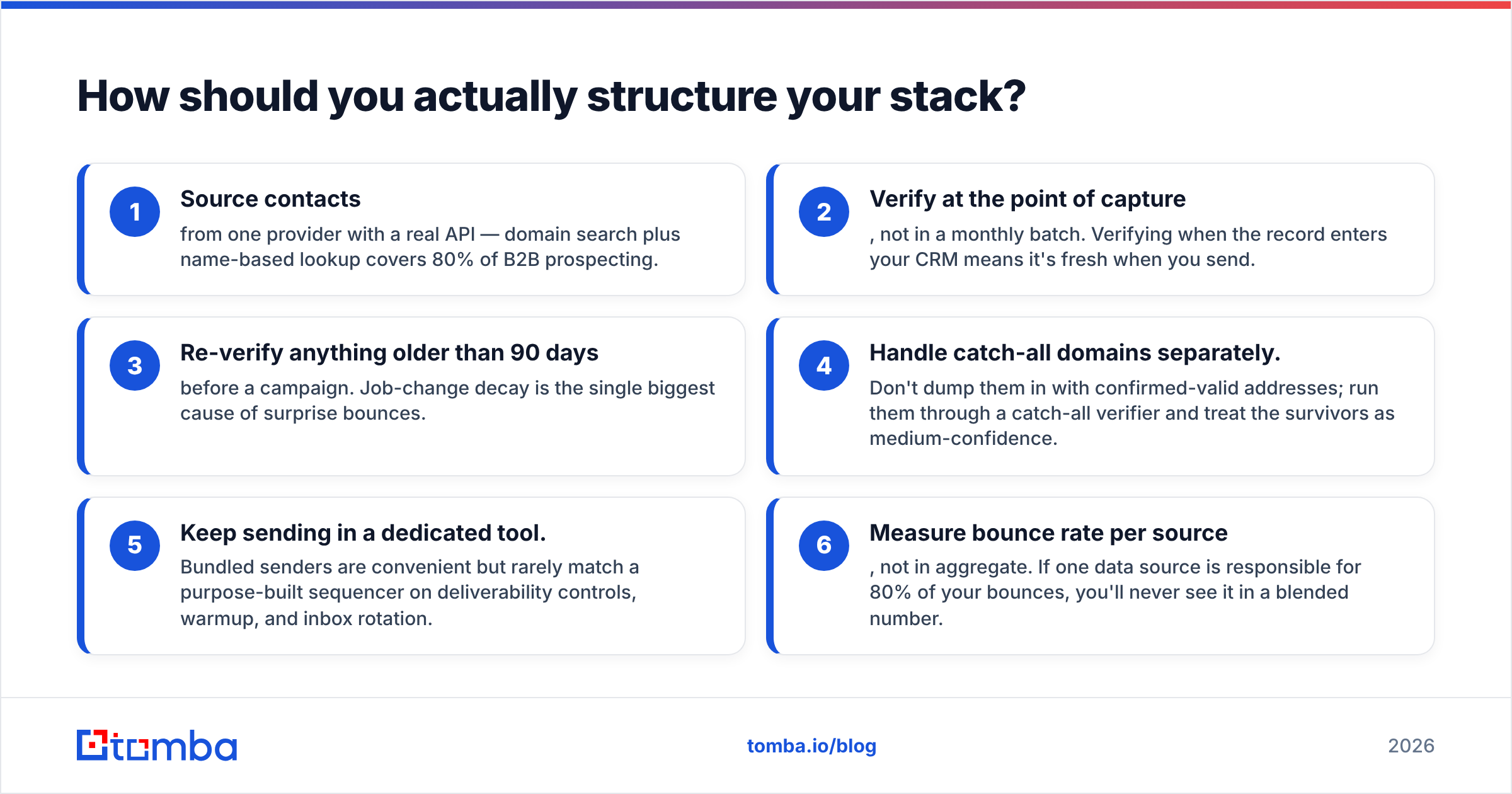
How should you actually structure your stack?#
Here is a working pattern that avoids paying twice for the same job:
- Source contacts from one provider with a real API. Domain search plus name lookup covers about 80% of B2B prospecting.
- Verify at the point of capture, not in a monthly batch. Verify when the record enters your CRM, and it is still fresh when you send.
- Re-verify anything older than 90 days before a campaign. Job changes are the biggest cause of surprise bounces.
- Handle catch-all domains separately. Do not mix them with confirmed-valid addresses. Run them through a catch-all verifier and treat the survivors as medium confidence.
- Keep sending in a dedicated tool. Bundled senders are handy. They rarely match a purpose-built sequencer on warmup, inbox rotation, and deliverability controls.
- Measure bounce rate per source, not in aggregate. If one source causes 80% of your bounces, a blended number will hide it.
That structure is provider-agnostic. It works with EmailListValidation plus a finder. It works with FindThatLead plus a verifier. It also works with one unified platform, which simply costs less to run and less to debug.
What's the verdict?#
The short answer on EmailListValidation vs FindThatLead: if you have a list, use EmailListValidation. If you need a list, use FindThatLead. If you need both jobs done all year, use neither on its own.
EmailListValidation is the better verifier, and it is not close. It is the only one of the two whose whole business is verification. Its pay-as-you-go model suits irregular, high-volume cleaning.
FindThatLead is the better prospecting tool. It is the only one of the two that finds anything. Its all-in-one dashboard fits small teams doing modest volume in European markets.
The trap is buying both. You pay twice for overlapping verification, and you still get an API that satisfies neither your engineers nor your RevOps lead. Run the cost table above against your real monthly volume before you subscribe to anything.
Ready to consolidate? Tired of stitching a finder to a verifier and reconciling two credit balances? Start with the Tomba Email Finder. Find emails by domain, name, or company. Verify them in the same call. Enrich the record too — one API key, one plan. The free tier gives you 25 searches a month to test against your own target accounts. Starter is $49/mo when you are ready to scale.
Related guides#
Ready to find emails that actually work?
Join 150,000+ professionals who stopped guessing and started sending. Free credits on signup — no credit card required.
Get the Tomba newsletter
Practical outbound tactics and product updates — once every two weeks.
About the author