EmailListValidation vs Generect: Which One Do You Need?
One cleans the list you already have. The other builds the list from scratch. Here's an honest breakdown of EmailListValidation vs Generect — pricing models, accuracy, API fit, and which one your outbound stack actually needs first.
TL;DR
- These two tools do different jobs. EmailListValidation is a bulk email verification service — you feed it a list, it tells you which addresses are safe to send to. Generect is a B2B lead-generation API — you feed it search criteria, it returns contacts.
- If you already have a list, you need a verifier. If you have nothing but an ICP, you need a data source. Buying the wrong one first is the most common mistake teams make.
- Pricing models are incompatible. EmailListValidation leans pay-as-you-go credits with no expiry pressure; Generect leans subscription/API contracts aimed at agencies and product teams.
- Neither is a complete stack on its own. Verification without sourcing leaves you with a clean but tiny list. Sourcing without verification leaves you with a big list that bounces.
- The practical answer for most teams is one platform that finds and verifies in the same call, which is where a combined email finder plus email verifier setup wins on cost and on ops overhead.
What are EmailListValidation and Generect, actually?#
Start with the honest framing, because most "X vs Y" pages blur it.
EmailListValidation is a list-hygiene tool. Its entire product surface is: upload a CSV (or hit the API), get back a status per address — valid, invalid, catch-all/accept-all, disposable, role-based, unknown. It runs syntax checks, MX record lookups, SMTP handshakes, disposable-domain matching, and spam-trap heuristics. It does not source contacts. If you hand it an empty file, you get an empty file back.
Generect is a lead-data tool. It sells access to B2B contact and company data, with a strong API-first orientation — search by company, role, industry, headcount, geography, and get back people with work emails and LinkedIn profiles. A lot of its customer base is agencies and SaaS products embedding lead search into their own UI rather than SDRs clicking around a dashboard.
So the real question in "EmailListValidation vs Generect" is not which tool is better. It's which half of the pipeline you're missing right now.
Is this even a fair comparison?#
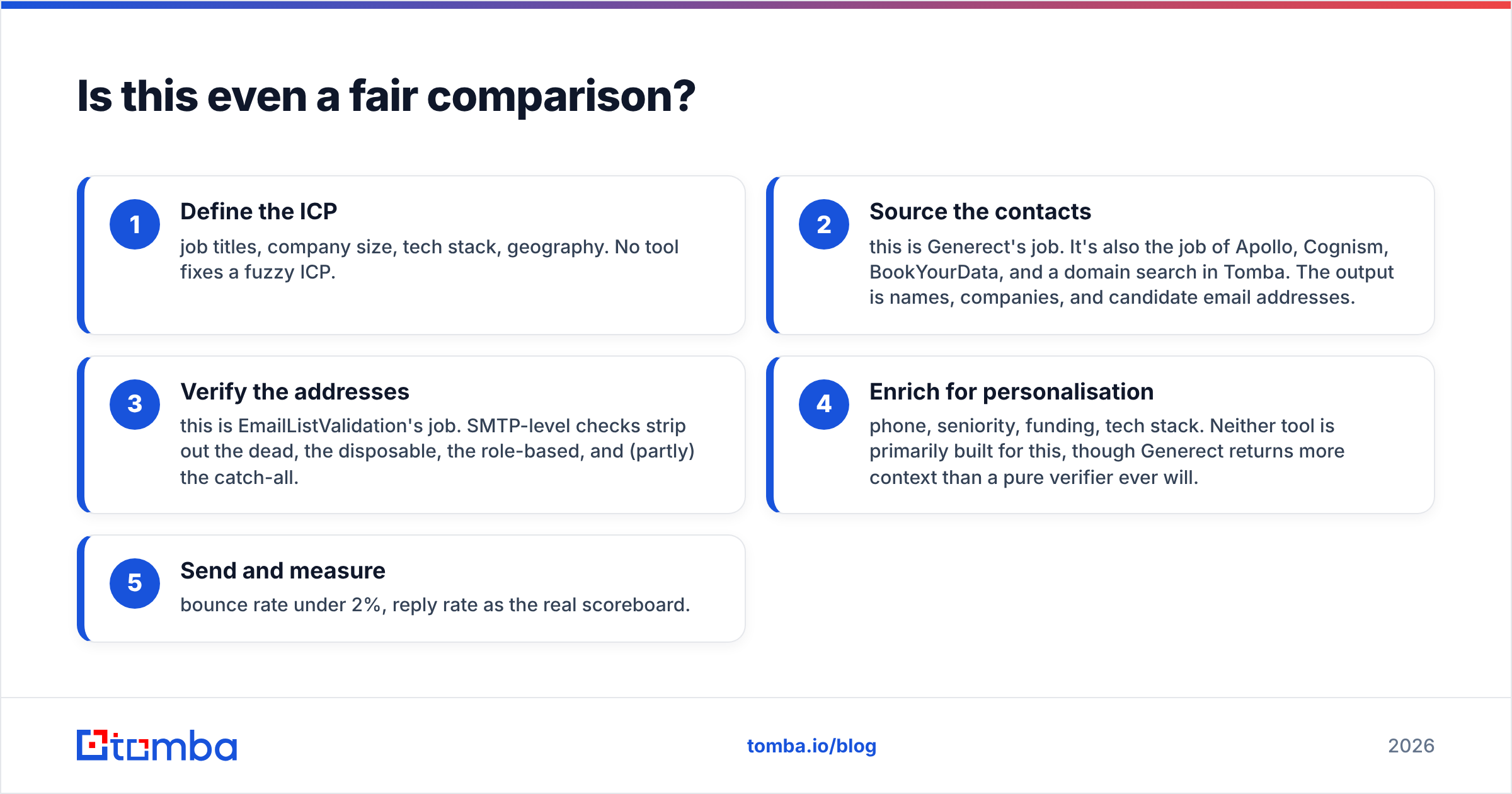
Only if you compare them on the job you're hiring them for. Here's the pipeline both tools sit inside, in order:
- Define the ICP — job titles, company size, tech stack, geography. No tool fixes a fuzzy ICP.
- Source the contacts — this is Generect's job. It's also the job of Apollo, Cognism, BookYourData, and a domain search in Tomba. The output is names, companies, and candidate email addresses.
- Verify the addresses — this is EmailListValidation's job. SMTP-level checks strip out the dead, the disposable, the role-based, and (partly) the catch-all.
- Enrich for personalisation — phone, seniority, funding, tech stack. Neither tool is primarily built for this, though Generect returns more context than a pure verifier ever will.
- Send and measure — bounce rate under 2%, reply rate as the real scoreboard.
Skip step 2 and you have a verifier polishing an empty spreadsheet. Skip step 3 and you learn about your data quality from your inbox provider's suspension email. That's the whole argument.

How do they compare feature by feature?#
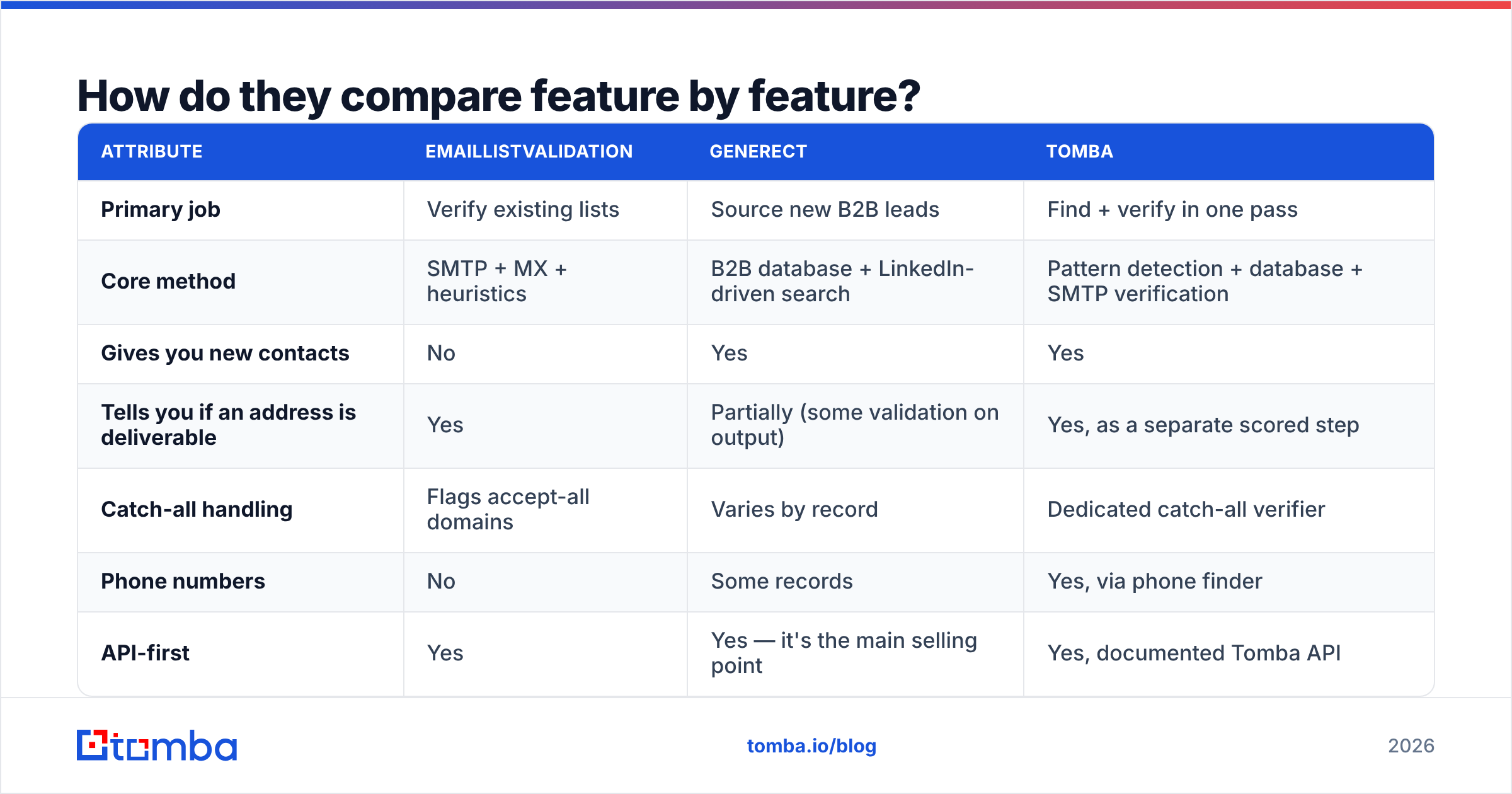
Here's the head-to-head on the attributes that actually change your workflow. Treat specifics as directional — both vendors change packaging, so confirm on their own pages before you buy.
| Attribute | EmailListValidation | Generect | Tomba |
|---|---|---|---|
| Primary job | Verify existing lists | Source new B2B leads | Find + verify in one pass |
| Core method | SMTP + MX + heuristics | B2B database + LinkedIn-driven search | Pattern detection + database + SMTP verification |
| Gives you new contacts | No | Yes | Yes |
| Tells you if an address is deliverable | Yes | Partially (some validation on output) | Yes, as a separate scored step |
| Catch-all handling | Flags accept-all domains | Varies by record | Dedicated catch-all verifier |
| Phone numbers | No | Some records | Yes, via phone finder |
| API-first | Yes | Yes — it's the main selling point | Yes, documented Tomba API |
| Bulk CSV workflow | Core feature | Available | Yes, via bulk email finder |
| Typical buyer | Email marketers, ESP-heavy teams | Agencies, dev teams, data resellers | SDR teams and builders who need both halves |
| Pricing shape | Pay-as-you-go credits | Subscription / API plan | Free tier + $49/mo Starter |
Two things jump out of that table.
First, the overlap is thin. The only row where both genuinely compete is deliverability signal, and even there they're not equivalent — Generect validating an address at export time is not the same as running a fresh SMTP check the morning you send.
Second, if you buy both, you're paying two vendors, maintaining two API integrations, and reconciling two credit balances to accomplish what a single find-and-verify platform does in one call.

Which one is more accurate?#
Different definitions of accuracy, so measure them differently.
For a verifier like EmailListValidation, accuracy means: did the "valid" bucket actually deliver? The honest test is a bounce-rate audit. Run 2,000 addresses through it, send, and compare the reported valid count against hard bounces. Anything over 2–3% hard bounces on a list marked clean means the verifier is guessing on catch-all domains and labelling them optimistically. Good verifiers are conservative — they'd rather return "unknown" than a false "valid".
For a data source like Generect, accuracy means: is this person still there, and is this address the one they read? The failure modes are different — stale job titles, addresses from a previous employer, aliases that forward nowhere, and personal Gmail addresses padding a B2B list. Test it by pulling 200 records in a vertical you know well and manually checking 20 against LinkedIn and the company site.

The trap in the middle: a sourcing tool's internal validation is not a substitute for a verification pass. Records get exported once and cached forever, while people change jobs constantly. Even if Generect validated an address the day it entered the database, that tells you very little about a record you're emailing eight months later. Verify at send time, not at export time. If you want the mechanics of why addresses rot, the email deliverability primer covers the sender-side consequences.
What does each one cost?#
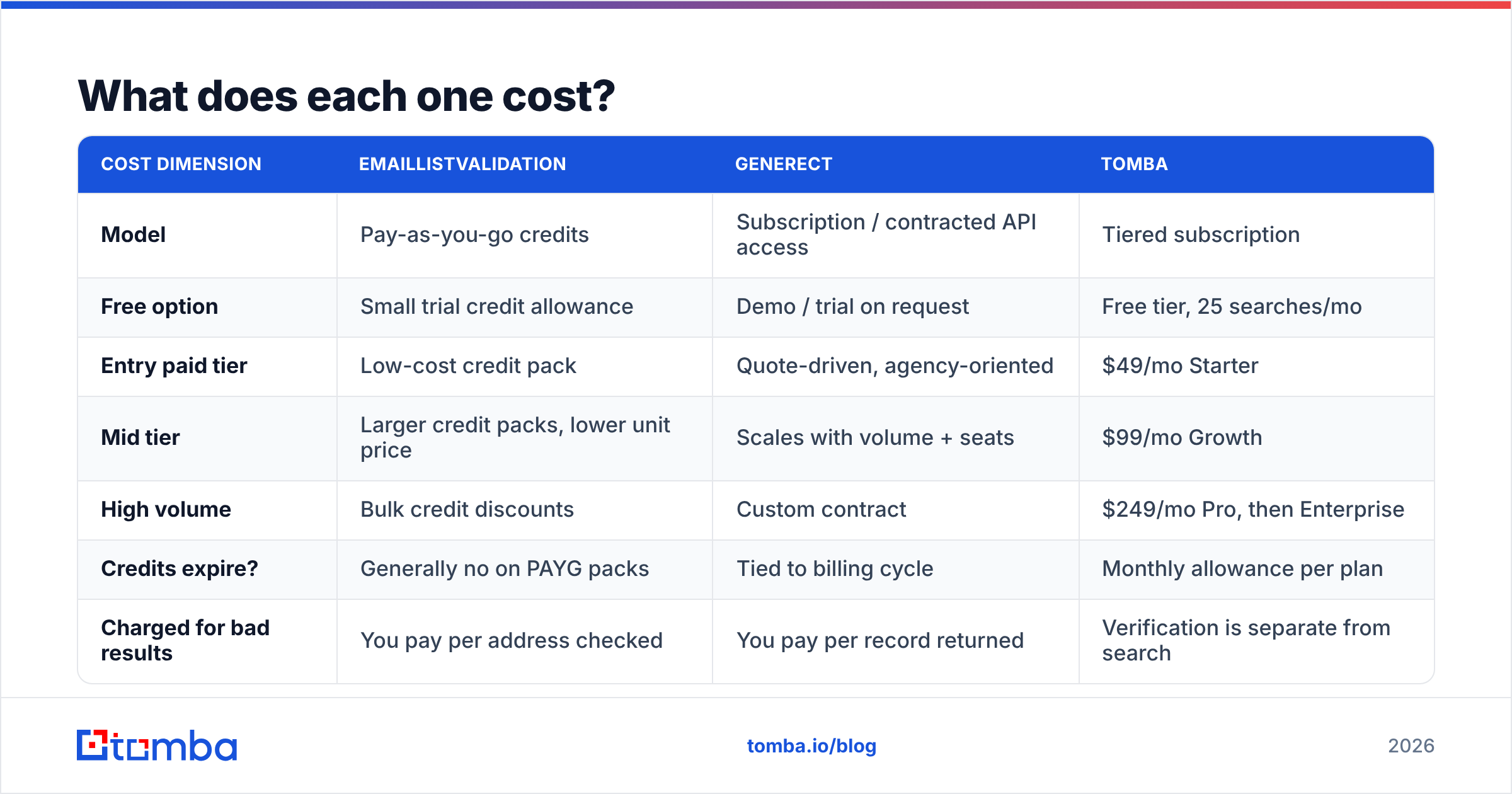
Pricing structures differ so much that a per-credit comparison is close to meaningless — but the shape of the cost matters for budgeting.
| Cost dimension | EmailListValidation | Generect | Tomba |
|---|---|---|---|
| Model | Pay-as-you-go credits | Subscription / contracted API access | Tiered subscription |
| Free option | Small trial credit allowance | Demo / trial on request | Free tier, 25 searches/mo |
| Entry paid tier | Low-cost credit pack | Quote-driven, agency-oriented | $49/mo Starter |
| Mid tier | Larger credit packs, lower unit price | Scales with volume + seats | $99/mo Growth |
| High volume | Bulk credit discounts | Custom contract | $249/mo Pro, then Enterprise |
| Credits expire? | Generally no on PAYG packs | Tied to billing cycle | Monthly allowance per plan |
| Charged for bad results | You pay per address checked | You pay per record returned | Verification is separate from search |
The strategic difference: pay-as-you-go suits spiky workloads (you clean a database twice a year), while subscriptions suit continuous workloads (you pull 500 new leads every week). If your sourcing is continuous and your cleaning is spiky, you'll end up on one of each — which is exactly the two-vendor overhead problem.
Compare that against Tomba pricing, where the search and verification budgets live under one plan and one invoice.
Which should you pick for your use case?#
Match the tool to the constraint you actually have:
- You inherited a 60k-row CRM export of unknown age. EmailListValidation. This is the textbook case — cheap PAYG credits, no subscription, one job done well. Don't buy a data platform to solve a hygiene problem.
- You're an agency building lead lists for ten clients a month. Generect. The API-first design and the volume orientation are built for exactly this, and you'll want programmatic access rather than a dashboard your junior team clicks through.
- You're a SaaS embedding contact search into your own product. Generect or a documented email finder API. Evaluate on rate limits, response schema stability, and support SLA — not on the marketing site.
- You're a 3–10 person SDR team running outbound weekly. Neither alone. You need sourcing and verification on a repeating cadence, which means either two subscriptions or one combined platform.
- You're doing account-based outbound into 200 named accounts. A domain search plus verification beats a broad database pull. You already know the companies; you need the right people at them, not a filter query.
- Your bounce rate is the emergency. Verification first, always. Fix the leak before you pour in more water — a suspended sending domain costs more than any tool on this page.

What do reviewers say about each tool?#
Check G2 and Capterra before you commit, and read the 3-star reviews rather than the 5-star ones. The patterns worth watching for:
On verifiers generally, the recurring complaint is the "unknown" bucket. Every SMTP-based verifier hits catch-all domains where the server accepts everything and reveals nothing. Vendors handle this differently: some mark them risky, some mark them valid, some charge you anyway. Ask directly how catch-all results are billed — it's often 20–30% of a B2B list, so the answer materially changes your cost per usable address.
On lead databases generally, the recurring complaint is coverage by region and vertical. A database that's excellent for US SaaS mid-market can be thin for German manufacturing or Southeast Asian logistics. Never evaluate a data vendor on their sample file — evaluate on a query you'd actually run, in your worst-case geography.
Also worth noting: competitors like BookYourData take a third approach again, selling pre-verified list purchases rather than either raw search or raw verification. That's a legitimate model if your ICP is broad and stable — just budget for the fact that any purchased list still ages from the day it's delivered.
Can one tool replace both?#
Yes, for most mid-market teams — and that's the pragmatic conclusion of this comparison.
The reason "finder + verifier" got split into two industries is historical, not technical. Verification vendors grew out of email marketing and ESP hygiene. Data vendors grew out of sales intelligence. The buyer sitting in the middle — an SDR who needs a valid address for a named prospect this afternoon — has to bridge two products that were never designed to talk to each other.
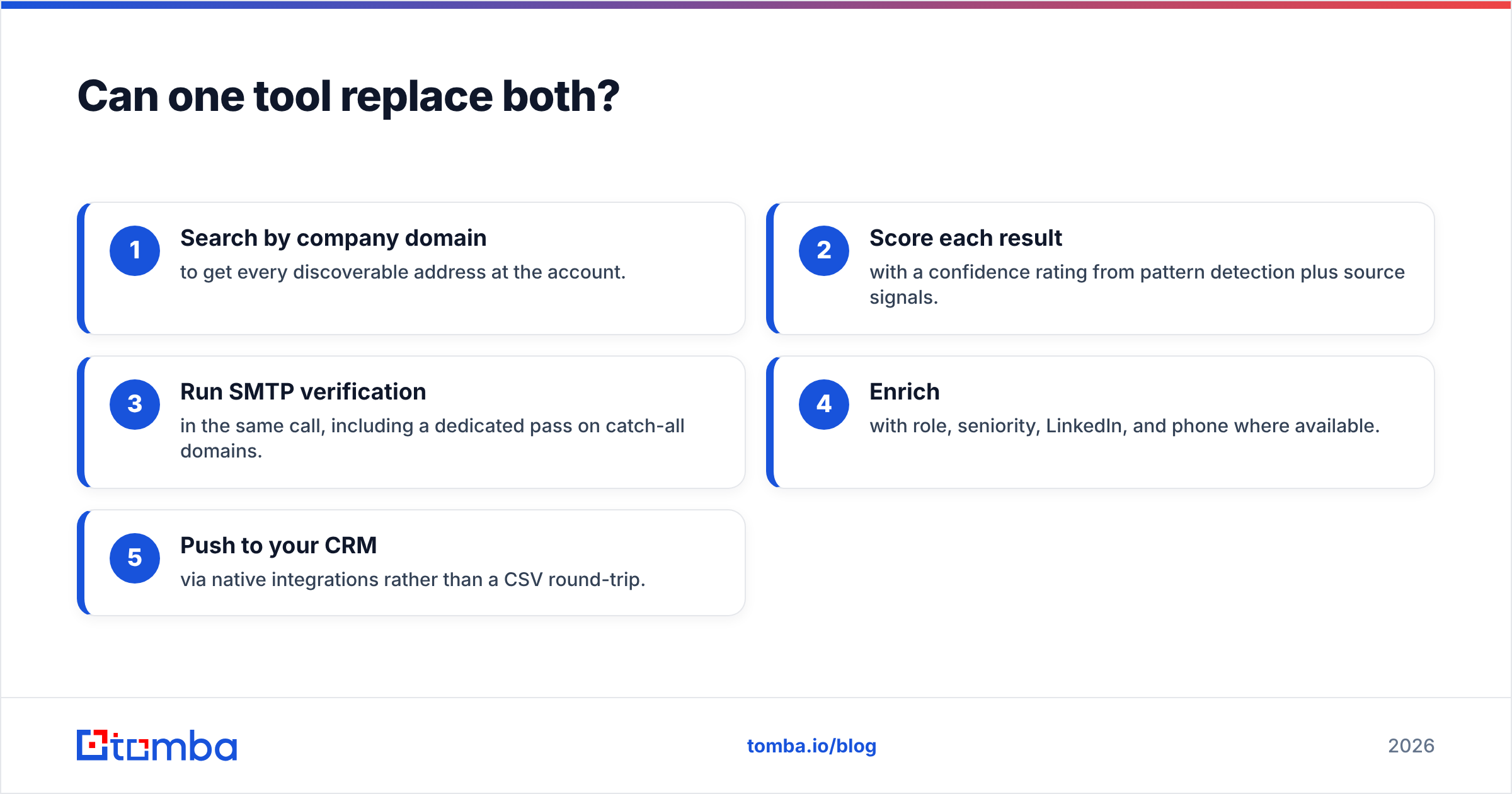
A combined platform closes that gap:
- Search by company domain to get every discoverable address at the account.
- Score each result with a confidence rating from pattern detection plus source signals.
- Run SMTP verification in the same call, including a dedicated pass on catch-all domains.
- Enrich with role, seniority, LinkedIn, and phone where available.
- Push to your CRM via native integrations rather than a CSV round-trip.
That's one credit balance, one API key, and one place to debug when the numbers look wrong. For teams under roughly 50 seats, the operational savings usually outweigh any per-unit price advantage from specialising.
How should you run the evaluation?#
Don't take anyone's word for it, including this post. Run a 90-minute bake-off:
- Pick 100 real prospects you can independently verify — companies you know, roles you can see on LinkedIn.
- Run them through each candidate tool using the free tier or trial credits.
- Score three numbers: match rate (how many returned an address at all), accuracy (how many were correct on manual spot-check), and bounce rate (send a small, genuinely relevant campaign and measure).
- Divide cost by usable addresses, not by credits. A tool at half the price with a third of the match rate is more expensive.
- Test the API, not just the UI, if you'll be integrating. Read the error responses and rate limits before you build.
That test settles EmailListValidation vs Generect for your data far better than any feature matrix — including the one above.
Start with the half you're missing#
If your problem is a dirty list, buy verification credits and move on. If your problem is an empty list, buy data. If your problem is both — which it is for most outbound teams — stop paying two vendors to hand files to each other.
Try the Tomba Email Finder on your next 25 prospects free: search by domain or by name, get a confidence score on every result, and run verification in the same workflow before a single email leaves your outbox. When you're ready to scale, Starter is $49/mo and the same data is available through the API, Chrome extension, Google Sheets, and your CRM.
Related guides#
Ready to find emails that actually work?
Join 150,000+ professionals who stopped guessing and started sending. Free credits on signup — no credit card required.
Get the Tomba newsletter
Practical outbound tactics and product updates — once every two weeks.
About the author