EmailListValidation vs LeadsForge: Which Wins in 2026?
One tool cleans lists, the other builds them. We break down EmailListValidation vs LeadsForge on accuracy, pricing, data coverage, and cost per usable contact — plus when neither is the right pick.
TL;DR#
- They solve different halves of the same problem. EmailListValidation cleans a list you already have. LeadsForge builds a list you don't have yet. Comparing them head-to-head only makes sense once you know which half is actually broken in your pipeline.
- EmailListValidation wins on cost-per-check. Pay-as-you-go verification credits are cheap, there's no monthly commitment, and the API is straightforward. It does not find a single new contact for you.
- LeadsForge wins on speed-to-list. Describe your ICP in plain language, get a contact list back. The trade-off is that AI-assembled lists inherit whatever the underlying data provider knows — and you still need to verify the output.
- Buying both is a common, expensive mistake. If you're paying one vendor to source and another to verify, you're paying twice for one workflow and reconciling two credit systems.
- A combined find-and-verify platform usually beats the two-tool stack on cost per usable contact — which is the only metric that maps to reply rate.
What is EmailListValidation?#
EmailListValidation is a bulk email verification service. You upload a CSV (or call the API), it runs each address through syntax checks, MX record lookups, disposable-domain detection, role-account flagging, and an SMTP handshake, then hands you back a status per row: valid, invalid, unknown, catch-all, or risky.
That's the entire product. It's a filter, not a source. The company has been around long enough to have a real customer base in the ESP and agency world, and the pricing is genuinely aggressive — pay-as-you-go credits, no seat fees, volume discounts as you scale. At the time of writing, entry-level bundles land in the mid-teens of dollars per 1,000 verifications, dropping steeply above 100k. Check their current pricing page before you budget; verification pricing moves.
Where it earns its keep: you inherited a 40,000-row list from a trade show, a departed SDR, or a scraped export, and you have no idea how much of it is dead. Running that through a verifier before your first send is not optional — it's the difference between a warm domain and a burned one. If you want the mechanics of that, our email verifier breakdown covers the same validation stack.
Where it doesn't help: you have a target account list and zero contacts at those accounts. EmailListValidation has nothing to say about that.
What is LeadsForge?#
LeadsForge sits at the opposite end. It's an AI-assisted lead list builder: you describe the audience you want ("Series A fintech companies in Germany, heads of engineering, 50–200 employees"), and it returns a contact list with names, titles, companies, and email addresses. The pitch is conversational prospecting — no filter panels, no boolean strings, just a prompt.
Two things to be clear-eyed about, because vendors in this category rarely are:
First, the AI is the interface, not the data. Every tool in this space queries an underlying B2B contact database — sometimes proprietary, more often licensed or aggregated. The natural-language layer translates your prompt into filters. It is a genuinely nicer UX. It does not make the underlying records more accurate.
Second, "verified" in an AI list builder usually means "syntax-checked plus a lookup against a cached status." That is not the same as a fresh SMTP verification at send time. Contact data decays at roughly 25–30% per year — people change jobs, companies get acquired, mailboxes get deprovisioned. A record verified nine months ago and cached is a coin flip today.
If you're evaluating LeadsForge, pull a sample of 200 rows, run them through an independent verifier, and measure the real valid rate. Do this before you sign anything annual. Every vendor in this space will let you sample if you push.

Are EmailListValidation and LeadsForge actually competitors?#
Mostly, no — and that's the most useful thing to understand about this matchup.
Think of outbound data like cooking. LeadsForge is the grocery run: it decides what ends up in the basket. EmailListValidation is checking expiry dates before anything hits the pan. You can do a great grocery run and still serve spoiled food. You can also check every date meticulously and still have an empty fridge.
The reason people search "EmailListValidation vs LeadsForge" is usually that they have a budget line for "email data" and are trying to decide where the money goes. That framing is the trap. The right question is: which stage of your list pipeline is leaking?
- High bounce rate, plenty of contacts? That's a verification problem. EmailListValidation solves it cheaply.
- Clean sends but not enough volume, or wrong-fit accounts? That's a sourcing problem. A verifier will never fix it.
- Both? You need a platform that does both passes in one system, or you're going to spend your week exporting CSVs between two dashboards.
How do EmailListValidation, LeadsForge, and Tomba compare?#
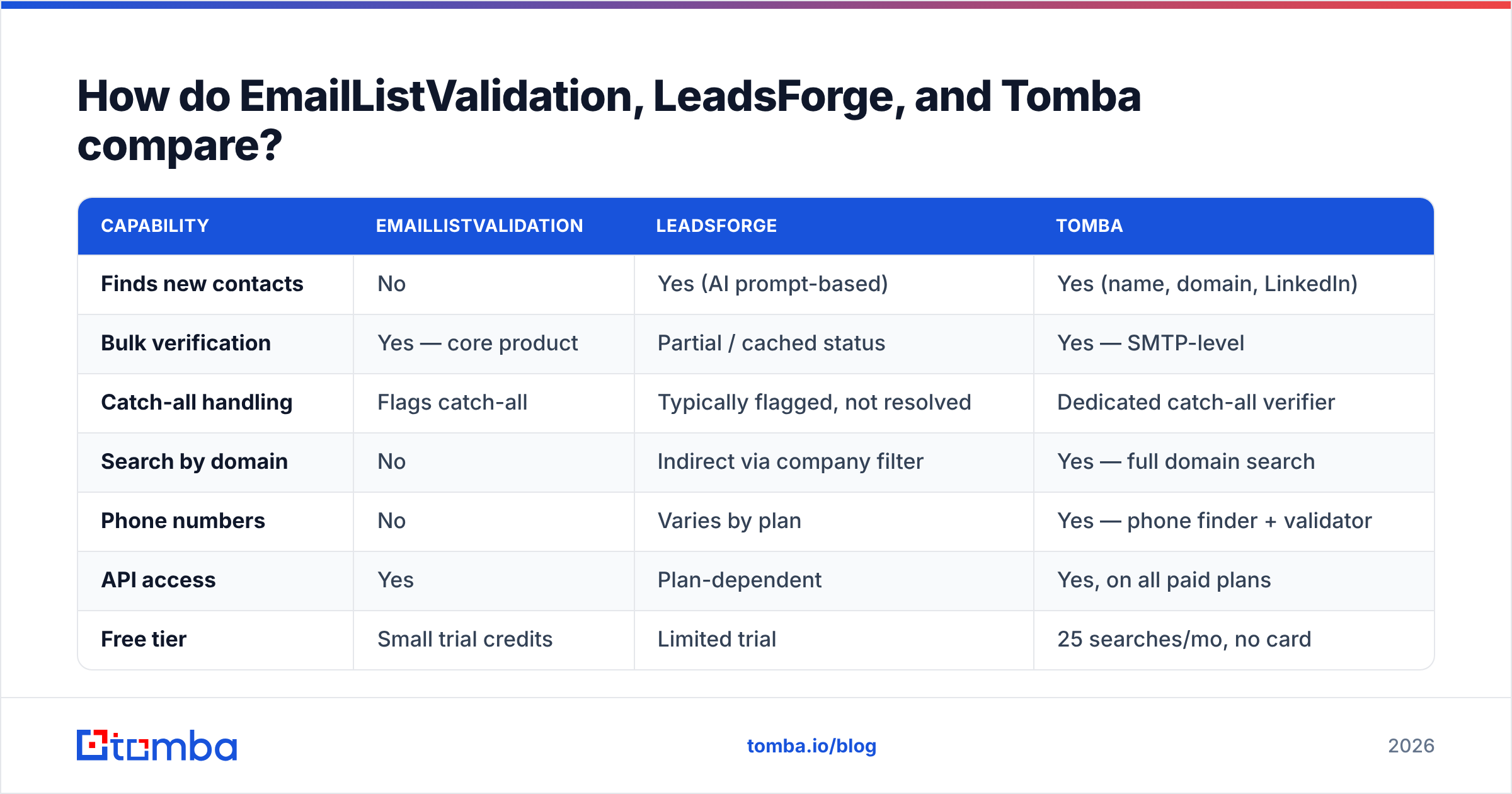
Here's the honest layout. Pricing figures are indicative at time of writing — verification and data vendors change tiers frequently, so confirm on each vendor's page.
| Capability | EmailListValidation | LeadsForge | Tomba |
|---|---|---|---|
| Finds new contacts | No | Yes (AI prompt-based) | Yes (name, domain, LinkedIn) |
| Bulk verification | Yes — core product | Partial / cached status | Yes — SMTP-level |
| Catch-all handling | Flags catch-all | Typically flagged, not resolved | Dedicated catch-all verifier |
| Search by domain | No | Indirect via company filter | Yes — full domain search |
| Phone numbers | No | Varies by plan | Yes — phone finder + validator |
| API access | Yes | Plan-dependent | Yes, on all paid plans |
| Free tier | Small trial credits | Limited trial | 25 searches/mo, no card |
| Entry paid price | Pay-as-you-go credits | Subscription (varies) | $49/mo Starter |
| Spreadsheet add-ins | CSV upload only | Export to CSV/CRM | Sheets, Excel, Airtable, CRM |
| Best for | Cleaning an existing list | Fast list assembly | End-to-end find + verify |
Two structural differences matter more than any single row.
Credit fungibility. With a two-tool stack, sourcing credits and verification credits live in separate wallets that expire on separate schedules. You will over-buy one and run dry on the other. A single credit pool that covers both search and verification removes an entire category of procurement annoyance.
The catch-all gap. Neither a pure verifier nor a pure list builder resolves catch-all domains well — and catch-alls are 15–25% of B2B domains depending on your vertical. A verifier flags them "unknown" and moves on. A list builder ships them as-is. That means a meaningful chunk of your best enterprise targets sit in a bucket nobody will make a call on. Tools with a dedicated catch-all verifier attack that bucket specifically, which is where a surprising amount of recoverable pipeline hides.
Which one is more accurate?#
Different question for each tool, so answer it separately.
For EmailListValidation, accuracy means: does the status it returns match reality? Good verifiers land in the 96–99% agreement range against a known-good control set on standard domains. ELV performs respectably here. The variance across the whole category is smaller than vendors imply — on ordinary, non-catch-all mailboxes, most mature verifiers agree with each other. Where they diverge is on catch-alls, greylisting-heavy providers, and aggressive anti-verification setups. That's the part worth testing, and it's the part every vendor's marketing page skips.
For LeadsForge, accuracy means: is the person real, at that company, in that role, at that address? This is a much harder standard, and it degrades with time in ways verification does not. A verifier tells you a mailbox accepts mail today. It cannot tell you the person still works there. That's why title-level and company-level freshness matters as much as deliverability status when you're buying sourced lists.

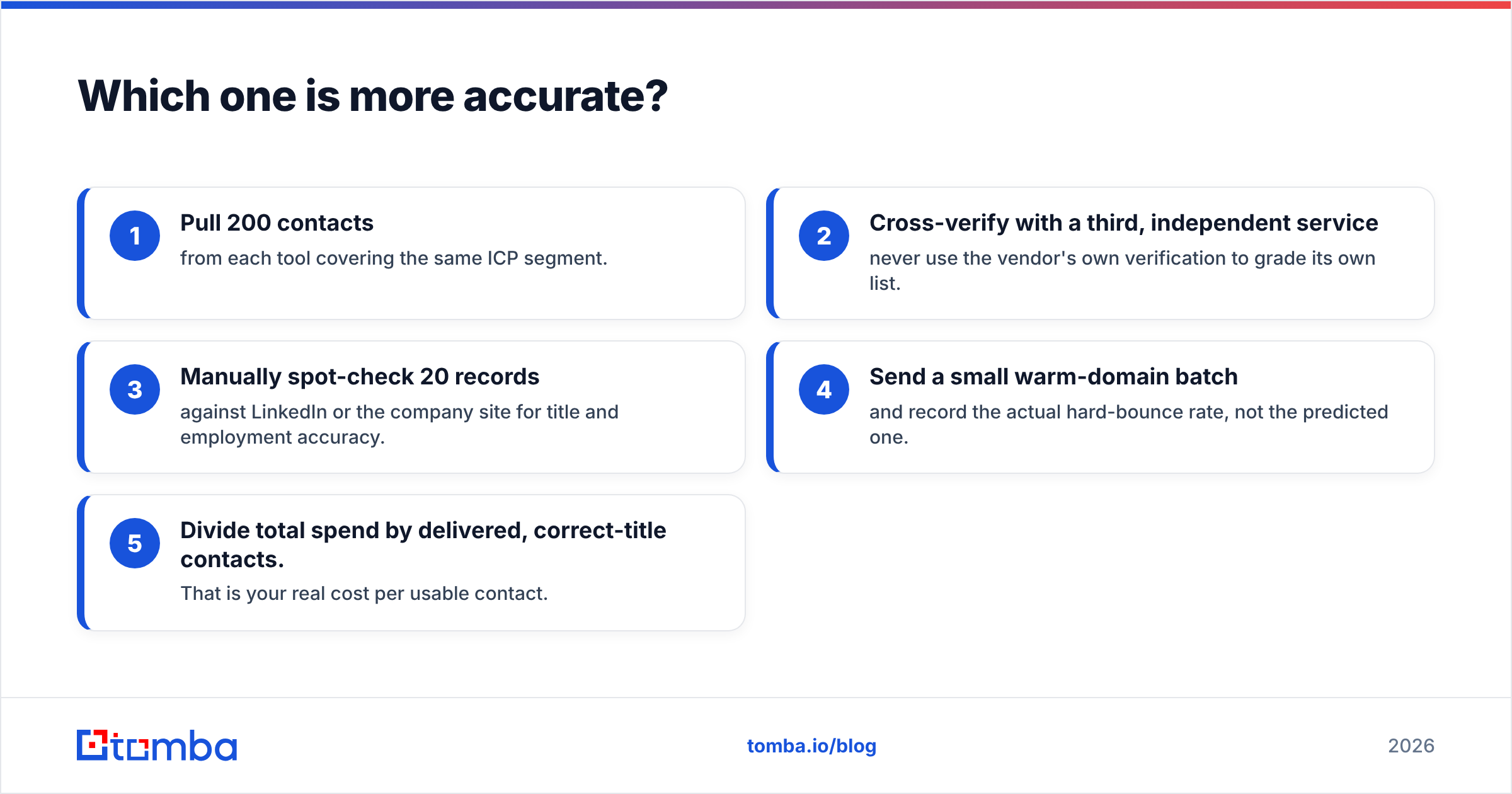
The practical test, and it takes an afternoon:
- Pull 200 contacts from each tool covering the same ICP segment.
- Cross-verify with a third, independent service — never use the vendor's own verification to grade its own list.
- Manually spot-check 20 records against LinkedIn or the company site for title and employment accuracy.
- Send a small warm-domain batch and record the actual hard-bounce rate, not the predicted one.
- Divide total spend by delivered, correct-title contacts. That is your real cost per usable contact.
Most teams discover the tool with the lower sticker price is not the tool with the lower cost per usable contact. Coverage rate — the share of your target list a tool can find anything for — swings that number harder than per-credit price does.
What does each actually cost per usable contact?#
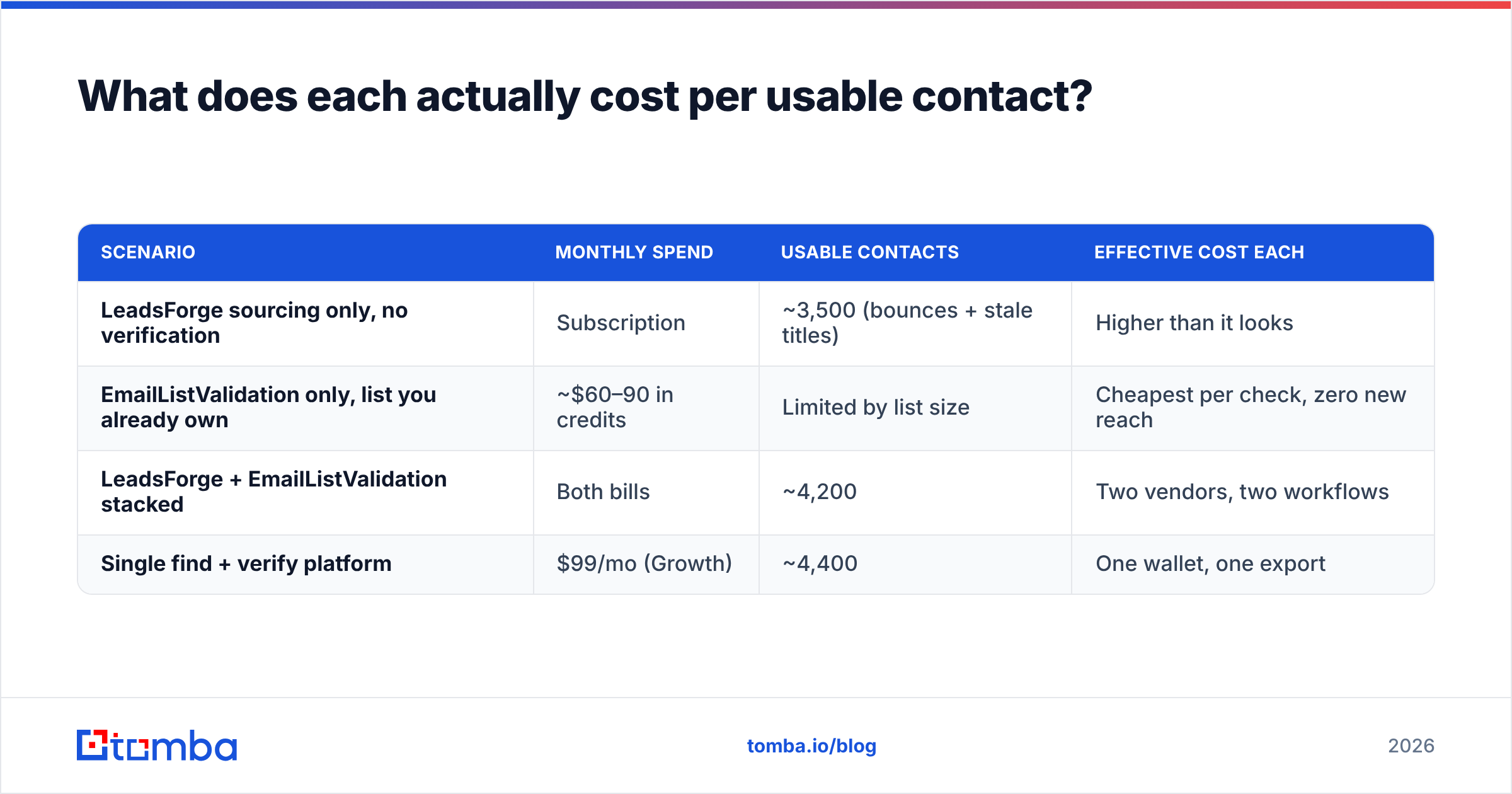
Sticker price is close to meaningless in this category. Here's a modeled example for a team that needs 5,000 verified, correct-title contacts per month. Treat the numbers as illustrative arithmetic, not quotes.
| Scenario | Monthly spend | Usable contacts | Effective cost each |
|---|---|---|---|
| LeadsForge sourcing only, no verification | Subscription | ~3,500 (bounces + stale titles) | Higher than it looks |
| EmailListValidation only, list you already own | ~$60–90 in credits | Limited by list size | Cheapest per check, zero new reach |
| LeadsForge + EmailListValidation stacked | Both bills | ~4,200 | Two vendors, two workflows |
| Single find + verify platform | $99/mo (Growth) | ~4,400 | One wallet, one export |

The stacked-tools row is where most teams land by accident, and it's the row with the worst operational overhead: two logins, two credit balances, two support queues, and a CSV shuttle in the middle that someone has to babysit every week. If you want to see how a unified pool prices out, Tomba pricing runs Free (25 searches/mo), Starter $49/mo, Growth $99/mo, and Pro $249/mo, with search and verification drawing from the same balance.

Who should pick EmailListValidation?#
Pick it when all of these are true:
- You already have the contacts. Inherited database, event list, CRM backlog, newsletter file — the volume exists and the quality doesn't.
- You need one-off cleaning, not continuous sourcing. Pay-as-you-go with no subscription is genuinely the right shape for a quarterly hygiene pass.
- You're price-sensitive at high volume. Above 100k addresses, per-check economics dominate everything else.
- You have an ESP migration coming. Every major ESP will hold or throttle a list with a bad reputation history. Cleaning first is table stakes.
Who should pick LeadsForge?#
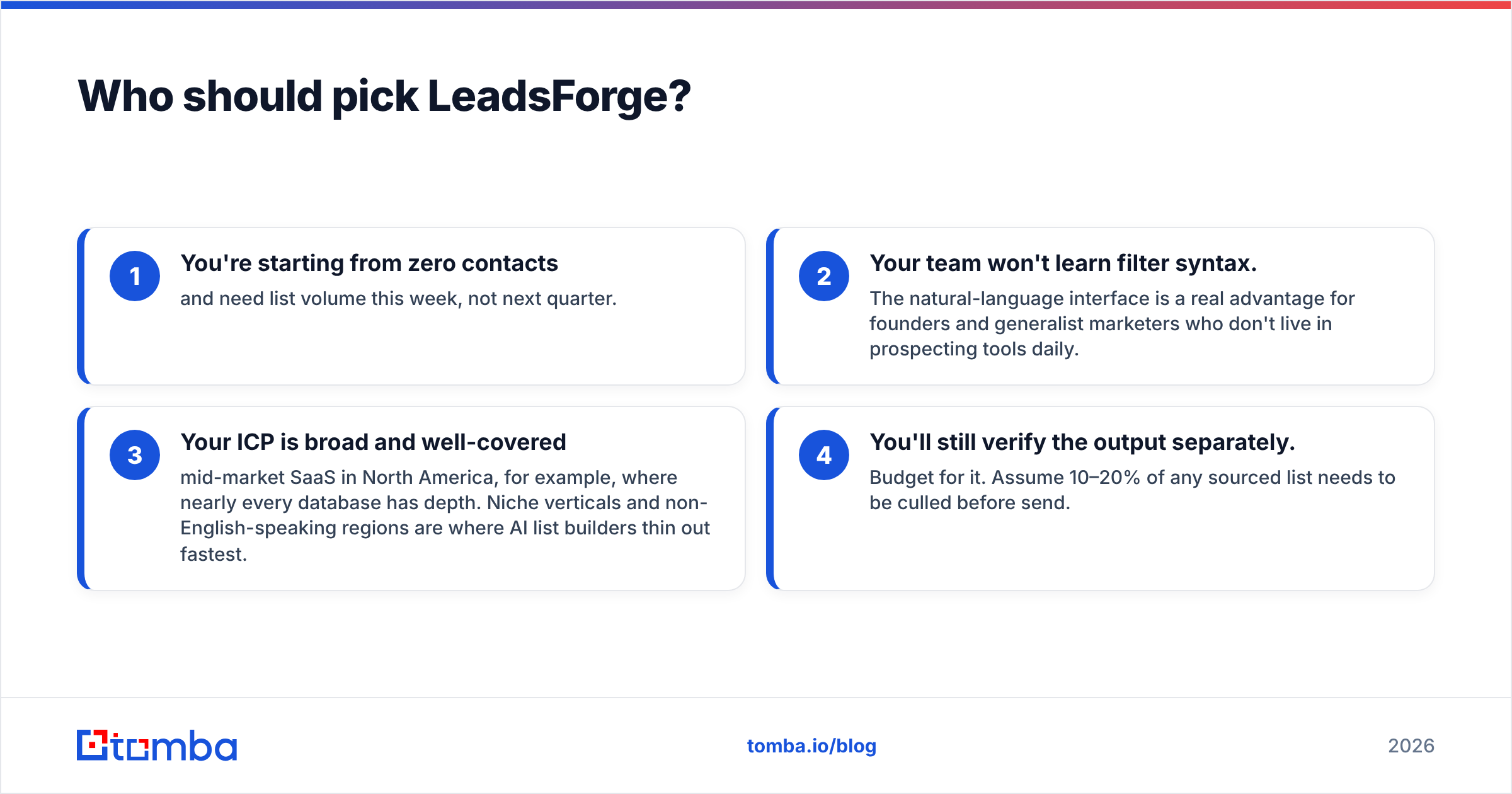
- You're starting from zero contacts and need list volume this week, not next quarter.
- Your team won't learn filter syntax. The natural-language interface is a real advantage for founders and generalist marketers who don't live in prospecting tools daily.
- Your ICP is broad and well-covered — mid-market SaaS in North America, for example, where nearly every database has depth. Niche verticals and non-English-speaking regions are where AI list builders thin out fastest.
- You'll still verify the output separately. Budget for it. Assume 10–20% of any sourced list needs to be culled before send.
When should you skip both?#
When your workflow is: find contacts at target accounts → verify them → push to CRM → send. That's a single pipeline, and splitting it across two vendors adds cost and failure points without adding capability.
A combined platform handles it in one pass: domain search to pull every findable contact at a target company, pattern detection to construct addresses when no record exists, SMTP verification on the way out, and a bulk email finder for list-scale runs. Add data enrichment and the record lands in your CRM with title, company, and social profile already attached — no second tool, no reconciliation step.
Worth stating plainly: this isn't a knock on either vendor. EmailListValidation is a good verifier at a fair price, and prompt-based list building is a legitimately better UX than filter panels for a lot of users. The argument is about stack shape, not product quality. If verification is genuinely all you need, a dedicated verifier is a perfectly rational buy — and other strong options exist across the category on G2's email verification listings if you want to widen the shortlist.
What should you do next?#
Run the afternoon test. Take 200 rows of your actual ICP — not a vendor's demo segment — and push them through each option you're considering. Measure coverage rate, verified-valid rate, title accuracy, and real bounce rate on a small send. Divide spend by contacts that survived all four. Then decide.
If that test tells you the leak is in verification, EmailListValidation is a sound, cheap fix. If it tells you the leak is in sourcing, an AI list builder will get you volume fast. And if it tells you — as it does for most outbound teams — that you're losing contacts at both stages, stop buying two tools for one job.
Start with the Tomba Email Finder on the free tier: 25 searches a month, no card, same credit pool for search and verification. Run your 200-row test against it alongside whatever else is on your shortlist, and let the cost-per-usable-contact number make the call for you.
Related guides#
Ready to find emails that actually work?
Join 150,000+ professionals who stopped guessing and started sending. Free credits on signup — no credit card required.
Get the Tomba newsletter
Practical outbound tactics and product updates — once every two weeks.
About the author