EmailListValidation vs LimeLeads: Which Tool Wins in 2026?
One cleans lists, the other sells them. Here's an honest breakdown of EmailListValidation vs LimeLeads on pricing, accuracy, data freshness, and which one actually belongs in your stack.
TL;DR
- EmailListValidation and LimeLeads solve different problems. ELV is a bulk email verifier — you bring the list. LimeLeads is a B2B contact database — it hands you the list. Comparing them head-to-head only makes sense if your real question is "where do good emails come from?"
- EmailListValidation is cheap per record (pay-as-you-go from roughly $0.0009–$0.004/email depending on volume) and fine at syntax, MX, role, and disposable detection. It cannot tell you whether a contact still works at the company.
- LimeLeads sells credits against a static US-heavy B2B index. Coverage outside North America is thin, and record freshness is the recurring complaint in reviews.
- Neither tool alone gives you a clean, current, deliverable list. You need discovery + verification in the same loop — which is why most teams end up pairing a finder with a verifier, or using a platform that does both.
- If you only read one line: use a finder that verifies at source (Tomba, $49/mo Starter, free tier 25 searches), fall back to ELV for legacy list hygiene, and treat any static database — LimeLeads included — as a starting point that still needs re-verification.
What is EmailListValidation and what does it actually do?#
EmailListValidation (ELV) is a bulk email verification service. You upload a CSV or hit the API, and it returns a status per address: valid, invalid, unknown, disposable, role-based, or catch-all.
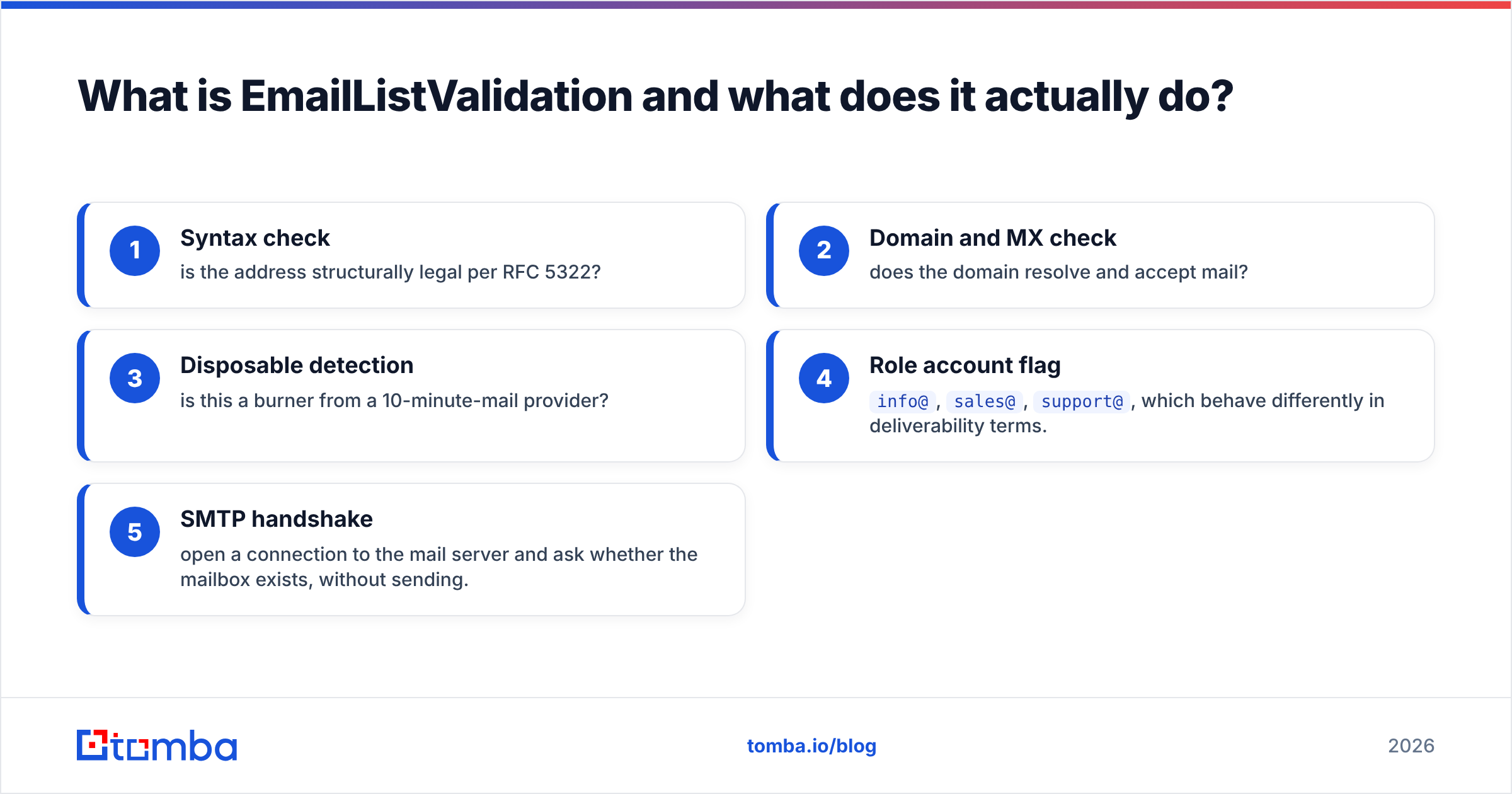
Under the hood it runs the standard verification stack:
- Syntax check — is the address structurally legal per RFC 5322?
- Domain and MX check — does the domain resolve and accept mail?
- Disposable detection — is this a burner from a 10-minute-mail provider?
- Role account flag —
info@,sales@,support@, which behave differently in deliverability terms. - SMTP handshake — open a connection to the mail server and ask whether the mailbox exists, without sending.
That fifth step is where verifiers earn their money, and where they hit the wall. Google Workspace and Microsoft 365 have both narrowed what their servers reveal during a handshake. A growing share of corporate domains are catch-all — they accept mail to any address, so the handshake tells you nothing. ELV returns those as "unknown" or "accept-all," and how you treat that bucket determines your real bounce rate.
What ELV cannot do: tell you whether sarah.chen@acme.com is still Sarah's address after she left for a competitor eight months ago. The mailbox may still accept mail. It may forward to a manager. It may be a ghost. Verification confirms deliverability, not currency. That distinction destroys more outbound campaigns than any bounce rate.
What is LimeLeads and who is it for?#
LimeLeads is a B2B contact database. You filter by industry, employee count, revenue, job title, technology, and geography, then spend credits to unlock records — name, title, company, email, sometimes a phone number.
The pitch is speed. Instead of researching accounts and hunting for the right contact, you build a list in a search UI and export in minutes. For a US-focused SMB or mid-market motion, that model works reasonably well.
The structural weakness is the same one every static database shares: the index is a snapshot. B2B contact data decays at roughly 22–30% per year, and it decays faster in high-churn segments like tech sales, marketing, and startups. A record collected 14 months ago has a coin-flip chance of still being correct at the title level, even if the mailbox still resolves.
LimeLeads also skews heavily to North America. If your ICP includes DACH, Nordics, APAC, or MENA accounts, expect gaps — not just missing emails, but missing companies entirely. Check G2's category listings before committing to any single database vendor; coverage claims and user-reported coverage rarely match.
EmailListValidation vs LimeLeads: how do they compare?#
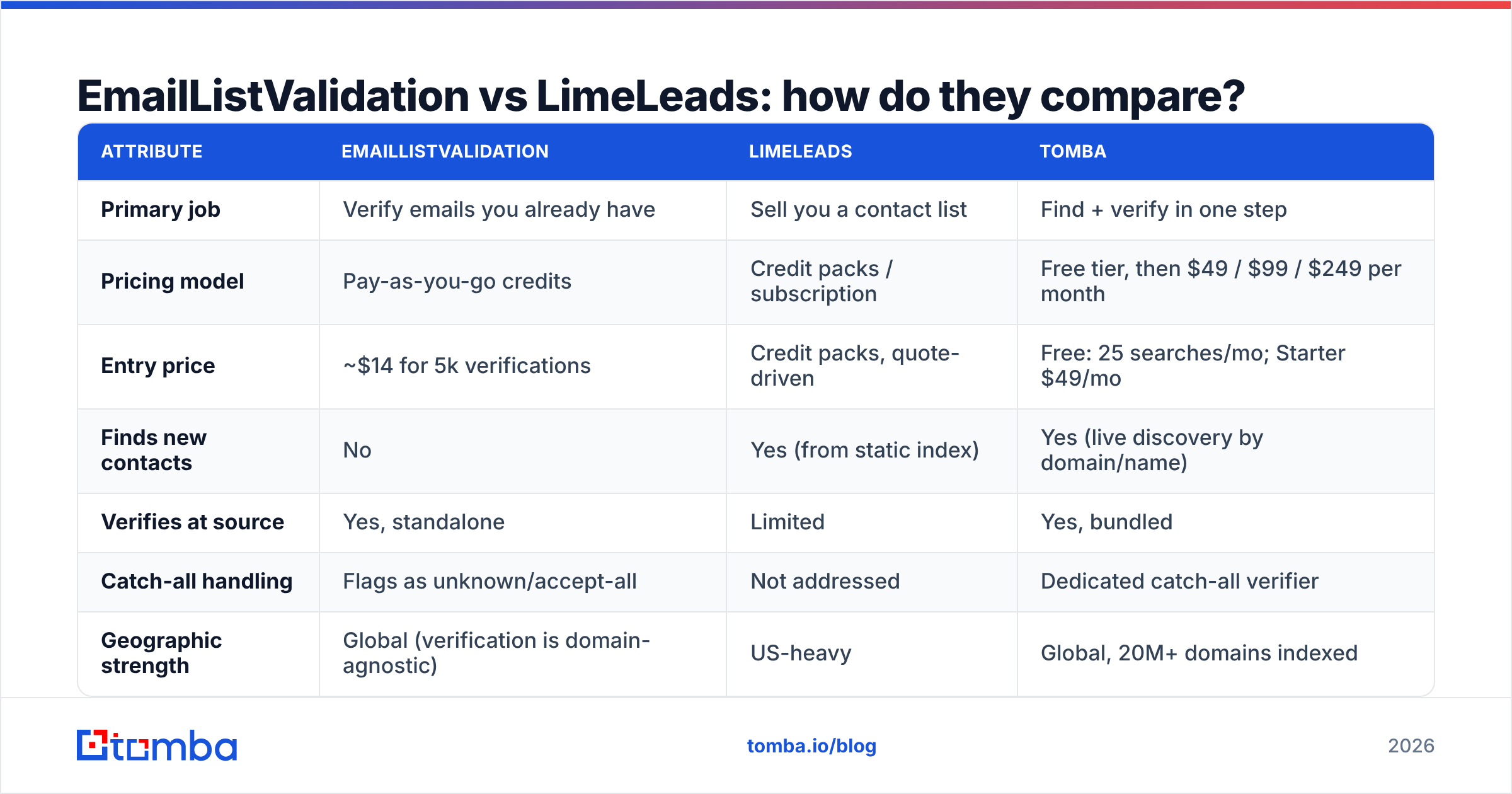
Here is the honest side-by-side, with Tomba included as the category the comparison keeps pointing at — a finder that verifies inline.
| Attribute | EmailListValidation | LimeLeads | Tomba |
|---|---|---|---|
| Primary job | Verify emails you already have | Sell you a contact list | Find + verify in one step |
| Pricing model | Pay-as-you-go credits | Credit packs / subscription | Free tier, then $49 / $99 / $249 per month |
| Entry price | ~$14 for 5k verifications | Credit packs, quote-driven | Free: 25 searches/mo; Starter $49/mo |
| Finds new contacts | No | Yes (from static index) | Yes (live discovery by domain/name) |
| Verifies at source | Yes, standalone | Limited | Yes, bundled |
| Catch-all handling | Flags as unknown/accept-all | Not addressed | Dedicated catch-all verifier |
| Geographic strength | Global (verification is domain-agnostic) | US-heavy | Global, 20M+ domains indexed |
| Phone data | No | Sometimes | Yes, phone finder + validator |
| API | Yes | Limited | Yes, full REST API + CLI + MCP |
| Best for | Cleaning legacy CRM lists | Fast US SMB list building | Building and maintaining fresh outbound lists |
Read the table row by row and the shape of the decision appears: these are not substitutes. ELV is a hygiene layer. LimeLeads is a sourcing layer. If you buy one, you almost certainly still need the other — or something that collapses both jobs into one workflow.
Which one is more accurate in practice?#
Accuracy means different things for each tool, so compare them on the metric that matters for their job.
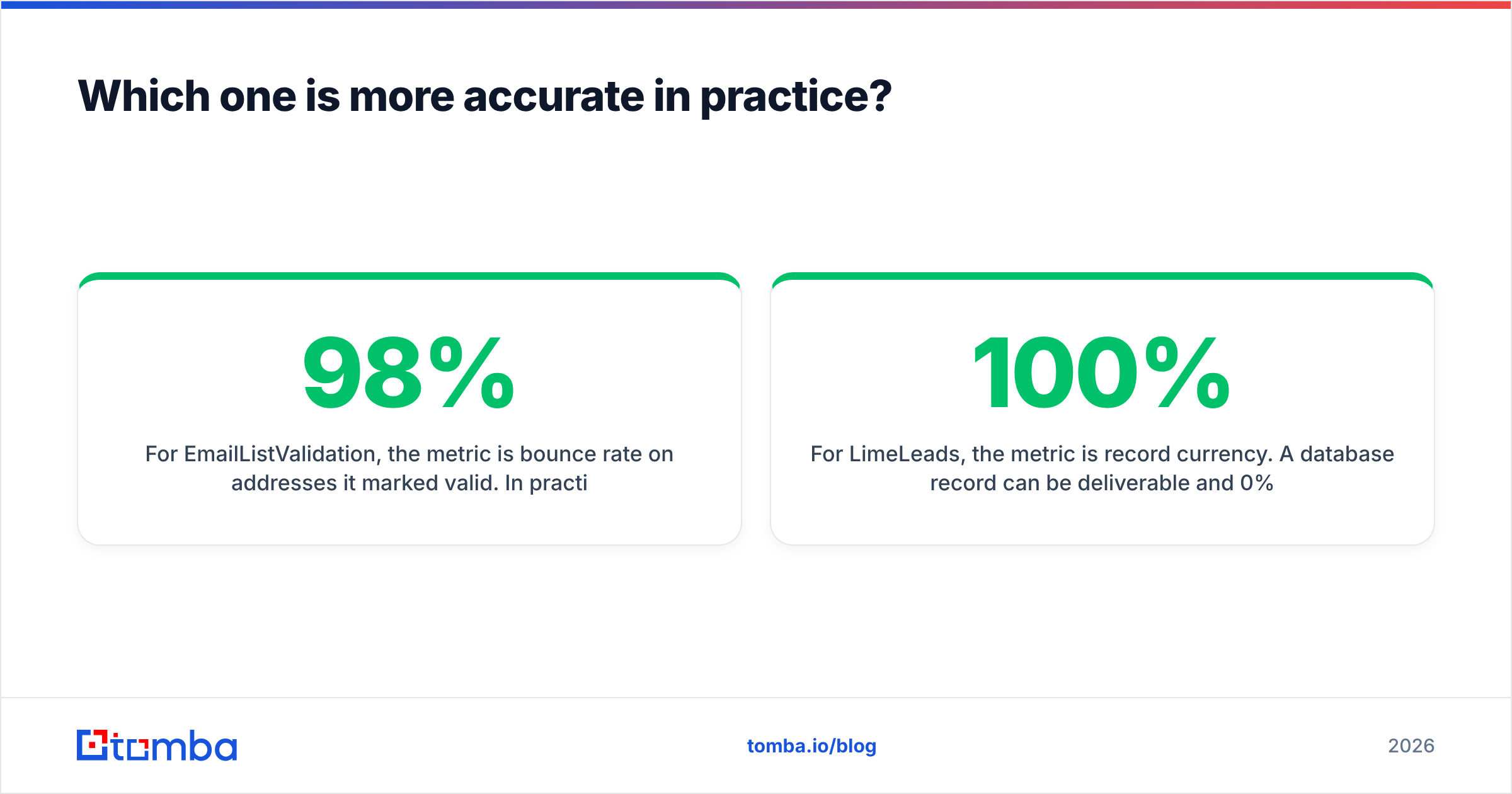
For EmailListValidation, the metric is bounce rate on addresses it marked valid. In practice, well-run verifiers land in the 95–98% range on standard corporate domains. ELV sits in that band. The variance shows up on catch-all domains, which now represent a meaningful share of B2B mailboxes. If ELV returns 30% "unknown" on your list and you mail all of them, your measured accuracy collapses — not because the tool lied, but because you mailed the bucket it explicitly refused to vouch for. A dedicated catch-all verifier is the right answer to that bucket, not a coin flip.
For LimeLeads, the metric is record currency. A database record can be 100% deliverable and 0% useful. The person left. The title changed. The company was acquired and moved to a new domain. Static databases are structurally incapable of catching that between refresh cycles, and refresh cycles are opaque at every vendor — LimeLeads included.
This is the argument for verify-at-request-time architectures. When you run a domain search or a name lookup, the system resolves the pattern and validates the mailbox at the moment you ask, not at the moment some crawler last visited. The result carries a confidence score you can threshold on. Same idea, opposite direction of causality.
A practical rule that has held up across thousands of campaigns:
- Never mail an unverified list, regardless of where it came from — purchased, scraped, or exported from your own CRM.
- Re-verify anything older than 90 days. Decay is continuous, not stepwise.
- Split catch-alls into a separate segment with lower send volume and closer bounce monitoring.
- Suppress role accounts for cold outreach unless the offer genuinely targets a shared inbox.
- Track bounces by source, not in aggregate — that's how you learn which vendor is actually selling you decay.
- Cap new-domain sending volume until sender reputation stabilizes; even perfect data will not save a cold domain hammered on day one.
What do they cost, and where do the costs hide?#
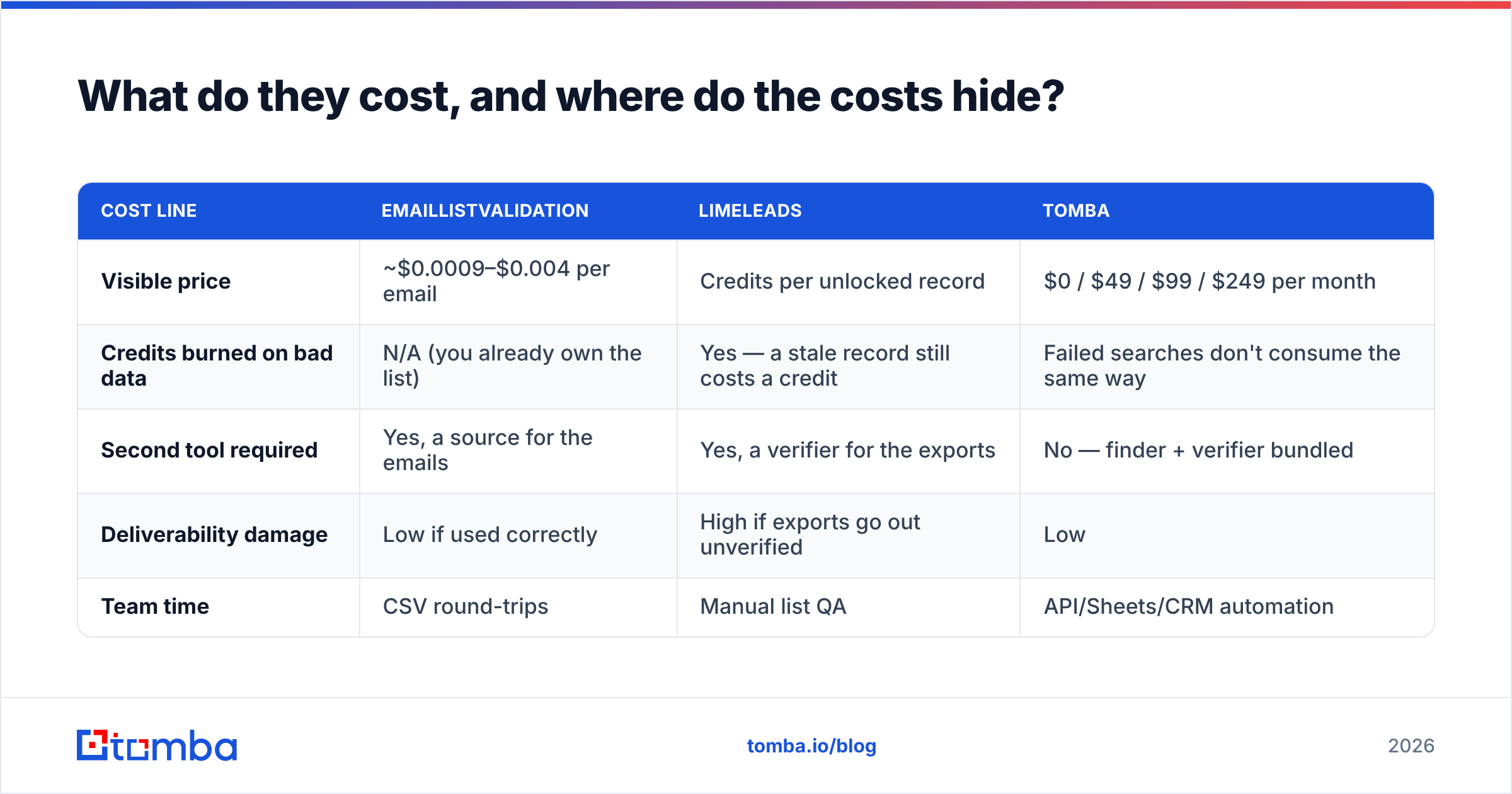
Sticker price is the easy part. The hidden costs are where teams get surprised.
| Cost line | EmailListValidation | LimeLeads | Tomba |
|---|---|---|---|
| Visible price | ~$0.0009–$0.004 per email | Credits per unlocked record | $0 / $49 / $99 / $249 per month |
| Credits burned on bad data | N/A (you already own the list) | Yes — a stale record still costs a credit | Failed searches don't consume the same way |
| Second tool required | Yes, a source for the emails | Yes, a verifier for the exports | No — finder + verifier bundled |
| Deliverability damage | Low if used correctly | High if exports go out unverified | Low |
| Team time | CSV round-trips | Manual list QA | API/Sheets/CRM automation |
The credit-burn line is the one people miss. On a static database, you pay to unlock a record before you know whether it's current. Unlock 1,000 contacts at a 25% decay rate and you have paid full price for 250 records you will suppress. That is not a knock on LimeLeads specifically — it is the economics of every unlock-then-discover model. Compare it against transparent Tomba pricing, where the verification is part of the same call rather than a downstream cost you absorb separately.
Are there better alternatives to both?#
For most outbound teams in 2026, yes — because the finder-plus-verifier split is a workflow tax you no longer have to pay.
If your problem is a dirty existing list: a standalone verifier is correct. ELV works. So do ZeroBounce alternatives and Tomba's own email verifier if you'd rather keep one vendor. There is no strong reason to run a separate verification contract if your finder already verifies.
If your problem is sourcing contacts: you have three models to pick from.
- Static databases (LimeLeads, and the broader category) — fastest to first list, highest decay risk, weakest outside the US. Fine as a supplement, risky as the only source.
- Live finders — you supply a company domain or a name, the tool resolves the address and verifies it in the same request. Slower per record, dramatically fresher. This is where Tomba Email Finder sits.
- Curated verified databases — vendors like BookYourData sell pay-as-you-go lists with verification built into the purchase, which meaningfully reduces the credit-burn problem of unlock-then-discover models. It is a genuinely different posture from a raw static index and worth evaluating if you want database convenience without inheriting all the decay risk.
If your problem is both: run discovery and verification through one API and stop maintaining CSV plumbing. Push results directly into your CRM through a HubSpot integration or Salesforce integration, or work in a spreadsheet with the Google Sheets add-on if your team lives there. The workflow difference compounds: every manual export step is a place where stale data re-enters a clean pipeline.
How should you actually decide?#
Answer three questions honestly.
1. Do you already have the contacts? If yes, you need verification, not a database. Buy ELV credits or use a bundled verifier and move on. Do not buy a list to solve a hygiene problem.
2. Is your ICP US-only? If yes, a US-focused database is viable as one input. If your pipeline includes Europe, APAC, or emerging markets, a static US-heavy index will quietly under-serve half your territory and you will blame your reps for it.
3. How fast does your target segment churn? Enterprise IT directors move slowly. Startup marketing leads move constantly. High-churn segments punish static data brutally — mail a 12-month-old list of Series A marketing heads and expect a third of it to be wrong at the person level, not just the mailbox level.
Map your answers:
| Your situation | Best fit |
|---|---|
| Dirty CRM list, no sourcing need | EmailListValidation (or a bundled verifier) |
| US SMB, need volume fast, will re-verify | LimeLeads + a verifier |
| Global ICP, need fresh contacts continuously | Live finder with inline verification |
| Small team, one budget line, wants both jobs done | Tomba Starter at $49/mo |
| Developer-led, wants everything in code | Tomba API or CLI |
One more thing worth saying plainly: no tool fixes bad targeting. A perfectly verified list of the wrong people converts at zero. Data quality is a floor, not a strategy. Get the floor right, then spend your energy on segmentation and message.
What's the verdict?#
EmailListValidation wins if your only job is cleaning a list you already own. It's inexpensive, the API is straightforward, and it does exactly one thing competently. Don't expect it to tell you whether a contact is still employed — that is outside what any verifier can know.
LimeLeads wins if you're US-focused, need volume immediately, and you're disciplined about re-verifying every export. It is a legitimate shortcut to a first list. Treat its output as raw material, never as a finished list, and budget for the share of unlocked credits you will suppress.
Neither wins if you're building a durable outbound motion. The two-tool split creates CSV round-trips, duplicate spend, and a gap between when a record is sourced and when it is checked — and that gap is exactly where decay lives.
The cleaner architecture is discovery and verification in the same request. Start with the Tomba Email Finder free tier — 25 searches a month, no card — and run it against 20 accounts you already know well. Compare what it returns against whatever list you're currently paying for. If the finder is fresher, you've answered the vendor question with your own data instead of someone else's benchmark. Starter is $49/mo when you're ready to scale, and the same credits cover email verification, domain search, and bulk lead generation without a second contract.
Sources worth checking before you buy: G2 lead intelligence category, HubSpot's guide to B2B data decay, and the vendors' own docs.
Related guides#
Ready to find emails that actually work?
Join 150,000+ professionals who stopped guessing and started sending. Free credits on signup — no credit card required.
Get the Tomba newsletter
Practical outbound tactics and product updates — once every two weeks.
About the author