EmailListVerify Pricing 2026: Reviews, Pros and Cons
A neutral breakdown of EmailListVerify pricing in 2026 — real per-credit costs, what reviewers praise, where the tool falls short, and when a find-plus-verify platform is the cheaper move.
TL;DR
- EmailListVerify is a pure list-cleaning tool: you bring emails, it tells you which ones are safe to send to. It does not find addresses for you.
- Pricing is credit-based and cheap at volume — roughly $0.004 per email at 1,000 credits, dropping toward $0.0006 per email at a million. Pay-as-you-go credits don't expire; monthly plan credits do.
- Reviews on G2 and Capterra skew positive on price and speed, and negative on support response times and catch-all handling.
- The hidden cost is upstream: if you're paying per verification on a scraped list that's 40% junk, you're buying garbage twice.
- If you need to find addresses as well as verify them, a combined platform (Tomba's Starter at $49/mo, for example) usually beats stitching a finder and a verifier together.
What is EmailListVerify?#
EmailListVerify is a bulk email verification service. Think of it as a metal detector at airport security: it doesn't create passengers, it just decides which ones get through. You upload a CSV of addresses you already own — from a form, a scraper, an old CRM export — and it returns each one labeled valid, invalid, catch-all, disposable, or unknown.
That scope matters when you evaluate the price. You're not buying data. You're buying a filter.
Here's what the platform actually does, in the order most teams use it:
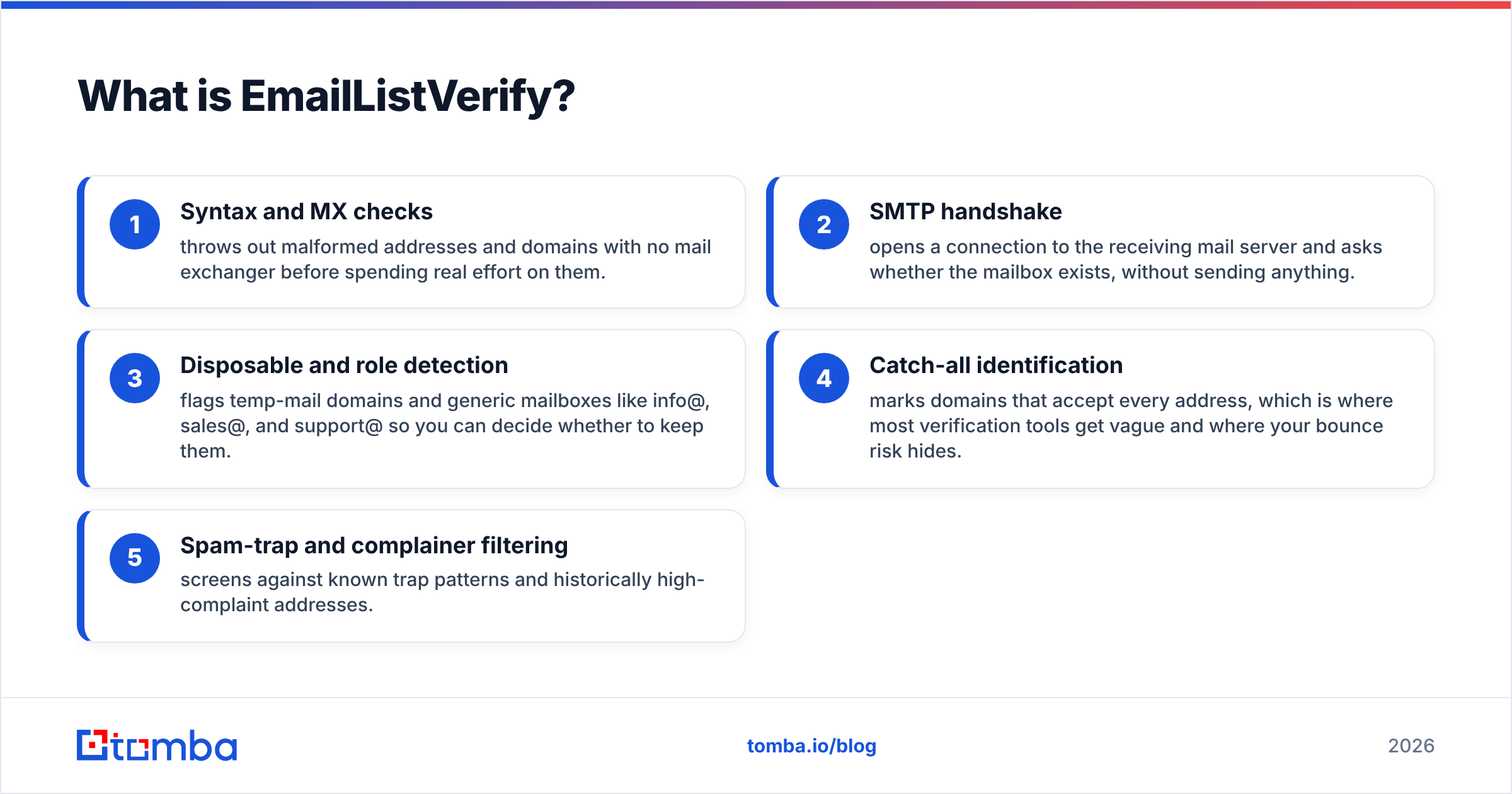
- Syntax and MX checks — throws out malformed addresses and domains with no mail exchanger before spending real effort on them.
- SMTP handshake — opens a connection to the receiving mail server and asks whether the mailbox exists, without sending anything.
- Disposable and role detection — flags temp-mail domains and generic mailboxes like info@, sales@, and support@ so you can decide whether to keep them.
- Catch-all identification — marks domains that accept every address, which is where most verification tools get vague and where your bounce risk hides.
- Spam-trap and complainer filtering — screens against known trap patterns and historically high-complaint addresses.
The output is a scored file plus an API endpoint for real-time checks at form submission. That's the whole product. No sequencer, no CRM, no prospecting database.

How much does EmailListVerify cost in 2026?#
Credit-based, with two ways to buy: one-time packs that never expire, and monthly subscriptions that are slightly cheaper per credit but reset at the end of each billing cycle.
These are the published pay-as-you-go tiers at the time of writing. Verify current numbers on the official EmailListVerify pricing page before you budget — credit pricing across this category moves a couple of times a year.
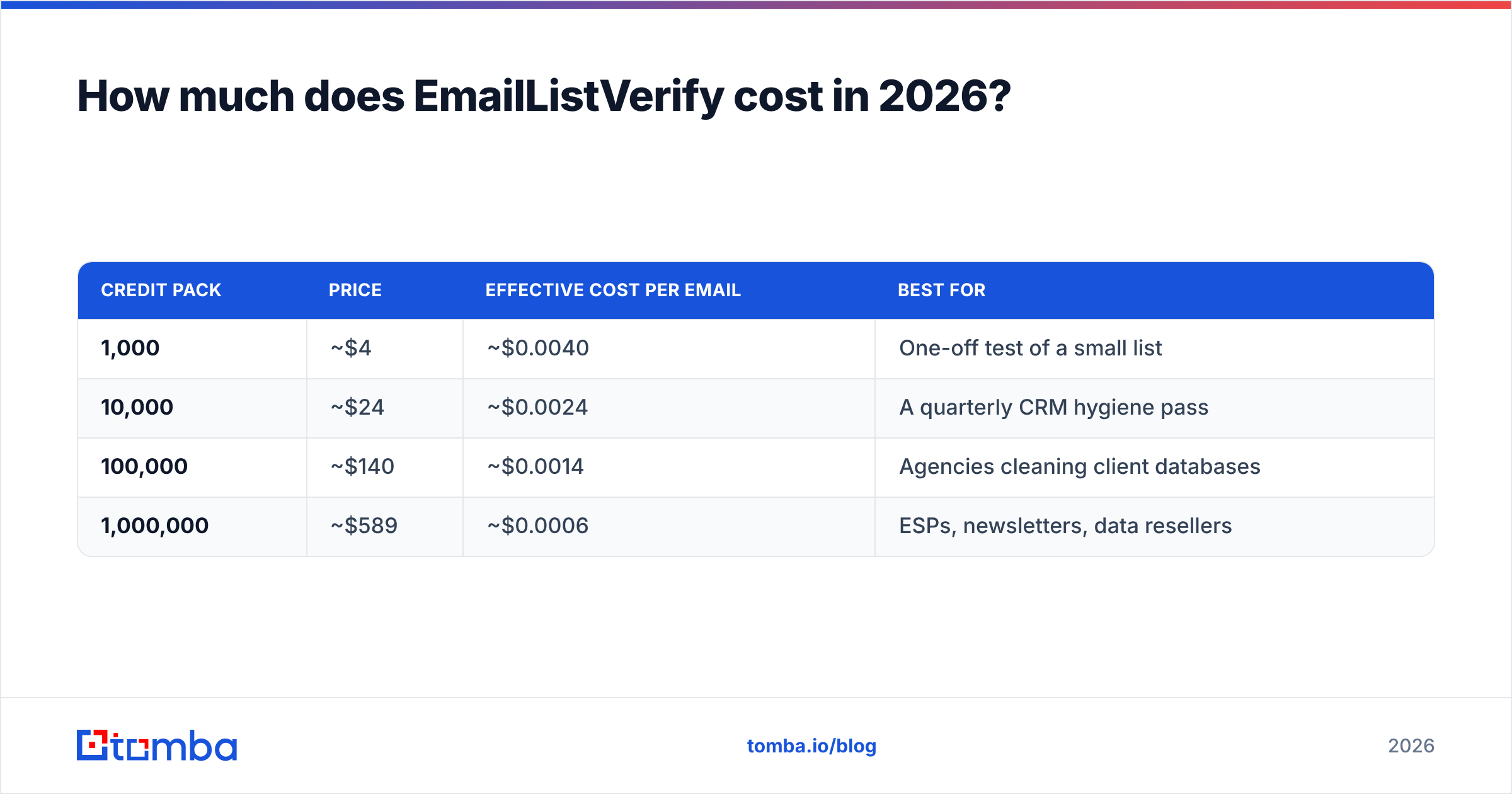
| Credit pack | Price | Effective cost per email | Best for |
|---|---|---|---|
| 1,000 | ~$4 | ~$0.0040 | One-off test of a small list |
| 10,000 | ~$24 | ~$0.0024 | A quarterly CRM hygiene pass |
| 100,000 | ~$140 | ~$0.0014 | Agencies cleaning client databases |
| 1,000,000 | ~$589 | ~$0.0006 | ESPs, newsletters, data resellers |
Two structural details decide whether this is actually cheap for you:
Credits don't expire on pay-as-you-go. That's genuinely rare and genuinely useful. If you clean lists twice a year, buy a big pack once and stop thinking about it. Most competitors either expire credits or push you into a subscription.
Monthly plans trade flexibility for a modest discount. The per-credit savings are real but small, and unused credits vanish at the reset. Unless your verification volume is steady month over month, the pay-as-you-go route usually wins on total spend.
The third detail nobody puts on a pricing page: you pay for unknowns. Every verification service consumes a credit whether the answer is "valid," "invalid," or "we couldn't tell." On a list heavy with catch-all domains — common in enterprise B2B, where Microsoft 365 tenants frequently accept everything — you can burn 20% of a pack on results you still have to make a judgment call about. Price per credit is not price per decision.
What do EmailListVerify reviews actually say?#
Pull the pattern out of G2 and Capterra and reviewers land in a consistent place.
What people consistently praise:
- Price per thousand, especially above 100k credits. This is the single most-cited reason people pick it.
- Processing speed on large files — six-figure lists typically finish in hours, not days.
- The non-expiring credit model, which reviewers describe as "buy once, forget about it."
- A straightforward API that drops into signup forms without much engineering.
What people consistently complain about:
- Support latency. Ticket responses measured in days rather than hours is the most repeated grievance.
- Catch-all results. Reviewers describe them as too conservative or too vague to act on, which is exactly where the money is in B2B.
- UI age. Functional, dated, not much loved.
- Occasional discrepancies when the same list is run through two verifiers — a category-wide issue, not unique to this vendor, but it shows up in reviews.
The honest read: for a low-touch, high-volume cleaning job, the reviews are good. For a team that needs a human on the other end when something looks wrong mid-campaign, they're mixed.
How accurate is EmailListVerify compared to other tools?#
Accuracy claims in this space are close to meaningless as marketed. Every vendor advertises 98-99%, and every one of those numbers comes from a self-selected test list. What varies enormously is performance on the hard cases: catch-all domains, greylisting servers, and providers that deliberately return ambiguous SMTP responses.

A more useful way to think about it: run a 500-address sample through two providers before committing to either. Compare the disagreement rate, not the headline accuracy. If Tool A calls 60 addresses invalid that Tool B calls valid, one of them is costing you either deliverability or pipeline — and a $2 sample test tells you which.
For catch-all domains specifically, generic verification hits a wall. The receiving server says yes to everything, so an SMTP check proves nothing. That's why dedicated tooling exists: a catch-all verifier layers pattern data, historical sends, and known-good mailbox evidence on top of the handshake instead of shrugging and returning "unknown." If a meaningful share of your target accounts sit behind catch-all domains, this single capability matters more than the price per credit.
How does EmailListVerify compare to other options?#
Compare it against tools that serve the same job — but note the important asymmetry: some of these only clean, and some also find. Paying for both categories separately is where budgets quietly double.

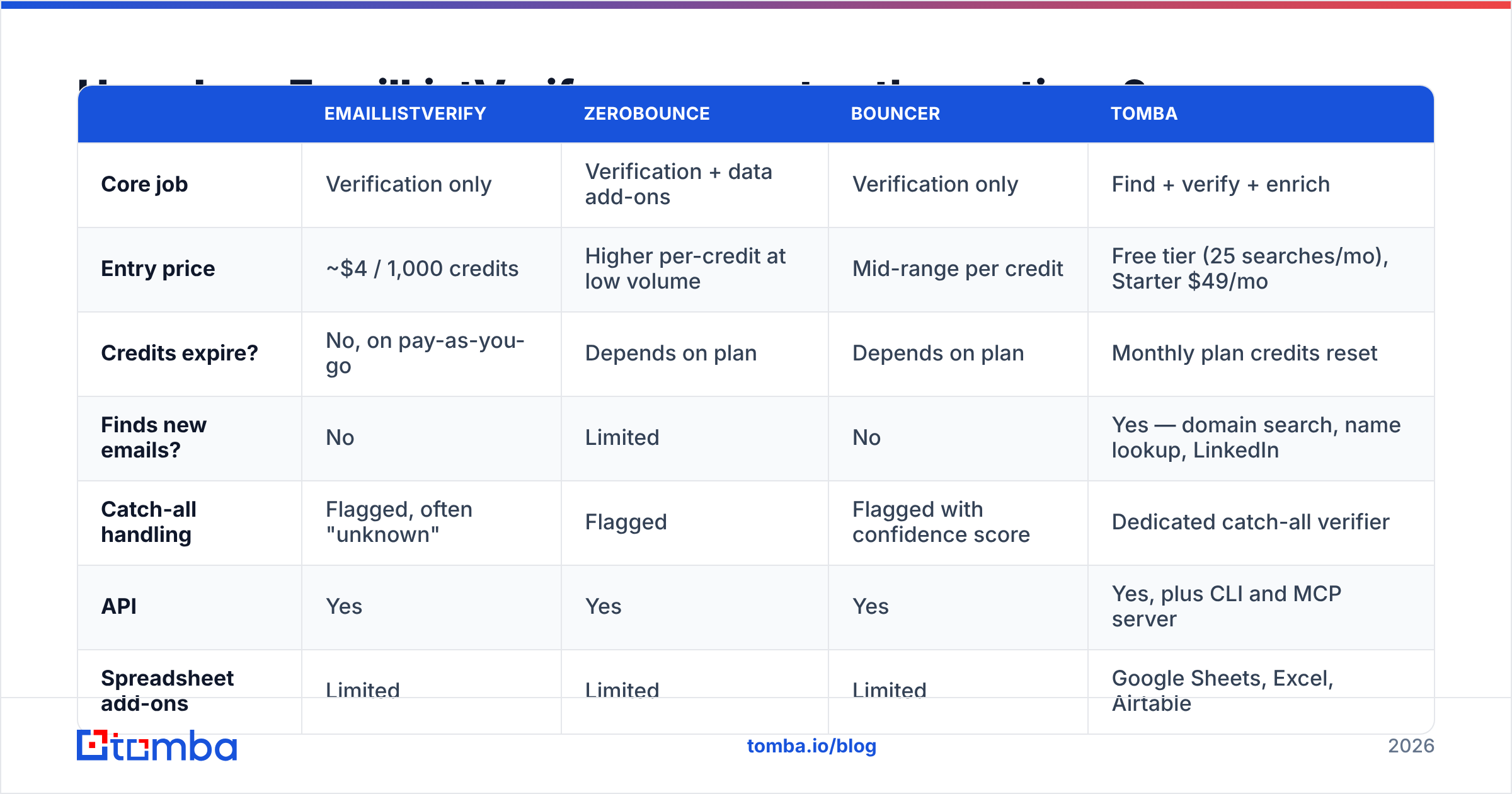
| EmailListVerify | ZeroBounce | Bouncer | Tomba | |
|---|---|---|---|---|
| Core job | Verification only | Verification + data add-ons | Verification only | Find + verify + enrich |
| Entry price | ~$4 / 1,000 credits | Higher per-credit at low volume | Mid-range per credit | Free tier (25 searches/mo), Starter $49/mo |
| Credits expire? | No, on pay-as-you-go | Depends on plan | Depends on plan | Monthly plan credits reset |
| Finds new emails? | No | Limited | No | Yes — domain search, name lookup, LinkedIn |
| Catch-all handling | Flagged, often "unknown" | Flagged | Flagged with confidence score | Dedicated catch-all verifier |
| API | Yes | Yes | Yes | Yes, plus CLI and MCP server |
| Spreadsheet add-ons | Limited | Limited | Limited | Google Sheets, Excel, Airtable |
| Best fit | Cheap bulk cleaning | Marketing teams wanting add-ons | Teams valuing UI and speed | Teams that need the address and the verdict |
If verification is the only thing you need — you already have a rich, growing list from inbound and you just want it clean — EmailListVerify's price is hard to argue with. If you're doing outbound, verification is only the second half of the job, and buying it standalone means you still need a source for the addresses themselves. That's the case where an email verifier bundled with a finder changes the math, and it's worth reading the direct EmailListVerify alternative breakdown before you commit to a big credit pack.

What are the real pros and cons?#
Pros
- Lowest-in-class cost at volume. Above 100k credits, few competitors get close on price per email.
- Non-expiring credits. Buy a pack, use it over eighteen months, no waste. This is a real financial advantage for irregular cleaners.
- Fast bulk processing. Large uploads complete quickly and reliably.
- No forced subscription. You can use the tool seriously without a recurring contract, which is unusual in this category.
- Solid API for real-time checks. Good enough to sit on a signup form and block junk at the point of entry.
Cons
- Verification only. No sourcing, no enrichment, no phone data. It's one tool in a stack, not the stack.
- Catch-all results are weak. In B2B, where catch-all domains are everywhere, "unknown" is a non-answer you paid for.
- Support is the top complaint. Slow ticket responses are the most common negative theme across review sites.
- Dated interface. Everything works; nothing delights.
- Credits burn on inconclusive results. Your effective cost per usable decision is higher than the sticker rate suggests.
Who should buy EmailListVerify — and who shouldn't?#
Buy it if:
- You run a newsletter or ESP with a large opt-in list that needs periodic hygiene.
- You're an agency cleaning client databases and price per thousand is the deciding metric.
- You already have a reliable source of addresses and just need a bounce filter in front of the send.
- Your volume is lumpy and non-expiring credits genuinely save you money.
Look elsewhere if:
- You're doing outbound prospecting and need to build the list, not just clean it. Buying a finder and a verifier separately usually costs more than a combined plan.
- A large share of your prospects sit behind catch-all domains and you need a verdict, not a shrug.
- You need responsive support during an active campaign.
- You want one API and one bill covering sourcing, verification, and enrichment.
What does verification actually cost you if you get it wrong?#
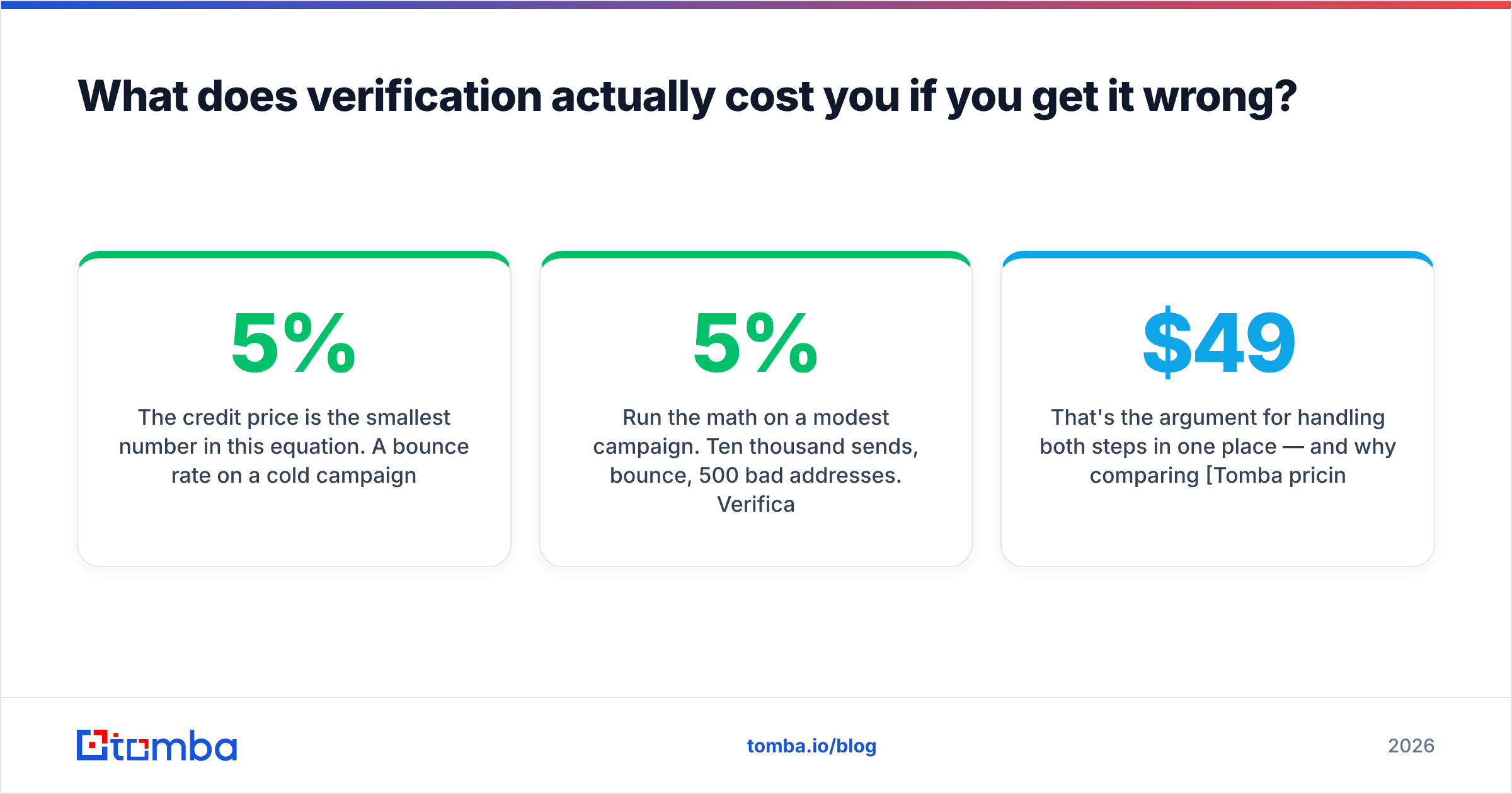
The credit price is the smallest number in this equation. A 5% bounce rate on a cold campaign doesn't just waste those sends — it damages email deliverability for the entire domain. Google and Microsoft both weigh bounce and complaint rates heavily in inbox placement, and a burned sending domain takes weeks to recover, if it recovers.
Run the math on a modest campaign. Ten thousand sends, 5% bounce, 500 bad addresses. Verification on those would have cost roughly $24. The cost of the reputation hit — reduced inbox placement across every subsequent campaign from that domain — is orders of magnitude higher. Verification is cheap insurance regardless of which vendor you buy it from.
The better lever is upstream. Addresses sourced from a maintained B2B dataset and verified at the point of discovery arrive clean. Addresses scraped and then cleaned arrive expensive: you pay to acquire junk, then pay again to identify it as junk. If your workflow starts with a scraper and ends at a verifier, the verifier is treating a symptom.
That's the argument for handling both steps in one place — and why comparing Tomba pricing against a finder-plus-verifier stack often surprises teams. The Free tier covers 25 searches a month for testing; Starter is $49/mo, Growth $99/mo, Pro $249/mo, with each tier including finding, verification, and enrichment rather than metering them separately.
The bottom line#
EmailListVerify is a good, cheap, narrow tool. If your only problem is "this list has bounces in it," buy a pay-as-you-go pack and move on — the price is genuinely competitive and the non-expiring credits are a real benefit. Accept the tradeoffs: slow support, dated UI, and catch-all results you'll need to interpret yourself.
If your actual problem is "I need contacts at 400 target accounts and I need them to be deliverable," verification is one line item in a bigger workflow, and buying it standalone tends to cost more than it saves.
Test before you commit either way. Take 500 addresses, run them through two services, and compare the disagreement rate. It's the cheapest decision you'll make this quarter.
Ready to skip the two-tool stack? The Tomba Email Finder finds professional addresses by domain, name, or company and verifies them in the same call — so the list arrives clean instead of needing to be cleaned. Start on the free tier with 25 searches a month, no card required, and see what your real per-usable-contact cost looks like.
Related guides#
Ready to find emails that actually work?
Join 150,000+ professionals who stopped guessing and started sending. Free credits on signup — no credit card required.
Get the Tomba newsletter
Practical outbound tactics and product updates — once every two weeks.
About the author