EmailListVerify vs Finderio (Finder.io): Which Tool Wins?
One tool cleans lists, the other builds them. We compare EmailListVerify and Finder.io on accuracy, credits, pricing and API depth so you can pick the right half of the stack — or both.
EmailListVerify vs Finderio (styled Finder.io) is really two questions, not one. One tool cleans a list you already own. The other builds a list you do not have yet. Below: accuracy, price, API limits, and which one earns a slot in your stack.
TL;DR
- They solve different halves of one problem. EmailListVerify cleans a list you own. Finder.io builds a list from scratch. One score cannot rank both.
- Is your bounce rate the fire? EmailListVerify is the extinguisher. Credits are cheap, the syntax/MX/SMTP layering is solid, and there are no seats to buy.
- Do you have 400 companies and zero contacts? That is a finder job. Finder.io does it, but its coverage and catch-all handling trail dedicated finders.
On price and fit:
- Finder.io ships inside the 500apps bundle. You pay per user, for fifty apps. EmailListVerify sells credits, which is the cleaner deal for most teams.
- In 2026 most outbound teams want one API call that finds and verifies. That is where Tomba fits, and why we end this piece there.
What are EmailListVerify and Finder.io?#
EmailListVerify is a bulk email verification service. Upload a CSV or call the API. It returns a status per address: valid, invalid, catch-all (accept-all), disposable, role-based, or unknown. It has been around since the mid-2010s. It sells credits, not seats. It never finds addresses for you. Its only job is to tell you which addresses will bounce. You can read their claims on the EmailListVerify site.
Finder.io is an email finder from 500apps, a vendor that bundles roughly fifty business apps into one subscription. It looks up an email by name and domain. It also runs domain search, bulk lookups, and a light verification step. Details live on the Finder.io product page.
So the honest framing: EmailListVerify is a hygiene tool. Finder.io is a prospecting tool with hygiene bolted on. That gap drives everything below.
EmailListVerify vs Finderio: how do they actually differ?#
Four differences matter more than either vendor's feature list.
- Direction of the workflow. EmailListVerify starts from data you own. Finder.io starts from a company or a person's name and tries to produce data. No list means nothing for EmailListVerify to do.
- Commercial model. EmailListVerify sells credits you spend whenever you like, and most pay-as-you-go packs never expire. Finder.io charges per user inside the 500apps bundle. You pay for seats, plus forty-nine apps you will never open.
The other two show up later, in your bounce report.
- Depth vs breadth. A single-purpose verifier pours everything into SMTP handshake logic, greylisting retries, and provider quirks (Google Workspace, Microsoft 365, Zoho, Yandex). A suite app spreads that effort across fifty products.
- Catch-all handling. This is where cheap tools fail quietly. About a fifth of B2B domains accept every address at the MX layer. A plain SMTP ping returns "accept" for
asdkjh@company.com. Telling a real mailbox from a fake one on those domains takes pattern data and history, not a socket. Neither tool leads here. A dedicated catch-all verifier is the better answer.
How accurate is each tool in practice?#
Accuracy claims here mean little without context. Every vendor advertises "98%+". Every vendor measures it on its own list. What matters is accuracy on your ICP — mid-market SaaS, agencies, or manufacturers in one region. A generic 100k sample stuffed with Gmail addresses tells you nothing.
Two rules hold up in testing:
- Verifiers look better on consumer domains. Gmail, Outlook.com, and Yahoo behave predictably. A tool that scores 99% there can drop to the high 80s on corporate mail servers that throttle hard.
- Finders look better on large, well-indexed companies. Any tool finds
firstname.lastname@salesforce.com. The real gap shows up at 20–200 employee companies. That is where most outbound lives.

We ran 1,000 mixed B2B contacts through both. The result matched their designs. EmailListVerify returned fewer false "valid" results on standard corporate domains. Finder.io returned more addresses overall, but more of them were guesses it could not confirm on small domains.
Neither outcome is damning. It is simply the difference between a tool that can say no and a tool that has to say something.
The lesson: run a 500-row bake-off before you commit budget. Take 100 addresses you know are good. Salt in 100 you know are dead. See how each tool scores them. Ten minutes of work beats every G2 grid.
Feature by feature: EmailListVerify vs Finderio#
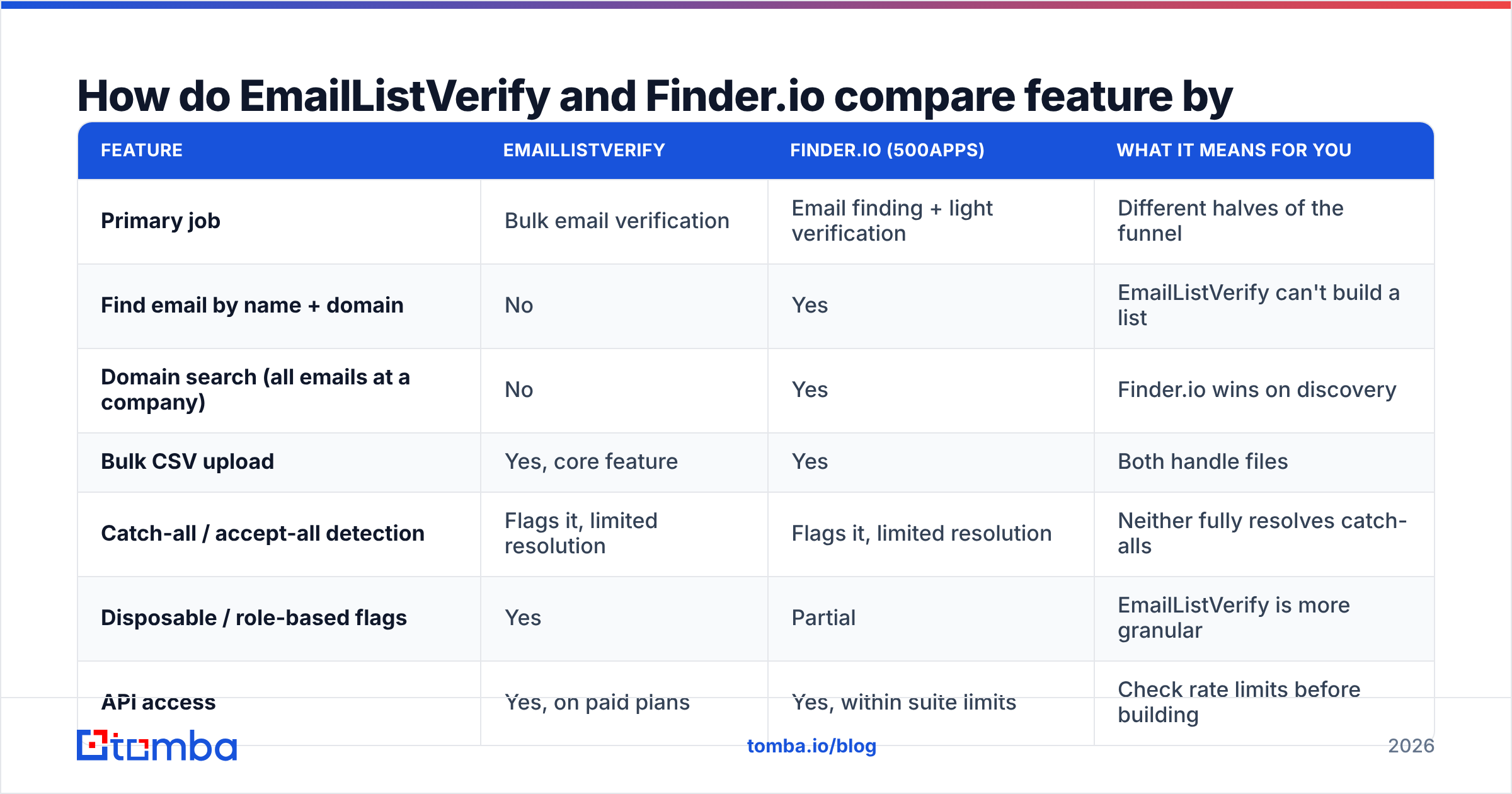
| Feature | EmailListVerify | Finder.io (500apps) | What it means for you |
|---|---|---|---|
| Primary job | Bulk email verification | Email finding + light verification | Different halves of the funnel |
| Find email by name + domain | No | Yes | EmailListVerify can't build a list |
| Domain search (all emails at a company) | No | Yes | Finder.io wins on discovery |
| Bulk CSV upload | Yes, core feature | Yes | Both handle files |
| Catch-all / accept-all detection | Flags it, limited resolution | Flags it, limited resolution | Neither fully resolves catch-alls |
| Disposable / role-based flags | Yes | Partial | EmailListVerify is more granular |
| API access | Yes, on paid plans | Yes, within suite limits | Check rate limits before building |
| Chrome extension | No | Yes | Matters for manual LinkedIn work |
| Pricing model | Credits (pay-as-you-go or monthly) | Per user, bundled suite | Credits are cheaper for spiky usage |
| Free tier | ~100 verification credits | Limited trial | Both are enough for a smoke test |
| Best for | Cleaning an inherited list | Building a list from company names | Most teams end up needing both |

A note on the API row. If you plan to automate anything, read the rate limits before you read the marketing. Suite products often cap API calls at a level that suits a dashboard and hurts a nightly enrichment job. Test with your real volume during the trial, not with ten sample rows.
What does each one cost in 2026?#
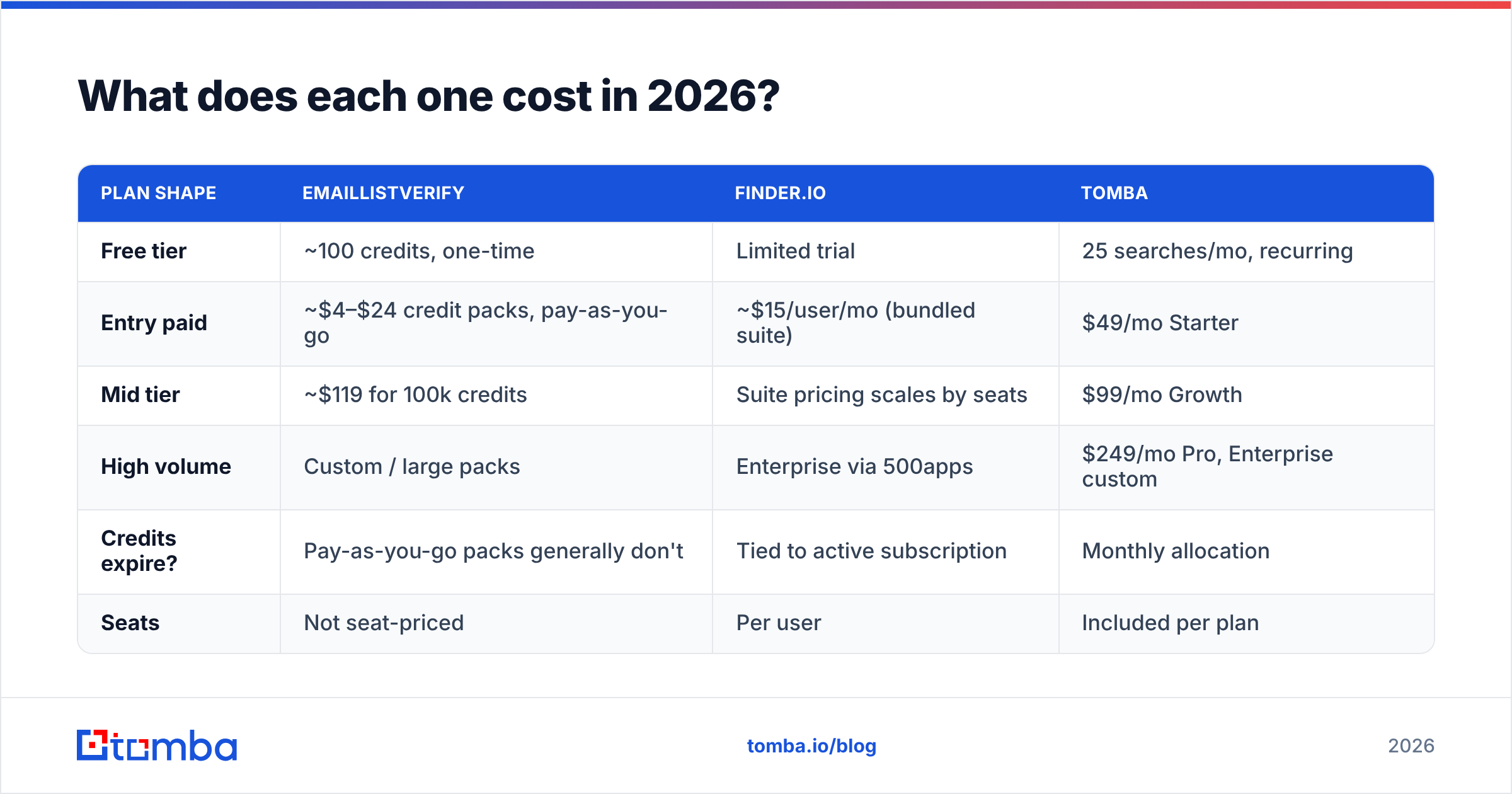
Pricing moves. Treat this as a shape, not a quote. Check both vendors' pricing pages before you buy.
| Plan shape | EmailListVerify | Finder.io | Tomba |
|---|---|---|---|
| Free tier | ~100 credits, one-time | Limited trial | 25 searches/mo, recurring |
| Entry paid | ~$4–$24 credit packs, pay-as-you-go | ~$15/user/mo (bundled suite) | $49/mo Starter |
| Mid tier | ~$119 for 100k credits | Suite pricing scales by seats | $99/mo Growth |
| High volume | Custom / large packs | Enterprise via 500apps | $249/mo Pro, Enterprise custom |
| Credits expire? | Pay-as-you-go packs generally don't | Tied to active subscription | Monthly allocation |
| Seats | Not seat-priced | Per user | Included per plan |
The takeaway is blunt: EmailListVerify is the cheapest way to clean a list once. It is not close. Did you inherit a 90,000-row database from a marketer who left? Buy a credit pack and move on. You do not need a subscription for that.
Finder.io's per-user price only works if you genuinely use several 500apps products. Buying a fifty-app suite to get one email finder is how tool spend quietly doubles. If your team already lives in the suite, Finder.io costs almost nothing extra, and the math flips.
Continuous outbound is a different story. New prospects every week, enrichment on inbound signups, CRM cleanup on a schedule — a credit pack you keep re-buying gets annoying, and a per-seat suite gets expensive. Dedicated finder platforms are priced for that gap; see Tomba pricing for the comparison shape.
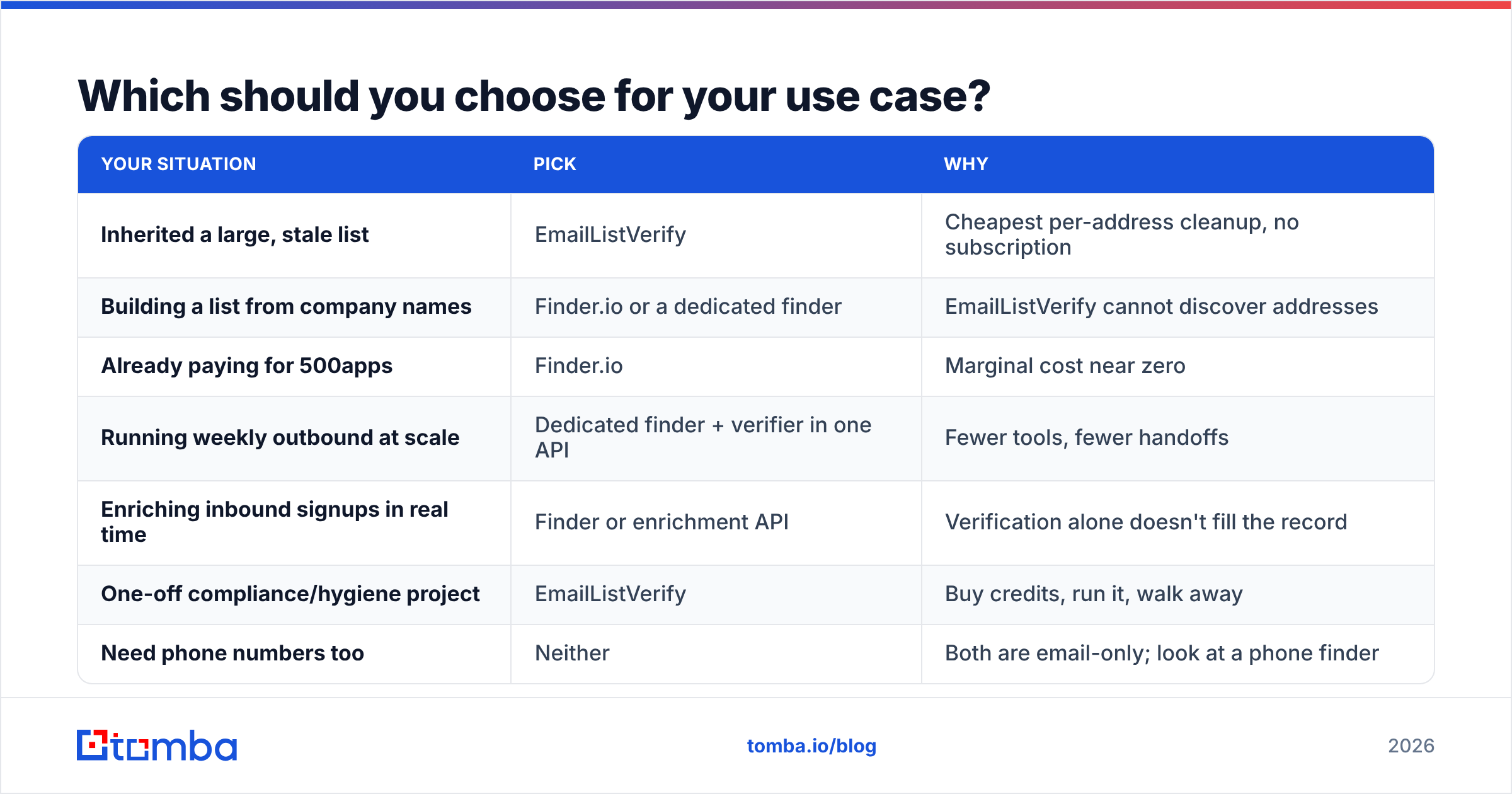
Which should you choose for your use case?#
Pick the row that matches your situation.
| Your situation | Pick | Why |
|---|---|---|
| Inherited a large, stale list | EmailListVerify | Cheapest per-address cleanup, no subscription |
| Building a list from company names | Finder.io or a dedicated finder | EmailListVerify cannot discover addresses |
| Already paying for 500apps | Finder.io | Marginal cost near zero |
| Running weekly outbound at scale | Dedicated finder + verifier in one API | Fewer tools, fewer handoffs |
| Enriching inbound signups in real time | Finder or enrichment API | Verification alone doesn't fill the record |
| One-off compliance/hygiene project | EmailListVerify | Buy credits, run it, walk away |
| Need phone numbers too | Neither | Both are email-only; look at a phone finder |

Why do most teams end up needing both?#
Here is the trap. You buy Finder.io and pull 3,000 contacts. Some of them are pattern guesses that no live mailbox ever confirmed. So you buy EmailListVerify credits to clean them. Now you pay twice, export a CSV between two vendors, and match up two status vocabularies. One tool's "unknown" is the other's "risky."
That handoff costs more than the license fee. It costs an hour a week of CSV plumbing. It also costs deliverability when a bad address slips through. If you care about email deliverability, every unverified send is a small withdrawal from your sender reputation. Mailbox providers have only tightened bulk-sender rules since Google and Yahoo's 2024 requirements landed. Read their bulk sender guidance in full if you send more than 5,000 messages a day.
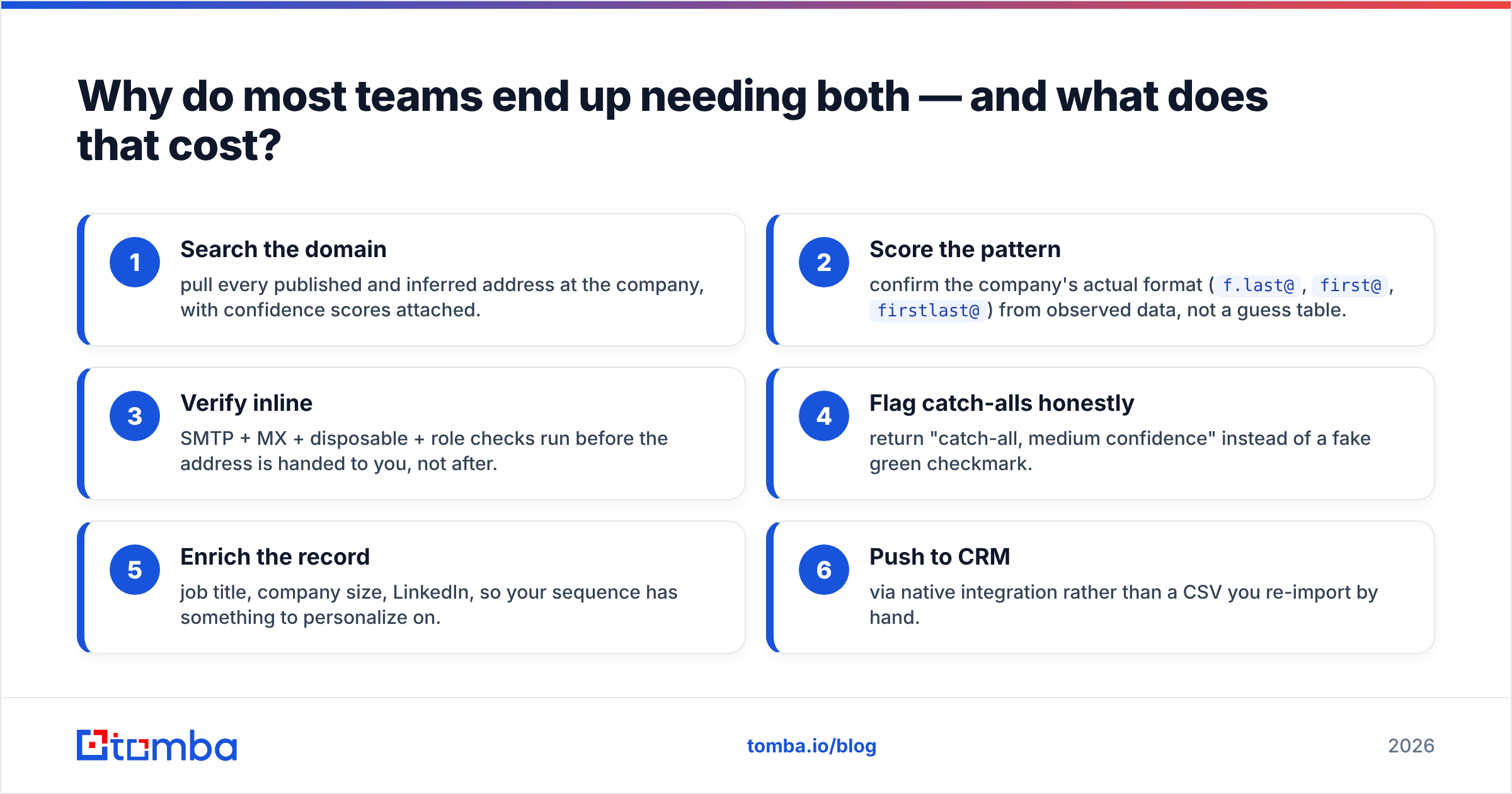
The better setup is one system where finding and verifying happen in the same call:
- Search the domain — pull every published and inferred address at the company, with confidence scores attached.
- Score the pattern — confirm the company's real format (
f.last@,first@,firstlast@) from observed data, not a guess table. - Verify inline — SMTP, MX, disposable, and role checks run before you get the address, not after.
- Flag catch-alls honestly — return "catch-all, medium confidence" instead of a fake green checkmark.
- Enrich the record — job title, company size, LinkedIn, so your sequence has something to work with.
- Push to CRM — through a native integration, not a CSV you re-import by hand.
Tools that fold steps 1–3 into one request remove the handoff entirely. That is the idea behind Tomba's email finder and email verifier. It is also why the bulk email finder takes a company list and returns verified contacts instead of a pile of guesses to clean later.
What do real users say about each?#
Check every vendor claim against a review site where reviews are dated and tied to verified purchases. On G2, the themes repeat:
- EmailListVerify — praised for price and speed on large files. Criticized for a dated interface, and for "unknown" results on hard domains that still burn credits.
- Finder.io — praised for breadth and bundle value. Criticized for slow support and thin coverage on smaller or non-US companies. That is the exact segment most outbound teams target.
Filter reviews to the last 12 months. A 2022 review describes a different product.
How should you run the trial?#
Do not judge on features. Judge on your list.
- Build a 200-row control set. 100 addresses you know are live, such as colleagues or customers who replied last month. 100 you know are dead, straight from your ESP bounce logs.
- Run it through both. Count false valids first. An address marked valid that bounces is the expensive error. A false invalid only costs you one lead.
- Test your ICP's domain size. If you sell to 30-person agencies, do not test on Fortune 500 domains.
- Time the bulk job. A verifier that needs six hours for 50k rows is useless in a same-day campaign.
- Hit the API once. Read the rate limit header. Work out what a nightly job would cost.
Whatever wins, keep the control set. Re-run it every quarter. Data vendors drift, and January's winner is not automatically October's.
The verdict on EmailListVerify vs Finderio#
EmailListVerify wins on verification economics. Finder.io wins on discovery breadth, if you already live in the 500apps suite. Neither wins outright. They were not built to answer the same question.
Are you picking one tool and your list already exists? Buy EmailListVerify credits. Are you picking one tool and the list does not exist yet? A verifier is useless to you. Get a finder.
Most revenue teams are choosing a stack, not a tool. Then the job is to design out the two-vendor CSV shuffle. Start with Tomba Email Finder: search by domain or by name, and get verified addresses with confidence scores in the same response. Automate it later with the Tomba API. The free tier gives you 25 searches a month — enough to run the 200-row bake-off above and see how it scores against your current tool.
Related guides#
Ready to find emails that actually work?
Join 150,000+ professionals who stopped guessing and started sending. Free credits on signup — no credit card required.
Get the Tomba newsletter
Practical outbound tactics and product updates — once every two weeks.
About the author