EmailListVerify vs LimeLeads: Honest 2026 Comparison
One tool cleans lists you already own. The other sells you lists you don't. Here's how EmailListVerify and LimeLeads actually compare on data quality, pricing, and where each one quietly fails.
TL;DR
- EmailListVerify and LimeLeads are not competitors. EmailListVerify is a bulk email verification service. LimeLeads is a B2B contact database you buy lists from. Comparing them is like comparing a water filter to a well.
- If you already have a list and your bounce rate is climbing, EmailListVerify is the cheaper, faster answer — pay-as-you-go credits, no subscription required.
- If you have no list at all, EmailListVerify gives you nothing. LimeLeads (or any B2B database) fills that gap, but you inherit whatever staleness the database carries.
- The failure mode most teams hit: buy a list from a database, blast it unverified, torch the sending domain. Whatever you buy, verify before you send.
- If you'd rather not run two vendors, a combined finder-plus-verifier stack (Tomba is one, and it starts at $49/mo) collapses both jobs into one credit pool and one API.
What do EmailListVerify and LimeLeads actually do?#
They solve opposite halves of the same problem.
EmailListVerify is a list-hygiene tool. You upload a CSV of addresses you already collected — from signups, scrapes, exports, a conference badge scan — and it tells you which ones will bounce. It runs syntax checks, MX record lookups, SMTP handshakes, disposable-domain detection, role-account flagging (info@, sales@), and catch-all identification. It never invents an address. Feed it an empty file, you get an empty file back.
LimeLeads is a list-building tool. You filter by industry, company size, job title, geography, and technology, then export contacts you didn't have before. It is a database play: the value is in coverage and filter precision, not in validating what you already own.
Here's how the jobs split in practice:
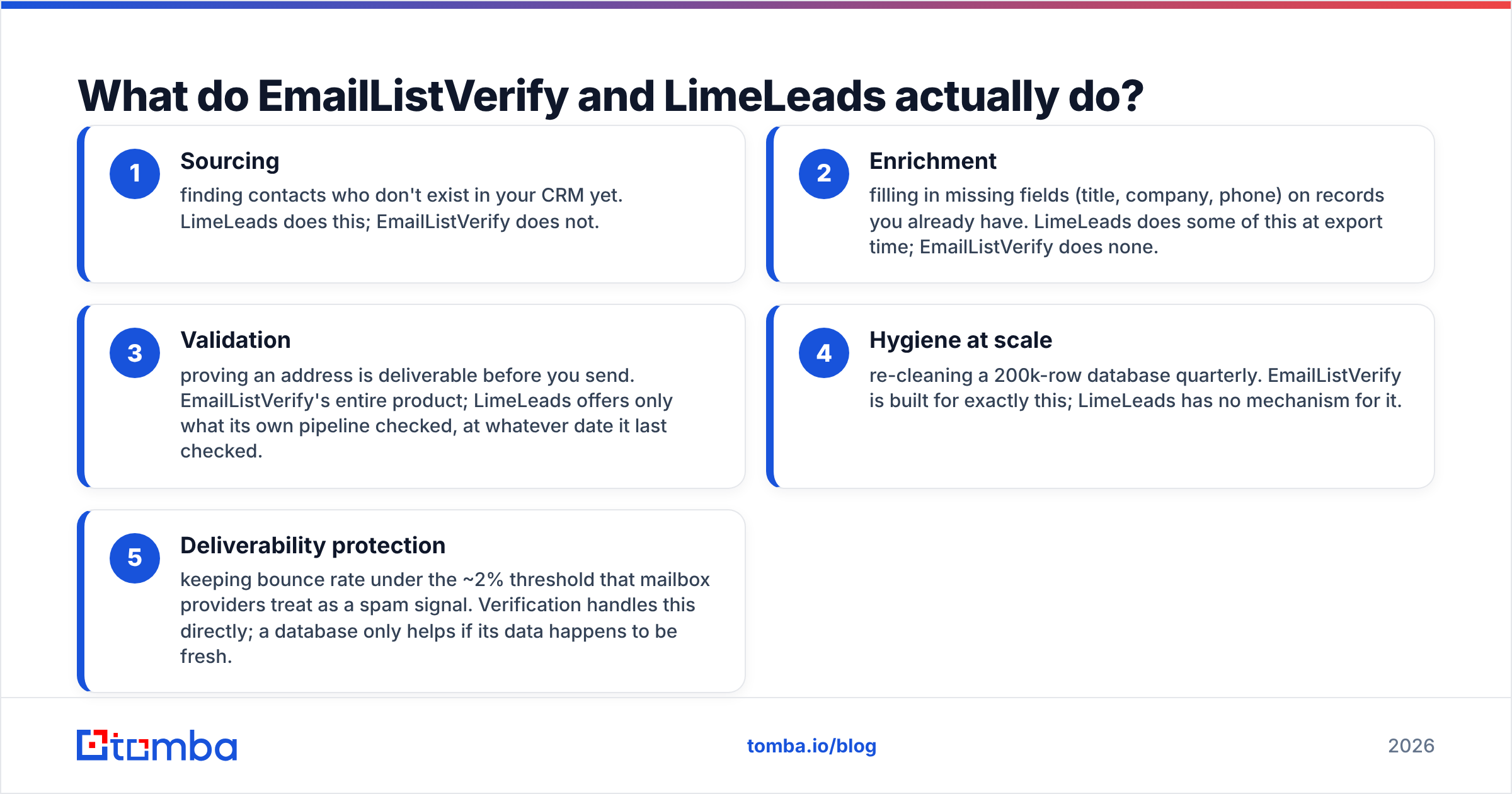
- Sourcing — finding contacts who don't exist in your CRM yet. LimeLeads does this; EmailListVerify does not.
- Enrichment — filling in missing fields (title, company, phone) on records you already have. LimeLeads does some of this at export time; EmailListVerify does none.
- Validation — proving an address is deliverable before you send. EmailListVerify's entire product; LimeLeads offers only what its own pipeline checked, at whatever date it last checked.
- Hygiene at scale — re-cleaning a 200k-row database quarterly. EmailListVerify is built for exactly this; LimeLeads has no mechanism for it.
- Deliverability protection — keeping bounce rate under the ~2% threshold that mailbox providers treat as a spam signal. Verification handles this directly; a database only helps if its data happens to be fresh.
The point: buying from LimeLeads and skipping verification is the single most common way teams destroy a new sending domain in week one.

Which one has better data accuracy?#
Different question for each tool, so let's split it.
For EmailListVerify, accuracy means: when it says "valid," does the message land? Independent verification benchmarks generally cluster the established players — EmailListVerify, ZeroBounce, NeverBounce, Bouncer — in a similar band on clean B2B lists, with the real spread showing up on hard cases: catch-all domains, Microsoft 365 tenants that refuse SMTP probes, and greylisting servers. EmailListVerify does flag catch-alls rather than guessing, which is honest but leaves you with an "unknown" bucket you still have to decide about. If a big share of your list sits on catch-all domains, a dedicated catch-all verifier is worth running as a second pass before you write those contacts off.
For LimeLeads, accuracy means: was this person still in this role when the record was written, and is the address still live? No B2B database escapes decay. Industry consensus puts contact data decay somewhere around 25–30% per year — people change jobs, companies get acquired, domains migrate. A database that refreshed a record 14 months ago is quoting you history, no matter how confident the UI looks.
That is why you never treat a purchased list as verified. Run it through a email verifier the same day you export it, before it touches your sequencer.

The uncomfortable part: verification tells you an address accepts mail. It does not tell you the person still works there. A verified address at a company someone left in March is a deliverable message to a dead mailbox — good for your bounce rate, useless for your pipeline. That gap is why sourcing freshness and verification freshness both matter, and why teams running one without the other keep getting surprised.
How do EmailListVerify and LimeLeads compare feature by feature?#

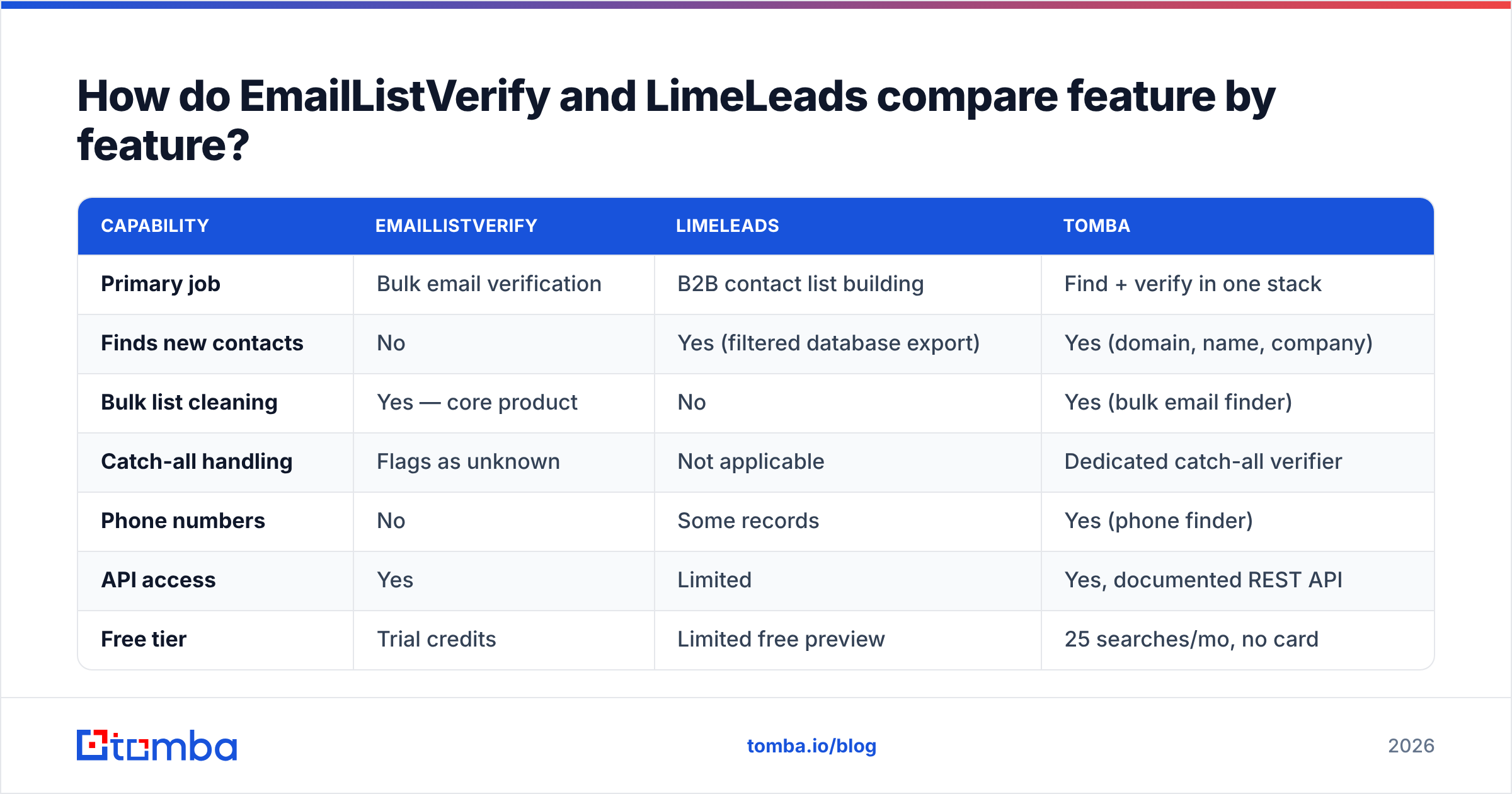
| Capability | EmailListVerify | LimeLeads | Tomba |
|---|---|---|---|
| Primary job | Bulk email verification | B2B contact list building | Find + verify in one stack |
| Finds new contacts | No | Yes (filtered database export) | Yes (domain, name, company) |
| Bulk list cleaning | Yes — core product | No | Yes (bulk email finder) |
| Catch-all handling | Flags as unknown | Not applicable | Dedicated catch-all verifier |
| Phone numbers | No | Some records | Yes (phone finder) |
| API access | Yes | Limited | Yes, documented REST API |
| Free tier | Trial credits | Limited free preview | 25 searches/mo, no card |
| Pricing model | Pay-as-you-go credits or monthly | Credit packs / subscription | $49–$249/mo + free tier |
| Best for | Cleaning lists you already own | Cold list sourcing on a budget | Teams that need both |
| Weak spot | Can't source anything | Data freshness varies by segment | Smaller brand than Apollo/ZoomInfo |
Read that table as a shopping list, not a scoreboard. If your only problem is a dirty list, the EmailListVerify column is the only one that matters and the rest is noise. If your only problem is an empty CRM, the reverse.
What does each one cost in 2026?#
Pricing on both platforms moves, so treat these as shape-of-the-deal rather than a quote — check emaillistverify.com and limeleads.com before you budget.
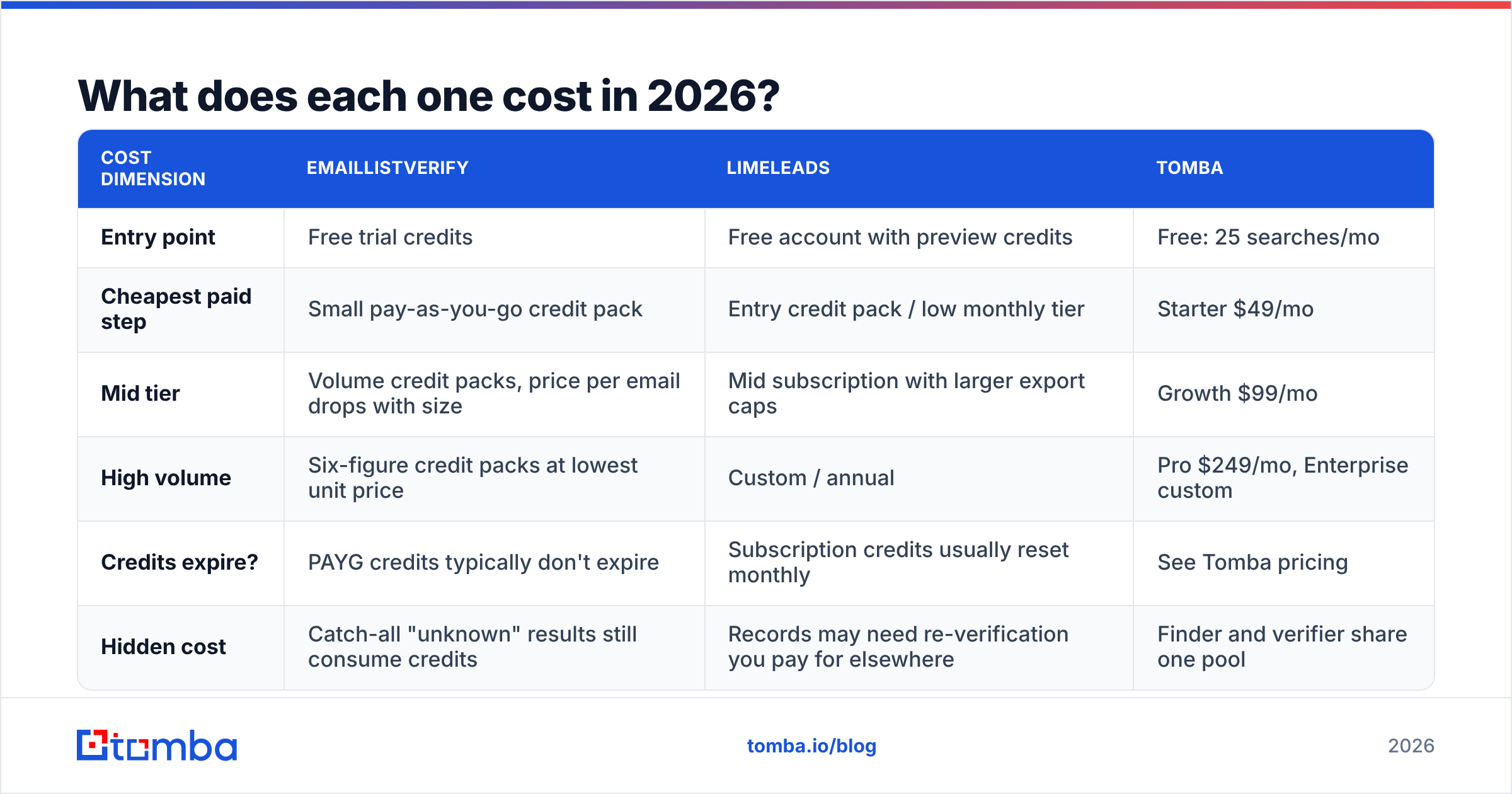
| Cost dimension | EmailListVerify | LimeLeads | Tomba |
|---|---|---|---|
| Entry point | Free trial credits | Free account with preview credits | Free: 25 searches/mo |
| Cheapest paid step | Small pay-as-you-go credit pack | Entry credit pack / low monthly tier | Starter $49/mo |
| Mid tier | Volume credit packs, price per email drops with size | Mid subscription with larger export caps | Growth $99/mo |
| High volume | Six-figure credit packs at lowest unit price | Custom / annual | Pro $249/mo, Enterprise custom |
| Credits expire? | PAYG credits typically don't expire | Subscription credits usually reset monthly | See Tomba pricing |
| Hidden cost | Catch-all "unknown" results still consume credits | Records may need re-verification you pay for elsewhere | Finder and verifier share one pool |
The line item people forget is the double spend. Buy 10,000 contacts from a database, then pay a verifier to clean them, and your true cost per usable contact is both invoices divided by the survivors — not the export price divided by 10,000. On a list where 18% bounce or land as unknown, that's a meaningfully different number than the one in your spreadsheet.
Pay-as-you-go is EmailListVerify's genuine structural advantage here. Verification demand is spiky — you clean a big list before a campaign, then nothing for six weeks. Paying a monthly subscription for that pattern wastes money. Non-expiring credits fit it.
When should you pick EmailListVerify?#
Pick it when all of these are true:
- You already have volume. Signup lists, webinar registrations, legacy CRM records, scraped exports. Something to clean.
- Your bounce rate is the pain. Google and Yahoo's bulk-sender requirements made bounce discipline non-optional; anything drifting toward 2–3% needs cleaning before the next send, not after.
- You want zero commitment. Buy credits, use them whenever, no seat fees.
- You need an API for a signup form. Real-time validation at the point of capture stops junk from entering the database at all, which is cheaper than cleaning it later.
Skip it if your actual problem is that you have 40 contacts and need 4,000. No verifier solves an empty pipeline.
When should you pick LimeLeads?#
Pick it when:
- You're building an outbound motion from zero and need a filterable source of net-new contacts.
- Your ICP is mainstream — SMB and mid-market US companies in well-covered verticals. Coverage on niche European segments, very small companies, and non-English markets is where most mid-tier databases thin out. Check your specific segment against the free preview before committing.
- Budget matters more than breadth. LimeLeads sits well below ZoomInfo-class pricing, which is the reason most people look at it. If you want a wider set of options in that band, G2's lead intelligence category lists the alternatives, and vendors like BookYourData serve a similar list-buying need with a different data model.
- You accept the verification step. Budget for it separately. It is not optional.

Is there a tool that does both jobs?#
Yes, and that is the real decision behind "EmailListVerify vs LimeLeads" — whether you want two vendors or one.
An email finder with built-in verification covers both sides of the workflow: you give it a company domain or a person's name, it returns the address with a confidence score, and the verification runs inside the same request. No CSV round-trip between vendors, no second invoice, no reconciling two credit systems at month end.
Concretely, that looks like:
- Domain search to pull every discoverable address at a target company — the sourcing job LimeLeads does, run per-account rather than by bulk filter.
- Email Finder for named prospects you already identified on LinkedIn or a customer list.
- Verification inline, so an address arrives already scored instead of leaving in a batch and returning hours later.
- One API for engineering to integrate once, instead of wiring two vendors with two auth schemes and two rate limits.
The honest trade-off: a per-account finder is not the same as a filterable database. If you want to say "show me every VP of Ops at 50–200 person logistics companies in Texas" and get 3,000 rows, a database UI is genuinely better at that. If you already know your target accounts — from intent data, a partner list, a conference roster, your own research — the finder approach produces fresher data because it resolves the address at query time rather than reading a record written months ago.
That freshness difference is the whole argument. A database returns what it stored. A finder resolves what is true now.
What does a sane 2026 stack look like?#
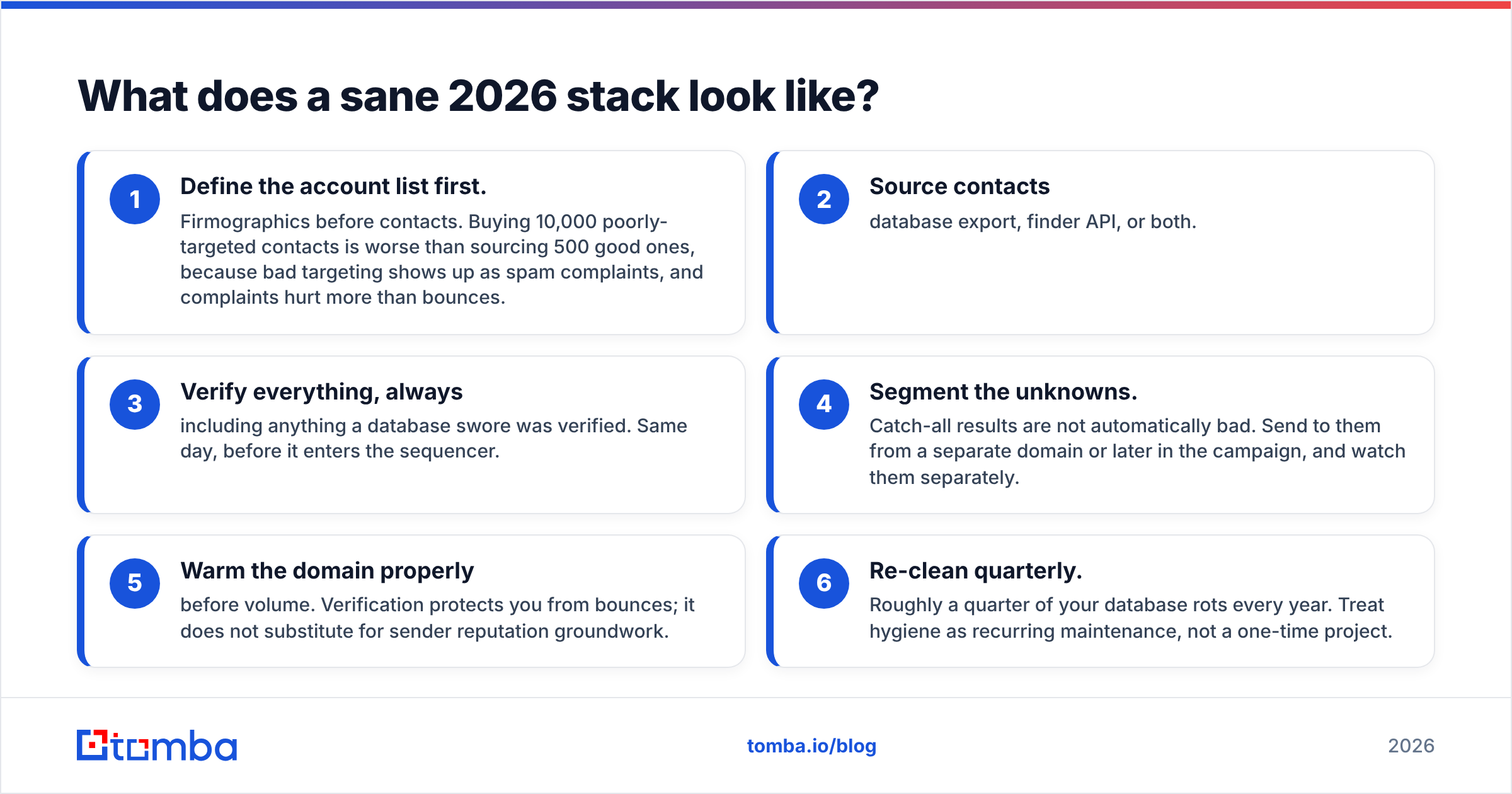
Whatever combination you land on, the sequence matters more than the logos:
- Define the account list first. Firmographics before contacts. Buying 10,000 poorly-targeted contacts is worse than sourcing 500 good ones, because bad targeting shows up as spam complaints, and complaints hurt more than bounces.
- Source contacts — database export, finder API, or both.
- Verify everything, always — including anything a database swore was verified. Same day, before it enters the sequencer.
- Segment the unknowns. Catch-all results are not automatically bad. Send to them from a separate domain or later in the campaign, and watch them separately.
- Warm the domain properly before volume. Verification protects you from bounces; it does not substitute for sender reputation groundwork.
- Re-clean quarterly. Roughly a quarter of your database rots every year. Treat hygiene as recurring maintenance, not a one-time project.
Teams that skip step 3 because "the list came verified" are the ones filing deliverability support tickets in month two.
So which one wins?#
Neither, because they're not in the same race — and any article that declares a winner between a verifier and a database is selling you something.
Choose EmailListVerify if you have a list and need it clean, want pay-as-you-go pricing, and don't need net-new contacts. It does one job and does it at a fair price.
Choose LimeLeads if your CRM is empty, your ICP is mainstream, and ZoomInfo-tier pricing is out of reach. Then budget separately for verification, because you will need it.
Choose a combined stack if you're tired of paying two vendors to complete one workflow, or if your targeting is account-based enough that filtered bulk exports were never the right shape anyway.
Ready to test the combined route? Tomba's Email Finder gives you 25 free searches a month with no card required — enough to run your real target accounts through it and compare the output against whatever export you're currently paying for. Paid plans start at $49/mo, verification is included in the same credit pool, and the API is one integration instead of two. Run your ten hardest accounts through it before you renew anything.
Related guides#
Ready to find emails that actually work?
Join 150,000+ professionals who stopped guessing and started sending. Free credits on signup — no credit card required.
Get the Tomba newsletter
Practical outbound tactics and product updates — once every two weeks.
About the author