EmailListVerify vs Salesbot: Full 2026 Comparison Guide
One cleans the list you already have. The other tries to build and work the list for you. Here is where EmailListVerify and Salesbot actually differ — and which one belongs in your 2026 outbound stack.
TL;DR
- EmailListVerify and Salesbot are not really competitors. EmailListVerify is a bulk email verification service. Salesbot is an AI outbound platform that sources contacts and runs sequences. Comparing them is comparing a filter to a factory.
- If your problem is "I have a 40,000-row CSV and I don't know what's dead," EmailListVerify is the cheaper, more focused answer.
- If your problem is "I have no list and nobody to write the emails," Salesbot-style AI SDR tooling is the category you're shopping — but you inherit its data quality, whatever it is.
- Neither one solves the middle of the funnel well: finding accurate, role-specific contacts at named accounts. That's a dedicated email finder's job.
- Budget check: a verification-only workflow can run under $50/month at modest volume. An AI outbound platform is a multi-hundred-dollar-per-month commitment with a longer ramp.
What problem does each tool actually solve?#
Start with the honest framing, because most "X vs Y" pages skip it.
EmailListVerify is a list-hygiene utility. You bring emails you already have — from a form, a conference badge scan, an export from an old CRM, a scraped list — and it tells you which addresses will bounce. It runs syntax checks, MX record lookups, SMTP handshakes, disposable-domain detection, role-account flags (info@, sales@), and catch-all identification. It does not find anyone. It has no opinion about who you should contact.
Salesbot sits at the opposite end. It's an AI-led outbound product: identify accounts, pull contacts, generate messaging, run the sequence, hand back replies. The pitch is compression — fewer humans, fewer tools, fewer handoffs between the list and the send.
So the real question is not "which is better." It's which gap in your pipeline is currently costing you money.
Think of it like a restaurant. EmailListVerify is the health inspector who tells you which ingredients have spoiled. Salesbot is a contract kitchen that sources ingredients, cooks, and plates. You don't pick one over the other on principle. You pick based on whether your problem is spoilage or staffing.

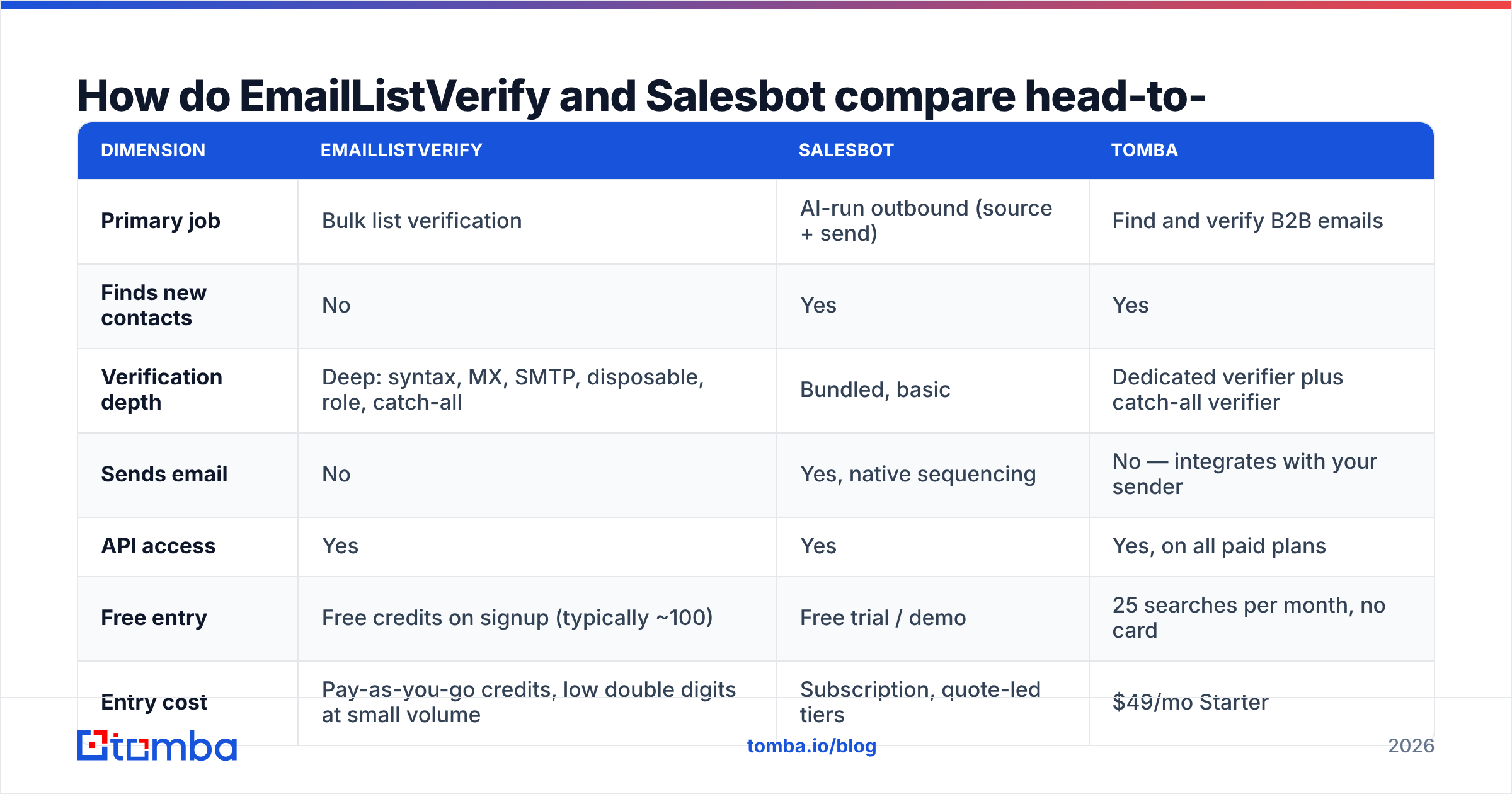
How do EmailListVerify and Salesbot compare head-to-head?#
Here's the practical breakdown. Pricing figures reflect published rates at the time of writing — vendors change tiers often, so confirm on the vendor page before you commit budget.
| Dimension | EmailListVerify | Salesbot | Tomba |
|---|---|---|---|
| Primary job | Bulk list verification | AI-run outbound (source + send) | Find and verify B2B emails |
| Finds new contacts | No | Yes | Yes |
| Verification depth | Deep: syntax, MX, SMTP, disposable, role, catch-all | Bundled, basic | Dedicated verifier plus catch-all verifier |
| Sends email | No | Yes, native sequencing | No — integrates with your sender |
| API access | Yes | Yes | Yes, on all paid plans |
| Free entry | Free credits on signup (typically ~100) | Free trial / demo | 25 searches per month, no card |
| Entry cost | Pay-as-you-go credits, low double digits at small volume | Subscription, quote-led tiers | $49/mo Starter |
| Data source transparency | N/A — you supply the data | Vendor-controlled, limited visibility | Published data sourcing |
| Best fit | Cleaning a list you already own | Teams replacing SDR headcount | Building an accurate list from scratch |
| Worst fit | You have no list yet | You need surgical, account-based targeting | You want the tool to send for you |
The table exposes the actual decision. EmailListVerify assumes you have data. Salesbot assumes you want to outsource judgment. If neither assumption fits, you're shopping in the wrong aisle.
What are the five failure modes that decide this choice?#
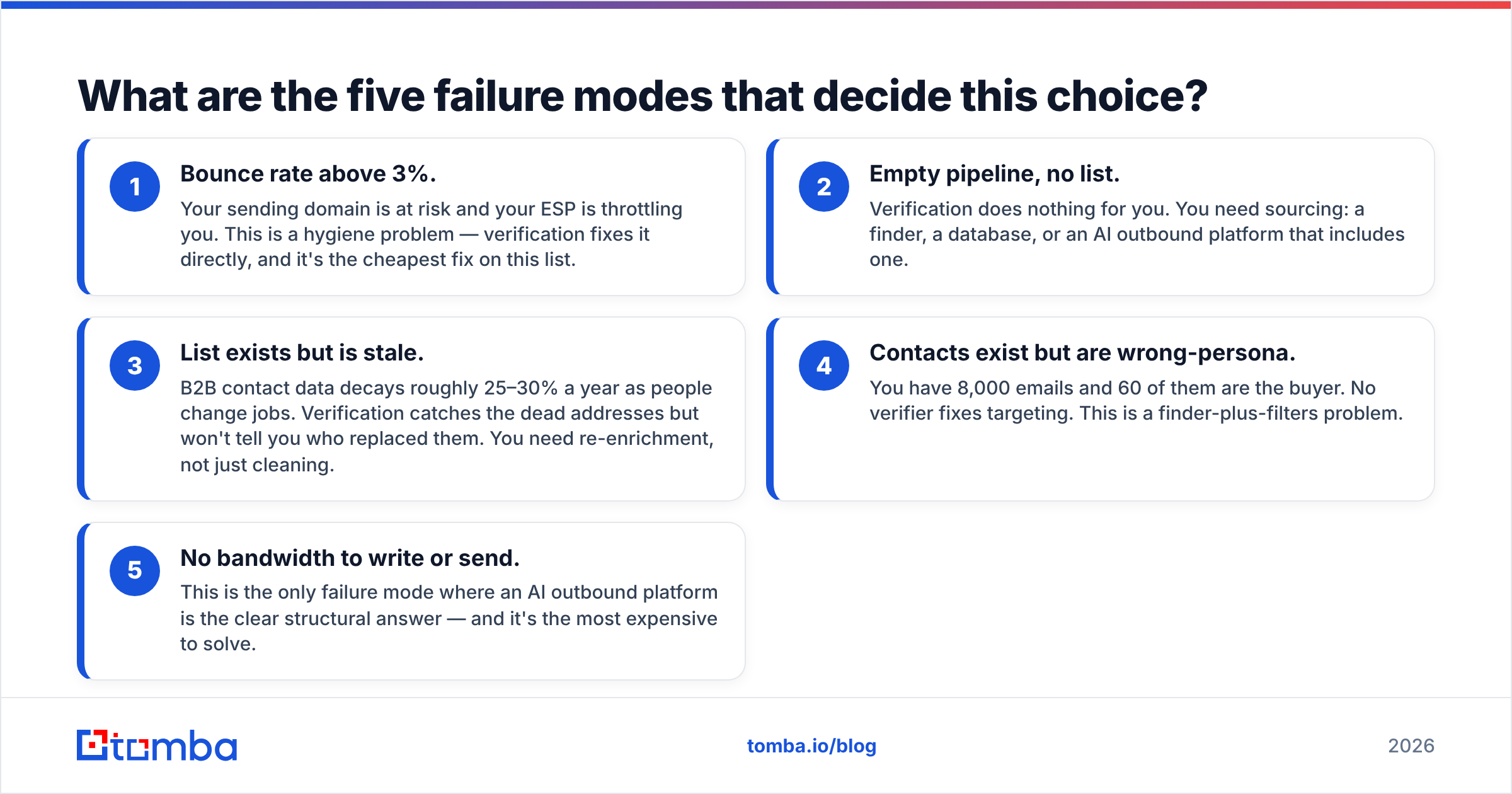
Before you compare feature grids, diagnose your own pipeline. In practice, one of these five is what's actually broken:
- Bounce rate above 3%. Your sending domain is at risk and your ESP is throttling you. This is a hygiene problem — verification fixes it directly, and it's the cheapest fix on this list.
- Empty pipeline, no list. Verification does nothing for you. You need sourcing: a finder, a database, or an AI outbound platform that includes one.
- List exists but is stale. B2B contact data decays roughly 25–30% a year as people change jobs. Verification catches the dead addresses but won't tell you who replaced them. You need re-enrichment, not just cleaning.
- Contacts exist but are wrong-persona. You have 8,000 emails and 60 of them are the buyer. No verifier fixes targeting. This is a finder-plus-filters problem.
- No bandwidth to write or send. This is the only failure mode where an AI outbound platform is the clear structural answer — and it's the most expensive to solve.
Most teams that land on an "EmailListVerify vs Salesbot" search are actually in bucket 3 or 4 and don't know it yet.
Which one is more accurate — and accurate at what?#
This is where the comparison gets slippery, because the two tools report accuracy on different things.
EmailListVerify reports verification accuracy: of the addresses it marks valid, how many actually accept mail. Good verifiers land in the high 90s on standard domains. The honest caveat every verifier shares: catch-all domains. When a mail server accepts everything at the SMTP layer, no verifier can tell you whether jane.doe@ is a real mailbox or a black hole. EmailListVerify flags these as catch-all rather than guessing, which is the correct behavior — but it means a chunk of your list stays in limbo. If catch-alls are a big share of your target accounts (common in enterprise), you need a dedicated catch-all verifier that goes further than a binary flag.
Salesbot reports something different: sourcing accuracy — of the contacts it surfaces, how many are correct and reachable. That number depends entirely on the underlying data layer, which most AI outbound vendors don't fully document. When a platform bundles sourcing, verification, and sending behind one interface, you lose the ability to audit any single stage. If reply rates drop, you can't tell whether the data was wrong, the copy was wrong, or the domain was burned.
That opacity is the real cost of bundling. It's not that AI outbound platforms have bad data — it's that you can't independently verify it, and you can't swap out just the broken layer.
The practical takeaway: separate your accuracy measurements. Track bounce rate (data quality), reply rate (targeting plus copy), and inbox placement (email deliverability) as three distinct numbers. A tool that collapses them into one dashboard metric is hiding information you need.
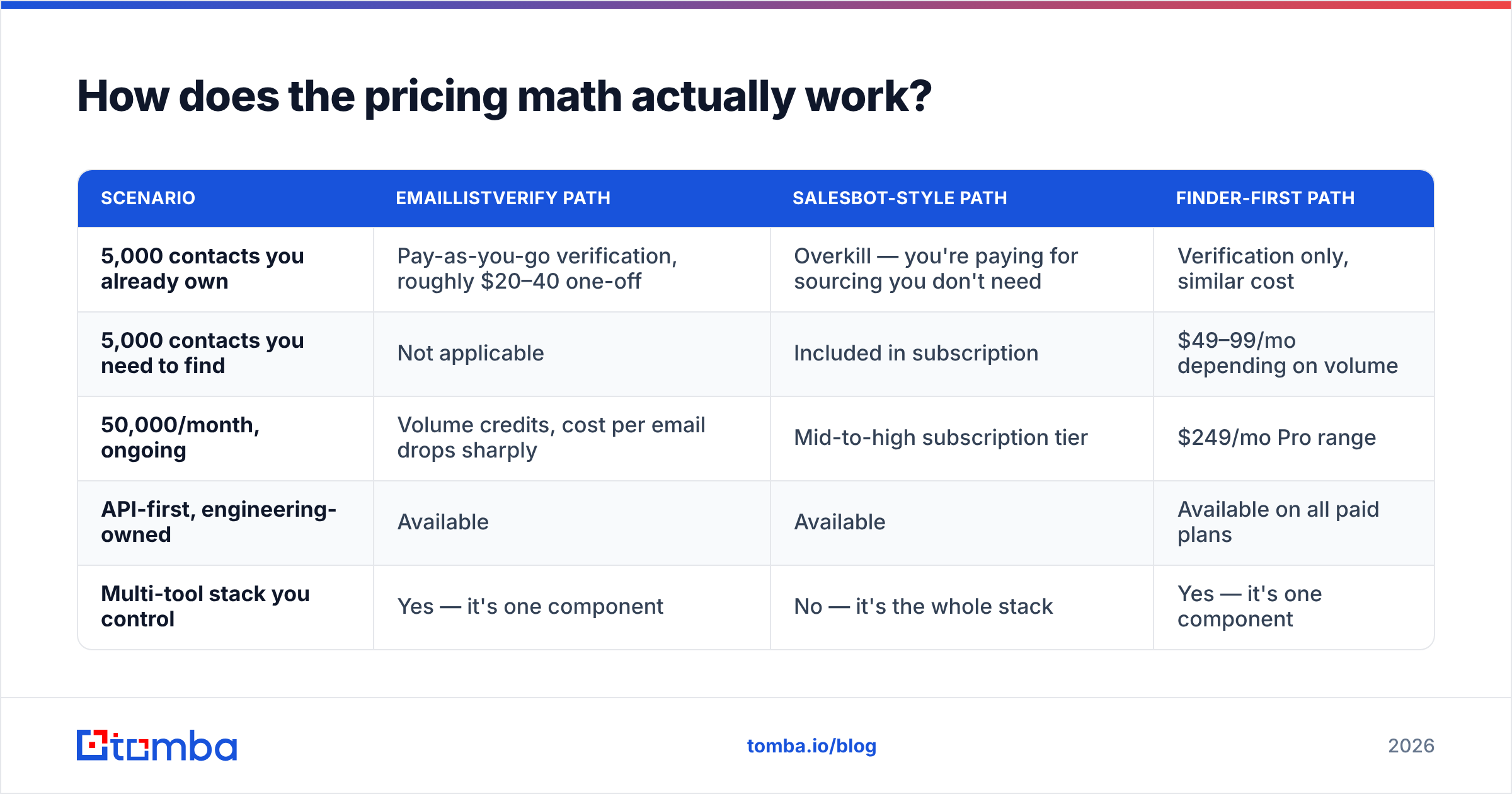
How does the pricing math actually work?#
| Scenario | EmailListVerify path | Salesbot-style path | Finder-first path |
|---|---|---|---|
| 5,000 contacts you already own | Pay-as-you-go verification, roughly $20–40 one-off | Overkill — you're paying for sourcing you don't need | Verification only, similar cost |
| 5,000 contacts you need to find | Not applicable | Included in subscription | $49–99/mo depending on volume |
| 50,000/month, ongoing | Volume credits, cost per email drops sharply | Mid-to-high subscription tier | $249/mo Pro range |
| API-first, engineering-owned | Available | Available | Available on all paid plans |
| Multi-tool stack you control | Yes — it's one component | No — it's the whole stack | Yes — it's one component |
Two things fall out of this.
First, verification is cheap and should always be in your workflow, regardless of which sourcing route you take. It's the highest-ROI line item in outbound because it protects the asset everything else depends on: your sending domain.
Second, bundled AI outbound is expensive per seat and hard to unwind. Once your sequences, contact records, and reply history live inside one platform, migrating is a project. Evaluate accordingly — run a paid pilot on a narrow segment before you move the whole motion.
For reference on how buyers actually rate these categories, G2's email verification and sales intelligence grids are a reasonable sanity check on vendor claims, and HubSpot's research on email benchmarks gives you baseline reply and bounce numbers to compare your pilot against.

Is Salesbot better than EmailListVerify for outbound teams?#
For a team that has no list and no SDR, yes — but that's a comparison of unequal scopes, not a fair fight.
The more useful question: is a bundled AI outbound platform better than a composed stack?
Arguments for bundling:
- One vendor, one invoice, one support thread.
- Faster time to first send — days, not weeks.
- No integration debt between finder, verifier, and sender.
Arguments for composing:
- You can swap any layer when it underperforms without rebuilding everything.
- You can audit data quality independently of copy performance.
- Cost scales with what you use, not with seats.
- Your contact data stays portable.
Most teams past their first 20 customers end up composing. The bundled platform gets you moving; the composed stack is what you keep. The exception is genuinely small teams where the marginal hour matters more than the marginal dollar — there, bundling wins on speed alone.
What do both tools leave uncovered?#
The gap sits between them, and it's the part that most directly moves reply rate: finding the right person at a named account and confirming that address is live before it ever enters a sequence.
EmailListVerify only reacts to a list you hand it. Salesbot-style platforms source contacts, but with limited visibility into how, and limited control over targeting precision.
A finder-first workflow closes that gap in four steps:
- Domain sweep. Run domain search against your target account list to see every discoverable contact and the company's email pattern, before you commit to any individual guess.
- Person-level lookup. Use an email finder for named prospects — first name, last name, domain — rather than permutating and hoping.
- Verify in the same pass. Every address gets checked with an email verifier before it touches your sender, including catch-all handling.
- Batch it. For anything above a few hundred rows, bulk email finder processing plus CSV export keeps the workflow to minutes rather than an afternoon.
That sequence gives you a list that's both correct and targeted — the two properties verification alone and sourcing alone each get only half right. Tomba pricing starts free at 25 searches/month, then $49/mo Starter, $99/mo Growth, $249/mo Pro, so you can validate the workflow on a single campaign before scaling it.
Which should you pick in 2026?#
Pick EmailListVerify if: you already own the data, your bounce rate is the problem, you want a focused utility rather than a platform, and you're happy owning the rest of the stack yourself. It's good at one job and priced like a tool that knows it.
Pick Salesbot if: you're replacing or augmenting SDR capacity, you value speed to first send over stack control, and you're comfortable trusting a vendor's data layer without full visibility into it. Run a scoped pilot and measure bounce rate independently — don't take the dashboard's word for it.
Pick a finder-first stack if: your targeting is the bottleneck. If you know exactly which 300 accounts matter and which titles inside them matter, no amount of list cleaning or AI sequencing beats simply getting the right 300 addresses right the first time.
The combination most working teams land on: a finder plus verifier for data, a sending tool you control for delivery, and a CRM as the system of record. Three components, each replaceable, each measurable.
What should you do first this week?#
Run a diagnostic before you buy anything. Take 500 rows from your current list, verify them, and look at the pass rate. Under 80% valid means hygiene is your problem and a verifier pays for itself immediately. Above 90% valid with a weak reply rate means your data is fine and your targeting is the issue — no verifier will fix that, and neither will an AI writing better subject lines to the wrong people.
Then check the inverse: pick 20 accounts you genuinely want, and see how many of the right-title contacts you can actually produce from your existing tooling. If the answer is under half, that's your real gap.
Ready to fix the sourcing half? Start with the Tomba Email Finder — search by domain, name, or company, get pattern-confirmed addresses with confidence scores, and verify them in the same workflow before anything reaches your sequence. The free tier gives you 25 searches a month with no card required, which is enough to test the four-step workflow above against your own target accounts and see whether the bottleneck was ever really your list hygiene.
Related guides#
Ready to find emails that actually work?
Join 150,000+ professionals who stopped guessing and started sending. Free credits on signup — no credit card required.
Get the Tomba newsletter
Practical outbound tactics and product updates — once every two weeks.
About the author