EmailListVerify vs ZoomInfo: Which One Do You Actually Need?
One tool cleans lists for a few dollars. The other sells contact data for five figures a year. Here is how EmailListVerify and ZoomInfo actually compare, where each one breaks, and what to buy if your budget sits between them.
TL;DR
- These two products do not compete. EmailListVerify checks whether emails you already have are deliverable. ZoomInfo sells you the contacts in the first place, plus intent, firmographics, and org charts.
- EmailListVerify costs single-digit dollars per thousand verifications with pay-as-you-go credits. ZoomInfo is an annual contract, quoted privately, and typically lands in the $15,000–$40,000+ range depending on seats and credits.
- If you buy ZoomInfo, you will still want a verifier. ZoomInfo's records decay like every other database, and its own exports routinely include contacts who left the company months ago.
- If you buy EmailListVerify alone, you have no way to source new contacts — it is a cleaning tool, not a prospecting tool.
- The realistic middle path for most teams under 50 reps: a combined finder plus verifier (Tomba, Findymail, BookYourData and similar) at $49–$249/mo, which covers sourcing and validation without a procurement cycle.
What are you actually comparing here?#
You are comparing a bucket to a well.
EmailListVerify is a bucket cleaner. You pour in a CSV of addresses you already own, it tells you which ones will bounce, and you pour the survivors back into your sending tool. It does not know who the CFO of a Series B fintech is, and it never will.
ZoomInfo is the well. It holds hundreds of millions of business contacts, company records, technographic signals, and buying-intent data, and it lets you pull new names out of it by filter. Verification is a small side feature bolted onto a much bigger data platform.
So "EmailListVerify vs ZoomInfo" is not really a head-to-head. It is a question about which layer of your outbound stack is currently broken. If your reply rates are fine but your bounce rate is 9%, you have a verification problem. If your bounce rate is fine but you have run out of people to email, you have a sourcing problem. Buying the wrong one fixes nothing.
What is EmailListVerify and what does it actually do?#
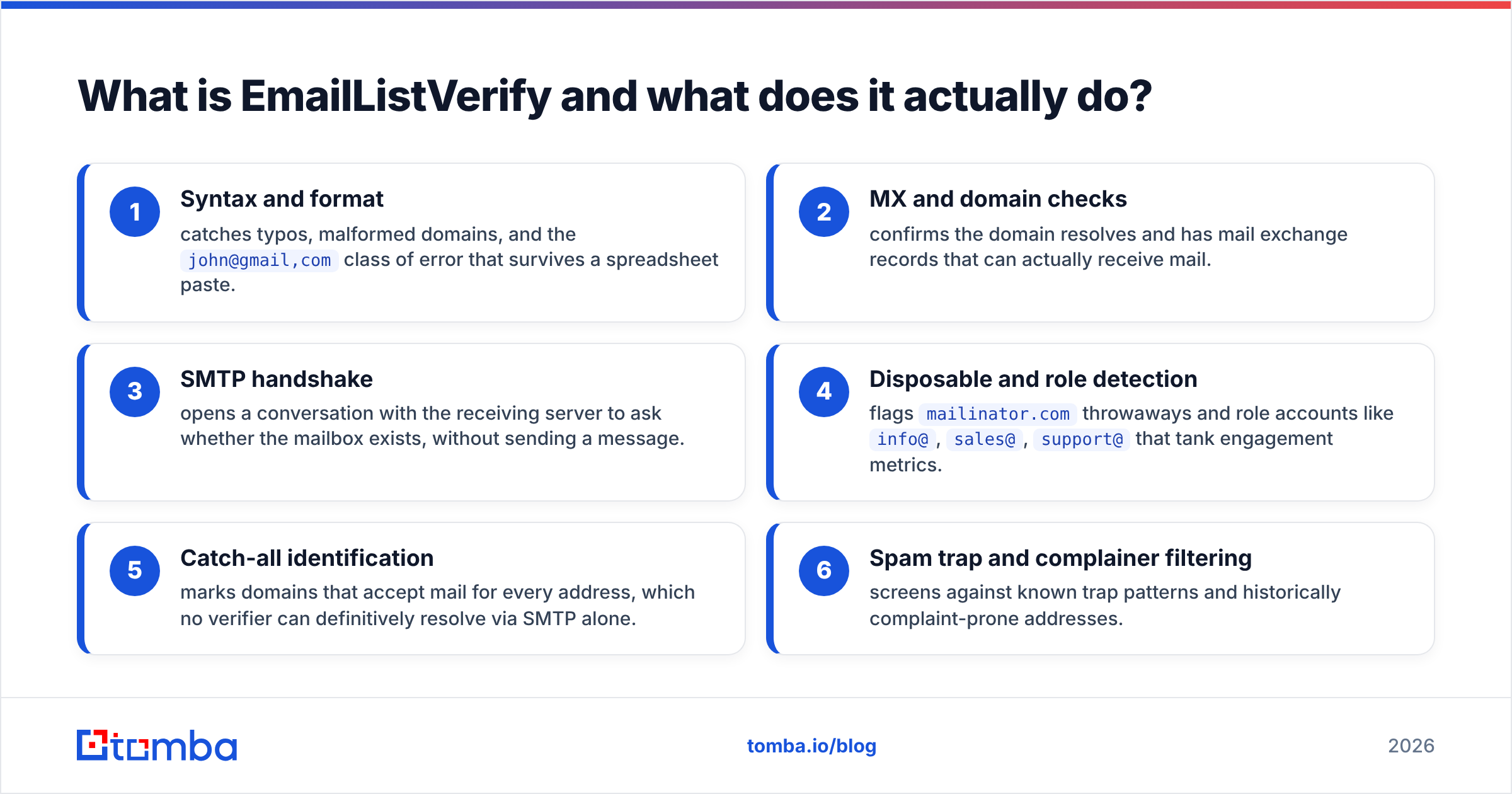
EmailListVerify is a bulk email validation service. Upload a list, or hit the API, and it runs each address through a chain of checks:
- Syntax and format — catches typos, malformed domains, and the
john@gmail,comclass of error that survives a spreadsheet paste. - MX and domain checks — confirms the domain resolves and has mail exchange records that can actually receive mail.
- SMTP handshake — opens a conversation with the receiving server to ask whether the mailbox exists, without sending a message.
- Disposable and role detection — flags
mailinator.comthrowaways and role accounts likeinfo@,sales@,support@that tank engagement metrics. - Catch-all identification — marks domains that accept mail for every address, which no verifier can definitively resolve via SMTP alone.
- Spam trap and complainer filtering — screens against known trap patterns and historically complaint-prone addresses.
That is the whole product. It is fast, it is cheap, and it does one job. The output is a segmented file: deliverable, undeliverable, risky, unknown. What you do next is your problem.
The weak spot is the same one every SMTP-based verifier hits: catch-all domains. Microsoft 365 tenants configured to accept everything will come back "unknown" or "risky," and on enterprise-heavy lists that bucket can be 20–30% of your file. Some tools invest heavily in resolving these — a dedicated catch-all verifier uses pattern intelligence and historical send data rather than the SMTP handshake alone. EmailListVerify does flag them, but resolving them is not its strength.
What is ZoomInfo and who is it built for?#
ZoomInfo is a go-to-market intelligence platform. The contact database is the anchor, but the pitch is the surrounding layer:
- Contact and company records — direct dials, mobile numbers, emails, titles, reporting structure, headcount, revenue, tech stack.
- Intent data — signals from content consumption networks suggesting an account is researching your category right now.
- Websights — de-anonymizing company-level website traffic so you can chase accounts that browsed but never filled a form.
- Copilot — the AI layer that surfaces accounts and drafts outreach based on all of the above.
- Workflows and CRM sync — automated enrichment and routing into Salesforce, HubSpot, and Marketo.
This is enterprise software with enterprise mechanics. Pricing is not public. You go through a demo, a discovery call, and a quote. Contracts are annual, often multi-year, and credits are metered per export. Reviews on G2 consistently praise data depth and just as consistently flag the contract structure, auto-renewal terms, and credit overage costs.
ZoomInfo makes sense when you have a defined ICP, a rep team large enough that data quality compounds across many pipelines, and a RevOps function that can actually operationalize intent signals. It is overkill — and financially painful — for a three-person startup that needs 500 emails a month.
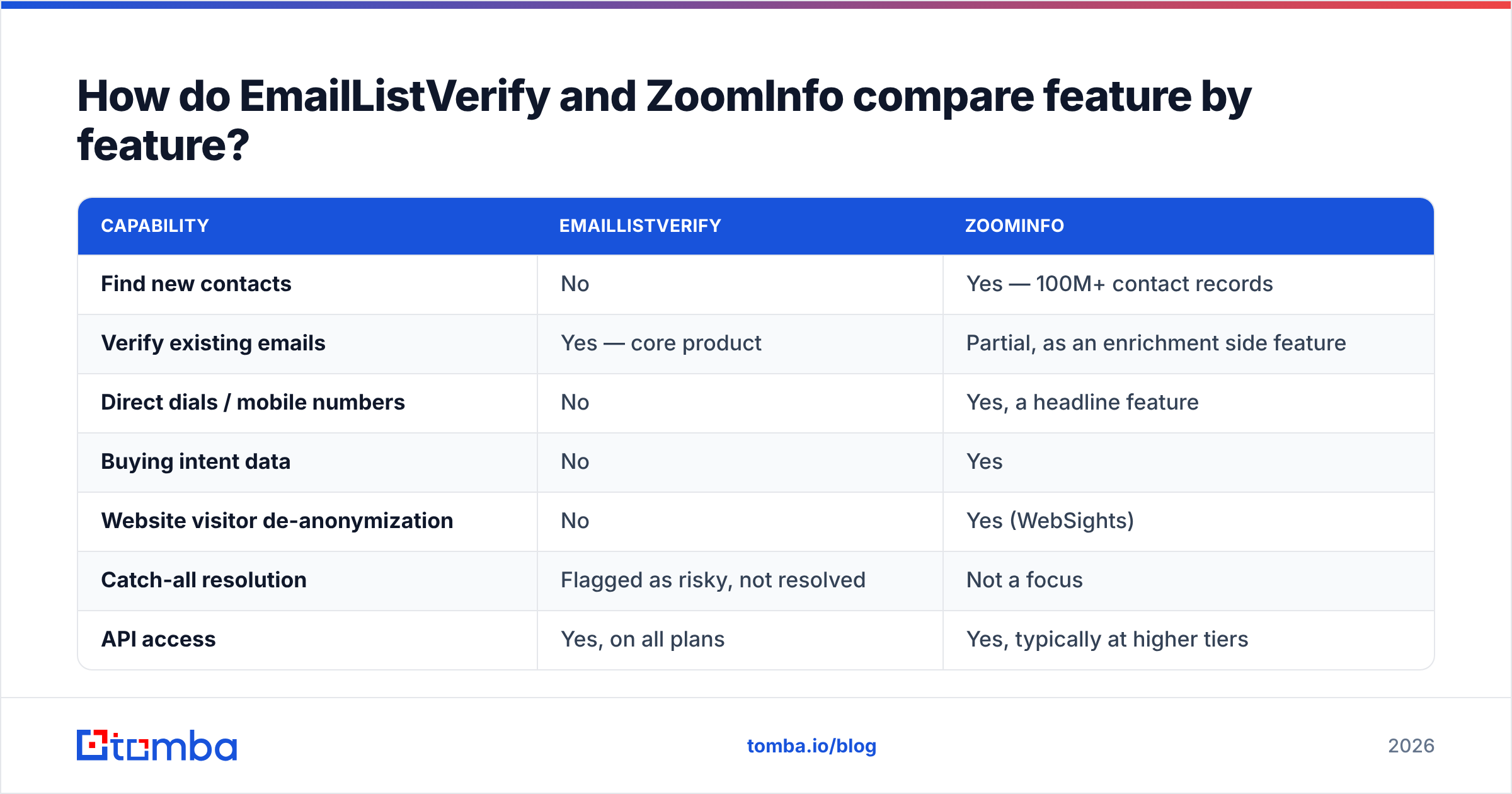
How do EmailListVerify and ZoomInfo compare feature by feature?#
| Capability | EmailListVerify | ZoomInfo |
|---|---|---|
| Find new contacts | No | Yes — 100M+ contact records |
| Verify existing emails | Yes — core product | Partial, as an enrichment side feature |
| Direct dials / mobile numbers | No | Yes, a headline feature |
| Buying intent data | No | Yes |
| Website visitor de-anonymization | No | Yes (WebSights) |
| Catch-all resolution | Flagged as risky, not resolved | Not a focus |
| API access | Yes, on all plans | Yes, typically at higher tiers |
| Pricing model | Pay-as-you-go credits or monthly | Annual contract, custom quote |
| Entry cost | Under $10 for a small list | Four to five figures per year |
| Free tier | 100 free verifications | No — demo only |
| Contract required | No | Yes, annual |
| Time to first value | Minutes | Weeks (demo → quote → onboarding) |
| Best for | Cleaning any list, any source | Enterprise ABM and large sales teams |
The table makes the real decision obvious. There is exactly one row where they overlap — verification — and it is a core product for one and an afterthought for the other.

How does the pricing actually break down?#
This is where the comparison gets uncomfortable, because the two tools are not within an order of magnitude of each other.
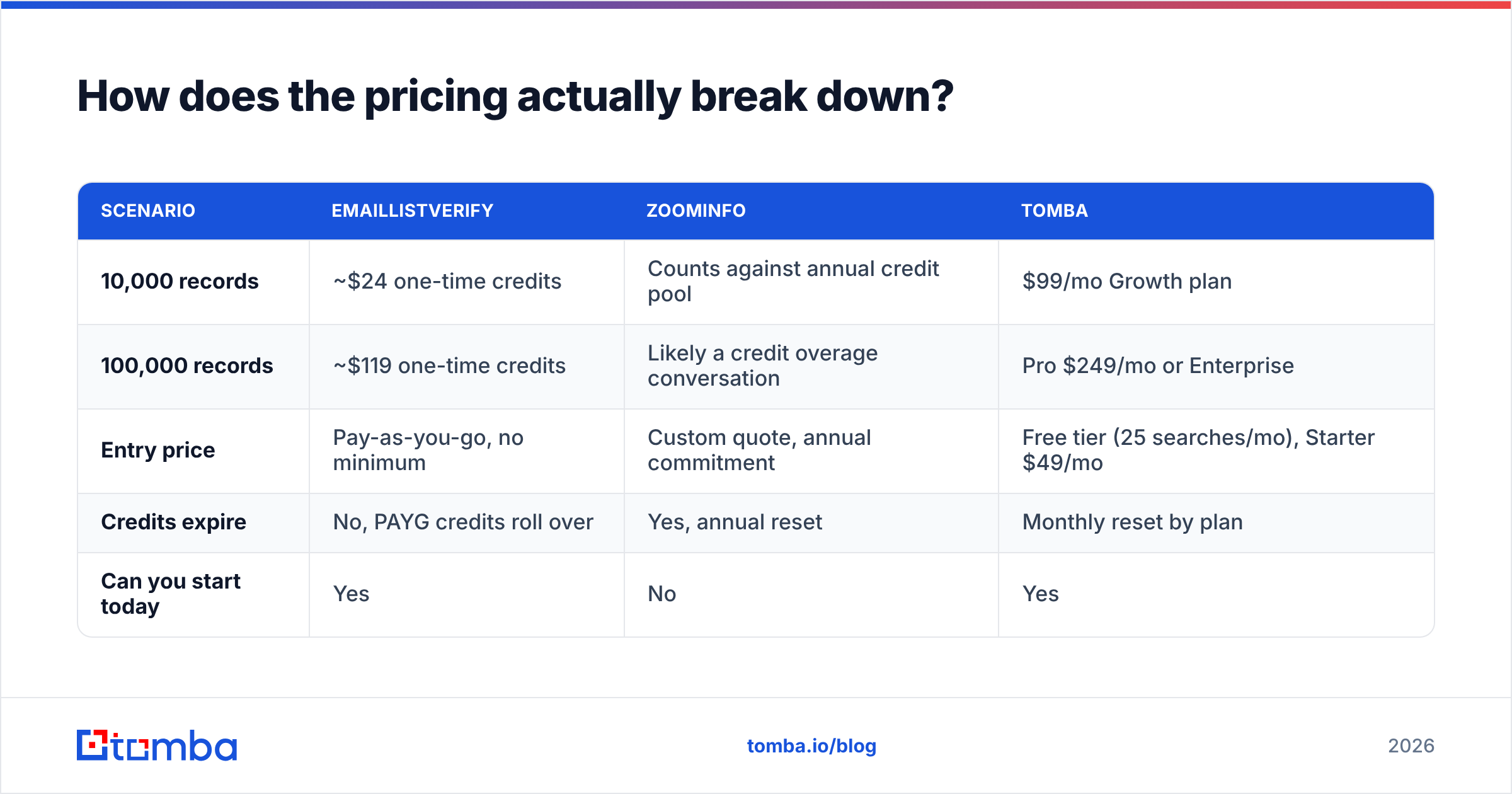
| Scenario | EmailListVerify | ZoomInfo | Tomba |
|---|---|---|---|
| 10,000 records | ~$24 one-time credits | Counts against annual credit pool | $99/mo Growth plan |
| 100,000 records | ~$119 one-time credits | Likely a credit overage conversation | Pro $249/mo or Enterprise |
| Entry price | Pay-as-you-go, no minimum | Custom quote, annual commitment | Free tier (25 searches/mo), Starter $49/mo |
| Credits expire | No, PAYG credits roll over | Yes, annual reset | Monthly reset by plan |
| Can you start today | Yes | No | Yes |
Verify the current numbers on each vendor's own page before you budget — verification pricing shifts often, and ZoomInfo does not publish a rate card at all. Anecdotally, from public review data and buyer reports, small ZoomInfo deployments start around $15,000/year and mid-market deployments with intent and Copilot commonly clear $40,000. Compare that with published Tomba pricing at $49/mo for Starter and $249/mo for Pro, and you can see why most sub-50-rep teams never make it past ZoomInfo's discovery call.
The cost trap is not the list price on either side. It is buying ZoomInfo and still paying for verification because exports bounce, or buying EmailListVerify and discovering you have nothing to verify because you have no sourcing engine.
Which one has better data accuracy?#
Different question for each tool, so answer it twice.
For EmailListVerify, accuracy means: when it says "deliverable," does the message land? Independent bounce-rate tests generally put competent SMTP verifiers in the 95–98% range on standard domains, and EmailListVerify sits in that band. The variance between reputable verifiers on clean B2B lists is small — a percentage point or two. Where they separate is catch-all handling and how aggressively they dump ambiguous records into "unknown," which quietly shrinks your usable list.
For ZoomInfo, accuracy means: is this person still in that role, and is that email still their email? Here the honest answer is that every large B2B database decays. Roughly 25–30% of B2B contact data goes stale per year through job changes, restructures, and domain migrations. ZoomInfo invests heavily in refresh and community-contributed signals, and it is one of the better-maintained databases in the market — but "better-maintained" is not "current." Any ZoomInfo export older than a few weeks should be re-verified before a send.

That decay rate is the reason the "do I need both?" question has an obvious answer for anyone running ZoomInfo at scale. You do. Or you need a sourcing tool with verification built into the same pipeline so the two never drift apart.
Do you need both, or is there a middle option?#
Three realistic configurations, depending on your size:
- Enterprise, 50+ reps, ABM motion. ZoomInfo for sourcing and intent, plus a dedicated verifier in the pipeline before anything hits a sequencer. Budget for both. The verifier costs a rounding error next to the platform contract and prevents the domain-reputation damage that a 12% bounce campaign causes.
- Mid-market, 5–50 reps. A combined finder plus verifier is usually the better economics. An email finder that sources by domain or name and validates in the same call removes the export-then-clean handoff entirely. Peers worth shortlisting here include Tomba, Findymail, and BookYourData, which sells pre-verified B2B lists with a bounce guarantee — a genuinely different model that suits teams who want data delivered rather than queried.
- Startup or solo founder. Skip both. Use a free tier, a domain search to pull the contacts at your target accounts, and an email verifier on the way out. You do not have enough send volume to justify a data platform, and you do not have enough list volume to justify a standalone verification vendor.
The mistake to avoid is buying the enterprise platform to solve a hygiene problem. If your bounces are high, a $24 verification credit pack fixes it this afternoon. No quote, no annual commitment, no onboarding call.
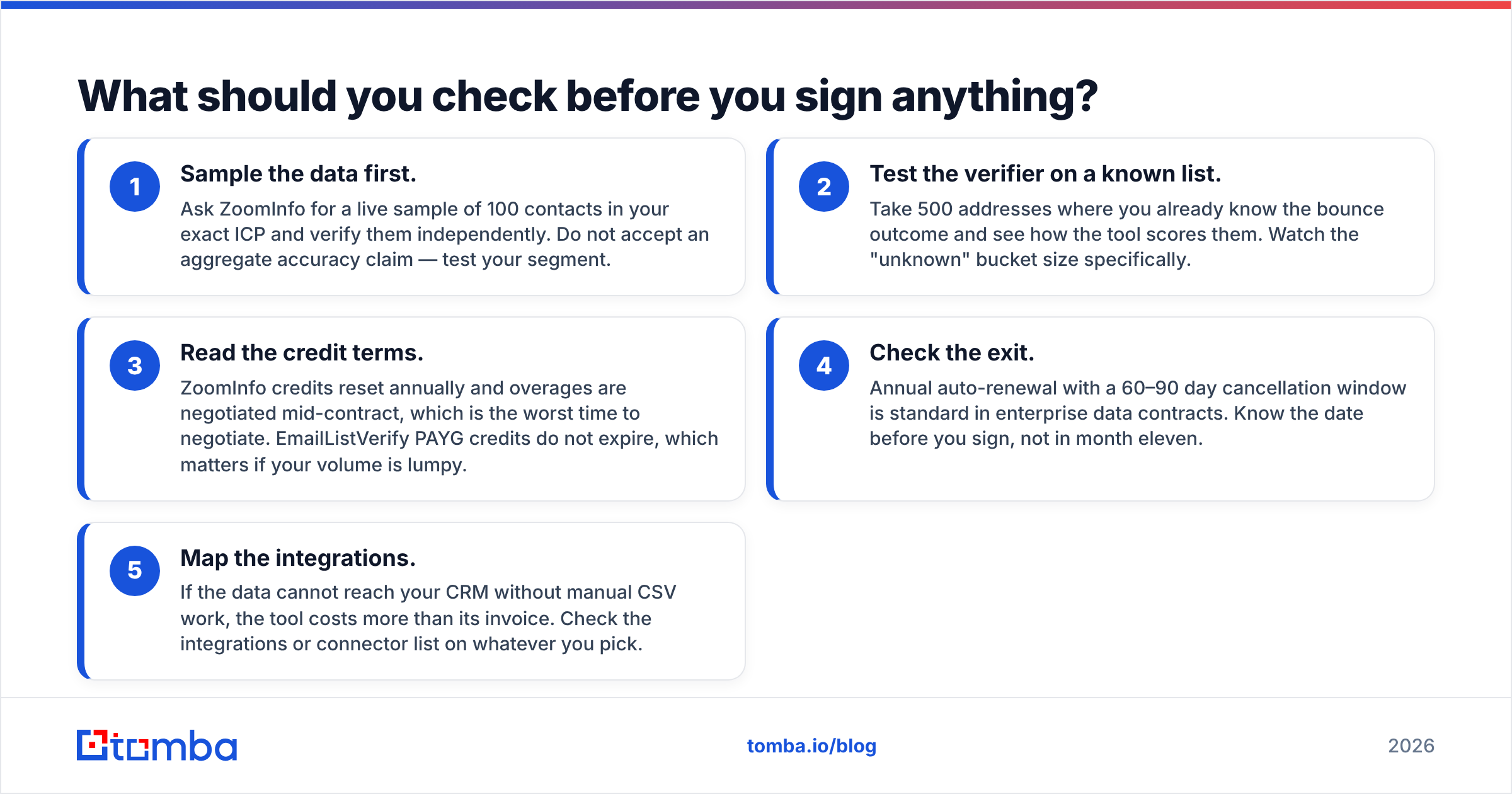
What should you check before you sign anything?#
Run this list before either purchase:
- Sample the data first. Ask ZoomInfo for a live sample of 100 contacts in your exact ICP and verify them independently. Do not accept an aggregate accuracy claim — test your segment.
- Test the verifier on a known list. Take 500 addresses where you already know the bounce outcome and see how the tool scores them. Watch the "unknown" bucket size specifically.
- Read the credit terms. ZoomInfo credits reset annually and overages are negotiated mid-contract, which is the worst time to negotiate. EmailListVerify PAYG credits do not expire, which matters if your volume is lumpy.
- Check the exit. Annual auto-renewal with a 60–90 day cancellation window is standard in enterprise data contracts. Know the date before you sign, not in month eleven.
- Map the integrations. If the data cannot reach your CRM without manual CSV work, the tool costs more than its invoice. Check the integrations or connector list on whatever you pick.
Which one wins?#
Neither, because they are answering different questions — but here is the practical verdict.
Choose EmailListVerify if you already have a source of contacts (scraped lists, event exports, form fills, a ZoomInfo seat) and you need them clean before sending. It is cheap, fast, and unglamorous in the way good infrastructure tends to be.
Choose ZoomInfo if you have a large sales org, a budget that treats $30k/year as a line item rather than an existential decision, and a RevOps team that will actually use intent data instead of letting it rot in a dashboard. The data depth is real. The contract terms are also real — go in with your eyes open.
Choose neither if you are a small or mid-sized team who needs both sourcing and verification without a procurement cycle. That is the gap where a combined tool wins on both cost and workflow simplicity.
If that last description is you, start with the Tomba Email Finder. You get sourcing by domain, name, or company plus built-in verification on the same credits, a free tier at 25 searches/month to test your own ICP before paying anything, and Starter at $49/mo when you are ready to scale — no quote, no annual commitment, no discovery call. Run 100 of your target accounts through it and compare the output against whatever quote is sitting in your inbox.
Related guides#
Ready to find emails that actually work?
Join 150,000+ professionals who stopped guessing and started sending. Free credits on signup — no credit card required.
Get the Tomba newsletter
Practical outbound tactics and product updates — once every two weeks.
About the author