EmailOversight vs UpLead: Which One Do You Actually Need?
EmailOversight cleans the list you already have. UpLead builds you a new one. Here's an honest breakdown of pricing, accuracy, workflow fit, and when neither is the right buy.
EmailOversight vs UpLead is a match-up that confuses a lot of buyers. One tool cleans the list you already own. The other sells you a list you don't have yet. Here is how to tell which one your team needs.
TL;DR
- EmailOversight and UpLead are not really competitors. EmailOversight checks and cleans email lists you already own. UpLead sells you contact records you don't have yet.
- Is your problem bounces, spam traps, and a burned sending domain? Then EmailOversight is the relevant vendor. Is your problem "we have nobody to email"? Then UpLead is.
- UpLead lists at $99/mo (Essentials) and $199/mo (Plus), both with credit caps. EmailOversight charges per verification on volume tiers, so cost tracks list size rather than seat count.
- Buying both is common and usually redundant. Most teams pay two vendors for one workflow that fits in a single platform.
- The honest recommendation: pick based on which half of the funnel is actually broken. Price a combined find-plus-verify tool before you sign two contracts.
What are EmailOversight and UpLead, actually?#
They solve two different problems that look alike on a G2 category page.
EmailOversight is an email hygiene and validation platform. You feed it a list — a CSV, a CRM export, or an API call at form-submit time. It tells you which addresses are safe to send to, which are risky, which are spam traps, and which belong to bots or complainers. It runs several checks rather than a single SMTP ping: syntax, MX and MTA lookups, SMTP probing, and trap and bot databases. It also sells append services that attach a verified email to a record you already have.
UpLead is a B2B contact database and prospecting tool. You filter by industry, headcount, title, location, tech stack, or intent signals. It returns contact records: name, title, company, email, and sometimes a direct dial. It also runs a live verification check the moment you reveal a contact. That one feature is why buyers confuse it with a verification vendor.
The EmailOversight vs UpLead difference in one sentence: EmailOversight takes a list as input. UpLead produces a list as output.
That framing decides almost everything below. A team with 400,000 old CRM records and a 14% bounce rate has an EmailOversight problem. A three-rep outbound team with an empty pipeline has an UpLead problem. Buy the wrong one and it feels productive for about six weeks. Then it stalls.
EmailOversight vs UpLead: how do they compare head-to-head?#
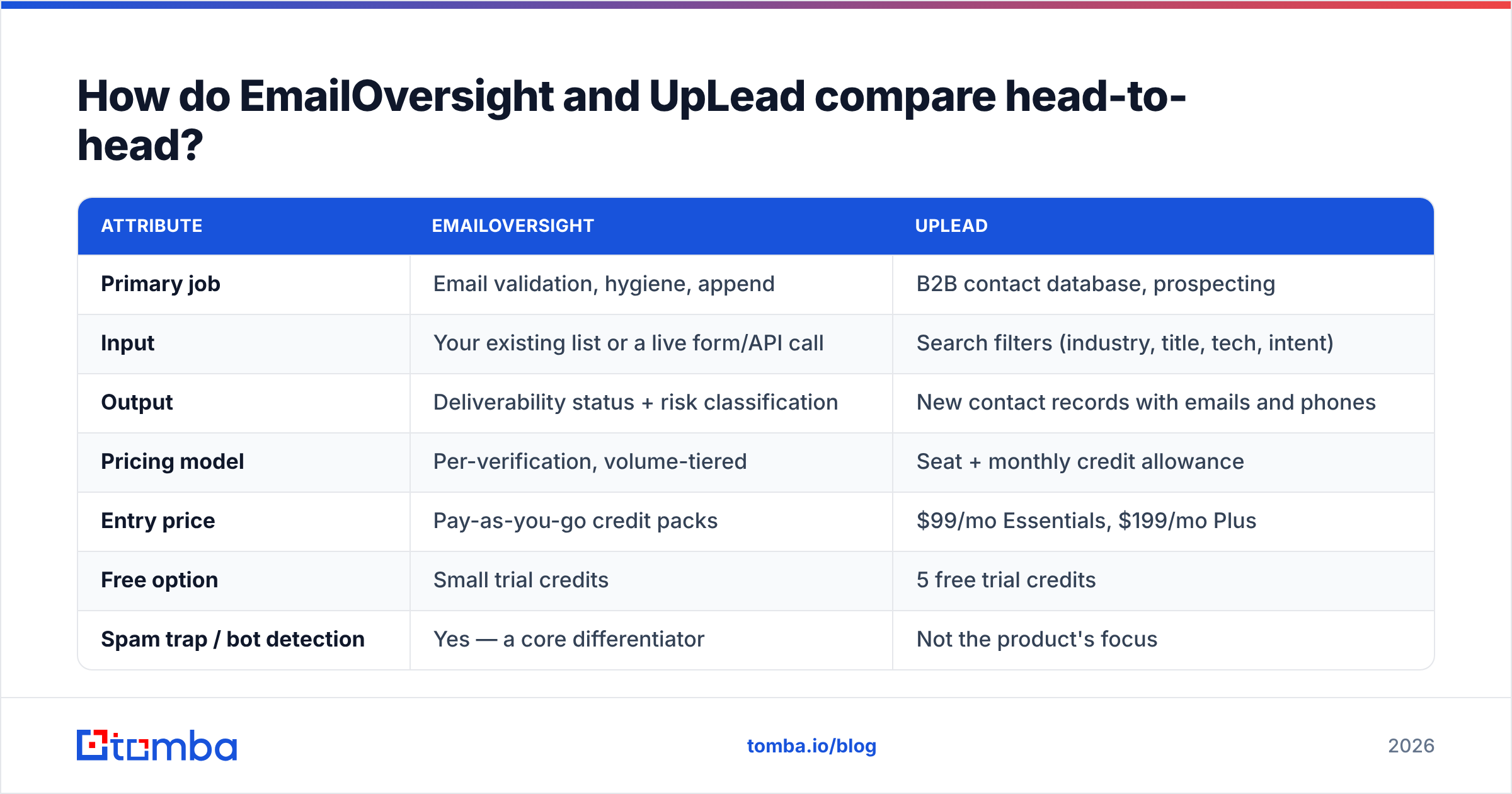
Here is the practical side-by-side. Pricing reflects the plans listed publicly at the time of writing. Both vendors change rate cards, so confirm before you buy.
| Attribute | EmailOversight | UpLead |
|---|---|---|
| Primary job | Email validation, hygiene, append | B2B contact database, prospecting |
| Input | Your existing list or a live form/API call | Search filters (industry, title, tech, intent) |
| Output | Deliverability status + risk classification | New contact records with emails and phones |
| Pricing model | Per-verification, volume-tiered | Seat + monthly credit allowance |
| Entry price | Pay-as-you-go credit packs | $99/mo Essentials, $199/mo Plus |
| Free option | Small trial credits | 5 free trial credits |
| Spam trap / bot detection | Yes — a core differentiator | Not the product's focus |
| Catch-all handling | Explicit risk classification | Flagged, but limited resolution |
| Intent data | No | Yes (third-party intent signals) |
| Technographics | No | Yes — filter by installed tech |
| Best for | List owners, ESPs, agencies, high-volume senders | SDR teams building net-new pipeline |
| Weakest at | Finding contacts you don't have | Cleaning a large legacy database |
Notice that there is almost no overlap in the "best for" row. That is the whole story of this comparison.
What does EmailOversight actually do well?#
Its edge is risk scoring, not just validity.
Most verification tools answer one question: will this address accept mail? EmailOversight answers a business question: should you send to this address at all? The two answers differ more often than people expect. A recycled spam trap will accept your mail and quietly wreck your sender reputation. A known complainer address is deliverable, and it will still mark you as spam. A bot-driven click address inflates your engagement numbers and teaches you the wrong lesson about your copy.
Where it earns its keep:
- Legacy database cleanup. Lists older than 12 months decay fast. B2B contact data typically goes stale at 22–30% per year through job changes alone. A one-time cleanup on 250k records is exactly the shape of work this platform is built for.
- Real-time form protection. API validation at signup keeps typos, throwaway addresses, and traps out of the database. That is far cheaper than cleaning them out later.
- Agency and ESP workflows. If you send on behalf of clients, you need proof a list was scrubbed before deployment. Trap and complainer detection is that proof.
- Append work. When you hold a name and company but no address, its append service tries to fill the gap. That helps with event lists and webinar signups that have partial data.
Where it doesn't help: if your CRM is empty, a verification engine has nothing to check. It is a filter, not a source.
What does UpLead actually do well?#
Its edge is filter precision on a mid-sized database.
UpLead's database is smaller than the giants in the category. It advertises roughly 155 million contacts, against rivals claiming 250M+. The pitch has always been that a smaller, verified set beats a bigger, stale one. Two features stand out in practice. The first is technographic filtering: you can find every company running a specific CRM, help desk, or payment processor. The second is the live verification step that runs when you reveal a contact, so you don't spend credits on addresses that were already dead.
Where it earns its keep:
- Narrow ICP targeting. "Series B SaaS companies in DACH running HubSpot with 50–200 employees" is a query it handles cleanly.
- Small SDR teams. The $99/mo entry point works for a one- to three-rep team that doesn't want an annual enterprise contract.
- Predictable spend. Credits are capped by plan, so you can't burn $4,000 in a weekend by accident.
- CRM push. Native links to Salesforce, HubSpot, Pipedrive and Zapier keep records flowing without CSV gymnastics.
Where it disappoints: credit caps bite fast. 170 credits a month on Essentials is about eight prospecting hours for an active rep. Teams often move up to Plus within a quarter, or buy top-ups that quietly double the real monthly cost. Unused credits usually don't roll over, so seasonal teams pay for capacity they never use.
How accurate is each one, and can you trust the claims?#
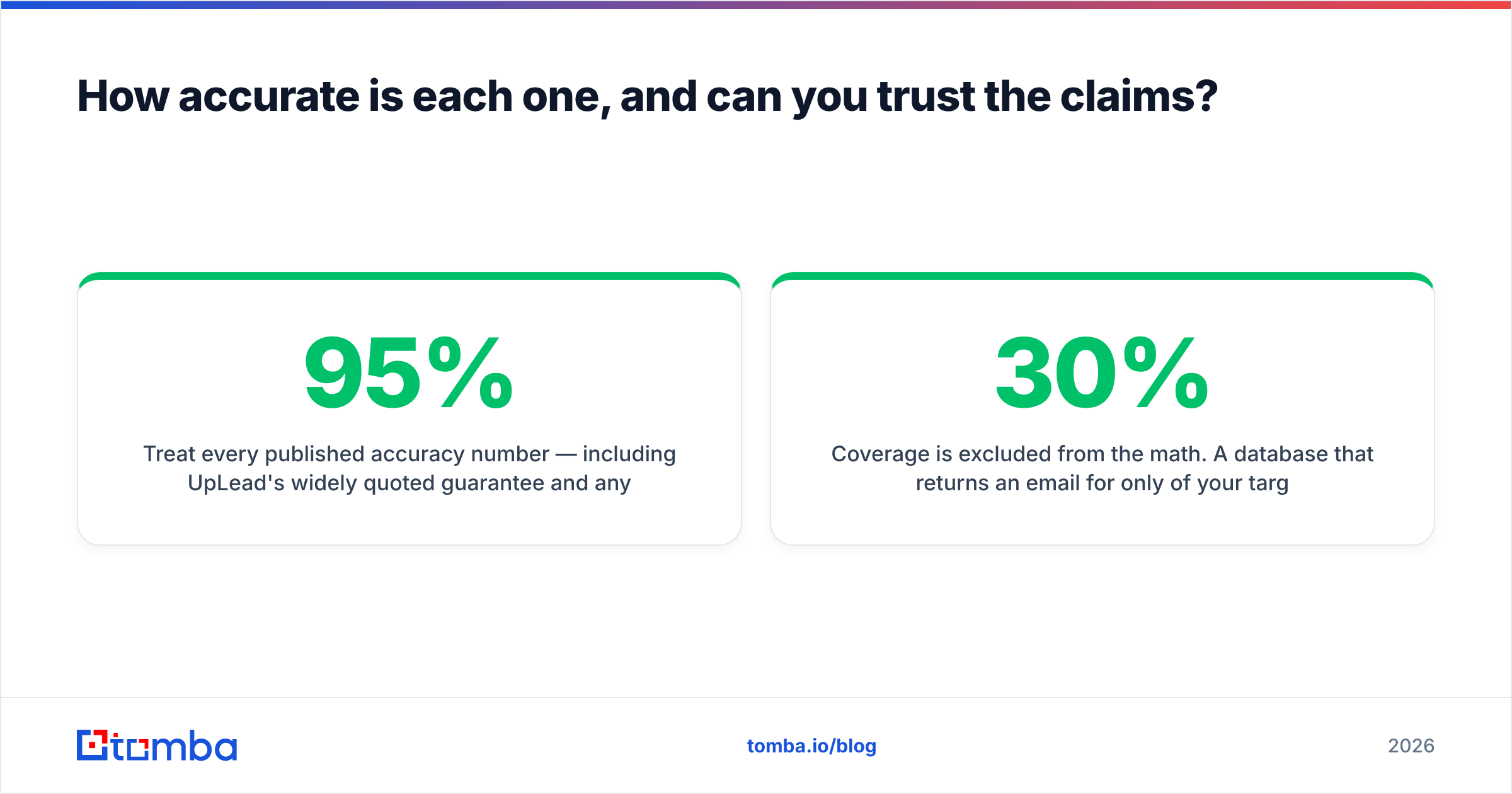
Treat every published accuracy number as a marketing figure until you test it on your own data. That includes UpLead's widely quoted 95% guarantee and any verifier's "99% accurate" claim.

Two things distort vendor accuracy claims:
Coverage is left out of the math. A database that finds an email for only 30% of your target list can report brilliant accuracy on the 30% it found. The number that matters is usable contacts per 100 targets: coverage times accuracy. A tool at 60% coverage and 92% accuracy gives you 55 usable contacts. A tool at 35% coverage and 98% accuracy gives you 34. The second one wins the headline and loses your quarter.
Catch-all domains hide the failures. Many B2B domains accept all mail at the server level. SMTP probing then can't confirm whether a single mailbox exists. Vendors handle this three ways. Some mark it "valid", which flatters the score and bounces later. Some mark it "unknown", which is honest and gets left out of the accuracy math. Some run deeper pattern and signal analysis to resolve it. EmailOversight's approach sits closer to the honest end. UpLead flags catch-alls but is not built to resolve them. That is what a dedicated catch-all verifier is for.
Run the same 200-row control list through any tool you are testing. Send to the results and measure the real bounce rate. That takes a day, and it beats every comparison post on the internet, including this one.
What do EmailOversight and UpLead actually cost?#
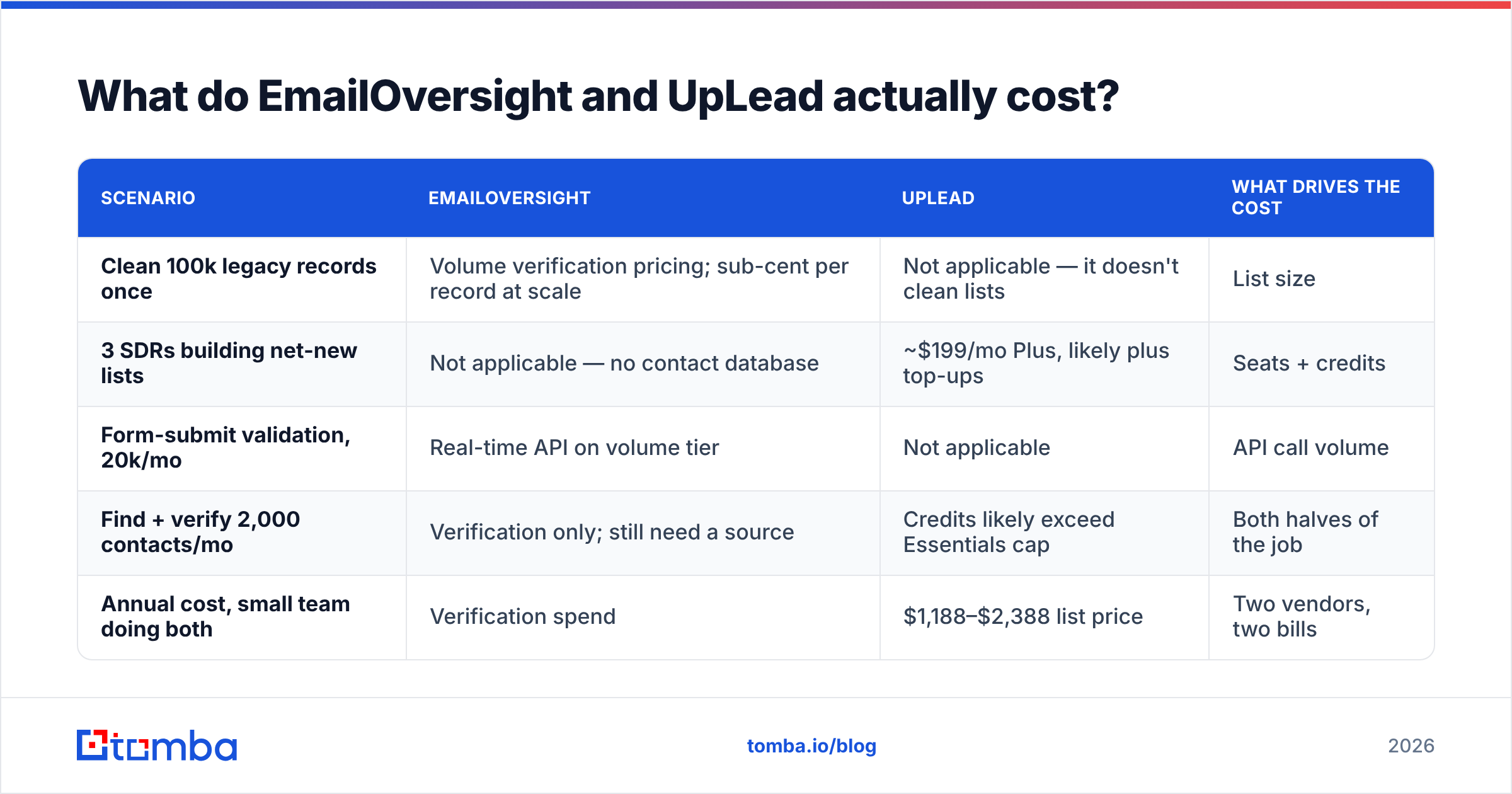
The two pricing models are built differently. A head-to-head price comparison misleads unless you map both to your own volume.
| Scenario | EmailOversight | UpLead | What drives the cost |
|---|---|---|---|
| Clean 100k legacy records once | Volume verification pricing; sub-cent per record at scale | Not applicable — it doesn't clean lists | List size |
| 3 SDRs building net-new lists | Not applicable — no contact database | ~$199/mo Plus, likely plus top-ups | Seats + credits |
| Form-submit validation, 20k/mo | Real-time API on volume tier | Not applicable | API call volume |
| Find + verify 2,000 contacts/mo | Verification only; still need a source | Credits likely exceed Essentials cap | Both halves of the job |
| Annual cost, small team doing both | Verification spend | $1,188–$2,388 list price | Two vendors, two bills |

The awkward row is the fourth one. Say your workflow is find contacts, then verify them. Neither vendor covers that alone. You buy UpLead for sourcing and EmailOversight for hygiene, and you are at roughly $250–$400/mo before either tool has produced a reply. For comparison, Tomba pricing starts at $49/mo on Starter and $99/mo on Growth, with finding and verification in the same credit pool. That is why "do I need two vendors?" is a fair question to ask in the EmailOversight vs UpLead debate before you sign anything.
Which one should you pick for your situation?#
Match the tool to the broken half of your funnel:
- Your bounce rate is above 5% and deliverability is slipping. Buy verification. EmailOversight's trap and complainer detection is genuinely different here, and reputation damage costs far more than a hygiene pass. Pair it with SPF, DKIM and DMARC checks. Validation alone won't fix email deliverability if your authentication is broken.
- Your reps have no one to call. Buy a data source. UpLead at $99/mo is a fair starting point for a small team with a narrow ICP, especially if technographic filtering maps to how you qualify accounts.
- You need both and you're under 5,000 contacts a month. Look hard at a combined platform first. Two bills, two APIs, two credit systems, and a CSV shuttling between them is a real operational cost.
Volume and business model change the answer:
- You're at enterprise volume — 500k+ records, multiple sending domains. Two specialists make sense. At that scale you want a dedicated hygiene vendor with trap networks, plus a dedicated data vendor with coverage guarantees in the contract. The extra integration work pays for itself.
- You're an agency sending on behalf of clients. Verification is non-negotiable, so put it in your onboarding checklist. Sourcing may be client-supplied. In that case you don't need UpLead at all.
- You mostly enrich inbound signups. Neither product is the obvious answer. You want data enrichment plus live validation on the form, not a prospecting database.
If you're still torn, look at your last quarter. Count how many deals died because you emailed the wrong person. Then count how many died because you couldn't find anyone to email. That ratio is your answer.
Do you need both — or neither?#
Most teams that buy both are solving one problem twice.
Find-then-verify is a single pipeline. You identify the company, find the person, get the address, then confirm it is safe to send. Split that across two vendors and you get two credit pools that expire on their own schedules, two accuracy standards that disagree, and a manual handoff someone has to own. When a contact bounces, you also can't tell whether the source was wrong or the verifier was.
One platform that covers domain search, email verification, and bulk email finder workflows collapses that into one audit trail. That is not automatically better. A specialist hygiene vendor will beat a generalist on trap detection, and a dedicated intent-data platform will beat everyone on buying signals. But most teams run straightforward outbound at moderate volume. For them, one tool at $49–$99/mo replaces two at $250+.
Check the independent review data too. G2's email verification category and the B2B data provider listings show the same pattern: satisfaction scores track workflow fit far more closely than database size or headline accuracy.
What's the verdict?#
EmailOversight if your list is dirty. UpLead if your list is empty. Neither if you need both jobs done and you're not at enterprise volume.
EmailOversight is a serious hygiene platform. Its trap, bot and complainer detection is real differentiation, and those are the checks that protect a sending domain. UpLead is a solid mid-market prospecting database with unusually good technographic filtering and a fair entry price. Credit caps are its weak spot, and they push growing teams up a tier fast.
The mistake to avoid in the EmailOversight vs UpLead choice is buying one and expecting it to do the other's job. Verification will not fill your pipeline. A contact database will not repair your sender reputation.
If your real requirement is "find the right person's email and confirm it's safe to send," start with Tomba Email Finder. Domain search, single lookups, catch-all resolution and verification all run from the same credit pool. The free tier gives you 25 searches a month, so you can test on your own control list before you spend anything. Run the same 200 rows through it, EmailOversight and UpLead, then send. The bounce rate will tell you more than any comparison table.
Related guides#
Ready to find emails that actually work?
Join 150,000+ professionals who stopped guessing and started sending. Free credits on signup — no credit card required.
Get the Tomba newsletter
Practical outbound tactics and product updates — once every two weeks.
About the author