EmailValidation.io Pricing, Reviews, Pros and Cons (2026)
A neutral breakdown of EmailValidation.io pricing, real user reviews, and the pros and cons that matter — plus how its credit costs compare to Tomba, ZeroBounce and NeverBounce in 2026.

TL;DR
- EmailValidation.io is a narrow, API-first email verification service. It validates addresses you already have; it does not find new ones.
- Pricing is credit-based and cheap at the entry point — roughly $9–$15 for the smallest paid pack, scaling down toward fractions of a cent per check at volume. There is a small free monthly allowance for testing.
- Reviews are thin. It has very few G2/Capterra entries compared with ZeroBounce or NeverBounce, which means you are buying on documentation quality rather than social proof.
- The real cost is workflow fragmentation: you still need a separate finder, enrichment source, and catch-all handling. Bundled platforms often work out cheaper once you count all three line items.
- Best fit: developers who want a dead-simple REST endpoint. Worst fit: sales teams who need to build lists, not just clean them.
What is EmailValidation.io?#
EmailValidation.io is a single-purpose email verification API. You send an address, it returns a JSON verdict — syntax valid, MX records present, SMTP reachable, disposable domain, role-based address, free provider, and a deliverability score.
That is the whole product. There is no prospecting database behind it, no Chrome extension pulling contacts off LinkedIn, no CRM sync. It sits in the "utility API" category alongside services like Abstract API or Mailboxlayer: one endpoint, predictable JSON, minimal ceremony.
The design philosophy matters when you evaluate pricing. A tool that does one thing should be judged on cost per successful check and on how well it handles the hard cases — catch-all domains, greylisting, and providers that refuse SMTP probes entirely. It should not be judged on features it never claimed.
Where teams get burned is treating a verification API as a lead-generation stack. Verification tells you whether an address will bounce. It does not tell you whose address it is, whether that person is still at the company, or how to reach the other 40 people on your target account. Those are separate jobs requiring separate tools — which is exactly where the total-cost math starts to shift.

How does EmailValidation.io pricing work in 2026?#
Credit-based, prepaid, with a monthly free tier for evaluation.
The structure is straightforward: one API call consumes one credit, regardless of the verdict. That last detail is important and frequently missed. Unlike some verifiers that refund credits for "unknown" results, most credit-based APIs charge for the attempt, not the answer. If 12% of your list returns unknown because the domain is a catch-all, you paid for those 12% anyway.
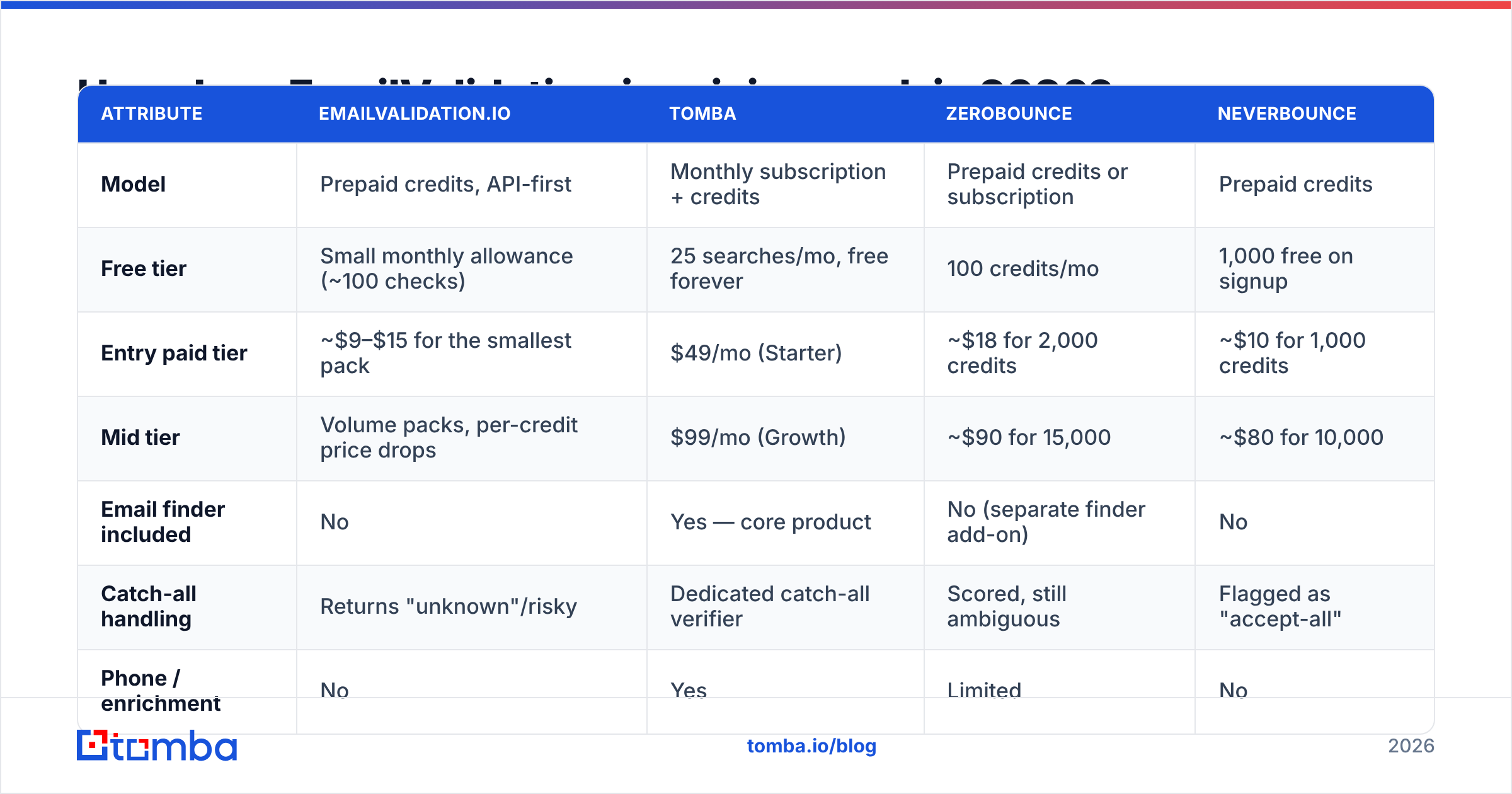
Here is the shape of the pricing model and how it stacks against the alternatives most buyers shortlist. Always confirm current numbers on each vendor's own pricing page — verification pricing changes often.
| Attribute | EmailValidation.io | Tomba | ZeroBounce | NeverBounce |
|---|---|---|---|---|
| Model | Prepaid credits, API-first | Monthly subscription + credits | Prepaid credits or subscription | Prepaid credits |
| Free tier | Small monthly allowance (~100 checks) | 25 searches/mo, free forever | 100 credits/mo | 1,000 free on signup |
| Entry paid tier | ~$9–$15 for the smallest pack | $49/mo (Starter) | ~$18 for 2,000 credits | ~$10 for 1,000 credits |
| Mid tier | Volume packs, per-credit price drops | $99/mo (Growth) | ~$90 for 15,000 | ~$80 for 10,000 |
| Email finder included | No | Yes — core product | No (separate finder add-on) | No |
| Catch-all handling | Returns "unknown"/risky | Dedicated catch-all verifier | Scored, still ambiguous | Flagged as "accept-all" |
| Phone / enrichment | No | Yes | Limited | No |
| Native integrations | API only | 20+ (HubSpot, Sheets, Zapier, Salesforce) | Broad | Moderate |
| Best for | Developers cleaning a form field | Teams building + cleaning lists | High-volume list hygiene | One-off list scrubs |
Two things jump out of that table.
First, EmailValidation.io wins on the smallest possible commitment. If you need to validate signups on a registration form and nothing else, a $9 pack is genuinely hard to beat. You do not need a subscription, you do not need a seat, you do not need to talk to sales.
Second, it loses badly on scope. The moment your use case includes "and then find the emails," you are buying a second tool. A bulk email finder plus a verifier plus enrichment, bought separately, routinely costs more than one platform that does all three — and it costs you engineering time to stitch together.
Is EmailValidation.io accurate enough for cold outreach?#
For syntax and MX checks, yes. For the cases that actually cause bounces, it is average.
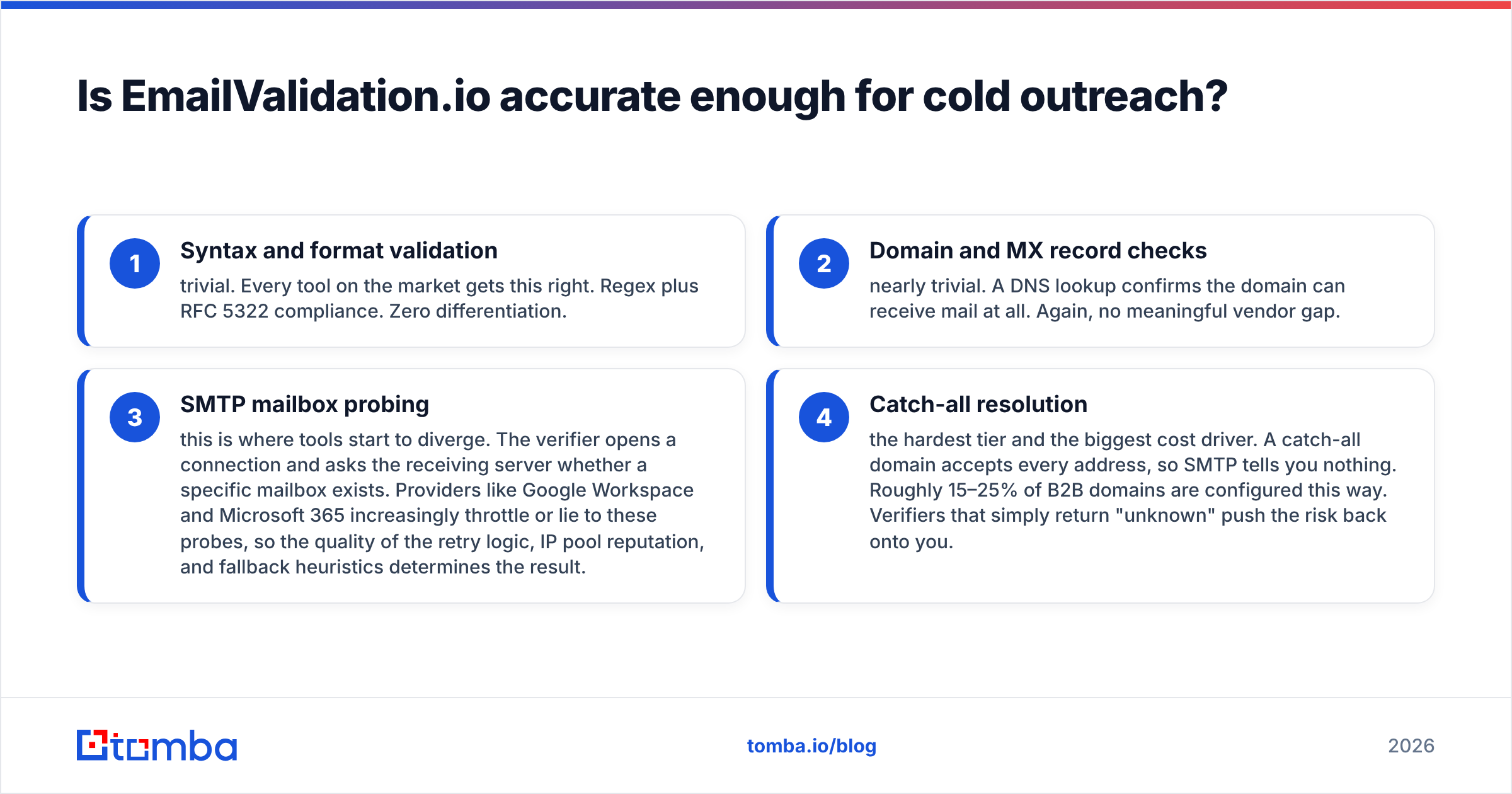
Verification accuracy splits into four difficulty tiers, and almost every vendor performs identically on the first two:
- Syntax and format validation — trivial. Every tool on the market gets this right. Regex plus RFC 5322 compliance. Zero differentiation.
- Domain and MX record checks — nearly trivial. A DNS lookup confirms the domain can receive mail at all. Again, no meaningful vendor gap.
- SMTP mailbox probing — this is where tools start to diverge. The verifier opens a connection and asks the receiving server whether a specific mailbox exists. Providers like Google Workspace and Microsoft 365 increasingly throttle or lie to these probes, so the quality of the retry logic, IP pool reputation, and fallback heuristics determines the result.
- Catch-all resolution — the hardest tier and the biggest cost driver. A catch-all domain accepts every address, so SMTP tells you nothing. Roughly 15–25% of B2B domains are configured this way. Verifiers that simply return "unknown" push the risk back onto you.
EmailValidation.io handles tiers 1–3 competently and punts on tier 4 by returning a risky/unknown flag. That is honest behavior, but it leaves a meaningful slice of your list unusable. If a quarter of your B2B prospects sit behind catch-all domains and your tool marks all of them "unknown," you either discard real prospects or send blind and take the bounce hit.
This is where a catch-all verifier earns its keep — pattern inference, historical send data, and cross-source corroboration can resolve a large share of those addresses instead of discarding them. Before you compare headline per-credit prices, ask what percentage of your specific list will come back unresolved, because unresolved credits are wasted credits.
One more accuracy note that has nothing to do with the vendor: verification only measures whether a mailbox exists. It does not protect email deliverability. You can verify a list to 99% and still land in spam because your SPF, DKIM, and DMARC records are misconfigured or your domain has no sending history. Verification is necessary and not sufficient. Google's own sender guidelines spell out the authentication requirements that matter more than list hygiene alone.
What do real EmailValidation.io reviews say?#
The honest answer: there are not many, and that is the most useful review signal available.
Check G2 and Capterra and you will find a handful of entries for EmailValidation.io versus hundreds for ZeroBounce and NeverBounce. That asymmetry is not proof of a bad product — plenty of good developer tools have thin review profiles because their users are engineers who never fill out review forms. But it does change how you should evaluate.
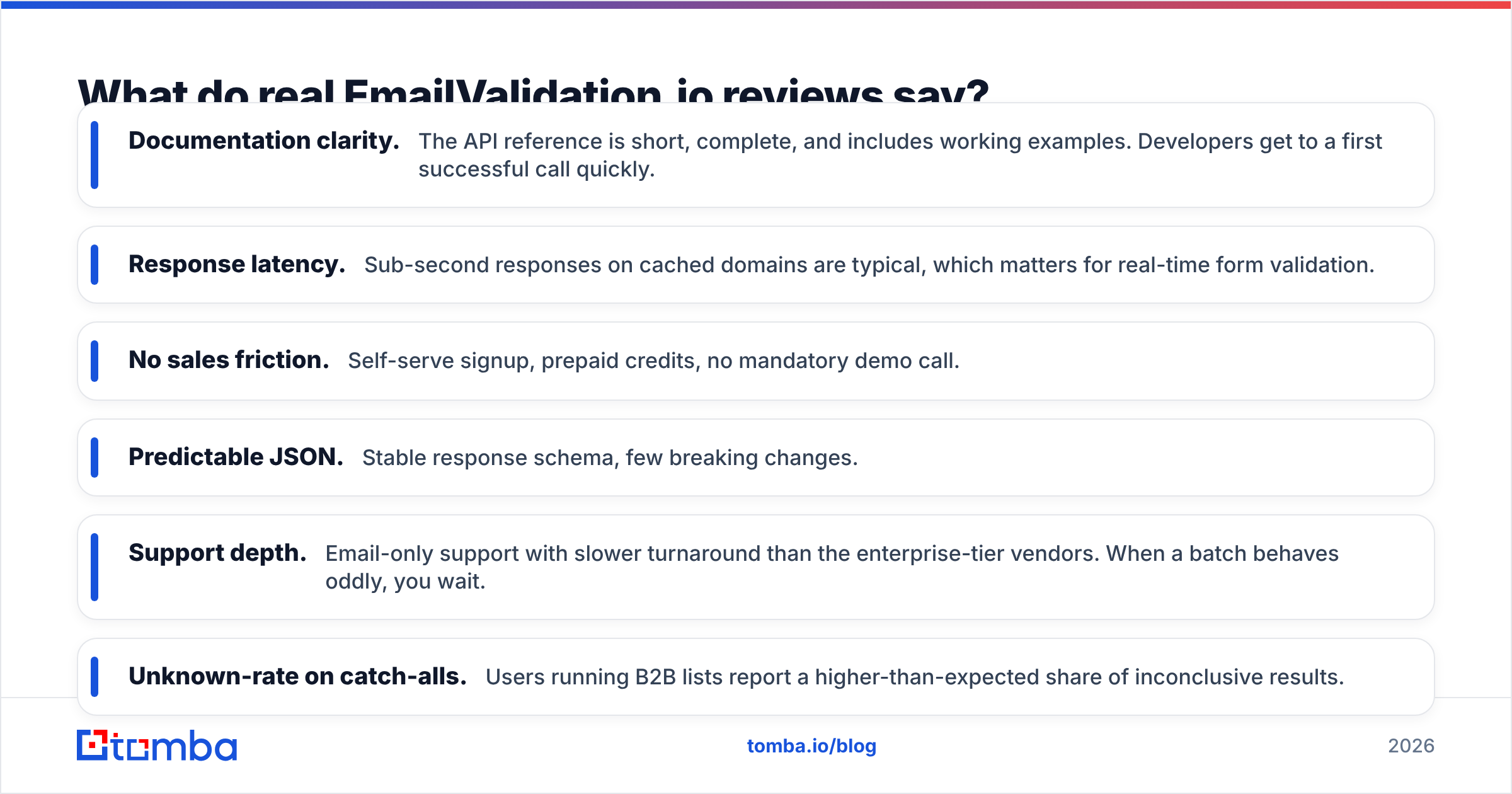
What the available feedback consistently praises:
- Documentation clarity. The API reference is short, complete, and includes working examples. Developers get to a first successful call quickly.
- Response latency. Sub-second responses on cached domains are typical, which matters for real-time form validation.
- No sales friction. Self-serve signup, prepaid credits, no mandatory demo call.
- Predictable JSON. Stable response schema, few breaking changes.
What comes up as criticism:
- Support depth. Email-only support with slower turnaround than the enterprise-tier vendors. When a batch behaves oddly, you wait.
- Unknown-rate on catch-alls. Users running B2B lists report a higher-than-expected share of inconclusive results.
- No bulk UI. Everything routes through the API. If you want to drag a CSV into a dashboard and get a cleaned file back, you are writing a script.
- Thin ecosystem. No native HubSpot, Salesforce, or Sheets connectors. You build the glue.
That last point is worth pricing out. If a developer spends two days wiring a verification API into your CRM, that engineering cost dwarfs the price difference between a $9 credit pack and a bundled platform with a native HubSpot integration. Buy-versus-build math applies to plumbing, not just to core features.
What are the pros and cons of EmailValidation.io?#
Pros
- Lowest possible entry cost. A sub-$15 prepaid pack with no subscription is the cheapest way to start validating anything.
- Genuinely good developer experience. Clean REST endpoint, sane JSON, documentation you can read in ten minutes.
- No lock-in. Prepaid credits mean no monthly commitment and no renewal you forget to cancel.
- Fast enough for real-time use. Suitable for inline signup-form validation where latency budgets are tight.
- Focused scope. It does not pretend to be a GTM platform, and there is honesty in that.
Cons
- Verification only. No finder, no enrichment, no phone data, no database. You will buy other tools.
- Weak catch-all resolution. A large share of B2B addresses come back inconclusive, and you pay for those credits.
- Minimal review footprint. Little independent validation of accuracy claims at scale.
- API-only workflow. No bulk dashboard, no non-technical path, no CRM connectors out of the box.
- Credits burn on failures. Unknown results consume budget the same as clean verdicts.

Who should buy EmailValidation.io, and who should not?#
Buy it if you are a developer with one narrow job: validating addresses at the point of capture. A signup form, a checkout field, a lead-gen landing page. You want one endpoint, you want it cheap, and you do not care about anything else. EmailValidation.io is a good fit and the pricing is fair.
Do not buy it if you are a sales, growth, or RevOps team. Your job is not "clean this list" — it is "build a list of 500 qualified contacts at 120 target accounts, verify them, enrich them, and push them into the CRM." A verification API covers roughly one fifth of that workflow.
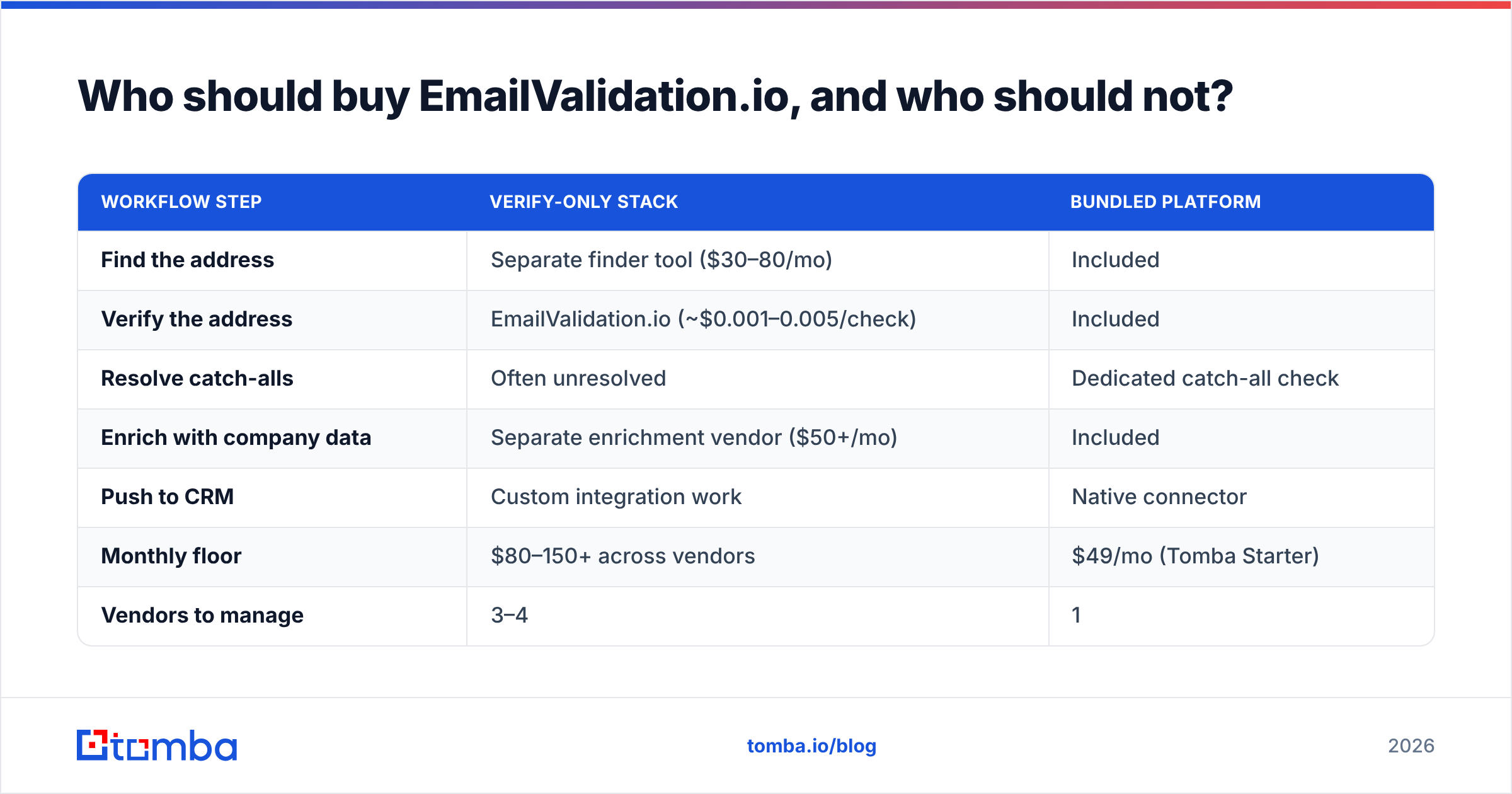
For that broader job, the comparison changes. You are no longer asking "which verifier is cheapest per credit," you are asking "what does one verified, enriched, CRM-ready contact cost me end to end?" Under that lens:
| Workflow step | Verify-only stack | Bundled platform |
|---|---|---|
| Find the address | Separate finder tool ($30–80/mo) | Included |
| Verify the address | EmailValidation.io (~$0.001–0.005/check) | Included |
| Resolve catch-alls | Often unresolved | Dedicated catch-all check |
| Enrich with company data | Separate enrichment vendor ($50+/mo) | Included |
| Push to CRM | Custom integration work | Native connector |
| Monthly floor | $80–150+ across vendors | $49/mo (Tomba Starter) |
| Vendors to manage | 3–4 | 1 |
If you are comparing verification-only vendors specifically, several dedicated alternatives are worth a look depending on your priorities — see the ZeroBounce alternative and Clearout alternative breakdowns for side-by-side detail. Providers such as BookYourData take a different route again, selling pre-verified contact data outright rather than validating lists you already own, which suits teams that would rather buy coverage than build it.
How should you test any verification tool before committing?#
Run the same control list through every candidate. This is the only benchmark that reflects your actual data.
Build a test file of 300–500 addresses with a known composition:
- 50 addresses you know are live — colleagues, your own aliases, addresses that recently replied to you.
- 50 addresses you know are dead — bounced contacts from your last six months of sending.
- 100 addresses on known catch-all domains — this is the segment that separates vendors.
- 50 role-based addresses — info@, sales@, support@.
- 50 disposable/temp domains — check whether the vendor flags them.
- The remainder from your real target list — whatever you actually plan to send to.
Then score each vendor on three numbers: false-positive rate (dead addresses marked valid — the expensive error), false-negative rate (live addresses marked invalid — the wasteful error), and unknown rate (credits spent for no answer).
Marketing pages quote 98–99% accuracy across the board. Those numbers are computed on vendor-friendly samples. Your control list is the only figure that predicts your bounce rate. A tool with a 2% false-positive rate on your data will hurt your sender reputation regardless of what its homepage claims.
Also test the boring things while you are at it: how long a 10,000-address batch takes, whether the API rate-limits you mid-run, whether the response schema documents every possible status value, and whether you can get a human on support within a business day.
The verdict#
EmailValidation.io is a competent, cheap, narrowly-scoped verification API, and that is exactly what it claims to be. If your entire problem is "make sure this form field is a real mailbox," it does the job for less money and less friction than almost anything else on the market. The thin review footprint is a real risk factor, but the documentation quality partially compensates.
If your problem is bigger than that — building lists, resolving catch-alls, enriching contacts, syncing to a CRM — the credit price stops being the relevant number. What matters is the total cost of the three or four tools you will end up paying for, plus the engineering time to connect them.
If you fall into that second group, start with the Tomba Email Finder. It finds the addresses, verifies them, resolves catch-alls, and pushes them where your team already works — on a free tier of 25 searches a month, then $49/mo Starter and $99/mo Growth. Check the Tomba pricing page and run your control list against it before you decide. One tool, one bill, one workflow beats four tabs and a glue script.
Related guides#
Ready to find emails that actually work?
Join 150,000+ professionals who stopped guessing and started sending. Free credits on signup — no credit card required.
Get the Tomba newsletter
Practical outbound tactics and product updates — once every two weeks.
About the author