EmailValidation.io vs LeadRocks: Which One Do You Need in 2026?
EmailValidation.io vs LeadRocks: one checks emails you own, the other sells contacts you don't. Here is an honest look at pricing, accuracy, freshness, and which one belongs in your outbound stack.
EmailValidation.io vs LeadRocks is not a fair fight. One tool checks emails you already own. The other sells you contacts you do not have yet. This guide shows which half of your pipeline is broken.
TL;DR
- The EmailValidation.io vs LeadRocks match-up is lopsided by design. EmailValidation.io is a checking API. It tells you if an address can take mail today. LeadRocks is a stored B2B contact list. You search it to find new people.
- Bounce rate at 6%? Domain getting throttled? You need a verifier.
- No list at all? You need a data source.
- Buy both and you pay twice. You also glue CSV files together by hand.
- LeadRocks is cheap, and its lifetime deals are famous. But stored lists rot. Roughly 25-30% of B2B contact data goes stale each year.
- Our pick for most teams: skip the either/or. Use one tool that finds the address live and checks it in the same call. Keep a standalone verifier for big clean-up jobs only.
EmailValidation.io vs LeadRocks: what does each tool do?#
They fix two different halves of the same job. Mixing them up is the most common stack mistake we see.
EmailValidation.io does one thing. You send it an address. It sends back a clear verdict. Is the syntax valid? Are MX records there? Does the mail server answer? Is the domain a catch-all? Is it a throwaway or a role inbox, like info@ or sales@? It also returns a quality score.
It finds no one. It holds no list of people. It is plumbing. You wire it into a signup form, or run a list through it before a send.
LeadRocks has the opposite shape. It is a searchable B2B contact list, built largely on LinkedIn profile data. You filter by job title, company size, industry, place, and tech stack. Then you export contacts with emails, and sometimes phone numbers.
It sells itself as a self-serve list builder. It grew through lifetime-deal sites. That is why founder groups name it so often.
So the real EmailValidation.io vs LeadRocks question is not "which tool is better?" It is "which stage of my pipeline is broken right now?"

Why is this comparison apples-to-oranges?#
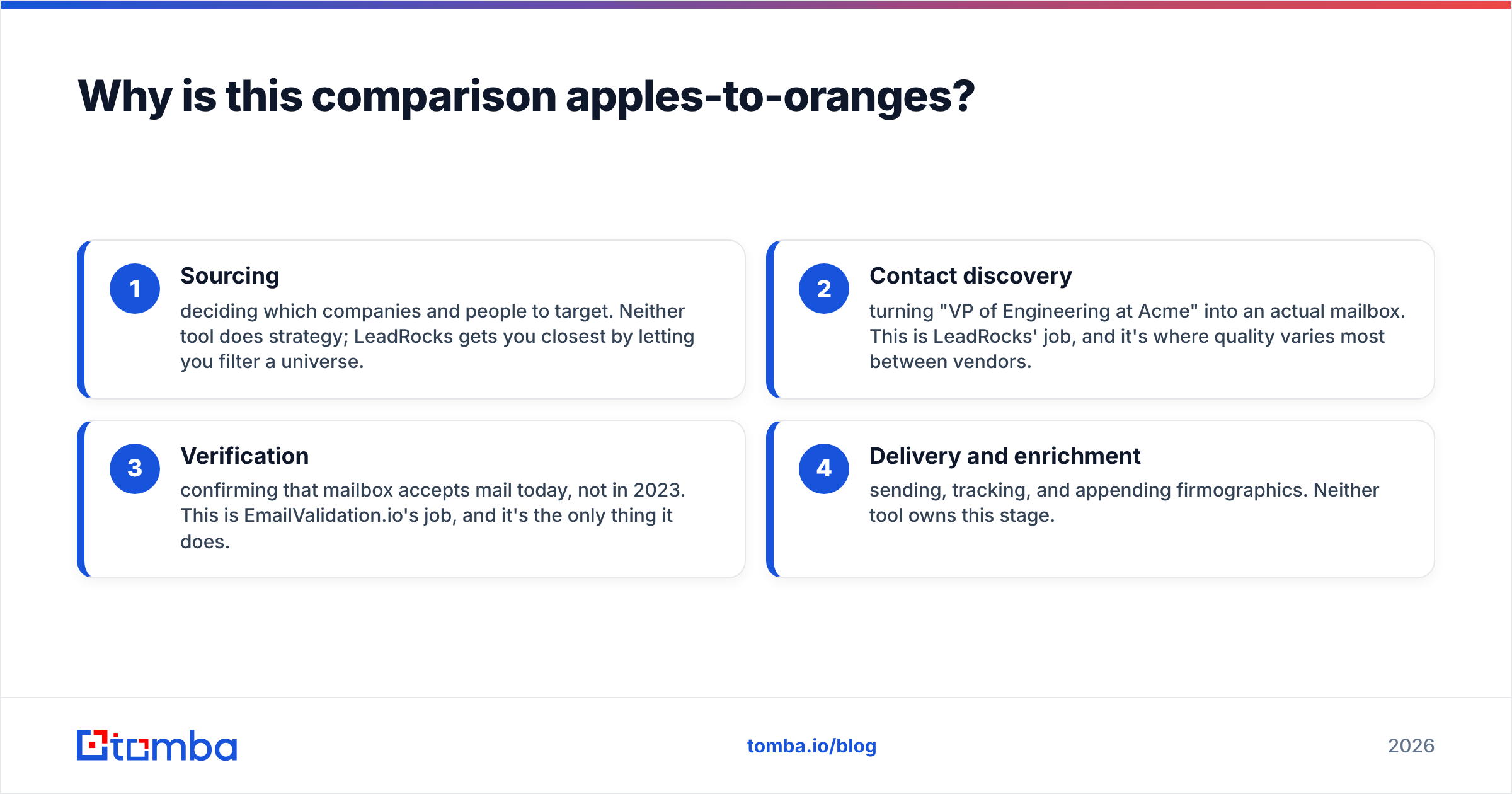
A lead pipeline has four stages. These two tools sit at opposite ends of it.
- Sourcing — you pick the companies and people to target. Neither tool sets your strategy. LeadRocks gets you closest, since you can filter a wide pool.
- Contact discovery — you turn "VP of Engineering at Acme" into a real mailbox. That is the LeadRocks job. Quality varies a lot by vendor here.
- Checking — you confirm the mailbox takes mail today, not in 2023. That is the EmailValidation.io job, and its only job.
- Sending and enrichment — you send, track, and add company data. Neither tool owns this stage.
Buy LeadRocks and skip stage 3, and you will mail a rotten list. Your sender score pays for it. Buy EmailValidation.io with no data source, and you get a very clean list of zero leads. Both mistakes cost the same.
EmailValidation.io vs LeadRocks: how do features and price compare?#
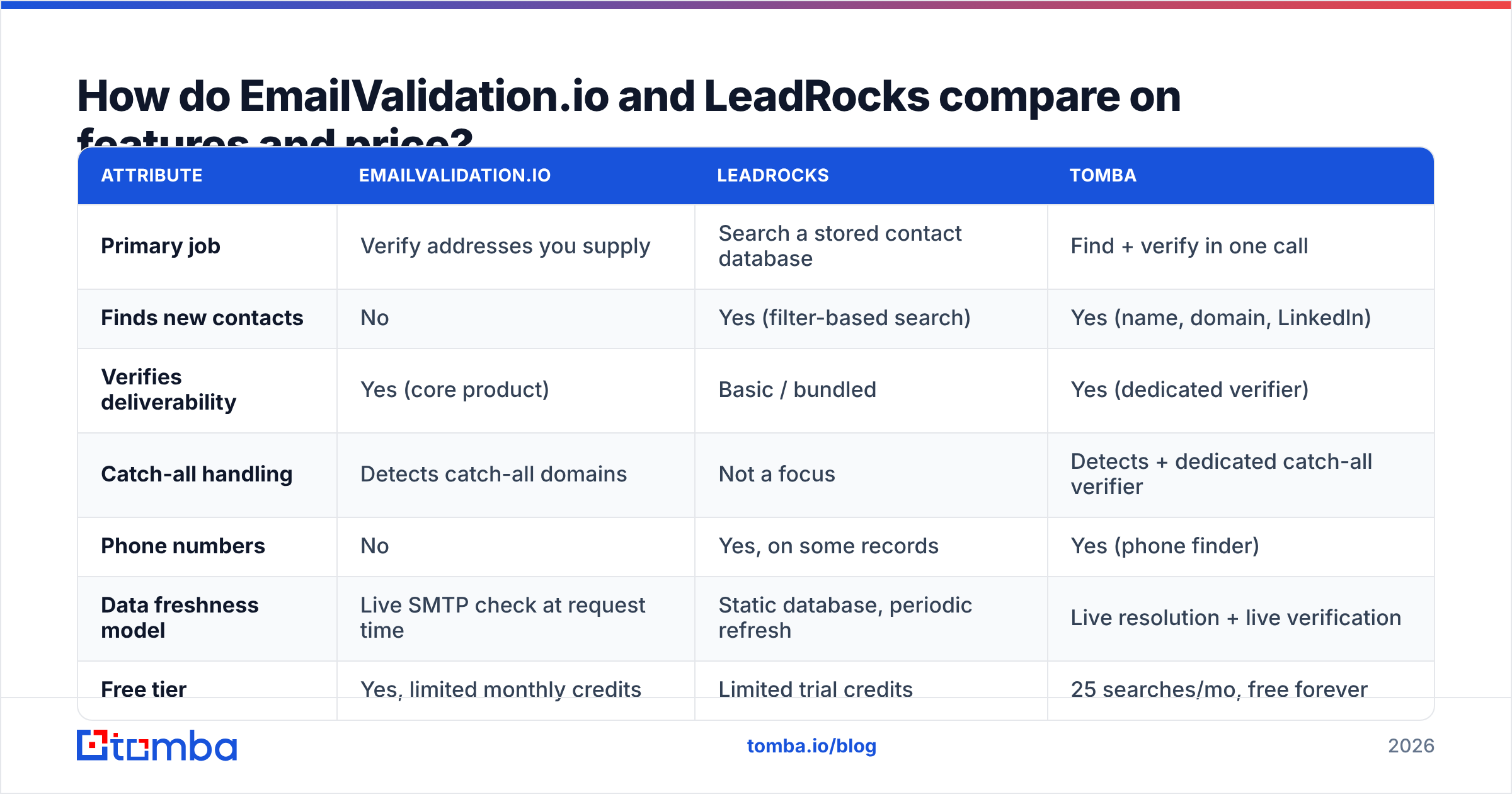
Here is the side by side. A combined find-and-verify tool sits in the third column. It shows what you pay for twice. Prices move, so check each vendor page before you buy.
| Attribute | EmailValidation.io | LeadRocks | Tomba |
|---|---|---|---|
| Primary job | Verify addresses you supply | Search a stored contact database | Find + verify in one call |
| Finds new contacts | No | Yes (filter-based search) | Yes (name, domain, LinkedIn) |
| Verifies deliverability | Yes (core product) | Basic / bundled | Yes (dedicated verifier) |
| Catch-all handling | Detects catch-all domains | Not a focus | Detects + dedicated catch-all verifier |
| Phone numbers | No | Yes, on some records | Yes (phone finder) |
| Data freshness model | Live SMTP check at request time | Static database, periodic refresh | Live resolution + live verification |
| Free tier | Yes, limited monthly credits | Limited trial credits | 25 searches/mo, free forever |
| Entry paid price | ~$15/mo range | ~$39/mo range, LTDs common | $49/mo Starter |
| Bulk workflow | CSV + API | CSV export | Bulk finder + verifier, API, CLI |
| Native integrations | API-first, few native apps | CRM exports, Chrome extension | HubSpot, Salesforce, Pipedrive, Sheets, Zapier, Make |
| Best for | Form validation, list hygiene | Cheap first list for a small team | Teams that need both, on one bill |

That table holds the whole argument. Two columns have a hard "No" in a row that matters. The third does not.
This is not a sales claim. It is a scope gap. EmailValidation.io is narrow on purpose, and narrow tools are often great at their one job. LeadRocks is cheap on purpose, and cheap lists trade freshness for price.
EmailValidation.io vs LeadRocks: which one is more accurate?#
"Accurate" means two different things here. Vendors love that gap.
For a checker like EmailValidation.io, it means verdict accuracy. When it says "deliverable," does the mail land? Two things go wrong. Catch-all domains accept everything, so they tell you nothing. And some hosts block probes, so good addresses look bad. Microsoft 365 tenants do this a lot. A tool that sounds sure about a catch-all is guessing. Pick one that reports catch-all as its own status.
For a list like LeadRocks, it means record freshness. Is this person still in that role? Is the mailbox still live? A stored list is a snapshot. B2B contact data decays by about 25-30% a year, and that compounds fast. A list you exported 18 months ago is close to a coin flip. This is not a dig at LeadRocks. It is true of every stored-data product, even the pricey ones.

Here is the takeaway. Re-check a list right before every send, not once at export time. If you must do that anyway, ask why the finding and the checking sit on two bills.
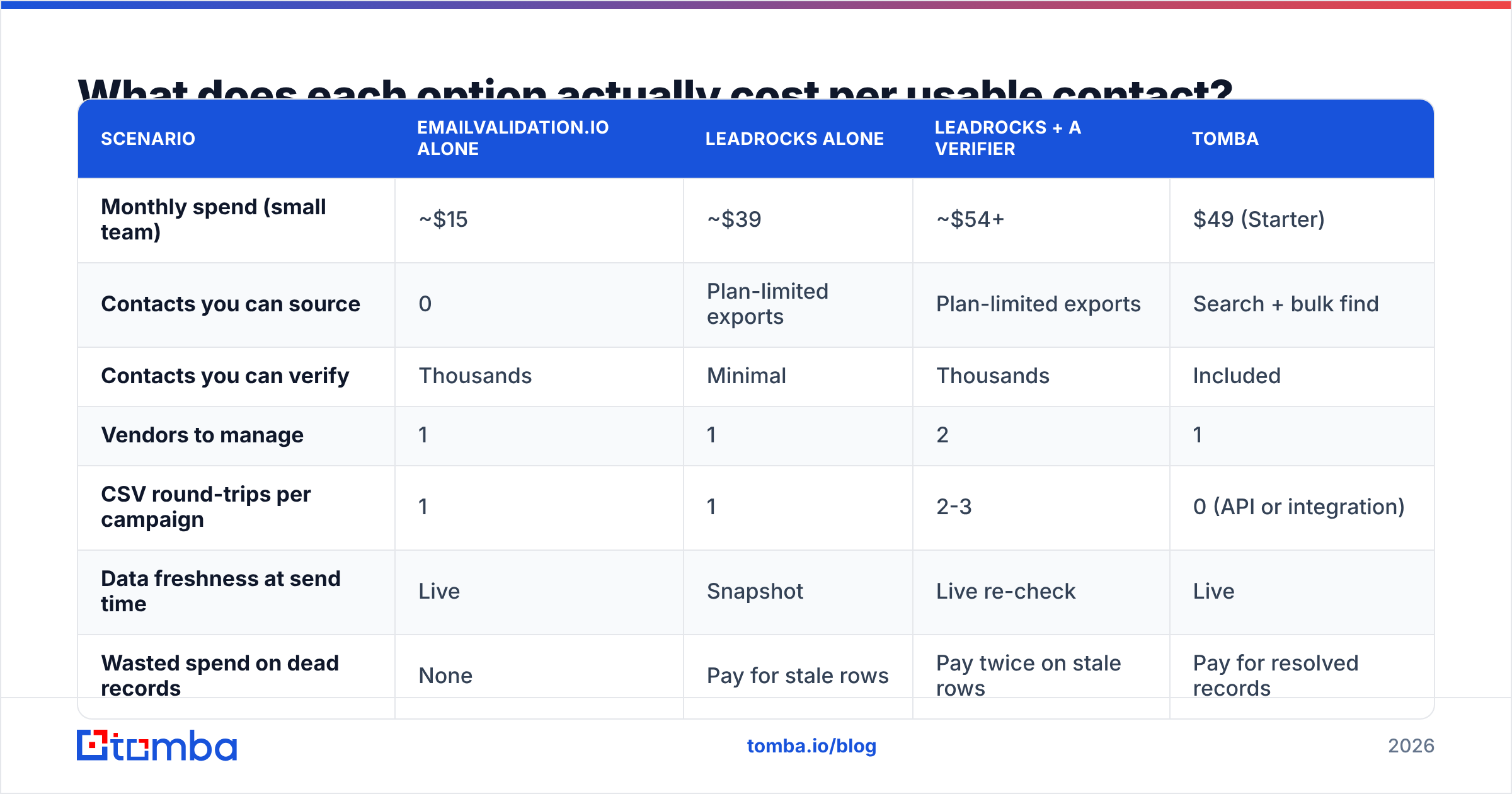
What does each option cost per usable contact?#
Sticker price lies, because the units differ. A check credit and a contact credit are not the same thing.
| Scenario | EmailValidation.io alone | LeadRocks alone | LeadRocks + a verifier | Tomba |
|---|---|---|---|---|
| Monthly spend (small team) | ~$15 | ~$39 | ~$54+ | $49 (Starter) |
| Contacts you can source | 0 | Plan-limited exports | Plan-limited exports | Search + bulk find |
| Contacts you can verify | Thousands | Minimal | Thousands | Included |
| Vendors to manage | 1 | 1 | 2 | 1 |
| CSV round-trips per campaign | 1 | 1 | 2-3 | 0 (API or integration) |
| Data freshness at send time | Live | Snapshot | Live re-check | Live |
| Wasted spend on dead records | None | Pay for stale rows | Pay twice on stale rows | Pay for resolved records |
The last row is where real money leaks. You pay the list vendor for rows the checker then throws out. On a list with 20% decay, a fifth of your data budget dies the same afternoon.
A live finder flips that. It builds and confirms the address the moment you ask. The credit and the result stay tied together.
Check the maths against Tomba pricing. The free tier gives 25 searches a month. Starter is $49/mo, Growth is $99/mo, Pro is $249/mo, and Enterprise is custom. Compare each vendor page too. Prices in the tables above are common published rates. Treat them as a guide, not a quote.
Who should pick EmailValidation.io?#
Pick it when checking is a job on its own:
- You run a product with signups. Live checks on the form stop typos and throwaway addresses at the door. This is the sweet spot. A finder tool adds nothing here.
- You inherited a big CRM. A one-off scrub of 200,000 rows is a checking job, not a finding job.
- You already like your data vendor. If ZoomInfo or Apollo covers sourcing, a cheap checker on top is a smart add.
- You want plain API plumbing. It is one clean, well-documented endpoint. That is the appeal.
What it will not do: build a list, tell you who to contact, or find a phone number.
Who should pick LeadRocks?#
Pick it when budget rules and your freshness bar is medium:
- You are a solo founder or a two-person team. Your first hundred touches do not need a seat-based contract.
- You target stable segments. Big firms churn less, so a snapshot ages better there than in early-stage startups.
- You caught a lifetime deal. A one-time payment spread over two years is hard to beat on raw cost.
- You like to browse. Filter-and-scroll suits some styles more than "find this exact person" does.
One thing you must budget for: a check on every export, every time. Mailing a raw list export is the fastest way to wreck email deliverability on a young domain.
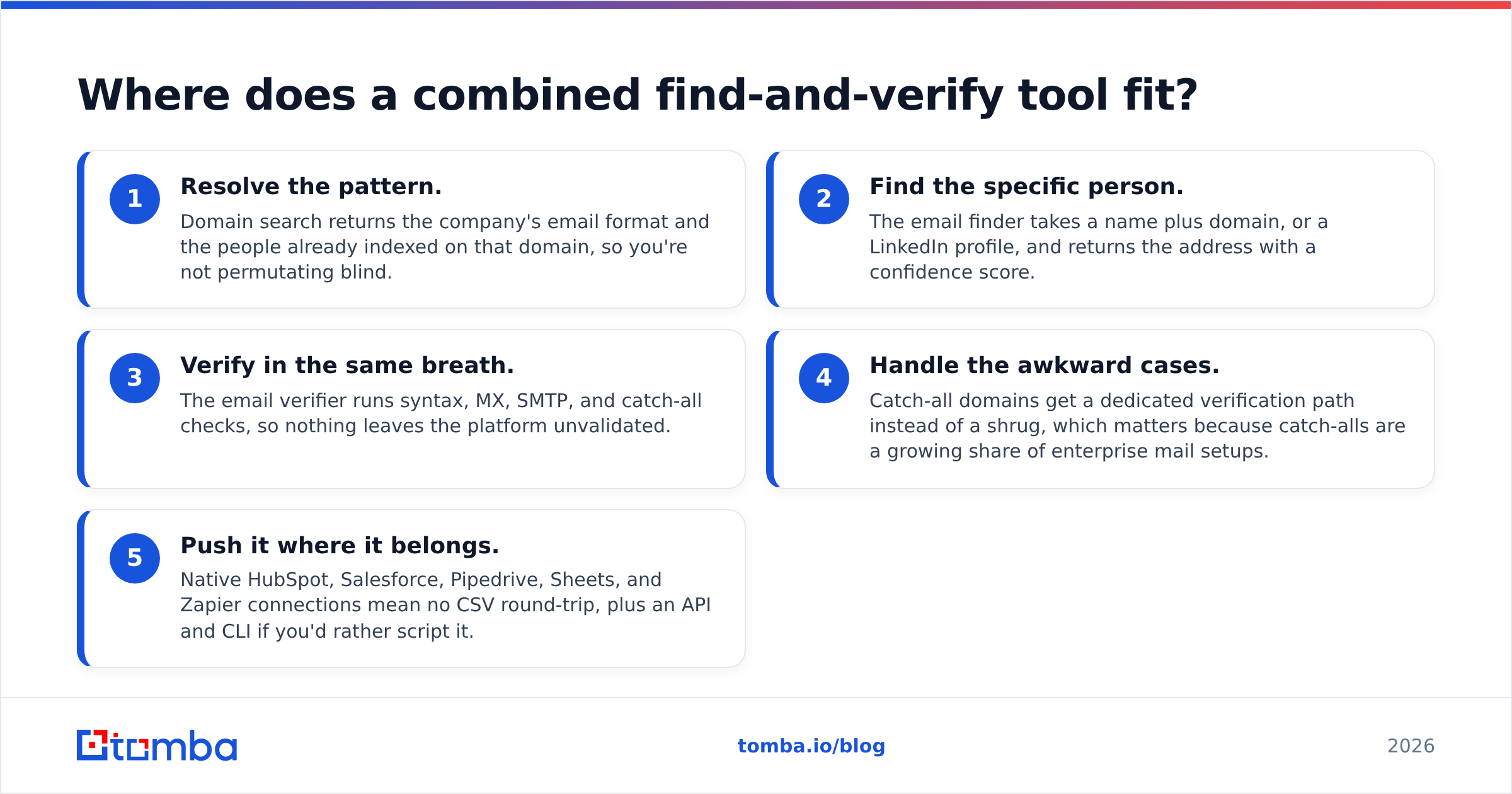
Where does a combined find-and-verify tool fit?#
It removes the seam. Teams end up with two bills for a historic reason. Finding and checking grew up as separate markets. The daily workflow has no such break.
With a platform like Tomba, the steps look like this:
- Get the pattern. Domain search returns the company email format and the people already known on that domain. You stop guessing.
- Find the person. The email finder takes a name plus a domain, or a LinkedIn profile. It returns the address with a confidence score.
- Check it in the same breath. The email verifier runs syntax, MX, server, and catch-all checks. Nothing leaves the platform unchecked.
- Handle the odd cases. Catch-all domains get their own path, not a shrug. That matters, since catch-alls keep growing in big mail setups.
- Push it where it belongs. Native HubSpot, Salesforce, Pipedrive, Sheets, and Zapier links mean no CSV round-trip. There is an API and a CLI if you would rather script it.
You get one credit ledger, one support contact, and one place to trace a bad record. On G2 the whole category splits the same way. Databases sit on one side and checkers on the other. That split costs mid-market teams money every month.
What are the honest trade-offs of consolidating?#
Consolidation is not free. Saying otherwise would be a pitch, not analysis.
- Depth vs breadth. A single-purpose checker can obsess over odd server behaviour. A broad platform may not. If you check millions of addresses a month, test both.
- Filter richness. Some lists offer filters a finder does not, like intent, funding stage, or hiring speed. If your targeting leans on those, keep the list.
- Lifetime-deal maths. If you own a LeadRocks license for life, its extra cost is zero. Adding a checker beats a full move.
- Migration friction. Any stack change eats a week of ops time. Switch at a natural line. Renewal, a new fiscal year, or the day your bounce rate passes 3%.
Run your own numbers. Source fewer than a few hundred contacts a month, and two vendors may cost less. Above that, the waste on stale rows takes over.
How do you settle EmailValidation.io vs LeadRocks in ten minutes?#
Answer one question: do you have a list?
- No list, no budget: start with LeadRocks or a free finder tier. Check every address before you send.
- List exists, bounces are high: you have a checking problem. EmailValidation.io or a dedicated email verifier fixes it for the price of lunch.
- Both problems, one budget: consolidate. Two vendors passing CSVs back and forth is the priciest setup on this page.
- Past 5,000 contacts a month: move to an API. Manual export-import breaks right where mistakes get costly. That is why bulk email finder workflows exist.
Ready to stop paying twice?#
The EmailValidation.io vs LeadRocks choice is really a choice between two half-stacks and one whole one. Start with the Tomba Email Finder. The free tier gives 25 searches a month, with checks included.
Run the same 25 records three ways. Compare a LeadRocks export, an EmailValidation.io verdict, and Tomba. See which addresses land. If Tomba wins on your own data, Starter at $49/mo replaces both line items. If it does not, you lost ten minutes and you know which half of your pipeline to fix first.
Related guides#
Ready to find emails that actually work?
Join 150,000+ professionals who stopped guessing and started sending. Free credits on signup — no credit card required.
Get the Tomba newsletter
Practical outbound tactics and product updates — once every two weeks.
About the author