EmailVerify.io Pricing, Reviews, Pros and Cons (2026)
A neutral breakdown of EmailVerify.io pricing, real per-email costs, accuracy on catch-all domains, and the cases where a different verifier or an all-in-one finder saves you money.
TL;DR
- EmailVerify.io is a pay-as-you-go email verification service: you buy credits, upload a list, and get a valid / invalid / catch-all / unknown verdict per address. Credits do not expire, which is the single biggest reason people pick it.
- Effective cost lands roughly between $0.006 and $0.002 per email depending on volume. That is competitive at small volumes and unremarkable at large ones.
- Reviews are broadly positive on speed, support, and the no-expiry credit model. The recurring complaints are the same as every verifier: catch-all domains, "unknown" verdicts you still paid for, and a UI that feels dated next to newer tools.
- It is a verifier only. If you also need to find addresses, you are buying a second tool — which is where bundled platforms change the math.
- Best fit: teams with an existing list to clean occasionally. Worst fit: outbound teams building lists weekly, who end up paying two vendors for one workflow.
What is EmailVerify.io?#
EmailVerify.io is a standalone bulk email verification tool. You feed it a list of addresses, it runs syntax checks, MX record lookups, disposable and role-account detection, and an SMTP handshake, then returns a status for each address. There is a web dashboard for CSV uploads and an API for real-time checks at form submission or before a send.
That's the whole product, and that focus is a feature. It does not try to be a sequencer, a CRM, or a database. You bring the list; it tells you which addresses will bounce.
The category matters because bounce rate is the fastest way to wreck email deliverability. Mailbox providers treat a hard-bounce rate above roughly 2% as a signal that you're mailing a purchased or stale list, and your sender reputation degrades from there. Verification is insurance, not growth.

How does EmailVerify.io pricing actually work?#
Credits, bought in packs, spent one per address checked. No monthly seat fee, no forced subscription, and — the part reviewers consistently mention — credits don't expire. Buy 50,000 today, use 3,000 this quarter and the rest next year.
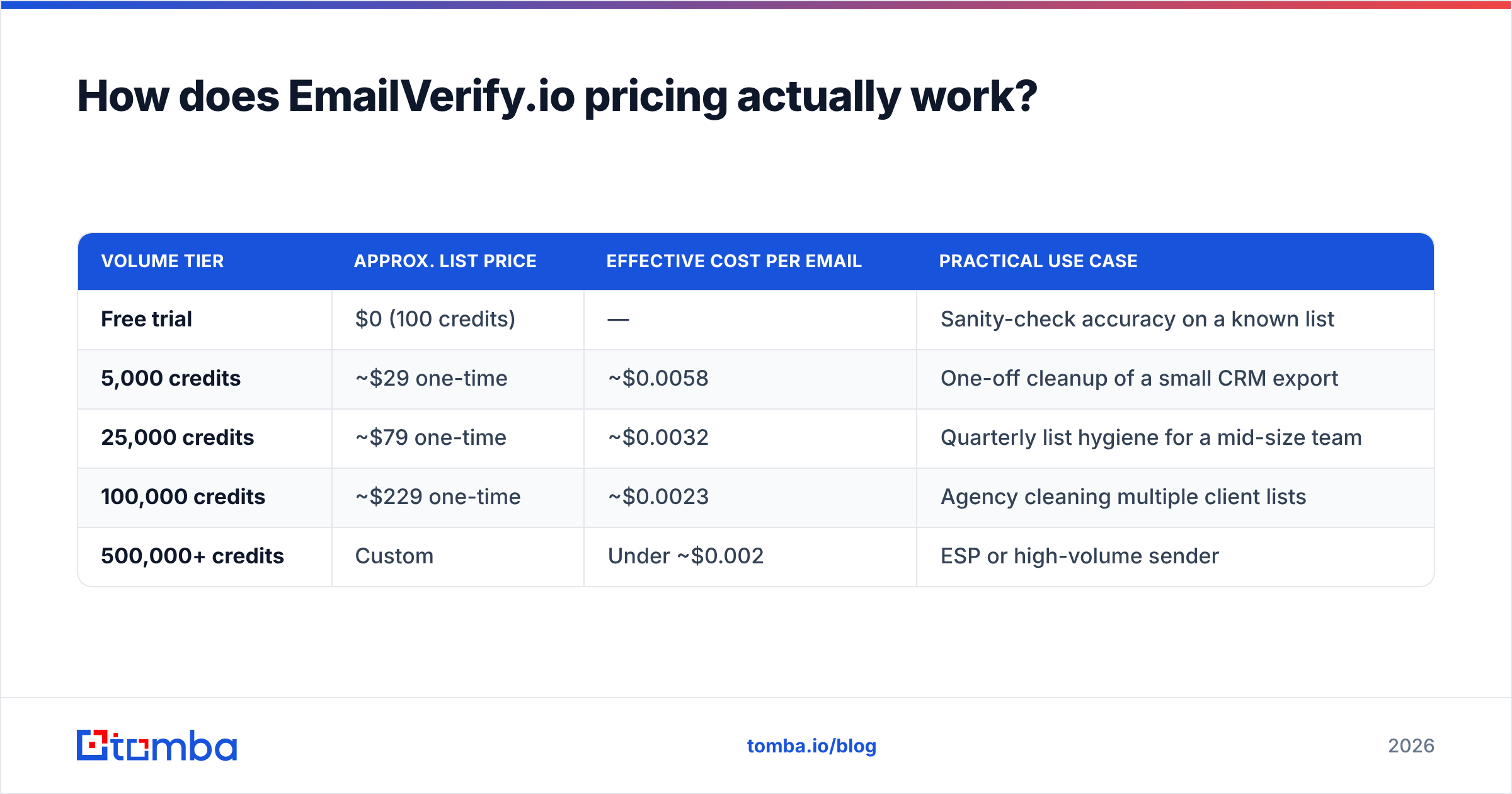
Here's the shape of the pricing at the time of writing. Always confirm current list prices on emailverify.io before you budget, because credit pricing across this category gets adjusted quietly and often.
| Volume tier | Approx. list price | Effective cost per email | Practical use case |
|---|---|---|---|
| Free trial | $0 (100 credits) | — | Sanity-check accuracy on a known list |
| 5,000 credits | ~$29 one-time | ~$0.0058 | One-off cleanup of a small CRM export |
| 25,000 credits | ~$79 one-time | ~$0.0032 | Quarterly list hygiene for a mid-size team |
| 100,000 credits | ~$229 one-time | ~$0.0023 | Agency cleaning multiple client lists |
| 500,000+ credits | Custom | Under ~$0.002 | ESP or high-volume sender |
Two details decide whether that table is good news for you.
First: are duplicates and already-known addresses charged? Most verifiers dedupe before billing. Run your own dedupe anyway with a remove duplicates pass so you're not testing the vendor's honesty with your budget.
Second: do you pay for "unknown" results? On most platforms, yes. An SMTP server that times out or greylists still consumes a credit and gives you nothing actionable. On a typical B2B list, 3–8% of addresses come back unknown or catch-all. Your real cost per usable verdict is therefore 5–10% higher than the headline number.
What do EmailVerify.io reviews actually say?#
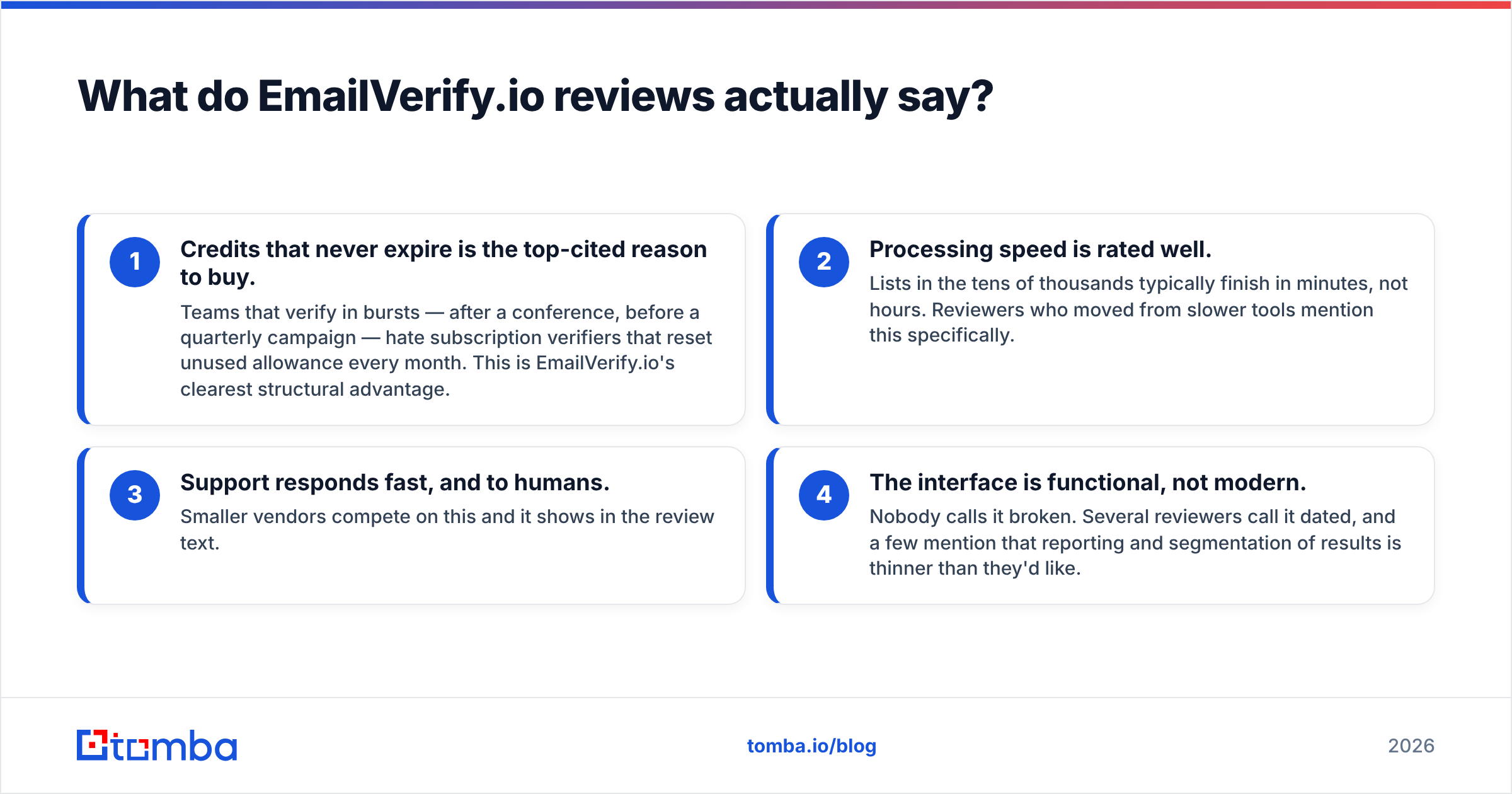
Aggregate sentiment across G2 and Capterra for this class of tool clusters into four repeated themes. Reading fifty reviews of any verifier, you get the same four.
- Credits that never expire is the top-cited reason to buy. Teams that verify in bursts — after a conference, before a quarterly campaign — hate subscription verifiers that reset unused allowance every month. This is EmailVerify.io's clearest structural advantage.
- Processing speed is rated well. Lists in the tens of thousands typically finish in minutes, not hours. Reviewers who moved from slower tools mention this specifically.
- Support responds fast, and to humans. Smaller vendors compete on this and it shows in the review text.
- The interface is functional, not modern. Nobody calls it broken. Several reviewers call it dated, and a few mention that reporting and segmentation of results is thinner than they'd like.
The negative reviews are worth reading literally. When someone writes "it marked good addresses as invalid," the underlying cause is nearly always a catch-all domain or an aggressive greylisting server, not a broken product. That's a category-wide physics problem, and any verifier claiming 99%+ accuracy on catch-all domains is overselling.
How accurate is EmailVerify.io, and what does accuracy even mean here?#
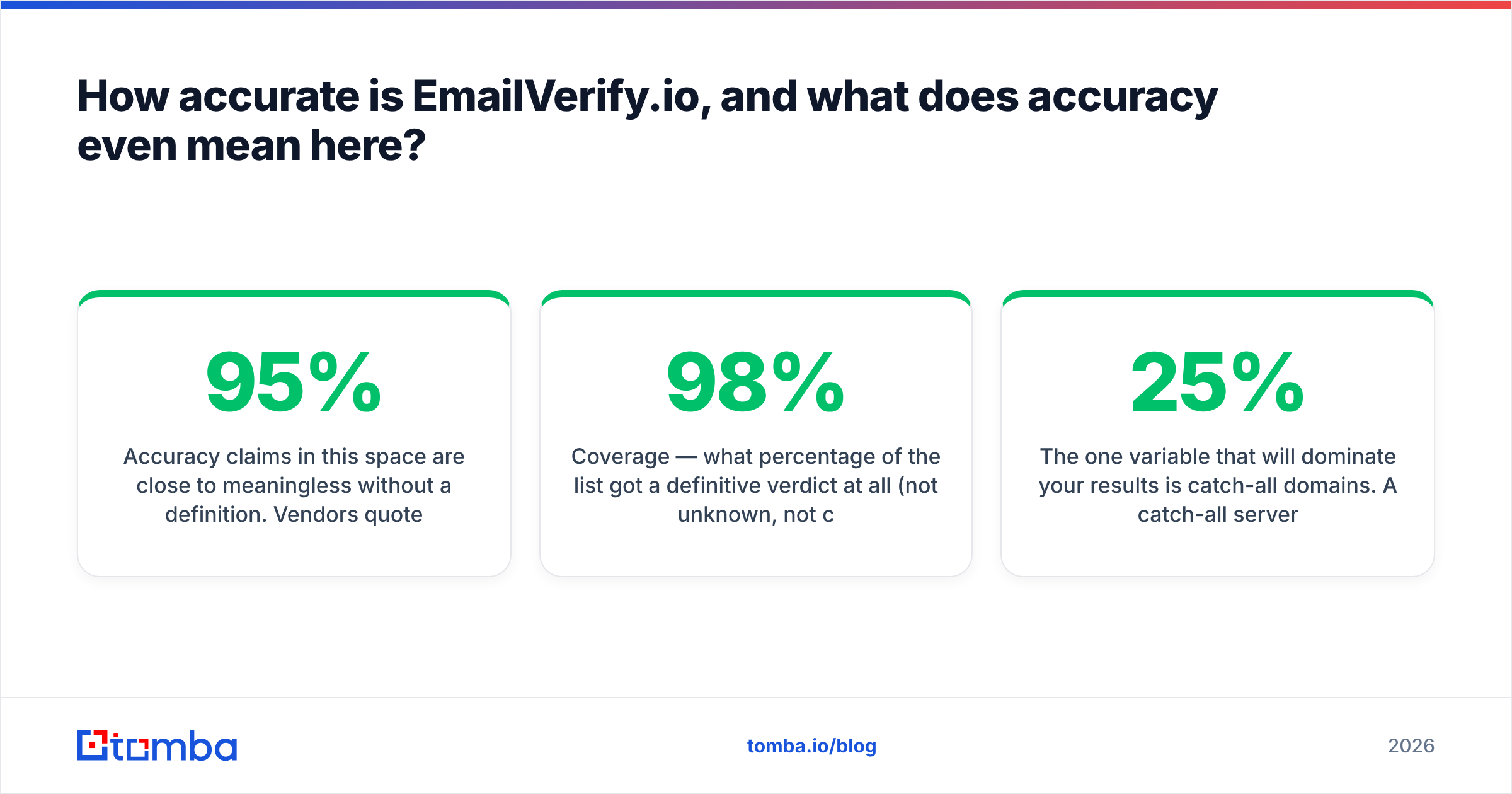
Accuracy claims in this space are close to meaningless without a definition. Vendors quote numbers between 95% and 99%, but they measure different things:
- Bounce-rate accuracy — of the addresses marked valid, what percentage actually delivered? This is the number that matters.
- Coverage — what percentage of the list got a definitive verdict at all (not unknown, not catch-all)? Two tools can both be "98% accurate" while one leaves 15% of your list unresolved.
- False-positive rate — how many deliverable addresses were wrongly marked invalid? Every one of those is a lost prospect you'll never contact.
Run your own test before committing budget. Take 500 addresses where you already know the outcome — recent sends with confirmed opens on one side, confirmed hard bounces on the other — and push them through the free trial. Compare verdicts. It takes twenty minutes and it beats any review site.
The one variable that will dominate your results is catch-all domains. A catch-all server accepts mail to any address at that domain, so an SMTP probe can't distinguish jane@acme.com from xkcd@acme.com. Roughly 20–25% of B2B domains are configured this way, and the share is higher in enterprise. A verifier that returns "catch-all" and stops has given you a shrug. Tools that layer pattern data and historical engagement signals on top — like a dedicated catch-all verifier — can resolve a meaningful slice of that bucket rather than leaving it to you.
How does EmailVerify.io compare to other verification tools?#
The honest framing is not "which verifier is best" but "am I buying a verifier or a workflow." If you already have lists, buy the cheapest accurate verifier. If you're building lists, a bundled finder-plus-verifier is usually cheaper than two subscriptions and definitely less work.
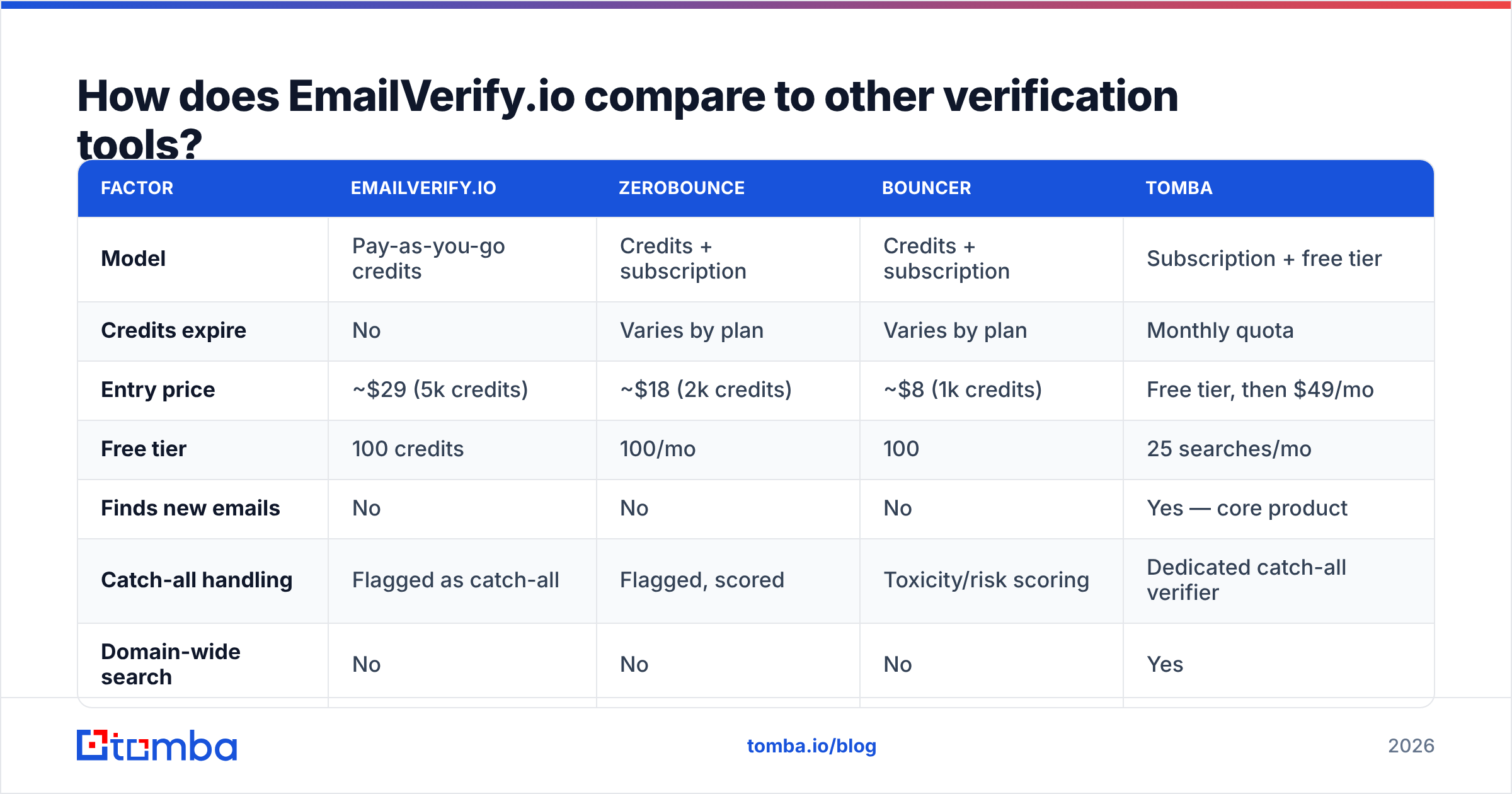
| Factor | EmailVerify.io | ZeroBounce | Bouncer | Tomba |
|---|---|---|---|---|
| Model | Pay-as-you-go credits | Credits + subscription | Credits + subscription | Subscription + free tier |
| Credits expire | No | Varies by plan | Varies by plan | Monthly quota |
| Entry price | ~$29 (5k credits) | ~$18 (2k credits) | ~$8 (1k credits) | Free tier, then $49/mo |
| Free tier | 100 credits | 100/mo | 100 | 25 searches/mo |
| Finds new emails | No | No | No | Yes — core product |
| Catch-all handling | Flagged as catch-all | Flagged, scored | Toxicity/risk scoring | Dedicated catch-all verifier |
| Domain-wide search | No | No | No | Yes |
| API | Yes | Yes | Yes | Yes |
| Phone / enrichment | No | Partial (append) | No | Yes |

Read the "finds new emails" row twice, because it's the row that decides your annual spend. A verifier is a downstream tool: it can only improve a list you already have. If your process is "scrape or export a list, then clean it," you need a source anyway — and that source is either a manual scrape, a database subscription, or an email finder.
Priced out over a year, two narrow tools frequently cost more than one platform that does both. And that's before you count the integration tax: two API keys, two rate limits, two billing relationships, two vendors to chase when data quality slips.
When is EmailVerify.io the right choice?#
It genuinely is the right call in three situations.
- You verify sporadically. Non-expiring credits are strictly better than a monthly subscription you use four times a year. This is the strongest case for the product and reviewers are right to lead with it.
- Your list source is already solved. If leads come from inbound forms, event scans, or a partner feed, you don't need a finder. You need cheap, fast hygiene at the point of capture — which the API handles well.
- You want vendor separation. Some teams deliberately keep sourcing and verification with different vendors so the verifier has no incentive to bless its own data. That's a defensible governance argument, and it costs you money for a reason you should be able to articulate.
And three situations where it's the wrong call.
- You build new lists weekly. You'll pay a finder plus a verifier and stitch them together in a spreadsheet. Bundle instead.
- Your market is enterprise-heavy. More catch-all domains means more unresolved verdicts and more credits spent on shrugs.
- You need more than an email. If your motion includes phone or firmographic context, a verifier gives you one field. Contact-level data enrichment gives you the record.
What are the pros and cons of EmailVerify.io?#
Pros
- Non-expiring credits. No use-it-or-lose-it pressure, no subscription you forget to cancel.
- Fast bulk processing. Large lists clear in minutes, which matters when a campaign is queued.
- Straightforward API. Real-time verification at form submit is a simple integration, and it stops junk entering your CRM at the source.
- No seat pricing. Cost scales with volume, not headcount.
- Responsive support. Consistently mentioned in reviews as better than the category norm.
Cons
- Verification only. No sourcing, no enrichment, no phone data. It solves one step of a five-step workflow.
- Catch-all results are a dead end. You get the flag, not the answer, and you still paid the credit.
- Unknowns are billable. Budget 5–10% above the headline rate for verdicts you can't use.
- Dated interface and thin reporting. Functional, but segmentation and export options lag newer tools.
- Pricing opacity at the top end. High-volume tiers move to custom quotes, so comparison shopping gets harder exactly where the money is.
How should you actually build a verification workflow in 2026?#
Verification is one step. The full sequence that keeps bounce rates under 2% looks like this:
- Source deliberately. Pull addresses by company domain rather than buying static lists — a domain search returns the pattern and the people, and the data is generated at request time rather than aged in a database.
- Dedupe before you spend. Every duplicate is a wasted credit. Do it locally.
- Verify in bulk. Run the whole list through a verifier and split the output by status, not by a single valid/invalid binary.
- Handle catch-all separately. Don't discard the bucket and don't mail it blind. Route it through a tool that scores catch-all deliverability, then send to that segment on a secondary domain until you've seen real bounce data.
- Re-verify on a schedule. B2B data decays roughly 25–30% a year through job changes alone. A list verified in January is measurably worse by July.
- Verify at capture, not just in batches. An API call on form submit prevents the problem instead of cleaning it up later.
Skip step four and you'll either throw away a fifth of your addressable market or torch your domain reputation proving they were bad. Skip step five and you'll re-learn it every year.
Is EmailVerify.io worth the money?#
For occasional cleanup with a list you already own: yes, and the non-expiring credits make it a better deal than most subscription verifiers at that usage pattern. The product does what it says, quickly, with support that answers.
For an outbound team building fresh lists: probably not on its own. The per-email price is fine, but you're solving half a problem and paying a second vendor for the other half. Price the whole workflow — sourcing, verification, catch-all resolution, enrichment — before you commit, and compare that total against Tomba pricing, where a Starter plan runs $49/mo with a free tier at 25 searches to test against your own domains first.
The one thing not to do is skip verification. It's the cheapest line item in your outbound stack and the only one that protects everything downstream of it.
If your bottleneck is finding the right addresses in the first place — not just cleaning the ones you have — start with the Tomba Email Finder. Search by domain, name, or company, get verification built into the same result, resolve catch-all domains instead of shrugging at them, and run the whole thing through one email finder API or a bulk email finder upload. Free tier included, so you can benchmark it against your current verifier on your own list before moving any budget.
Related guides#
// get started
Find, verify and enrich your first contacts today
Start on the free plan with 25 searches a month, then scale when your team is ready.
Free plan · No credit card required · GDPR & CCPA
// about the author