EmailVerify.io vs LeadGenius: Which One Do You Actually Need?
One cleans the list you already have. The other builds a list you don't. Here's an honest breakdown of EmailVerify.io vs LeadGenius — pricing models, accuracy claims, and the stack most outbound teams end up running instead.
EmailVerify.io vs LeadGenius is an odd matchup. One tool cleans a list you own. The other builds a list you don't have yet. Here is how to tell which one your team needs.
TL;DR
- They are not rivals. EmailVerify.io is a list-hygiene tool. You give it emails, and it tells you which ones bounce.
- LeadGenius is a managed B2B data service. You describe who you want. Software and human researchers then build the list.
- Pricing runs on opposite models. EmailVerify.io sells credits self-serve. LeadGenius sells annual contracts through a sales call. Expect a quote, not a checkout page.
The short rule:
- Is your bounce rate 9%? You want a verifier.
- Can't find 400 ops managers at mid-market logistics firms in DACH? You want a data provider.
- Running fewer than 50 reps? Most teams pick a third option: one self-serve tool that finds and verifies on the same credit pool.
- Whichever you pick, verify before you send. One bad import can cost you a domain.
EmailVerify.io vs LeadGenius: what does each tool actually do?#
They sit at different points in the same pipeline. That is why the matchup feels unfair until you know what you are solving for.
EmailVerify.io is an email verification service. Its job is to subtract. You upload a CSV or call the API with one address. It runs syntax checks, MX lookups, disposable-domain checks, role-account flags, and an SMTP handshake. Then it hands back a status: valid, invalid, risky, or unknown. You delete or park the bad ones.
LeadGenius is a managed data provider. Its job is to add. You define an ideal customer profile. You can ask for fields no stock database carries, such as store count, fleet size, or which apps a company runs. LeadGenius then blends crawling, machine learning, and human researchers to build that list and keep it fresh. Delivery lands in your CRM, your warehouse, or a flat file on a set cadence.
Here's the split in plain terms:
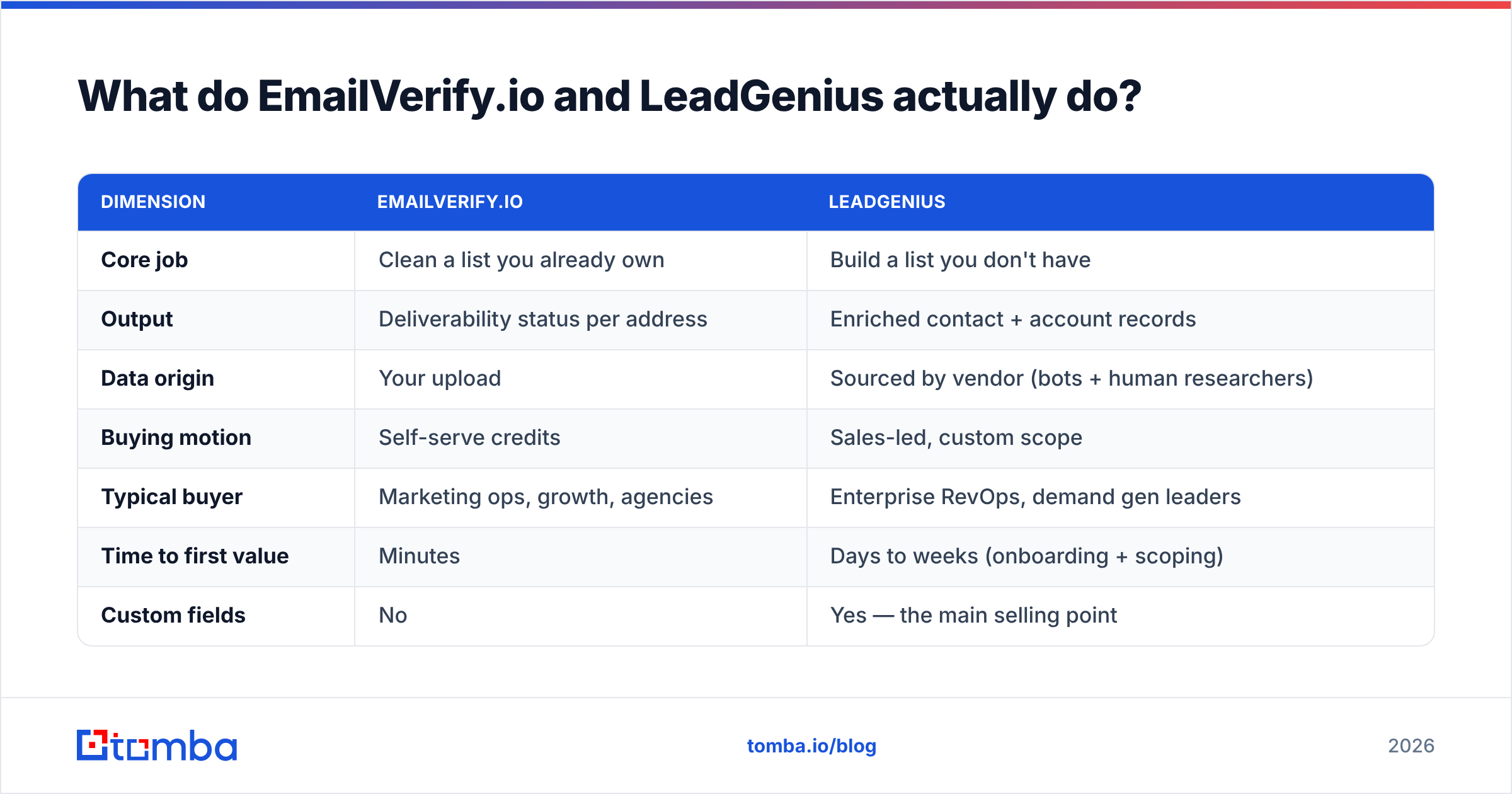
| Dimension | EmailVerify.io | LeadGenius |
|---|---|---|
| Core job | Clean a list you already own | Build a list you don't have |
| Output | Deliverability status per address | Enriched contact + account records |
| Data origin | Your upload | Sourced by vendor (bots + human researchers) |
| Buying motion | Self-serve credits | Sales-led, custom scope |
| Typical buyer | Marketing ops, growth, agencies | Enterprise RevOps, demand gen leaders |
| Time to first value | Minutes | Days to weeks (onboarding + scoping) |
| Custom fields | No | Yes — the main selling point |
| Contract | Pay-as-you-go or monthly | Usually annual |
Read that table once and the choice mostly makes itself. Both vendors say "data quality" in their marketing. They mean very different things by it.
Is EmailVerify.io better than LeadGenius for cold outbound?#
For the send step, yes. But that is like saying a smoke alarm beats an architect. Different stage.
A verifier guards the one thing you cannot buy back: your sender reputation. Mailbox providers read hard bounces as a sign that your list is stale or bought. Once your bounce rate passes 2–3%, filtering turns harsh fast. Google and Microsoft both tightened bulk-sender rules in the last two years. List hygiene stopped being optional. Our email deliverability glossary entry covers how the signals stack up.
What a verifier like EmailVerify.io does well:
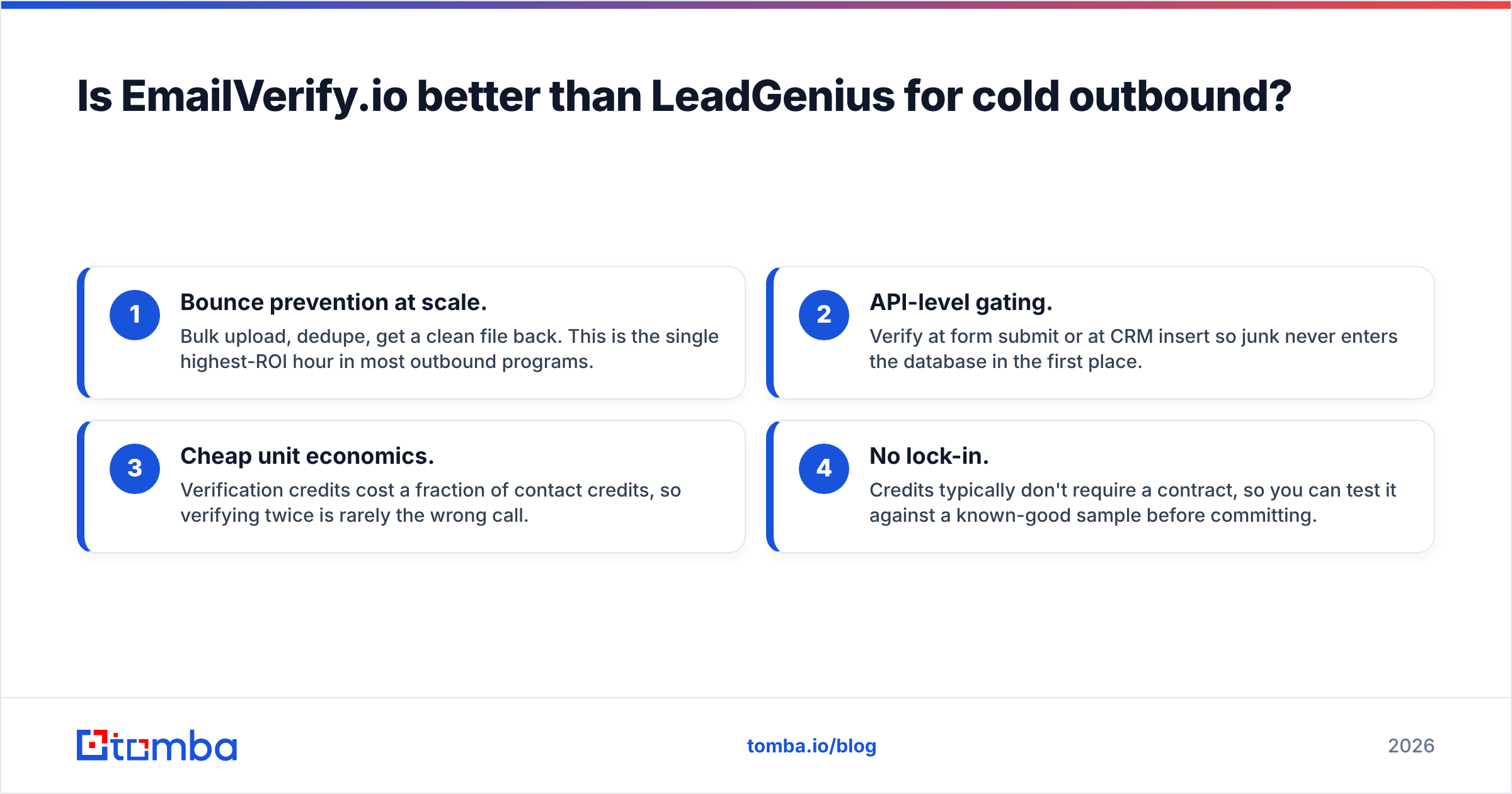
- Bounce prevention at scale. Upload in bulk, dedupe, get a clean file back. It is the best hour you will spend on outbound.
- API-level gating. Check at form submit or at CRM insert. Junk never enters the database.
- Cheap per record. Verify credits cost far less than contact credits. So verifying twice is rarely the wrong call.
- No lock-in. Credits rarely need a contract. Test on a known-good sample first.
What it cannot do: tell you who to email. Feed it 300 rows and you get 300 verdicts. It will never hand you 3,000 rows.

Is LeadGenius worth it compared to a standard database?#
It hinges on one thing. Can you describe your ICP with standard firmographics?
Say you sell to "SaaS companies, 50–500 employees, US, VP Marketing." You do not need a managed data service. Every mainstream B2B database already sells that segment. You would pay a premium just to have a human confirm it.
LeadGenius earns its price when your filter is odd. Here are real examples of fields that stock databases skip:
- Physical footprint — number of retail sites, warehouse square footage, fleet size.
- Operational signals — the ERP a company runs, the payment processor it uses, or a job post that implies budget.
- Org-chart depth — mapped reporting lines inside a target account, not just a title string.
- Non-English markets — regions where crawling degrades badly and human researchers win.
- Refresh guarantees — a contracted cadence for re-checking records that decay fast.
That is a real, defensible product. It is also why the price talk starts with a call. Human research has a labor cost floor. Self-serve databases do not. Vendors here price against the value of the segment, not per record. Buyer reviews on G2 praise the custom fields. They flag the same two gripes: slow onboarding and the annual commitment.
How does the pricing compare?#
This is where the two products split hardest. It is also the part most comparison posts wave away.
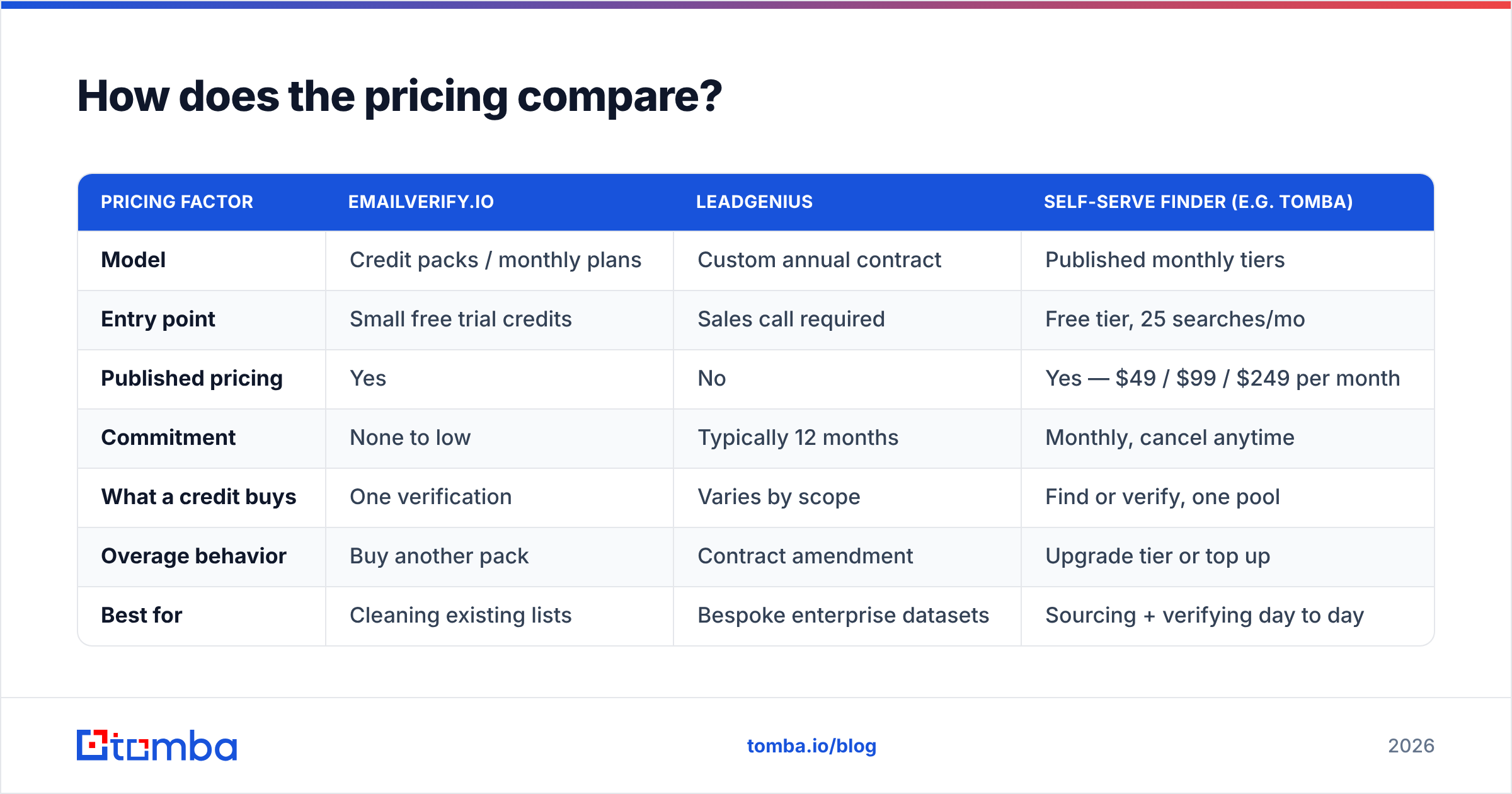
| Pricing factor | EmailVerify.io | LeadGenius | Self-serve finder (e.g. Tomba) |
|---|---|---|---|
| Model | Credit packs / monthly plans | Custom annual contract | Published monthly tiers |
| Entry point | Small free trial credits | Sales call required | Free tier, 25 searches/mo |
| Published pricing | Yes | No | Yes — $49 / $99 / $249 per month |
| Commitment | None to low | Typically 12 months | Monthly, cancel anytime |
| What a credit buys | One verification | Varies by scope | Find or verify, one pool |
| Overage behavior | Buy another pack | Contract amendment | Upgrade tier or top up |
| Best for | Cleaning existing lists | Bespoke enterprise datasets | Sourcing + verifying day to day |
Two practical notes.
First, check current numbers on the vendor's own page before you budget. Credit pack prices shift more often than vendors announce.
Second, watch how "unknown" results are billed. Some verifiers charge full price for catch-all or unknown verdicts. Those give you no real answer. Others credit them back. That one policy can move your true cost per usable record by 20% or more. Do most of your targets sit behind accept-all servers? Then a good catch-all verifier matters more than the headline rate.
Which one is more accurate — and what does accuracy even mean here?#
They measure different things. So a head-to-head accuracy number is mostly noise.
For a verifier, accuracy means one thing. Of the addresses marked valid, how many landed? A good verifier sits in the high 90s on normal mailboxes. It drops sharply on catch-all domains. No outside tool can get a firm answer from those servers. Any vendor who claims near-perfect catch-all accuracy is selling a guess with a score on it. That is fine, as long as they label it.
For a data provider, accuracy means something else. Of the records sent, how many are the right person, at the right company, with a live address, today? That is a stacked metric. A record can carry a perfect email and still be wrong. The contact may have changed jobs six weeks ago. Human checks help, but decay is relentless. B2B contact data loses 2–3% of its validity each month. So ask about refresh cadence, not a one-time accuracy figure.
Here is the trap. Teams buy sourced data and assume it arrives send-ready. Run every record through an email verifier before it hits a sequence. The gap between "was valid when researched" and "is valid today" is where bounces come from.

When should you pick each one?#
Pick EmailVerify.io if:
- You already hold a list — scraped, exported, inherited, or bought — and you do not trust it.
- You need list cleaning today, with no procurement cycle.
- Your volume is spiky. One big cleanup a quarter, and you pay only for what you burn.
- You want an API gate in front of forms or CRM imports.
Pick LeadGenius if:
- Your ICP needs fields no database sells, and you proved it by trying two of them.
- You have budget for an annual contract and a stakeholder who owns data quality.
- You need ongoing refresh, not a one-time file.
- Your market is small enough that record-level precision beats volume.
Pick neither — and use a self-serve finder — if:
- You need both sourcing and verification at fair volume, with no sales call.
- Your ICP fits normal firmographics.
- You want reps to find contacts inside their own workflow, not file a data request.
That last case covers most SMB and mid-market teams. It is where a tool like Tomba's email finder fits. Find addresses by name and domain. Run domain search to map a whole company. Verify from the same credit pool. Then push results out by API or a spreadsheet add-on. It does not replace bespoke enterprise research, and it does not pretend to. It just removes the daily friction of knowing who to email without having their address.
What does a sensible stack actually look like?#
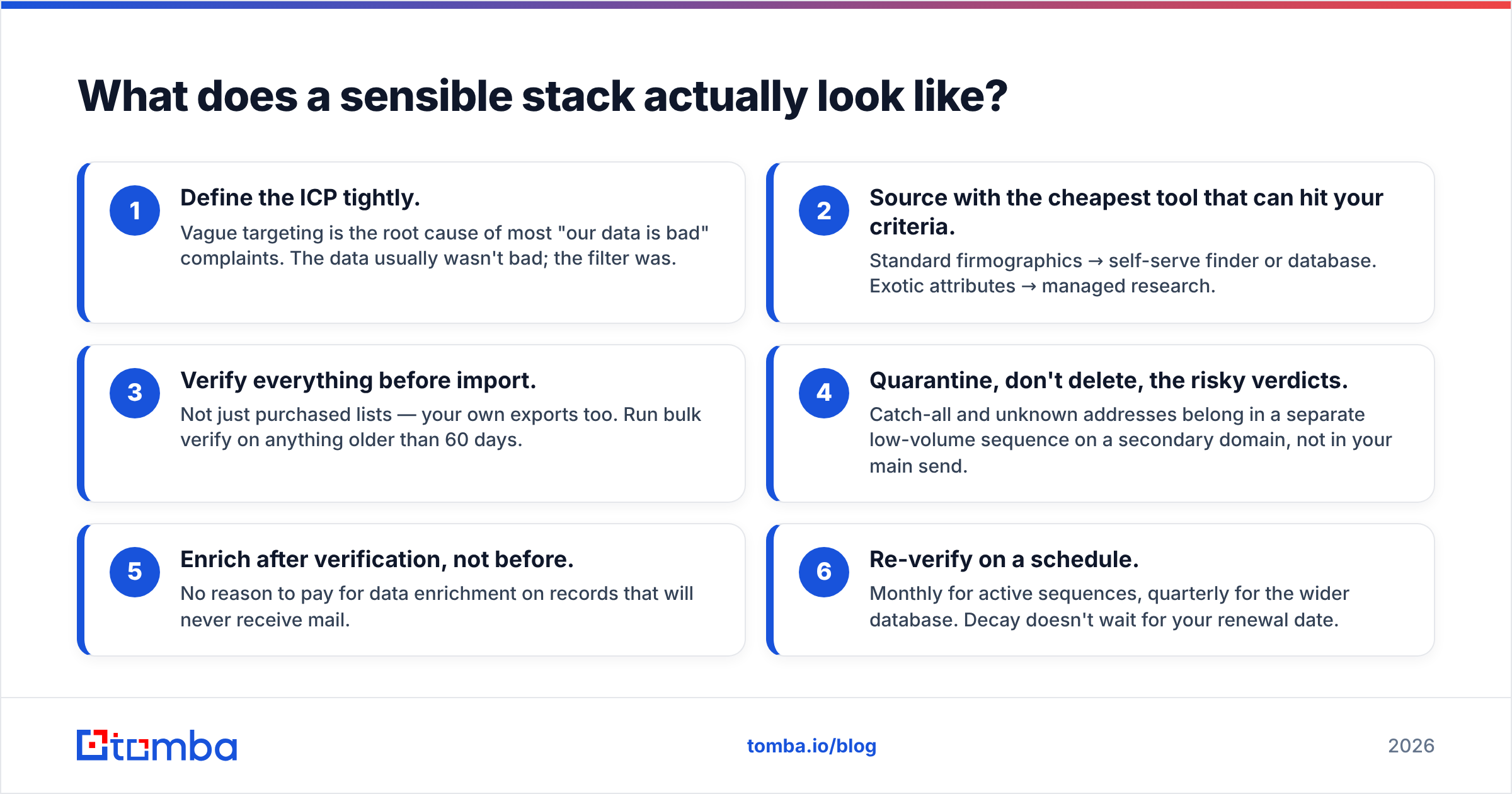
Here is the sequence most working outbound programs land on, whatever the vendor names:
- Define the ICP tightly. Vague targeting causes most "our data is bad" complaints. The data usually was not bad. The filter was.
- Source with the cheapest tool that can hit your criteria. Standard firmographics call for a self-serve finder or database. Odd fields call for managed research.
- Verify everything before import. Not just bought lists. Your own exports too. Run bulk verify on anything older than 60 days.
- Quarantine the risky verdicts, don't delete them. Catch-all and unknown addresses belong in a small sequence on a second domain, not your main send.
- Enrich after verification, not before. Why pay for data enrichment on records that will never get mail?
- Re-verify on a schedule. Monthly for live sequences, quarterly for the wider database. Decay does not wait for your renewal date.
Step 3 is the one teams skip. It is also the one that costs the most. A 6% bounce rate on a single 5,000-contact blast can drag inbox placement down for weeks after you fix the list.
What's the verdict on EmailVerify.io vs LeadGenius?#
If you can only fund one, buy the verifier. Data you cannot send to is a slow problem. A damaged sending domain is an urgent one. Verification also costs an order of magnitude less than sourcing. EmailVerify.io is a fair pick for that job, and so are several rivals. This is a commodity category. Price per usable verdict and catch-all handling matter more than the brand.
Buy LeadGenius when the data truly does not exist for sale. That is a real constraint for some businesses. Paying humans to research it is then the right answer. Just confirm the constraint first. Most teams who think they need custom research need a tighter ICP and a self-serve tool instead.
And if you sit in the middle? You need addresses daily. Your targets are normal companies. You would rather not book a demo to learn the price. Start with published pricing and a free tier. You can weigh Tomba pricing against a quote in about thirty seconds. That is roughly thirty seconds faster than a discovery call.
So the EmailVerify.io vs LeadGenius question ends where it started: clean the list you have, or buy the list you lack. Ready to stop stitching two vendors together? Try the Tomba Email Finder free. You get 25 searches a month, no card, with sourcing and verification on one credit pool. Run it against a domain you know well and check the addresses yourself before you spend a cent.
Related guides#
Ready to find emails that actually work?
Join 150,000+ professionals who stopped guessing and started sending. Free credits on signup — no credit card required.
Get the Tomba newsletter
Practical outbound tactics and product updates — once every two weeks.
About the author