Emailverify.io vs SalesQL: Which Email Tool Wins in 2026?
Emailverify.io verifies addresses you already have. SalesQL pulls contacts off LinkedIn. They solve opposite halves of the same problem — here is which one your pipeline actually needs, and what it costs to run both.
Emailverify.io vs SalesQL is an odd match-up. One tool cleans the list you have. The other builds a list you do not have yet. Most buyers weigh them as rivals, then learn they fix different problems. This guide covers what each one does, what it costs in 2026, and which one your team needs.
TL;DR
- Emailverify.io and SalesQL are not rivals. Emailverify.io is a bulk email verification engine. SalesQL is a LinkedIn contact extractor. Buying one and hoping it does the other job is the most common mistake here.
- Pick SalesQL if your prospecting starts in LinkedIn Sales Navigator. It pulls emails and phone numbers off profiles into a CSV or your CRM.
- Pick Emailverify.io if you already own a list. A CRM export, a scrape, a bought database — you need bounce rates under 2% before you press send.
- Running both means two subscriptions, two credit pools, and a manual CSV handoff. A combined finder-plus-verifier stack (Tomba, Hunter, Apollo) usually costs less than the pair.
- Whatever you choose, verify at send time, not at scrape time. B2B data decays about 2–2.5% per month. A list checked in January is clearly worse by April.
Emailverify.io vs SalesQL: what does each tool do?#
They sit at opposite ends of the same workflow.
Emailverify.io is a validation service. You upload a list by CSV, by API, or through an ESP integration. It returns a status for each address: deliverable, undeliverable, risky, unknown, or catch-all.
Under the hood it runs syntax checks, MX record lookups, and disposable-domain matching. It also spots role accounts (info@, sales@) and runs SMTP handshake probes. It finds no new contacts. It only tells you whether the contacts you have are worth mailing.
SalesQL is a Chrome extension for LinkedIn. You open a profile or a Sales Navigator search and click the extension. It returns personal and work emails plus phone numbers.
Results drop into lists you can export or sync to HubSpot, Pipedrive, or Salesforce. Each result carries a light verification label. That label only rates SalesQL's own output. You cannot point it at an outside 50,000-row file.
Here is the practical framing. SalesQL fills the top of the funnel. Emailverify.io guards the bottom. So the real question is not which tool is better. It is which half of your data problem costs you more money today.

How do the core features compare?#
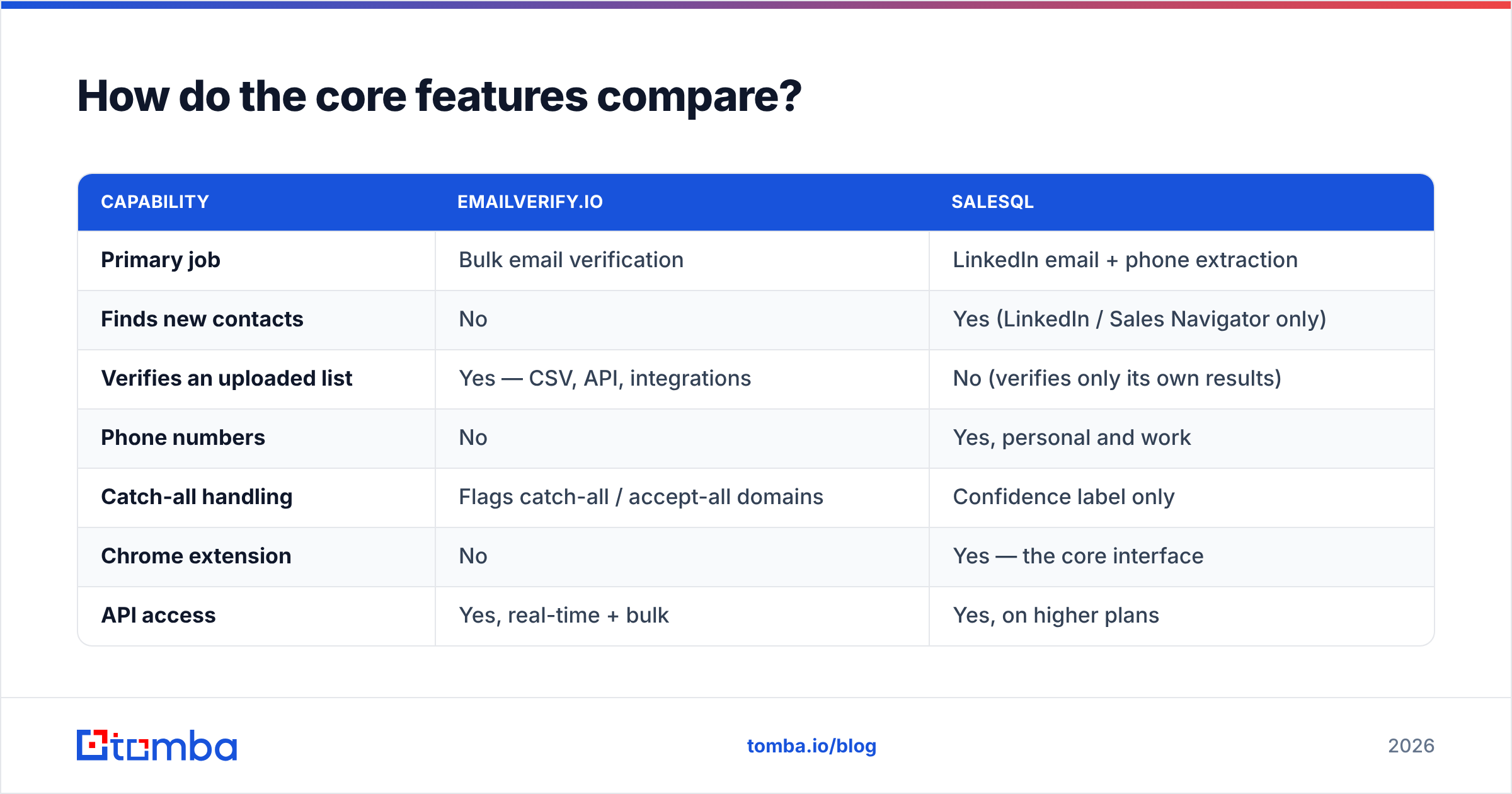
| Capability | Emailverify.io | SalesQL |
|---|---|---|
| Primary job | Bulk email verification | LinkedIn email + phone extraction |
| Finds new contacts | No | Yes (LinkedIn / Sales Navigator only) |
| Verifies an uploaded list | Yes — CSV, API, integrations | No (verifies only its own results) |
| Phone numbers | No | Yes, personal and work |
| Catch-all handling | Flags catch-all / accept-all domains | Confidence label only |
| Chrome extension | No | Yes — the core interface |
| API access | Yes, real-time + bulk | Yes, on higher plans |
| CRM sync | Via integrations / export | Native HubSpot, Pipedrive, Salesforce |
| Free entry point | Free credits on signup | ~100 credits/month free plan |
| Best fit | List hygiene before a send | Sourcing contacts from LinkedIn |
Two rows need more detail.
Catch-all domains. A catch-all (accept-all) server accepts mail to any address at the domain. So an SMTP probe cannot prove that one mailbox exists. Roughly a fifth of B2B domains work this way, and most of them are enterprise.
Emailverify.io flags them honestly, which is the right call. A tool that returns "valid" for every catch-all address is lying to you. SalesQL hands you those addresses with a middling score and leaves the call to you. If you sell to large firms, this gap hits a real slice of your list. Pair either tool with a dedicated catch-all verifier.
Phone numbers. SalesQL's mobile coverage is a real strength, and no verify-only tool offers it. If you call first, or call as well as email, that alone can settle the choice.
Which one is more accurate?#
In the Emailverify.io vs SalesQL match-up, accuracy means two different things. So judge each tool on its own terms.
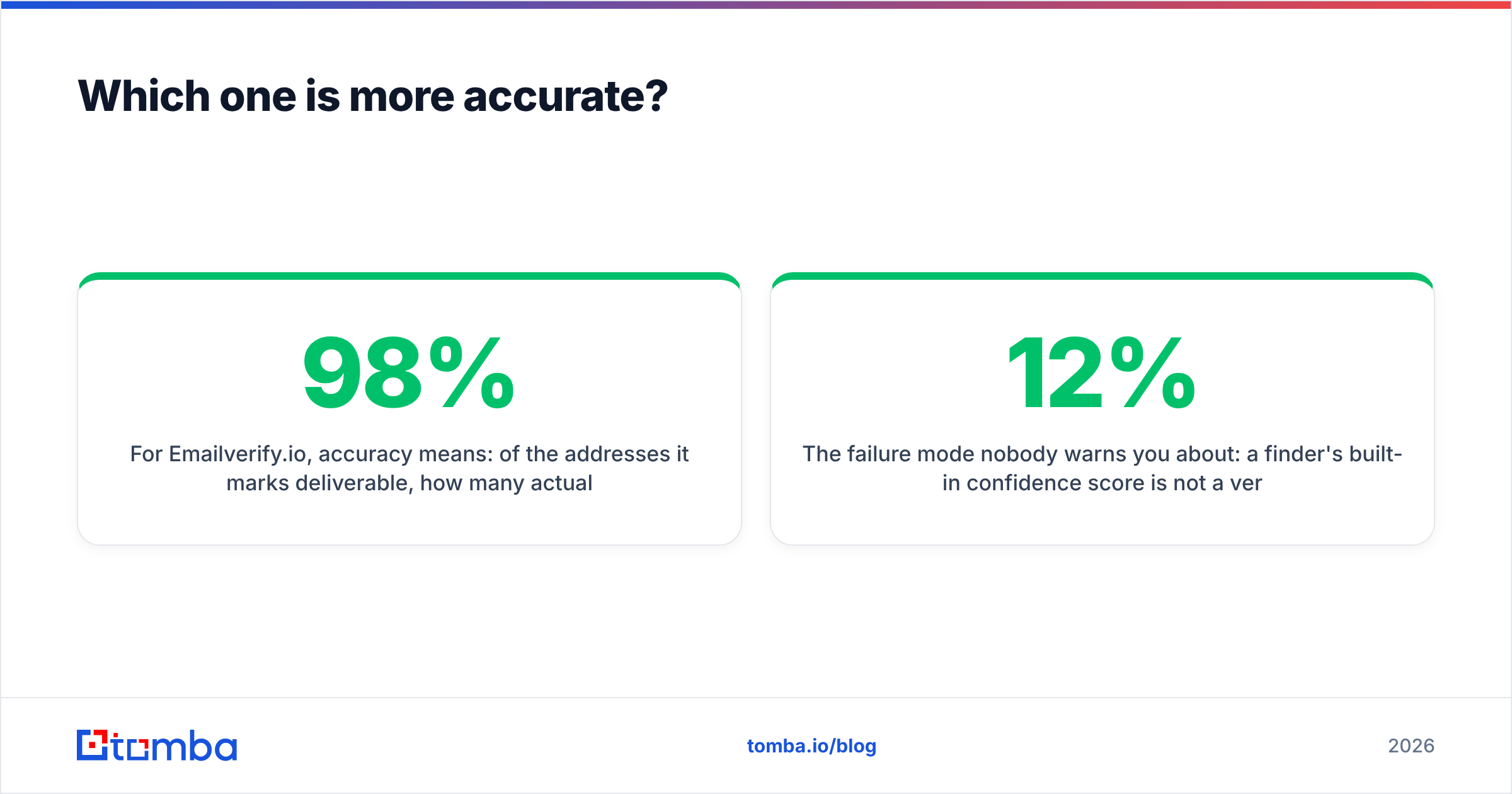
For Emailverify.io, the question is simple. Of the addresses it marks deliverable, how many land? Tests across the category put the good engines at 95–98% on clean, non-catch-all B2B data. The gap between vendors grows fast on catch-all and small-business domains. Emailverify.io sits well inside that band.
The number to watch is not the headline claim. It is the unknown rate — the share of addresses the tool will not judge. A vendor that returns 12% unknown is quietly pushing the risk back to you.
For SalesQL, the question is different. Of the profiles you enrich, how many yield a working address? Coverage varies a lot by region and job level. Expect strong results for US and Western European mid-market roles. Expect thinner results for APAC, non-English markets, and very small firms.
Personal (gmail/outlook) addresses are often easier to find than work ones. That helps recruiters and hurts B2B sellers. Many buyers ignore outreach sent to a personal inbox, and some countries treat that address differently under privacy law.

Here is the trap nobody warns you about. A finder's built-in confidence score is not a verification. It is a guess drawn from pattern matching and source agreement. Even a good finder gets 8–12% wrong. That is enough to push a cold campaign past the 3% bounce mark, where Google and Microsoft start to throttle your domain. So run an independent email verifier over any scraped list, however confident the scraper was.
What does each one cost in 2026?#
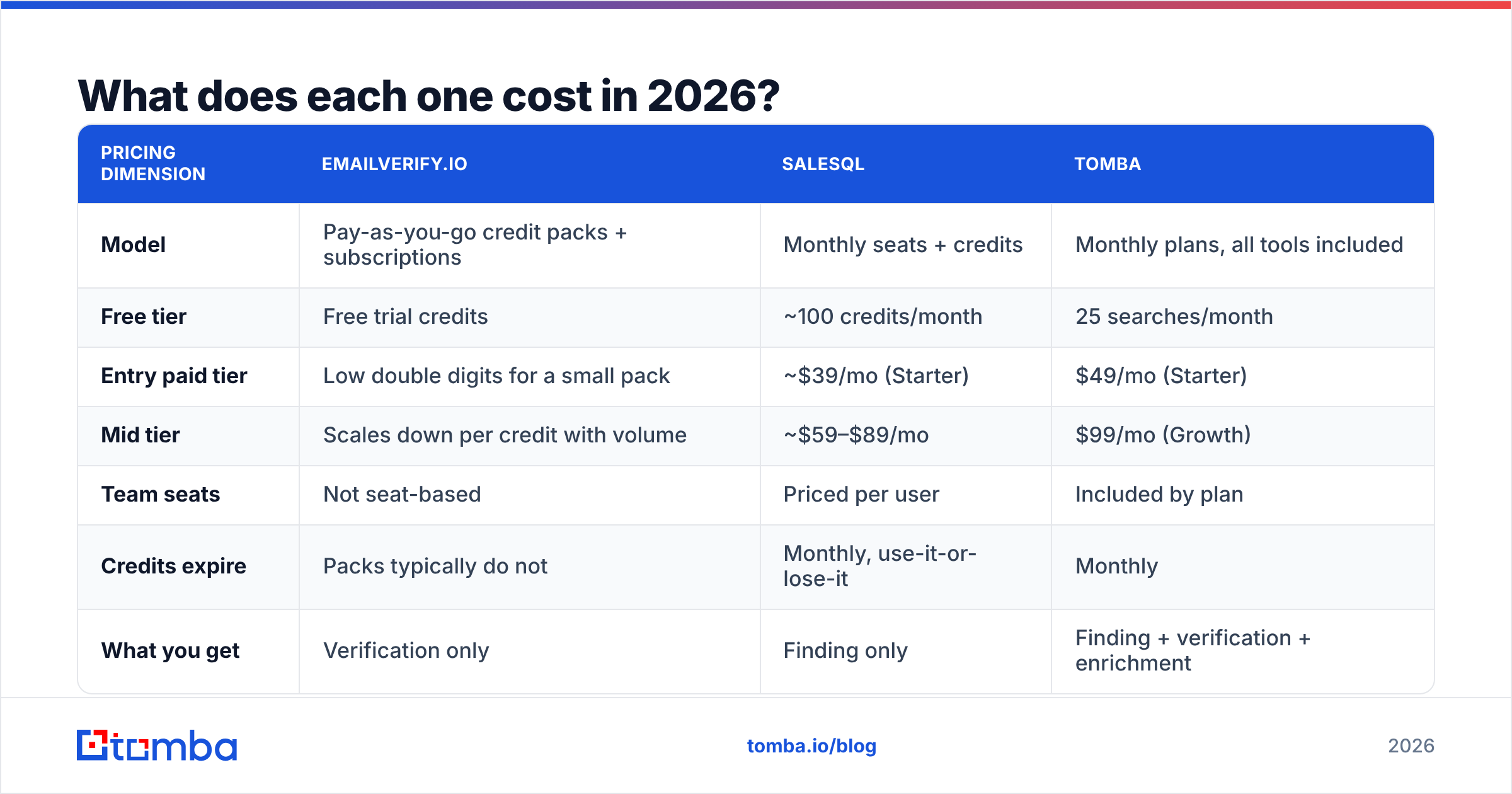
Both vendors change prices often. Treat these as shapes, not quotes, and check the live pages first.
| Pricing dimension | Emailverify.io | SalesQL | Tomba |
|---|---|---|---|
| Model | Pay-as-you-go credit packs + subscriptions | Monthly seats + credits | Monthly plans, all tools included |
| Free tier | Free trial credits | ~100 credits/month | 25 searches/month |
| Entry paid tier | Low double digits for a small pack | ~$39/mo (Starter) | $49/mo (Starter) |
| Mid tier | Scales down per credit with volume | ~$59–$89/mo | $99/mo (Growth) |
| Team seats | Not seat-based | Priced per user | Included by plan |
| Credits expire | Packs typically do not | Monthly, use-it-or-lose-it | Monthly |
| What you get | Verification only | Finding only | Finding + verification + enrichment |
The economics matter more than the sticker price. SalesQL credits reset monthly and never roll over. That punishes lumpy prospecting — you build a 3,000-contact list in week one of a quarter, then barely touch the tool for six weeks. Emailverify.io's pay-as-you-go packs suit that pattern. Buy 10,000 credits, spend them over three months, top up when they run out.
Stack both tools and you are looking at roughly $50–$100 a month. Add the daily tax of exporting from one and importing into the other.
Compare that with a single platform. Tomba pricing starts at $49/mo for Starter and $99/mo for Growth. The finder, verifier, domain search, catch-all checks, phone finder, and enrichment share one credit pool and one API key. Many teams buy two tools for one reason: the finder's data is not safe enough to send to. For them, collapsing the stack is cheaper and less error-prone.

Which should you pick for your workflow?#
Match the tool to the way your list gets built.
- You live in Sales Navigator. Your ICP is a set of LinkedIn filters, and you enrich profile by profile. SalesQL wins outright. Emailverify.io has nothing to offer until you hold addresses. A LinkedIn finder is worth a look if you want the same credits to work outside LinkedIn too.
- You inherited a database. A CRM with 40,000 stale contacts, a bought list, a five-year-old newsletter file. Emailverify.io is the right buy, and SalesQL is beside the point. Run the whole file, drop undeliverables, hold risky ones back, and re-check every quarter.
- You prospect by company, not by person. You have a target account list and need everyone in marketing at each domain. Neither tool fits. That is a domain search job: you give a domain and get back the team's addresses with confidence scores.
The next three cases point the same way — toward one pipeline instead of two.
- You run high-volume cold email. You need finding and verification in one pipeline, at API speed. Bounce protection has to be a hard gate before anything hits your sequencer. One platform beats a two-vendor handoff, because every CSV export is a chance to mail a list nobody re-checked.
- You need phones as well as emails. SalesQL covers this. Emailverify.io does not. If dialling is core, weigh SalesQL against a phone finder with a validator attached.
- You buy data in bulk. Providers like BookYourData sell pre-built, pre-verified B2B lists. That is a fair shortcut when you need volume fast. Still verify at send time, just as you would with scraped data.

Is the two-tool stack worth the friction?#
Sometimes. Be honest about the cost.
The friction is real. Two logins, two billing cycles, two support queues, two sets of credit rules. Then a manual export-import loop where field mapping breaks in silence. Under deadline pressure, teams skip the verify step. That defeats the point of buying a verifier. The stack only works when verification is automated, API to API, not human to CSV.
The upside is focus. A tool that does nothing but verify tends to handle edge cases better. Think greylisting servers, temporary SMTP failures, weekly disposable-domain updates, and role-account nuance. If you send hundreds of thousands of emails a month, your domain reputation is a company asset. That depth can justify a standalone verifier next to any finder.
For everyone else, the maths flips. Most teams send 1,000 to 20,000 emails a month. For them the focus premium is theory and the friction is daily. Reviews on G2 show the same buyer pattern again and again. Teams start with best-of-breed point tools, then move to fewer platforms as their process matures. Rarely the other way around.
Three questions settle it:
- Do you already have a finder you trust? If yes, add a verifier. If no, buy a platform that does both.
- Can you automate the handoff? If verification needs a human to remember, it will not happen at volume.
- What is a bounced send worth? Below 5,000 sends a month, your reputation is cheap to protect either way. Above that, a slide into the spam folder dwarfs the price gap.
What are the strongest alternatives to both?#
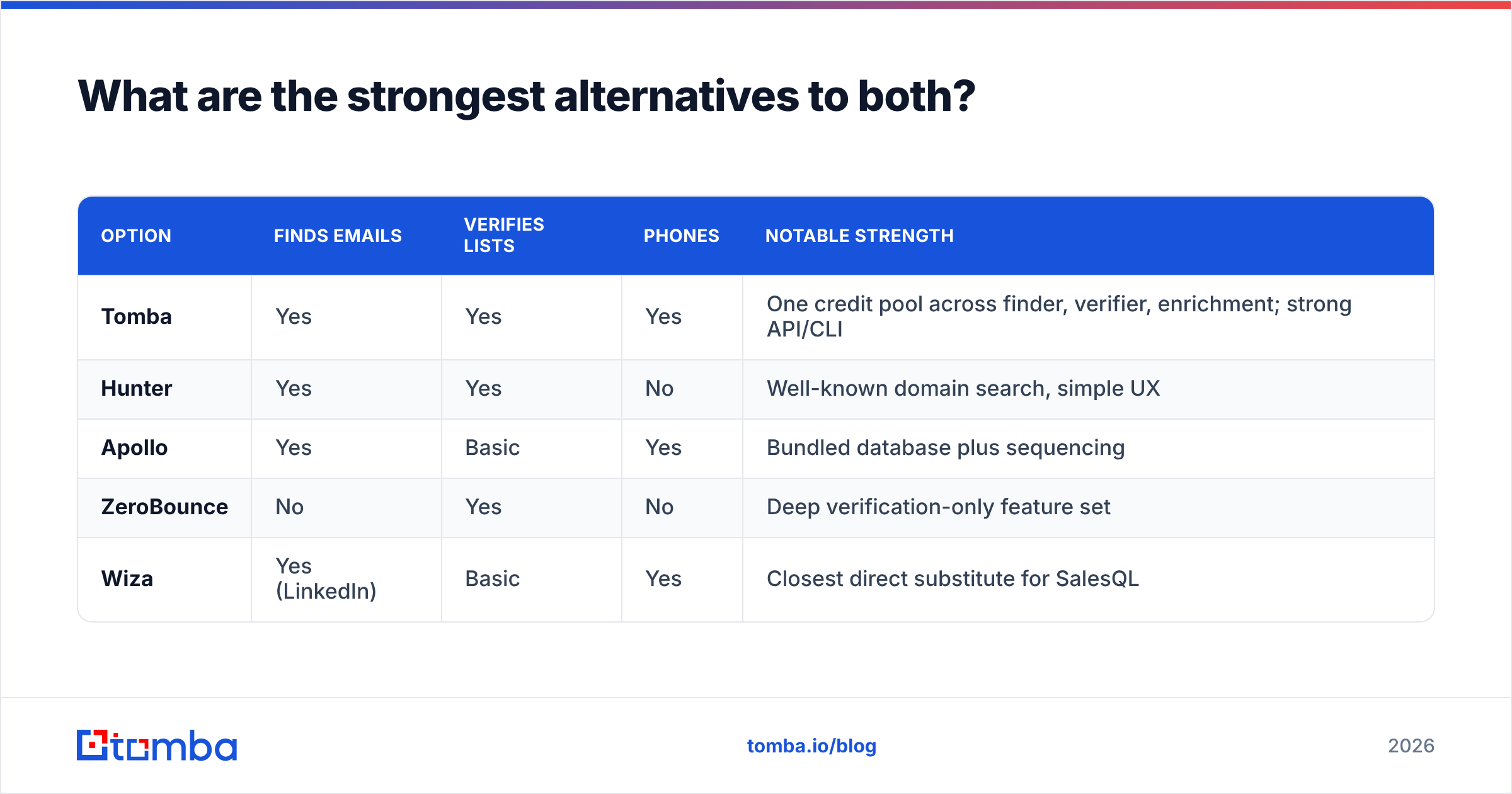
If neither tool covers your whole workflow, the shortlist looks like this.
| Option | Finds emails | Verifies lists | Phones | Notable strength |
|---|---|---|---|---|
| Tomba | Yes | Yes | Yes | One credit pool across finder, verifier, enrichment; strong API/CLI |
| Hunter | Yes | Yes | No | Well-known domain search, simple UX |
| Apollo | Yes | Basic | Yes | Bundled database plus sequencing |
| ZeroBounce | No | Yes | No | Deep verification-only feature set |
| Wiza | Yes (LinkedIn) | Basic | Yes | Closest direct substitute for SalesQL |
Wiza is the nearest swap if SalesQL coverage lets you down in one region. ZeroBounce is the nearest swap if Emailverify.io returns too many unknowns on your data. The ZeroBounce alternative breakdown shows how the verify-only vendors differ on catch-all handling.
Some teams would rather not run a two-vendor pipeline at all. The consolidation route is simple. Find the contact, verify it in the same call, push it to your CRM, and never export a CSV. That is what the Tomba API and its bulk endpoints are built for. It removes the most common point of failure in a SalesQL-plus-verifier setup: the step a human forgets.
The verdict#
SalesQL if you prospect on LinkedIn. Emailverify.io if you are cleaning a list you already own. Neither, if you need both jobs done in one place.
Most people weighing Emailverify.io vs SalesQL are trying to solve one problem: "I need contacts I can safely email." Then they find it takes two products. That is fixable, and paying two vendors is not the only fix.
Start with the Tomba Email Finder. Find the address, verify it in the same request, and skip the CSV handoff. The free tier gives you 25 searches a month, so you can test coverage on your own ICP first. Starter runs $49/mo with the verifier, domain search, and enrichment included. Run 50 real target accounts through it, compare the hit rate with SalesQL and Emailverify.io, and let your own data pick the winner.
Related guides#
Ready to find emails that actually work?
Join 150,000+ professionals who stopped guessing and started sending. Free credits on signup — no credit card required.
Get the Tomba newsletter
Practical outbound tactics and product updates — once every two weeks.
About the author