Emelia Pros and Cons in 2026: An Honest Review for Cold Email Teams
Emelia is one of the cheapest ways to run cold email and LinkedIn sequences from one place — but the savings come with real trade-offs. Here is an unsentimental look at where it wins, where it breaks, and what to pair it with.
Emelia is cheap, simple, and aimed at small teams. This review lays out the Emelia pros and cons in plain terms, so you can decide fast.
TL;DR
- Emelia is a low-cost, all-in-one cold email and LinkedIn tool built in France. It targets solo founders, freelancers, and small agencies who want sequences without an enterprise contract.
- The strongest pros: low price, unlimited sending accounts on most plans, a simple UI, native LinkedIn steps, and a clean API for scripting campaigns.
- The real cons: a thin data layer, reporting that stops at surface metrics, fewer integrations than Instantly or Lemlist, and a small support bench.
- The built-in email finder is handy, not authoritative. If you send at any volume, run your list through a dedicated finder and verifier first.
- Best fit: teams sending 1,000–20,000 emails a month. You trade deep analytics and CRM depth for price and simplicity.
What is Emelia and who is it actually built for?#
Emelia is a cold outreach platform. It bundles email sequencing, LinkedIn automation, a lead database, and a light email finder into one subscription. You connect sending mailboxes (Gmail, Outlook, or any SMTP/IMAP provider). Then you import a list, build a multi-step drip campaign, and let it run. The product sits beside Instantly, Lemlist, Smartlead, and Saleshandy. It prices itself under all of them.
The company is French, and that shows in two ways. First, GDPR posture is taken seriously. Data residency and processing terms are clearer than with several US rivals. Second, the English docs and community content lag behind the French originals. If you learn tools from forum threads and third-party tutorials, you will find fewer of them for Emelia than for Instantly.
The honest profile of an Emelia customer looks like this:
- Solo founder doing founder-led sales. Needs 200 sends a week and one or two mailboxes. Nobody in finance is checking the line item.
- Freelance lead-gen consultant. Runs campaigns for three to eight clients. Needs workspace separation and a predictable monthly cost.
- Small agency under 10 seats. Wants unlimited mailboxes without per-inbox billing. That is where rivals get expensive fast.
- Technical operator. Wants an API and webhooks, so campaigns can be built from a script instead of clicked in a UI.
- LinkedIn-plus-email sender. Wants connection requests and messages in the same sequence as email, without a second product.
If none of those fit, Emelia will feel undersized within a quarter. That is the case for a 15-person SDR team with Salesforce as the source of truth and a RevOps lead who wants attribution by sequence step.
What are Emelia's biggest pros?#
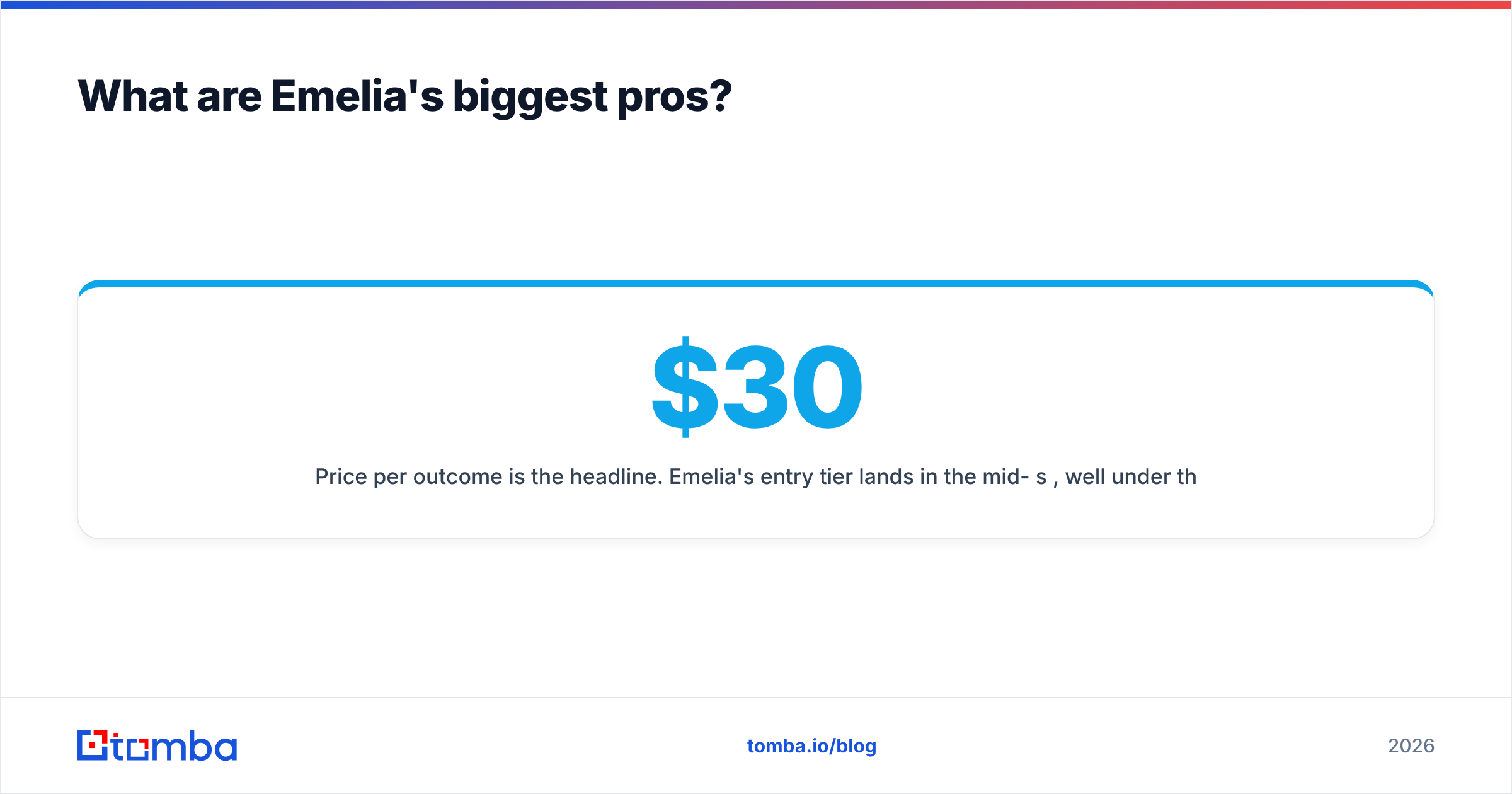
Price per outcome is the headline. The entry tier lands in the mid-$30s per month. Most rivals charge $60–$100 for a similar feature set. For a solo operator, that gap is the whole tooling budget.
Unlimited sending accounts on most plans. This is the quiet killer feature. Instantly and Smartlead price per inbox or per slot, so going from 3 mailboxes to 30 multiplies the bill. Emelia mostly decouples mailbox count from price. An agency running many domains is not punished for the setup that actually protects email deliverability.
The UI does not fight you. Campaign creation is four screens, not fourteen. Variables are plain-text placeholders. The sequence builder shows the whole flow on one canvas. For a tool you open twice a week, that ease is worth real money.
Native LinkedIn steps. You can mix "send connection request → wait 2 days → send LinkedIn message → wait 3 days → send email" in one sequence. Lemlist does this well too. Most cheaper tools do not do it at all. If your motion is truly multichannel, this removes a second subscription and a sync headache.
A usable API and webhooks. Emelia exposes endpoints for contacts, campaigns, and events. That matters more than it sounds. You can push verified leads from your enrichment pipeline straight into a campaign, with no CSV round trip. Pair it with a bulk email finder run, and the list-to-send loop becomes one cron job.
Unified inbox and reply detection. Replies land in one place. Campaigns pause on reply, and bounce handling is automatic. Table stakes in 2026, but done cleanly.

Where does Emelia fall short?#
The data layer is the weakest link. Emelia includes a lead database and an email finder. Both are fine for spot checks. Neither matches providers whose whole business is contact data. Coverage on non-US domains, catch-all handling, and role-based filtering are all shallower. This is not a scandal. It is what happens when a sequencer bolts on enrichment as a feature.
Reporting stops at the surface. You get sends, opens, clicks, replies, and bounces per campaign. You do not get step-level cohort analysis, reply sentiment, per-mailbox reputation trends, or A/B significance testing. So you cannot tell whether a 1.4-point lift is real. If your process is "test hard, kill losers on data," you will hit the ceiling.
The integration ecosystem is small. There is Zapier, Make, and the API. Native CRM sync is not on par with the bigger platforms. You will not get a reply that writes an activity to the right Salesforce or HubSpot record with the right owner. You will build glue instead. Compare that to a stack where HubSpot integration is a checkbox.
Warmup is an add-on, not a philosophy. Emelia offers warmup. But deliverability is not the center of the product, as it is at Instantly or Smartlead. There is no deep inbox-placement testing, no per-provider seed-list reporting, and no automatic ramp curve. You still check your own SPF record, DKIM, and DMARC by hand.
Support is fast but thin. Response times are good. The knowledge base is not deep. Complex edge cases often end in "we'll pass it to the team." A small company means real humans. It also means a smaller bench.
Occasional rough edges. Users report CSV import quirks with unusual encodings. LinkedIn automation carries the same platform risk it carries everywhere. LinkedIn changes its detection, tools adapt, and there is a lag. Treat any LinkedIn automation as fragile, whatever the vendor.
How does Emelia compare to other cold email platforms?#
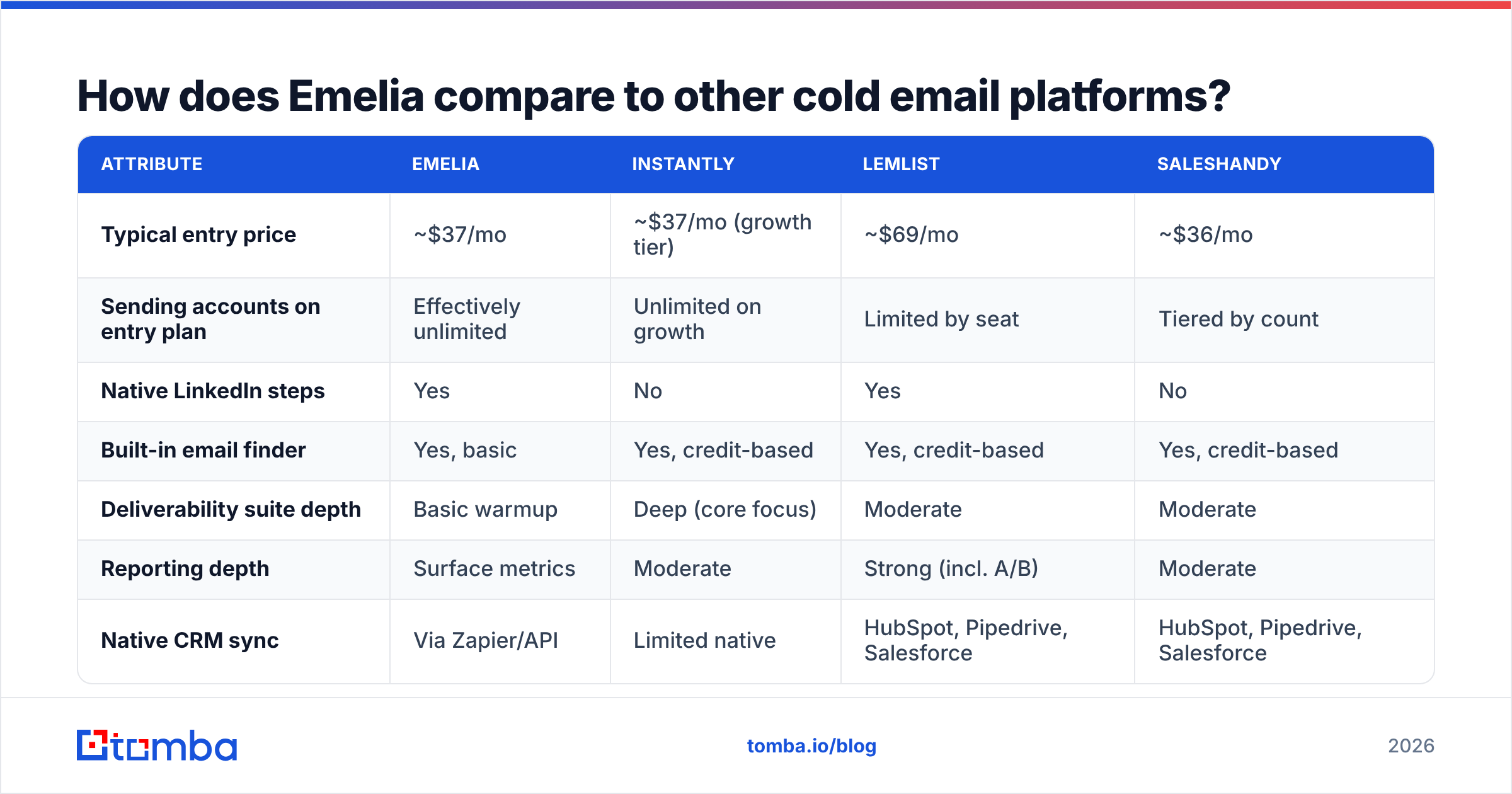
| Attribute | Emelia | Instantly | Lemlist | Saleshandy |
|---|---|---|---|---|
| Typical entry price | ~$37/mo | ~$37/mo (growth tier) | ~$69/mo | ~$36/mo |
| Sending accounts on entry plan | Effectively unlimited | Unlimited on growth | Limited by seat | Tiered by count |
| Native LinkedIn steps | Yes | No | Yes | No |
| Built-in email finder | Yes, basic | Yes, credit-based | Yes, credit-based | Yes, credit-based |
| Deliverability suite depth | Basic warmup | Deep (core focus) | Moderate | Moderate |
| Reporting depth | Surface metrics | Moderate | Strong (incl. A/B) | Moderate |
| Native CRM sync | Via Zapier/API | Limited native | HubSpot, Pipedrive, Salesforce | HubSpot, Pipedrive, Salesforce |
| API quality | Good, documented | Good | Good | Good |
| Best for | Price-sensitive solos and small agencies | High-volume senders | Multichannel personalization | Teams wanting CRM sync cheaply |
Prices move. Check current numbers on each vendor's own page before you budget. The structural gaps stay true across price updates: LinkedIn steps, the mailbox pricing model, and deliverability depth.
Read the table as three bets. Instantly bets that deliverability is the bottleneck. Lemlist bets that personalization is. Emelia bets on cost and simplicity. All three bets work for some teams. None of them is a bet on data quality. That is why every one of these tools leaves the list to you.
What does Emelia actually cost — including the hidden parts?#
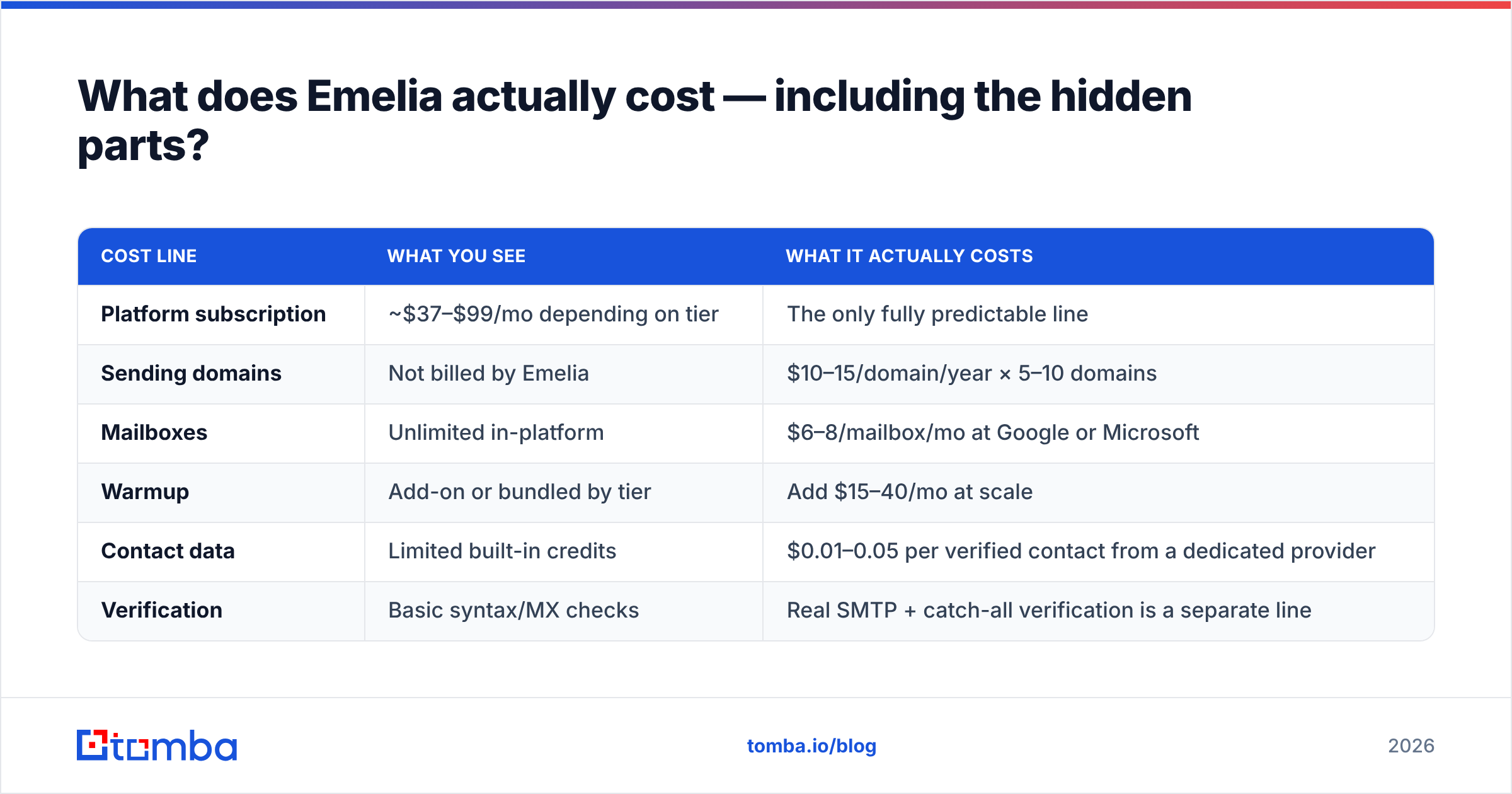
| Cost line | What you see | What it actually costs |
|---|---|---|
| Platform subscription | ~$37–$99/mo depending on tier | The only fully predictable line |
| Sending domains | Not billed by Emelia | $10–15/domain/year × 5–10 domains |
| Mailboxes | Unlimited in-platform | $6–8/mailbox/mo at Google or Microsoft |
| Warmup | Add-on or bundled by tier | Add $15–40/mo at scale |
| Contact data | Limited built-in credits | $0.01–0.05 per verified contact from a dedicated provider |
| Verification | Basic syntax/MX checks | Real SMTP + catch-all verification is a separate line |
The subscription is the cheapest part of running cold email. A three-mailbox, three-domain setup with warmup and real data costs $150–250 a month all-in. Emelia's share is under a quarter of that. So the right question is not "is $37 cheap?" It is "does that $37 line remove work from the other lines?" It mostly does not. It does not add to them either.
Is Emelia's built-in email finder good enough?#
For a quick check on a prospect you already know, yes. For building the list your whole quarter depends on, no. This is not an Emelia-specific knock. Bundled finders inside sequencers are convenience features. They index fewer sources, refresh less often, and rarely show the confidence signals you need before you send.
Three gaps show up in practice:
- Catch-all domains. Many B2B domains accept every address at the SMTP layer. A naive verifier then marks everything "valid." Without a dedicated catch-all verifier, you are guessing. Guess wrong and you burn the domain reputation you spent six weeks warming.
- Pattern guesses vs. confirmed sources. Guessing
first.last@domain.comis easy. Knowing the pattern is confirmed by several public sources for that company is what separates a 3% bounce rate from a 12% one. - Freshness. People change jobs all the time. A finder that refreshes quarterly hands you addresses that were right last spring.
The fix is boring and it works. Source and verify outside the sequencer, then push in only clean, confirmed contacts. Run a domain search to map the company. Pull individual addresses with a dedicated email finder. Gate everything through an email verifier before import. Emelia's API makes that handoff easy, which may be the best use of the API it has.

If you are weighing a full switch, the Emelia alternative comparison covers the data-first side of the decision in more detail.
Who should choose Emelia, and who should not?#
Choose Emelia if:
- You are cost-constrained and volume-modest. Under 20,000 sends a month, your budget will bind before the feature ceiling does.
- You run many mailboxes on few seats. The unlimited-accounts model pays off more with every domain you add.
- Email and LinkedIn are one motion for you. Both in one sequence builder, with no second subscription, is real value.
- You are technical. The API turns Emelia from a UI into a component you can automate around.
- GDPR posture matters to your buyers. A French vendor with clear EU processing is easier to clear with European procurement.
Choose something else if:
- Deliverability is your main bottleneck. If you already fight spam placement, buy the tool that treats deliverability as its product, not its add-on.
- Your CRM is the system of record. Zapier glue to keep Salesforce accurate is a tax you pay every week, forever.
- You optimize on data. Step-level analytics and honest A/B testing are not there.
- You need enterprise controls. SSO, granular roles, audit logs, and procurement-friendly contracts are not strengths here.
- You expect the tool to supply your leads. No sequencer should be your data vendor, and this one least of all.
What is the right stack around Emelia?#
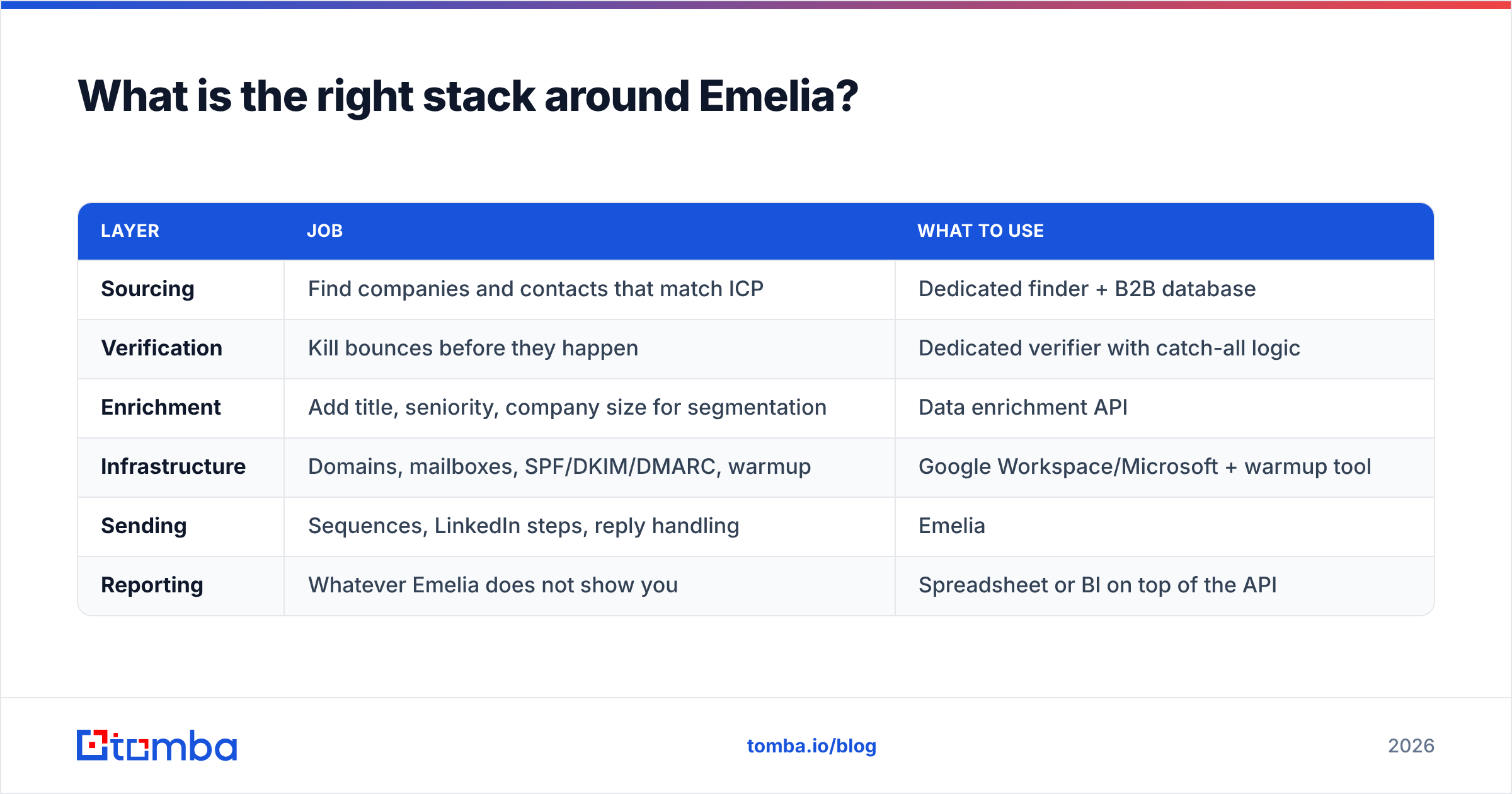
Treat Emelia as the sending layer and nothing more. A stack that works:
| Layer | Job | What to use |
|---|---|---|
| Sourcing | Find companies and contacts that match ICP | Dedicated finder + B2B database |
| Verification | Kill bounces before they happen | Dedicated verifier with catch-all logic |
| Enrichment | Add title, seniority, company size for segmentation | Data enrichment API |
| Infrastructure | Domains, mailboxes, SPF/DKIM/DMARC, warmup | Google Workspace/Microsoft + warmup tool |
| Sending | Sequences, LinkedIn steps, reply handling | Emelia |
| Reporting | Whatever Emelia does not show you | Spreadsheet or BI on top of the API |
Mature outbound teams all land on the same pattern. Keep the data problem separate from the sending problem. They fail in different ways, and they improve in different ways. A sequencer that is also weak at data does not save you a vendor. It only hides which half is underperforming.
For outside opinions, check current user reviews on G2 and the vendor's own docs at emelia.io. For a primer on how sequencing fits the wider discipline, HubSpot's sales resources are a solid neutral start.
What is the verdict on Emelia pros and cons?#
Emelia is a good tool that knows what it is. It sells price and simplicity, delivers both, and does not pretend to be an enterprise platform. The Emelia pros and cons are both concrete. Pros: cheap, unlimited mailboxes, LinkedIn built in, clean API, quick to learn. Cons: shallow data, shallow reporting, few integrations, deliverability as an afterthought.
The mistake is not choosing Emelia. The mistake is assuming the bundled finder solves your list problem. It does not. Reply rates in 2026 are decided by list quality first, offer second, copy third, and tooling a distant fourth. Emelia only touches the fourth.
Fix the first one before you send a single sequence. Build your list with the Tomba Email Finder. Verify every address, catch-all domains included. Then push the clean file into Emelia by API or CSV. Tomba's free tier gives you 25 searches a month to test coverage on your own target accounts. Paid plans start at $49/month — see Tomba pricing for the full breakdown. Run 100 of your real prospects through both finders, compare confirmed hits and bounce rates, and let your own data decide which layer belongs where.
Related guides#
Ready to find emails that actually work?
Join 150,000+ professionals who stopped guessing and started sending. Free credits on signup — no credit card required.
Get the Tomba newsletter
Practical outbound tactics and product updates — once every two weeks.
About the author