EngageBay vs HubSpot 2026: Pricing, Features, and Verdict
EngageBay undercuts HubSpot by roughly 10x on list price, but the gap is not just money. Here is where each platform actually wins, where it breaks, and which one fits your team size.
TL;DR
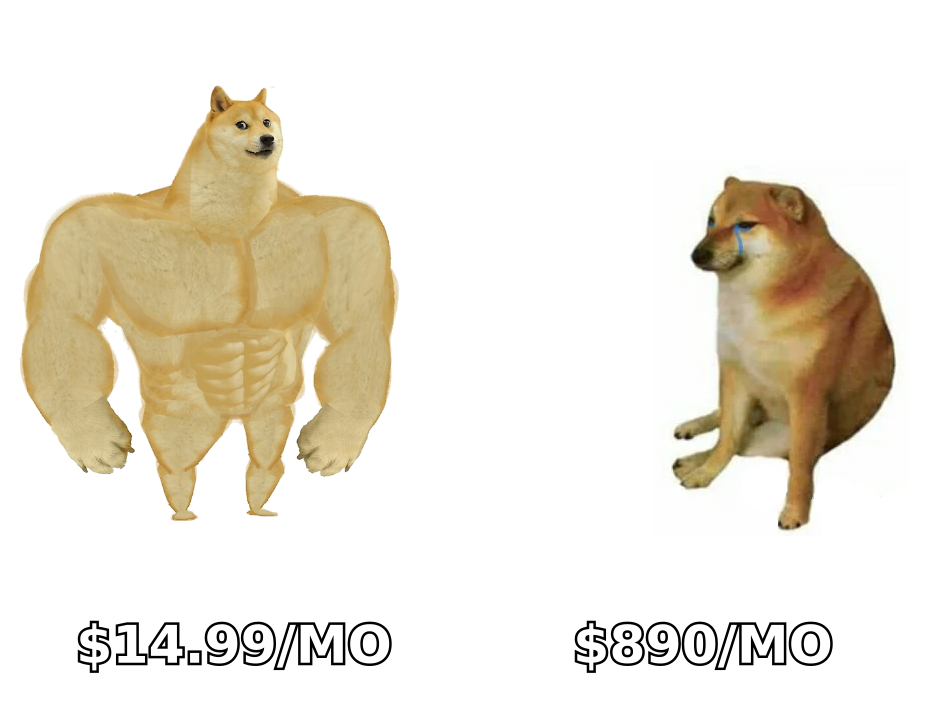
- Price gap is real and large. EngageBay's paid tiers start around $14.99/user/month; HubSpot's Marketing Hub Professional lists at roughly $890/month plus a one-time onboarding fee. For a 5-person team, that is a difference of thousands per year.
- HubSpot wins on depth, ecosystem, and reporting. Custom objects, revenue attribution, 1,700+ marketplace apps, and a partner network EngageBay cannot match.
- EngageBay wins on cost per feature. You get CRM, email marketing, landing pages, helpdesk, and live chat in one subscription instead of four separate Hubs.
- The real decision is team size and complexity. Under 10 seats with straightforward funnels, EngageBay is usually the rational pick. Multi-team GTM with attribution requirements, HubSpot.
- Neither platform finds contacts for you. Both are systems of record. You still need a separate email finder and verification layer to keep either database clean.
What are EngageBay and HubSpot?#
Think of it like buying a kitchen. HubSpot is a professional-grade modular kitchen: every appliance is best-in-class, everything integrates, and you pay per module. EngageBay is a well-built all-in-one unit that comes complete for one price. It does not have the same top-end capability, but nothing is missing on day one.
HubSpot launched in 2006 and effectively invented the inbound marketing category. Today it sells a "Customer Platform" split into Hubs: Marketing, Sales, Service, Content, Operations, and Commerce. You can buy a single Hub or bundle them. Free tiers exist for every Hub, and the free CRM is genuinely usable, which is how most companies enter the ecosystem.
EngageBay launched in 2017 with an explicit positioning: an affordable alternative to HubSpot for small businesses. It bundles marketing automation, a sales CRM, and a service desk into three suites (Marketing, CRM & Sales, Service) or one All-in-One plan. The product is deliberately modeled on HubSpot's structure, which makes migration conceptually simple even when the tooling is not.
The short version: same category, very different buyer. HubSpot sells to companies that will outgrow a spreadsheet stack. EngageBay sells to companies that refuse to pay HubSpot prices to escape one.
How do EngageBay and HubSpot compare feature by feature?#
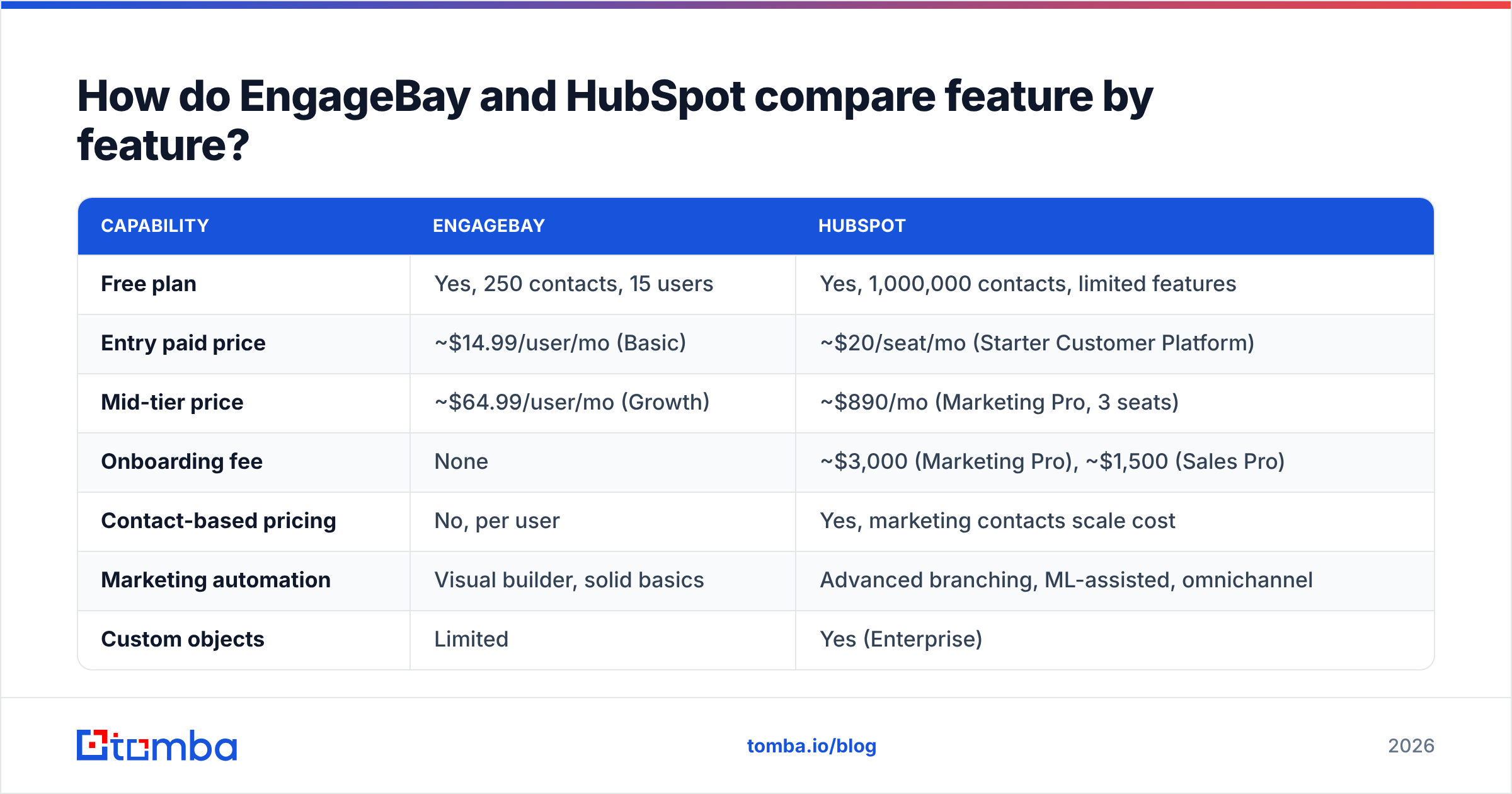
Here is the honest side-by-side. Prices reflect published list pricing at the time of writing; both vendors change tiers frequently, so verify on their pricing pages before you budget.
| Capability | EngageBay | HubSpot |
|---|---|---|
| Free plan | Yes, 250 contacts, 15 users | Yes, 1,000,000 contacts, limited features |
| Entry paid price | ~$14.99/user/mo (Basic) | ~$20/seat/mo (Starter Customer Platform) |
| Mid-tier price | ~$64.99/user/mo (Growth) | ~$890/mo (Marketing Pro, 3 seats) |
| Onboarding fee | None | ~$3,000 (Marketing Pro), ~$1,500 (Sales Pro) |
| Contact-based pricing | No, per user | Yes, marketing contacts scale cost |
| Marketing automation | Visual builder, solid basics | Advanced branching, ML-assisted, omnichannel |
| Custom objects | Limited | Yes (Enterprise) |
| Reporting/attribution | Standard dashboards | Multi-touch revenue attribution |
| App marketplace | ~30 integrations | 1,700+ apps |
| Native helpdesk | Included in All-in-One | Service Hub, priced separately |
| Landing pages / forms | Included | Included (Content Hub for advanced) |
| Sequences / cadences | Included in Growth | Sales Hub Pro and above |
| AI features | Basic AI copy assist | Breeze AI across Hubs |
| Support | Email/chat, 24/5 | Tiered; phone support on Pro+ |
| Learning resources | Docs, small community | HubSpot Academy, huge partner network |
Two rows deserve emphasis. The onboarding fee row is where HubSpot deals quietly inflate: a Marketing Pro contract that looks like $10,680/year is closer to $13,700 in year one. And the contact-based pricing row is the one that bites growing teams. HubSpot charges by marketing contacts, so a successful lead-gen quarter raises your bill automatically. EngageBay's per-user model is more predictable, though its contact caps per plan still apply.
What does each platform actually cost in 2026?#
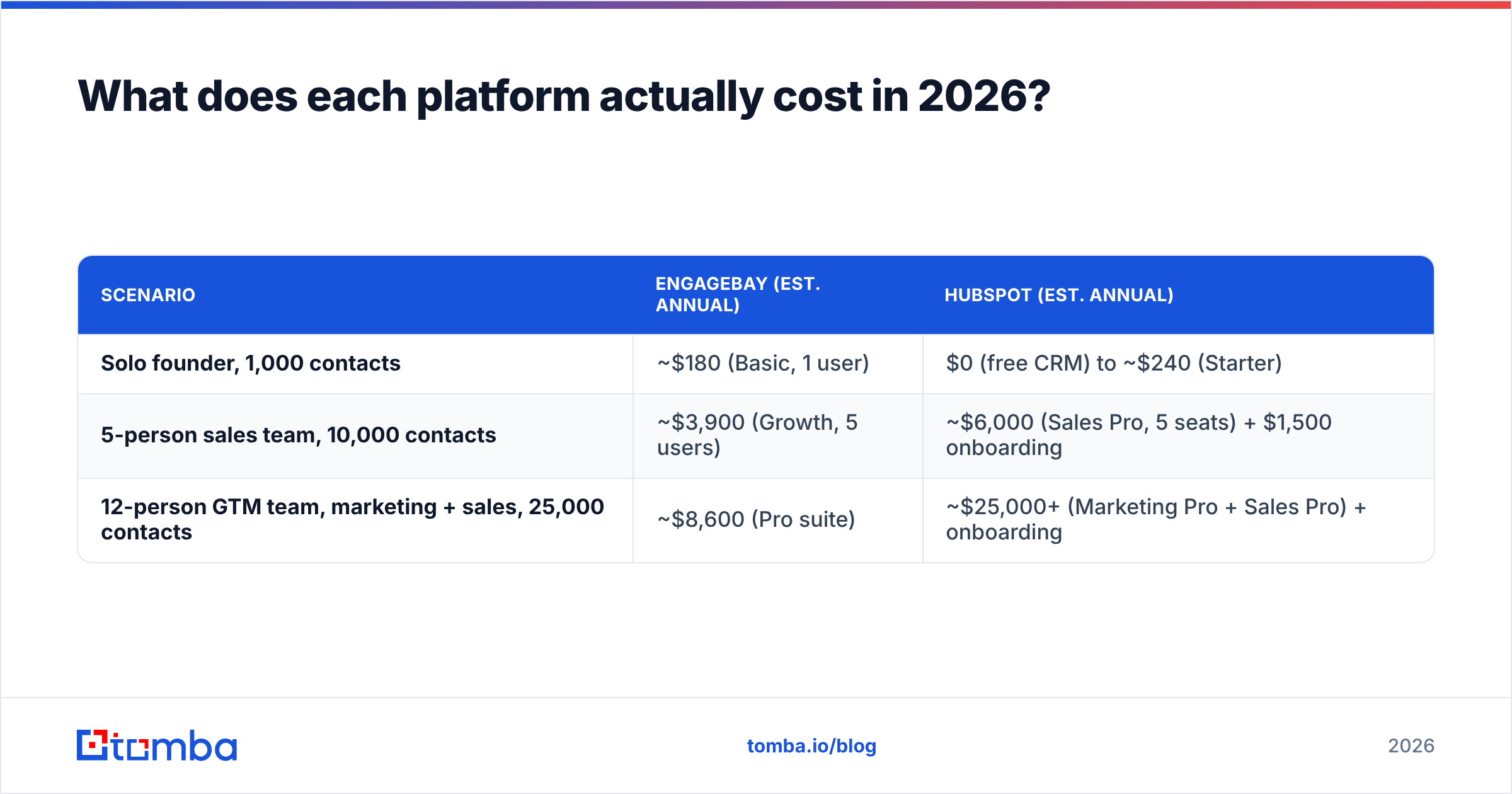
Cost comparisons only mean something at a specific team size. Here are three realistic scenarios, using list pricing and annual billing.
| Scenario | EngageBay (est. annual) | HubSpot (est. annual) |
|---|---|---|
| Solo founder, 1,000 contacts | ~$180 (Basic, 1 user) | $0 (free CRM) to ~$240 (Starter) |
| 5-person sales team, 10,000 contacts | ~$3,900 (Growth, 5 users) | ~$6,000 (Sales Pro, 5 seats) + $1,500 onboarding |
| 12-person GTM team, marketing + sales, 25,000 contacts | ~$8,600 (Pro suite) | ~$25,000+ (Marketing Pro + Sales Pro) + onboarding |
At one seat, HubSpot is arguably cheaper because its free CRM is unusually generous. The gap opens at the mid-tier and becomes a chasm when you need both marketing and sales functionality. That last row is where most comparison shoppers land, and it is why EngageBay exists.
What the table does not price: the cost of switching later. If you outgrow EngageBay at 40 employees, you will migrate to HubSpot or Salesforce anyway, and that migration costs real money in consulting hours and lost reporting history. Factor a possible re-platform into a 3-year view rather than comparing year-one invoices only.
Which one has better marketing automation?#
HubSpot, and it is not particularly close at the top end.
EngageBay's workflow builder handles the patterns most SMBs need: form submission triggers, drip sequences, lead scoring rules, tag-based branching, and time delays. If your automation logic fits on a whiteboard, EngageBay will run it.
HubSpot handles the cases that do not fit on a whiteboard. Enterprise-grade branching with dozens of conditions, workflows that write to custom objects, programmable automation via custom-coded actions, omnichannel orchestration across ads and SMS, and reporting that ties a closed deal back to the specific blog post that started it. Multi-touch attribution alone justifies the price for companies whose CAC math depends on channel-level truth.
Where the difference shows up practically:
- Data model. HubSpot's custom objects let you model subscriptions, properties, shipments, or anything else your business actually sells. EngageBay is contact-deal-company only.
- Reporting ceiling. EngageBay dashboards answer "how did this campaign do." HubSpot answers "which channel produced pipeline that closed at above-average ACV."
- Deliverability tooling. HubSpot gives you dedicated IP options, suppression management, and detailed bounce diagnostics. EngageBay's tooling is thinner, which makes your own list hygiene more important. If you are sending cold, read up on email deliverability before you blame either platform.
- Ecosystem. When you need a niche integration, HubSpot's marketplace almost certainly has it. With EngageBay, you will be writing a Zapier workflow or an API call.
Which one has the better sales CRM?#
Closer race, and the answer depends on whether your reps live in the CRM or in their inbox.
EngageBay's CRM covers pipelines, deal stages, task management, call logging, appointment scheduling, and email sequences. For a team of five running a single pipeline, it is genuinely sufficient. The UI is dated compared to HubSpot's, and bulk operations feel slower, but nothing blocks the job.
HubSpot's Sales Hub is a better daily driver. The Gmail and Outlook extensions are excellent, sequence enrollment is one click, meeting links are polished, and the deal board handles complex multi-pipeline setups without complaint. Sales Hub Professional adds forecasting, playbooks, and sequence-level analytics that most SMB tools do not attempt.
The catch: Sales Hub Professional is ~$100/seat/month. Ten reps is $12,000/year before you add marketing. That is the entire annual EngageBay budget for the same team, twice over.
Where does each platform break down?#
Every comparison post that reports no downsides is selling something. Here is where each one frustrates users, based on patterns visible in public reviews on G2 and Capterra.
EngageBay's weak points:
- Email editor quirks. The drag-and-drop builder is functional but less forgiving than HubSpot's; complex templates take longer to build.
- Reporting depth. Fine for campaign-level metrics, thin for revenue attribution or cohort analysis.
- Integration gaps. If your stack includes anything unusual, expect to build the connector yourself.
- Support at scale. Response times are good for the price, but there is no partner ecosystem to call when something complex breaks.
HubSpot's weak points:
- Price escalation. The jump from Starter to Professional is severe, and marketing-contact pricing means growth increases cost.
- Contract rigidity. Annual commitments are standard, and downgrading mid-term is generally not possible.
- Onboarding fees. Non-negotiable on most Professional and Enterprise deals unless you have leverage.
- Feature gating. Capabilities you assume are standard, such as sequences or custom reporting, sit behind specific Hub tiers, so "we have HubSpot" does not mean you have the feature you read about.
Who should pick EngageBay and who should pick HubSpot?#
Use these as decision rules rather than preferences.
- Pick EngageBay if you have fewer than 15 employees and one pipeline. The feature ceiling is above your needs and the price is a fraction.
- Pick EngageBay if budget predictability matters more than capability. Per-user pricing does not spike when a campaign performs well.
- Pick HubSpot if marketing and sales must share one attribution model. No affordable alternative does closed-loop reporting as well.
- Pick HubSpot if you expect to raise funding or scale headcount quickly. Migrating a CRM during hypergrowth is a painful, avoidable tax.
- Pick HubSpot if you need a specific integration or a certified partner. The ecosystem is the product as much as the software is.
- Pick neither if your only real need is email marketing. A dedicated ESP will cost less and do that one job better.
A middle path exists that many teams miss: start on HubSpot's free CRM, run marketing through a cheaper tool, and only buy a paid Hub when a specific gate blocks revenue. That defers the price cliff without locking you into a platform you will outgrow in the other direction.
How do you keep either CRM filled with usable contact data?#
This is the part both vendors gloss over. HubSpot and EngageBay are systems of record, not systems of acquisition. Neither one finds you new prospects. Both will happily store bad data and charge you for the privilege, and in HubSpot's case, bad marketing contacts inflate your bill directly.
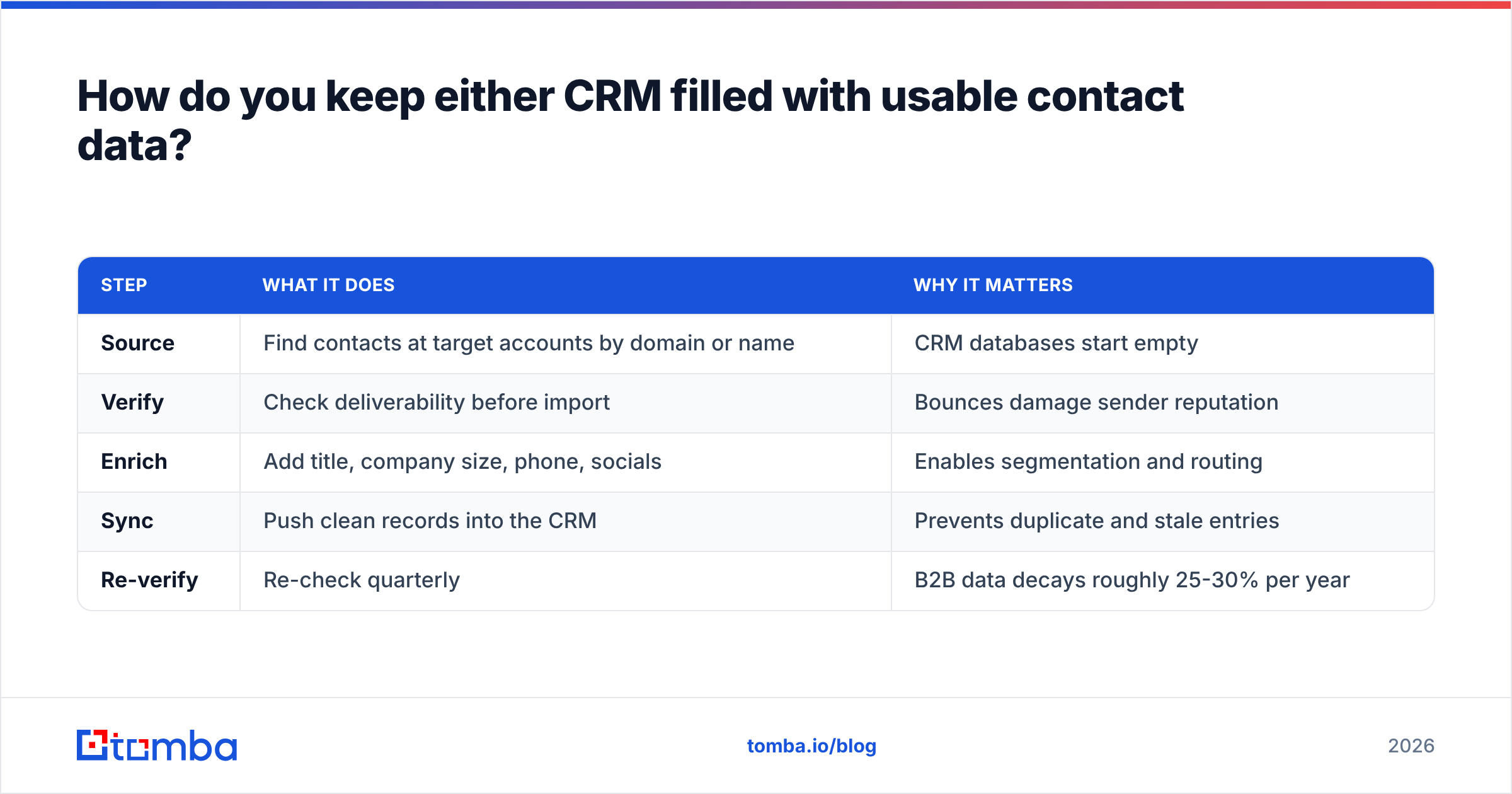
A workable data layer around either CRM looks like this:
| Step | What it does | Why it matters |
|---|---|---|
| Source | Find contacts at target accounts by domain or name | CRM databases start empty |
| Verify | Check deliverability before import | Bounces damage sender reputation |
| Enrich | Add title, company size, phone, socials | Enables segmentation and routing |
| Sync | Push clean records into the CRM | Prevents duplicate and stale entries |
| Re-verify | Re-check quarterly | B2B data decays roughly 25-30% per year |
For sourcing, a domain search pulls the addressable contacts at a target company, and a bulk email finder handles account lists at scale. For hygiene, run every list through an email verifier before it touches your CRM, especially on HubSpot where the contact count is billable. And if you are already on HubSpot, the HubSpot integration pushes verified records straight into the right properties instead of via CSV round-trips.
Skipping this step is the most common reason a CRM evaluation goes wrong. Teams blame the platform for weak results when the actual problem is a contact list with a 22% bounce rate and half the job titles missing.
What is the verdict on EngageBay vs HubSpot?#
EngageBay is the better value; HubSpot is the better platform. Those are not contradictory statements.
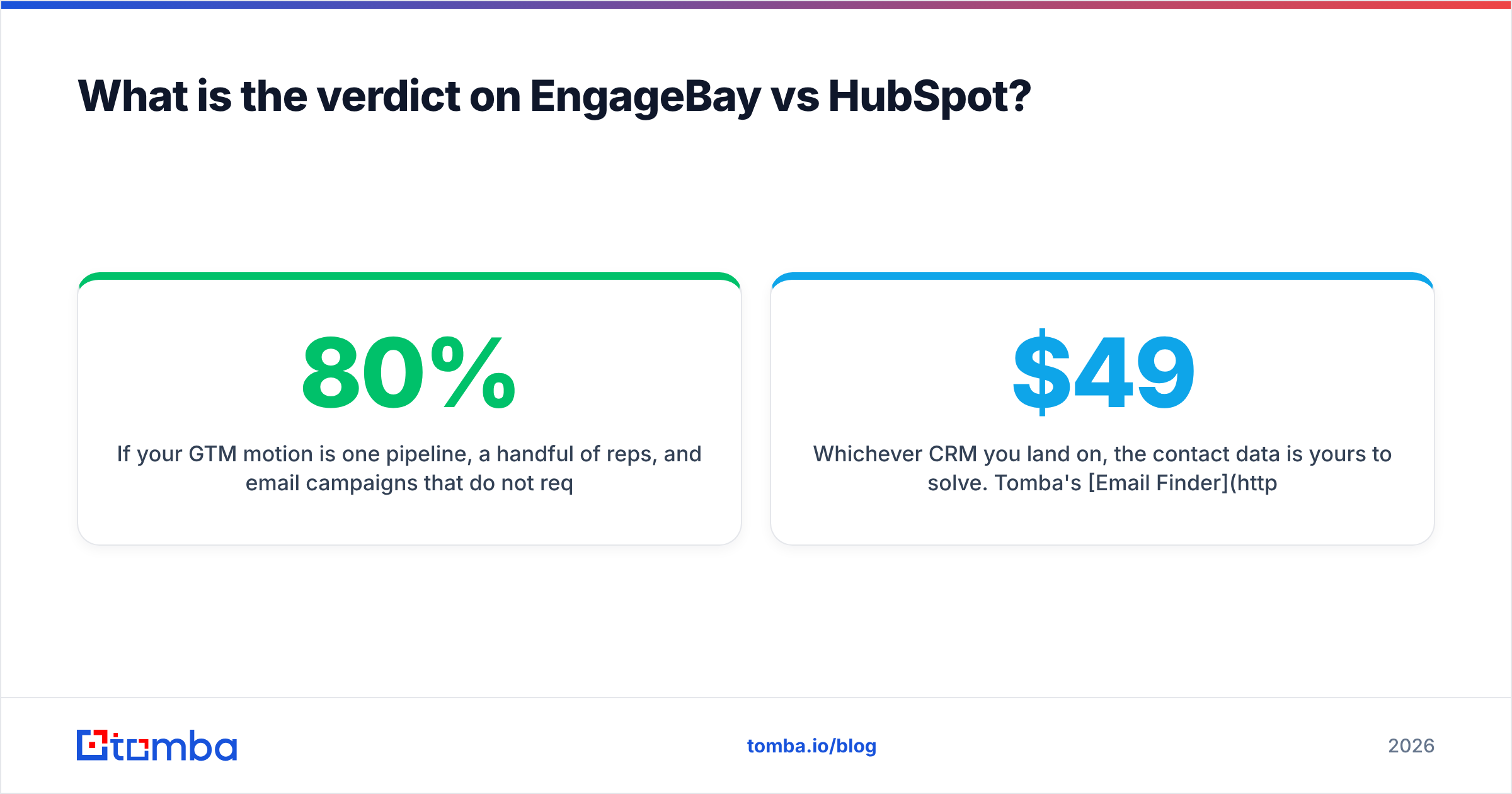
If your GTM motion is one pipeline, a handful of reps, and email campaigns that do not require attribution modeling, EngageBay delivers 80% of HubSpot's practical utility for roughly 10% of the cost. That is a defensible business decision, not a compromise.
If you are running coordinated marketing and sales motions, need custom objects, or have a board asking channel-level CAC questions, HubSpot's price becomes justifiable and EngageBay's ceiling becomes a real constraint. Buying the cheaper tool and then migrating in 18 months costs more than starting correctly.
Test both. HubSpot's free CRM and EngageBay's free plan both let you import 250 real contacts and run an actual campaign, which tells you more in a week than any comparison table will.
Whichever CRM you land on, the contact data is yours to solve. Tomba's Email Finder locates verified professional addresses by domain, name, or company, and pushes them into your stack via API, Chrome extension, or Sheets. The free tier covers 25 searches a month, paid plans start at $49/month, and full Tomba pricing is public. Fill the CRM you chose with contacts that actually receive your emails.
Related guides#
Ready to find emails that actually work?
Join 150,000+ professionals who stopped guessing and started sending. Free credits on signup — no credit card required.
Get the Tomba newsletter
Practical outbound tactics and product updates — once every two weeks.
About the author