Enrichley vs Leadsforge: Which B2B Data Tool Wins in 2026?
Enrichley and Leadsforge both promise verified B2B contact data. We break down match rates, credit math, catch-all handling and export limits so you know which one survives contact with a real outbound list.
Enrichley vs Leadsforge is a fair fight on paper. Both sell verified B2B contact data. This guide compares match rates, credit math, catch-all handling and export limits, so you can pick the one that holds up on a real outbound list.
TL;DR
Enrichley vs Leadsforge is a choice between two newer B2B contact-data tools. Both promise verified work emails at scale. The real gap is credit accounting, catch-all handling, and what happens when a lookup fails.
Enrichley leans enrichment-first. You bring a list of companies or LinkedIn URLs, and it fills the gaps. Leadsforge leans prospecting-first. You describe an ICP, and it builds the list for you.
The number that matters is not "database size." It is cost per verified, deliverable contact. A 70% match rate at $0.04/credit beats a 90% claimed rate at $0.12 if a third of that 90% bounces.
Neither vendor publishes an audited accuracy figure. Treat marketing match rates as unproven until you run your own 500-row test.
If you mainly need email discovery and verification without seat minimums, a focused email finder like Tomba (free tier, then $49/mo) is usually cheaper than either entry plan.
What are Enrichley and Leadsforge?#
Both tools sit in the same category — lead intelligence and contact enrichment — but they solve the problem from opposite ends.
Enrichley is built around the enrichment workflow. You already have something: a CRM export, a list of domains, a webinar signup sheet, a set of scraped LinkedIn profiles. Its job is to take that partial record and add a work email, a job title, a company size, sometimes a direct dial. Its value shows up in fill rate — how many of your existing rows come back complete.
Leadsforge is built around list building. You describe an ideal customer profile — "Series B SaaS companies in DACH, 50–200 employees, VP Marketing or above" — and it returns contacts from its own database. Its value shows up in coverage — how many matching records exist, and how stale they are.
That difference sounds academic until the bill arrives. Enrichment pricing punishes low fill rates, because you often pay for attempts. List-building pricing punishes broad ICPs, because you pull thousands of records you never contact. Buy the wrong shape of tool and you burn budget before you send a single email.
One more honest note: neither is a household name. Unlike Apollo, ZoomInfo, or Clearbit, you will not find years of third-party benchmark data on either. Check current claims on G2's lead intelligence category and Capterra before you sign anything annual. Then run your own sample.

Enrichley vs Leadsforge: how do they compare head to head?#
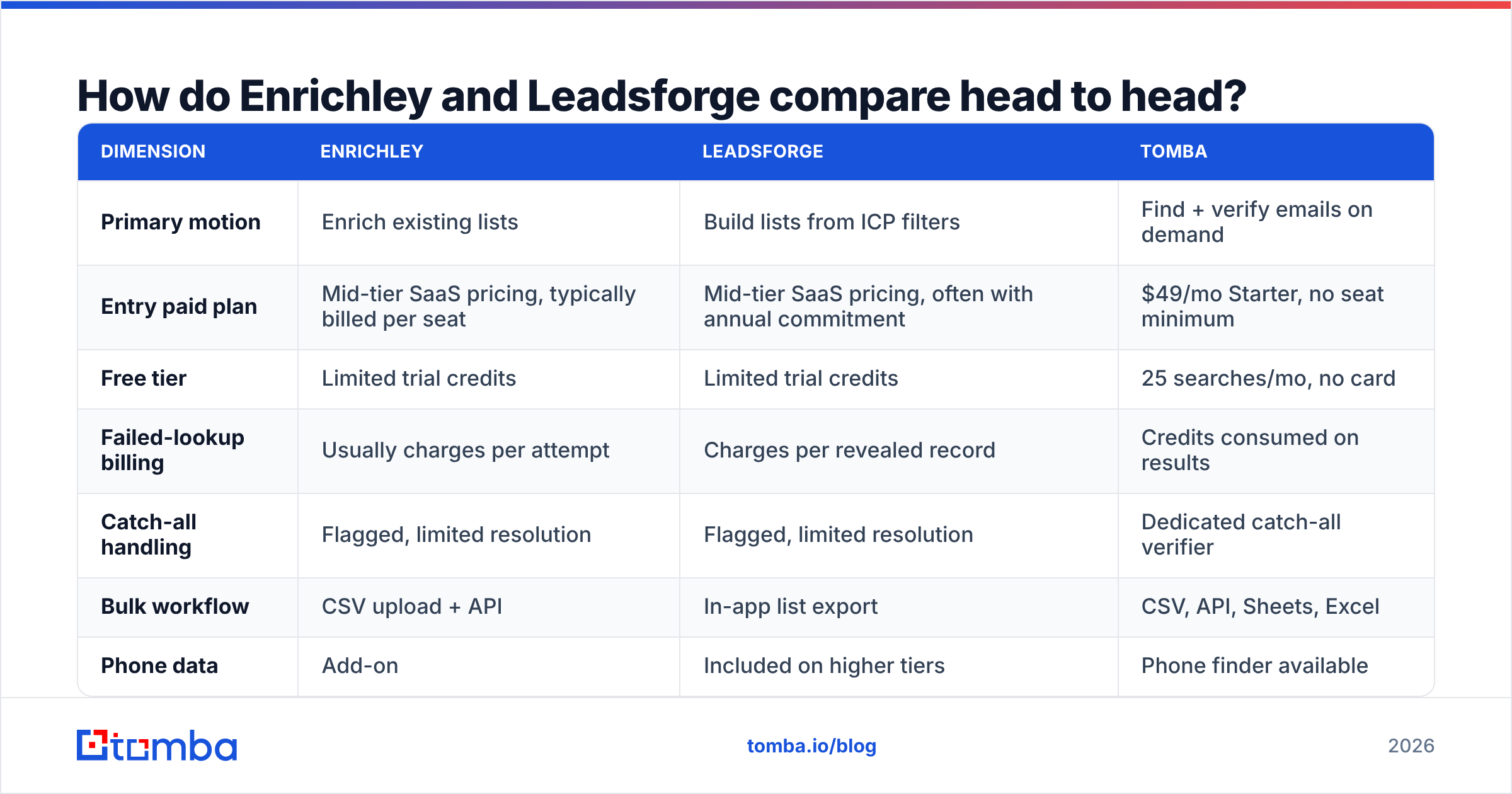
Here is the practical comparison, built on the axes that change your cost per meeting. Where a vendor does not publish a number, we say so instead of guessing.
| Dimension | Enrichley | Leadsforge | Tomba |
|---|---|---|---|
| Primary motion | Enrich existing lists | Build lists from ICP filters | Find + verify emails on demand |
| Entry paid plan | Mid-tier SaaS pricing, typically billed per seat | Mid-tier SaaS pricing, often with annual commitment | $49/mo Starter, no seat minimum |
| Free tier | Limited trial credits | Limited trial credits | 25 searches/mo, no card |
| Failed-lookup billing | Usually charges per attempt | Charges per revealed record | Credits consumed on results |
| Catch-all handling | Flagged, limited resolution | Flagged, limited resolution | Dedicated catch-all verifier |
| Bulk workflow | CSV upload + API | In-app list export | CSV, API, Sheets, Excel |
| Phone data | Add-on | Included on higher tiers | Phone finder available |
| Best for | RevOps cleaning a CRM | SDR teams building net-new lists | Founders and lean teams needing accurate emails |
Read the "failed-lookup billing" row twice. It is the biggest hidden cost in this category. A tool that charges for every attempt at a 65% match rate really charges 1.54x its list price per usable contact. A tool that bills only on a returned result charges exactly list price.
Which one actually finds more valid emails?#
No blog post can answer that for you. Any post that quotes a confident percentage for two small vendors is guessing. What you can do is run a standard test. It takes about forty minutes.
Build a control list of 300–500 rows. Pull it from your own closed-won accounts, not from a vendor sample. Mix company sizes and at least three countries. Make at least 20% of them companies under 50 employees, because that is where every database falls apart.
Run the same list through both tools. Do not clean it between runs. Do not let a vendor's solutions engineer run it for you.
Measure match rate, not database size. Match rate = rows returned with an email / rows submitted.
Verify the output with a neutral third party. Run every returned address through an independent email verifier. Do not trust the source tool's own "verified" label. Vendors grade their own homework.
Compute true cost per deliverable contact. Total spend divided by (rows returned × verified-valid rate). This is the only number worth comparing.
Send a 100-address test batch. Watch the hard-bounce rate. Anything above 3% means the "verified" label was decorative.

The gap between claimed accuracy and verified-deliverable accuracy is where budgets die. Tools that show a confidence score per record give you more control than tools with a plain valid/invalid flag. You get to set your own threshold instead of accepting theirs.
How do the pricing models really differ?#
Both platforms use credits. Credits are where comparison shopping goes to die, because a credit is not a unit. It is a number the vendor defines.
Ask each vendor these five questions in writing before you buy:
- What consumes a credit? An email reveal, a phone reveal, an enrichment attempt, and an export may each be priced differently.
- Do failed lookups consume credits? If yes, your real price is list price divided by match rate.
- Do credits roll over? Most do not. Unused credits on a monthly plan are a discount you never receive.
- Is there a seat minimum? Per-seat pricing on a three-person team can double the true monthly cost versus a flat plan.
- What are the export limits? Some platforms cap CSV export volume separately from credits, which quietly forces an upgrade.
Pricing is where Enrichley vs Leadsforge really diverges. Enrichley rewards clean input lists: feed it good domains and named contacts, and the fill rate climbs. Leadsforge rewards tight ICP filters: the broader your search, the more records you pull and pay for, with no lift in reply rates.
For comparison, Tomba pricing runs Free (25 searches/mo), Starter at $49/mo, Growth at $99/mo, Pro at $249/mo, and Enterprise on request, with no per-seat charge. That flat structure is not automatically better. If you need firmographic filters to build lists from scratch, a database-first platform earns its price. But if you already know who you want to reach and just need the address, you are paying for a filtering engine you will never open.
What about catch-all domains and verification?#
Catch-all domains are the honest test of a data vendor. A catch-all mail server accepts every address at a domain, valid or not. So a standard SMTP handshake cannot confirm that a specific mailbox exists. Roughly a fifth of B2B domains work this way, and the share is higher among large companies.
Vendors handle this in three ways:
- Flag and pass. The record is marked "catch-all / accept-all" and handed to you as-is. You decide. Both Enrichley and Leadsforge sit here by default.
- Flag and exclude. The record is dropped from your export. Safe for bounce rates, terrible for coverage — you lose real contacts at real companies.
- Resolve with pattern and signal analysis. The tool mixes known company email patterns, past send data, and secondary sources to score the specific mailbox. That is what a dedicated catch-all finder does.
If much of your ICP is mid-market or enterprise, option three is worth paying for. Option one leaves you two bad choices: send blind and risk your sender reputation, or throw away good prospects.

Which integrates better with your stack?#
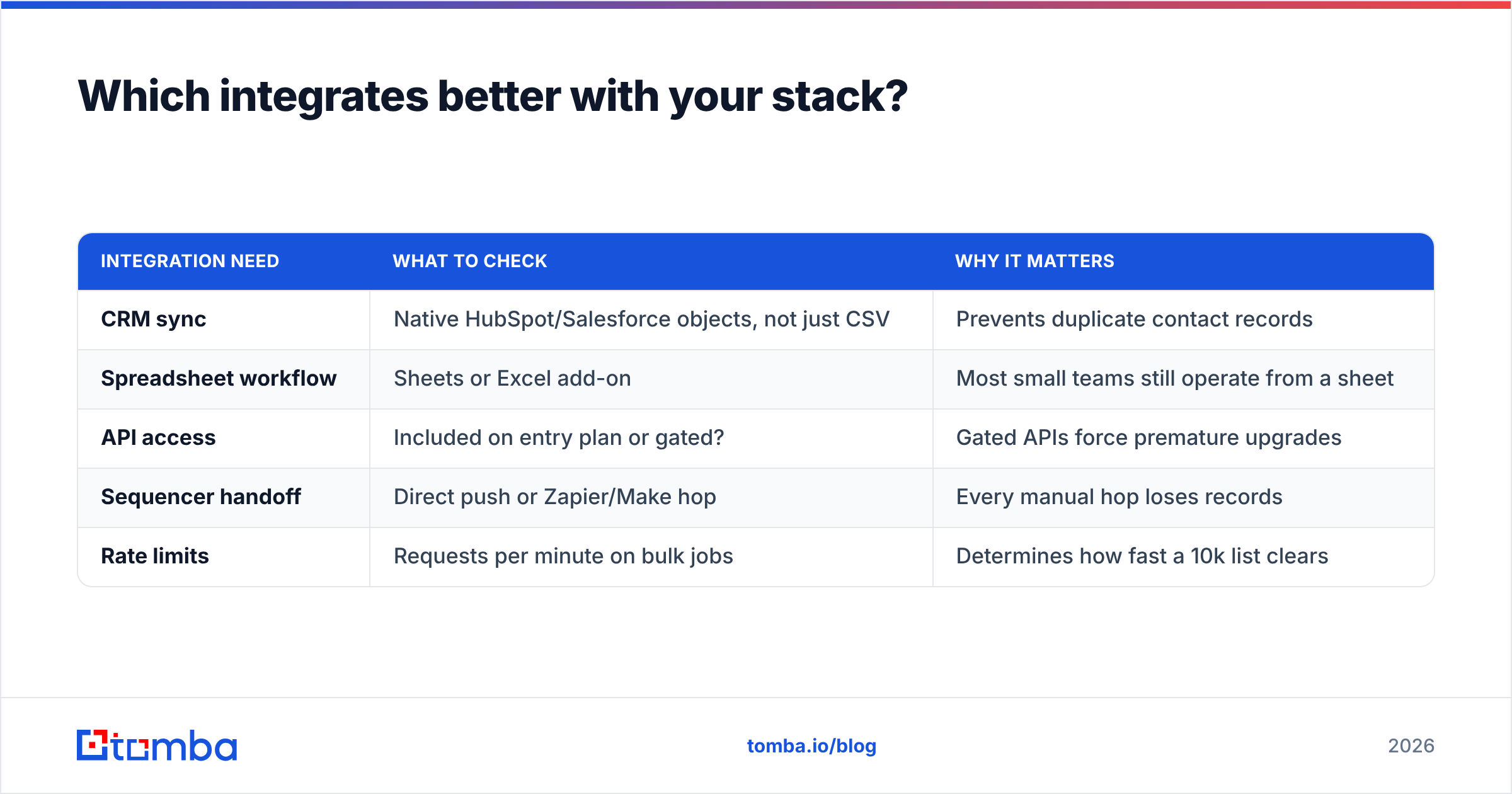
Data that lives inside a vendor's UI is data you will not use. The integration question is really one question: where does the record end up without manual work?
| Integration need | What to check | Why it matters |
|---|---|---|
| CRM sync | Native HubSpot/Salesforce objects, not just CSV | Prevents duplicate contact records |
| Spreadsheet workflow | Sheets or Excel add-on | Most small teams still operate from a sheet |
| API access | Included on entry plan or gated? | Gated APIs force premature upgrades |
| Sequencer handoff | Direct push or Zapier/Make hop | Every manual hop loses records |
| Rate limits | Requests per minute on bulk jobs | Determines how fast a 10k list clears |
Enrichley's enrichment-first design is the easier fit for a RevOps team wiring an automated CRM hygiene job. Leadsforge's list-first design is the easier fit for an SDR who wants to go from filter to sequence in one session. For a benchmark on how a native CRM sync should behave, HubSpot's integration documentation covers field mapping and deduplication well.
If you build your own tooling, confirm that API access is on the plan you are buying, not two tiers up. Tomba, for example, exposes the same lookups through its email finder API on paid plans. That matters if enrichment will run inside your own pipeline instead of a vendor dashboard.
Who should pick Enrichley, and who should pick Leadsforge?#
Pick Enrichley if your problem is a dirty CRM. You have 40,000 records with missing titles and stale emails, and your job is to make them usable again. Enrichment-first tools are built for exactly that.
Pick Leadsforge if your problem is an empty pipeline. You need net-new accounts matching an ICP you can describe in filters, and you would otherwise pay an SDR to build lists by hand.
Pick neither if your list is small and specific. Under a few thousand lookups a month, a platform subscription with seat fees is the wrong shape. A focused finder plus a verifier costs a fraction.
Pick a prebuilt list provider if you want data you own outright. Vendors like BookYourData sell pay-as-you-go verified B2B lists with no subscription, which suits one-off campaigns and agencies.
Run both in parallel for a month if the deal size justifies it. For enterprise ACVs, a $500 bake-off is cheap insurance against a $20,000 annual mistake.
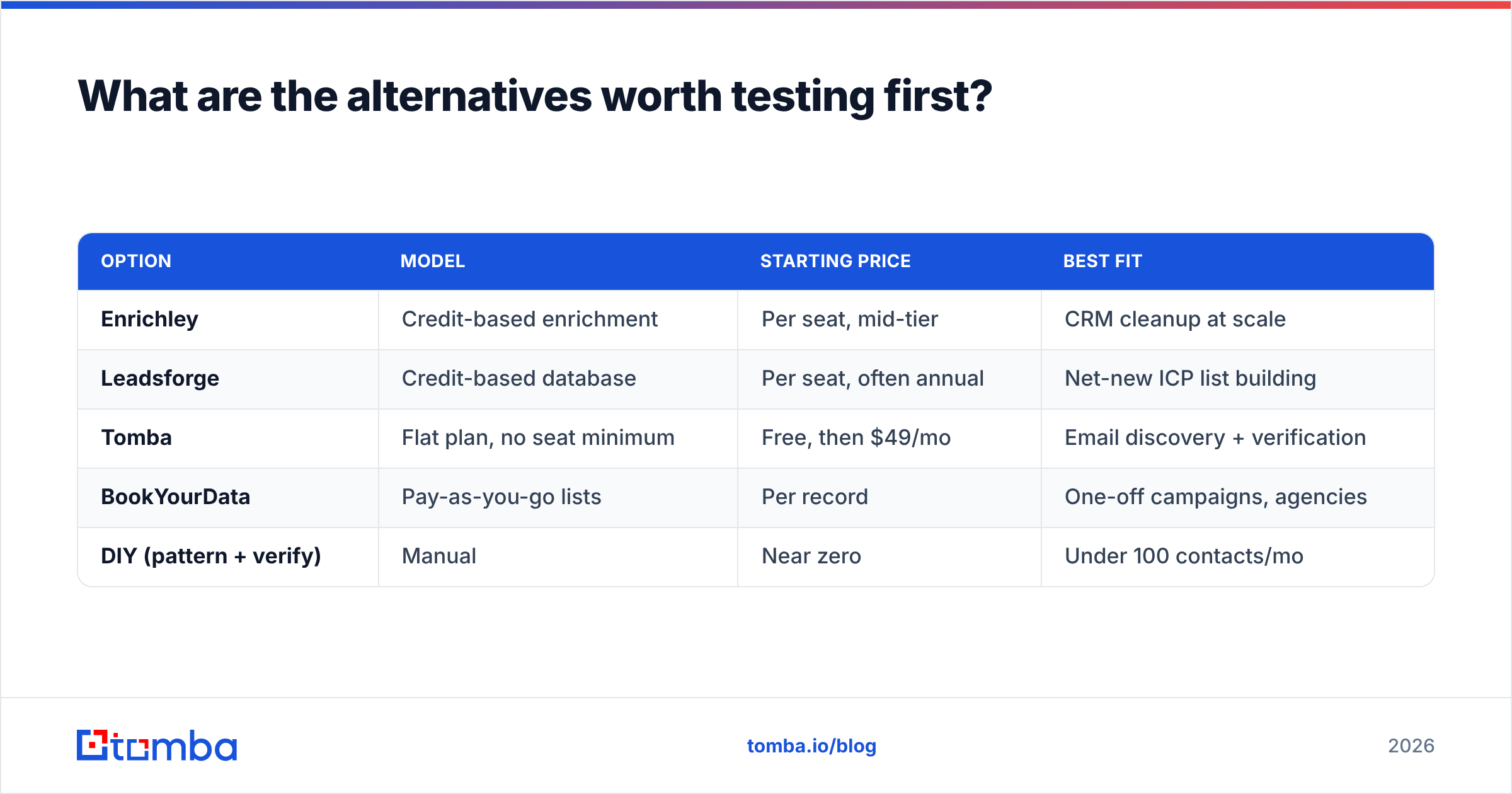
What are the alternatives worth testing first?#
Before committing to either platform, price out the narrower tools. Most teams find they were buying a database when they only needed an address.

| Option | Model | Starting price | Best fit |
|---|---|---|---|
| Enrichley | Credit-based enrichment | Per seat, mid-tier | CRM cleanup at scale |
| Leadsforge | Credit-based database | Per seat, often annual | Net-new ICP list building |
| Tomba | Flat plan, no seat minimum | Free, then $49/mo | Email discovery + verification |
| BookYourData | Pay-as-you-go lists | Per record | One-off campaigns, agencies |
| DIY (pattern + verify) | Manual | Near zero | Under 100 contacts/mo |
The DIY row is not a joke. If you need fifty contacts this quarter, a company email pattern check plus a verification pass will get you there for free. Tooling should scale with volume, not with ambition.
How should you decide this week?#
Run the 500-row test above against both trials, verify the output independently, and compute cost per deliverable contact. Then compare that number to what a flat-rate finder would cost for the same volume. In the end, Enrichley vs Leadsforge comes down to that one number. In most public bake-offs, the platform wins on breadth and loses on unit economics — fine if you need the breadth, expensive if you don't.
Also check the boring things: contract length, whether credits expire, whether the API is gated, and whether the "verified" label comes with a documented method. Vendors that explain where their data comes from are easier to trust than vendors that say "proprietary waterfall" and change the subject.
Start with the cheap test. If your bottleneck is finding accurate work emails rather than filtering a database, try the Tomba Email Finder — 25 free searches a month, no card, and $49/mo when you outgrow it. Run your control list through it alongside both platforms, verify all three outputs with the same verifier, and let the bounce rate pick your winner.
Related guides#
Ready to find emails that actually work?
Join 150,000+ professionals who stopped guessing and started sending. Free credits on signup — no credit card required.
Get the Tomba newsletter
Practical outbound tactics and product updates — once every two weeks.
About the author