Enrichley vs Wiza in 2026: Which Lead Data Tool Wins?
Wiza pulls contacts out of LinkedIn searches. Enrichley leans on waterfall enrichment. We break down sourcing, accuracy, credits, pricing and export limits, plus where a domain-first email finder beats both.
Enrichley vs Wiza is not a fair fight, because the two tools do different jobs. Wiza builds lists from LinkedIn. Enrichley fills gaps in lists you already own. Here is how each one works, what it costs, and when a third option beats both.
TL;DR
- Wiza is a LinkedIn-native tool. It turns Sales Navigator searches, lists and profile URLs into exportable contact rows. If your prospecting starts on LinkedIn, it fits the workflow with almost no friction.
- Enrichley is a waterfall enrichment layer. You feed it records you already have, and it fans the lookup across several providers to fill the gaps.
- They are not the same product. Wiza sources contacts. Enrichley enriches them.
- Cost behaves differently. Wiza charges per revealed contact and gates phone data behind a higher tier. A waterfall charges per successful match across several vendors.
- If you already know the companies you want, neither is the cheapest path. A domain-first email finder plus a verifier usually wins on cost per verified contact.
Enrichley vs Wiza: what does each tool do?#
Wiza is the better known of the two. It launched as a LinkedIn scraper and grew into a full contact-data platform. Today it sells one promise: go from a Sales Navigator search to a clean CSV of verified emails and phone numbers. The design assumes you work inside LinkedIn. You run a search, click the extension, and Wiza reveals the contact details behind the profiles. You can read the official positioning on wiza.co.
Enrichley starts from the other end. It is a waterfall enrichment service. You upload or API-push a list of partial records, and it queries several data vendors in turn until one returns a match. The pitch is coverage. Instead of betting on one database, you rent access to many and pay only when something comes back.
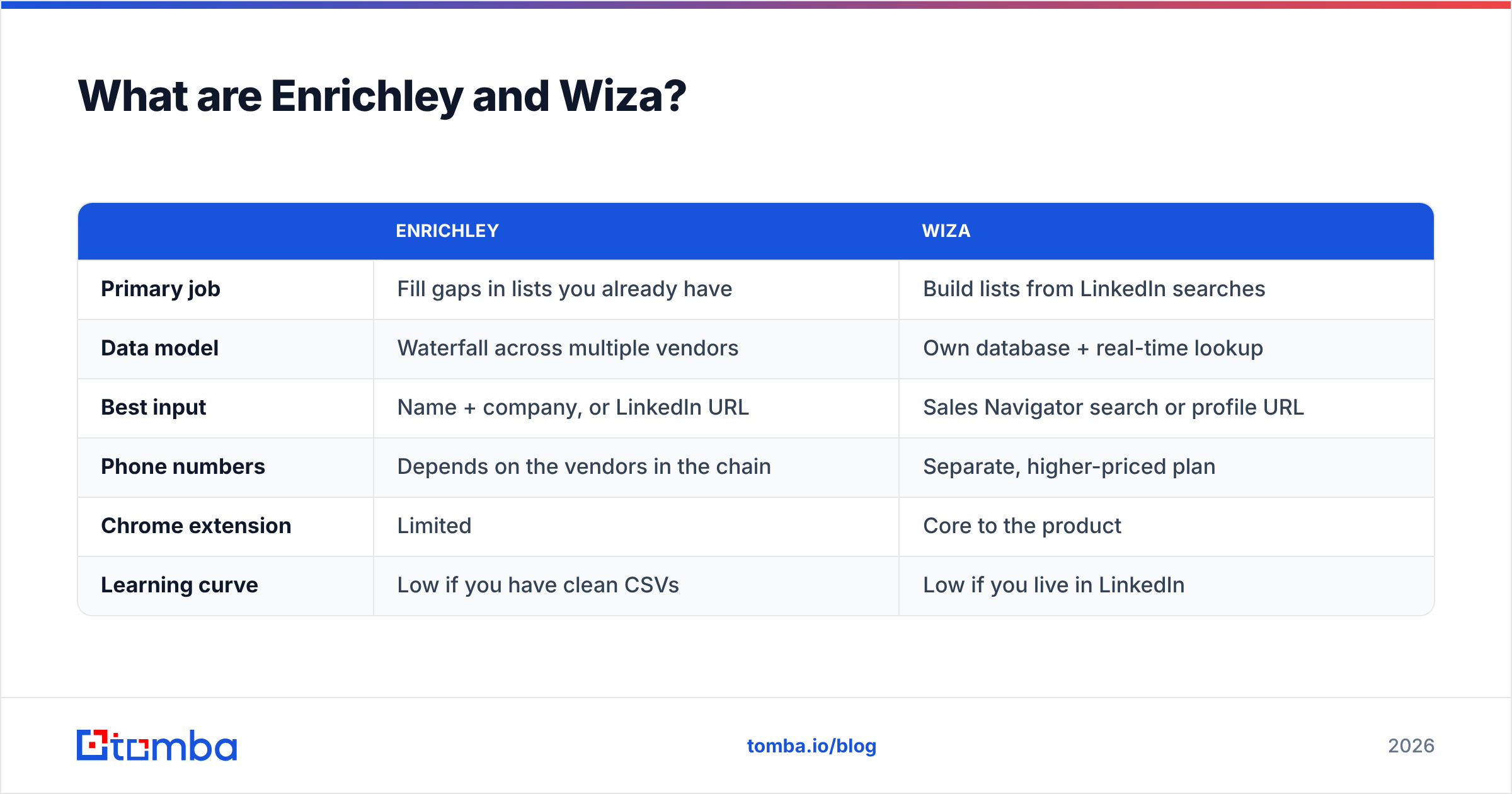
That difference in starting point drives almost every other difference between them.
| Enrichley | Wiza | |
|---|---|---|
| Primary job | Fill gaps in lists you already have | Build lists from LinkedIn searches |
| Data model | Waterfall across multiple vendors | Own database + real-time lookup |
| Best input | Name + company, or LinkedIn URL | Sales Navigator search or profile URL |
| Phone numbers | Depends on the vendors in the chain | Separate, higher-priced plan |
| Chrome extension | Limited | Core to the product |
| Learning curve | Low if you have clean CSVs | Low if you live in LinkedIn |
How does each one actually find contact data?#
This is the part most comparison posts skip. It also decides whether your bounce rate is 2% or 12%.
Wiza's sourcing is identity-first. It starts from a LinkedIn profile: one person, one employer, one job title. From that anchor it resolves a work email, plus a phone number on the higher tier. Profiles are self-maintained, so the job title and company are usually fresher than anything in a static database.
Enrichley's sourcing is match-first. It takes whatever identifier you give it and queries providers until one claims a hit. Quality depends on which vendors sit in the chain, and in what order. A good waterfall beats any single provider. A badly ordered one just charges you three times for the same wrong answer.
Three things are true of both tools.
- Verification still happens at the end. Neither can prove a mailbox exists without an SMTP check. Wiza runs its own validation before export. Waterfall tools usually pass through the upstream vendor's confidence score, which is not the same thing.
- Catch-all domains stay unsolved. About a fifth of B2B domains accept all mail at the server level, so a standard check returns "unknown". Use a dedicated catch-all verifier to resolve those instead of guessing.
- The compliance surface differs. Scraping LinkedIn at scale runs into the platform's user agreement and can trigger account restrictions. Enrichment from a domain or a CRM record never touches LinkedIn.

Is Enrichley or Wiza more accurate?#
Neither vendor publishes an independently audited accuracy number. Treat any headline figure from either marketing site as a best case, measured on their own sample.
What you can measure is your own bounce rate. In practice, three things move it more than the brand on the invoice:
- Input quality. A LinkedIn URL is a better key than "John Smith at Acme". Wiza wins here by default, because its input is the profile. Enrichley is only as good as the CSV you feed it.
- Recency of the employment record. People change jobs constantly. A tool that resolves against a live profile catches the change faster than a database refreshed quarterly.
- Whether the result was actually verified. A "found" email is not a deliverable email. Any tool that hands you a pattern-guessed address without an SMTP check moves the risk to your sending domain.

The practical rule is simple. Whichever tool you pick, run the export through an independent email verifier before it touches your sequencer. A second-opinion pass on a 5,000-row list costs a few dollars. It routinely strips out 5% to 15% of the addresses the sourcing tool marked as valid. That gap is the difference between a healthy sender reputation and a spam-folder spiral.
Also watch the risky-accept category. Role addresses (info@, sales@, support@) do resolve, so a naive verifier passes them. They still inflate your complaint rate and rarely convert. Filter them out on purpose rather than trusting a green checkmark.
Enrichley vs Wiza vs a domain-first finder#
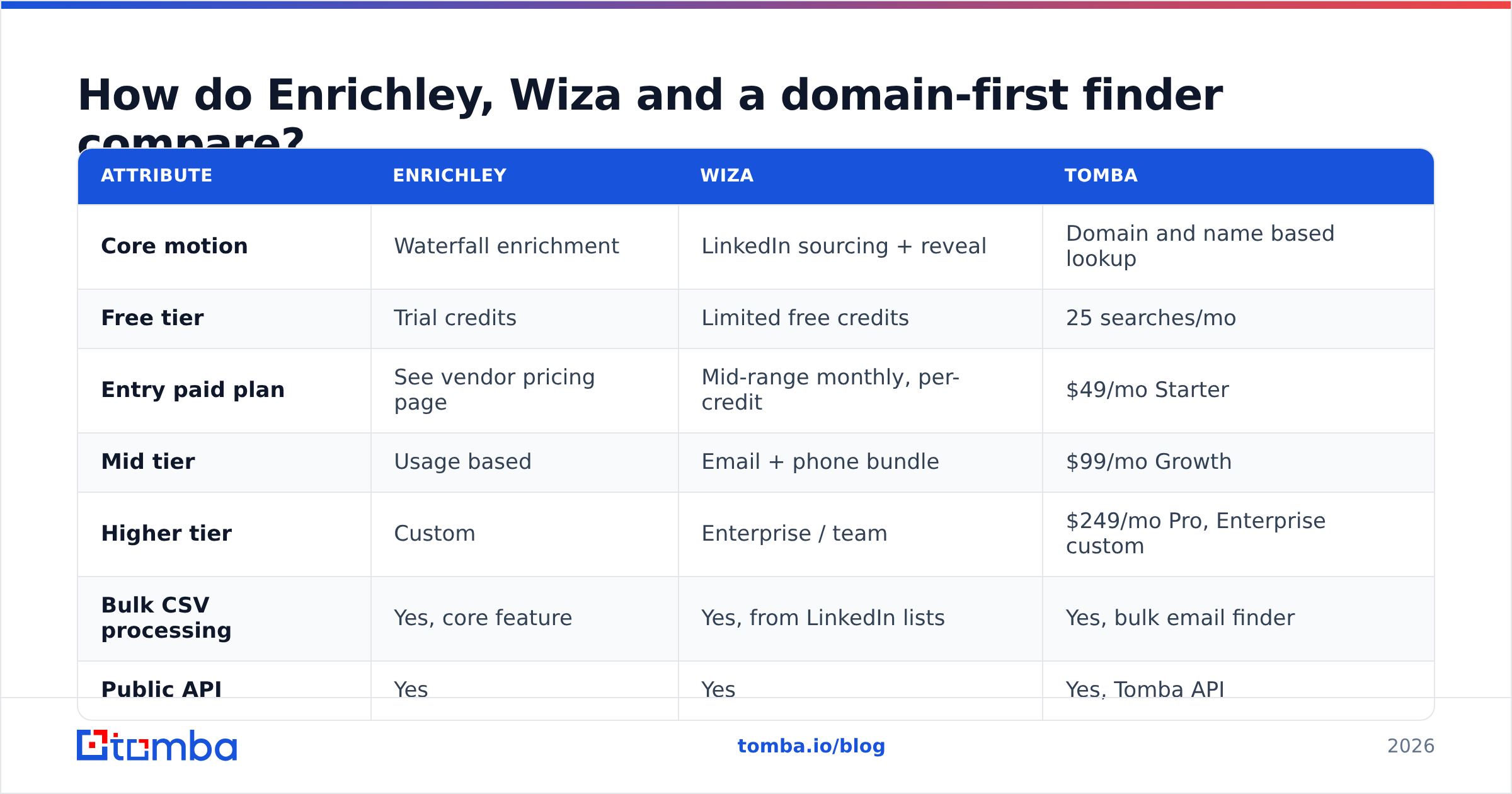
Here is the side-by-side with a third option, because framing this as a two-horse race hides the cheapest answer for a lot of teams.
| Attribute | Enrichley | Wiza | Tomba |
|---|---|---|---|
| Core motion | Waterfall enrichment | LinkedIn sourcing + reveal | Domain and name based lookup |
| Free tier | Trial credits | Limited free credits | 25 searches/mo |
| Entry paid plan | See vendor pricing page | Mid-range monthly, per-credit | $49/mo Starter |
| Mid tier | Usage based | Email + phone bundle | $99/mo Growth |
| Higher tier | Custom | Enterprise / team | $249/mo Pro, Enterprise custom |
| Bulk CSV processing | Yes, core feature | Yes, from LinkedIn lists | Yes, bulk email finder |
| Public API | Yes | Yes | Yes, Tomba API |
| Email verification included | Passthrough confidence | Built-in validation | Dedicated verifier + catch-all |
| Phone numbers | Vendor dependent | Higher tier only | Phone finder + validator |
| Works without LinkedIn | Yes | Not really | Yes |
| Best for | Filling CRM gaps | Sales Navigator prospecting | Named-account and domain sweeps |

Two notes on reading that table honestly. First, published pricing changes. Check the vendor pages before you budget, and confirm whether credits roll over or expire each month. That single term swings effective cost more than the sticker price. Second, "credits" are not comparable units across vendors. One tool charges a credit per attempt, another per successful match, another per enriched field. Always normalise to cost per verified, deliverable contact before you compare. Run 500 records through each on a trial and divide.
What does each one actually cost per usable lead?#
Run the numbers on a realistic month: 2,000 target contacts, with email plus phone needed for a third of them.
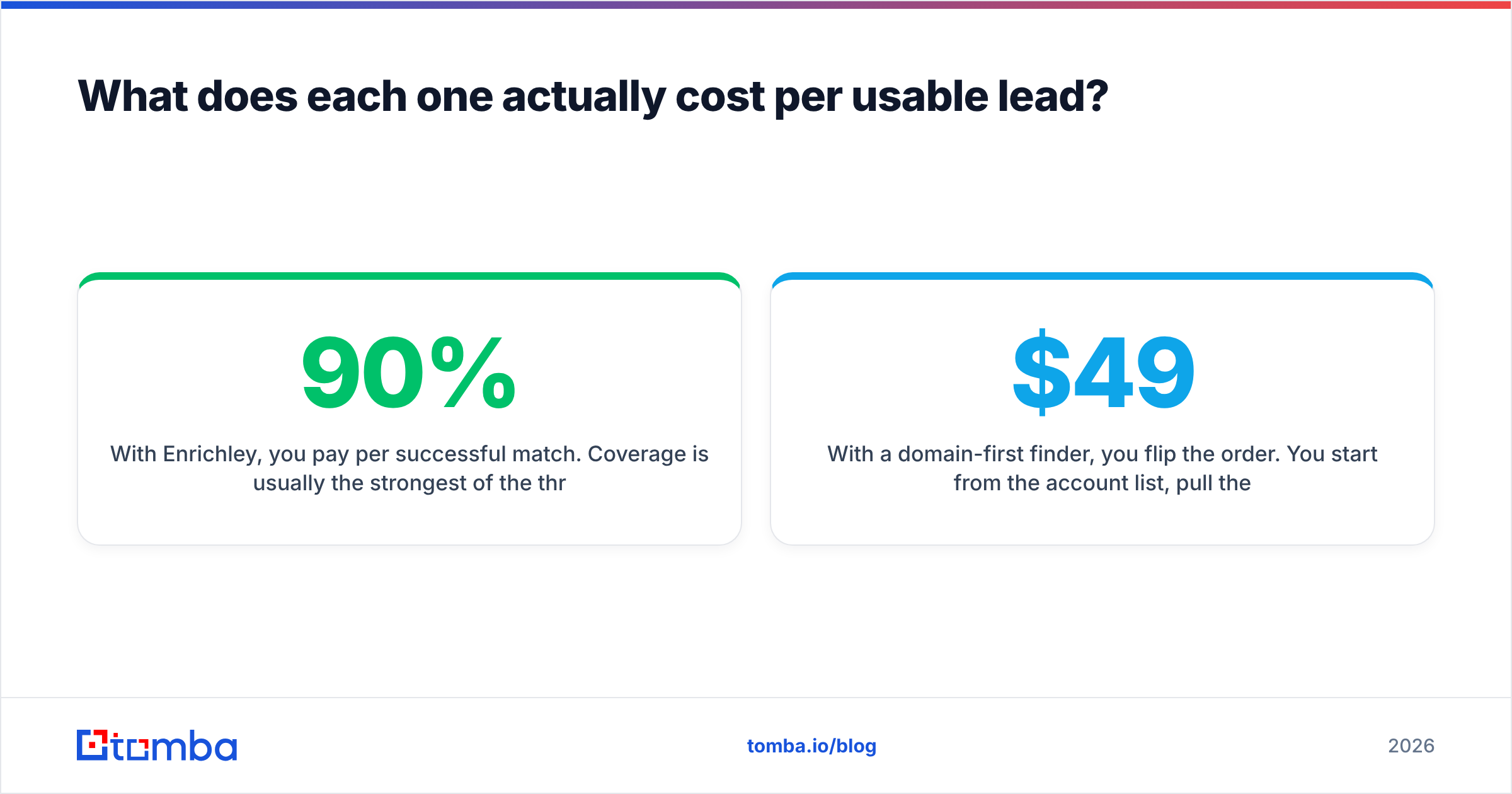
- With Wiza, you pay per revealed contact, and phone data sits on a pricier tier. You buy that tier for the whole seat even if only a third of your contacts need a number. Cost per contact climbs fast unless you segment your exports.
- With Enrichley, you pay per successful match. Coverage on messy input is usually the strongest of the three, because the waterfall keeps trying. But you also pay retail margin on top of each upstream vendor, and a 90% hit rate on 2,000 rows is 1,800 billable matches.
The third option flips the order.
- With a domain-first finder, you start from the account list. Pull the org chart per domain with domain search, then spend credits only on the roles you actually want. On Tomba pricing, Starter is $49/mo, Growth is $99/mo and Pro is $249/mo. The free tier gives you 25 searches to test the hit rate on your own domains first.
One pattern shows up again and again in outbound teams. Sourcing tools look cheap per credit and turn expensive per booked meeting, because the credit is spent before you have qualified the contact. Qualify first, spend second.
Who should choose Wiza?#
Pick Wiza if all of these are true:
- Your ICP is genuinely discoverable through LinkedIn Sales Navigator filters, and you already pay for Navigator.
- Your reps build lists themselves, ad hoc, rather than receiving them from a data team.
- You need job-title freshness more than you need volume.
- You are comfortable with the account-risk and terms-of-service surface that comes with LinkedIn-based extraction.
Wiza's real advantage is workflow compression: search, filter, export, sequence. For a two-rep team running targeted outbound, that speed beats a lower per-credit rate. Reviews on G2 praise the export flow and flag credit consumption as the main complaint. That is what you would expect from a per-reveal pricing model.
Who should choose Enrichley?#
Pick Enrichley if:
- You already have the accounts and contacts, and the problem is missing fields, not missing people.
- Your CRM is full of records with a name and a company but no email, and those records came from webinars, events, or inbound forms.
- Your inputs are messy enough that single-provider lookups return "not found" too often.
- You would rather pay a premium for coverage than manage contracts with four separate data vendors.
Waterfall enrichment earns its keep on the long tail. Say a single-source finder gets you 62% coverage and a waterfall gets you 88%. Those extra 26 points can justify a higher per-match price, as long as the extra matches are contacts you would actually email. Audit that before you scale: pull 200 waterfall-only matches and check how many are current, in-region and in-title.
What is the better setup for most outbound teams?#
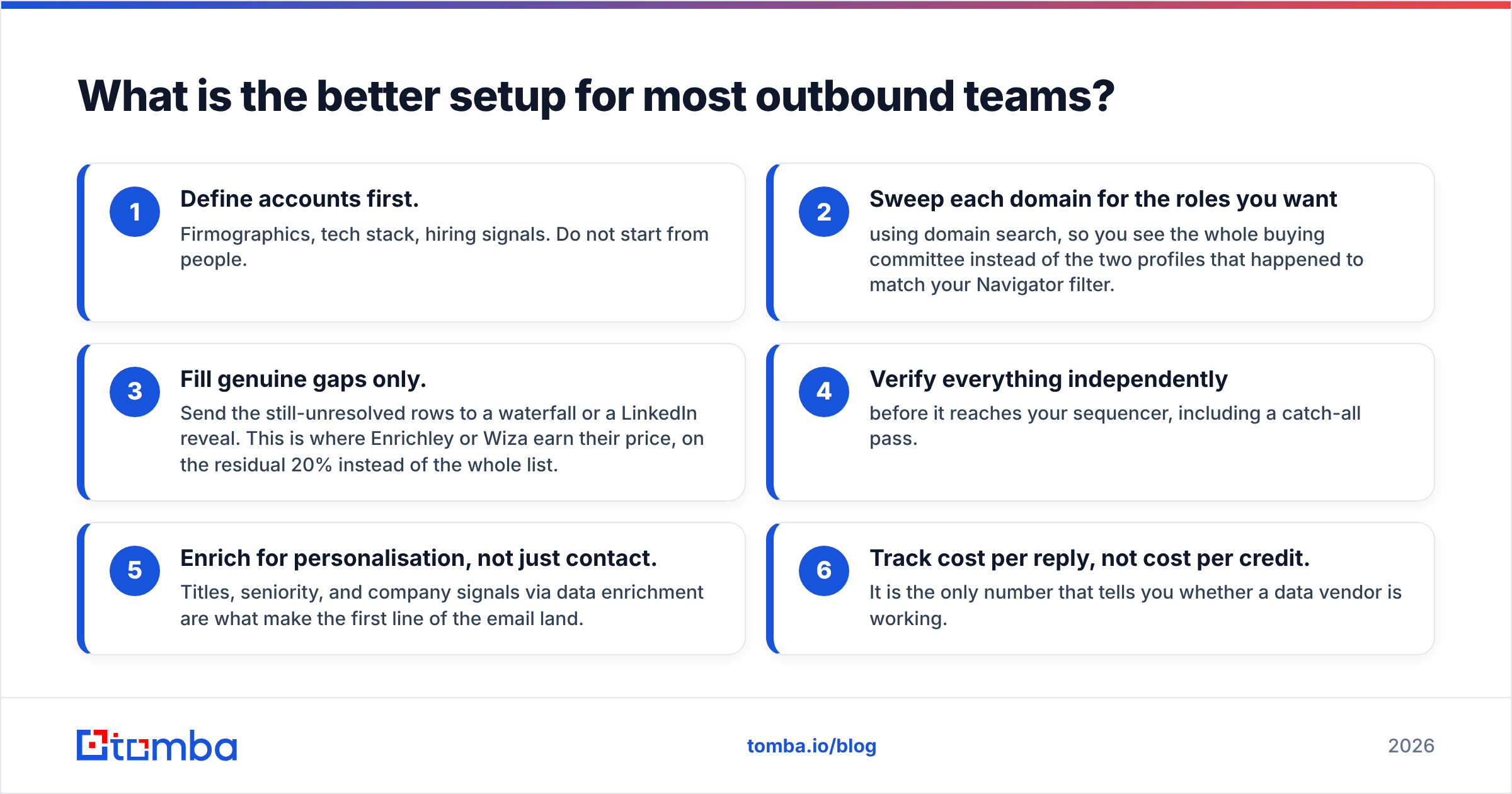
The setup that beats a single tool is a small stack with clear division of labour:
- Define accounts first. Firmographics, tech stack, hiring signals. Do not start from people.
- Sweep each domain for the roles you want using domain search, so you see the whole buying committee instead of the two profiles that happened to match your Navigator filter.
- Fill genuine gaps only. Send the still-unresolved rows to a waterfall or a LinkedIn reveal. This is where Enrichley or Wiza earn their price, on the residual 20% instead of the whole list.
- Verify everything independently before it reaches your sequencer, including a catch-all pass.
- Enrich for personalisation, not just contact. Titles, seniority, and company signals via data enrichment are what make the first line of the email land.
- Track cost per reply, not cost per credit. It is the only number that tells you whether a data vendor is working.
If you would rather skip sourcing and buy a prebuilt, filtered list, BookYourData is a reasonable route. The contacts arrive assembled rather than built by you. Different model, and a fair one, depending on how repeatable your ICP is.
Frequently asked questions#
Is Wiza a direct Enrichley competitor? Only partially. They overlap on enrichment, but Wiza's core value is LinkedIn sourcing, which Enrichley does not do. Many teams run both and pay twice for the overlap without noticing.
Do I still need a separate verifier? Yes. Sourcing tools verify against their own thresholds, and those thresholds are tuned to make coverage numbers look good. An independent check catches what the vendor's optimistic scoring waves through.
What about catch-all domains? Neither tool resolves them reliably. Use a dedicated catch-all check rather than accepting or discarding the whole bucket, since large enterprises are heavily represented in it.
Can I test all three cheaply? Take 200 rows from a live campaign, run them through each tool, sequence them, and compare bounce rate and reply rate. Two weeks of data beats any comparison table, including this one.
Where to start#
Does your prospecting begin with a list of target companies rather than a LinkedIn search? Start with the Tomba Email Finder. Point it at a domain and get verified contacts for the roles you care about. Keep your enrichment or LinkedIn spend for the gaps that are genuinely worth filling. The free tier gives you 25 searches to check the hit rate on your own accounts, and Starter at $49/mo covers most single-rep workloads without a credit-anxiety spiral.
Related guides#
Ready to find emails that actually work?
Join 150,000+ professionals who stopped guessing and started sending. Free credits on signup — no credit card required.
Get the Tomba newsletter
Practical outbound tactics and product updates — once every two weeks.
About the author