Enrow vs Exellius: Email Verification Compared in 2026
Enrow and Exellius both promise clean B2B contact data with fewer bounces. We break down accuracy, catch-all handling, pricing models, and API depth — and name the cases where a cheaper third option wins.
TL;DR
- Enrow and Exellius sit in the same narrow lane: get B2B email addresses that actually accept mail, then hand them back through a UI, a CSV, or an API. Neither is a full sales-engagement suite.
- Enrow leans hardest on the "no-bounce" promise — verification depth first, finding second. Exellius leans toward sourcing and enrichment coverage, with verification as the finishing step.
- The real differentiator between them is catch-all handling. Any vendor can validate a mailbox that answers honestly; the score you should care about is how many catch-all domains get resolved instead of dumped into "unknown".
- Pricing on both is credit-based, so your true cost per usable contact depends on how many credits get burned on results you can't use. Compare cost-per-valid, never cost-per-search.
- If you need finding, verification, catch-all resolution, enrichment, and a real API on one bill, Tomba pricing starts at $49/mo (Growth $99, Pro $249) with a free 25-search tier for testing.
What are Enrow and Exellius?#
Both tools solve the same painful last step of outbound: you have a name and a company, and you need an address that won't bounce.
Enrow (enrow.io) positions itself as an email finder and verifier built around bounce elimination. The pitch is that it will only return an address when it is confident, and that it resolves a meaningful share of catch-all domains that other verifiers give up on. It is API-first with a straightforward web app on top, and it is popular with agencies and lead-gen shops that get paid on deliverability, not volume.
Exellius is the broader of the two in scope. It sits closer to a sourcing-plus-enrichment layer: pull contacts from a company or a list, enrich the record, then verify. Teams that pick it usually want coverage across a target account list rather than one-off lookups.
The distinction matters more than the feature checkboxes. Enrow answers "is this address safe to mail?" Exellius answers "who works here and how do I reach them?" You can force either tool to do the other job, but you will feel the seams.
If you want a neutral read on how buyers actually rate both, G2 is the least-biased place to sanity-check review volume before you trust any vendor's own case studies — including the numbers in this post.
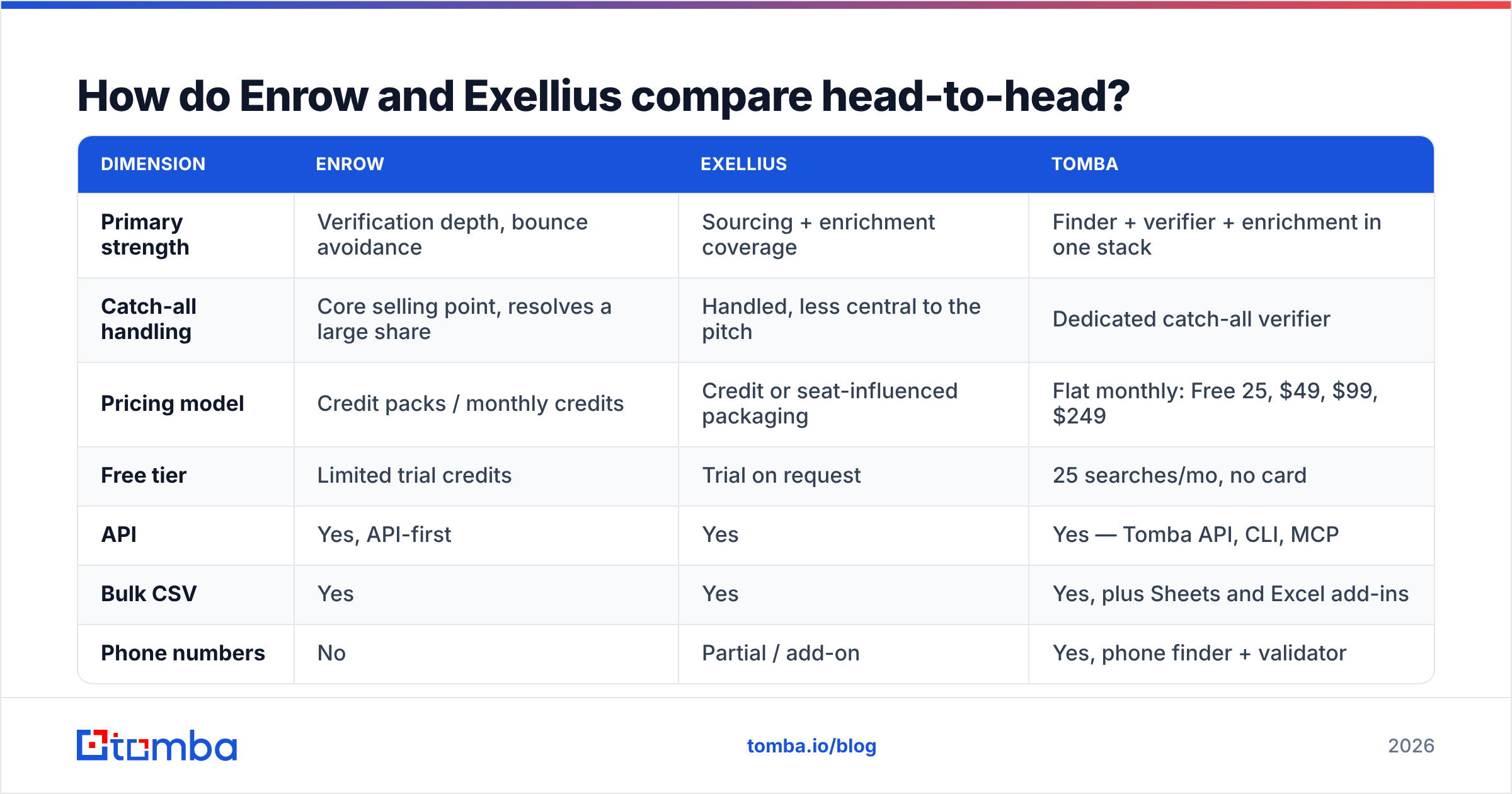
How do Enrow and Exellius compare head-to-head?#
Here is the practical comparison. Treat pricing rows as indicative: both vendors iterate on packaging, and you should confirm current rates on their own sites before you sign anything.
| Dimension | Enrow | Exellius | Tomba |
|---|---|---|---|
| Primary strength | Verification depth, bounce avoidance | Sourcing + enrichment coverage | Finder + verifier + enrichment in one stack |
| Catch-all handling | Core selling point, resolves a large share | Handled, less central to the pitch | Dedicated catch-all verifier |
| Pricing model | Credit packs / monthly credits | Credit or seat-influenced packaging | Flat monthly: Free 25, $49, $99, $249 |
| Free tier | Limited trial credits | Trial on request | 25 searches/mo, no card |
| API | Yes, API-first | Yes | Yes — Tomba API, CLI, MCP |
| Bulk CSV | Yes | Yes | Yes, plus Sheets and Excel add-ins |
| Phone numbers | No | Partial / add-on | Yes, phone finder + validator |
| Best for | Agencies mailing at volume | ABM lists needing coverage | Teams wanting one bill for find + verify |
| Weak spot | Narrow scope beyond email | Cost creep as coverage widens | Not a sequencer — bring your own sender |
Four rows in and the pattern is clear: this is not a "which tool is better" question. It is a "which failure mode can you tolerate" question. Enrow's failure mode is telling you nothing when it isn't sure. Exellius's failure mode is telling you something that still needs a verification pass.
Which one is more accurate on real lists?#
Accuracy claims from any email vendor are marketing until you test them on your own ICP. That said, there is a reliable pattern worth knowing before you run the test.

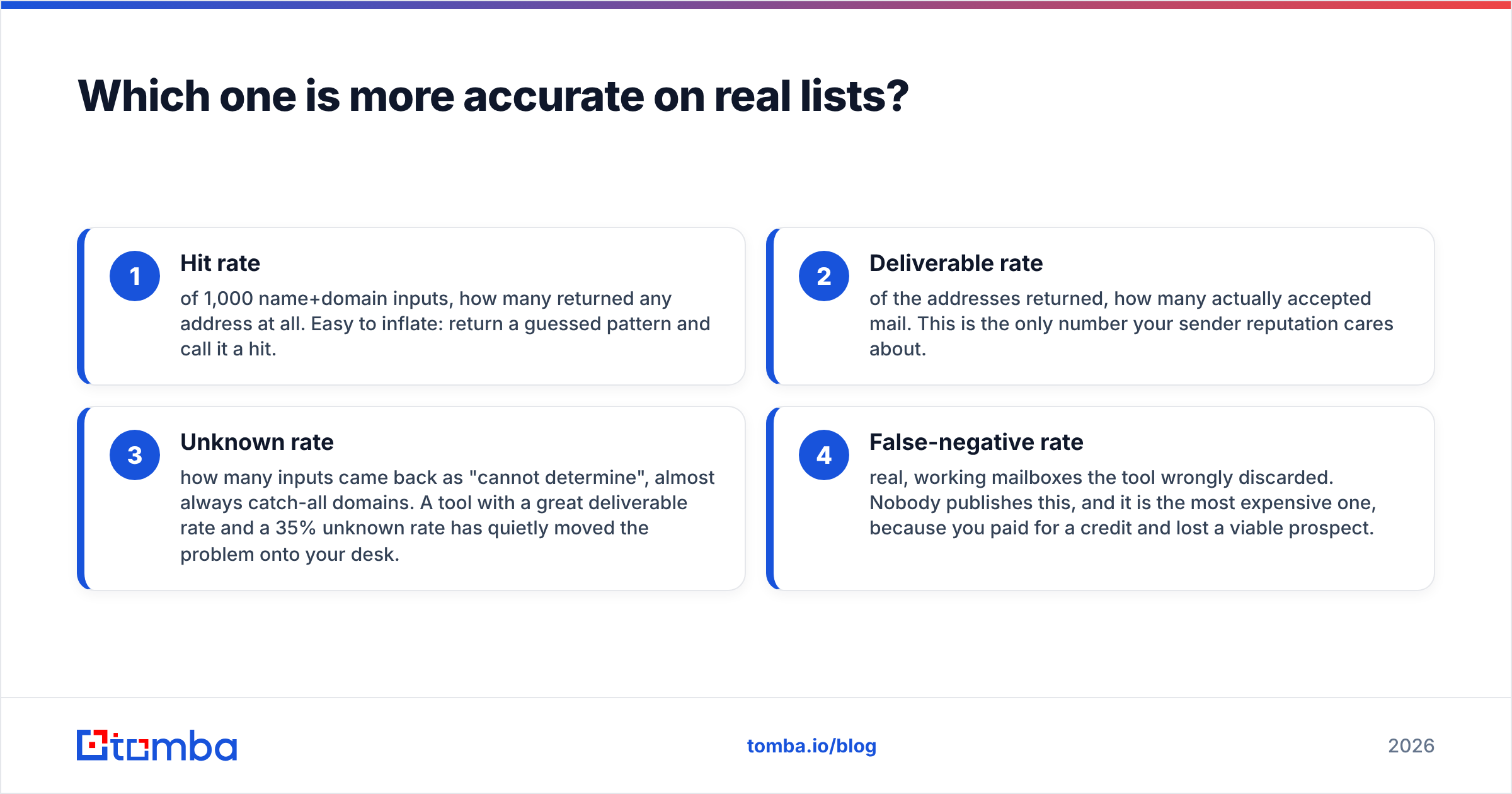
Accuracy splits into three separate numbers that vendors love to blend into one:
- Hit rate — of 1,000 name+domain inputs, how many returned any address at all. Easy to inflate: return a guessed pattern and call it a hit.
- Deliverable rate — of the addresses returned, how many actually accepted mail. This is the only number your sender reputation cares about.
- Unknown rate — how many inputs came back as "cannot determine", almost always catch-all domains. A tool with a great deliverable rate and a 35% unknown rate has quietly moved the problem onto your desk.
- False-negative rate — real, working mailboxes the tool wrongly discarded. Nobody publishes this, and it is the most expensive one, because you paid for a credit and lost a viable prospect.
Enrow optimises for #2 and #3, and that is a defensible choice: bounce messages are what wreck a sending domain, and Google's own sender guidelines treat invalid-recipient rates as a reputation signal. Exellius optimises for #1 across a wider set of sources, which is what you want when the constraint is "we must reach 400 accounts this quarter", not "we must never bounce".

The honest verdict: on well-known domains with public patterns, all three tools in the table land within a few points of each other. The spread opens up on catch-all domains, small companies, and non-US TLDs. That is where you should point your test list.
How does pricing actually work — and where does it bite?#
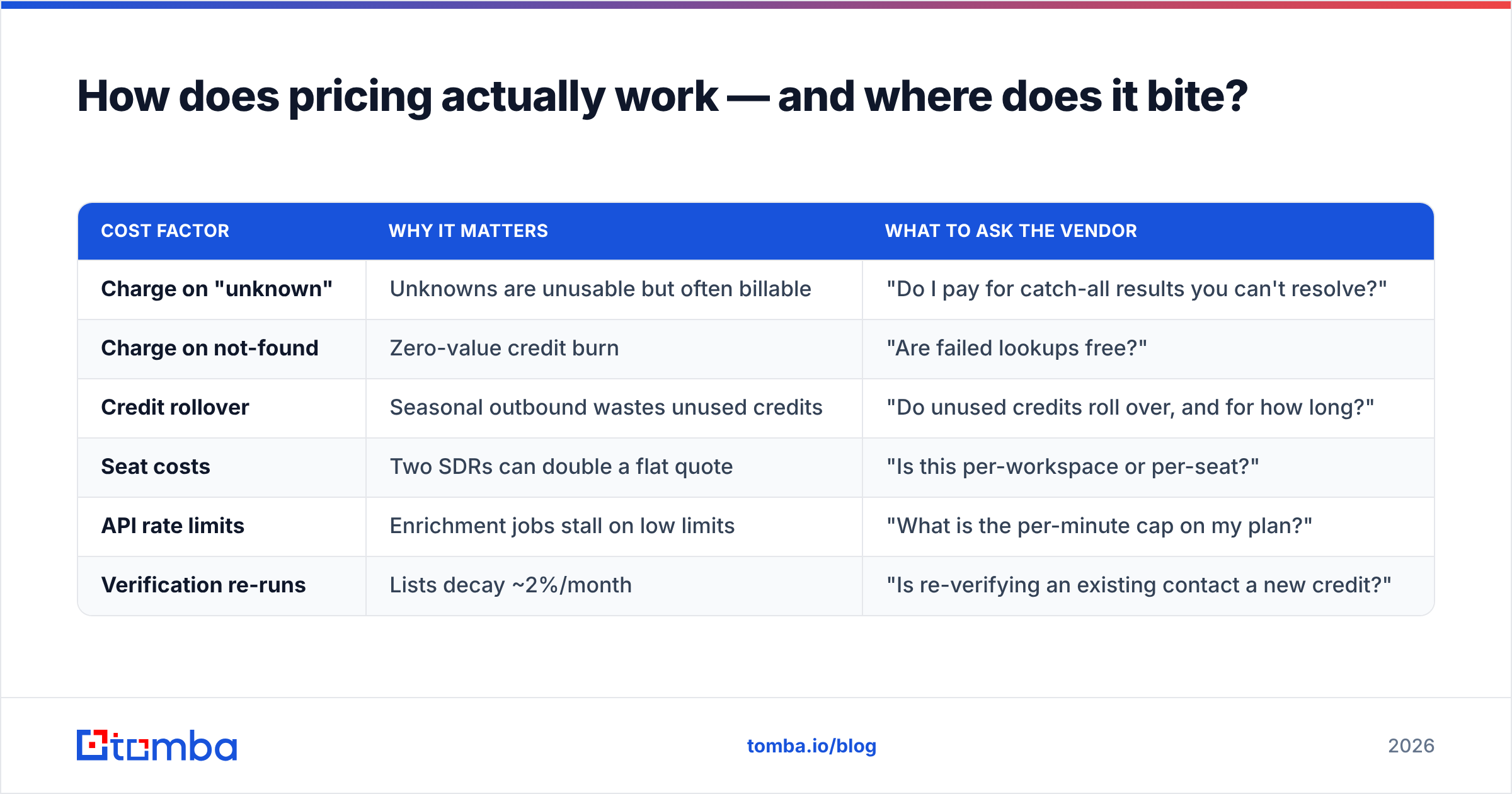
Credit systems are where comparison shopping falls apart. The sticker price per credit is not your cost.
Your real number is:
cost per usable contact = (monthly spend) ÷ (contacts that were valid AND you actually mailed)
Run that formula and the ranking often flips. A tool at half the credit price that burns credits on "unknown" results is more expensive per usable contact than a pricier tool that resolves catch-alls.
| Cost factor | Why it matters | What to ask the vendor |
|---|---|---|
| Charge on "unknown" | Unknowns are unusable but often billable | "Do I pay for catch-all results you can't resolve?" |
| Charge on not-found | Zero-value credit burn | "Are failed lookups free?" |
| Credit rollover | Seasonal outbound wastes unused credits | "Do unused credits roll over, and for how long?" |
| Seat costs | Two SDRs can double a flat quote | "Is this per-workspace or per-seat?" |
| API rate limits | Enrichment jobs stall on low limits | "What is the per-minute cap on my plan?" |
| Verification re-runs | Lists decay ~2%/month | "Is re-verifying an existing contact a new credit?" |

Tomba's approach here is deliberately boring: flat monthly tiers ($49 Starter, $99 Growth, $249 Pro), with the email verifier, domain search, and enrichment included rather than metered as separate SKUs. That is simpler to forecast, and it is worse than a credit pack if your usage is genuinely spiky — a two-week project is cheaper on credits than on a subscription. Pick the model that matches your usage curve, not the one with the nicer landing page.
Who should pick Enrow?#
Choose Enrow when bounce rate is the metric your job depends on.
- You mail at volume from a domain you cannot afford to burn. Agencies running client sending infrastructure, or anyone with one primary domain and no appetite for a reputation dip.
- You already have a source of names. If your list comes out of LinkedIn exports, a CRM, or a scraper, you need verification, not discovery — and paying for a broad sourcing layer is waste.
- You want verification wired into a pipeline. API-first design means you can verify at the moment of record creation instead of in a weekly batch.
- You accept a lower hit rate in exchange for confidence. If "no address" is an acceptable answer, Enrow's conservatism is a feature.
Where it frustrates people: it is a specialist. No phone numbers, no sequencing, and if you also need firmographics you are buying a second tool.
Who should pick Exellius?#
Choose Exellius when coverage across a defined account list is the constraint.
- You run ABM against a fixed target list. You need someone at every account, across multiple personas, and gaps are the enemy.
- You need enrichment alongside the address. Titles, company size, and technographics arriving in the same call saves an integration.
- Your sending volume is moderate. A slightly higher unknown or risky rate is survivable when you send hundreds of emails a week, not tens of thousands.
- You want fewer vendors in the stack. One contract covering sourcing plus verification is easier to defend internally than three.
Where it frustrates people: cost predictability. The broader the coverage you ask for, the faster credits move, and the more likely you are to add a dedicated verifier anyway before a big send.
Is there a third option worth testing?#
Yes — and you should test it precisely because the Enrow-vs-Exellius choice forces a trade-off that a combined stack avoids.
The gap both tools leave is the middle: finding and verifying and enriching on one bill, at a price you can forecast, with a real API rather than a CSV round-trip.
That is the slot Tomba occupies:
- Email finder — name plus domain in, verified address out, with confidence scoring rather than a silent guess.
- Domain search — pull every discoverable address at a company when you don't have names yet, which is where pure verifiers leave you stranded.
- Catch-all verification — a dedicated pass on the domains that generate most of your "unknown" rows.
- Enrichment and phone data — one workspace instead of a second vendor for the same records.
- Developer surface — API, CLI, MCP server, plus Sheets, Excel, and Airtable if your ops live in a spreadsheet.
- Flat pricing — Free (25 searches/mo), $49, $99, $249, so a second SDR doesn't reprice the deal.

Tomba is not the right answer for everyone. If you need multichannel sequencing, LinkedIn automation, or intent data, this is the wrong shelf entirely — you want a sales-engagement platform and you'll plug a data tool into it. And if your team runs one 5,000-contact project a year, a credit pack from Enrow will be cheaper than twelve months of subscription. Be honest about your usage shape.
How do you run your own bake-off in one afternoon?#
Vendor benchmarks are run on lists that flatter the vendor. Here is the test that actually settles it, and it takes about two hours.
- Build a 200-row control list from your real ICP. Not the Fortune 500. Include the small companies, the non-US domains, and the industries where you always struggle. Skewing toward easy domains is how people buy the wrong tool.
- Include 20 known-good and 10 known-bad addresses. Pull the good ones from your own inbox — people who have replied to you. The bad ones are addresses that already hard-bounced. This measures false negatives and false positives, which no vendor reports.
- Run the identical list through each tool on the same day. Data decays; a week's gap invalidates the comparison.
- Record four columns per tool: found, deliverable, unknown, credits consumed. Then compute cost per deliverable contact.
- Send a real 50-contact batch from the winner's output. Watch the bounce rate in your sending tool. A verifier that looks perfect in a spreadsheet and produces a 4% bounce rate failed the only test that counts.
- Re-verify the same list 30 days later. Decay rates differ by vendor, and if you maintain a standing database, decay costs more over a year than the initial verification did.
Score it on cost-per-deliverable and false-negative count. In most bake-offs we've seen described, the tools cluster tightly on easy domains and separate hard on catch-alls and small companies — which is exactly why a generic accuracy percentage on a homepage tells you nothing about your list.
What's the verdict on Enrow vs Exellius?#
Enrow if bounce protection is the job. Exellius if list coverage is the job. Neither is a mistake, and the deciding factor is your sending volume: heavy senders should buy conservatism, moderate senders should buy coverage.
But run the third quote. The reason Enrow-vs-Exellius feels like a hard choice is that each tool is strong at one half of a two-part problem, and you end up paying two vendors to close the loop. If that's where you're heading, price the combined stack first.
Start with the Tomba Email Finder — the free tier gives you 25 searches a month with no card, which is enough to run your 200-row control list against whatever Enrow and Exellius return and see the cost-per-deliverable difference in your own spreadsheet. If the numbers favour a specialist, buy the specialist. If they favour one bill at $49/mo, you'll know that too.
Related guides#
Ready to find emails that actually work?
Join 150,000+ professionals who stopped guessing and started sending. Free credits on signup — no credit card required.
Get the Tomba newsletter
Practical outbound tactics and product updates — once every two weeks.
About the author