Enrow vs Findymail (2026): Which Email Finder Actually Wins
Enrow leads with verification-grade accuracy, Findymail leads with LinkedIn-native sourcing. Here is how the two compare on hit rate, credit rules, API depth and real cost per usable email in 2026.
TL;DR
- Enrow is built verification-first: it waterfalls across providers, then guarantees a bounce ceiling. Pick it if your only KPI is "did this email bounce?"
- Findymail is built prospecting-first: it is strongest when your list starts as a LinkedIn or Sales Navigator search, and it does not bill you for emails it fails to find.
- On flat-domain B2B lists the two land close together. The gap opens on catch-all domains, non-US data, and API/automation depth — that is where you should run your own sample.
- Neither is the cheapest path to a usable email at volume. A finder + verifier stack like Tomba starts at $49/mo with a free tier, and bundles domain search, catch-all verification and enrichment in the same credit pool.
- Decision rule: buy Enrow for deliverability insurance, Findymail for LinkedIn-native list building, and a combined platform when you need both plus an API you can build on.
What are Enrow and Findymail?#
Both are European-built B2B contact tools that sit in the same slot in your stack — the step between "I know who I want to reach" and "I have an address that will actually accept mail."
Enrow launched as an email-finding and verification engine with a single obsession: bounce rate. Its pitch is a waterfall — it queries multiple upstream sources and its own verification layer, then only returns addresses it is confident in, with a published bounce guarantee. The product surface is deliberately narrow: find, verify, bulk-upload, API.
Findymail came at the same problem from the prospecting side. Its core loop is: run a search on LinkedIn Sales Navigator or Apollo, export the list, and get verified emails back. The Chrome extension and the "we only charge for emails we find" credit policy are what most reviewers on G2 single out. Findymail also ships a verifier, but it exists to protect the finder's output rather than as a standalone product.
That difference in origin explains almost every practical difference below.

How do Enrow and Findymail compare feature by feature?#
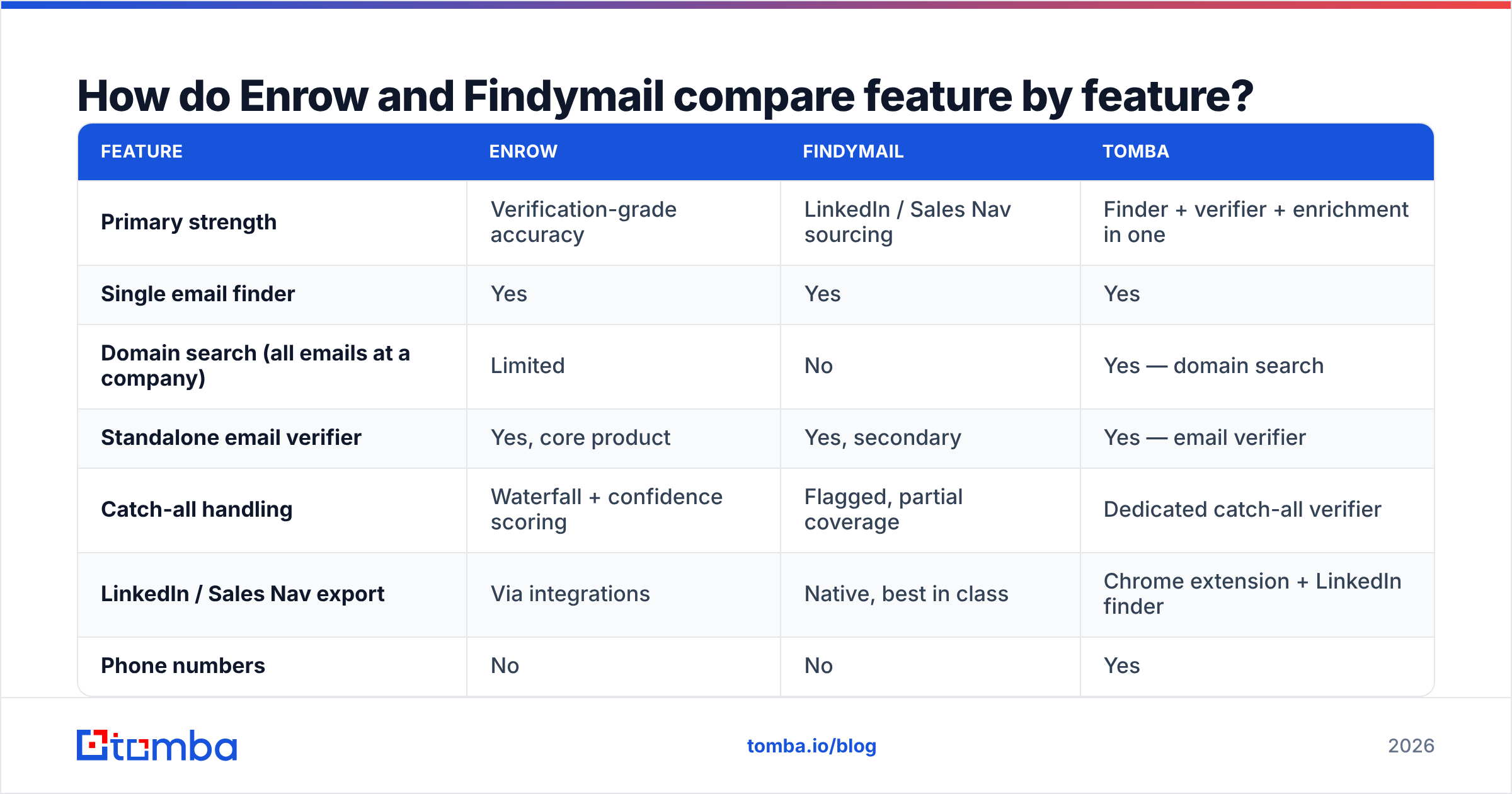
Here is the head-to-head on the attributes that actually change your week:
| Feature | Enrow | Findymail | Tomba |
|---|---|---|---|
| Primary strength | Verification-grade accuracy | LinkedIn / Sales Nav sourcing | Finder + verifier + enrichment in one |
| Single email finder | Yes | Yes | Yes |
| Domain search (all emails at a company) | Limited | No | Yes — domain search |
| Standalone email verifier | Yes, core product | Yes, secondary | Yes — email verifier |
| Catch-all handling | Waterfall + confidence scoring | Flagged, partial coverage | Dedicated catch-all verifier |
| LinkedIn / Sales Nav export | Via integrations | Native, best in class | Chrome extension + LinkedIn finder |
| Phone numbers | No | No | Yes |
| Public API | Yes | Yes | Yes — Tomba API, CLI, MCP |
| Free tier | Trial credits | Trial credits | 25 searches/mo, permanent |
| Entry paid plan | ~$29–$59/mo range | ~$49/mo | $49/mo Starter |
| Charged for not-found emails | No | No | No |
Pricing on all three moves — treat the last two rows as directional and confirm on each vendor's page before you commit annual budget. What does not move is the shape: Enrow sells confidence, Findymail sells sourcing convenience, and a full-stack platform sells coverage.
Which tool finds more valid emails?#
The honest answer: it depends on your list composition, and anyone quoting you a single percentage is selling something.

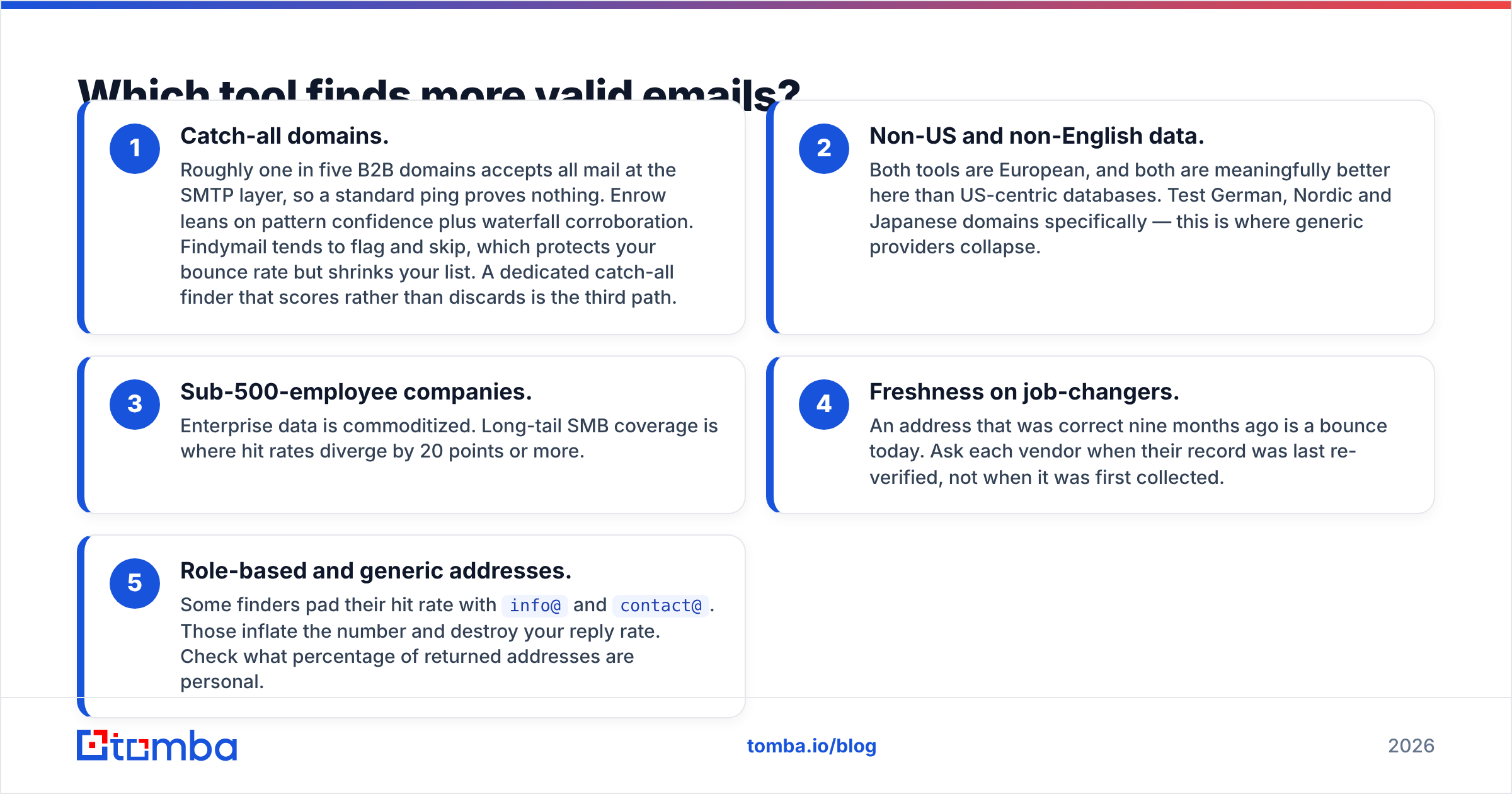
What consistently separates finders in real tests is not the easy half of the list. Every serious tool resolves firstname.lastname@bigcompany.com at a mid-90s rate. The spread shows up in five specific places:
- Catch-all domains. Roughly one in five B2B domains accepts all mail at the SMTP layer, so a standard ping proves nothing. Enrow leans on pattern confidence plus waterfall corroboration. Findymail tends to flag and skip, which protects your bounce rate but shrinks your list. A dedicated catch-all finder that scores rather than discards is the third path.
- Non-US and non-English data. Both tools are European, and both are meaningfully better here than US-centric databases. Test German, Nordic and Japanese domains specifically — this is where generic providers collapse.
- Sub-500-employee companies. Enterprise data is commoditized. Long-tail SMB coverage is where hit rates diverge by 20 points or more.
- Freshness on job-changers. An address that was correct nine months ago is a bounce today. Ask each vendor when their record was last re-verified, not when it was first collected.
- Role-based and generic addresses. Some finders pad their hit rate with
info@andcontact@. Those inflate the number and destroy your reply rate. Check what percentage of returned addresses are personal.
Run the same 200-row sample through both trials. Score on usable addresses per 100 rows, not on advertised accuracy — a tool that returns 60 addresses at 98% validity beats one returning 90 at 70%.
How much do Enrow and Findymail really cost?#
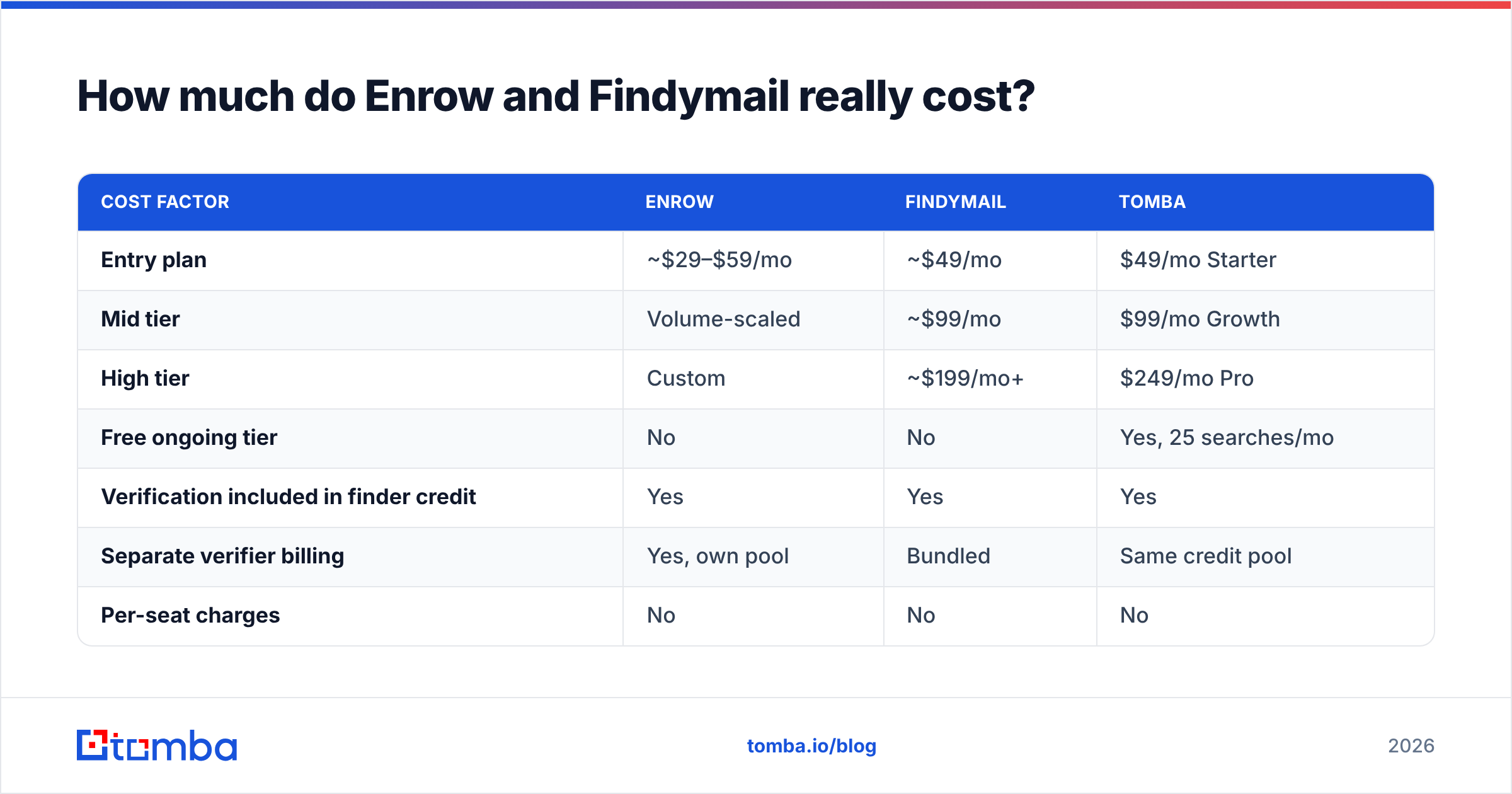
Sticker price is the wrong number. The number that matters is cost per usable email, which is sticker price divided by the addresses you can actually send to.

| Cost factor | Enrow | Findymail | Tomba |
|---|---|---|---|
| Entry plan | ~$29–$59/mo | ~$49/mo | $49/mo Starter |
| Mid tier | Volume-scaled | ~$99/mo | $99/mo Growth |
| High tier | Custom | ~$199/mo+ | $249/mo Pro |
| Free ongoing tier | No | No | Yes, 25 searches/mo |
| Verification included in finder credit | Yes | Yes | Yes |
| Separate verifier billing | Yes, own pool | Bundled | Same credit pool |
| Per-seat charges | No | No | No |
| Annual discount | Yes | Yes | Yes |
Three cost traps to check before signing:
- Double-spend on verification. If you pay a finder for an address and then pay a verifier to check it, you have doubled your per-contact cost. Bundled credit pools avoid this. See Tomba pricing for how a single pool across finder, verifier and enrichment changes the math.
- Credit expiry. Monthly credits that do not roll over punish spiky outbound teams. If you build lists in two-week sprints, you will burn half your allowance on empty months.
- Enrichment gaps. If the tool returns only an email, you still need job title, company size and — for many teams — a phone number. Buying those separately from a third vendor is where budgets quietly double. A single data enrichment call is materially cheaper than an email vendor plus an enrichment vendor.

Is Enrow better than Findymail for cold outreach?#
For pure deliverability protection, yes — Enrow is the more conservative engine, and conservative is what keeps your domain alive.
But "better for cold outreach" is a bigger question than bounce rate. Cold outreach performance is a chain: list quality → address validity → sender infrastructure → targeting → copy. A verifier fixes exactly one link. If your sender reputation is already damaged, a 99%-valid list will still land in spam.
Use this split:
- Choose Enrow when you send high volume, you have been burned by a bounce spike, or your ESP has flagged your account. The bounce guarantee is real insurance and worth paying for.
- Choose Findymail when your prospecting starts in Sales Navigator, your team lives in the browser, and you want the shortest path from a saved search to a CSV of verified addresses. The credit policy — no charge for misses — makes budgeting predictable.
- Choose neither alone when you need domain-level discovery ("give me every marketing contact at these 400 companies"), phone numbers, or an API you can wire into your own product.
What are the best Enrow and Findymail alternatives in 2026?#
If you tested both and neither fit, the gap is usually coverage breadth or API depth rather than accuracy. Worth evaluating:
- Tomba — finder, verifier, domain search, catch-all verification, phone finder and enrichment on one credit pool, with a permanent free tier and a documented API. Best fit when you want one vendor instead of three. See the Findymail alternative breakdown for a direct feature map.
- BookYourData — a strong choice when you want to buy a pre-built, filtered list rather than resolve contacts one at a time. Different purchase model, genuinely good for fast TAM coverage in defined verticals.
- Clearbit / enrichment-first platforms — right when enrichment matters more than discovery and you already have the domains.
- Bulk-first workflows — if your input is a spreadsheet of 10,000 rows rather than a live search, a bulk email finder plus a scheduled verification pass will cost less than either subscription tool at that volume.
How should you run the trial?#
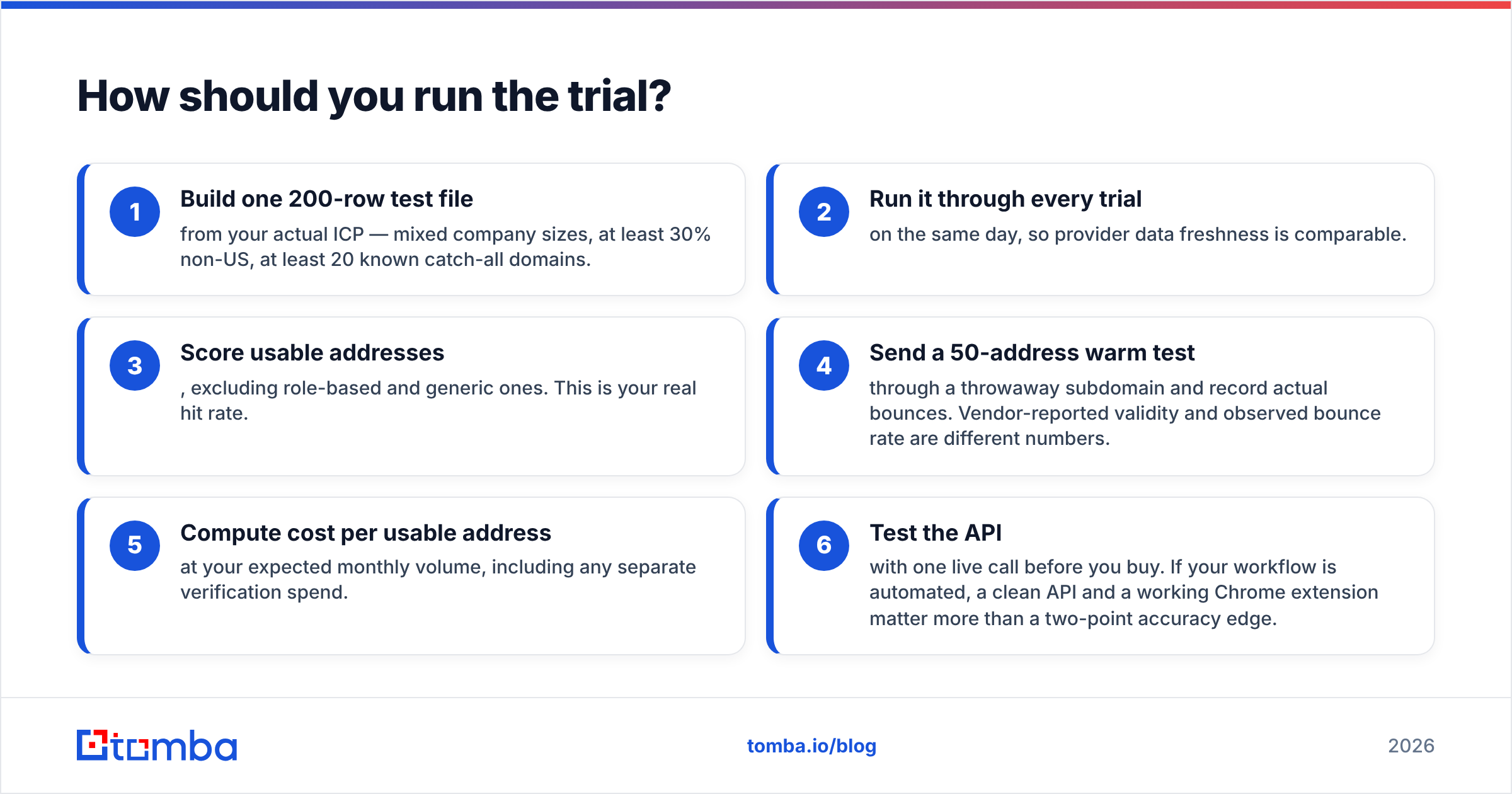
Do not evaluate on the vendor's demo data. Run this in an afternoon:
- Build one 200-row test file from your actual ICP — mixed company sizes, at least 30% non-US, at least 20 known catch-all domains.
- Run it through every trial on the same day, so provider data freshness is comparable.
- Score usable addresses, excluding role-based and generic ones. This is your real hit rate.
- Send a 50-address warm test through a throwaway subdomain and record actual bounces. Vendor-reported validity and observed bounce rate are different numbers.
- Compute cost per usable address at your expected monthly volume, including any separate verification spend.
- Test the API with one live call before you buy. If your workflow is automated, a clean API and a working Chrome extension matter more than a two-point accuracy edge.
Whichever tool wins, pair it with disciplined list hygiene. Deduplicate before you upload, re-verify anything older than 60 days, and never mail an unverified catch-all in a first-touch sequence. Those three habits move email deliverability more than switching vendors ever will.
The verdict#
Enrow wins on verification rigor. Findymail wins on LinkedIn-native sourcing speed. They are solving adjacent problems well, and if your workflow is narrow enough, either is a defensible buy.
The teams that overpay are the ones that end up running both — a finder for sourcing, a verifier for safety, an enrichment tool for context, and a fourth vendor for phone numbers. Four invoices, four credit pools, four sets of rate limits.
If that sounds like where you are heading, start with the Tomba Email Finder. Twenty-five free searches a month, $49/mo when you outgrow that, and the verifier, domain search, catch-all checks and enrichment run on the same credits — so cost per usable email goes down as your list gets harder, not up. Run your 200-row sample against it alongside the other two and let the numbers decide.
Related guides#
Ready to find emails that actually work?
Join 150,000+ professionals who stopped guessing and started sending. Free credits on signup — no credit card required.
Get the Tomba newsletter
Practical outbound tactics and product updates — once every two weeks.
About the author