Enrow vs RampedUp: Which B2B Data Tool Wins in 2026?
Enrow verifies email addresses. RampedUp sells contact and company data. They get compared constantly, but they solve different halves of the same problem — here's which one you actually need.
TL;DR
- Enrow and RampedUp are not the same category of tool. Enrow is an email verification and finding layer; RampedUp is a contact and company database with heavy Salesforce/CRM gravity.
- Pick Enrow if your list already exists and your problem is bounces, catch-all domains, and deliverability. Pick RampedUp if your problem is "I don't have contacts yet" and your team lives inside a CRM.
- RampedUp's seat-based model punishes small teams; Enrow's credit model punishes high-volume enrichment. Model your actual monthly volume before signing anything.
- Neither tool is a complete stack on its own. Most teams end up running a finder + a verifier + a CRM sync, which is why blended platforms are eating this space.
- If you want find, verify, catch-all handling, and enrichment on one credit pool, a consolidated tool like Tomba removes a vendor from the diagram.
What are Enrow and RampedUp, exactly?#
They get compared because both promise "better contact data," but they attack opposite ends of the pipeline.
Enrow is a French email verification and email-finding service. Its pitch is accuracy on the hard cases — specifically catch-all domains, where most verifiers shrug and return "unknown." It sells credits, runs as an API plus a web app, and slots into cold-email stacks like Instantly, Smartlead, or Lemlist as the cleanup step before send.
RampedUp is a B2B data and sales-intelligence platform. It sells access to a contact and company database, enrichment for existing CRM records, and market-intelligence layers like job-change alerts and territory data. Its center of gravity is Salesforce — many of its best features assume you're pushing records into a CRM, not exporting a CSV.
Here's the honest framing of what each one actually does for you:
- Enrow answers "is this address real?" — you bring an address or a name+domain, it returns valid/invalid/catch-all with a confidence signal.
- RampedUp answers "who should I contact?" — you bring an ICP or an account list, it returns people, titles, and firmographics.
- Enrow protects your sending domain. Bounce rate is a deliverability input, and a verifier is the cheapest insurance you can buy.
- RampedUp protects your pipeline coverage. If reps are manually googling prospects, a database is the fix.
- Neither fully replaces the other. Database exports still contain stale addresses; verified addresses still need a source.
That last point is the one most buyers miss. Comparing Enrow vs RampedUp as if it's a straight either/or leads to buying the wrong half of the stack.

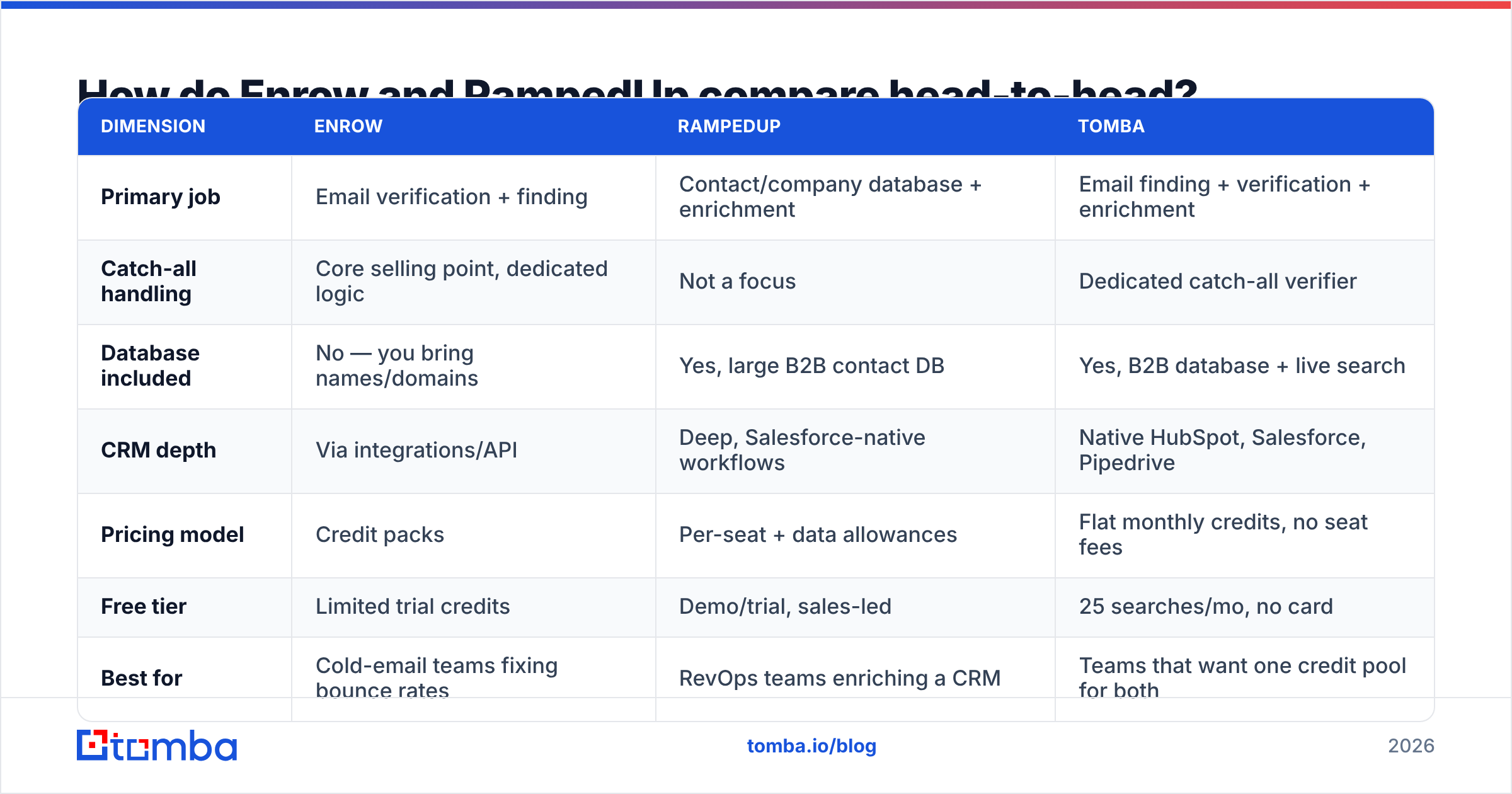
How do Enrow and RampedUp compare head-to-head?#
| Dimension | Enrow | RampedUp | Tomba |
|---|---|---|---|
| Primary job | Email verification + finding | Contact/company database + enrichment | Email finding + verification + enrichment |
| Catch-all handling | Core selling point, dedicated logic | Not a focus | Dedicated catch-all verifier |
| Database included | No — you bring names/domains | Yes, large B2B contact DB | Yes, B2B database + live search |
| CRM depth | Via integrations/API | Deep, Salesforce-native workflows | Native HubSpot, Salesforce, Pipedrive |
| Pricing model | Credit packs | Per-seat + data allowances | Flat monthly credits, no seat fees |
| Free tier | Limited trial credits | Demo/trial, sales-led | 25 searches/mo, no card |
| Best for | Cold-email teams fixing bounce rates | RevOps teams enriching a CRM | Teams that want one credit pool for both |
| Weak spot | No native prospect discovery | Verification depth on catch-alls | Fewer intent/market-intelligence layers |
Read that table as a job-to-be-done map, not a scoreboard. A verifier "losing" on database size is like a wrench losing on hammering.
Which one is more accurate?#
Accuracy means two different things here, and conflating them is how teams end up disappointed.
For Enrow, accuracy means: of the addresses it marks valid, how many actually deliver? Enrow's published claims center on high validity rates and — critically — on resolving catch-all domains that competitors return as "unknown." That's the interesting metric. Any verifier can catch a syntax error or a dead MX record. The differentiator is what happens when a domain accepts everything at the SMTP layer and you have no signal.
For RampedUp, accuracy means: of the contacts in the database, how many are still at that company with that title and that address? This is a decay problem. B2B contact data goes stale at roughly 25–30% per year across the industry — people change jobs, companies rebrand, mailboxes get retired. No database vendor escapes this, and the honest ones publish refresh cadences rather than a single vanity accuracy number.

The practical consequence: if you buy RampedUp and send straight from an export, you inherit that decay as bounces. If you buy Enrow with no source of contacts, you have a very sharp knife and nothing to cut. Teams running both are effectively paying two vendors to complete one workflow — which is the argument for a consolidated email verifier that sits on the same credit pool as the finder.
How to test accuracy yourself, in one afternoon:
- Build a 200-row control set from contacts you already know are valid (customers, partners, people who replied last quarter).
- Salt it with 50 known-dead addresses — bounced contacts from your last campaign.
- Run both tools on the same file and record valid/invalid/unknown for every row.
- Score false positives first. A tool that marks a dead address "valid" costs you deliverability; a tool that marks a live address "unknown" only costs you a lead.
- Check the catch-all bucket separately. That's where the price difference between verifiers is actually justified.
Do this before the sales call, not after. Vendor benchmarks are run on vendor-friendly lists.
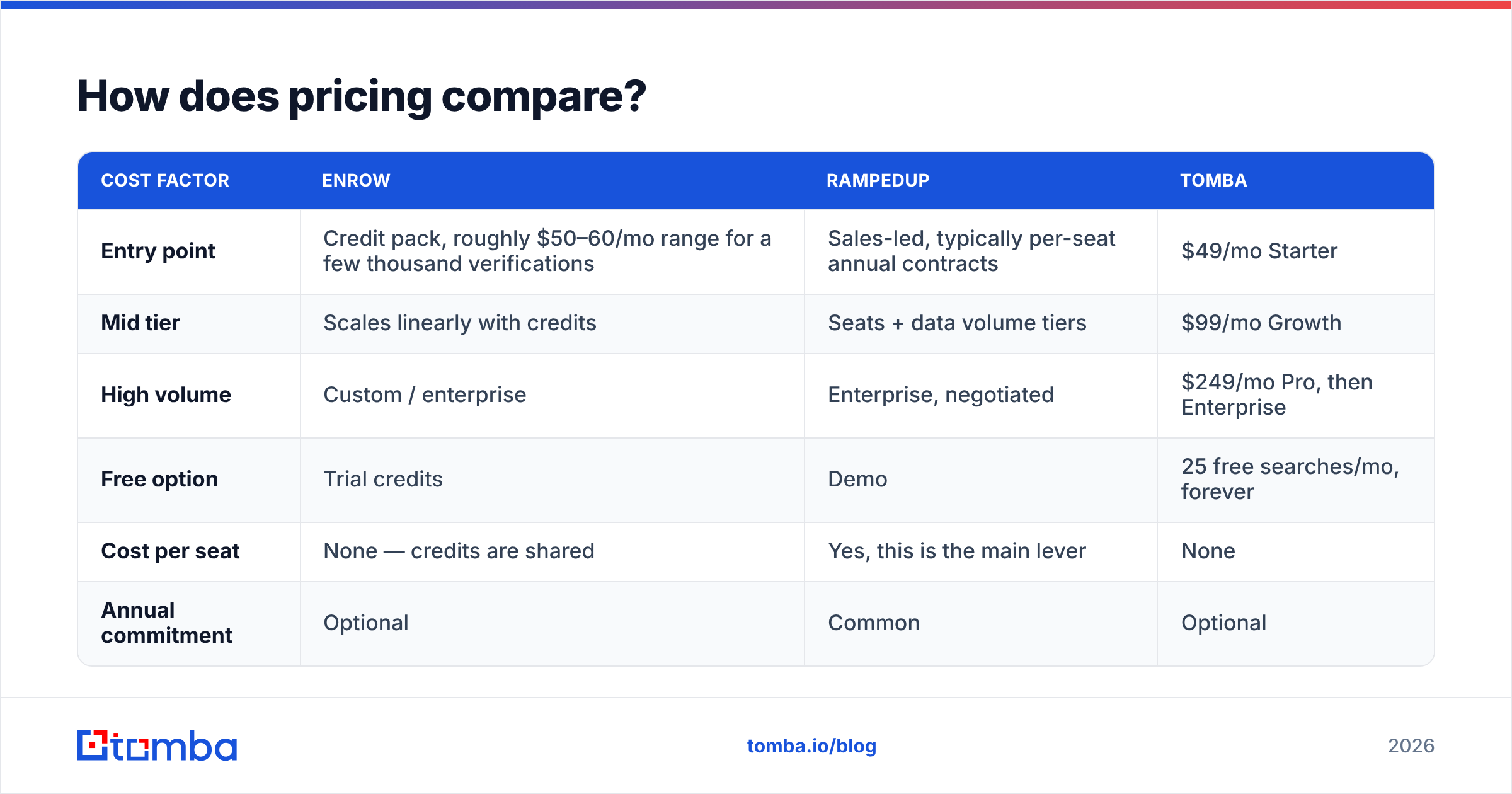
How does pricing compare?#
Both vendors move their pricing, so treat these as shapes rather than quotes — confirm current numbers on each vendor's page before you budget.
| Cost factor | Enrow | RampedUp | Tomba |
|---|---|---|---|
| Entry point | Credit pack, roughly $50–60/mo range for a few thousand verifications | Sales-led, typically per-seat annual contracts | $49/mo Starter |
| Mid tier | Scales linearly with credits | Seats + data volume tiers | $99/mo Growth |
| High volume | Custom / enterprise | Enterprise, negotiated | $249/mo Pro, then Enterprise |
| Free option | Trial credits | Demo | 25 free searches/mo, forever |
| Cost per seat | None — credits are shared | Yes, this is the main lever | None |
| Annual commitment | Optional | Common | Optional |
The structural difference matters more than the sticker price. Seat-based pricing scales with headcount; credit-based pricing scales with volume. A five-person SDR team doing 2,000 lookups a month gets destroyed by seat pricing. A two-person growth team doing 80,000 enrichments a month gets destroyed by credit pricing.
Run this calculation: (monthly lookups × cost per credit) versus (seats × seat price + overage). Whichever is lower wins for your shape, and it flips at a surprisingly low volume — usually somewhere between 10k and 25k monthly records.
For a like-for-like reference point, Tomba pricing publishes flat monthly tiers with no per-seat charge, which is why it tends to win on small-team math even when a database vendor has more raw records.
Which one fits your workflow?#
Match the tool to the bottleneck you actually have.
Choose Enrow if:
- You already have a source of contacts (scraped lists, LinkedIn exports, partner data, inbound signups).
- Your bounce rate is above 3% and your email deliverability is degrading.
- Catch-all domains are a meaningful share of your TAM — common in enterprise, education, and European markets.
- You want an API you can drop into a pipeline without a CRM migration.
Choose RampedUp if:
- Salesforce is the system of record and reps expect enrichment to happen inside it.
- You need account-level firmographics and territory data, not just email addresses.
- Job-change tracking on your existing customer base is a real revenue motion for you.
- You have enough seats and budget that a sales-led contract isn't friction.
Choose neither if:
- You need both discovery and verification and you're a team of under ten. Two vendors, two contracts, two credit pools, and a CSV shuttling between them is a tax you don't need to pay at that size.

What about catch-all domains?#
This is the technical crux of the Enrow pitch, so it deserves its own section.
A catch-all domain is configured to accept mail for any address at that domain, valid or not. anything@example.com returns a 250 OK at the SMTP layer. Traditional verification — which relies on the mail server rejecting unknown recipients — goes blind. Most verifiers return "unknown" or "accept-all" and hand the decision back to you.
That's a real problem because catch-alls are not rare. Depending on the segment, 15–30% of B2B domains are configured this way, and they skew toward larger, better-funded companies — exactly the accounts you want.
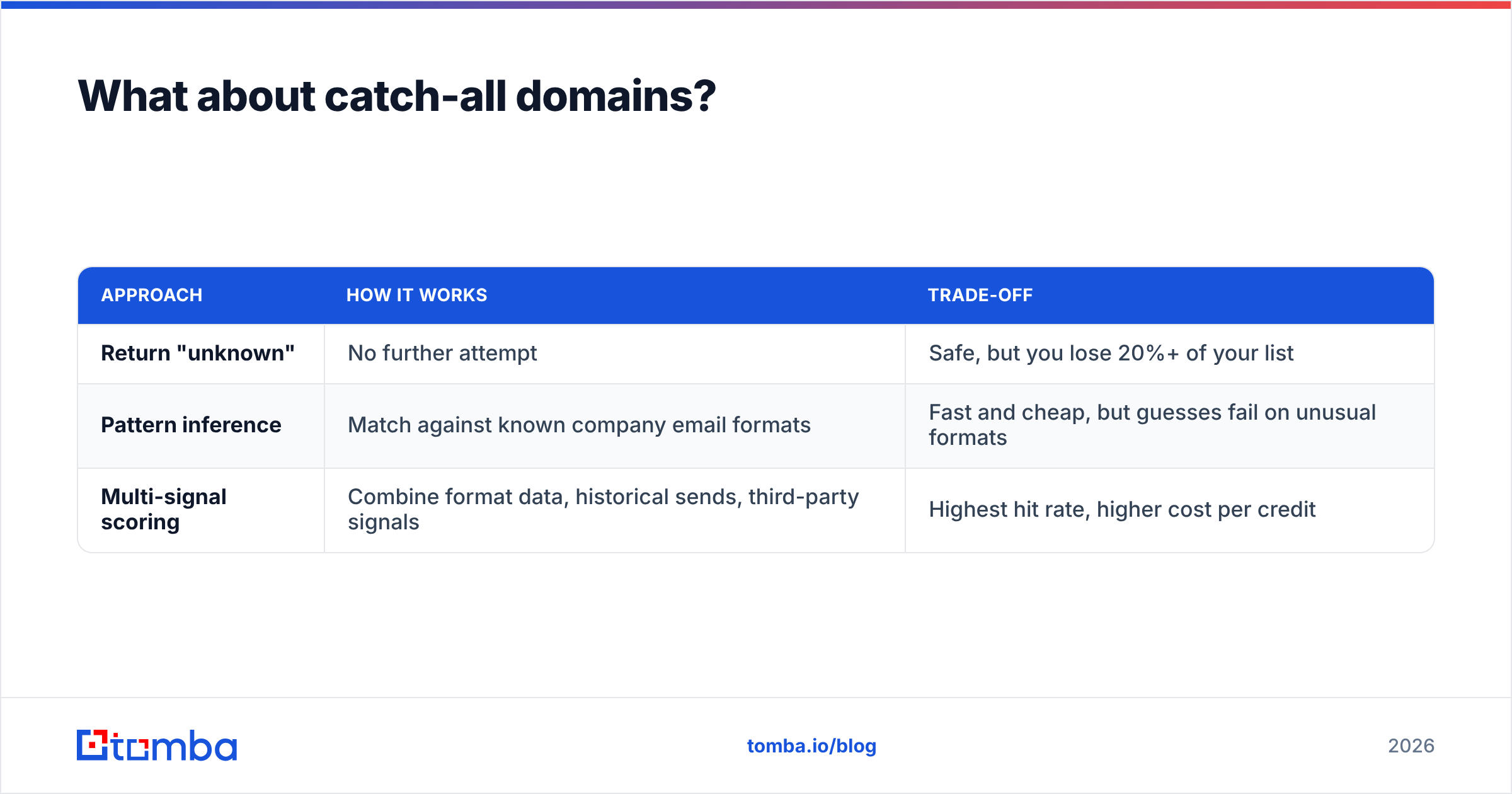
There are three ways vendors handle it:
| Approach | How it works | Trade-off |
|---|---|---|
| Return "unknown" | No further attempt | Safe, but you lose 20%+ of your list |
| Pattern inference | Match against known company email formats | Fast and cheap, but guesses fail on unusual formats |
| Multi-signal scoring | Combine format data, historical sends, third-party signals | Highest hit rate, higher cost per credit |
Enrow positions itself in the third bucket, and that's the honest reason its per-credit price sits above bulk-verification commodities. RampedUp isn't really playing this game — it's a database, and database records are as good as the last refresh.
If catch-alls are a big slice of your list, test them explicitly rather than trusting an aggregate accuracy number. Tools like Tomba's catch-all finder and free utilities like a company email pattern checker let you sanity-check format assumptions before you commit credits at scale.

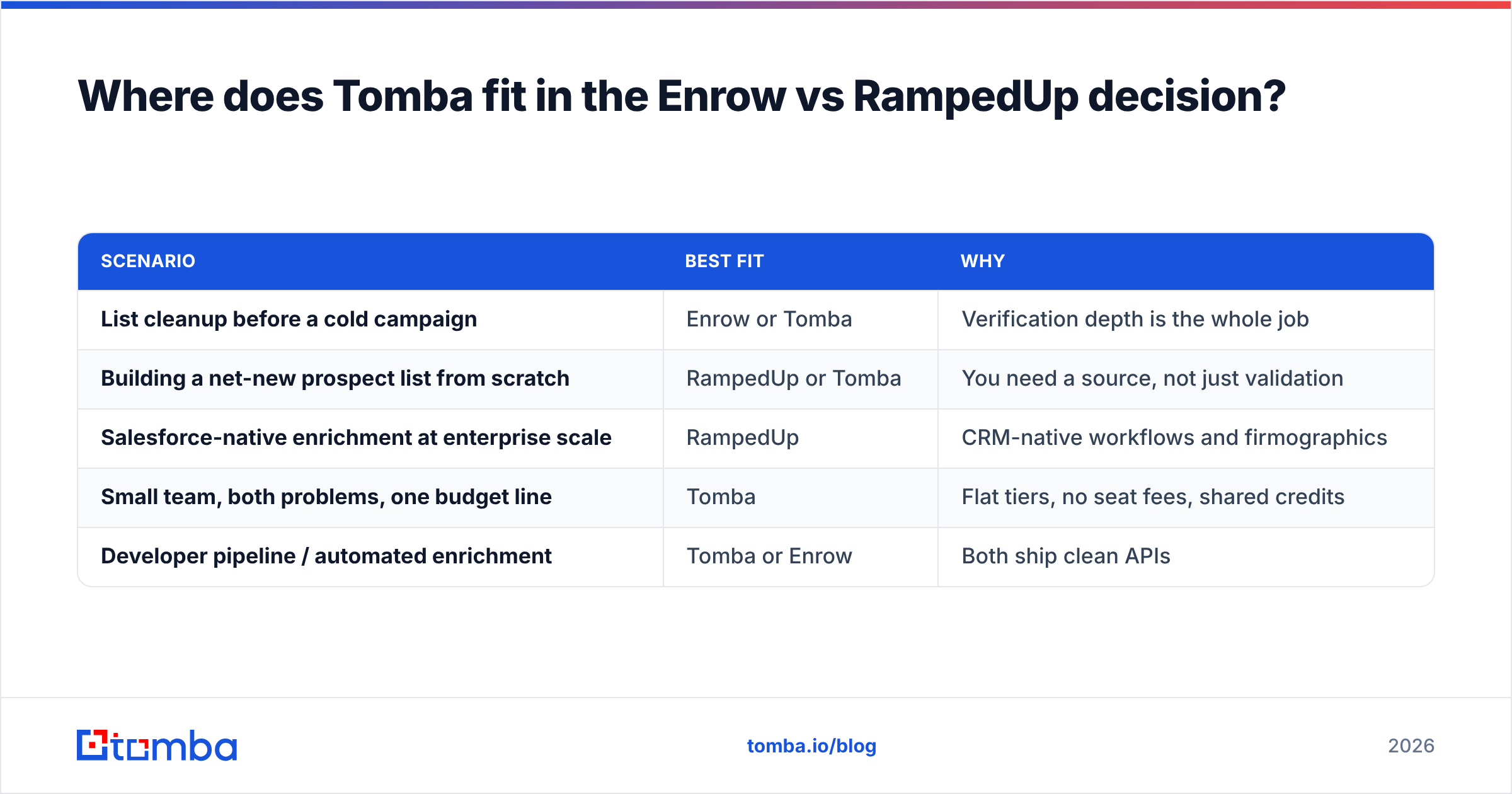
Where does Tomba fit in the Enrow vs RampedUp decision?#
Honestly: Tomba isn't the right answer for every buyer here, so let's be specific about when it is and isn't.
Tomba overlaps Enrow on verification, catch-all handling, and finding addresses by name plus domain. It overlaps RampedUp on enrichment and database access. The consolidation argument is straightforward — one credit pool covers domain search, finding, verification, and enrichment, so you're not reconciling two invoices and two rate limits.
Where Tomba doesn't compete: if what you need is deep market intelligence — intent data, job-change alerts wired into Salesforce workflows, territory planning — RampedUp is built for that motion and Tomba isn't. Buy the tool that matches the job.
| Scenario | Best fit | Why |
|---|---|---|
| List cleanup before a cold campaign | Enrow or Tomba | Verification depth is the whole job |
| Building a net-new prospect list from scratch | RampedUp or Tomba | You need a source, not just validation |
| Salesforce-native enrichment at enterprise scale | RampedUp | CRM-native workflows and firmographics |
| Small team, both problems, one budget line | Tomba | Flat tiers, no seat fees, shared credits |
| Developer pipeline / automated enrichment | Tomba or Enrow | Both ship clean APIs |
If you want to stress-test that claim, the fair comparison is to run the same 200-row control file through all three and compare valid rate, catch-all resolution, and cost per confirmed-deliverable address. That last metric — cost per confirmed deliverable, not cost per credit — is the only pricing number that matters.
What do reviewers say about each tool?#
Third-party review sites are noisy but useful for spotting patterns. Check current listings on G2 and Capterra rather than trusting any single quote, and read the two-star reviews first — that's where the real limitations surface.
The recurring themes worth watching for:
- For verification tools generally: complaints cluster around credits being consumed on "unknown" results and support responsiveness during volume spikes.
- For database tools generally: complaints cluster around data freshness in non-US regions, contract inflexibility, and seat minimums.
- For both: GDPR posture matters if you're prospecting into the EU. Ask directly how contacts were sourced and what the opt-out process is — this is a legal question, not a features question.
Also worth noting: buyers frequently shortlist these two against broader alternatives rather than each other. If you're at that stage, comparison pages like Apollo alternatives or a look at peer providers such as BookYourData — a solid choice when you specifically want pre-built, verified list purchases — will tell you more than another Enrow vs RampedUp spec sheet.
So which should you choose?#
The one-line verdict: Enrow if you have contacts and they're bouncing; RampedUp if you have a CRM and no contacts; a consolidated platform if you have both problems and one budget.
Enrow is a sharp, focused verification tool with a genuine technical edge on catch-alls. It is not a prospecting platform, and buying it expecting one will disappoint you.
RampedUp is a legitimate data and intelligence platform with real Salesforce depth. It is not a verification specialist, and sending straight from an export without a cleanup step will cost you sender reputation.
Neither is a bad product. They're just answers to different questions, and the comparison only makes sense once you've named your actual bottleneck. Write down your monthly volume, your seat count, your catch-all percentage, and your CRM. Those four numbers make the decision for you.
Ready to test the consolidated path? Start with the Tomba Email Finder — find addresses by name, domain, or company, verify them against the same credit pool, and handle catch-alls without adding a second vendor. The free tier gives you 25 searches a month with no card required, which is enough to run the 200-row control test described above and see the numbers for yourself. Paid plans start at $49/month with no per-seat charges, so the cost doesn't scale with how many people on your team need access.
Related guides#
Ready to find emails that actually work?
Join 150,000+ professionals who stopped guessing and started sending. Free credits on signup — no credit card required.
Get the Tomba newsletter
Practical outbound tactics and product updates — once every two weeks.
About the author