Enrow vs ReachStream: Verifier vs Database in 2026
Enrow verifies and finds emails one address at a time. ReachStream sells you a prebuilt B2B contact database. They solve different halves of the same problem — here is which half you actually need.
Enrow vs ReachStream is a choice between two jobs, not two versions of one tool. Enrow checks emails you already have. ReachStream sells you the list in the first place. Pick the wrong one and you pay twice.
TL;DR
Enrow finds and verifies email addresses. You bring names and domains. It returns a valid address and a confidence signal. It does not sell you a list.
ReachStream is a ready-made B2B contact database. You pick filters, then export contacts. Record freshness varies.
They are not true rivals. They sit at opposite ends of one pipeline. Most teams that buy one end up needing the other.
Is your target list short and named? A verifier wins. Need volume fast, with a broad ICP? A database wins.
One platform that searches, enriches and verifies — like Tomba — usually beats running two vendors. You save on cost and on bounces.
Enrow vs ReachStream: what are they?#
Enrow is an email finder and verifier. The pitch is narrow and honest. Give it a first name, a last name and a company domain. It returns the most likely work email, plus a verdict. It works hard to cut false positives. Those are the addresses that pass a quick check, then bounce in real life. You get an API, bulk CSV upload, and links into common sequencers.
ReachStream is a different animal. It is a B2B contact and company database with tens of millions of records. You pay by subscription or by credits. You do not supply the names. You supply the filters: industry code, job function, seniority, headcount, region. It hands back contacts with emails, phone numbers and company details.
That split matters more than any feature table. Enrow answers one question: is this person's email real? ReachStream answers another: who should I email at all?

Enrow vs ReachStream: how do they differ?#
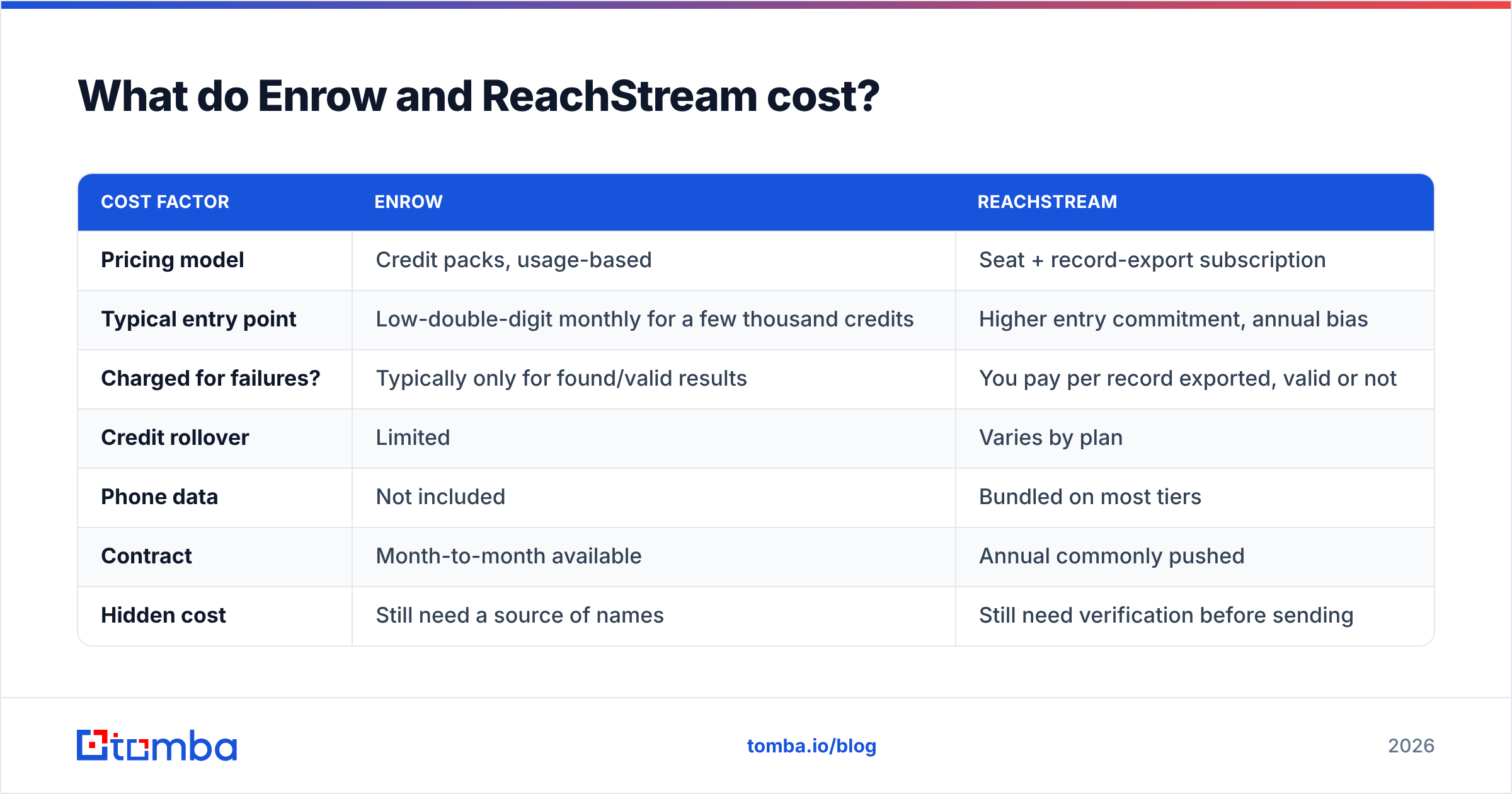
| Attribute | Enrow | ReachStream | Tomba |
|---|---|---|---|
| Primary job | Find + verify a known contact | Sell prebuilt contact lists | Find, verify, and enrich |
| Data model | On-demand lookup, generated at query time | Static database, refreshed on a cycle | Live search + verification layer |
| You must supply | Name + company domain | Filters only (no names needed) | Either — domain, name, or filters |
| Phone numbers | No | Yes, on many records | Yes, via phone finder |
| Catch-all handling | Core strength, explicit verdicts | Usually passes catch-alls through unflagged | Dedicated catch-all verifier |
| Best for | ABM, low-volume, high-precision | Broad TAM sweeps, volume outbound | Both, from one credit pool |
| Free tier | Limited trial credits | Sample/demo list on request | 25 searches per month |
| API access | Yes | Yes, on higher plans | Yes on all paid plans |
One row should decide your purchase: "you must supply." Do you already have a target list? It may come from Sales Navigator, an event sheet, or a webinar export. Then you do not need a database. You need a resolver. Are you staring at a blank sheet instead? No verifier on earth will help. You have nothing to verify yet.
Enrow vs ReachStream: which one is more accurate?#
Accuracy claims in this market are mostly noise. Every vendor prints a number above 95%. Every vendor also picked the test data. Only one number counts: the bounce rate on your sends.
Each model still fails in its own way.
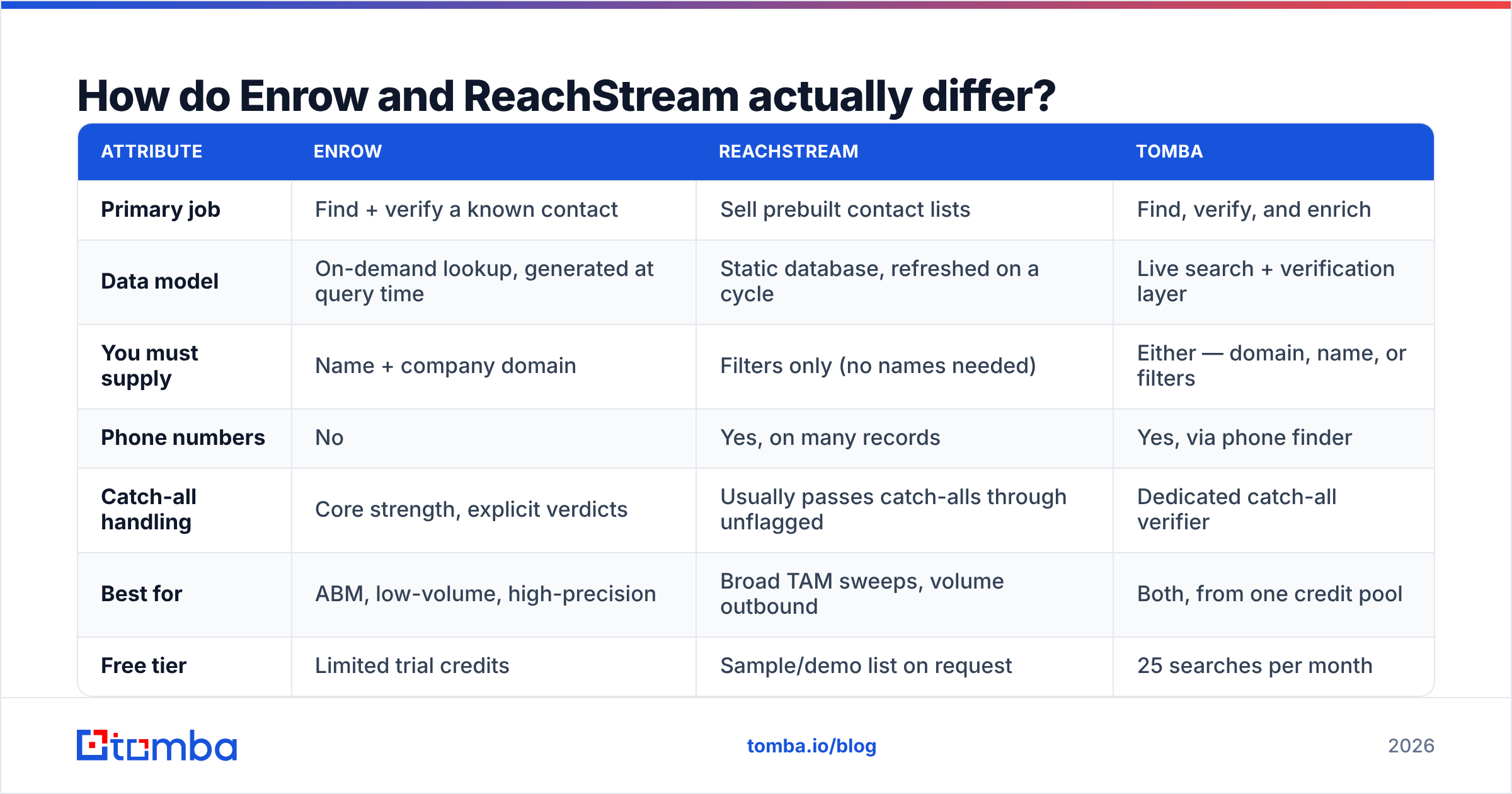
Verifier failure (Enrow-style). The person left the job last quarter. IT never closed the mailbox, so mail still lands. The address looks clean. Your reply rate is zero. A verifier proves delivery, not employment.
Database failure (ReachStream-style). The record was scraped 14 months ago. The title is stale. The company was bought. The domain now redirects. About 25–30% of B2B contact data goes stale each year. That is why every database sells "refresh" as a feature.
Catch-all guesswork. Some mail servers accept every address. So no tool can prove the mailbox exists without a send. Vendors that quietly mark those as "valid" inflate their score. Ask how each one reports catch-alls before you sign.
Pattern guessing. Some tools return
first.last@domain.comwith no proof behind it. Then you are paying for a guess. You can make the same guess for free with an email permutator.

Here is the practical test. Run 200 contacts through both tools. Send one small, warmed campaign. Then count hard bounces and real replies. Ten minutes of testing beats ten pages of vendor claims.
Enrow vs ReachStream pricing: what does each cost?#
Both vendors move their prices. Both cut deals at the top end. Treat this table as a guide, then check their own pages.
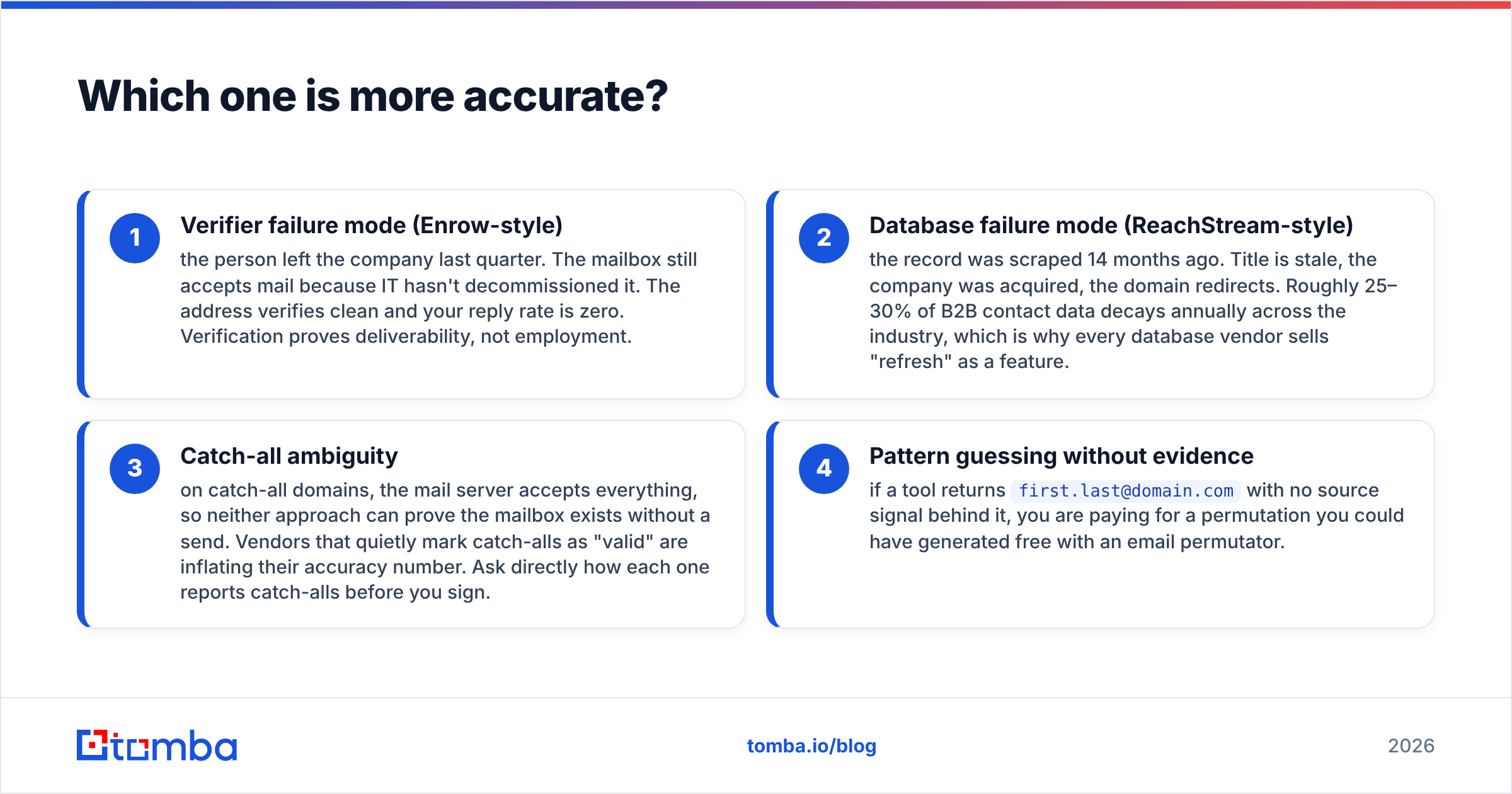
| Cost factor | Enrow | ReachStream |
|---|---|---|
| Pricing model | Credit packs, usage-based | Seat + record-export subscription |
| Typical entry point | Low-double-digit monthly for a few thousand credits | Higher entry commitment, annual bias |
| Charged for failures? | Typically only for found/valid results | You pay per record exported, valid or not |
| Credit rollover | Limited | Varies by plan |
| Phone data | Not included | Bundled on most tiers |
| Contract | Month-to-month available | Annual commonly pushed |
| Hidden cost | Still need a source of names | Still need verification before sending |
The hidden-cost row is where budgets break. Buy Enrow alone and you still need names. That means a second data source, or hours of manual work. Buy ReachStream alone and you still need to verify. Sending a raw purchased list from a cold domain will burn your sender reputation.
Add both bills together. The "cheap" pick is often the costly one. For contrast, one platform handles search plus verification. See Tomba pricing: $49/mo on Starter, $99/mo on Growth, $249/mo on Pro. The free tier gives 25 searches a month, so you can test the data first.

Is Enrow better than ReachStream for cold email?#
It depends on how you build your target list. The honest answer splits three ways.
Choose Enrow if:
- You run account-based outbound against 200–2,000 named accounts
- Your reps source names from LinkedIn, podcasts, job boards or events
- Deliverability is your bottleneck and you bounce above 3%
- You need an API to resolve addresses inside your own product
Choose ReachStream if:
- Your ICP is broad, such as "US manufacturing, 50–500 staff, ops leaders"
- You need 20,000 contacts this month and have no source list
- Phone numbers matter as much as email
- You already have a separate verification step
Choose neither (consolidate instead) if:
- You pay two vendors to cover one workflow
- Your ops team swaps CSV files between systems every week
- You want one credit pool, one API key, one bill
That last case is more common than vendors admit. The two-tool stack is usually an accident of purchasing, not a plan.
What does a consolidated stack look like?#
Forget "database vendor plus verifier vendor". The consolidated pattern runs one provider, in five steps.
Discover. Run a domain search on target companies. You see the email pattern and known contacts before you pay for a record.
Resolve. Feed names into the email finder. You get one address for one person, with the source signal attached.
Verify. Push it all through the email verifier. Route unclear domains to a catch-all check instead of guessing.
Enrich. Add company data, job title and phone before the record hits your CRM. Routing and scoring then work on day one.
Automate. Wire the chain through the Tomba API or a bulk job. Nobody exports a CSV by hand.
The win is not the feature list. Every step draws on the same credit pool. So you stop over-buying in one tool while you run dry in the other.
How should you evaluate any of these tools?#
Skip the marketing pages. Run the same five tests on every vendor you shortlist, Tomba included.
The known-list test. Take 100 contacts you have already emailed. Feed them in. A tool that marks known-good addresses invalid will make you drop real prospects.
The catch-all test. Pick five domains you know are catch-all. See how each vendor labels them. "Valid" is the wrong answer. "Catch-all — unverifiable" is the right one, and it should be its own status.
The freshness test. Pull 50 records. Check the same people on LinkedIn. Count how many changed jobs. Above 15% drift means you bought a snapshot, not a database.
The coverage test. Run your real ICP, not a sample of big brands. Every vendor covers Salesforce and HubSpot well. The question is your 80-person prospect in Lyon or Ohio.
The support test. Send a pre-sales question about GDPR. The speed and detail of the reply predicts your support at renewal time.
Review sites help for general mood. G2 and Capterra both cover this category. Read the two- and three-star reviews only. Five-star reviews here are heavily incentivized. The middle ones describe the real limits.
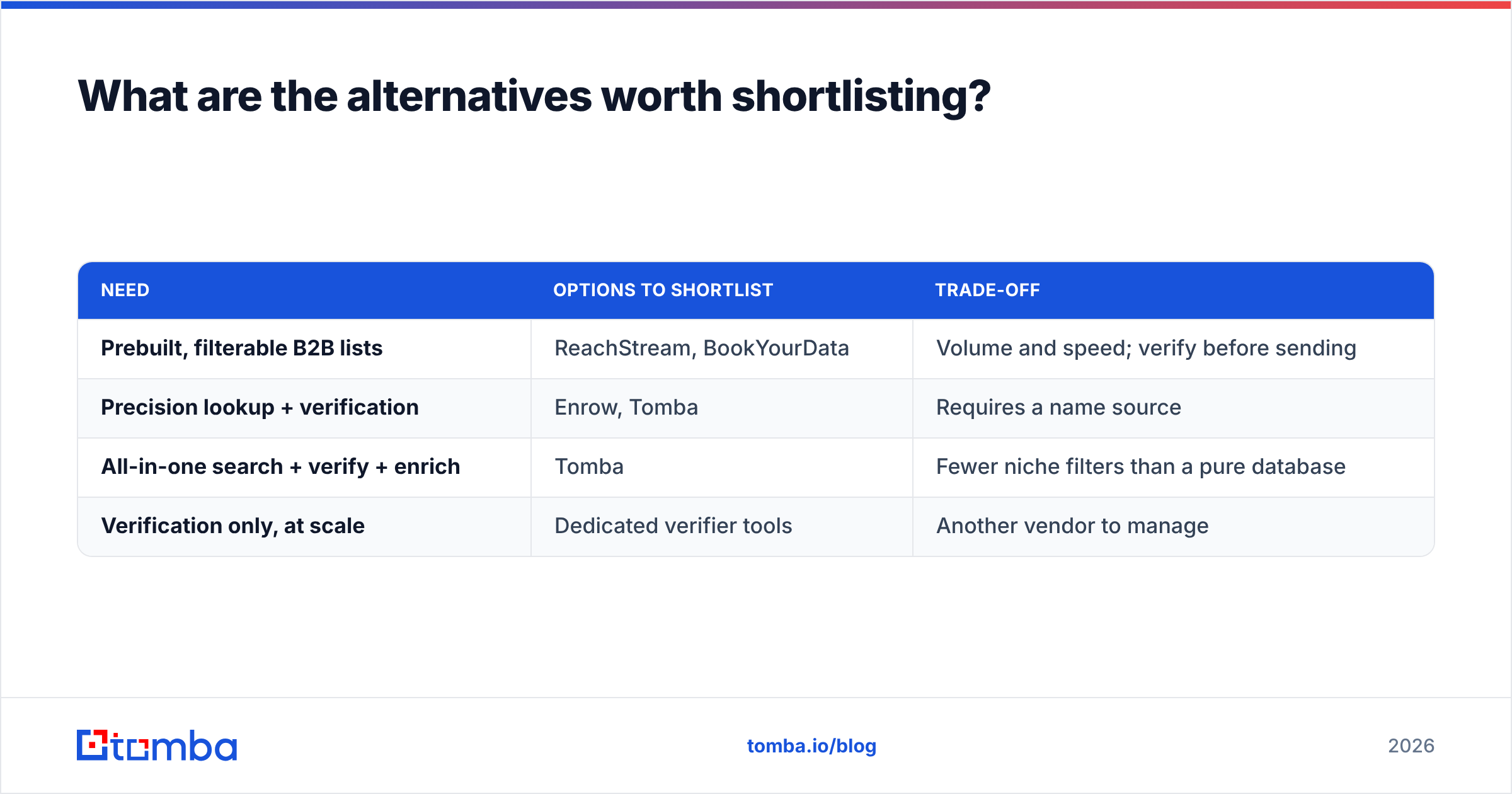
What are the alternatives worth shortlisting?#
Neither tool fits? The nearby options split on the same line: verifier or database.
| Need | Options to shortlist | Trade-off |
|---|---|---|
| Prebuilt, filterable B2B lists | ReachStream, BookYourData | Volume and speed; verify before sending |
| Precision lookup + verification | Enrow, Tomba | Requires a name source |
| All-in-one search + verify + enrich | Tomba | Fewer niche filters than a pure database |
| Verification only, at scale | Dedicated verifier tools | Another vendor to manage |
BookYourData suits one clear need: "hand me a clean, filterable list today". It is built for list delivery, not per-lookup resolution. That is a different buying motion from Enrow's, and a fair one.
Weighing a bigger platform switch? Our Apollo alternative guide covers what changes when a sequencer and a database ship together.
What is the verdict on Enrow vs ReachStream?#
Enrow wins on precision. ReachStream wins on reach. Neither wins outright, because they answer different questions.
Do you already know who you want to reach? Enrow's model is the right shape. You pay for resolution, not for records you will never touch. Do you not know yet? ReachStream's model is the right shape. Budget for verification too. Exported addresses are not send-ready.
There is a third path: one platform for discovery, resolution, verification and enrichment. Most teams land there after a year of running two contracts. It is not always the cheapest sticker price. It is almost always the cheapest total. Count the ops hours, the double credits, and the bounces nobody owned.
Start with the search layer. Run your real ICP through the Tomba Email Finder on the free tier. That is 25 searches, no card. Compare the hit rate and the verdicts against your Enrow or ReachStream quote. If the data holds up, Starter at $49/mo covers most single-rep workflows. The API is there from day one, so you never move a CSV by hand again.
Related guides#
Ready to find emails that actually work?
Join 150,000+ professionals who stopped guessing and started sending. Free credits on signup — no credit card required.
Get the Tomba newsletter
Practical outbound tactics and product updates — once every two weeks.
About the author