Enrow vs Salesbot (2026): Which Tool Wins for Cold Outreach?
Enrow verifies and finds emails. Salesbot automates the conversations that follow. We break down accuracy, pricing, workflow fit, and where each one quietly fails — plus what most teams actually end up buying.
TL;DR
- Enrow and Salesbot are not really competitors. Enrow is a data-layer tool (email finding and verification). Salesbot sits in the AI SDR / conversational automation layer, sending and replying on your behalf.
- If your problem is bounce rate, Enrow is the relevant purchase. If your problem is "nobody has time to write 400 first-touch emails," Salesbot is the relevant purchase.
- Verification-only vendors like Enrow price per credit and get expensive once you add discovery on top; AI SDR tools like Salesbot tend to price per seat or per conversation, which punishes small teams that just want volume.
- Most teams running real outbound end up with three line items: a finder, a verifier, and a sender. Consolidating the first two is where the easy savings live.
- Our practical take: buy the data layer first. An AI SDR pointed at a bad list is a very fast way to burn a sending domain.
What are Enrow and Salesbot, exactly?#
Start here, because the naming makes these look more similar than they are.
Enrow (enrow.io) is a French-built email data tool. Its pitch is accuracy: find a professional email address from a name and a company, then verify whether that address will actually accept mail. It leans hard on the verification side, including the hard cases — catch-all domains, role accounts, and the Microsoft 365 tenants that refuse to answer SMTP probes honestly. It's a component, not a workflow. You feed it names and domains; it hands back addresses and a status.
Salesbot is the other half of the sentence. The Salesbot category — AI sales agents, conversational bots, automated SDR assistants — exists to take a list you already have and do the human-shaped work: draft the first touch, personalize it against a scraped signal, send it, watch for a reply, classify that reply, and either book the meeting or drop the lead back into a nurture track. The value proposition is labor replacement, not data quality.
That distinction matters more than any feature checklist. Comparing "enrow vs salesbot" as though one replaces the other is like comparing a water filter to a coffee machine. You can buy either. You will probably regret owning only one.
The reason people search for the comparison anyway is budget. Both come out of the same outbound line item, both are sold as "the thing that fixes your pipeline," and if you can only approve one purchase this quarter, you need to know which one moves the number.

How do Enrow and Salesbot compare head-to-head?#
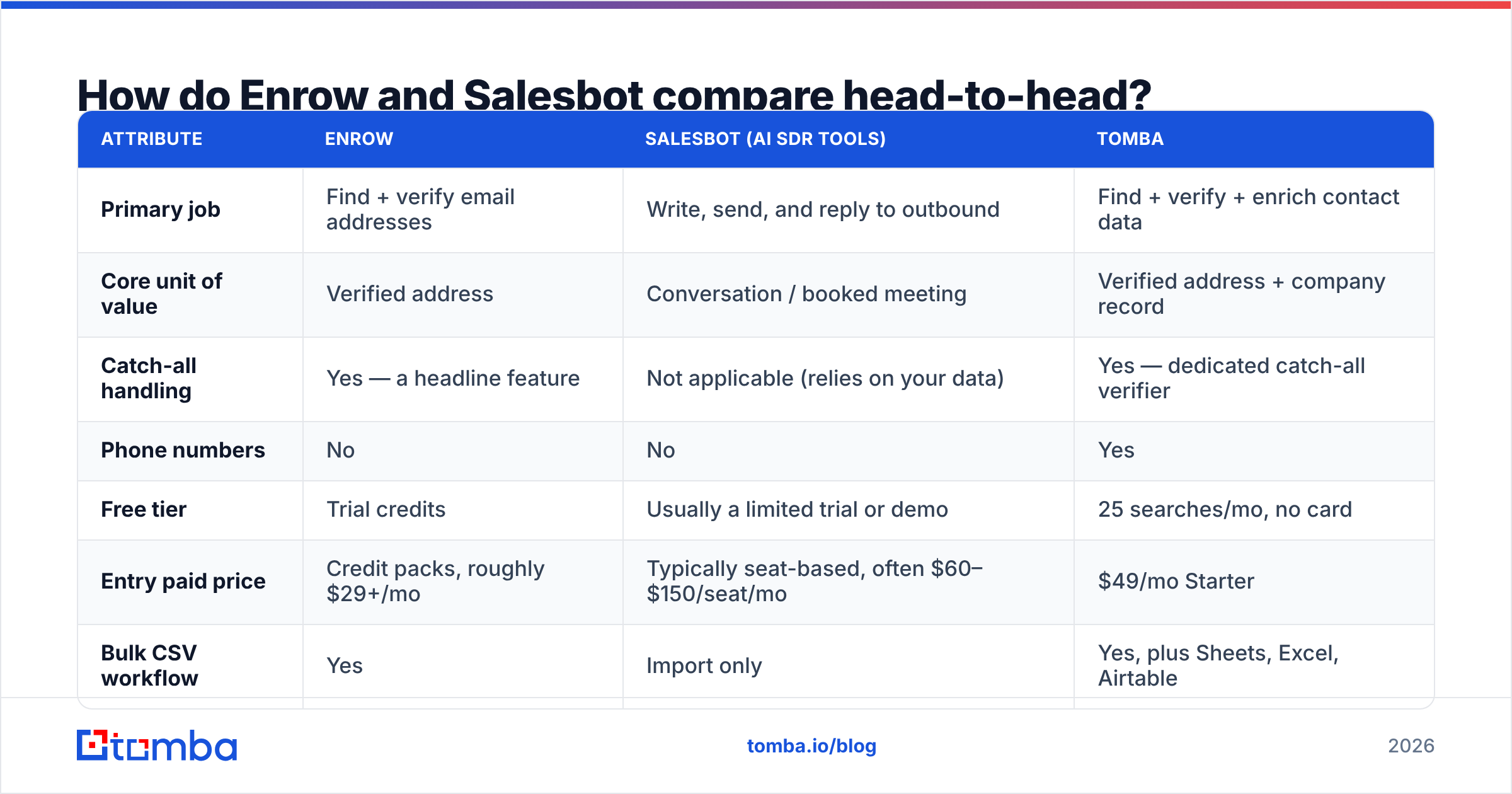
Here's the honest side-by-side. Note that vendor pricing in this category changes frequently and is often credit-based rather than flat — treat the figures below as directional and confirm on each vendor's own page before you buy.
| Attribute | Enrow | Salesbot (AI SDR tools) | Tomba |
|---|---|---|---|
| Primary job | Find + verify email addresses | Write, send, and reply to outbound | Find + verify + enrich contact data |
| Core unit of value | Verified address | Conversation / booked meeting | Verified address + company record |
| Catch-all handling | Yes — a headline feature | Not applicable (relies on your data) | Yes — dedicated catch-all verifier |
| Phone numbers | No | No | Yes |
| Free tier | Trial credits | Usually a limited trial or demo | 25 searches/mo, no card |
| Entry paid price | Credit packs, roughly $29+/mo | Typically seat-based, often $60–$150/seat/mo | $49/mo Starter |
| Bulk CSV workflow | Yes | Import only | Yes, plus Sheets, Excel, Airtable |
| Public API | Yes | Varies by vendor | Yes, plus CLI and MCP server |
| Sends email? | No | Yes — that's the point | No |
| Best for | Cleaning lists before send | Scaling reply handling | Building the list in the first place |
Read that table left to right and the overlap is one row: neither Enrow nor Tomba sends mail, and Salesbot doesn't build lists. The competitive tension is entirely about where you spend the first dollar.
Which problem are you actually trying to solve?#
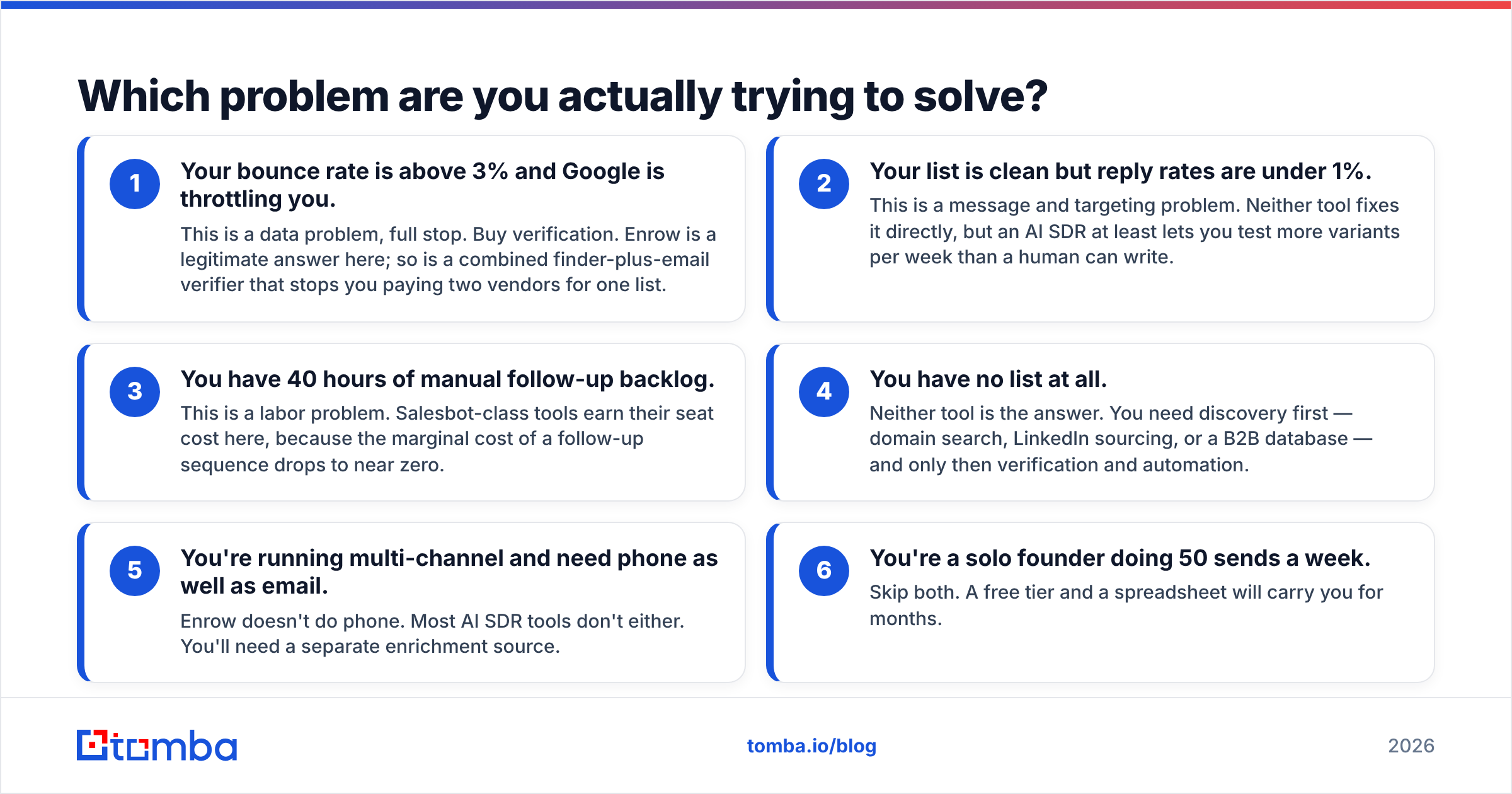
Diagnose before you shop. Four scenarios cover most teams:
- Your bounce rate is above 3% and Google is throttling you. This is a data problem, full stop. Buy verification. Enrow is a legitimate answer here; so is a combined finder-plus-email verifier that stops you paying two vendors for one list.
- Your list is clean but reply rates are under 1%. This is a message and targeting problem. Neither tool fixes it directly, but an AI SDR at least lets you test more variants per week than a human can write.
- You have 40 hours of manual follow-up backlog. This is a labor problem. Salesbot-class tools earn their seat cost here, because the marginal cost of a follow-up sequence drops to near zero.
- You have no list at all. Neither tool is the answer. You need discovery first — domain search, LinkedIn sourcing, or a B2B database — and only then verification and automation.
- You're running multi-channel and need phone as well as email. Enrow doesn't do phone. Most AI SDR tools don't either. You'll need a separate enrichment source.
- You're a solo founder doing 50 sends a week. Skip both. A free tier and a spreadsheet will carry you for months.
The most common expensive mistake is buying scenario 3's tool when you have scenario 1's problem. An AI agent sending 800 emails into an unverified list produces bounces at machine speed, and the damage to sender reputation takes weeks to undo.
Is Enrow accurate enough to skip a second verifier?#
Enrow markets itself on accuracy, and the verification-first positioning is credible. The category-wide reality is messier than any vendor's landing page suggests.
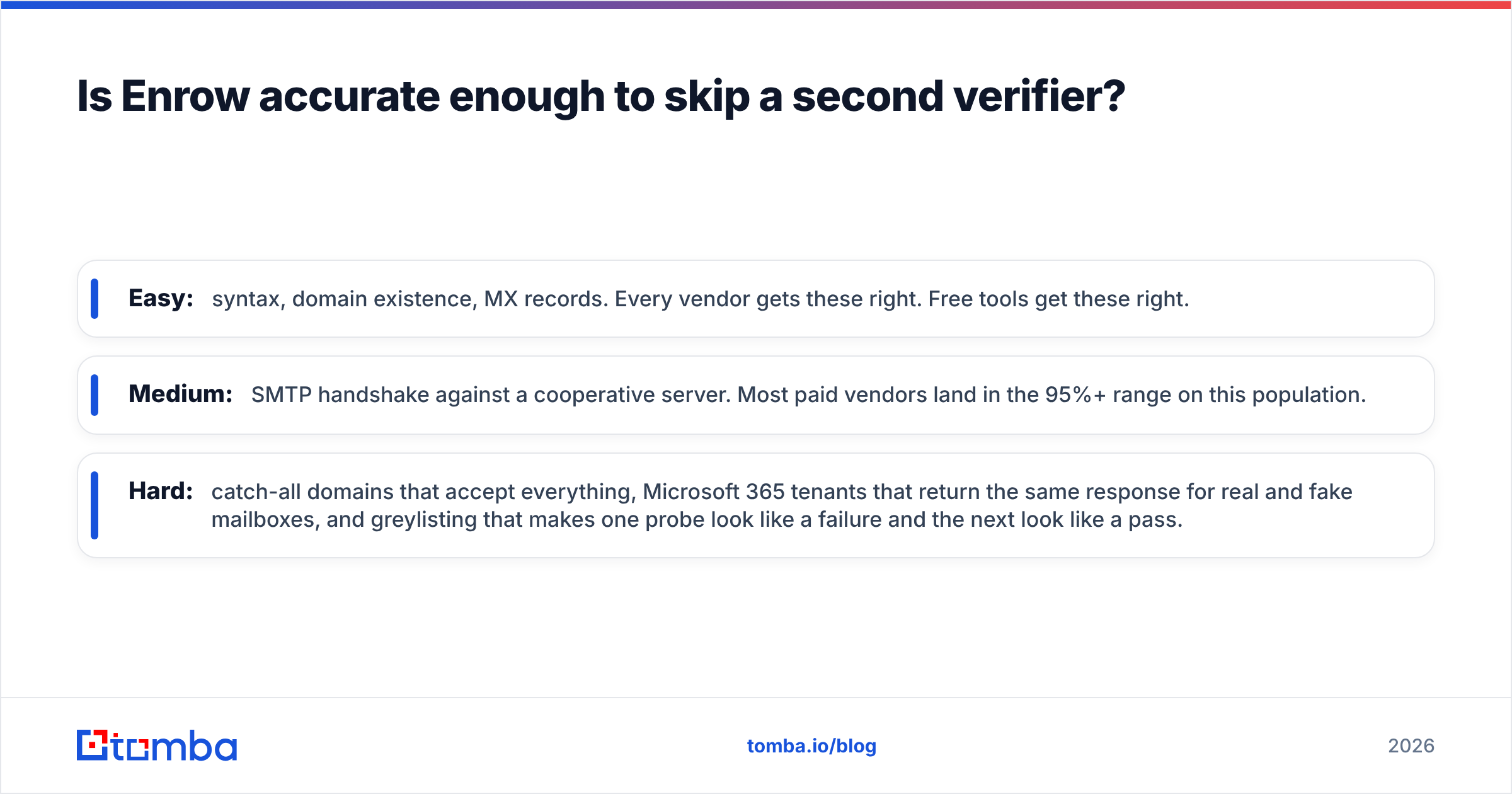
Email verification breaks into tiers of difficulty:
- Easy: syntax, domain existence, MX records. Every vendor gets these right. Free tools get these right.
- Medium: SMTP handshake against a cooperative server. Most paid vendors land in the 95%+ range on this population.
- Hard: catch-all domains that accept everything, Microsoft 365 tenants that return the same response for real and fake mailboxes, and greylisting that makes one probe look like a failure and the next look like a pass.
That third tier is where vendors genuinely differ, and it's where Enrow spends its marketing budget. It's also where you should run your own test rather than trusting anyone's published number — including ours. Take 200 addresses you already know the truth about (your CRM's replied-to contacts are perfect for this), run them through any candidate tool, and count the disagreements. Thirty minutes of work will tell you more than a month of G2 reading, though G2's lead intelligence category is a reasonable place to shortlist candidates.
One structural caveat on the verification-only model: a verifier can only tell you whether an address you already have is deliverable. It can't tell you the address exists in the first place. If you're paying Enrow for verification and a second vendor for discovery, you're paying twice for one contact — and the two vendors will sometimes disagree about the same person, which nobody has a good process for resolving.
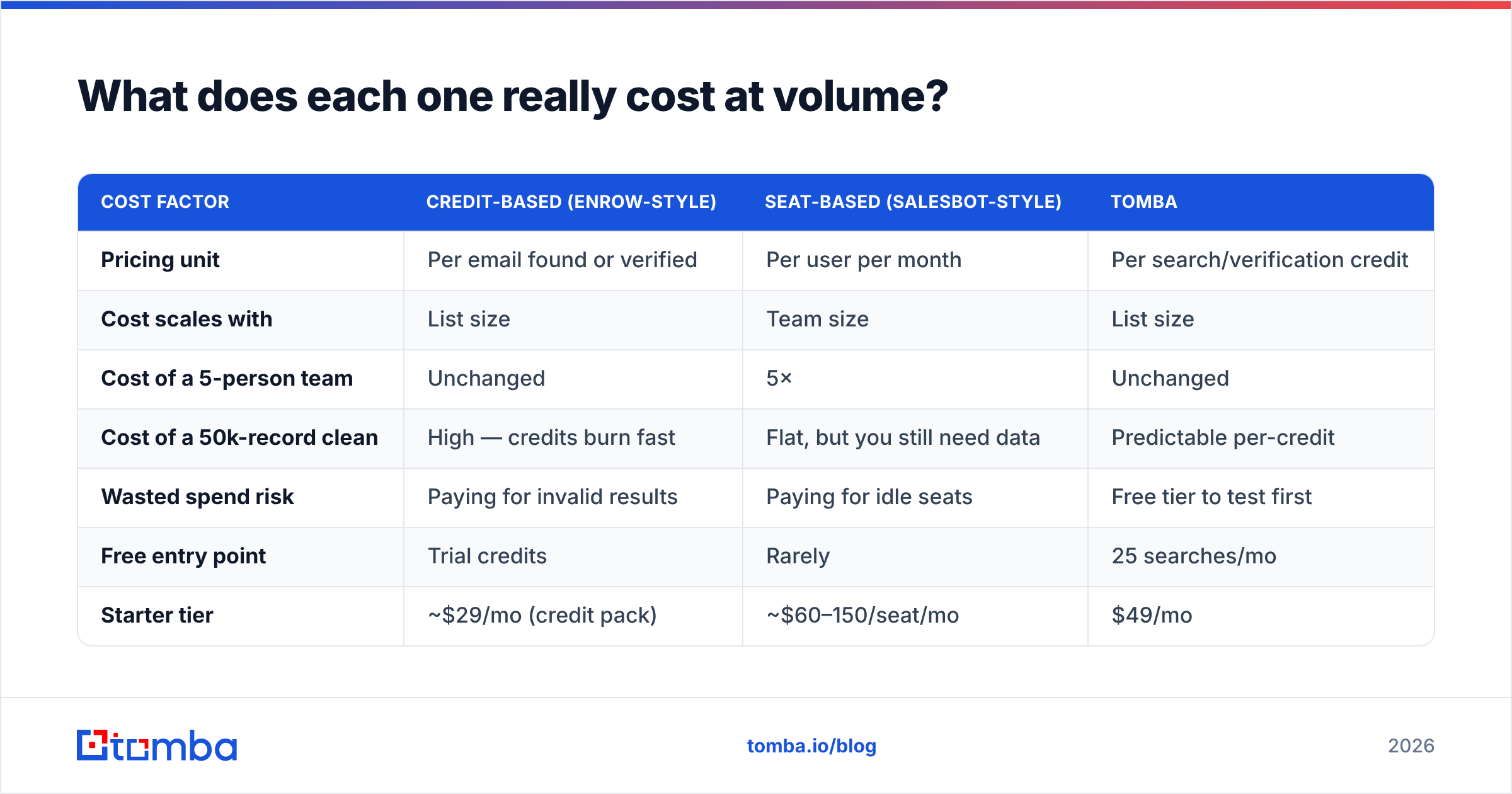
What does each one really cost at volume?#
Pricing models diverge more than the sticker prices suggest.
| Cost factor | Credit-based (Enrow-style) | Seat-based (Salesbot-style) | Tomba |
|---|---|---|---|
| Pricing unit | Per email found or verified | Per user per month | Per search/verification credit |
| Cost scales with | List size | Team size | List size |
| Cost of a 5-person team | Unchanged | 5× | Unchanged |
| Cost of a 50k-record clean | High — credits burn fast | Flat, but you still need data | Predictable per-credit |
| Wasted spend risk | Paying for invalid results | Paying for idle seats | Free tier to test first |
| Free entry point | Trial credits | Rarely | 25 searches/mo |
| Starter tier | ~$29/mo (credit pack) | ~$60–150/seat/mo | $49/mo |
| Mid tier | Scales with credit volume | Per-seat multiplier | $99/mo Growth |
| Scale tier | Custom | Custom + onboarding fees | $249/mo Pro, then Enterprise |
Two things fall out of this.
First, seat-based pricing is brutal for small teams with big lists, and credit-based pricing is brutal for big teams with small lists. Match the model to your shape, not to the headline number.
Second, watch for the credit-burn asymmetry. Some vendors charge a credit for every lookup attempt, including the ones that return nothing. Others charge only for results. Over a 20,000-row list with a 65% hit rate, that difference is 7,000 credits — real money. Ask the question explicitly during your trial, and check the Tomba pricing page for a comparison point on how per-result billing reads.
Where does each tool break down?#
Every tool in this category has a failure mode its marketing doesn't mention.
Enrow's weak points. It's narrow by design. No phone numbers, no company firmographics, no visitor identification, no CRM-native workflow. If your enrichment needs grow past email, you're adding vendors. The credit model also means a messy input list — misspelled company names, outdated domains, people who left two years ago — quietly converts budget into null results. Garbage in, invoice out.
Salesbot-class weak points. Three of them, and they compound. AI-drafted first touches are getting easier to spot as recipients see more of them; a bot that sends confidently into a bad list amplifies deliverability damage rather than containing it; and reply classification is only as good as its worst false positive — an "unsubscribe me" misread as "interested" is an unforced error you'll hear about. Automation multiplies whatever you feed it, including mistakes.
The shared weak point. Neither tool owns the handoff. Enrow gives you a CSV. Salesbot wants a list. Something has to sit between them, and in most companies that something is a person with a spreadsheet and a naming convention nobody else understands. Look hard at native integrations — Zapier, HubSpot, Salesforce, Sheets — because the glue work is where teams lose their week.
Is there a third option that covers more of the stack?#
Yes, and it's worth naming plainly rather than pretending the choice is binary.
If your bottleneck is the data layer — and for most teams under 50 reps, it is — a consolidated finder-and-verifier removes a vendor from the stack without losing capability. That's the argument for Tomba: find email addresses by name, domain, or company, verify them in the same pass, pull B2B phone numbers when you're running multi-channel, and push the result straight into your CRM. Catch-all domains get a dedicated check rather than a shrug. Bulk jobs run through the same bulk email finder rather than a separate SKU.
The honest limitation: Tomba doesn't send email and doesn't write your sequences. If what you want is an autonomous agent handling replies at 2am, Tomba is not that product and a Salesbot-class tool is. The two are complements, not substitutes.
There's also a middle path worth considering. Curated B2B database vendors — BookYourData among them — sell pre-verified contact lists outright, which suits teams that would rather buy a finished list than operate a lookup pipeline. Different economics, different failure modes, but a legitimate option if your ICP is stable and you'd rather not run the tooling yourself.
Which should you choose in 2026?#
Decision rules, in priority order:
- Choose Enrow if you already have a discovery source you trust, your only complaint is bounce rate, and verification accuracy on catch-all domains is your specific pain. It's a focused tool that does one job.
- Choose a Salesbot-class AI SDR if your list quality is already good, your sequences already convert, and the binding constraint is human hours. Automation amplifies what works; it does not create it.
- Choose a consolidated data platform if you're paying two or three vendors to produce one verified contact, or if you need phone alongside email. This is the most common situation and the one where consolidation pays back fastest.
- Choose nothing yet if you can't articulate your ICP in one sentence. No tool in this comparison fixes targeting, and buying one will only make the wrong outreach cheaper to send.
For a broader view on how the outbound stack fits together, HubSpot's sales blog has consistently decent coverage of sequencing and follow-up cadence — the layer above whichever tooling you pick.
The pattern we see repeatedly: teams buy automation first because it's the exciting purchase, watch deliverability collapse in month two, then buy verification as damage control. Reverse the order. Clean data makes mediocre automation work. Clever automation cannot rescue a dirty list.
Ready to fix the data layer first?#
Start with the part that everything else depends on. The Tomba Email Finder turns a name and a domain into a verified, deliverable address — with catch-all handling, bulk processing, a full API, and a free tier of 25 searches a month so you can test it against your own known-good contacts before spending anything. Paid plans start at $49/mo. Run your 200-address accuracy test, compare the disagreements, and buy the automation layer once your list is worth automating.
Related guides#
Ready to find emails that actually work?
Join 150,000+ professionals who stopped guessing and started sending. Free credits on signup — no credit card required.
Get the Tomba newsletter
Practical outbound tactics and product updates — once every two weeks.
About the author