Enrow vs Sparklane 2026: Email Accuracy vs Lead Signals
Enrow verifies email addresses. Sparklane predicts which accounts to chase. They get compared constantly, but they solve opposite halves of the outbound problem — here's which one your team actually needs.
TL;DR
- They are not really competitors. Enrow is an email verification specialist. Sparklane is a French account-intelligence and lead-prediction platform. Putting them head to head is like comparing a spell-checker to a research assistant.
- Pick Enrow if your bounce rate is the thing killing your campaigns and you already know who you want to reach.
- Pick Sparklane if you sell into France/EU mid-market and your problem is which accounts to target, not whether the email is valid.
- Neither one finds and verifies contacts end to end at a low seat cost — that gap is where a dedicated email finder plus verifier stack usually lands.
- Budget reality: Sparklane is a quote-based annual license aimed at teams; Enrow is credit-based and cheap to start. Very different buying motions.
What is the real difference between Enrow and Sparklane?#
The short version: Enrow tells you whether an address will bounce. Sparklane tells you which company to email in the first place.
Most people searching enrow vs sparklane have landed in this comparison because both tools show up in French B2B sales-tech roundups and both promise "better outbound results." That framing hides the actual split in the stack.
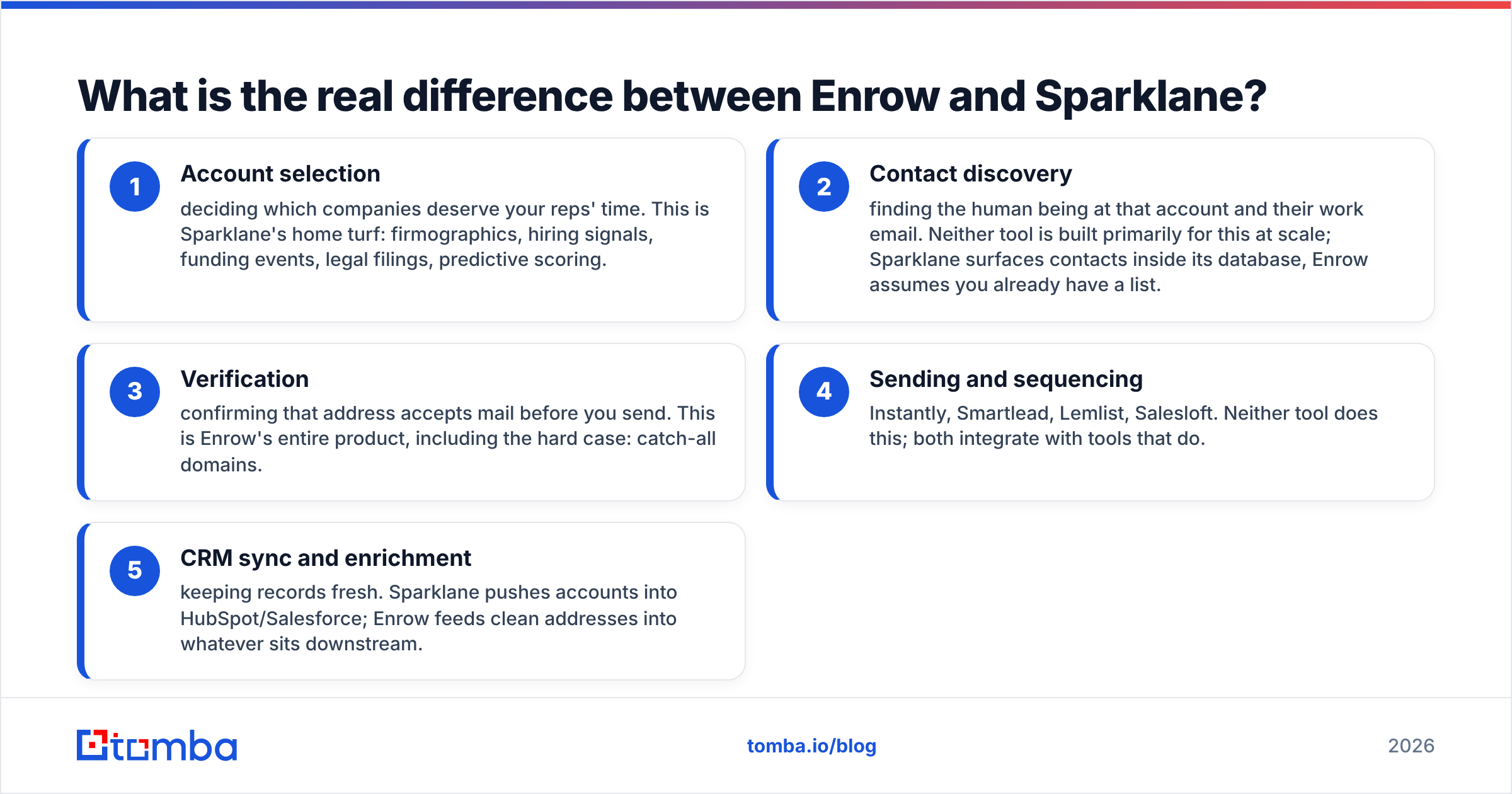
Here is how the pieces line up:
- Account selection — deciding which companies deserve your reps' time. This is Sparklane's home turf: firmographics, hiring signals, funding events, legal filings, predictive scoring.
- Contact discovery — finding the human being at that account and their work email. Neither tool is built primarily for this at scale; Sparklane surfaces contacts inside its database, Enrow assumes you already have a list.
- Verification — confirming that address accepts mail before you send. This is Enrow's entire product, including the hard case: catch-all domains.
- Sending and sequencing — Instantly, Smartlead, Lemlist, Salesloft. Neither tool does this; both integrate with tools that do.
- CRM sync and enrichment — keeping records fresh. Sparklane pushes accounts into HubSpot/Salesforce; Enrow feeds clean addresses into whatever sits downstream.
If you map your own pipeline against those five layers, the buying decision usually answers itself. Teams with a full pipeline and a 12% bounce rate need layer 3. Teams with pristine data and no idea who to call need layer 1.
What does Enrow actually do?#
Enrow is an email verification tool built around one claim that matters more than any other feature: it attempts to resolve catch-all domains.
That deserves an explanation. A catch-all (or "accept-all") mail server accepts every message sent to the domain, whether or not the mailbox exists. Standard SMTP verification hits a wall there — the server says yes to everything, so the verifier returns "unknown" and you are left guessing. On enterprise domains, catch-all rates routinely sit between 20% and 40% of a B2B list. That is a meaningful slice of your total addressable market sitting in a "maybe" bucket.
Enrow's pitch is that it applies additional signal layers to classify those unknowns as valid or invalid, so you can send to a chunk of the list you would otherwise discard. Their marketing centres on accuracy guarantees and low false-positive rates.
What Enrow is not:
- It is not a prospecting database. You bring the list.
- It is not a sequencer. You export to your sending tool.
- It is not an intent or signal platform. It has no opinion on whether the account is worth emailing.
Practical use case: you scraped 8,000 contacts from a conference attendee list, ran them through a cheap verifier, got 3,100 "unknown" results, and want to salvage them without torching your sender reputation. That is the Enrow-shaped problem.
What does Sparklane actually do?#
Sparklane is a sales intelligence platform with deep roots in the French and broader European market. Its core function is predictive lead generation: ingest company data — legal registry filings, financials, news, job postings, tech signals — score it against your ideal customer profile, and hand reps a ranked list of accounts with a reason to reach out.
The value proposition is time. Instead of a rep spending 40% of their week researching who to contact and why, Sparklane produces an account list with trigger events attached: this company just raised funds, that one is hiring six developers, this one changed CFO last month.
Where it is strongest:
- European coverage, especially France, where its registry and legal-data depth is genuinely hard to replicate with US-first tools.
- Account scoring tuned to your closed-won history rather than generic firmographic filters.
- CRM-native workflows — the output is designed to land in Salesforce or HubSpot as accounts and tasks, not as a CSV.
Where it is weaker for pure cold-email teams: it is not built to hand you 5,000 verified addresses this afternoon. Contact-level data exists, but the platform's centre of gravity is the account, not the mailbox. And the commercial model — annual license, sales-led, quote on request — does not suit a two-person agency testing a new vertical.
How do Enrow and Sparklane compare feature by feature?#
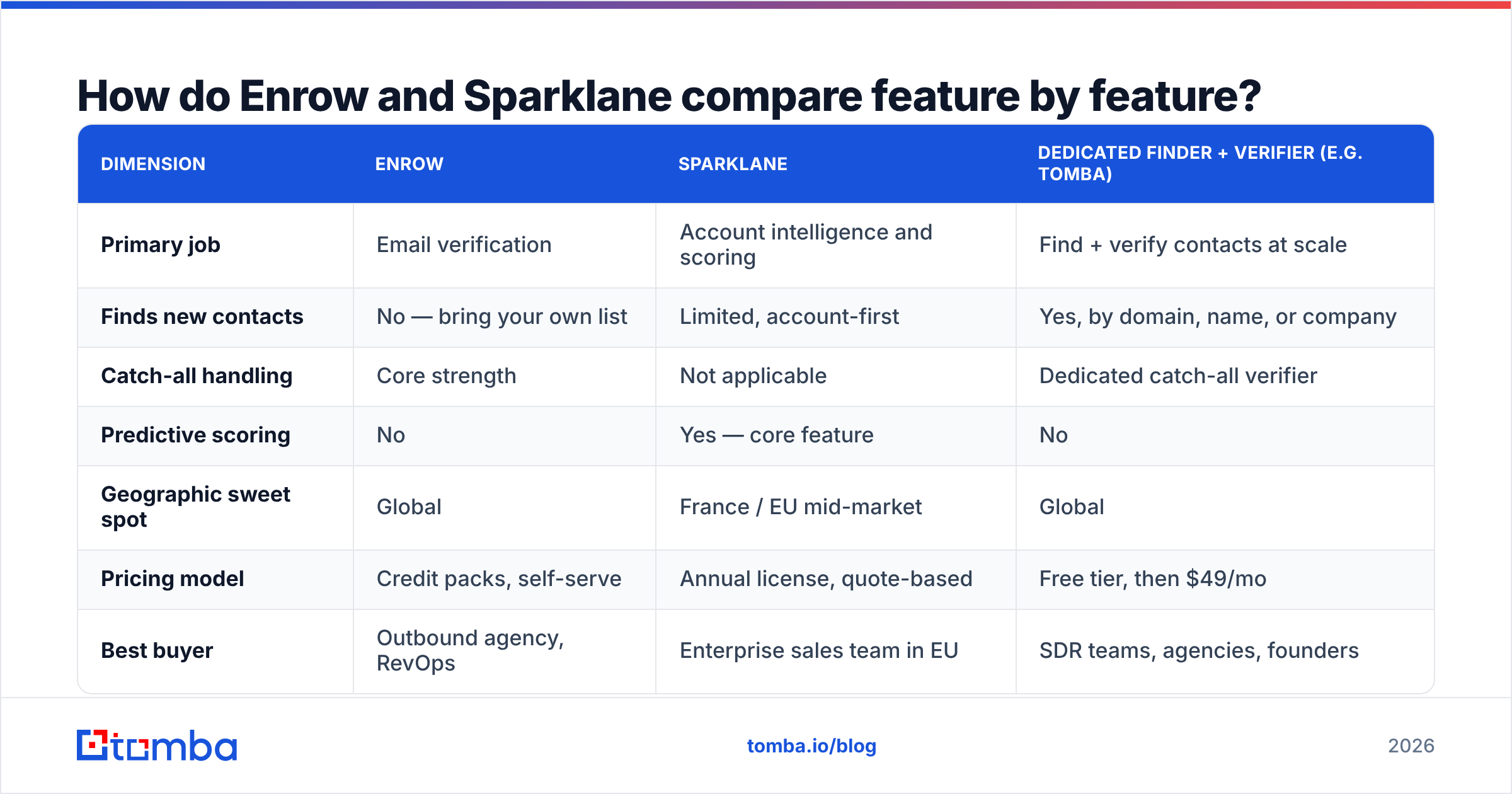
| Dimension | Enrow | Sparklane | Dedicated finder + verifier (e.g. Tomba) |
|---|---|---|---|
| Primary job | Email verification | Account intelligence and scoring | Find + verify contacts at scale |
| Finds new contacts | No — bring your own list | Limited, account-first | Yes, by domain, name, or company |
| Catch-all handling | Core strength | Not applicable | Dedicated catch-all verifier |
| Predictive scoring | No | Yes — core feature | No |
| Geographic sweet spot | Global | France / EU mid-market | Global |
| Pricing model | Credit packs, self-serve | Annual license, quote-based | Free tier, then $49/mo |
| Best buyer | Outbound agency, RevOps | Enterprise sales team in EU | SDR teams, agencies, founders |
| API access | Yes | Yes, on higher tiers | Yes — email finder API |
| Time to first value | Minutes | Weeks (onboarding, ICP setup) | Minutes |
Read that table as a routing decision, not a scoreboard. A tool that scores 8/10 on catch-all resolution and 0/10 on account discovery is not "better" or "worse" than its opposite — it is a different purchase.
Is Enrow or Sparklane better for cold email?#
For cold email specifically, Enrow is the more directly useful of the two — but it only solves half the problem.
Cold email performance breaks down into three multiplicative factors:
- List quality (are these the right people?)
- Deliverability (does the message reach the inbox?)
- Message quality (does it earn a reply?)
Enrow moves the deliverability number. Bounce rate is the single loudest negative signal you send to mailbox providers — Google's own Postmaster guidance and every serious sender-reputation framework treat high bounce rates as an immediate throttle trigger. Getting from 8% bounces to under 2% is often worth more than any subject-line optimisation you will ever run. If you want a primer on the mechanics, our glossary entry on email deliverability covers the fundamentals.
Sparklane moves list quality — but at the account level, over a longer time horizon, and mostly for teams selling into Europe with a defined ICP and an annual budget.
If you are running a 5,000-contact-per-month cold sequence today, Enrow changes your numbers this week. Sparklane changes your strategy next quarter.
What do these tools cost?#
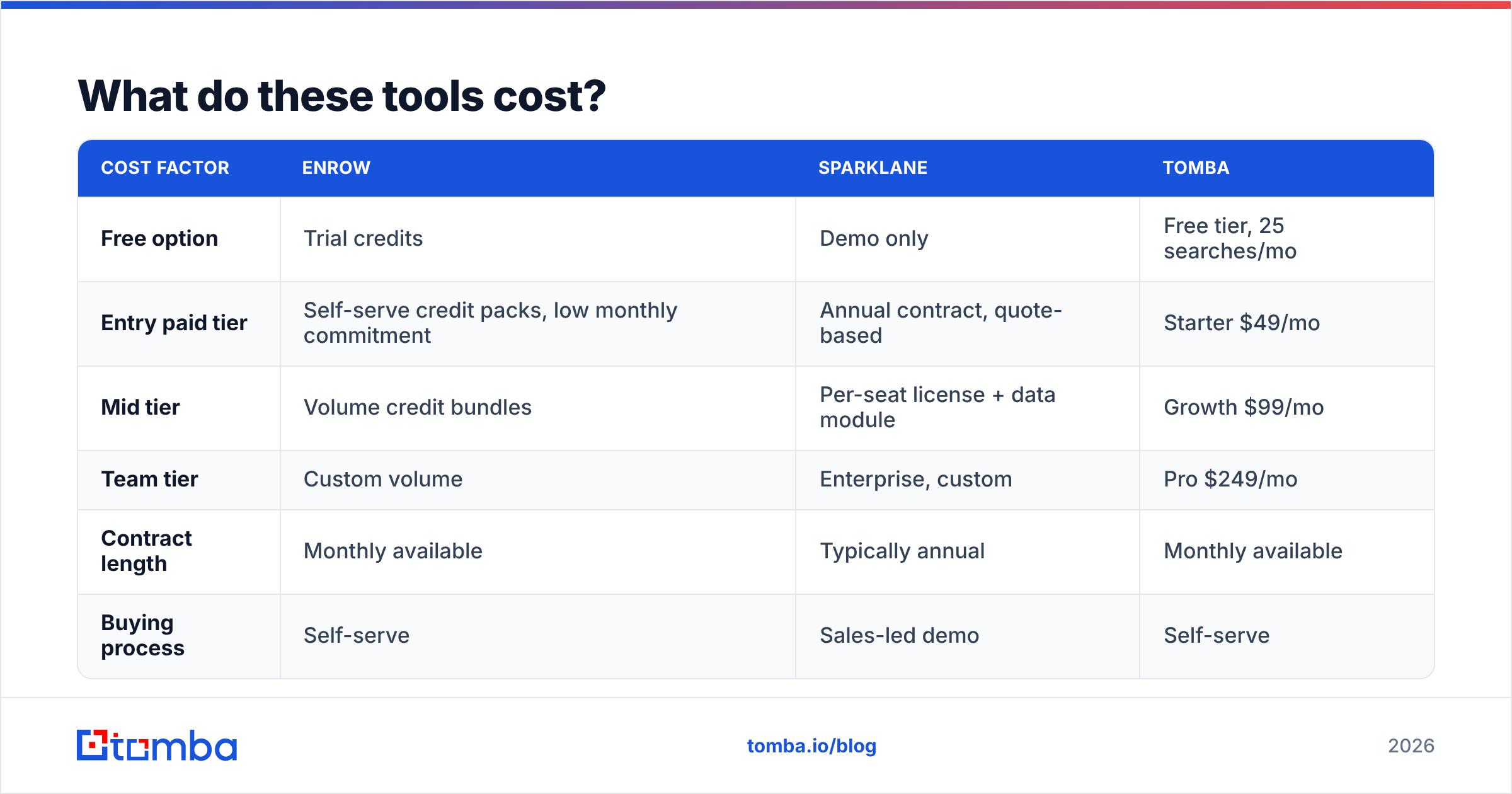
Published pricing is where the two diverge most sharply. Verify current figures on each vendor's site before you budget — credit-based pricing changes often.
| Cost factor | Enrow | Sparklane | Tomba |
|---|---|---|---|
| Free option | Trial credits | Demo only | Free tier, 25 searches/mo |
| Entry paid tier | Self-serve credit packs, low monthly commitment | Annual contract, quote-based | Starter $49/mo |
| Mid tier | Volume credit bundles | Per-seat license + data module | Growth $99/mo |
| Team tier | Custom volume | Enterprise, custom | Pro $249/mo |
| Contract length | Monthly available | Typically annual | Monthly available |
| Buying process | Self-serve | Sales-led demo | Self-serve |
The strategic point: Sparklane is a planned purchase; Enrow is an impulse purchase. One goes through procurement, the other goes on a company card. If you need to prove ROI inside 30 days, the sales-led annual contract is a structural disadvantage regardless of product quality.
For a like-for-like sense of what a combined find-and-verify stack costs, see Tomba pricing — the tiers above are current at time of writing.
Do you need both Enrow and Sparklane?#
Almost certainly not. Here is the honest allocation logic:
- You have a list, it bounces. Buy verification. Enrow, or the email verifier bundled into a broader platform, both solve this. Choose on price and catch-all performance.
- You have budget, a European mid-market ICP, and reps wasting hours on research. Sparklane earns its license. Nothing in the verification category replaces it.
- You have neither list nor targeting, and a small budget. Neither tool is your first purchase. You need contact discovery first — a domain search to pull every reachable contact at a target company, then verification on the output.
- You are running multi-market outbound at volume. You want one platform that finds, verifies, and enriches, with an API, rather than three vendors and a Zapier chain holding them together.
That last scenario is the most common one we see, and it is where the "vs" framing falls apart entirely. Teams do not actually want to choose between an account-intelligence license and a verification credit pack. They want the contact data to be correct on the way in.
Where does a dedicated email finder fit in this stack?#
Between the two. An email finder is the layer that turns "this account looks good" into "here is the CMO's verified work address."
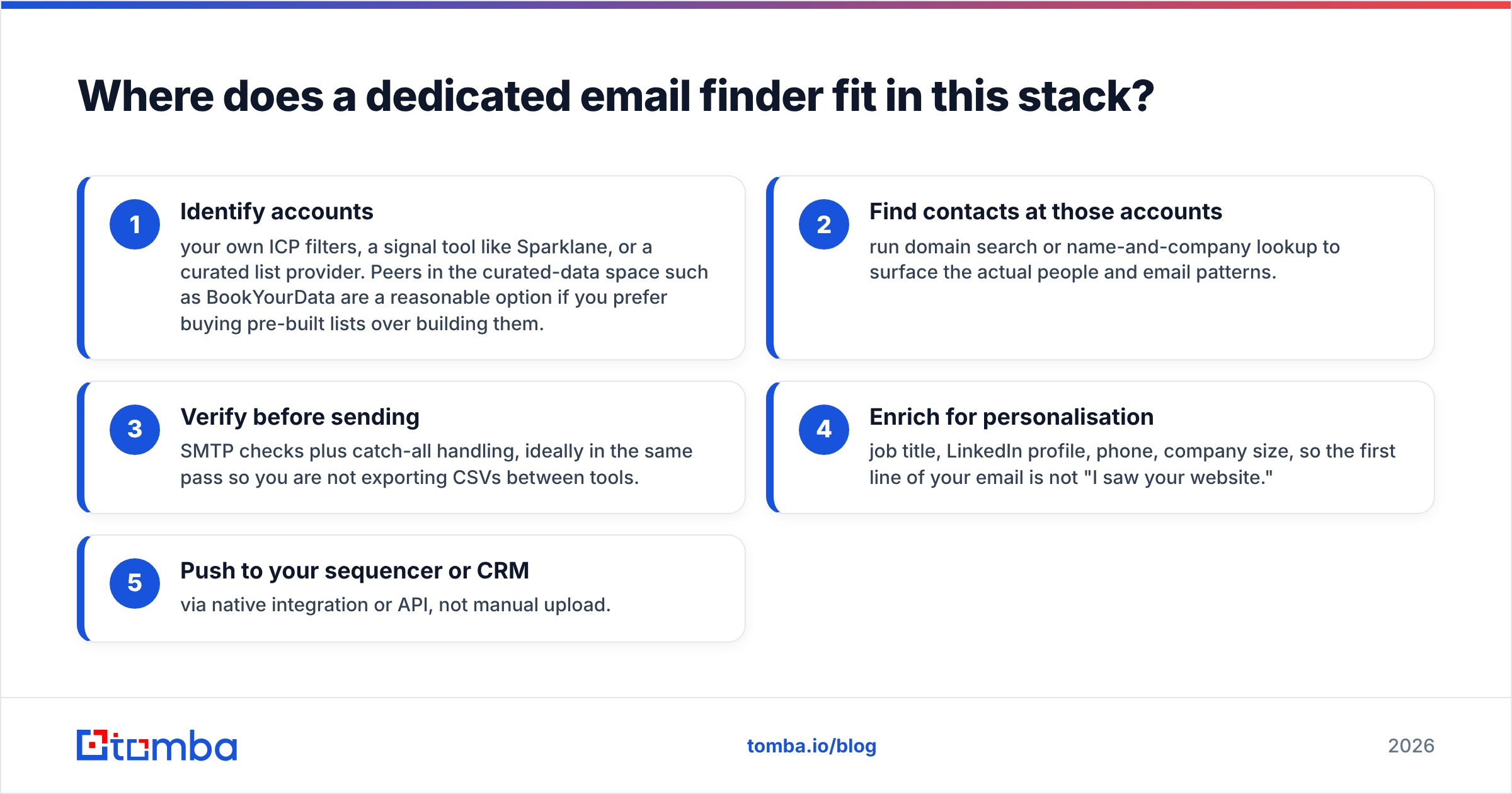
Concretely, the workflow looks like this:
- Identify accounts — your own ICP filters, a signal tool like Sparklane, or a curated list provider. Peers in the curated-data space such as BookYourData are a reasonable option if you prefer buying pre-built lists over building them.
- Find contacts at those accounts — run domain search or name-and-company lookup to surface the actual people and email patterns.
- Verify before sending — SMTP checks plus catch-all handling, ideally in the same pass so you are not exporting CSVs between tools.
- Enrich for personalisation — job title, LinkedIn profile, phone, company size, so the first line of your email is not "I saw your website."
- Push to your sequencer or CRM — via native integration or API, not manual upload.
Tomba covers steps 2 through 5 in one platform: email finder, email verifier, catch-all verifier, phone finder, and data enrichment, with a Free tier at 25 searches/month and Starter at $49/mo. That does not make it a Sparklane replacement — it has no predictive account scoring — but it does make the Enrow comparison a direct one, since verification and catch-all resolution are in scope.
How should you evaluate these tools yourself?#
Do not trust anyone's published accuracy number, including ours. Run this test instead:
- Build a 200-contact control list from a domain you can independently verify — ideally one where you already have confirmed replies from real people at that company.
- Include deliberate poison: 20 addresses you know are dead (departed employees, typo'd domains), and 40 from known catch-all domains.
- Run the same list through each candidate. Compare not just the valid/invalid split but the unknown rate. A tool that returns 30% unknown is quietly passing the problem back to you.
- Send a small real campaign to the accepted addresses through a warmed domain and measure actual hard bounces. This is the only number that matters.
- Check the false-positive cost: an address wrongly marked valid costs you reputation; an address wrongly marked invalid costs you a lead. Decide which error you can tolerate more.
Reviews on G2 are useful for support quality and billing complaints, less useful for accuracy claims — nobody runs controlled tests before writing a review.
Which should you buy?#
Buy Enrow if your list is already built, your bounce rate is above 3%, and a meaningful share of your target domains are catch-all. It is a focused tool that does one hard thing.
Buy Sparklane if you sell into France or wider Europe, you have an annual budget and a sales team large enough that research hours are a real line item, and you need account-level triggers rather than more email addresses.
Buy neither, yet, if your core problem is "I need 3,000 verified contacts at companies matching this profile, this month, without a procurement cycle." That is a finder-plus-verifier job, and paying for predictive scoring or standalone verification credits solves only a fraction of it.
The mistake to avoid is buying the more expensive, more strategic tool to fix a tactical data problem. Bad addresses do not become good because you scored the account better.
Start with clean data. If your outbound is stalling on bounces and missing contacts rather than on targeting, the Tomba Email Finder is the cheapest place to fix it — find emails by domain, name, or company, verify them (catch-alls included) in the same workflow, and push straight to your CRM or sequencer via the API. The Free tier gives you 25 searches a month to test it against your own control list before you spend anything.
Related guides#
Ready to find emails that actually work?
Join 150,000+ professionals who stopped guessing and started sending. Free credits on signup — no credit card required.
Get the Tomba newsletter
Practical outbound tactics and product updates — once every two weeks.
About the author