eWay-CRM Pricing, Reviews, Pros and Cons: A 2026 Breakdown
A neutral, numbers-first look at eWay-CRM: what each plan really costs per user, what reviewers praise and complain about, and the three team profiles that should walk away.
TL;DR
- eWay-CRM is a CRM that lives inside Microsoft Outlook. If your team already runs its day out of Outlook, that's the entire value proposition — and it's a real one.
- Paid plans land roughly in the $20–$50 per user per month range depending on tier and billing cycle, with a genuinely usable free plan on top. Annual billing cuts the sticker price by around 20–25%.
- Reviews average around 4.5/5 on G2 and Capterra. Praise clusters on Outlook integration and support; complaints cluster on the Windows-first desktop add-in, dated UI, and setup effort.
- The hidden costs are onboarding/customization time, cloud hosting on some plans, and the per-user math once you add non-sales seats.
- eWay-CRM manages relationships you already have. It does not find new contacts — you still need a separate prospecting and data layer to fill it.
What is eWay-CRM, and who actually uses it?#
eWay-CRM is a customer relationship management system built as a Microsoft Outlook add-in first and a standalone web/mobile app second. Instead of asking reps to leave their inbox and log activity in a separate tab, it puts deals, contacts, projects, and tasks in a panel next to the email they're already reading.
Think of it like a filing cabinet bolted to the side of your desk instead of one down the hall. The distance between "I just got an email" and "it's logged against the deal" is about one click. That's the whole pitch, and for a specific kind of company it works extremely well.
The typical eWay-CRM customer profile:
- SMBs of 5–50 people, heavily invested in Microsoft 365, where Outlook is the operating system of the workday.
- Project-based service firms — engineering, consulting, construction, architecture — that need deals and delivery projects in one place.
- Teams with a Windows-first fleet, since the richest experience is the Windows Outlook desktop add-in.
- Buyers who dislike per-seat SaaS creep and want a system they can self-host or run on their own terms.
- Companies replacing spreadsheets, not companies migrating off Salesforce.
If you're a 200-rep outbound org running Salesloft sequences and a data warehouse, this is not your tool. If you're a 12-person consultancy where every client conversation starts in Outlook, keep reading. For the general concept, see our CRM glossary entry.
How much does eWay-CRM cost in 2026?#
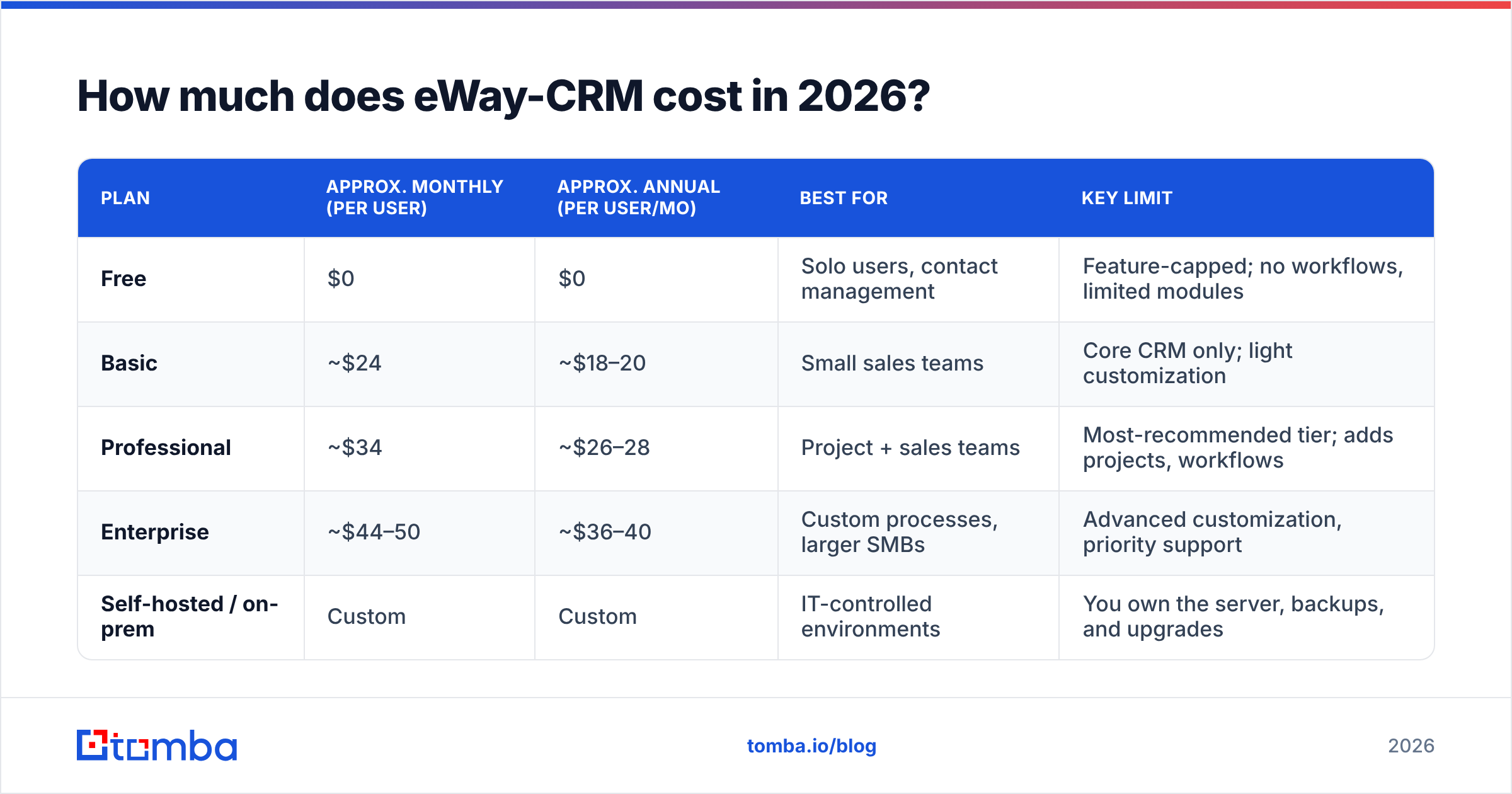
Here's the structure, with figures approximate and rounded — always confirm current numbers on the official eWay-CRM pricing page before you budget, because vendors adjust tiers more often than blogs get updated.
| Plan | Approx. monthly (per user) | Approx. annual (per user/mo) | Best for | Key limit |
|---|---|---|---|---|
| Free | $0 | $0 | Solo users, contact management | Feature-capped; no workflows, limited modules |
| Basic | ~$24 | ~$18–20 | Small sales teams | Core CRM only; light customization |
| Professional | ~$34 | ~$26–28 | Project + sales teams | Most-recommended tier; adds projects, workflows |
| Enterprise | ~$44–50 | ~$36–40 | Custom processes, larger SMBs | Advanced customization, priority support |
| Self-hosted / on-prem | Custom | Custom | IT-controlled environments | You own the server, backups, and upgrades |
Three things that matter more than the headline number:
- The free plan is real, not a trial. It gives you contact management inside Outlook indefinitely. That is unusual and it's the single strongest reason to test eWay-CRM before you shortlist alternatives.
- Annual billing is where the discount lives. The gap between monthly and annual is roughly 20–25%, which is standard, but it means the "$24" you saw quoted may actually be an annual-commitment price in someone else's blog post.
- Seats multiply faster than you plan for. CRM starts with five reps and ends with project managers, finance, and the founder all needing logins. Budget the tier price times your eventual headcount, not today's.
Why do eWay-CRM reviews average around 4.5 stars?#
Across G2 and Capterra, eWay-CRM sits in the mid-4s — respectable, and notably higher than several better-funded competitors. Ratings that high on an SMB tool usually mean one of two things: a small, self-selected user base, or a product that nails one job. Here it's mostly the second.
What reviewers consistently praise:
- Outlook integration that actually works. Reviewers describe filing emails to a deal or project in one or two clicks, with attachments preserved. Add-ins that stay stable across Outlook updates are rarer than they should be — Microsoft's own Outlook add-in documentation hints at why this is hard engineering.
- Support responsiveness. Repeated mentions of fast, human, non-scripted help — often from the same named people across multiple reviews.
- Project module depth. For service firms, having deals convert into delivery projects in one system removes an entire tool from the stack.
- Price-to-capability ratio. Reviewers coming from enterprise CRMs consistently call it good value.
What reviewers consistently complain about:
- The interface feels dated. It looks like Outlook, which is the point, but the aesthetic is closer to 2015 enterprise software than a modern SaaS dashboard.
- Windows-first reality. The desktop add-in experience is strongest on Windows Outlook; Mac and web users get a thinner experience. If half your team is on macOS, test this before you sign anything.
- Setup and customization take real effort. Multiple reviewers describe a learning curve and configuration time measured in days, not hours.
- Mobile app is functional, not delightful. Fine for lookups, not where anyone wants to run their day.
What are the real pros and cons of eWay-CRM?#
Stripping the marketing language out:
Pros
- Zero context switching. Reps live in Outlook; the CRM lives in Outlook. Adoption failure rates drop sharply when logging activity is not a separate destination.
- A free tier with no expiry. You can validate fit at zero cost, with your real data, before spending a dollar.
- Sales and delivery in one system. The project module means a won deal doesn't get re-keyed into a separate PM tool.
- Self-hosting option. For regulated industries or IT teams with data-residency requirements, on-premise deployment is a genuine differentiator most SaaS CRMs no longer offer.
- Predictable, mid-market pricing. No usage-based surprises, no credit meters.
Cons
- Platform dependency. Your CRM strategy is now downstream of Microsoft's add-in roadmap and your fleet's OS mix.
- Not built for high-volume outbound. No native sequencer that competes with dedicated cold-email platforms; you'll bolt one on.
- Thin native prospecting data. eWay-CRM organizes contacts you already have. It does not source them.
- Onboarding cost is unpriced. The configuration hours — mapping your process onto the modules — are the real second line item.
- Smaller ecosystem. Fewer prebuilt integrations than HubSpot or Pipedrive; expect to use middleware for edge cases.
How does eWay-CRM compare to other SMB CRMs?#
The honest comparison isn't "which is best" — it's "which failure mode can you live with."
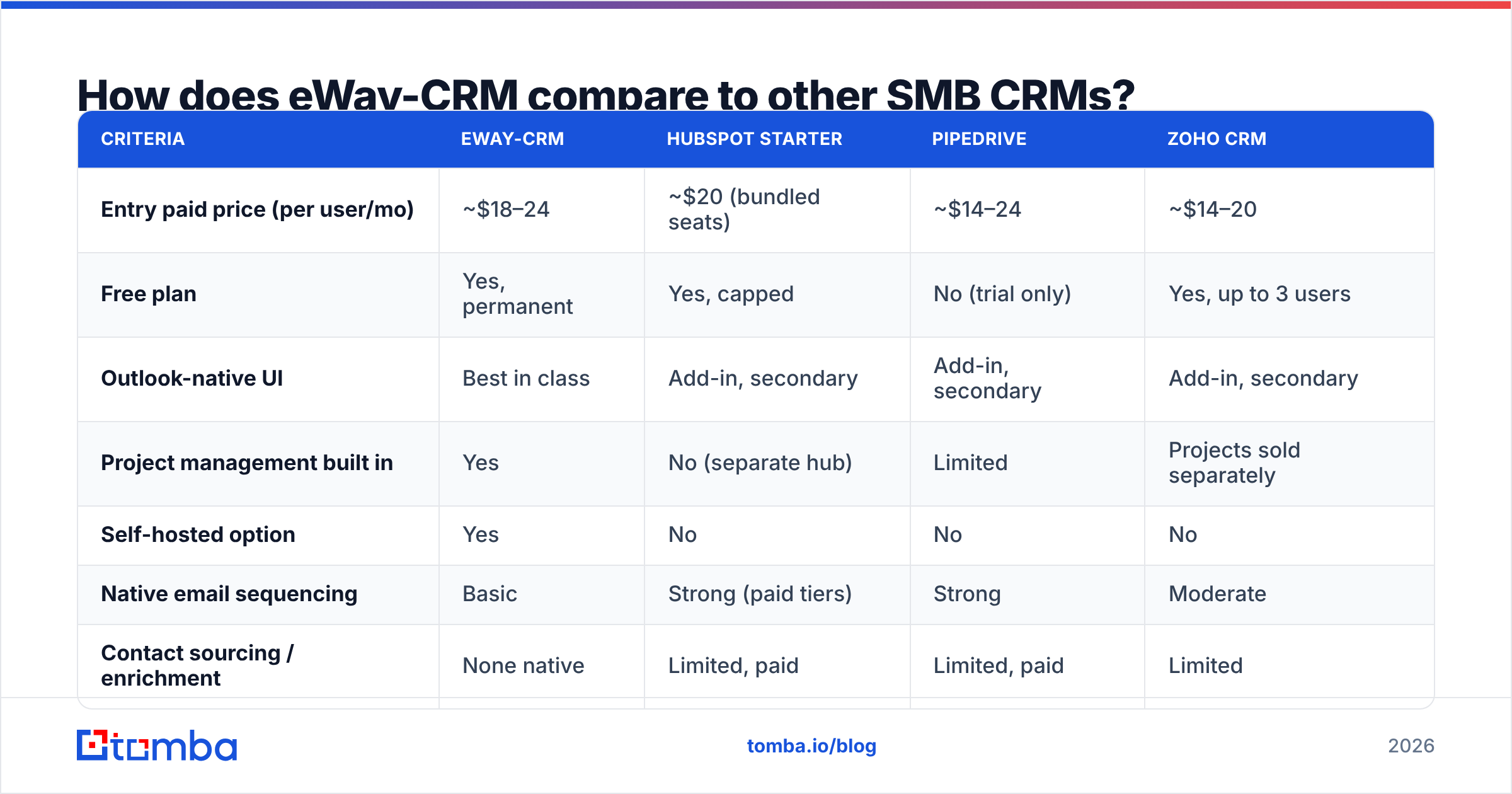
| Criteria | eWay-CRM | HubSpot Starter | Pipedrive | Zoho CRM |
|---|---|---|---|---|
| Entry paid price (per user/mo) | ~$18–24 | ~$20 (bundled seats) | ~$14–24 | ~$14–20 |
| Free plan | Yes, permanent | Yes, capped | No (trial only) | Yes, up to 3 users |
| Outlook-native UI | Best in class | Add-in, secondary | Add-in, secondary | Add-in, secondary |
| Project management built in | Yes | No (separate hub) | Limited | Projects sold separately |
| Self-hosted option | Yes | No | No | No |
| Native email sequencing | Basic | Strong (paid tiers) | Strong | Moderate |
| Contact sourcing / enrichment | None native | Limited, paid | Limited, paid | Limited |
| Learning curve | Moderate–high | Low | Low | Moderate |
Read that table by column, not by row. HubSpot wins on polish and ecosystem, and loses on price the moment you grow. Pipedrive wins on speed-to-value for pure sales teams and loses on anything beyond the pipeline. Zoho wins on raw price and loses on coherence. eWay-CRM wins on Outlook and project depth and loses on modernity and reach.
What are the hidden costs nobody quotes you?#
The per-seat number is the smallest part of the bill. Budget for these:
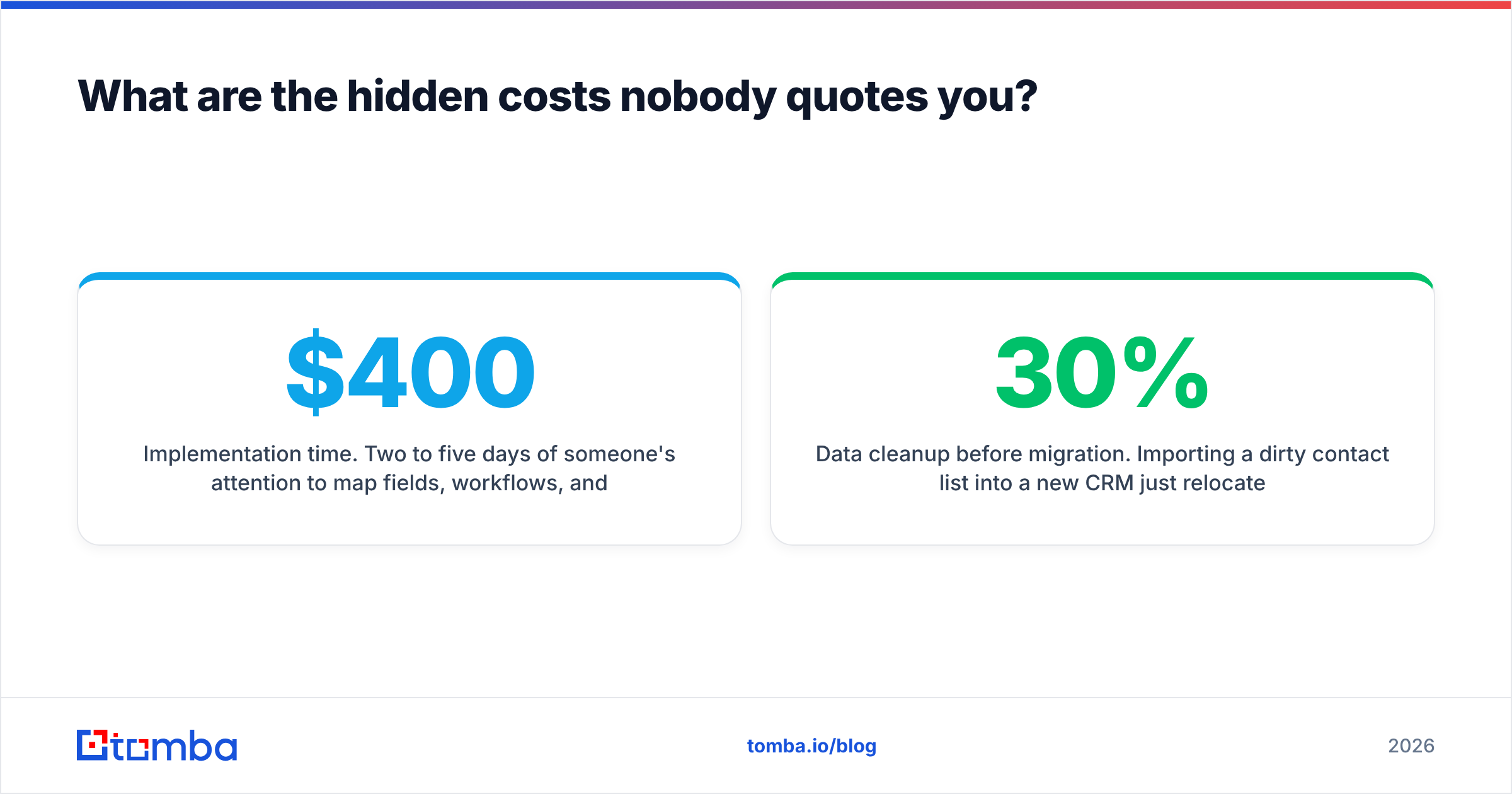
- Implementation time. Two to five days of someone's attention to map fields, workflows, and permissions. At an internal loaded cost of $400/day, that's $800–$2,000 before the first deal is logged.
- Data cleanup before migration. Importing a dirty contact list into a new CRM just relocates the problem. Run your list through an email verifier first — importing 30% dead addresses guarantees a bounce spike on your first campaign out of the new system.
- Cloud hosting or server ownership. Self-hosted looks cheaper until you price the VM, backups, and the person who patches it.
- The sequencer you'll add anyway. If outbound matters, you're adding a dedicated sending tool on top.
- The data layer you'll add anyway. See the next section.
None of these are eWay-CRM-specific failings. They're CRM-specific, and any vendor quoting you a clean per-seat number is quoting you a third of the truth.
Is eWay-CRM worth it for your team?#
Buy it if: you're a 5–50 person Microsoft 365 shop, mostly Windows, doing relationship-led or project-based selling, and your current system is a spreadsheet plus memory. The free tier means the test costs you nothing but time.
Think hard if: your team is half macOS, your motion is high-volume outbound, or you need a large integration ecosystem out of the box.
Skip it if: you're running a modern GTM stack with a data warehouse, a revenue-ops function, and sequencing tooling. You'll spend more forcing eWay-CRM into that shape than you save.
What eWay-CRM won't do — and how to cover the gap#
Here's the structural limit of every CRM, eWay-CRM included: a CRM is a container. It's excellent at organizing conversations with people you can already reach. It is architecturally incapable of telling you the email address of the VP of Operations at the 40 target accounts you haven't contacted yet.
That's a data problem, and it sits upstream of your CRM:
- Find the contact. Pull verified work addresses by company domain, name, or role using a domain search before anything enters the CRM.
- Verify before import. Every unverified record you load degrades your sender reputation and your reporting.
- Enrich what you have. Fill in job titles, company data, and phone numbers on the rows already sitting in eWay-CRM through data enrichment rather than manual research.
- Push clean records in. Use an API or automation layer so contacts arrive verified, deduplicated, and correctly mapped — not pasted.
Get this order right and the CRM decision matters much less than you think. Get it wrong and the best CRM on the market becomes an expensive archive of bounced addresses.
What's the verdict on eWay-CRM pricing?#
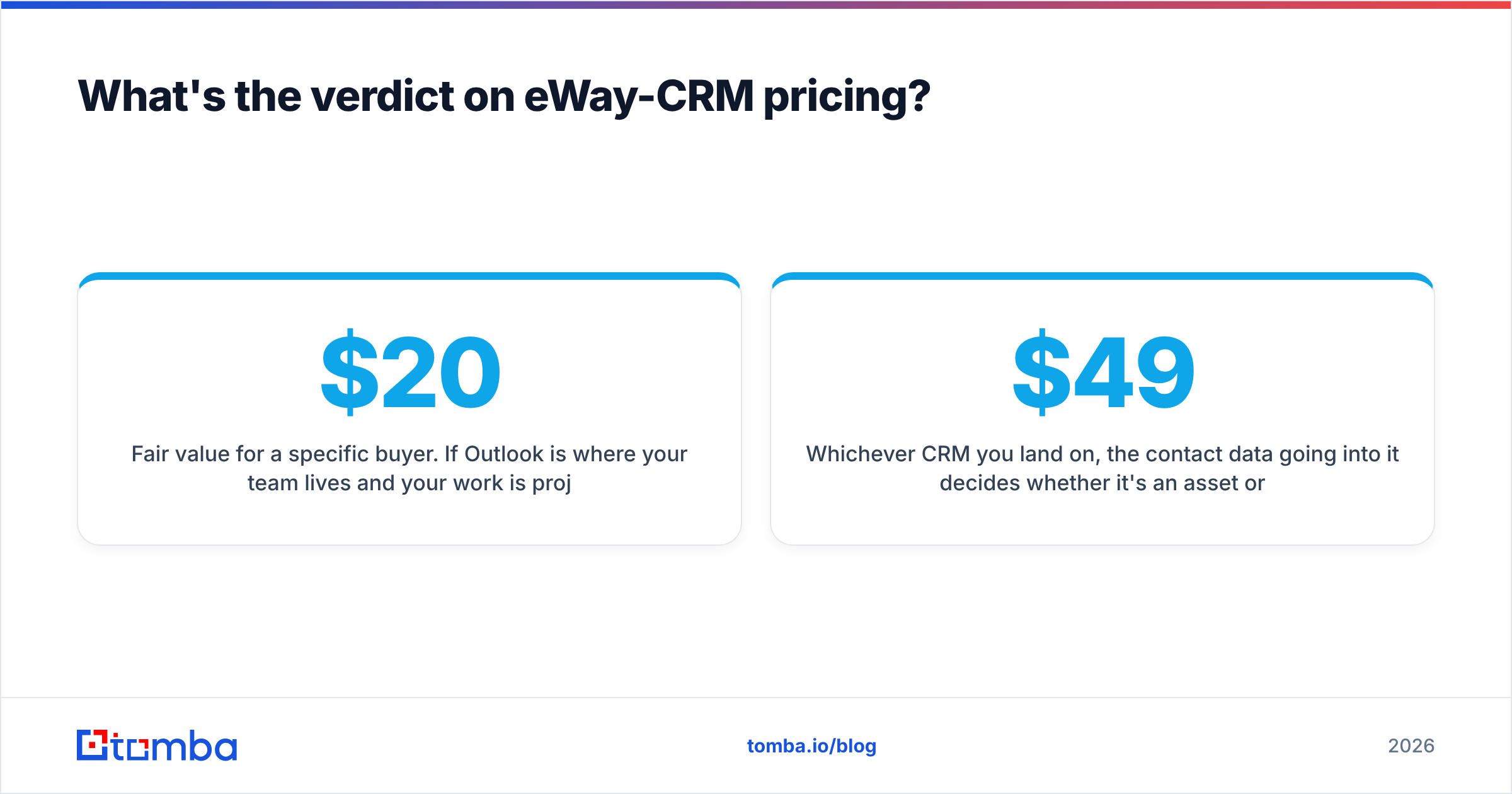
Fair value for a specific buyer. If Outlook is where your team lives and your work is project-shaped, roughly $20–$35 per user per month for a CRM that eliminates a tool and a context switch is a reasonable trade — and the permanent free tier removes the risk of finding out. If you're building a scalable outbound machine, the seat price isn't the issue; the missing prospecting and sequencing layers are, and you'll spend the savings assembling them.
Whichever CRM you land on, the contact data going into it decides whether it's an asset or a liability. Start with Tomba's Email Finder to source verified professional email addresses by domain, name, or company, then push only clean, verified records into eWay-CRM. The free tier covers 25 searches a month, and paid plans start at $49/mo — see full Tomba pricing for team volumes.
Related guides#
Ready to find emails that actually work?
Join 150,000+ professionals who stopped guessing and started sending. Free credits on signup — no credit card required.
Get the Tomba newsletter
Practical outbound tactics and product updates — once every two weeks.
About the author