Exact Data vs GetProspect: Which B2B Data Source Wins?
One sells you a licensed list. The other finds emails one prospect at a time. Here is how Exact Data and GetProspect actually compare on pricing, freshness, accuracy, and workflow fit in 2026.
Exact Data vs GetProspect comes down to one question: do you buy a list, or find contacts yourself? One vendor sells you a file. The other hands you a tool. Here is how the two compare in 2026.
TL;DR
- Exact Data is a list broker, not a prospecting tool. You describe an audience. They build and license a file. You pay per record, and there is an order minimum. Nothing about it is self-serve.
- GetProspect is a self-serve email finder. It runs on a LinkedIn Chrome extension and a searchable contact database. You pull contacts one page or one filter at a time.
- They rarely compete for the same buyer. Exact Data wins for direct mail, list append, and offline audiences. GetProspect wins for LinkedIn-sourced B2B outbound.
- Costs are hard to compare at face value. Broker files look cheap per record. Then you add minimums, license limits, and the clean-up pass you need anyway.
- Verify before you send, either way. Bought files and scraped contacts both go stale. A verify step is the gap between a 2% bounce rate and a burned domain.
What is Exact Data?#
Exact Data is a US list broker and data compiler. You tell them the audience you want — industry code, company size, job function, location, or consumer traits. They quote a file that matches. You get a one-time CSV, or a multi-use file if you pay more. There is no live database to log into.
The company has sold compiled data since the early 2000s. It covers both B2B and consumer records, which is rare now. Most sales-data vendors dropped consumer files years ago. Exact Data kept them. That is why direct-mail agencies, insurance marketers, and event promoters still call. You can review their current offering directly. Note that almost every page sends you to a quote form, not a checkout.
The mental model: Exact Data is a wholesaler. You place an order. You get stock. The stock starts aging the day it lands in your inbox.
What is GetProspect?#
GetProspect is a self-serve email finder with two ways in. A Chrome extension pulls contact data off LinkedIn profiles and search results. A web app lets you filter their contact database by title, company, industry, and location.
The workflow is the opposite of a broker's. You build a LinkedIn Sales Navigator search. You run the extension across it. Then you export the rows. Their product site lists a free tier and self-serve monthly plans. You can be exporting contacts fifteen minutes after signup. No sales call. No minimum order.
The mental model here: GetProspect is a faucet. You turn it on when you need contacts, and off when you don't. What comes out reflects whatever LinkedIn showed you today.

How do their data models differ?#
The Exact Data vs GetProspect choice really turns on this section. The two tools break in different places, because they collect data in different ways.
Where the data comes from
- Sourcing. Exact Data compiles offline and licensed sources: public filings, directories, survey data, telco and postal files. GetProspect leans on public professional profiles plus pattern-based email guesses.
- Freshness. A broker file is a snapshot, dated the day it was cut. A LinkedIn-based record shows whatever the person last put on their profile. Job changes show up in weeks. Emails are still guessed, not observed.
- Field depth. Exact Data goes wide: postal, phone, company, and consumer fields. GetProspect goes deep on work identity: title, company, LinkedIn URL, work email.
What that means for you
- Who owns the file. Broker files are usually licensed for a set number of uses, or a set period. Self-serve exports are yours to keep, within the terms of service. Read the license line before you treat a $2,000 file as a permanent asset.
- Who verifies. Neither vendor's raw output should hit a mailbox as-is. Broker email hygiene varies by file. Guessed emails carry a built-in error rate. A separate email verifier pass is not optional here.
- Compliance. Consumer records pull you into CAN-SPAM, TCPA, and state privacy rules. Work-email B2B prospecting mostly avoids that. It is the most underrated split between the two.
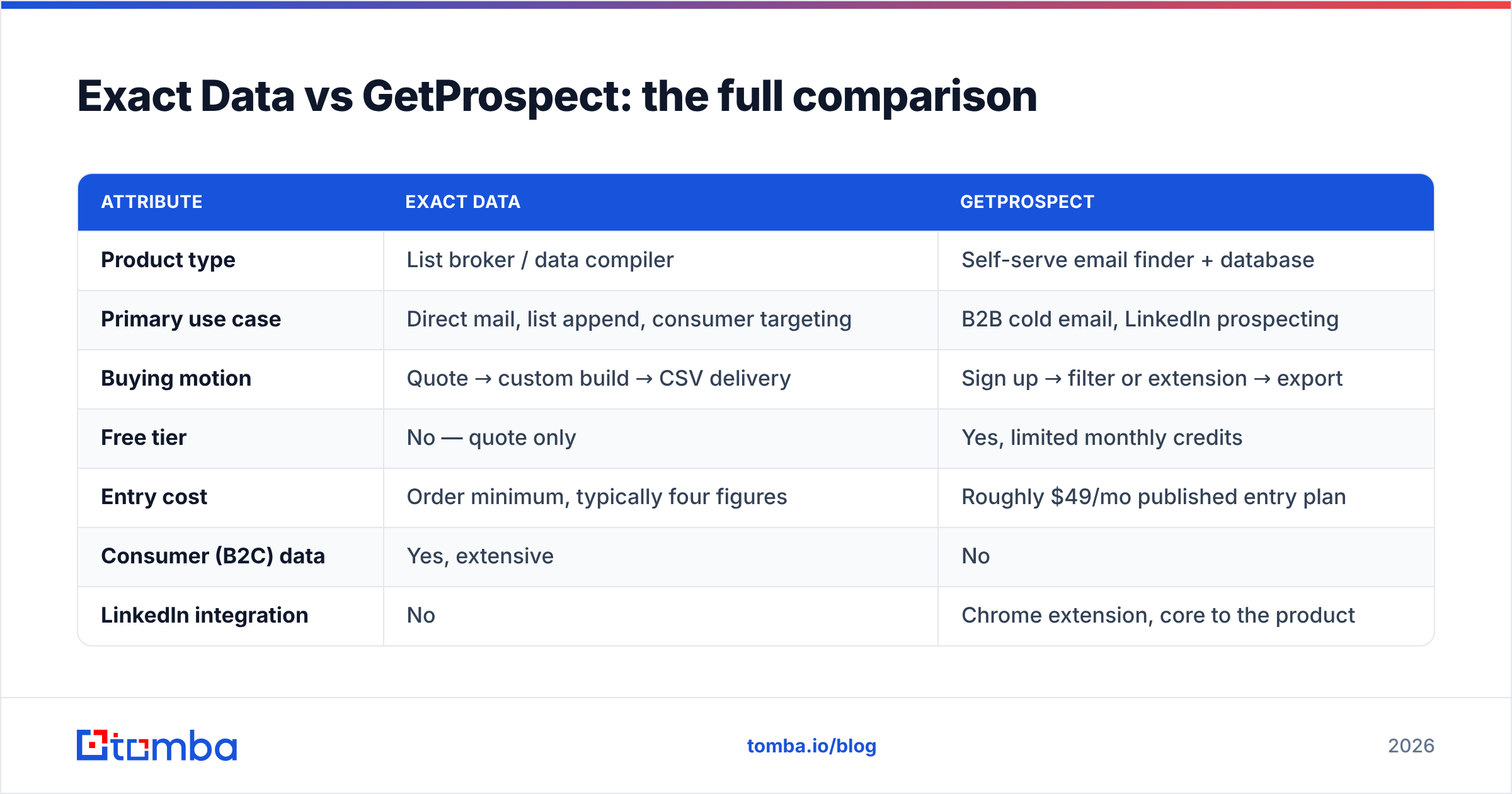
Exact Data vs GetProspect: the full comparison#
| Attribute | Exact Data | GetProspect |
|---|---|---|
| Product type | List broker / data compiler | Self-serve email finder + database |
| Primary use case | Direct mail, list append, consumer targeting | B2B cold email, LinkedIn prospecting |
| Buying motion | Quote → custom build → CSV delivery | Sign up → filter or extension → export |
| Free tier | No — quote only | Yes, limited monthly credits |
| Entry cost | Order minimum, typically four figures | Roughly $49/mo published entry plan |
| Consumer (B2C) data | Yes, extensive | No |
| LinkedIn integration | No | Chrome extension, core to the product |
| Phone numbers | Yes, including landline/postal | Limited |
| API access | Limited / enterprise arrangement | Yes |
| Data refresh | Per order, snapshot in time | Continuous, profile-driven |
| Licensing | Often use-limited | Standard SaaS export terms |
| Time to first contact | Days | Minutes |
The Exact Data vs GetProspect pattern is clear. One is procurement. The other is self-service. If your buying process needs a purchase order and a data-use agreement, you are in Exact Data's world. If it needs a corporate card and a Chrome extension, you are in GetProspect's.
How much do they actually cost?#
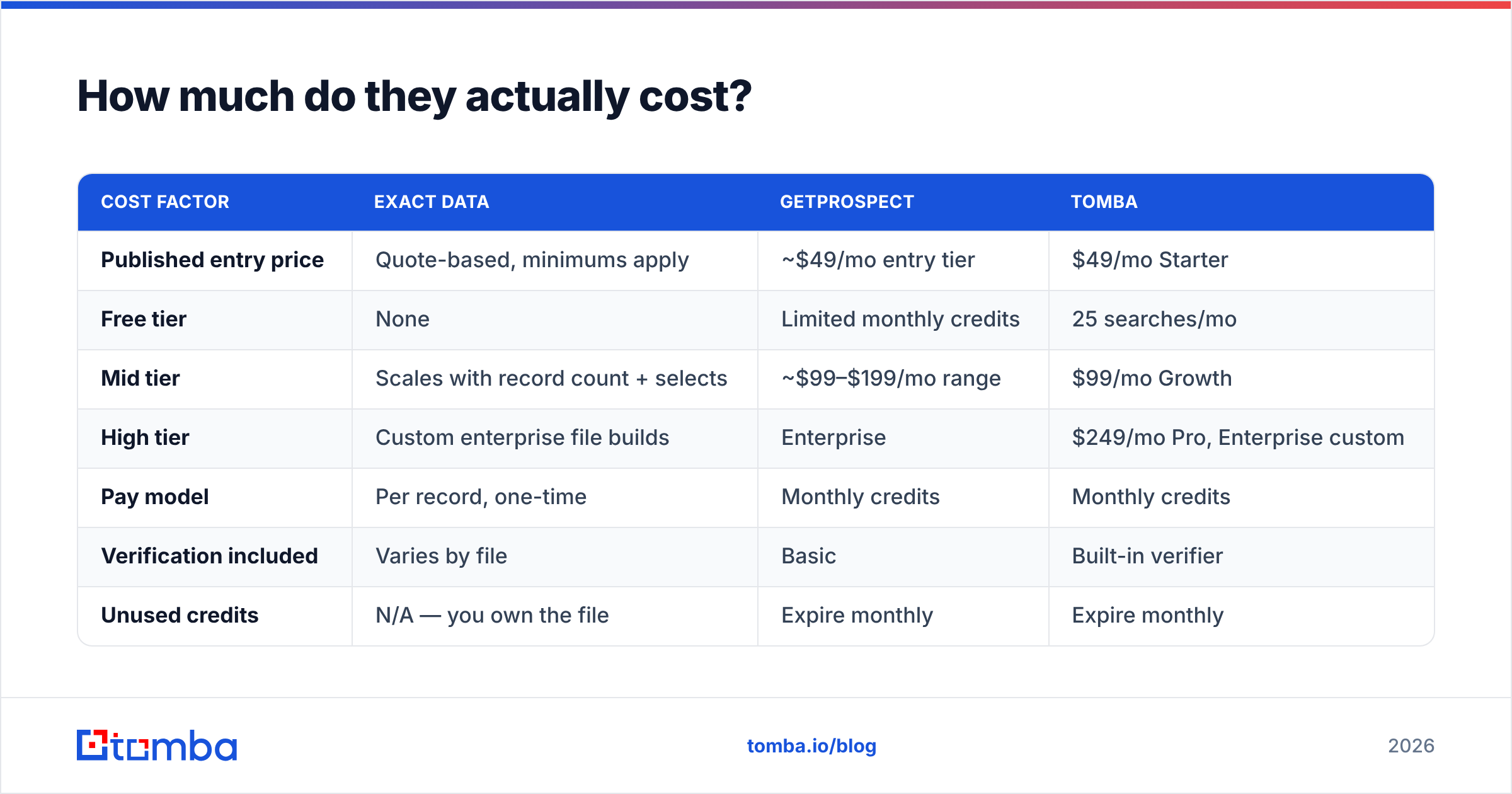
Any Exact Data vs GetProspect cost check needs one yardstick: cost per usable contact, not cost per record. A record that bounces costs you more than nothing. It costs you sender reputation.
| Cost factor | Exact Data | GetProspect | Tomba |
|---|---|---|---|
| Published entry price | Quote-based, minimums apply | ~$49/mo entry tier | $49/mo Starter |
| Free tier | None | Limited monthly credits | 25 searches/mo |
| Mid tier | Scales with record count + selects | ~$99–$199/mo range | $99/mo Growth |
| High tier | Custom enterprise file builds | Enterprise | $249/mo Pro, Enterprise custom |
| Pay model | Per record, one-time | Monthly credits | Monthly credits |
| Verification included | Varies by file | Basic | Built-in verifier |
| Unused credits | N/A — you own the file | Expire monthly | Expire monthly |
Two traps are worth naming.
Trap one: the minimum order. A $0.15-per-record quote sounds great. Then you learn the minimum is 25,000 records. That is $3,750 spent on an audience you have not tested. A self-serve tool lets you try 200 contacts first.
Trap two: expiring credits. Subscription tools reset every month. If your outbound runs in bursts — a quarter-end push, a conference — you pay for months when you export nothing. Broker files don't expire. They just decay. Pick your poison: is your prospecting steady or spiky?
Published Tomba pricing sits in the same self-serve band as GetProspect. That makes it a fair cross-check when you pressure-test either quote.
Which one has better data accuracy?#
Accuracy is the hardest part of any Exact Data vs GetProspect review. Neither vendor publishes an audited accuracy number. Be wary of any post that claims one. What you can reason about is how each one fails.
Exact Data fails through staleness. Compiled B2B files decay about 2–3% a month, as people change jobs and companies close. That is the widely cited industry figure, and broker files are not exempt. A file cut in January is much worse by June. Buy once, mail all year, and you are mailing a fossil.
GetProspect fails through guesswork. Pattern-based email discovery works well on firstname.lastname@company.com domains. It gets weak with odd formats, personal aliases, and catch-all setups. A catch-all domain accepts every address, so a simple check tells you nothing. That is why a catch-all verifier is its own kind of tool.
Use the same protocol whatever the source:
- Verify every record within 72 hours of the send, not on the day you buy.
- Split out catch-all domains and treat them as a lower-confidence tier.
- Cap your first send to a domain at a small volume, then expand once you see replies.
- Re-verify any list older than 90 days before you use it again.
- Track bounce rate by source, not just by campaign. That is how you learn which vendor delivers.
Review sites like G2 help you spot repeat complaints: billing friction, credit rollover, slow support. Treat star ratings as noise. Read the two-star reviews. That is where the real product limits show up.

Which should you choose for your use case?#
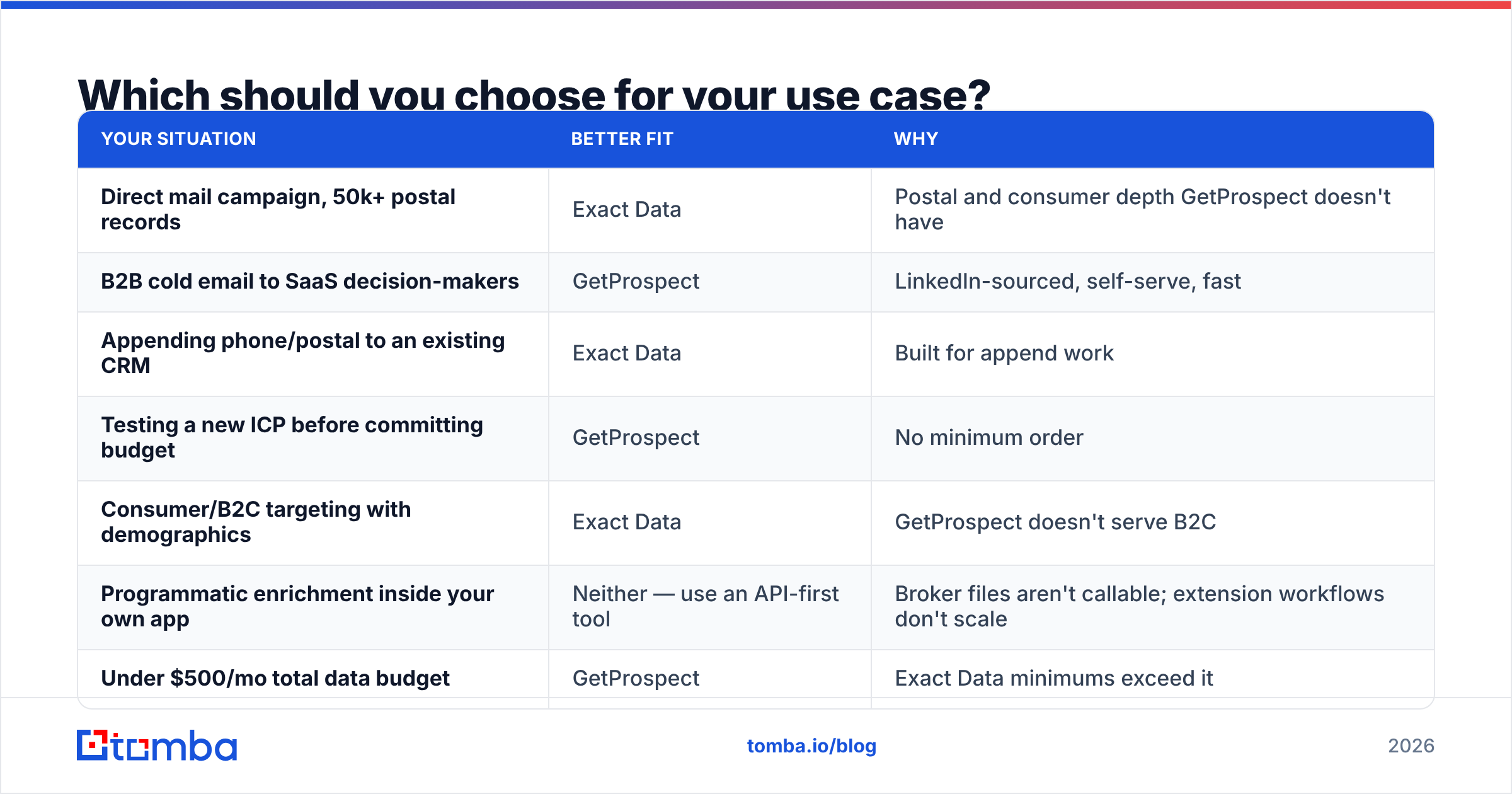
Most Exact Data vs GetProspect decisions come down to the campaign, not the tool.
| Your situation | Better fit | Why |
|---|---|---|
| Direct mail campaign, 50k+ postal records | Exact Data | Postal and consumer depth GetProspect doesn't have |
| B2B cold email to SaaS decision-makers | GetProspect | LinkedIn-sourced, self-serve, fast |
| Appending phone/postal to an existing CRM | Exact Data | Built for append work |
| Testing a new ICP before committing budget | GetProspect | No minimum order |
| Consumer/B2C targeting with demographics | Exact Data | GetProspect doesn't serve B2C |
| Programmatic enrichment inside your own app | Neither — use an API-first tool | Broker files aren't callable; extension workflows don't scale |
| Under $500/mo total data budget | GetProspect | Exact Data minimums exceed it |
| Regulated industry with data-provenance audits | Exact Data | Licensed sourcing with documentation |
Look at the sixth row. Both tools struggle when you need enrichment inside a system. Your CRM, your product, or your automation needs one contact resolved on demand. A CSV can't be called from code. A Chrome extension needs a person driving a browser. That job belongs to a third category.
Where does Tomba fit in this comparison?#
Straight answer: Tomba does not replace Exact Data, and it is not trying to. If you need consumer postal records or a licensed file for a mail drop, a broker is the right vendor. No email API will stand in for one.
There is one more angle on Exact Data vs GetProspect, though: neither is built API-first. Tomba overlaps with GetProspect, and the differences are worth stating plainly:
- API-first design. The Tomba API is the main interface, not an add-on. If enrichment has to run inside HubSpot, a Make scenario, or your own signup flow, that matters more than any UI.
- Verification in the same place. Finding and verifying live under one roof, catch-all handling included. You don't stitch two vendors together or juggle two credit balances.
- Domain-level discovery. Domain search pulls every findable address at a company. That is a different job than pulling one person off a LinkedIn profile. It helps when you map a buying committee.
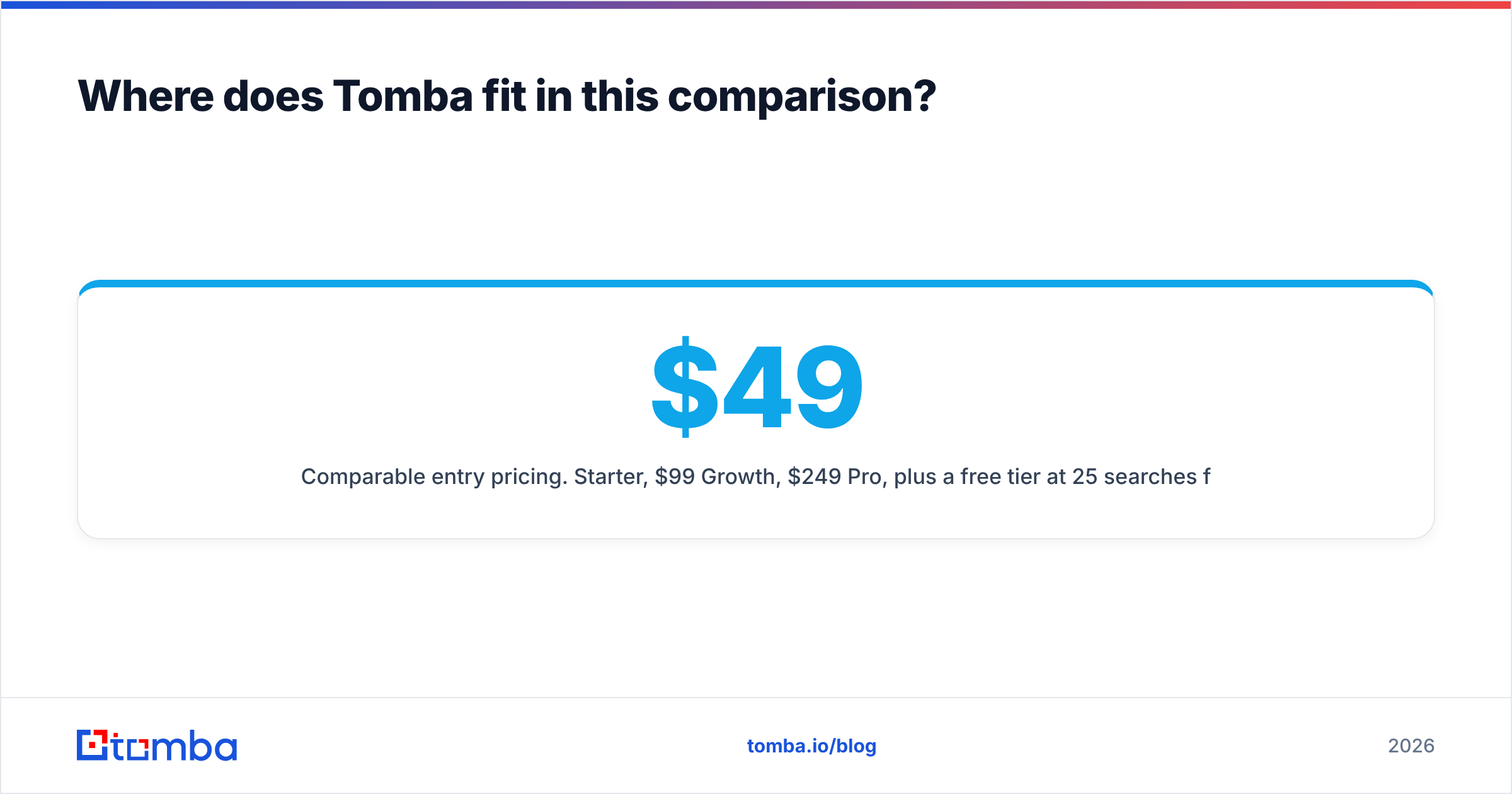
- Comparable entry pricing. $49/mo Starter, $99/mo Growth, $249/mo Pro, plus a free tier at 25 searches a month.
Other solid options — Findymail, BookYourData, and Apollo — cover nearby slices of the same problem. Any real evaluation should include at least two of them. BookYourData sells pay-as-you-go credits, which suits bursty prospecting better than monthly ones.
What's the verdict on Exact Data vs GetProspect?#
If your outbound runs on email and LinkedIn, start with GetProspect. It costs less to try, gives faster feedback, and skips the buying cycle. You learn whether your ICP guess is right for a few hundred dollars, not a few thousand.
If your campaign has a mail or consumer piece, use Exact Data. The comparison ends there. GetProspect has no answer for postal files or B2C data.
If you really need enrichment inside a system, neither one fits. Look at API-first providers instead.
One rule survives every branch. Never send to unverified data. A verify pass is cheap. Rebuilding a burned sending domain is not. And no vendor — broker or SaaS — hands you a file that is clean on arrival.
Ready to test the third path? Start with the Tomba Email Finder on the free tier: 25 searches a month, no card, no sales call. Take the same 25 target companies you would hand to a broker. Run them, compare what comes back, and let the bounce rate settle the Exact Data vs GetProspect debate. If the results hold up, Starter is $49/mo, and the API is there when your workflow outgrows the dashboard.
Related guides#
Ready to find emails that actually work?
Join 150,000+ professionals who stopped guessing and started sending. Free credits on signup — no credit card required.
Get the Tomba newsletter
Practical outbound tactics and product updates — once every two weeks.
About the author