Exact Data vs RocketReach 2026: Which B2B Contact Tool Wins?
Exact Data sells static list files. RocketReach sells live contact lookups. They solve different problems — and picking the wrong one wastes your whole data budget. Here's the honest breakdown.
TL;DR
- Exact Data is a list broker: you buy a static file of contacts filtered by industry, title, geography, or consumer attributes. You own the file, you pay once, and it starts decaying the moment it lands in your inbox.
- RocketReach is a lookup engine: you search a person or company, it returns emails and phone numbers on demand, priced per credit per month.
- If you need volume for a one-off campaign or direct mail, Exact Data is cheaper per record. If you need fresh contacts for named accounts, RocketReach wins on recency.
- Both have the same weakness: neither guarantees deliverability at send time, so you still need a verification layer before your sequencer touches the list.
- Most teams end up with a hybrid: a lookup tool for named-account work plus a dedicated finder/verifier stack. Tomba's Free tier (25 searches/mo) and $49/mo Starter make that layer cheap to test.
What is Exact Data and who actually buys it?#
Exact Data is a US-based list brokerage. You go to their site, build a segment with filters — SIC code, employee count, revenue band, job function, state, sometimes consumer-level attributes like homeownership — and they quote you a price for the file. Delivery is a CSV or a direct-to-ESP push.
The model is old-school direct marketing. It predates the SaaS lookup era, and it still has a real customer base: direct mail houses, event marketers who need physical addresses, insurance and mortgage lead buyers, and anyone doing multi-channel campaigns where postal data matters as much as email.
What you're buying is compilation — data aggregated from public filings, surveys, registrations, and licensed partners. What you're not buying is real-time verification. A record compiled in Q1 that lands in your CRM in Q3 has already lost people to job changes.
The B2B job-change rate runs roughly 20–30% annually depending on the segment and the year. On a 10,000-record file, that's 2,000–3,000 contacts that are wrong before you've sent a single email. This is the structural problem with any purchased static list, not a knock on Exact Data specifically.

What is RocketReach and how does it differ?#
RocketReach is a contact lookup platform. You search by name, company, or LinkedIn URL and it returns work emails, personal emails, and phone numbers pulled from a continuously updated index. There's a Chrome extension, a web app, bulk lookups, and an API.
The key structural difference: you pull records one at a time (or in bulk batches) at the moment you need them, rather than receiving a frozen snapshot. A contact you look up today reflects the index as of today.
RocketReach's pitch is breadth — hundreds of millions of professional profiles — plus the convenience of the extension while you're browsing LinkedIn. It's the tool a rep opens mid-prospecting, not a file an ops person imports once a quarter.
The trade-off is unit economics. Credits are metered. Look up 10,000 contacts on RocketReach and you're on an enterprise conversation. Buy 10,000 records from a broker and you're often looking at a few cents per record.
Exact Data vs RocketReach: how do they compare head-to-head?#
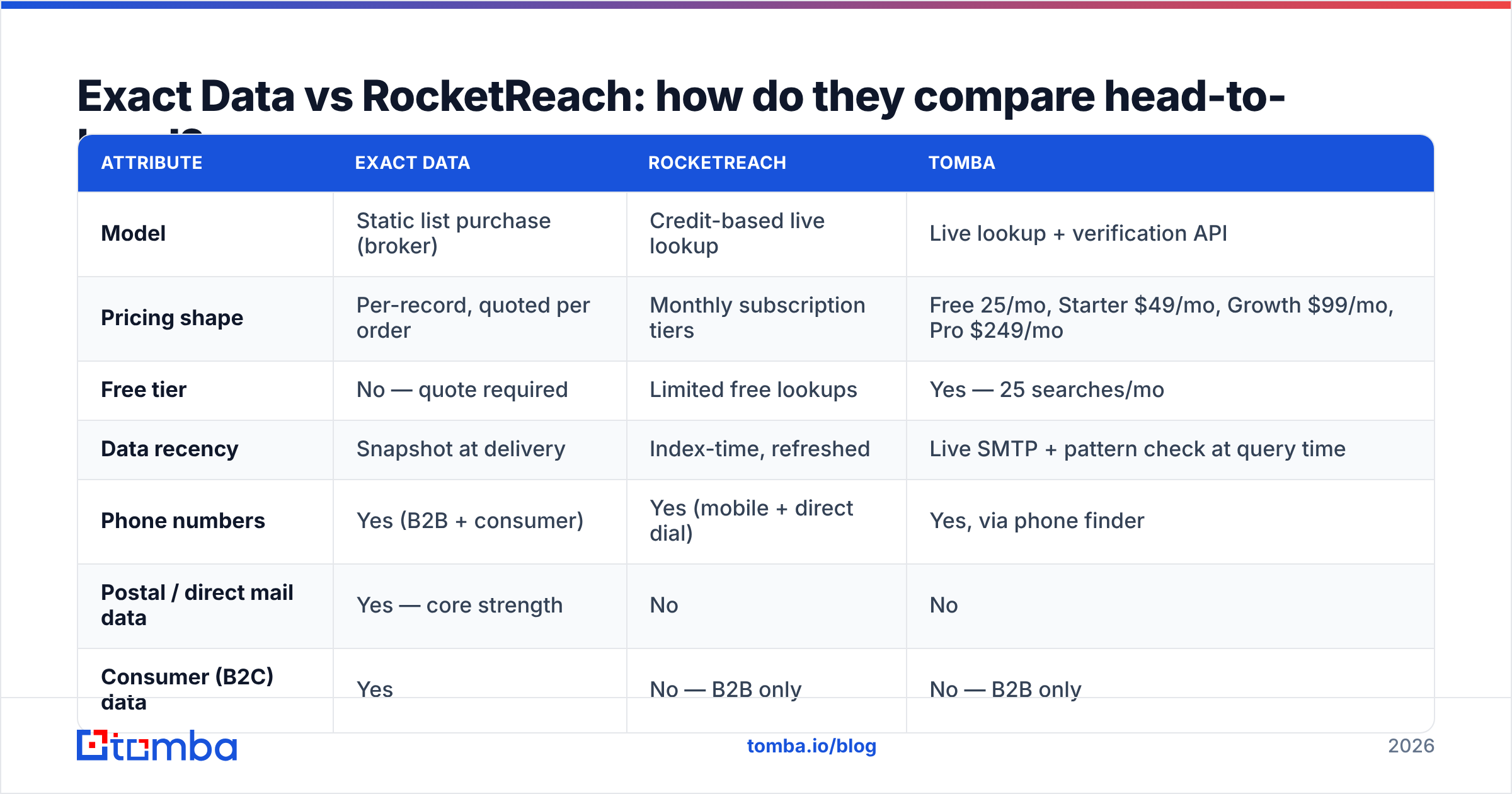
| Attribute | Exact Data | RocketReach | Tomba |
|---|---|---|---|
| Model | Static list purchase (broker) | Credit-based live lookup | Live lookup + verification API |
| Pricing shape | Per-record, quoted per order | Monthly subscription tiers | Free 25/mo, Starter $49/mo, Growth $99/mo, Pro $249/mo |
| Free tier | No — quote required | Limited free lookups | Yes — 25 searches/mo |
| Data recency | Snapshot at delivery | Index-time, refreshed | Live SMTP + pattern check at query time |
| Phone numbers | Yes (B2B + consumer) | Yes (mobile + direct dial) | Yes, via phone finder |
| Postal / direct mail data | Yes — core strength | No | No |
| Consumer (B2C) data | Yes | No — B2B only | No — B2B only |
| Built-in email verification | Not standard | Basic confidence scoring | Yes — dedicated verifier + catch-all handling |
| API access | Limited / file delivery | Yes | Yes, with CLI, MCP, and Sheets add-ons |
| Best for | Direct mail, high-volume B2C/B2B blasts | Named-account prospecting by reps | Domain-level email discovery + list hygiene |
The pattern is clear once you lay it out: these aren't really competitors. They're two answers to two different questions.
Exact Data answers: "Give me everyone who matches this profile so I can run a campaign at scale."
RocketReach answers: "I know exactly who I want to reach — give me their contact details right now."
If you've been comparing them as head-to-head alternatives, you may be solving the wrong problem. Ask which question your GTM motion actually asks, then pick accordingly.
How accurate is the data on each platform?#
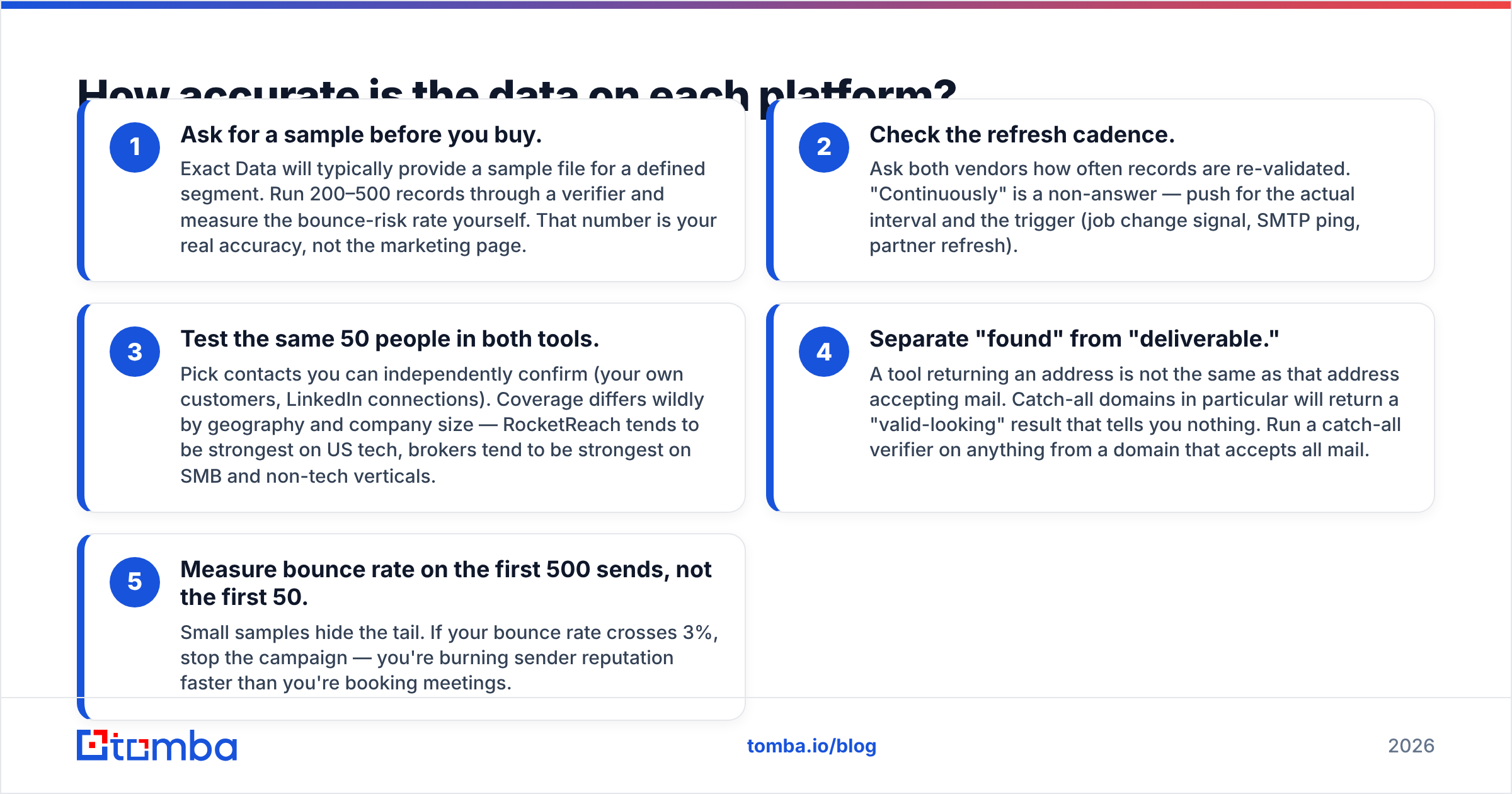
Neither vendor publishes an audited accuracy figure you can hold them to, and you should be skeptical of any provider that claims 95%+ without describing the methodology. Here's how to evaluate them honestly:
- Ask for a sample before you buy. Exact Data will typically provide a sample file for a defined segment. Run 200–500 records through a verifier and measure the bounce-risk rate yourself. That number is your real accuracy, not the marketing page.
- Check the refresh cadence. Ask both vendors how often records are re-validated. "Continuously" is a non-answer — push for the actual interval and the trigger (job change signal, SMTP ping, partner refresh).
- Test the same 50 people in both tools. Pick contacts you can independently confirm (your own customers, LinkedIn connections). Coverage differs wildly by geography and company size — RocketReach tends to be strongest on US tech, brokers tend to be strongest on SMB and non-tech verticals.
- Separate "found" from "deliverable." A tool returning an address is not the same as that address accepting mail. Catch-all domains in particular will return a "valid-looking" result that tells you nothing. Run a catch-all verifier on anything from a domain that accepts all mail.
- Measure bounce rate on the first 500 sends, not the first 50. Small samples hide the tail. If your bounce rate crosses 3%, stop the campaign — you're burning sender reputation faster than you're booking meetings.
That last point matters more than any accuracy claim on a pricing page. Google and Yahoo's bulk-sender requirements put a hard spam-complaint ceiling on senders, and a dirty purchased list is the fastest way to hit it. Their published guidance is worth reading before you import anything.
What does each one cost in 2026?#
Exact Data does not publish a public rate card — pricing is quote-based and depends on segment size, selects, and whether you're licensing for one use or multiple. Expect list-broker economics: cents per record, minimum order sizes, and surcharges for additional selects like phone or postal append.
RocketReach publishes tiered plans with lookup credits, split by whether you need email only or email plus phone. Annual billing drops the effective monthly rate. Team plans add seats and shared credit pools. Check their pricing page directly, since credit allocations get restructured periodically.
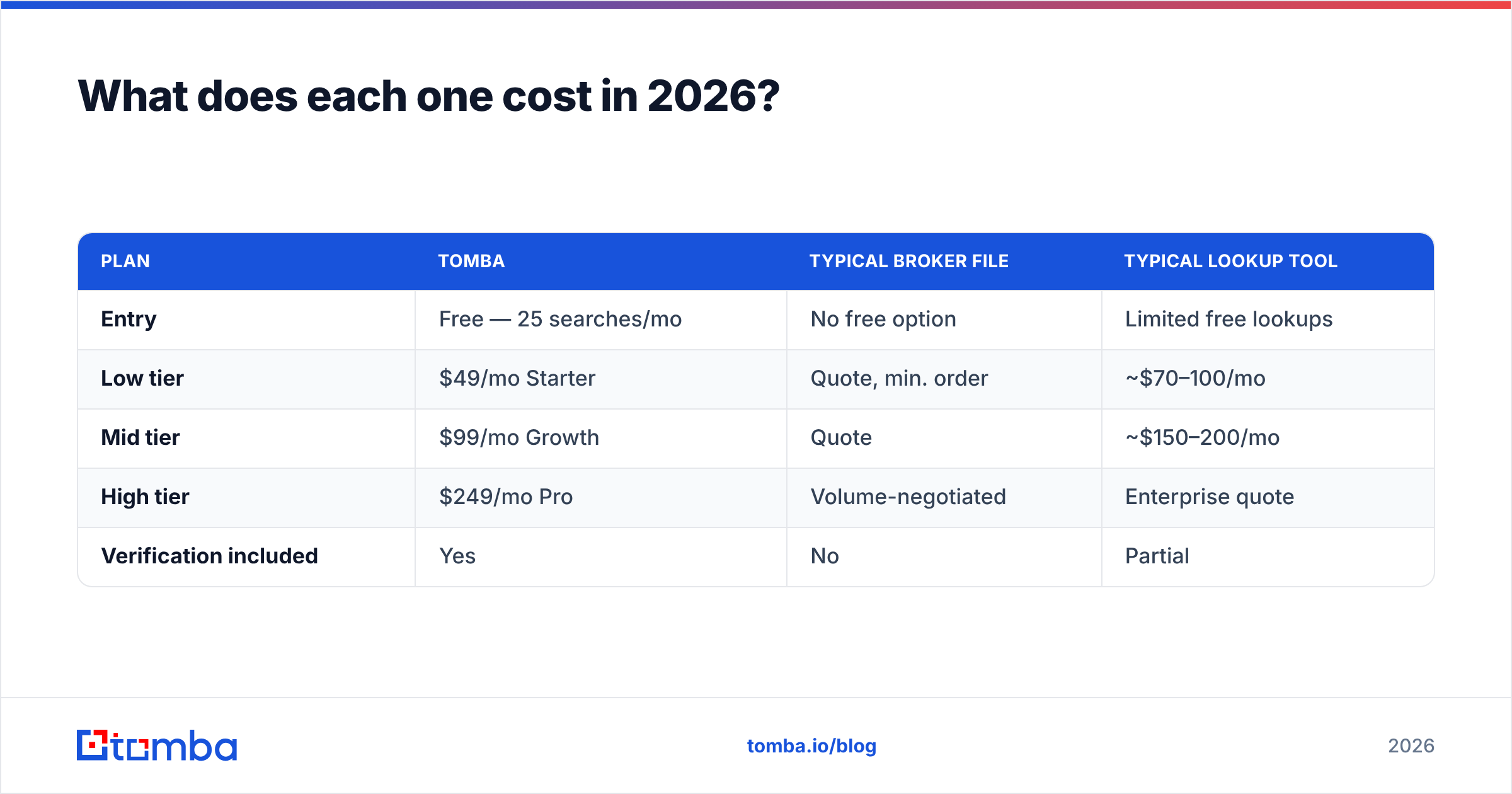
For comparison, here's how a dedicated email-discovery layer prices:
| Plan | Tomba | Typical broker file | Typical lookup tool |
|---|---|---|---|
| Entry | Free — 25 searches/mo | No free option | Limited free lookups |
| Low tier | $49/mo Starter | Quote, min. order | ~$70–100/mo |
| Mid tier | $99/mo Growth | Quote | ~$150–200/mo |
| High tier | $249/mo Pro | Volume-negotiated | Enterprise quote |
| Verification included | Yes | No | Partial |
The honest framing: if you need 50,000 postal records for a direct mail drop, a lookup tool is the wrong instrument and a broker will be dramatically cheaper. If you need 500 verified emails at accounts your AEs picked, a broker file is the wrong instrument and you'll waste most of what you bought.
See full Tomba pricing if you want to model the discovery-plus-verification layer separately from either.
Which should you choose for cold email specifically?#
For cold email, the calculus shifts hard toward live lookup — and toward verification on top of whatever source you use.
Purchased static lists carry three compounding risks for email specifically:
- Consent and compliance. Under GDPR, a purchased B2B list gives you no lawful basis by default for most EU contacts. CAN-SPAM is more permissive in the US, but "legal" and "deliverable" are different bars. The ICO's direct marketing guidance is the clearest public read on where the line sits.
- Spam traps. Recycled addresses that mailbox providers convert into traps sit in aged compiled data. One trap hit can tank a sending domain.
- Shared usage. The same records get sold repeatedly. If four other companies emailed that contact this month, your reply rate reflects that whether you know it or not.
None of that makes brokered data useless — it makes it unsuitable as a direct cold email source without heavy processing. If you do buy a file, the minimum viable pipeline is: dedupe → suppress your existing CRM → verify every address → segment out catch-alls → warm the sending domain → send in small batches.
For RocketReach-sourced contacts, the pipeline is shorter but not zero. Confidence scores are a signal, not a guarantee. Run the exports through an email verifier before they hit your sequencer.

What are the better-fit alternatives to both?#
Depending on what you're actually trying to do, neither may be the right pick.
If your problem is "I have a list of target companies and need contacts at them": a domain search approach is more direct than either. You feed a domain, get the people and email patterns at that company, and skip the credit-per-person math entirely.
If your problem is "I have names and companies from a webinar or event list": use a bulk email finder to append addresses to what you already have. You're not buying data; you're completing records you already earned.
If your problem is "I need verified B2B contacts with a self-serve buying experience": BookYourData is a solid option in this space — it sells pay-as-you-go verified B2B lists with a bounce guarantee, which is a meaningfully different posture from traditional brokerage. If the list-purchase model fits your motion but you want accountability on accuracy, it's worth a look alongside Exact Data.
If your problem is "reps need contacts while browsing LinkedIn": that's RocketReach's home turf, and a LinkedIn finder covers the same job if you want an alternative. Compare on coverage in your specific vertical, not on total database size.
If your problem is "our data is stale and we don't know which records": that's an enrichment and hygiene problem, not a sourcing problem. Data enrichment against your existing CRM will usually recover more pipeline than buying anything new.
How should you actually run the evaluation?#
Give yourself two weeks and a controlled test:
- Week 1 — build the sample. Pick 200 target contacts you can independently verify. Run them through RocketReach's free/trial credits. Request an Exact Data sample matching the same segment. Note coverage rate for each: how many of the 200 did each source return anything for?
- Week 1 — verify everything. Push both result sets through the same verifier so you're comparing apples to apples. Record valid / invalid / catch-all / unknown per source.
- Week 2 — send a small batch. 100 addresses from each source, same copy, same sending domain, staggered. Measure hard bounces, spam complaints, and replies.
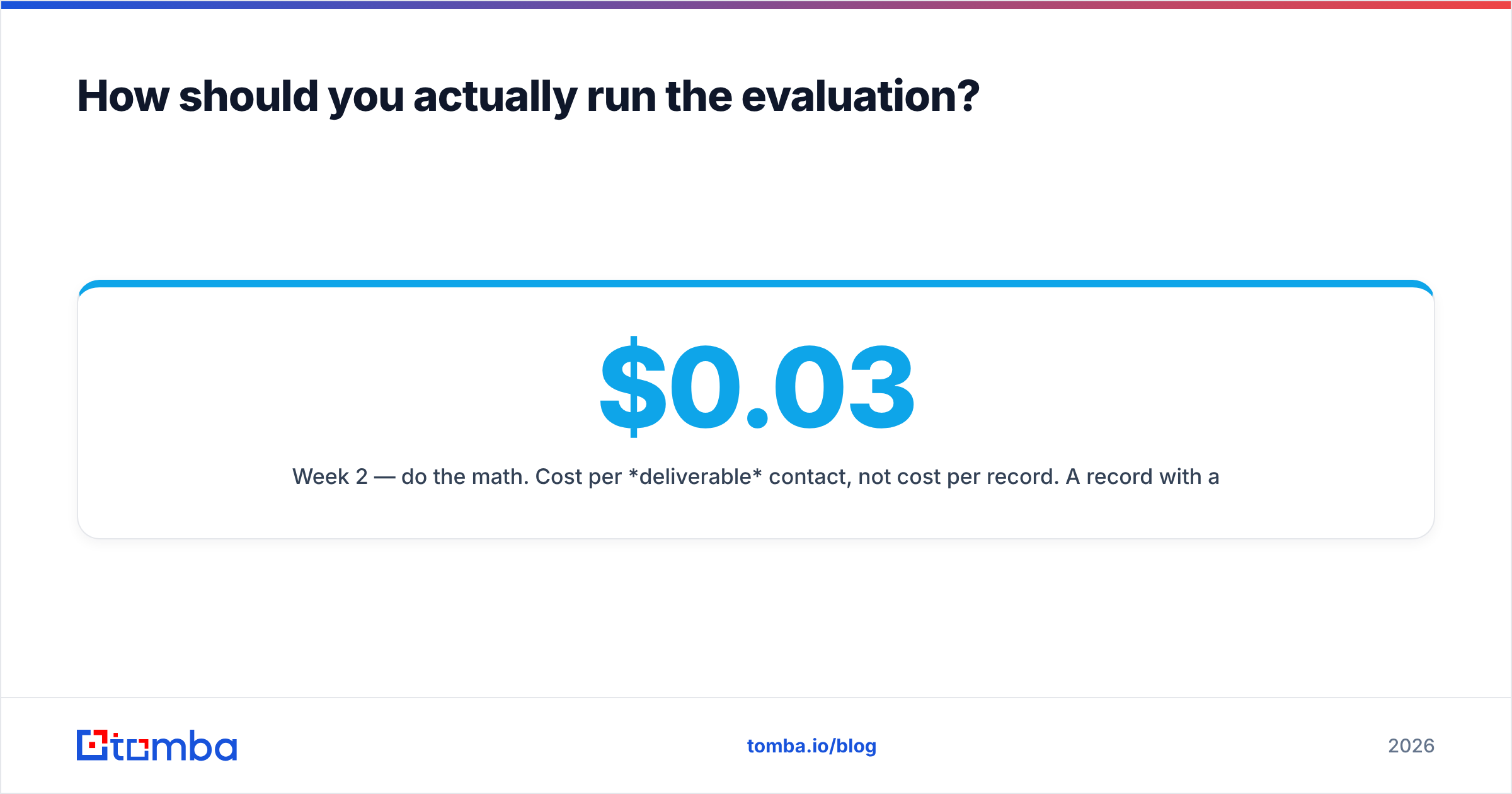
- Week 2 — do the math. Cost per deliverable contact, not cost per record. A $0.03 record with a 40% invalid rate costs $0.05 deliverable, plus the reputation damage the bounces caused.
That last number is the only one that should drive the decision. Vendors compete on cost per record because it flatters them. Your P&L cares about cost per meeting booked, and everything between those two numbers is data quality.
One practical note: track the results in a sheet, not in your head. If you already work in spreadsheets, the Google Sheets add-on route lets you run finds and verifications inline without exporting anything.
The verdict#
Choose Exact Data if: you run direct mail or multi-channel campaigns, you need postal and consumer attributes, you're buying at volume where per-record economics dominate, and you have an ops process to clean and verify before use.
Choose RocketReach if: your reps work named accounts, you need mobile numbers alongside email, you want a Chrome extension in the prospecting workflow, and per-contact cost is acceptable because your ACV is high.
Choose neither if: what you actually need is to find and verify emails at a defined set of companies. That's a narrower job, and paying for a full contact database or a bulk list file to do it is overpaying.
Whichever source you pick, the verification layer is not optional. It's the difference between a list that generates pipeline and a list that gets your domain blocklisted.
Ready to test the discovery layer on its own? Start with the Tomba Email Finder — 25 free searches a month, no card, so you can benchmark coverage against your current source before committing to anything. Feed it a domain or a name plus company, verify what comes back, and compare cost per deliverable contact against whatever quote is sitting in your inbox. If the numbers work, Starter is $49/mo and the same engine runs through the API, CLI, and Sheets.
Related guides#
Ready to find emails that actually work?
Join 150,000+ professionals who stopped guessing and started sending. Free credits on signup — no credit card required.
Get the Tomba newsletter
Practical outbound tactics and product updates — once every two weeks.
About the author