ExactVerify vs SalesQL 2026: Which Tool Should You Pick?
ExactVerify verifies email lists. SalesQL pulls contacts off LinkedIn. They solve different halves of the same problem — here is which one your pipeline actually needs, and when you need neither.
TL;DR
- ExactVerify and SalesQL are not really competitors. ExactVerify is an email verification service; SalesQL is a LinkedIn contact extraction extension. One cleans a list, the other builds one.
- If your problem is "my bounce rate is 9% and my domain is getting throttled," ExactVerify is the closer fit. If your problem is "I have 400 LinkedIn profiles and no email addresses," SalesQL is the closer fit.
- Buying both means paying two vendors, reconciling two credit systems, and moving CSVs between them. That is the hidden cost nobody puts on the pricing page.
- SalesQL's coverage is capped by what LinkedIn exposes and by extension stability — Chrome-extension scrapers break when LinkedIn changes its DOM or rate-limits your account.
- A single platform that does discovery and verification (Tomba, Dropcontact, Findymail, Hunter) usually beats a two-tool stack below roughly 20k contacts/month. Above that, specialised verification starts to pay for itself.
What are ExactVerify and SalesQL, actually?#
They sit at opposite ends of the same workflow, which is why comparing them head-to-head confuses people.
ExactVerify is a bulk email verification service. You upload a list, it runs syntax checks, MX record lookups, SMTP handshakes, disposable-domain detection, role-account flagging, and catch-all classification, then hands you back a scored file. It does not find email addresses. It tells you whether the ones you already have will bounce.
SalesQL is a Chrome extension that sits on top of LinkedIn. You open a profile, a Sales Navigator search, or a LinkedIn group, and SalesQL surfaces personal and work email addresses plus phone numbers, which you can push to a CSV or a CRM. It is a discovery tool built around one source of truth: LinkedIn.
So the honest framing of ExactVerify vs SalesQL is not "which is better." It is "which half of the pipeline is currently broken for you?"
Here is the pipeline both tools plug into:
- Source — decide who you want to reach (LinkedIn search, a conference list, a website scrape, an ICP query against a B2B database).
- Find — attach a work email address to each name. This is SalesQL's job, and the job of any email finder.
- Verify — confirm the mailbox exists and will accept mail. This is ExactVerify's job.
- Enrich — add title, company size, tech stack, phone, so your copy has something to hook onto.
- Send — sequence it, and watch bounce rate and reply rate like a hawk.
Miss step 2 and you have a list of names. Miss step 3 and you have a list of names that will get your domain blacklisted. Most teams that ask about ExactVerify vs SalesQL are actually asking "do I need one tool or two?"

How do ExactVerify and SalesQL compare feature by feature?#
The table below reflects each vendor's publicly documented positioning at the time of writing. Pricing on both products moves — treat these as ballpark, not a quote, and confirm on the vendor's own pricing page before you commit budget.

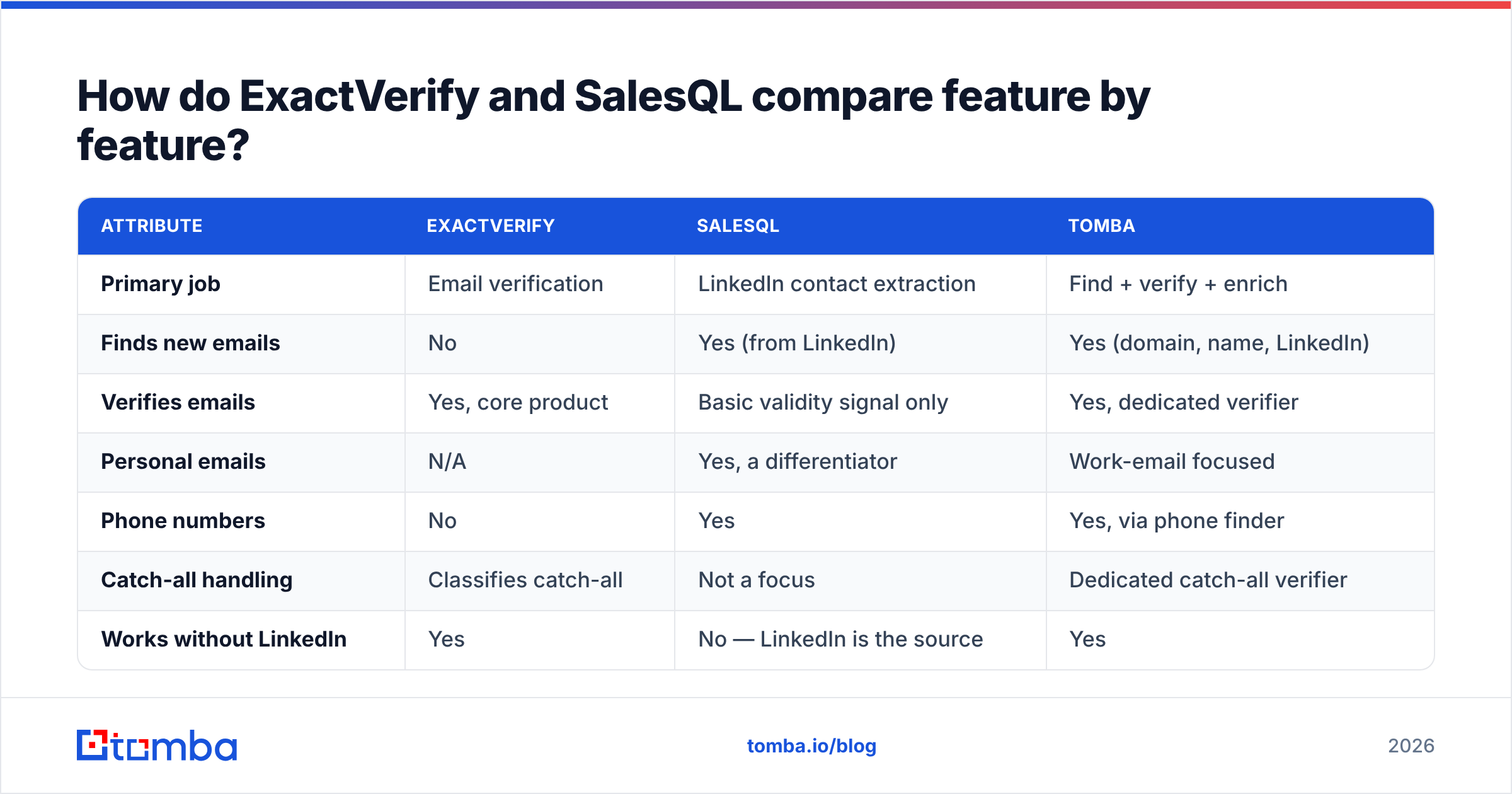
| Attribute | ExactVerify | SalesQL | Tomba |
|---|---|---|---|
| Primary job | Email verification | LinkedIn contact extraction | Find + verify + enrich |
| Finds new emails | No | Yes (from LinkedIn) | Yes (domain, name, LinkedIn) |
| Verifies emails | Yes, core product | Basic validity signal only | Yes, dedicated verifier |
| Personal emails | N/A | Yes, a differentiator | Work-email focused |
| Phone numbers | No | Yes | Yes, via phone finder |
| Catch-all handling | Classifies catch-all | Not a focus | Dedicated catch-all verifier |
| Works without LinkedIn | Yes | No — LinkedIn is the source | Yes |
| Bulk CSV workflow | Yes, core | Export-based | Yes, bulk finder + verifier |
| API access | Yes | Yes | Yes, documented REST API |
| Entry paid plan | Credit packs, low entry cost | Roughly $39–$60/mo tier | $49/mo Starter |
| Free tier | Trial credits | Free credits monthly | 25 searches/mo |
The pattern is clear: ExactVerify wins on depth in one narrow lane, SalesQL wins on a source nobody else has quite the same access to, and a full-stack platform wins on not making you run two subscriptions.
Is ExactVerify good enough as a standalone verifier?#
For pure list hygiene, yes — with the same caveats that apply to every SMTP-based verifier on the market.
What a verifier can determine with high confidence:
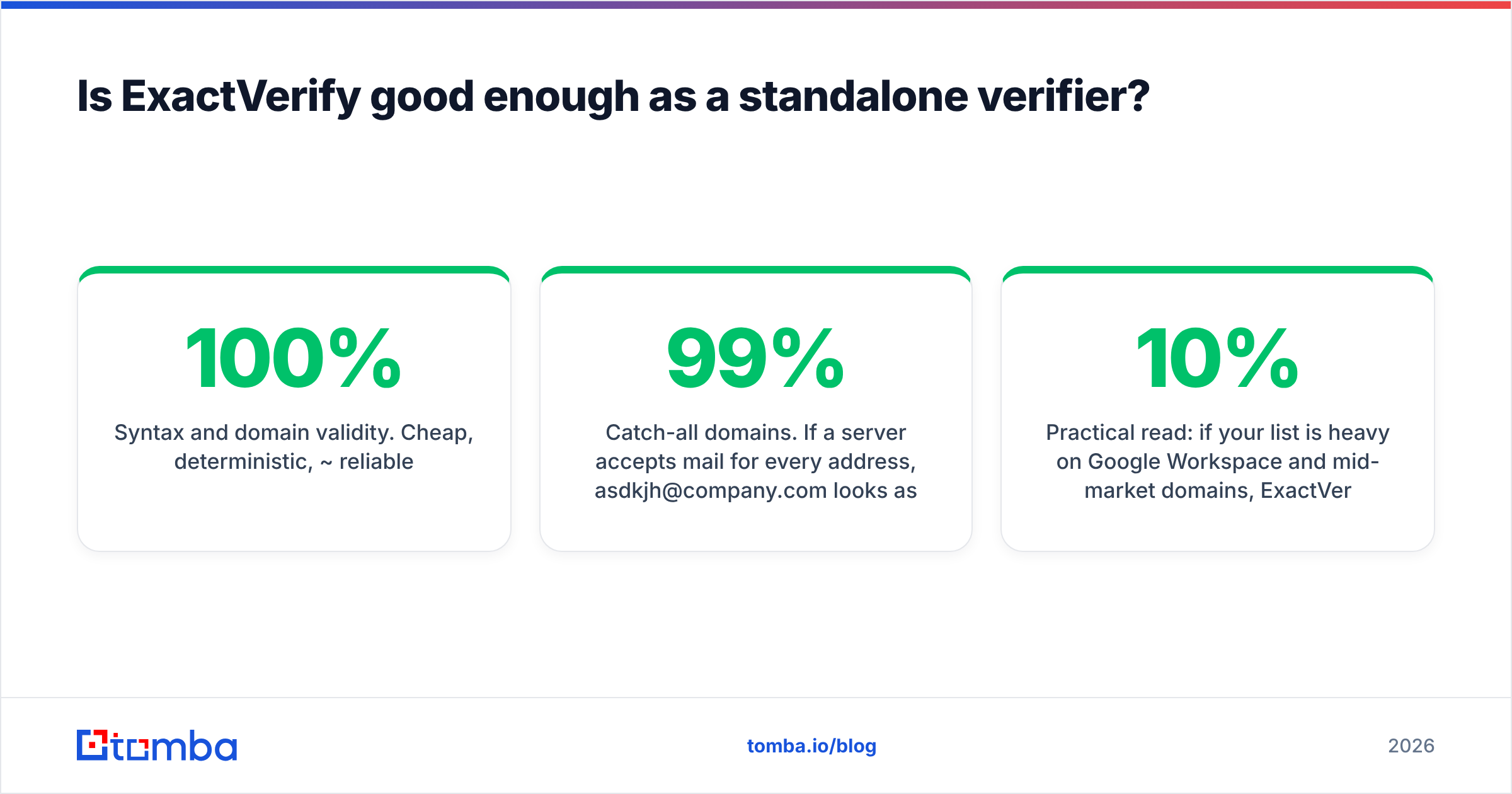
- Syntax and domain validity. Cheap, deterministic, ~100% reliable.
- MX records. Does the domain accept mail at all? Also deterministic.
- Disposable and role addresses. Pattern matching against maintained lists. Reliable, but list freshness varies by vendor.
- Hard-invalid mailboxes. Servers that explicitly reject unknown recipients will say so during the SMTP conversation.
What no verifier can determine with certainty:
- Catch-all domains. If a server accepts mail for every address,
asdkjh@company.comlooks as valid assarah.chen@company.com. Vendors that claim 99% certainty on catch-alls are selling you a probability model, not a verification. This is why a dedicated catch-all verifier exists as a separate product category — the honest ones score confidence rather than pretending to binary certainty. - Greylisting and aggressive spam filters. Microsoft 365 tenants in particular will happily accept a probe and drop the real message later.

Practical read: if your list is heavy on Google Workspace and mid-market domains, ExactVerify — or any competent verifier — will get you from a 10% bounce rate to under 2%. If your list is heavy on enterprise catch-alls, expect a large "risky/unknown" bucket and budget for it. Compare that against Tomba's email verifier, which bundles verification into the same credit pool as discovery, so you are not reconciling two invoices for one list.
One more thing that separates good verifiers from mediocre ones: what they do with your data. Check whether uploaded lists are retained, used to enrich the vendor's own database, or deleted after processing. Read the DPA, not the marketing page.
Is SalesQL the right way to get emails off LinkedIn?#
It is one of the established options, and it does the job it advertises. But you should understand the structural constraints before you build a process around it.
Where SalesQL is strong:
- Personal email coverage. SalesQL surfaces personal addresses alongside work ones, which matters for recruiting, and for industries where people change employers constantly. Many pure B2B finders skip this entirely.
- In-flow capture. You are already on LinkedIn doing research. Pulling the contact without leaving the tab removes a context switch, and that is a real productivity gain for a rep doing 60 profiles a day.
- Sales Navigator list extraction. Turning a saved search into a contact list in a few clicks is genuinely fast.
- Phone numbers. Mobile coverage is inconsistent across all vendors, but having phones and emails from one pull is convenient.
Where the model gets fragile:
- LinkedIn is a single point of failure. DOM changes break extensions. Rate limits throttle bulk pulls. LinkedIn's user agreement restricts automated data collection, and account restrictions on scraper-heavy usage are a documented risk across this whole tool category — read the G2 reviews for any LinkedIn extension and you will find the same complaint pattern.
- You can only reach people who are on LinkedIn and visible to you. Connection degree, regional platform usage, and profile privacy all cut into coverage. A domain-first approach does not have this ceiling — see domain search for the alternative model, where you start from a company and enumerate the people.
- Verification is not the product. SalesQL gives you a validity signal, but you should not treat it as a substitute for a dedicated verification pass before a cold campaign. This is precisely why people end up comparing ExactVerify vs SalesQL in the first place: they bought SalesQL, bounced a campaign, and went looking for a verifier.
If LinkedIn is your primary channel and you want the finder and the verifier under one roof, a LinkedIn finder that runs on the same credits as your verification avoids the two-vendor tax entirely.

What does the two-tool stack actually cost?#
Run the arithmetic on a realistic month rather than on list prices.
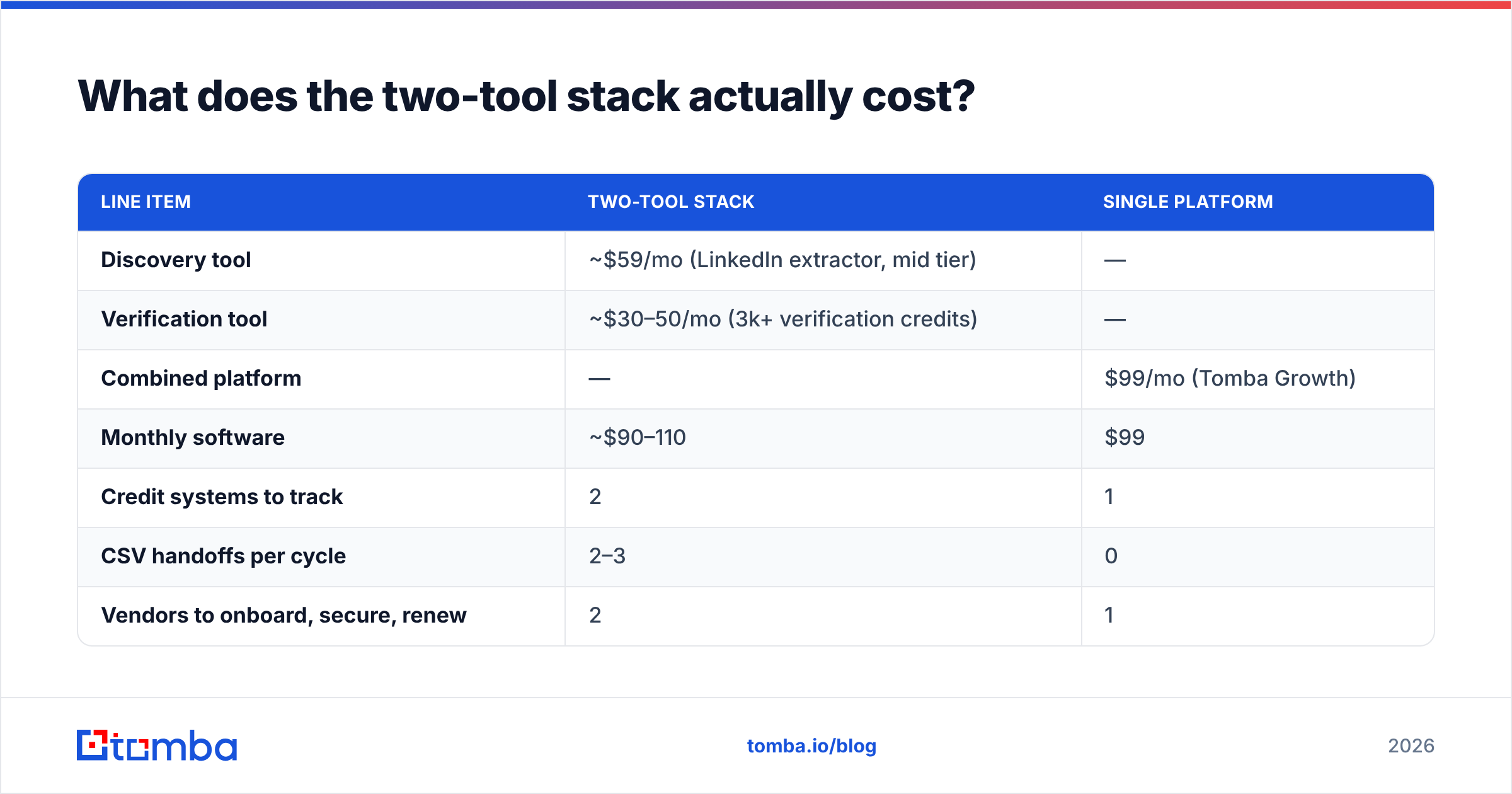
Assume a two-rep outbound team building 3,000 new contacts a month:
| Line item | Two-tool stack | Single platform |
|---|---|---|
| Discovery tool | ~$59/mo (LinkedIn extractor, mid tier) | — |
| Verification tool | ~$30–50/mo (3k+ verification credits) | — |
| Combined platform | — | $99/mo (Tomba Growth) |
| Monthly software | ~$90–110 | $99 |
| Credit systems to track | 2 | 1 |
| CSV handoffs per cycle | 2–3 | 0 |
| Vendors to onboard, secure, renew | 2 | 1 |
| Rep time on file shuffling | ~2 hrs/mo | ~0 |
The subscription cost is close to a wash. The difference shows up in the operational tax: two credit balances that run out at different times, two exports, a dedupe step, and a rep who is doing data entry instead of calling. At 3,000 contacts a month that is a couple of hours. At 30,000 it is a part-time job.
The inflection point runs the other way at high volume. If you are verifying 200k+ addresses a month, a specialist verifier's per-credit price beats a bundled platform's, and the operational overhead is amortised across a much bigger list. Check Tomba pricing against a dedicated verifier's volume tiers before assuming the bundle wins at every scale — Free starts at 25 searches/month, Starter is $49/mo, Growth $99/mo, and Pro $249/mo, with Enterprise negotiated.
Which should you choose for your use case?#
Match the tool to the actual bottleneck:
- You already have lists and they bounce. Buy a verifier. ExactVerify is a reasonable pick; so are ZeroBounce, Bouncer, and NeverBounce. SalesQL will not help you — it solves a problem you do not have.
- You live in Sales Navigator and need contacts fast. SalesQL fits the workflow. Add a verification step before you send. Do not skip it because the extension showed a green checkmark.
- You are recruiting and need personal emails. SalesQL's personal-email coverage is a genuine differentiator here. Most B2B-only finders will not give you a Gmail address.
- You prospect by company, not by person. Neither tool is ideal. You want domain search: give it
stripe.com, get back the people and patterns. Start there, then verify. - You run a technical GTM motion and want everything in code. You want an API-first vendor. Both have APIs; a platform where find, verify, and enrich hit the same endpoint set — like the Tomba API — removes the orchestration layer you would otherwise write yourself.
- You are pushing 100k+ addresses a month. Split the stack. Use a discovery platform for coverage and a specialist verifier for unit economics. This is the one scenario where paying two vendors is clearly the right call.
What should you test before you commit?#
Do not buy on a feature grid. Run the same 100-contact sample through every candidate and score it yourself. That is the only benchmark that reflects your ICP.
- Build a known-good control list. 50 addresses you have verified by hand — replies received, or confirmed by a colleague at the company. Any tool that marks these invalid is over-aggressive and will silently delete good leads.
- Add 25 known-bad addresses. Deliberately malformed, departed employees, dead domains. A tool that passes these is under-aggressive and will bounce your campaign.
- Add 25 catch-all domains. Watch how each vendor labels them. "Valid" on a catch-all is a red flag; "risky" or a confidence score is honest behaviour.
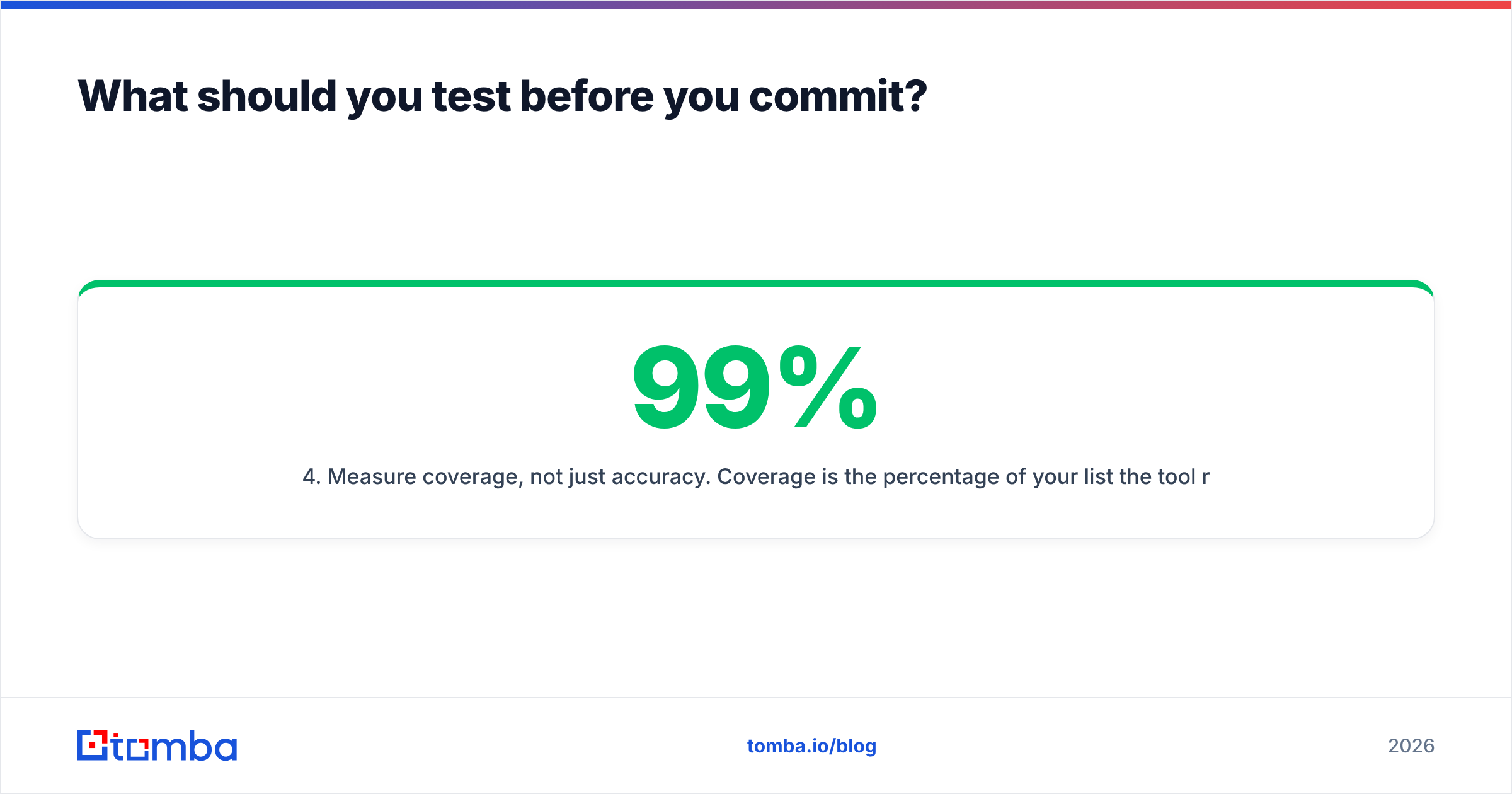
- Measure coverage, not just accuracy. Coverage is the percentage of your list the tool returns any answer for. A 99%-accurate tool that only covers 30% of your list is worse than a 95%-accurate tool covering 80%.
- Send a real campaign to 200 addresses. The bounce rate in your ESP is the only number that matters. Everything before it is a proxy.
- Time the workflow end to end. From "I have a list of companies" to "the sequence is live." Count every export, upload and dedupe. That number is where the two-tool tax shows up.
Run that on ExactVerify, on SalesQL, and on one bundled platform. You will usually find the accuracy differences are small and the workflow differences are large.
The bottom line#
ExactVerify and SalesQL are both competent at what they claim. ExactVerify is a verifier that will clean a dirty list. SalesQL is a LinkedIn extractor that will build one, with personal-email coverage most competitors lack. Neither is a complete pipeline, and running both means two invoices, two credit balances, and a CSV shuttle in the middle.
If you are early enough that adding vendors hurts, consolidate. If you are at the volume where per-credit pricing dominates your spend, split the stack and negotiate hard on the verification side.
For teams that want discovery and verification behind one login and one credit pool, start with the Tomba Email Finder — 25 free searches a month, no card, and verification runs on the same credits, so you can benchmark it against your ExactVerify-plus-SalesQL setup with your own list before deciding which side of that trade-off you are on.
Related guides#
Ready to find emails that actually work?
Join 150,000+ professionals who stopped guessing and started sending. Free credits on signup — no credit card required.
Get the Tomba newsletter
Practical outbound tactics and product updates — once every two weeks.
About the author