Extruct AI vs FindThatLead: Which B2B Data Tool Wins in 2026?
Extruct AI builds researched company lists with AI agents. FindThatLead finds and emails contacts. They solve different halves of the same problem — here is which one you actually need, and what each one costs you.
TL;DR
- These two tools are not really competitors. Extruct AI is a company-research agent that builds and enriches account lists from the open web. FindThatLead is a contact-level prospecting suite that finds emails and sends the campaign.
- Pick Extruct AI if your bottleneck is "which companies should we even target?" — messy ICPs, niche verticals, custom attributes no database has a column for.
- Pick FindThatLead if your bottleneck is "I have the company, get me the person and send the email" — it bundles finding, verifying, and sending in one seat.
- Neither is a best-in-class email-accuracy engine. If deliverability is the metric you're judged on, run contact discovery through a dedicated email finder and let these tools do what they're good at.
- Realistic 2026 stack: Extruct (or a database) for account selection → dedicated finder/verifier for contacts → sender of choice. Buying one tool to do all three is where budgets quietly die.
What are Extruct AI and FindThatLead?#
Short answer: one builds the account list, the other works the contact list.
Extruct AI is an AI agent platform for company research. You describe the kind of company you want — "Series A fintechs in DACH that mention SOC 2 on their site and have a careers page hiring a compliance lead" — and its agents crawl the web, read pages, and return a structured table with columns you defined. It behaves less like a static database and more like a research analyst you can point at a spreadsheet.
FindThatLead is an older, more conventional B2B prospecting suite out of Barcelona. It gives you domain-based lead search, an email finder, a verifier, a LinkedIn-oriented scraper (Scrab), and a cold-email sender under one login. It is built for the SDR who wants to go from "I know the company" to "the email is sent" without leaving the tab.
The confusion between them is understandable — both promise "leads." But they sit on opposite ends of the pipeline, and the buying mistake most teams make is assuming either one replaces the other.
What does Extruct AI actually do well?#
Think of Extruct as hiring an intern who reads 400 company websites overnight and fills in a spreadsheet you designed. Its value is in columns that don't exist in traditional databases.
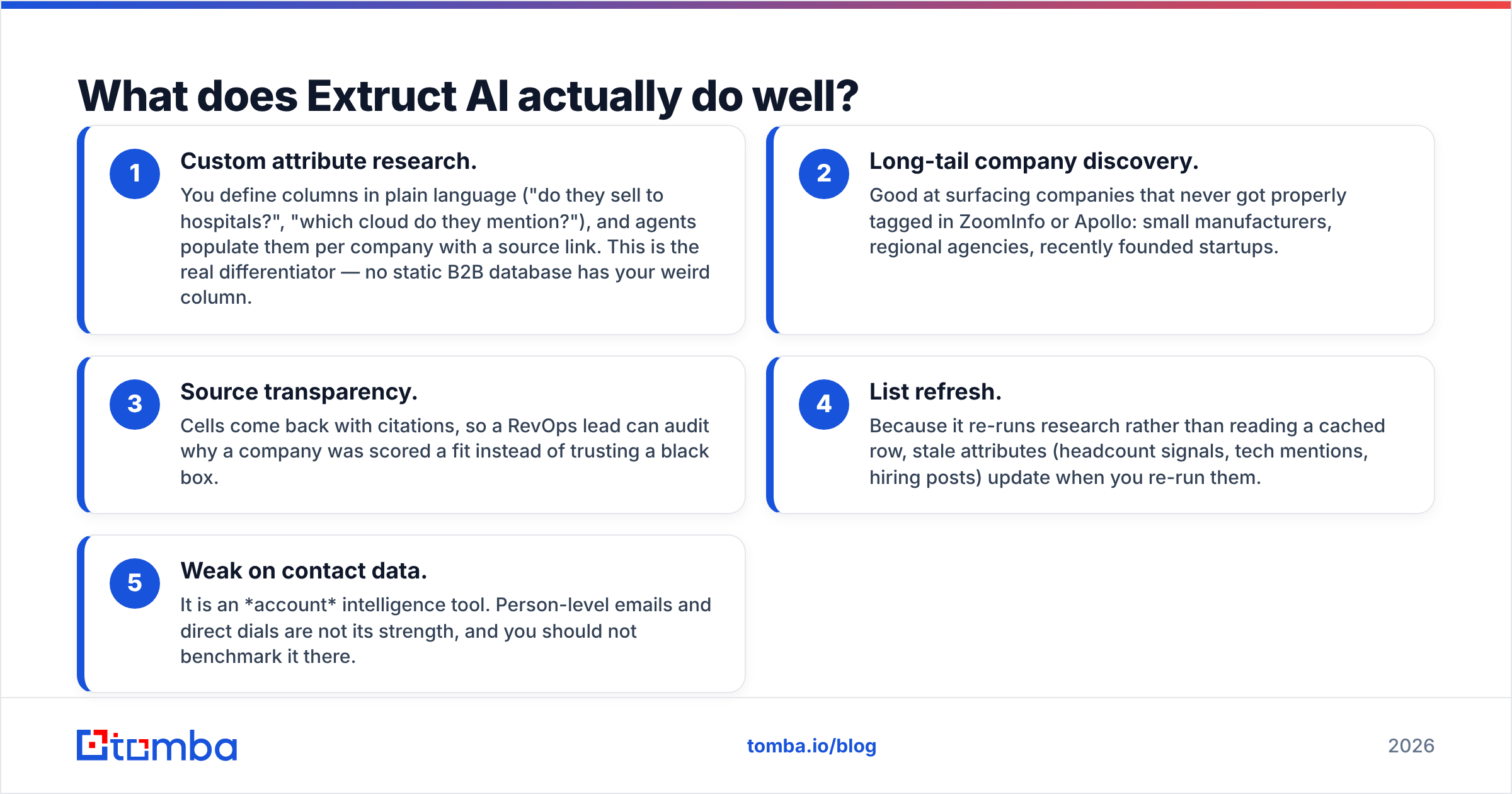
- Custom attribute research. You define columns in plain language ("do they sell to hospitals?", "which cloud do they mention?"), and agents populate them per company with a source link. This is the real differentiator — no static B2B database has your weird column.
- Long-tail company discovery. Good at surfacing companies that never got properly tagged in ZoomInfo or Apollo: small manufacturers, regional agencies, recently founded startups.
- Source transparency. Cells come back with citations, so a RevOps lead can audit why a company was scored a fit instead of trusting a black box.
- List refresh. Because it re-runs research rather than reading a cached row, stale attributes (headcount signals, tech mentions, hiring posts) update when you re-run them.
- Weak on contact data. It is an account intelligence tool. Person-level emails and direct dials are not its strength, and you should not benchmark it there.
That last point matters more than the marketing on either homepage. Account research and contact discovery are different engineering problems: one is crawling and summarizing, the other is pattern inference plus SMTP-level validation.

What does FindThatLead actually do well?#
FindThatLead's pitch is compression. Instead of stitching four tools together, you get:
- Domain search — drop in a company domain, get back the people and their work emails. Comparable in concept to a domain search workflow.
- Prospector — filter by role, industry, and location to build a person-level list without starting from a company list.
- Scrab — a browser extension aimed at LinkedIn profiles and search results, for teams that live in Sales Navigator.
- Email verification — an in-app validity check before you export or send.
- Cold-email sender — sequences, sending accounts, and basic tracking bundled in.
For a two-person startup that needs one subscription covering the whole motion, that bundling is genuinely valuable. The trade-off is depth: each module is fine, none is category-leading, and the send module competes with tools that do nothing but deliverability.
How do Extruct AI and FindThatLead compare head to head?#
| Dimension | Extruct AI | FindThatLead |
|---|---|---|
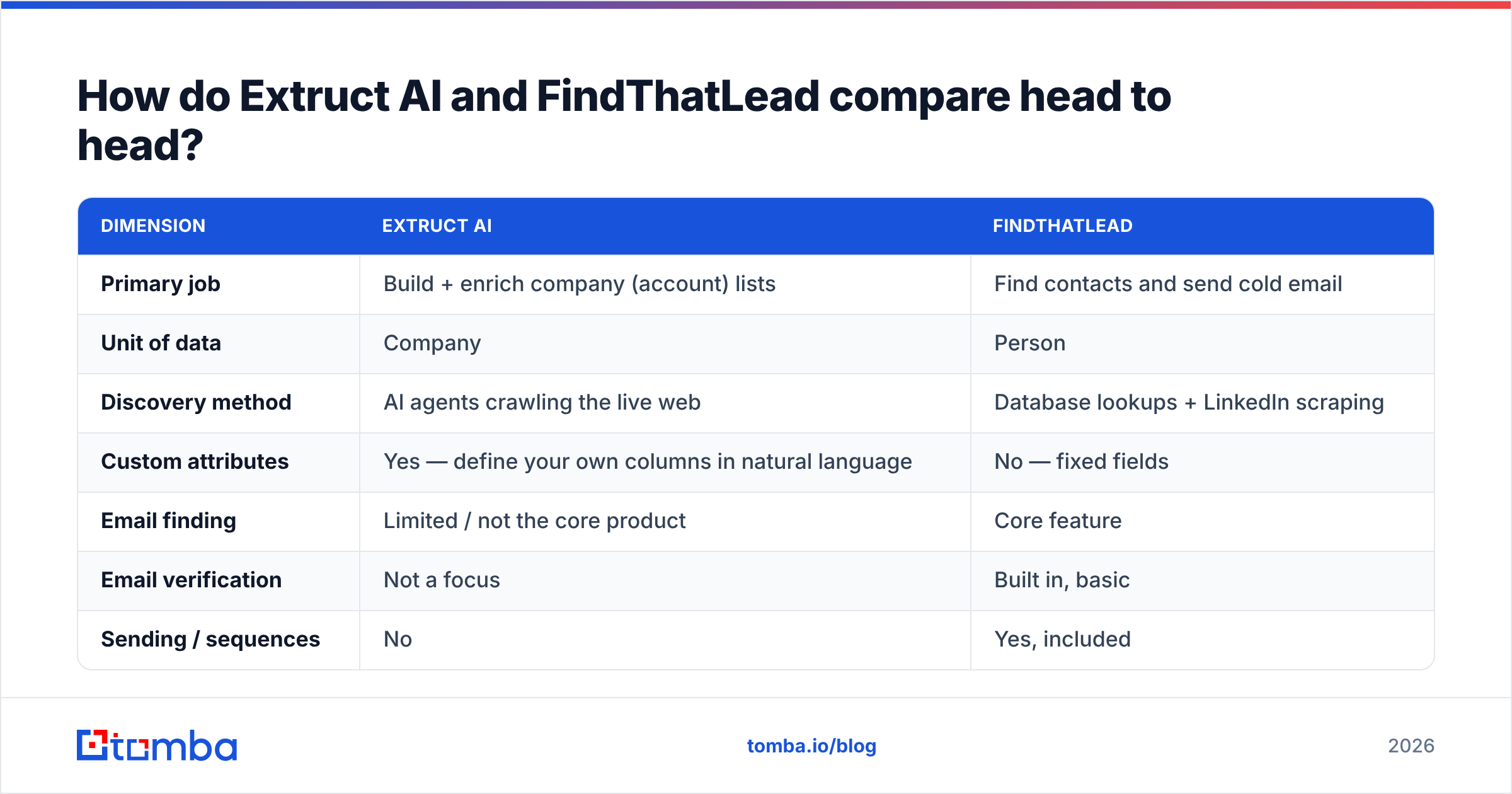
| Primary job | Build + enrich company (account) lists | Find contacts and send cold email |
| Unit of data | Company | Person |
| Discovery method | AI agents crawling the live web | Database lookups + LinkedIn scraping |
| Custom attributes | Yes — define your own columns in natural language | No — fixed fields |
| Email finding | Limited / not the core product | Core feature |
| Email verification | Not a focus | Built in, basic |
| Sending / sequences | No | Yes, included |
| Best for | RevOps, ABM, niche ICP research | SDRs, founders, SMB outbound |
| Learning curve | Medium — you design the research prompt | Low — point and click |
| API access | Yes | Yes |
| Where it breaks down | Person-level contact depth | Data freshness and bounce rates at scale |
Read that table as a division of labour, not a scoreboard. If you scored them on the same axis you'd be scoring a telescope against a hammer.
Which one is more accurate?#
Neither should be your accuracy benchmark, and here's why that's not a cop-out.
Extruct's accuracy question is "is this attribute true?" — and because cells come with sources, you can audit it. In practice, agent-researched attributes land in the high-80s to mid-90s percent range on well-defined questions ("do they have a mobile app?") and degrade fast on fuzzy ones ("are they enterprise-ready?"). Write your columns like a checklist, not like a vibe, and quality jumps.
FindThatLead's accuracy question is "will this email bounce?" — and that number moves depending on the segment. US tech domains behave; European SMBs, agencies, and catch-all-heavy domains are where any finder's hit rate falls apart. Independent user reviews on G2 consistently flag two things about the bundled-suite category: credits burned on unverified results, and bounce rates that only show up after you've already sent.
Three practical rules regardless of which tool you buy:
- Never send on a "found" status alone. Found and verified are different states. Run a separate email verification pass before a campaign — it costs less than a domain reputation repair.
- Treat catch-all domains as their own bucket. A catch-all accepts everything at the SMTP layer, so most verifiers return "unknown." Use a dedicated catch-all verifier or route those contacts to LinkedIn instead of email.
- Measure bounce rate by segment, not overall. A 4% blended bounce rate can hide a 15% bounce rate in one vertical that's quietly torching your sending domain.

What do Extruct AI and FindThatLead cost?#
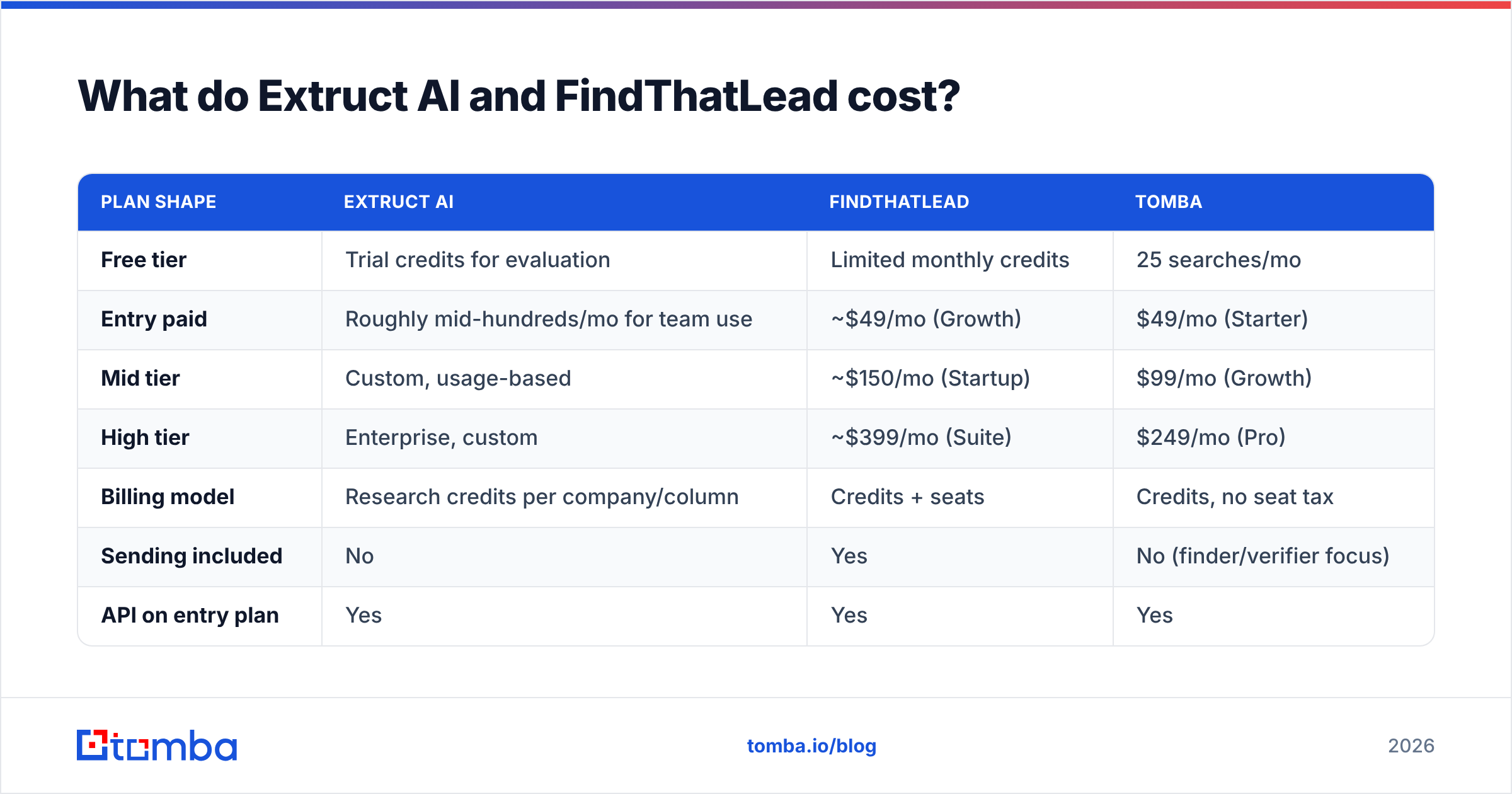
Pricing on both changes often, and both publish tiers that mix credits with seats — so treat the figures below as directional and confirm on the vendor's own pricing page before you sign anything.
| Plan shape | Extruct AI | FindThatLead | Tomba |
|---|---|---|---|
| Free tier | Trial credits for evaluation | Limited monthly credits | 25 searches/mo |
| Entry paid | Roughly mid-hundreds/mo for team use | ~$49/mo (Growth) | $49/mo (Starter) |
| Mid tier | Custom, usage-based | ~$150/mo (Startup) | $99/mo (Growth) |
| High tier | Enterprise, custom | ~$399/mo (Suite) | $249/mo (Pro) |
| Billing model | Research credits per company/column | Credits + seats | Credits, no seat tax |
| Sending included | No | Yes | No (finder/verifier focus) |
| API on entry plan | Yes | Yes | Yes |
Two cost traps worth naming:
Extruct's credit model scales with columns, not just rows. A 1,000-company list with 12 researched attributes is a much bigger bill than the same list with 3. Prototype the column set on 50 companies before running the full list — most teams discover half their columns weren't decision-relevant.
FindThatLead's bundled sender inflates the comparison. You're paying for sequencing capacity you may already own in Instantly, Smartlead, or HubSpot. If you already have a sender, the honest comparison is FindThatLead's finder against a standalone finder — and standalone finders win on price per verified contact almost every time. Compare against Tomba pricing before you assume the bundle is cheaper.
Which should you actually pick?#
Match the tool to your actual bottleneck, not to the demo you liked most.
- Pick Extruct AI if you sell into a category that databases classify badly, run ABM with tight account lists, or need custom qualification research that currently eats analyst hours. It replaces manual research, not your contact database.
- Pick FindThatLead if you're a founder or a small SDR team, you want one bill instead of four, and your target market is mainstream enough that a conventional database covers it. Speed to first campaign is its real product.
- Pick neither as your data core if you're running high volume. At tens of thousands of contacts a month, the economics push you toward a specialist finder plus a specialist sender, both on API.
- Pick both if you're doing serious ABM: Extruct decides who, a contact tool decides whom to email, a sender handles the rest.
For teams that already know their accounts and just need people, tools like BookYourData (pay-as-you-go verified B2B contacts) or a dedicated finder API solve that step more cheaply than either platform's bundled approach.
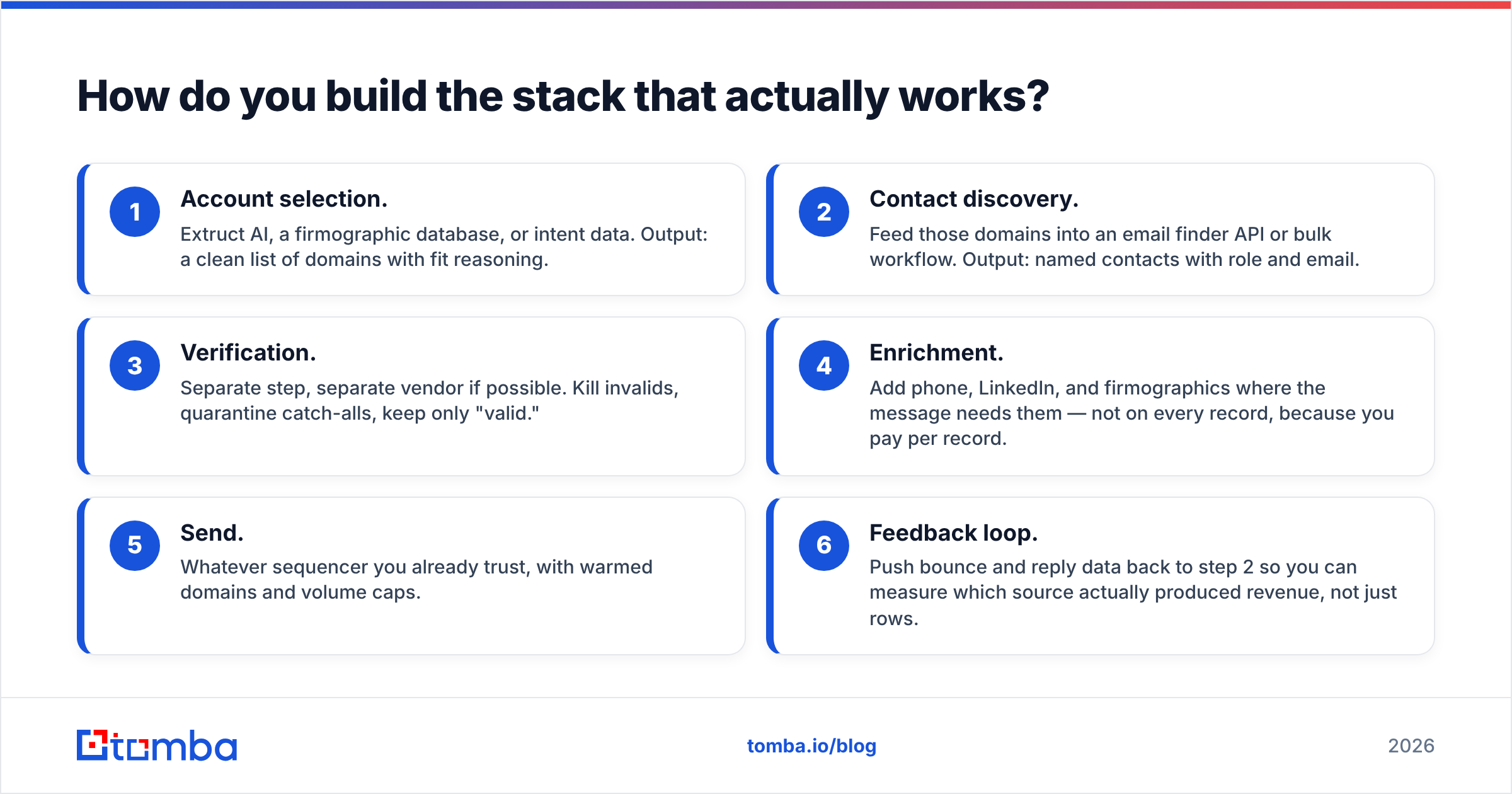
How do you build the stack that actually works?#
The pattern that holds up across most mid-market outbound teams in 2026:
- Account selection. Extruct AI, a firmographic database, or intent data. Output: a clean list of domains with fit reasoning.
- Contact discovery. Feed those domains into an email finder API or bulk workflow. Output: named contacts with role and email.
- Verification. Separate step, separate vendor if possible. Kill invalids, quarantine catch-alls, keep only "valid."
- Enrichment. Add phone, LinkedIn, and firmographics where the message needs them — not on every record, because you pay per record.
- Send. Whatever sequencer you already trust, with warmed domains and volume caps.
- Feedback loop. Push bounce and reply data back to step 2 so you can measure which source actually produced revenue, not just rows.
Step 3 is the one teams skip, and it's the one that determines whether steps 1, 2, and 4 were worth paying for. A perfectly researched account list emailed at a 12% bounce rate produces less pipeline than a mediocre list emailed at 1%.
If you want the domain-level view first, a company email search on your top 20 target accounts is a 10-minute test of whether the contact layer of your stack is good enough. If it returns three contacts per company where you expected fifteen, you've found your real gap — and it isn't the research tool.
The verdict#
Extruct AI wins on account research. FindThatLead wins on all-in-one convenience for small teams. Neither wins on contact accuracy at scale, because that's not the problem either was designed around.
If you're choosing between them today: buy Extruct when your list-building is a research problem, buy FindThatLead when your list-building is a speed problem, and in both cases assume you'll bolt a dedicated finder and verifier onto it within two quarters.
Want to test the contact layer before you commit budget? Run your ten hardest target domains through the Tomba Email Finder. The free tier gives you 25 searches a month with no card, Starter is $49/mo with no per-seat tax, and every result comes back with a confidence score and sources so you can see exactly why an address was returned. Compare the hit rate against whatever your current tool gives you on the same ten domains — that head-to-head takes fifteen minutes and settles the argument better than any comparison post, including this one.
Related guides#
Ready to find emails that actually work?
Join 150,000+ professionals who stopped guessing and started sending. Free credits on signup — no credit card required.
Get the Tomba newsletter
Practical outbound tactics and product updates — once every two weeks.
About the author