Fac Intelligence vs FindThatLead: Which Email Finder Wins in 2026?
Fac Intelligence and FindThatLead both promise verified B2B emails, but they solve different problems. Here's an honest breakdown of accuracy, pricing, API access, and which one actually belongs in your outbound stack in 2026.
Fac Intelligence vs FindThatLead comes down to one question: is your bottleneck data, or sending? Both tools promise verified B2B emails. Only one of them publishes its pricing. Here is the short answer first, then the evidence.
TL;DR
- FindThatLead is the more established and more open option. It bundles lead search with a cold-email sender, posts public pricing, and has a long track record with SMB sales teams.
- Fac Intelligence sells itself as an AI-led B2B intelligence layer, not a pure email finder. Public docs and pricing are thin, so treat any claim you can't test in a trial as unverified.
- Neither tool publishes an audited bounce rate. Run your own 200-contact bake-off before you sign an annual plan. Vendor accuracy numbers are marketing, not measurement.
- Need raw find-rate, a real API, and per-email verification? A dedicated finder like Tomba Email Finder usually wins on cost-per-valid-contact.
- Rule of thumb: buy the sender if your bottleneck is sending. Buy the finder if your bottleneck is data.
What are Fac Intelligence and FindThatLead?#
They sit in the same category, but they were built for different jobs.
FindThatLead launched in 2015 out of Barcelona. It became one of the widely used SMB prospecting tools in Europe. It does three things: search for leads by domain or role, verify the emails it returns, and send drip campaigns inside the same product. That last part matters. It is a finder and a sender, which is unusual. You can check its current feature set on the official FindThatLead site.
Fac Intelligence is the newer and less documented of the two. It sells company and contact intelligence — signal enrichment, firmographic scoring, contact discovery — rather than "type a domain, get emails." Public pricing pages, API docs, and third-party reviews are all thin next to FindThatLead. That gap is the single most important fact in this comparison. When a vendor hides pricing and coverage methodology, you are buying on a demo, not on evidence.
That asymmetry shapes everything below. One tool you can judge from the outside. The other you can only judge by taking a trial and testing it on your own list.
Fac Intelligence vs FindThatLead: how do they compare at a glance?#
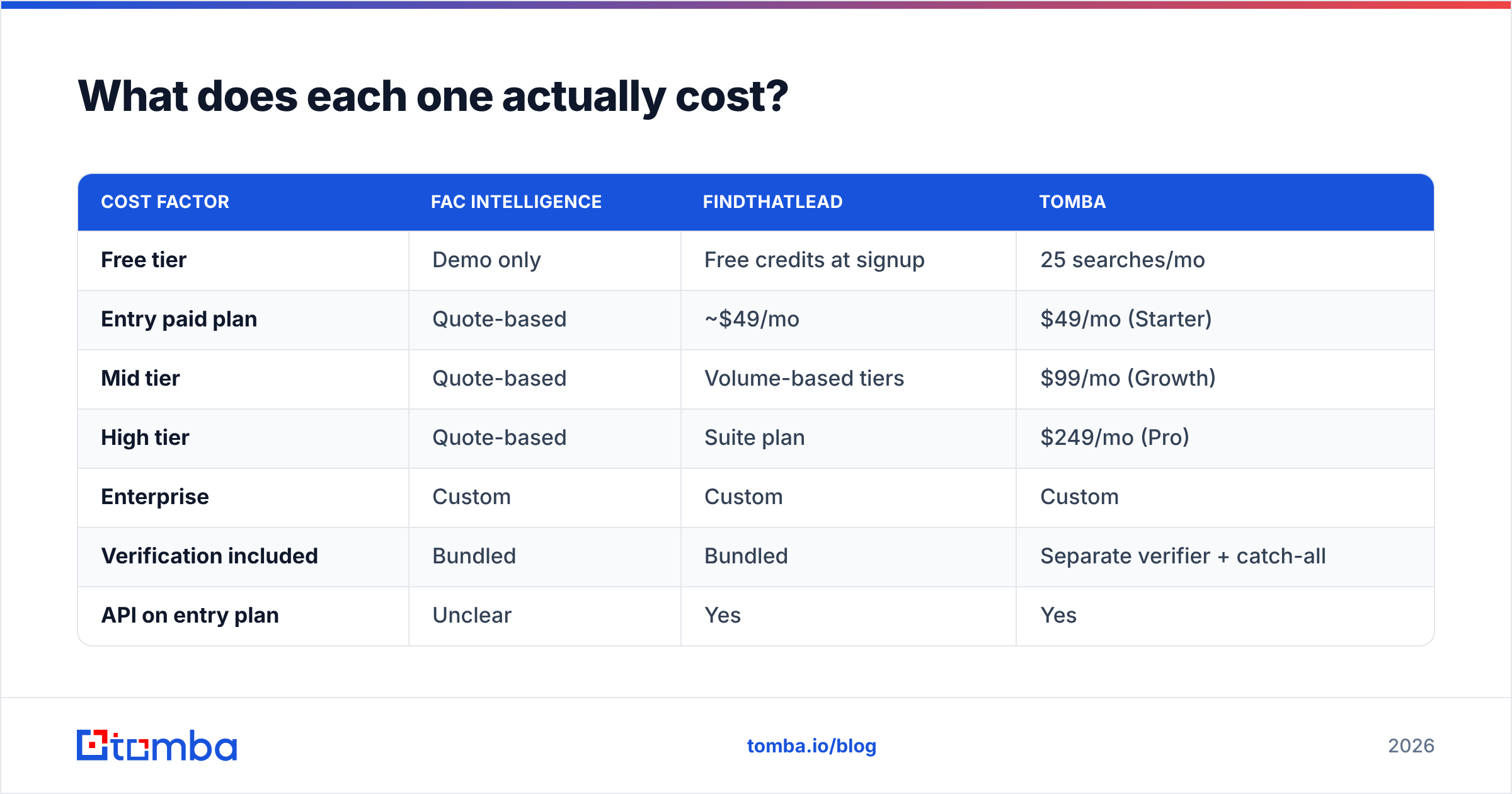
| Attribute | Fac Intelligence | FindThatLead |
|---|---|---|
| Primary job | B2B intelligence + contact discovery | Lead search + cold email sending |
| Pricing transparency | Limited / demo-led | Public tiers, self-serve |
| Typical entry price | Quote-based | ~$49/mo entry tier (check current page) |
| Free trial | Demo-gated | Free credits on signup |
| Bulk CSV enrichment | Yes | Yes |
| Built-in email sender | No | Yes (drip campaigns) |
| Chrome extension | Limited | Yes |
| Public API docs | Sparse | Yes |
| Email verification | Bundled, methodology unclear | Bundled verifier |
| Best for | Teams wanting scoring + signals | SMB teams wanting find + send in one tab |
Read the table as a shape, not a scoreboard. FindThatLead wins on transparency and self-serve access. Fac Intelligence argues that intelligence beats volume. That can be true, but you can't verify it from a pricing page.
Which one actually finds more valid emails?#
Nobody outside these vendors can tell you. Any blog post that gives you a precise percentage for both is making it up.
Here is what is knowable. Every email finder mixes four sources: crawled public web pages, patterns inferred from known company formats, licensed third-party data, and SMTP or MX-level checks. Find-rate gaps come down to how deep each well goes for your segment. A tool that shines on US SaaS may be weak on German manufacturing or LATAM agencies.

So run the test yourself. It takes an afternoon:
- Build a 200-row control list from your real ICP. Skip the clean list of famous tech companies. Include the messy mid-market accounts you actually sell to.
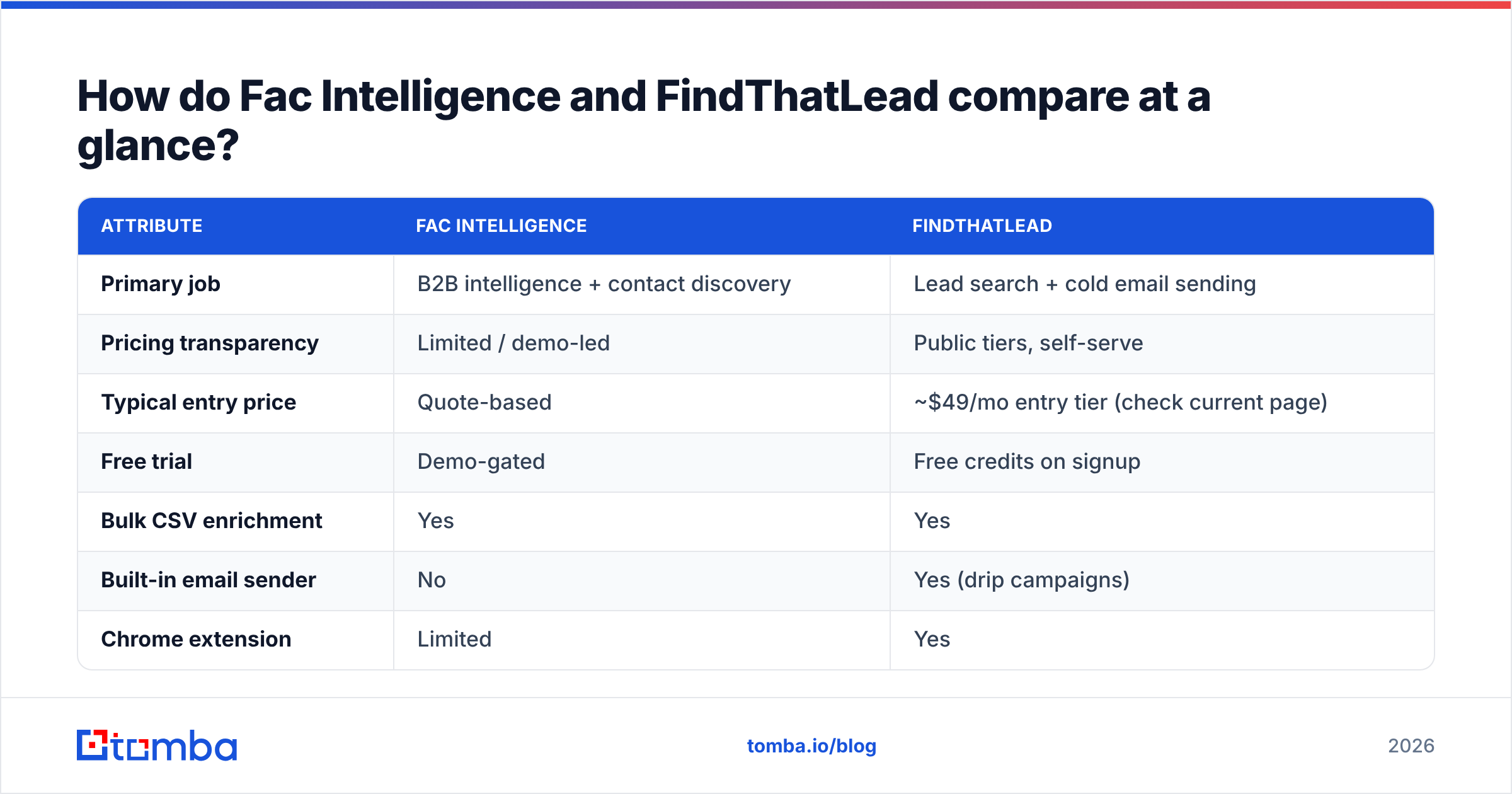
- Run the same list through both tools. Record find rate and confidence label separately. A tool that returns 90% coverage at low confidence is worse than one returning 60% at high confidence.
- Verify both outputs with a neutral third party. Don't let a vendor grade its own homework. Push both result sets through an independent email verifier and compare the valid, catch-all, and invalid splits.
- Send a small live batch from a warmed, throwaway-safe domain and record the real bounces. This is the only number that matters. SMTP "valid" and inbox "delivered" are not the same thing.
- Divide cost by valid contacts, not by credits. Cost-per-valid-contact is the only pricing metric that survives contact with reality.
Teams that skip step 5 find out in month four that their "cheap" tool cost $1.40 per usable address.

What does each one actually cost?#
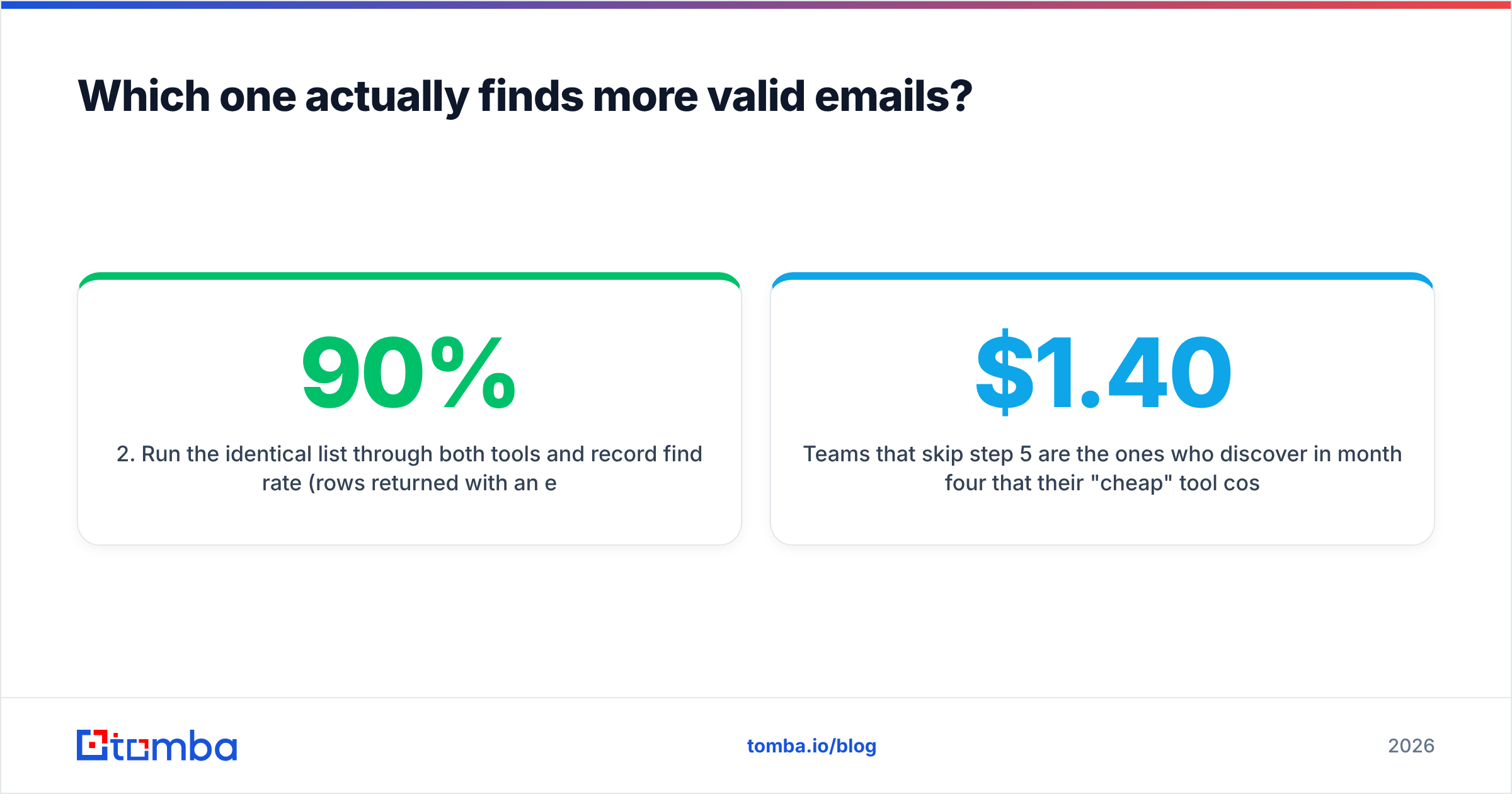
FindThatLead publishes tiered credit plans. The entry plan starts around $49/mo, and higher tiers add credits and seats. Vendors reprice often, so treat any figure in a blog post — including this one — as a starting point. Confirm it on the live pricing page before you buy.
Fac Intelligence is demo-led. That is not automatically bad, since enterprise data vendors often price on volume and use case. But it costs you three things in practice. You can't budget without a sales call. You can't compare cost-per-valid-contact during the trial. And your renewal leverage depends on how well you logged usage.
| Cost factor | Fac Intelligence | FindThatLead | Tomba |
|---|---|---|---|
| Free tier | Demo only | Free credits at signup | 25 searches/mo |
| Entry paid plan | Quote-based | ~$49/mo | $49/mo (Starter) |
| Mid tier | Quote-based | Volume-based tiers | $99/mo (Growth) |
| High tier | Quote-based | Suite plan | $249/mo (Pro) |
| Enterprise | Custom | Custom | Custom |
| Verification included | Bundled | Bundled | Separate verifier + catch-all |
| API on entry plan | Unclear | Yes | Yes |

The credit model is where most teams lose money. Ask both vendors the same four questions in writing:
- Do failed searches burn credits? Some tools charge for a lookup that returns nothing.
- Do credits roll over? Most don't, and seasonal outbound teams waste a lot of unused capacity.
- Is verification a separate credit? Bundled-sounding plans often meter find and verify apart.
- What is the overage rate? Overage often runs 2–3× the in-plan rate.
Is FindThatLead better because it also sends email?#
Only if sending is your bottleneck. For most teams in 2026, it isn't.
The all-in-one pitch is appealing when you're a two-person team: one login, one bill, one place to click. But bundling a sender into a data tool has a real cost. Sending is a specialist craft — domain rotation, per-inbox volume ramps, reply detection, spintax, bounce-triggered pausing, and the sender reputation monitoring that keeps your main domain alive. Dedicated sending platforms invest heavily there. Bundles usually ship a competent version, not a best-in-class one.
There is a structural risk too. If your data and your sending live with one vendor, a price change or a deliverability incident hits both halves of your pipeline at once. Split them, and you can swap either side without rebuilding the other.
The practical test is simple. If reps say "we don't have enough good contacts," buy data. If they say "our sequences are a mess and replies get lost," buy a sequencer. Buying the bundle to fix one of those means paying for the half you didn't need.
Where does each tool fit in a real outbound stack?#
Break your workflow into stages. Then ask which tool owns each one.
- Target account list — Built from firmographics, funding signals, tech stack, or hiring activity. This is where Fac Intelligence looks strongest on paper. Scoring and signals are what it sells.
- Contact discovery — Turning an account into named humans with titles. Both tools do this. FindThatLead's domain search equivalent and Chrome extension make one-off prospecting fast.
- Email finding — Getting the actual address. This is the commodity layer, and it is where find-rate gaps show up hardest. A specialist finder tends to win here.
- Verification — Splitting valid from catch-all from invalid. Catch-all domains are the silent killer. They accept everything at the SMTP layer, so a naive verifier marks them "valid" and your bounce rate learns the truth later. A dedicated catch-all verifier is worth the extra step.
- Enrichment — Adding phone numbers, LinkedIn URLs, seniority, and company data for personalization and routing.
- Sending and sequencing — Where FindThatLead's bundle earns its keep for small teams.
Map both tools against those six stages for your own team. If a tool truly owns only two of them, price it like a two-stage tool.
How do they compare to Tomba?#
Disclosure: this is the Tomba blog, so weigh what follows accordingly. Go verify it in a free tier rather than taking our word.
Tomba is not an all-in-one, on purpose. It is a data layer: email finder, verifier, domain search, catch-all detection, phone finder, and data enrichment. All of it runs through the same Tomba API, CLI, Sheets add-on, and Chrome extension. There is no sequencer, because you probably already have one you like.
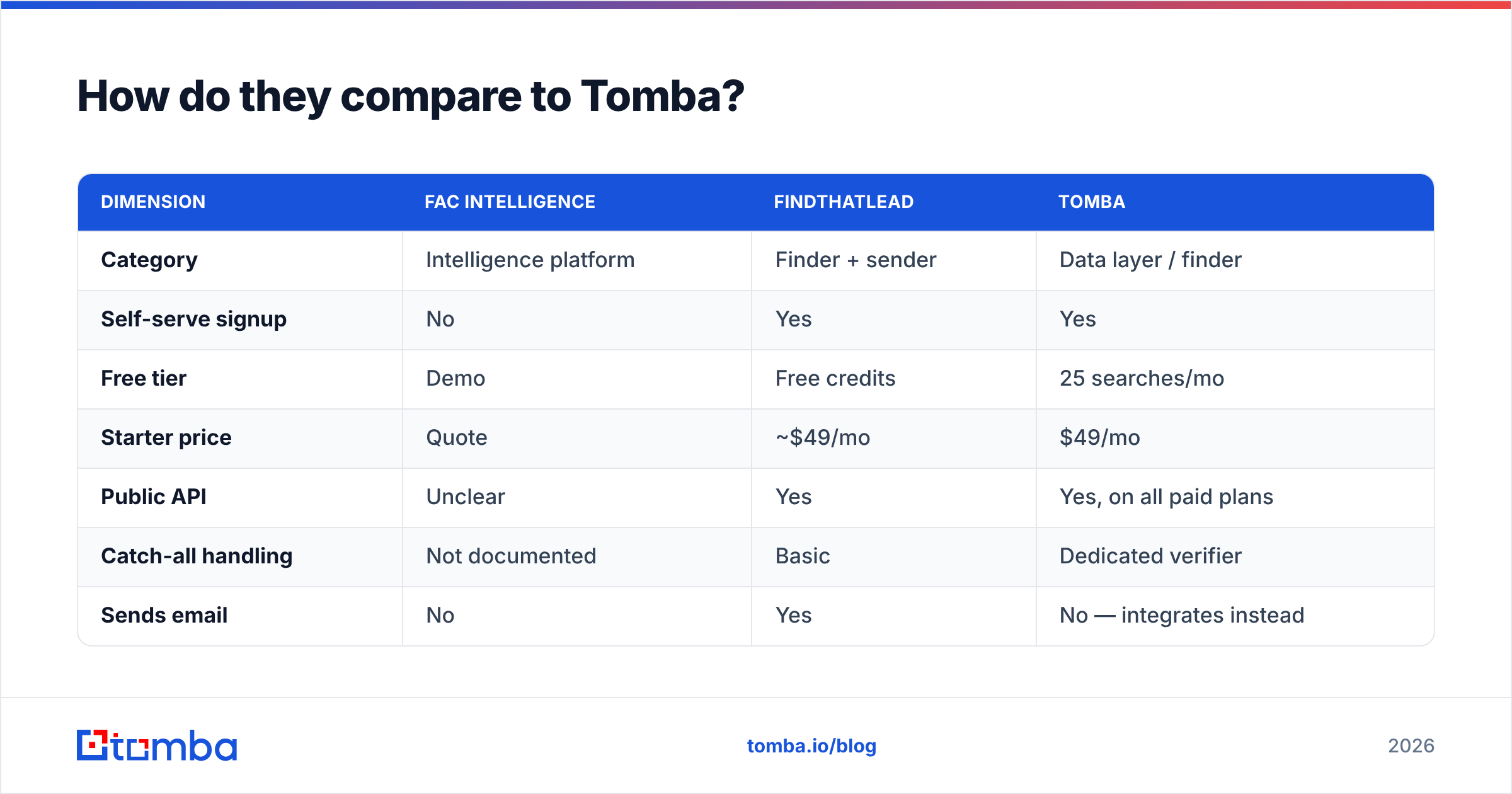
| Dimension | Fac Intelligence | FindThatLead | Tomba |
|---|---|---|---|
| Category | Intelligence platform | Finder + sender | Data layer / finder |
| Self-serve signup | No | Yes | Yes |
| Free tier | Demo | Free credits | 25 searches/mo |
| Starter price | Quote | ~$49/mo | $49/mo |
| Public API | Unclear | Yes | Yes, on all paid plans |
| Catch-all handling | Not documented | Basic | Dedicated verifier |
| Sends email | No | Yes | No — integrates instead |
| Sheets / Excel / Airtable | Limited | Partial | Yes |
| Data sourcing disclosure | Limited | Partial | Published |
Here is the honest trade-off. Want one tab that does everything? FindThatLead fits better, and Tomba is not competing for that job. Want the cleanest data feeding a sequencer you already pay for? A specialist finder wins on cost-per-valid-contact. And if account-scoring signals are what your GTM motion lacks, neither of the other two replaces that. You would pair Fac Intelligence with a finder rather than choose between them.

What should you check before signing either contract?#
Six things, ordered by how much money they save you:
- Test on your ICP, not a demo list. Vendor demos run on the segments where the vendor is strong. Your list is the only fair benchmark.
- Ask for coverage numbers by region, in writing. "Global coverage" means nothing. Request find-rate by country and company-size band for your top three segments.
- Read the data-sourcing disclosure. The source shapes both accuracy and your compliance risk. A vendor that won't answer in writing has answered.
- Confirm GDPR and CCPA terms in the contract, not on the marketing page. This matters most for EU contacts.
- Check export rights. Some tools block raw exports on lower tiers, which quietly locks your data inside their UI.
- Negotiate the exit. Month-to-month at a higher rate often beats an annual deal on a tool you haven't stress-tested. You can switch to annual once you have measured a real cost-per-valid-contact.
Third-party review sites like G2 help you spot recurring complaints: billing surprises, slow support, sudden coverage drops. Ignore the aggregate star rating. Read the two-star reviews from companies that look like yours.
New to how these tools resolve addresses? The basics of email address structure explain why pattern inference works at all — and why it breaks on companies with odd formats.
Which one should you pick?#
Pick by bottleneck, not by feature count.
- A 1–5 person team that needs to find and send from one tool this week: FindThatLead. The bundle is the point, pricing is clear, and free credits start today.
- Your problem is knowing which accounts to work, not how to reach them: evaluate Fac Intelligence. Insist on a paid pilot with documented find rates before any annual deal, given the thin public information.
- You already run Instantly, Smartlead, Outreach, or HubSpot sequences: neither bundle fits well. Use a specialist finder with an API and pipe verified contacts into your existing stack.
- You enrich thousands of rows a month: cost-per-valid-contact decides it. Run the 200-row bake-off, then let the spreadsheet pick.
- You are in a regulated space: the vendor with the clearest written sourcing and compliance answer wins, whatever its find rate.
Whatever you pick, verify before you send. The highest-ROI change most outbound teams make is not switching finders. It is adding a verification step between "found" and "sent." Bounce rates above 3% start hurting domain reputation, and that damage costs more to repair than any tool subscription saves.
Ready to test the data layer on its own? Start with the Tomba Email Finder free tier — 25 searches a month, no card, no demo call. Run the same 200 contacts you are using for your Fac Intelligence vs FindThatLead bake-off. Verify all three outputs with the same neutral checker, then compare cost per valid contact. If Tomba doesn't win on your list, you will have learned more than any comparison post can tell you. Full Tomba pricing starts at $49/mo when you are ready to scale.
Related guides#
Ready to find emails that actually work?
Join 150,000+ professionals who stopped guessing and started sending. Free credits on signup — no credit card required.
Get the Tomba newsletter
Practical outbound tactics and product updates — once every two weeks.
About the author