Fac Intelligence vs Findymail: Which Email Finder Wins in 2026?
Fac Intelligence and Findymail both promise verified B2B emails, but they win on different jobs. Here's an honest breakdown of match rates, bounce risk, pricing, API access, and which one actually fits your outbound motion.
TL;DR — Fac Intelligence vs Findymail, compared in five lines:
- Findymail is the more mature product. It is built for LinkedIn workflows, verifies every lookup, and posts credit-based pricing from about $49/mo.
- Fac Intelligence is a broader B2B data layer: company data plus contact discovery, not a pure email finder. Pricing and coverage are barely documented in public, so budget time for a demo call.
- Export lists from LinkedIn Sales Navigator? Findymail is the safer default. Need company data attached to each contact? An intelligence platform fits better.
- Neither tool covers domain-level discovery, catch-all handling, and a raw API on one plan. That job goes to a finder-plus-verifier stack.
- Either way: verify before you send. A 95% match rate is not a 95% delivery rate. That gap is where your domain reputation dies.
What are Fac Intelligence and Findymail?#
They solve overlapping problems from different directions.
Findymail is a contact-data tool with one core promise: emails that don't bounce. It leans on LinkedIn and Sales Navigator. You drop in a list, a profile URL, or a CSV. It returns work emails that already passed its own checks. The pitch is narrow on purpose — fewer features, more confidence per row, and a bounce guarantee on paid plans.
Fac Intelligence sits in the B2B data-intelligence camp. The framing is not "give me this person's email." It is "tell me about this company and the people in it." You get firmographics, signals, and contact discovery in one bundle. That is a different buying decision, and it comes with a slower sales motion: less self-serve signup, more scoping calls.
The practical difference is simple. Findymail is a tool you hand to an SDR on Monday morning. An intelligence platform is a system you set up once and pipe into a CRM.
One caveat before we go further. Fac Intelligence publishes far less public detail than Findymail does. Where numbers below are vendor-stated or unverified, treat them as a starting point for your own trial. Any post that quotes decimal-point accuracy for a tool with no public benchmark is making it up.
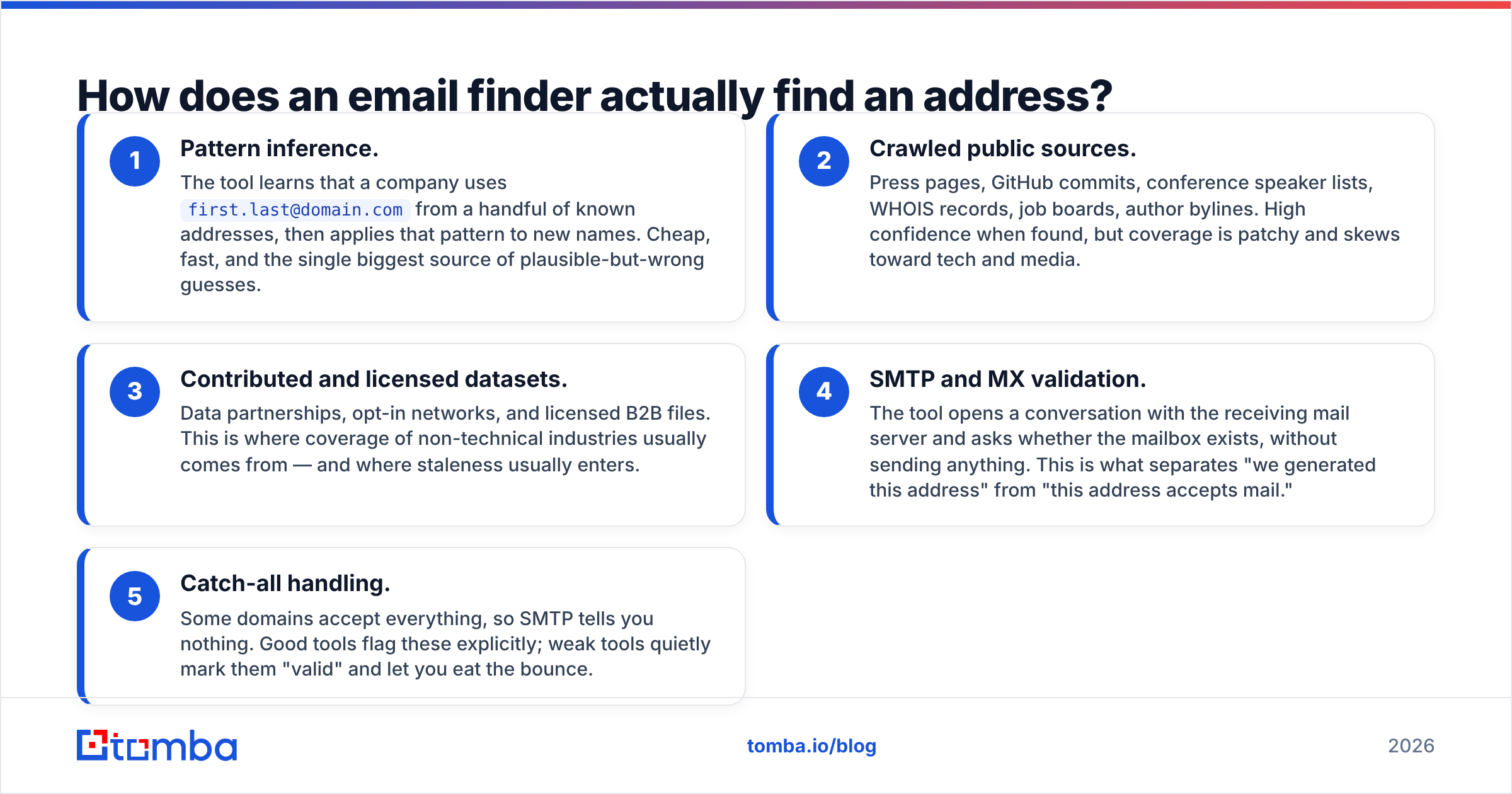
How does an email finder actually find an address?#
The mechanism explains most of the price and quality gaps between vendors. Every finder mixes these five methods:
- Pattern inference. The tool spots that a company uses
first.last@domain.com, then applies that pattern to new names. Cheap, fast, and the biggest source of wrong guesses. - Crawled public sources. Press pages, GitHub commits, speaker lists, WHOIS records, job boards, bylines. Confidence is high on a hit, but coverage skews to tech and media.
- Licensed and contributed data. Data partnerships and opt-in networks. This is where coverage of other industries comes from — and where stale rows creep in.
- SMTP and MX validation. The tool asks the mail server whether the mailbox exists, without sending anything. It separates a generated address from one that accepts mail.
- Catch-all handling. Some domains accept everything, so SMTP tells you nothing. Good tools flag them. Weak tools mark them valid and let you eat the bounce.
Findymail is unusually clear about step 4. Verification is not an upsell; it runs on every lookup. That is why its match rate looks lower on paper and better in your inbox. Intelligence platforms are strongest at steps 2 and 3 and weakest at step 5. That is why enriched records so often need a second pass through a dedicated email verifier before they hit a sequence.

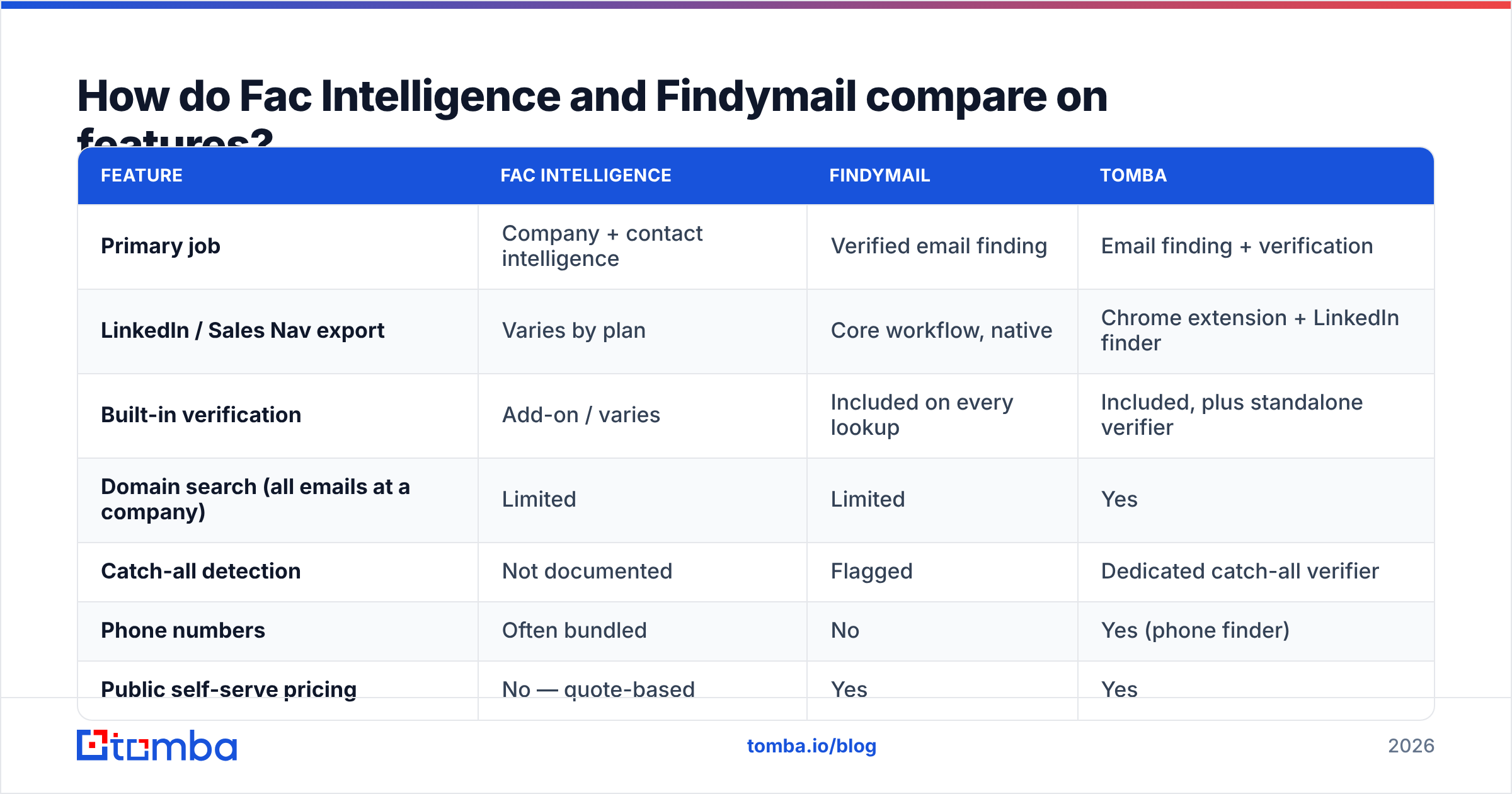
Fac Intelligence vs Findymail: how do the features compare?#
| Feature | Fac Intelligence | Findymail | Tomba |
|---|---|---|---|
| Primary job | Company + contact intelligence | Verified email finding | Email finding + verification |
| LinkedIn / Sales Nav export | Varies by plan | Core workflow, native | Chrome extension + LinkedIn finder |
| Built-in verification | Add-on / varies | Included on every lookup | Included, plus standalone verifier |
| Domain search (all emails at a company) | Limited | Limited | Yes |
| Catch-all detection | Not documented | Flagged | Dedicated catch-all verifier |
| Phone numbers | Often bundled | No | Yes (phone finder) |
| Public self-serve pricing | No — quote-based | Yes | Yes |
| Free tier | Demo / trial on request | Limited trial credits | 25 searches/mo, no card |
| API access | Enterprise-oriented | Yes, on paid plans | Yes, all paid plans |
| Bulk CSV processing | Yes | Yes | Yes |
The pattern repeats across the category. Intelligence platforms trade transparency for breadth. Focused finders trade breadth for confidence. Hybrid tools try to hold both at a lower price.
Which one is more accurate?#
Accuracy is the wrong single number. Three metrics get collapsed into that one word, and vendors quote whichever one flatters them:
- Match rate — how many of your input rows returned any email. Easy to inflate: guess a pattern for everyone and you clear 90%.
- Deliverability rate — of the emails returned, how many actually accept mail. This is the number that protects your domain.
- Bounce rate in production — what your sending platform reports a week later. It is the only figure that has ever mattered.
Findymail is built on the second and third metrics. It returns fewer rows than the volume players and backs them with a bounce guarantee. If you have ever burned a sending domain on a high-match-rate list, that trade is worth real money.
Fac Intelligence, like most intelligence-first platforms, optimizes for complete records: company size, industry, tech stack, headcount signals. The email is one field among many. That is more useful for account scoring and territory planning. It is also riskier as a send list unless you add a verification step.

The practical rule: never send to a row that was not validated in the last 30 days. B2B contact data decays by roughly 25–30% a year, per widely cited G2 and analyst estimates. It decays faster in high-turnover roles like sales and marketing. A record that was correct in January is a coin flip by autumn.
Selling into catch-all-heavy verticals — enterprise finance, government, older manufacturing? Check how each tool labels those domains. A catch-all verifier that returns a graded risk score beats a binary valid/invalid flag that is quietly guessing.
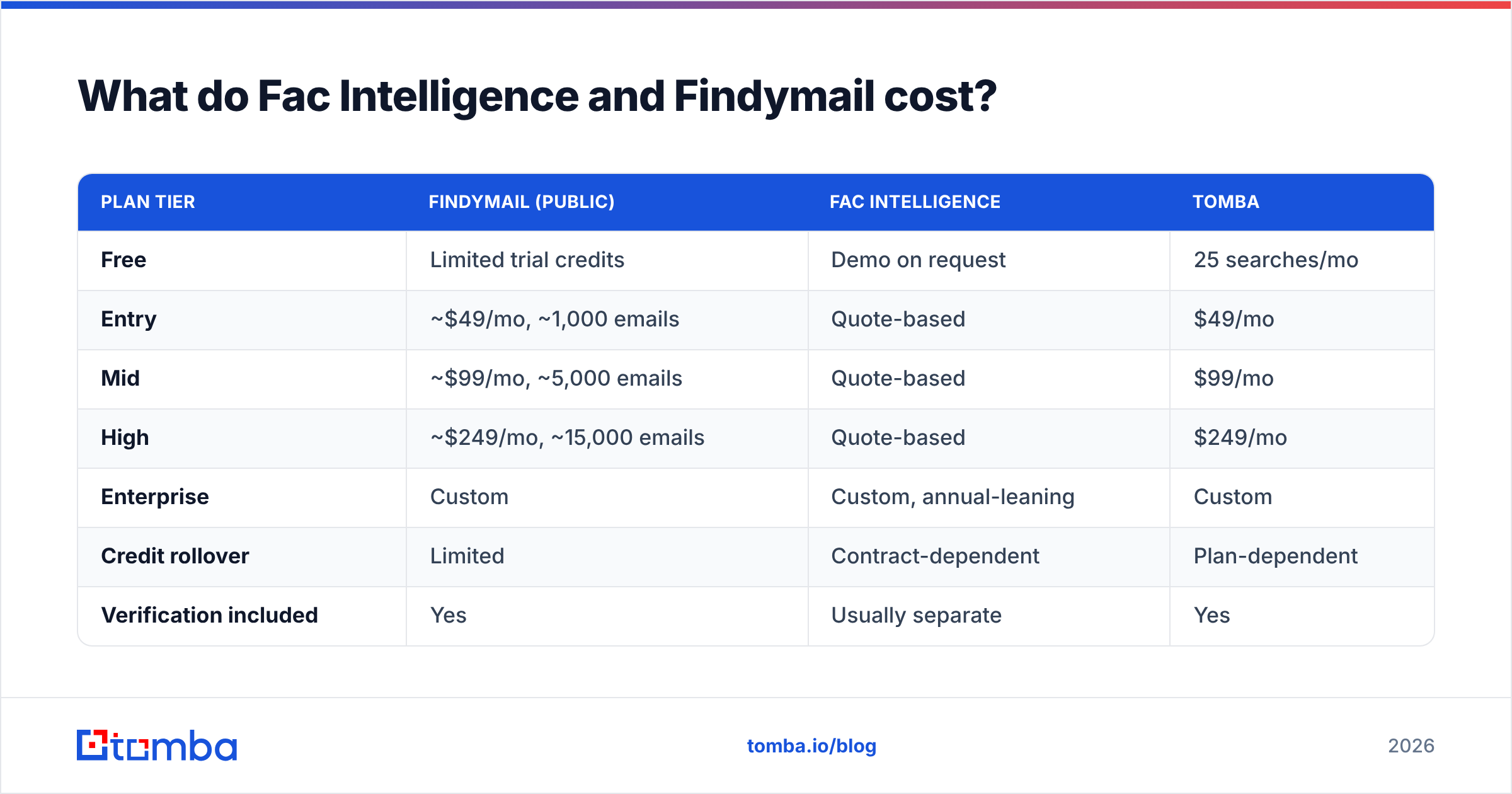
Fac Intelligence vs Findymail: what does each one cost?#
| Plan tier | Findymail (public) | Fac Intelligence | Tomba |
|---|---|---|---|
| Free | Limited trial credits | Demo on request | 25 searches/mo |
| Entry | ~$49/mo, ~1,000 emails | Quote-based | $49/mo |
| Mid | ~$99/mo, ~5,000 emails | Quote-based | $99/mo |
| High | ~$249/mo, ~15,000 emails | Quote-based | $249/mo |
| Enterprise | Custom | Custom, annual-leaning | Custom |
| Credit rollover | Limited | Contract-dependent | Plan-dependent |
| Verification included | Yes | Usually separate | Yes |
Findymail's published tiers are current as of writing. Check the site before you budget, because credit allocations shift. Fac Intelligence does not post comparable pricing. That is useful information in itself: quote-based vendors usually land above self-serve tools at the same volume, and they often ask for an annual commitment.
The number that matters is cost per usable email, not cost per credit. Run this math on your trial:
- Total spend ÷ rows returned = cost per row.
- Total spend ÷ rows that survived verification = cost per usable row.
- Cost per usable row × your bounce tolerance = the real budget line.
A $99 plan that returns 5,000 rows at 70% deliverability costs more per usable contact than a $99 plan that returns 3,500 rows at 96%. Vendors quote the first number. Your sending domain feels the second. For a self-serve benchmark, Tomba pricing is published in full, with no call required.

Which is better for LinkedIn-heavy prospecting?#
Findymail, clearly. It is not close.
Say your motion is: build a Sales Navigator search, export the list, find emails, sequence. Findymail was designed around that loop. Export handling is native, not bolted on, and the rows come back verified, so you can go straight into your sending tool.
An intelligence platform handles that loop awkwardly, because it is not the intended entry point. There you go company-first: define an ICP, pull matching accounts, then find contacts inside them. That suits ABM and territory planning. It does not suit an SDR working a list today.
If LinkedIn is your main source and you want to keep your options open, a dedicated LinkedIn finder plus a browser extension covers the same job without locking you into either ecosystem.
What about API access and workflow integration?#
Three questions decide this. Ask all three on the demo call:
- Is the API on my plan, or gated to enterprise? Plenty of vendors advertise "API available," then quote a five-figure annual minimum for the key.
- What is the rate limit, per second and per month? A big monthly credit pool behind a one-request-per-second cap is not a bulk pipeline.
- Does verification run through the API, or only in the UI? This one catches teams constantly. The web app cleans your data; the endpoint does not.
Findymail exposes an API on paid plans, with decent docs. Fac Intelligence leans enterprise, so API access likely sits inside a contract tier. That is fine if you buy at that level. It is expensive if you just want to enrich 500 rows a week from a script.
Building automation instead of clicking through a UI? Check for native connectors before you write glue code. A Tomba API key ships on every paid plan. The same credits work across the web app, the bulk email finder, and integrations like HubSpot and Zapier. That matters when RevOps has to keep CRM data fresh without a separate enrichment budget.
Who should pick which?#
Pick Findymail if:
- LinkedIn and Sales Navigator are your primary prospecting surface.
- You have been burned by bounces and want verification you never think about.
- You want self-serve pricing and no procurement cycle.
- Your team is 1–10 reps sending high-intent, moderate-volume sequences.
Pick Fac Intelligence if:
- You need account-level context, not just an email field.
- You run ABM or territory planning, where company data drives the motion.
- You have a data or RevOps function that can integrate and maintain a platform.
- An annual contract and a demo call are acceptable costs of doing business.
Consider a third option if:
- You need domain search — every reachable contact at a target company, not one profile at a time.
- You want finding, verification, catch-all handling, phone numbers, and an API on one plan instead of stitching two vendors together.
- You are price-sensitive at the entry tier and want a real free allowance to test with.
- You need prebuilt, pre-verified lists rather than lookups. A list-first provider like BookYourData is a strong fit there, and worth pricing alongside the finders here.

How should you run the trial?#
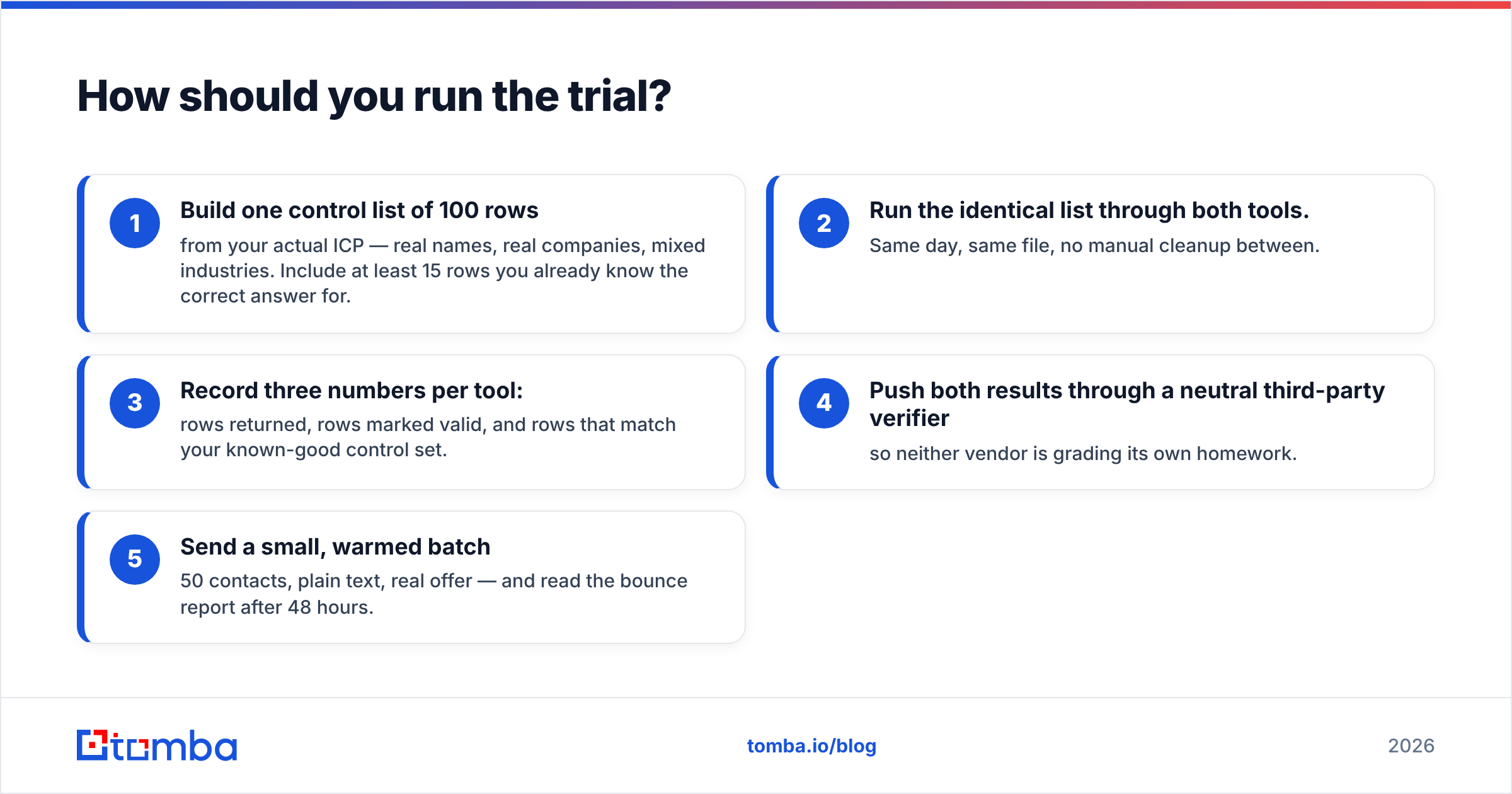
Don't compare marketing pages. Compare outputs on your own data.
- Build one control list of 100 rows from your real ICP — real names, real companies, mixed industries. Include at least 15 rows whose correct answer you already know.
- Run the identical list through both tools. Same day, same file, no manual cleanup between.
- Record three numbers per tool: rows returned, rows marked valid, and rows that match your known-good set.
- Push both results through a neutral third-party verifier, so neither vendor grades its own homework.
- Send a small, warmed batch — 50 contacts, plain text, real offer — and read the bounce report after 48 hours.
That test costs a couple of hours and one afternoon of credits. It will tell you more than every comparison article on the internet, including this one. Step 4 surprises most teams: the gap between "marked valid by the vendor" and "confirmed valid independently" is usually 5–15 points, and it is wider on catch-all-heavy domains.
Where does Tomba fit in the Fac Intelligence vs Findymail comparison?#
Honestly: Tomba overlaps more with Findymail than with Fac Intelligence. It competes on breadth per dollar, not on any single feature.
The difference from Findymail is scope. Domain search, catch-all verification, phone lookup, reverse email lookup, and enrichment all draw from one credit pool, instead of needing separate subscriptions. The difference from an intelligence platform is transparency. Pricing is published, the free tier is real, and the API ships on every paid plan rather than hiding behind a sales call.
Where Findymail still wins: if LinkedIn export is your whole workflow, it is excellent at that one job. Where an intelligence platform still wins: deep firmographic context for account scoring is not what an email finder is built for, and pretending otherwise would be dishonest.
Start with the free tier and run the 100-row test above. The Tomba Email Finder gives you 25 searches a month with no card, and verification on every result. It is $49/mo when you are ready to scale — enough to benchmark it head-to-head before you sign anything annual.
Related guides#
Ready to find emails that actually work?
Join 150,000+ professionals who stopped guessing and started sending. Free credits on signup — no credit card required.
Get the Tomba newsletter
Practical outbound tactics and product updates — once every two weeks.
About the author