FinalScout Pricing in 2026: Real Costs, Limits, and Value
FinalScout charges by verified email credits and gates its best features behind higher tiers. Here is what every plan actually costs, where the hidden limits bite, and when a cheaper email finder wins.
TL;DR
- FinalScout sells LinkedIn-sourced email discovery with AI-written outreach attached, priced by monthly email credits rather than by seats.
- Entry pricing starts in the low-$30s/month on annual billing, but the plan most teams actually need lands closer to $100-$200/month once you need volume, exports, and team access.
- The real cost driver is not the sticker price — it's credit burn on profiles that return nothing usable, and credits that reset instead of rolling over.
- If your workflow is domain-first or API-first rather than LinkedIn-profile-first, a dedicated email finder like Tomba ($49/mo Starter, $99/mo Growth) covers the same job at a lower cost per verified contact.
- Buy FinalScout if LinkedIn is your only prospecting surface and you want copy generation bundled. Skip it if you need bulk domain search, catch-all handling, or programmatic access.
What is FinalScout and who is it priced for?#
FinalScout is a Chrome-extension-first prospecting tool that pulls contact data from LinkedIn profiles, Sales Navigator lists, and Recruiter searches, then layers an AI email writer on top. You browse a profile or a search result page, click the extension, and it returns an email address plus an optional AI-generated first-touch message.
That product shape dictates the pricing shape. FinalScout charges per email credit — one credit per revealed email address — and stacks feature gates (bulk export, team seats, integrations, API-ish access) on top of credit tiers. It does not charge per seat the way Outreach or Salesloft do, and it does not sell you a static database dump the way ZoomInfo does.
The buyer it's priced for is a solo founder, recruiter, or small SDR team that lives inside LinkedIn all day. If that's you, the pricing math is reasonable. If you're enriching a CRM export, running domain-wide sweeps, or calling an API from a data pipeline, you're paying for a UI layer you won't use.

How much does FinalScout actually cost per month?#
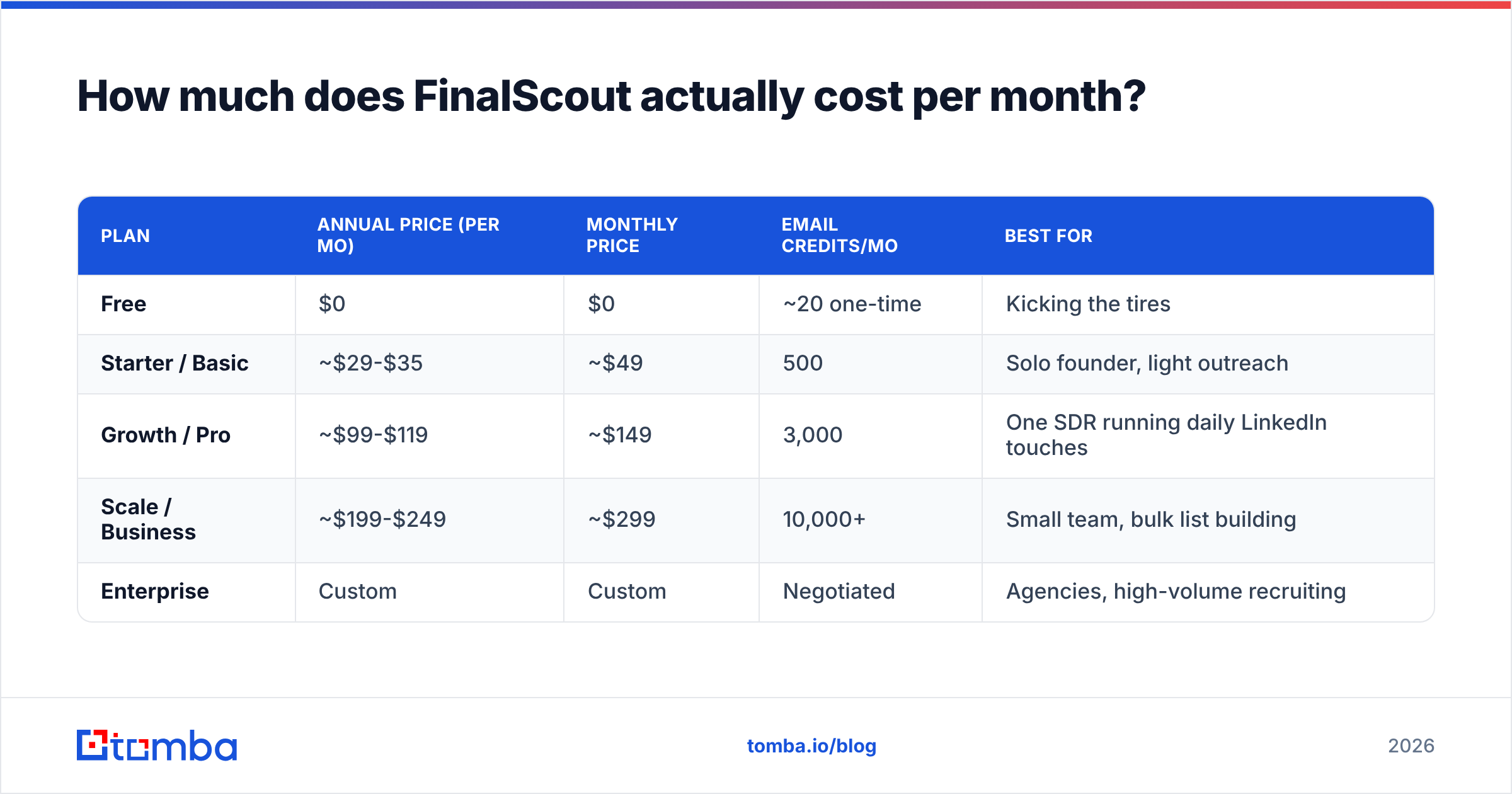
FinalScout publishes four public tiers plus a free trial allocation. Prices below reflect the published annual-billing rates on finalscout.com as of early 2026; monthly billing runs roughly 30-40% higher on every tier, which is a bigger annual-vs-monthly spread than most tools in this category.
| Plan | Annual price (per mo) | Monthly price | Email credits/mo | Best for |
|---|---|---|---|---|
| Free | $0 | $0 | ~20 one-time | Kicking the tires |
| Starter / Basic | ~$29-$35 | ~$49 | 500 | Solo founder, light outreach |
| Growth / Pro | ~$99-$119 | ~$149 | 3,000 | One SDR running daily LinkedIn touches |
| Scale / Business | ~$199-$249 | ~$299 | 10,000+ | Small team, bulk list building |
| Enterprise | Custom | Custom | Negotiated | Agencies, high-volume recruiting |
Two things to check before you sign, because vendors in this category change tiers quietly:
- Credit definition. Confirm in writing whether a credit is consumed on a returned email or on an attempted lookup. The difference is 20-40% of your effective spend.
- Rollover policy. FinalScout's credits reset monthly on standard plans. If your outbound is lumpy — heavy in Q1, quiet in August — you're paying for capacity you burn or lose.
- Annual lock-in. The headline price everyone quotes is the annual rate. Paying monthly to stay flexible costs meaningfully more.
- Seat model. Team access typically appears only at the higher tiers. Two people on a $99 plan is often not permitted, which quietly doubles your real cost.

Wait — that image path is wrong. Correct embed:
What do you actually get at each FinalScout tier?#
Credit counts are the headline, but feature gating is where the pricing decision gets made. Here's how the capability ladder typically works:
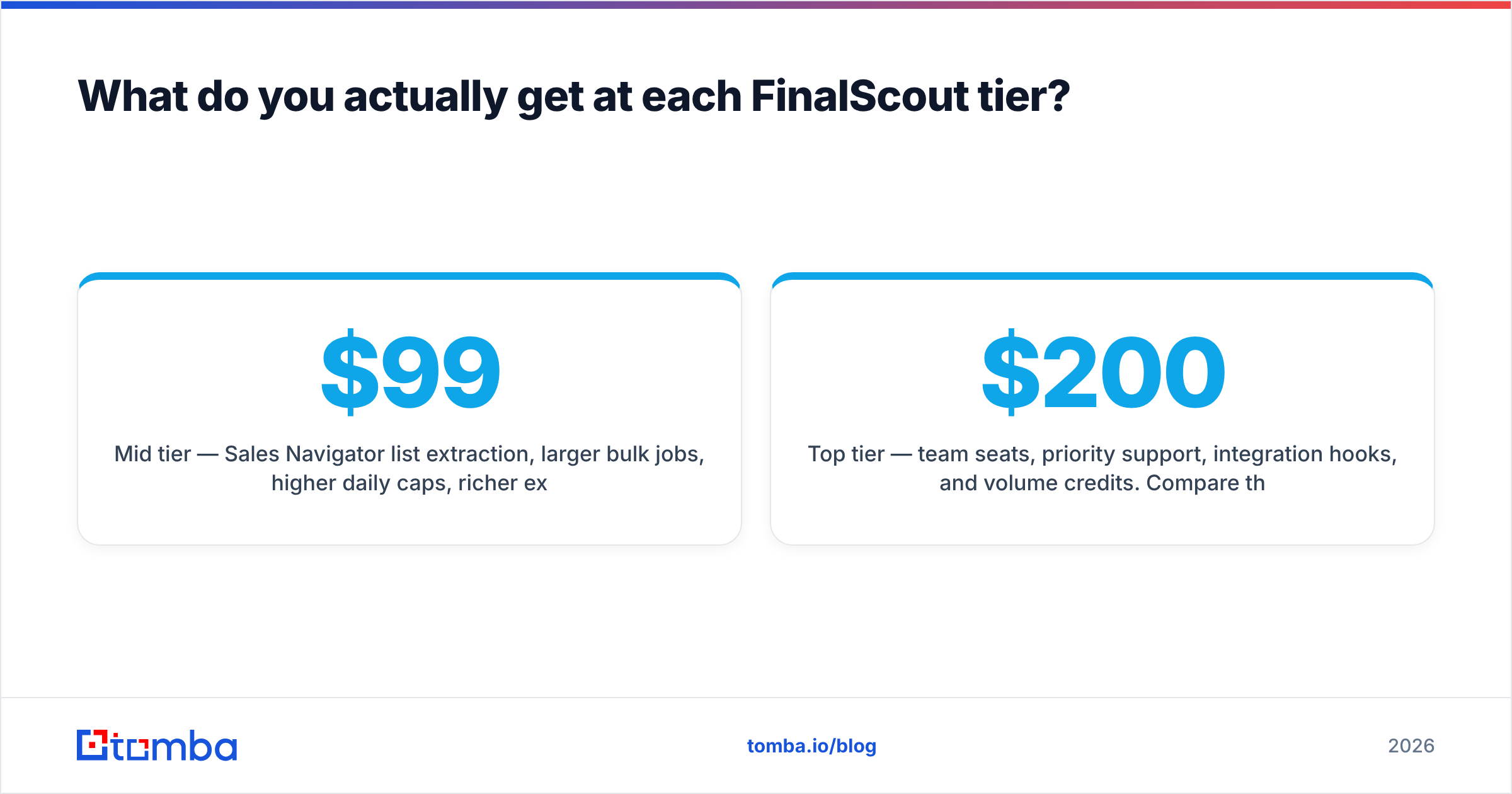
- Free tier — extension access, a handful of lookups, no bulk export. Enough to validate that FinalScout finds emails for your ICP, which is the only test that matters. Run 20 known contacts through it and count the hits.
- Entry tier — single user, individual profile lookups, AI email generation, CSV export usually capped. Fine for under ~25 prospects a day.
- Mid tier — Sales Navigator list extraction, larger bulk jobs, higher daily caps, richer export fields. This is where most buyers actually land, and it's why the honest budget number is $99-$149/mo, not $29.
- Top tier — team seats, priority support, integration hooks, and volume credits. Compare this against a dedicated data vendor before committing; at $200+/mo you're in range of tools with far broader coverage.
The AI writer is bundled at every paid tier, which is genuinely convenient — but it's also the feature most likely to be duplicated by something you already pay for. If you're running ChatGPT, Claude, or your sequencer's native AI, you're paying twice. A free cold email AI or subject line generator covers the same ground without a credit cost attached.
Is FinalScout expensive compared to other email finders?#
On raw cost per email, FinalScout sits mid-pack. On cost per usable, verified, deliverable email, the answer depends entirely on whether your prospects live on LinkedIn.
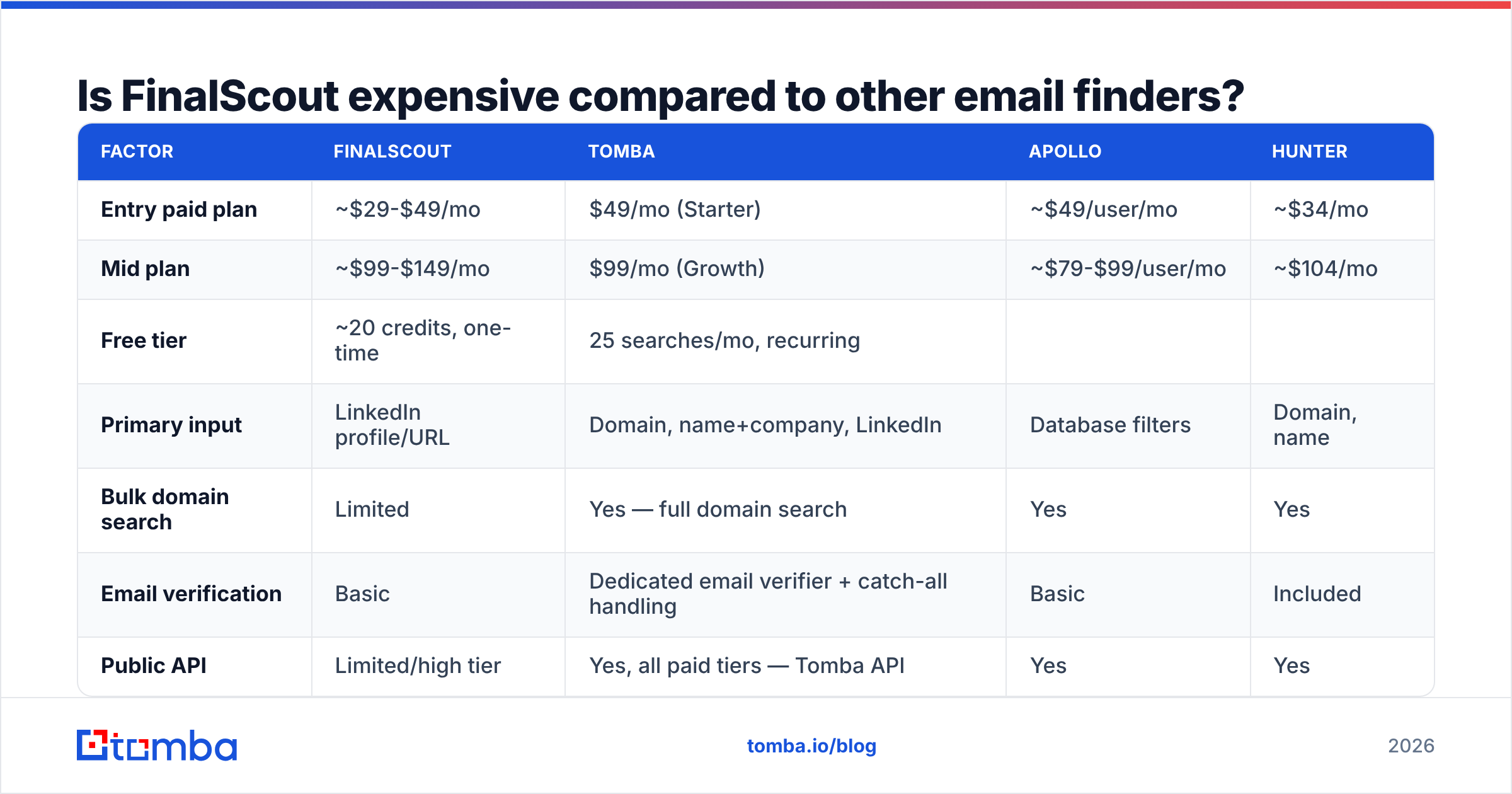
Here's how the economics compare against three common alternatives at a similar volume band (roughly 3,000 lookups/month):
| Factor | FinalScout | Tomba | Apollo | Hunter |
|---|---|---|---|---|
| Entry paid plan | ~$29-$49/mo | $49/mo (Starter) | ~$49/user/mo | ~$34/mo |
| Mid plan | ~$99-$149/mo | $99/mo (Growth) | ~$79-$99/user/mo | ~$104/mo |
| Free tier | ~20 credits, one-time | 25 searches/mo, recurring | ||
| Limited monthly credits | 25-50/mo | |||
| Primary input | LinkedIn profile/URL | Domain, name+company, LinkedIn | Database filters | Domain, name |
| --- | --- | --- | --- | --- |
| Bulk domain search | Limited | Yes — full domain search | Yes | Yes |
| Email verification | Basic | Dedicated email verifier + catch-all handling | Basic | Included |
| Public API | Limited/high tier | Yes, all paid tiers — Tomba API | Yes | Yes |
| Pricing model | Per credit, seat-gated | Per search, no per-seat tax | Per user per month | Per credit |
| Credit rollover | No (standard plans) | Plan-dependent | No | No |
The pattern: FinalScout's per-credit price is competitive, but its inputs are narrow. If you can only feed it LinkedIn URLs, every prospect who isn't active on LinkedIn is invisible to you — and in a lot of industries (manufacturing, local services, EU mid-market, healthcare admin) that's most of your list.

The per-seat line matters more than most buyers notice at signing. Apollo bills per user, so a three-person team at the mid tier is $237-$297/month before credits. FinalScout gates seats behind higher tiers instead, and Tomba pricing charges by search volume rather than headcount — so adding a second SDR doesn't change the invoice.
What are the hidden costs in FinalScout pricing?#
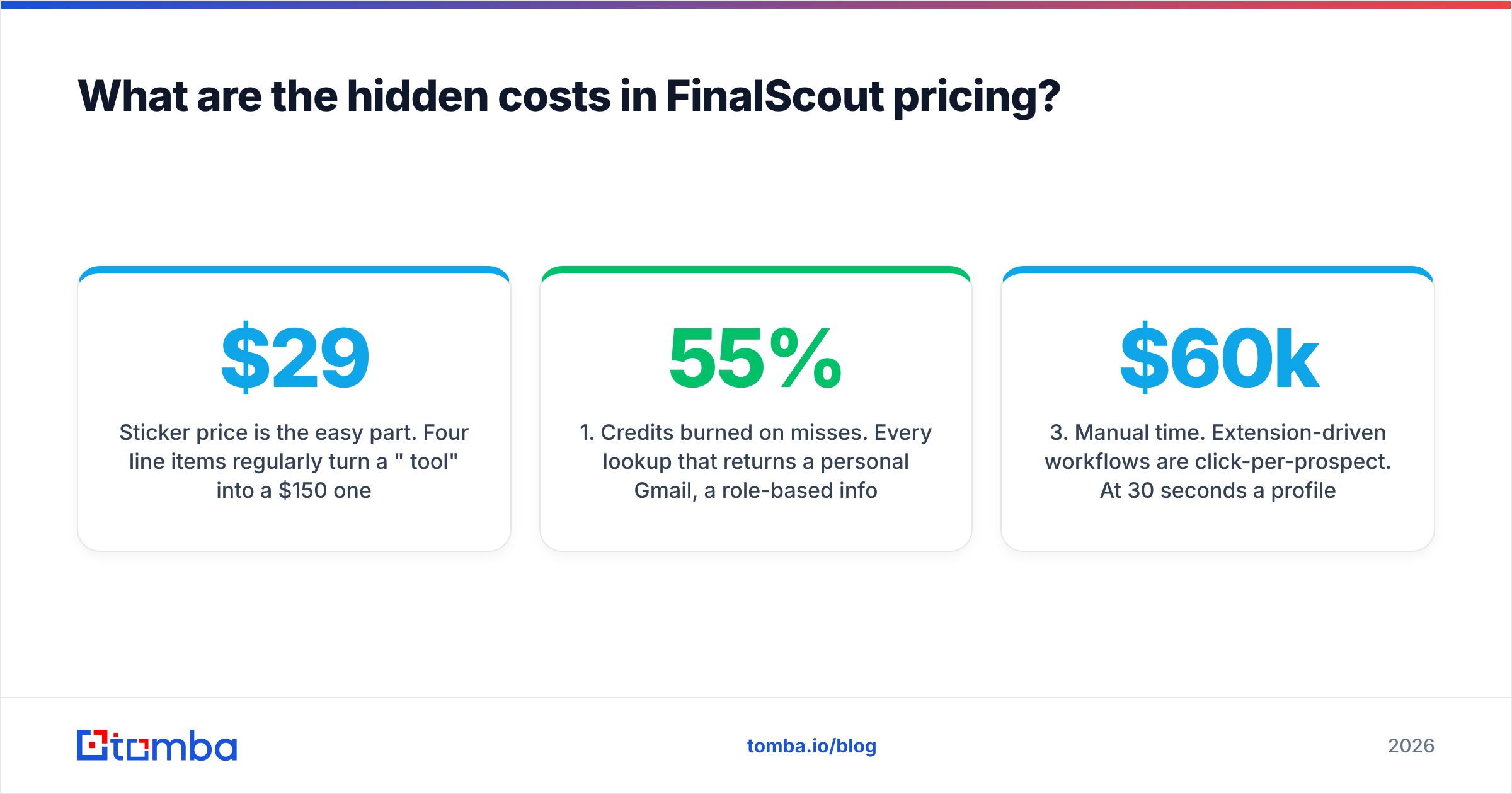
Sticker price is the easy part. Four line items regularly turn a "$29/month tool" into a $150/month one:
1. Credits burned on misses. Every lookup that returns a personal Gmail, a role-based info@ address, or nothing at all still costs you attention — and on some plans, a credit. Track your genuine hit rate for two weeks before scaling spend. A 55% usable-hit rate on a $99 plan means you're really paying $180 per 1,000 usable contacts.
2. Verification you still have to buy. Discovery and verification are different jobs. A found address is a hypothesis; a verified address is a fact. If FinalScout's built-in checking isn't catching catch-all domains, you'll pay a second vendor to run the list before sending — which is the whole reason catch-all verification exists as a distinct product category. Skipping it shows up later as bounces, and bounces damage sender reputation far more expensively than any credit pack.
3. Manual time. Extension-driven workflows are click-per-prospect. At 30 seconds a profile, 1,000 prospects is over eight hours of somebody's week. An API or bulk upload does the same job in one call. Price that labor honestly — at a $60k SDR salary, eight hours a month is roughly $250 in loaded cost, which dwarfs the subscription difference.
4. Annual commitment risk. The attractive prices are annual. If your outbound motion changes in month four — new ICP, new channel, new sequencer — you've prepaid for a workflow you abandoned.

Who should buy FinalScout, and who should not?#
Buy it if:
- LinkedIn and Sales Navigator are where you already spend prospecting time, and you want extraction plus copy in one click.
- Your volume is genuinely under ~3,000 contacts/month and stable.
- You're one person, or two at most, and don't need seat sprawl.
- Your ICP skews toward tech, SaaS, agencies, and recruiting — segments with dense, current LinkedIn presence.
Look elsewhere if:
- You prospect by company rather than by person. Feeding a domain and getting back every reachable contact is a fundamentally different query, and it's what domain search is built for.
- You need programmatic access. Building enrichment into your own product or pipeline means an API on the entry plan, not a Chrome extension.
- You're enriching an existing CRM list. Bulk upload beats profile-by-profile clicking every time — see bulk email finder workflows.
- Deliverability is your bottleneck. Then verification depth matters more than discovery breadth, and you should be buying on catch-all accuracy, not credit count.
- Your team is 3+ people. Seat gating at the top tier makes the effective per-person cost worse than volume-priced alternatives.
Independent user reviews are worth reading before you commit — G2 and Capterra both carry unfiltered feedback on hit rates and support responsiveness in this category, and the complaints cluster in predictable places: coverage outside tech, and credits that vanish at month end.
How do you evaluate email-finder pricing without guessing?#
Run the same 100-contact test against every tool on your shortlist. It takes an afternoon and it's the only benchmark that reflects your ICP rather than a vendor's.
- Build a control list. Pick 100 real prospects you can independently verify — customers, past contacts, people whose addresses you already know. Mix industries and company sizes to match your actual pipeline.
- Run the same list through each tool. Same inputs, same day. Note the returned address for each.
- Score three numbers, not one. Coverage (how many returned anything), accuracy (how many matched the known-good address), and usable rate (how many were role-free, deliverable, personal mailboxes).
- Convert to cost per usable contact. Divide the monthly plan price by monthly usable contacts. This single number is the only fair comparison across per-credit, per-seat, and per-search models.
- Test the failure path. How does each tool label uncertainty? A vendor that returns a confident wrong answer is more expensive than one that returns "unknown" — bounces cost reputation, and reputation costs deliverability.
- Check the exit. Can you export your data, cancel mid-term, and get a prorated refund? Read that clause before the annual discount tempts you.
That last point on labeling uncertainty is where cheap tools get expensive. A guessed address that bounces damages your domain; a clearly-flagged "risky" address costs you nothing but a skip. Vendors that publish where their data comes from tend to be the ones confident enough to say "we don't know."
What's the cheaper alternative if FinalScout doesn't fit?#
If your prospecting is domain-first, API-first, or volume-first — the three cases where FinalScout's credit model gets expensive — a dedicated email finder is a cleaner fit.
Tomba Email Finder takes a name and a company, or just a domain, and returns verified professional addresses with a confidence score attached. Free tier gives you 25 searches a month to test on your own list — recurring, not a one-time trial allocation. Paid plans run $49/mo (Starter), $99/mo (Growth), and $249/mo (Pro), with API access on every paid tier so you can wire enrichment straight into your CRM, your sequencer, or your own product. Verification, catch-all handling, and bulk processing are part of the same platform, so you're not stitching two vendors together to get from "found" to "safe to send."
Start with the 100-contact test described above. Run it on the free tier, score cost per usable contact, and let the number decide. Try the Tomba Email Finder — no card required for the free tier, and the API is there the moment clicking profiles one at a time stops scaling.
Related guides#
Ready to find emails that actually work?
Join 150,000+ professionals who stopped guessing and started sending. Free credits on signup — no credit card required.
Get the Tomba newsletter
Practical outbound tactics and product updates — once every two weeks.
About the author