FinalScout vs Go4database: Which B2B Email Tool Wins in 2026?
One scrapes LinkedIn profiles one at a time. The other sells you a pre-built list of a million contacts. We compare FinalScout vs Go4database on accuracy, pricing, workflow fit, and bounce risk.
FinalScout vs Go4database is an odd matchup. One tool pulls emails one LinkedIn profile at a time. The other sells you a finished file of a million contacts. Same goal, opposite methods — and the right pick depends on how your team actually works.
TL;DR
- FinalScout is a LinkedIn-first email finder. You open a profile or a Sales Navigator list, and it returns work emails plus AI-drafted outreach copy. It is a workflow tool.
- Go4database is a bulk B2B list vendor. You buy a ready-made contact file by industry, place, or job title, usually after a quote. It is a volume purchase.
- They are not really rivals. They fail in opposite ways. FinalScout is slow and pricey at scale. Go4database is fast and cheap, but you never saw the data get collected.
- Sending under about 2,000 emails a month to a LinkedIn crowd? FinalScout is the safer pick. Need 50,000 records in a niche by tomorrow? A list vendor is the only route — but budget for verification.
- Most teams land in the middle: an API-first finder plus a verifier, so you pay per valid contact instead of per row in someone else's spreadsheet.
FinalScout vs Go4database: what is each tool?#
Both answer "I need email addresses," but in opposite ways. That gap matters more than any feature checkbox.
- FinalScout is a browser extension plus web app. You install it on Chrome. Open a LinkedIn profile or a Sales Navigator search, and it pulls the person's work email. It also drafts the first outreach email, so one session finds the contact and writes the pitch. See finalscout.com for the current feature set.
- Go4database is a data broker. It sells ready-made B2B and consumer contact files, sliced by industry (healthcare, real estate, technology), job function, country, or company size. You ask for a quote, agree on volume, and receive a file. Details are on go4database.com.
Three more differences follow from that split:
- What you buy is different. FinalScout charges per email credit inside a monthly plan. Go4database charges per list or per thousand records, usually once.
- Freshness is different. FinalScout looks up a contact while you view the profile, so the job title is today's title. A bought list was built earlier, and you inherit every change since.
- Compliance risk is different. Both carry GDPR and CAN-SPAM questions, but not the same ones. A bought list needs consent and legitimate-interest paperwork. A LinkedIn extension risks the platform's terms of service.
Live lookup versus warehoused file. That one split explains almost every practical difference below.

FinalScout vs Go4database: how do they compare head to head?#
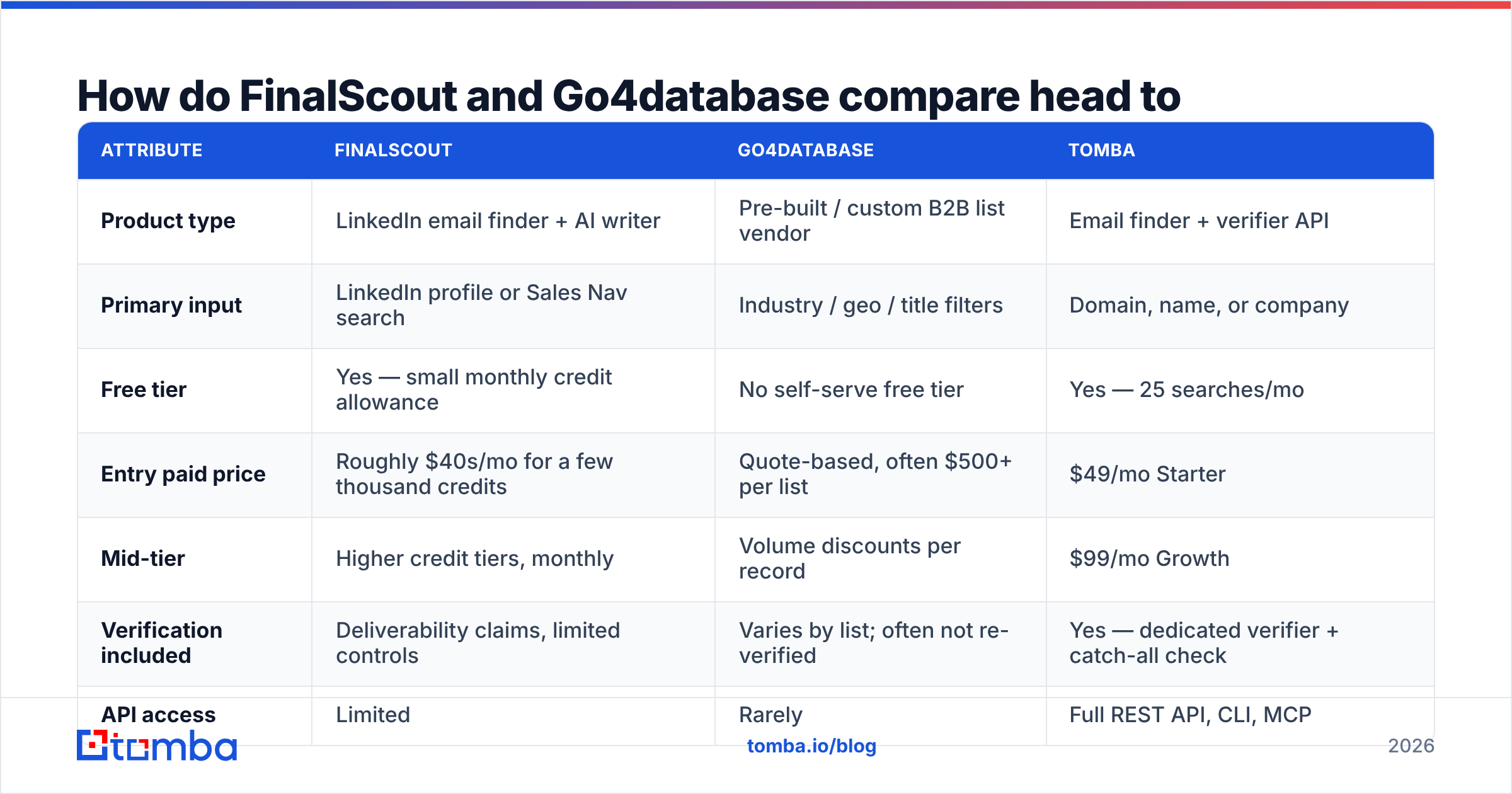
Here is the honest side-by-side. Prices move, and Go4database is quote-driven. Treat the dollar figures as directional, and confirm on the vendor's own page before you buy.
| Attribute | FinalScout | Go4database | Tomba |
|---|---|---|---|
| Product type | LinkedIn email finder + AI writer | Pre-built / custom B2B list vendor | Email finder + verifier API |
| Primary input | LinkedIn profile or Sales Nav search | Industry / geo / title filters | Domain, name, or company |
| Free tier | Yes — small monthly credit allowance | No self-serve free tier | Yes — 25 searches/mo |
| Entry paid price | Roughly $40s/mo for a few thousand credits | Quote-based, often $500+ per list | $49/mo Starter |
| Mid-tier | Higher credit tiers, monthly | Volume discounts per record | $99/mo Growth |
| Verification included | Deliverability claims, limited controls | Varies by list; often not re-verified | Yes — dedicated verifier + catch-all check |
| API access | Limited | Rarely | Full REST API, CLI, MCP |
| Data freshness | Live at lookup time | Compilation date unknown to buyer | Re-checked at request time |
| Best for | 1:1 LinkedIn prospecting | Large one-off vertical campaigns | Repeatable, automated pipelines |

The row that decides most evaluations is API access. If a human has to click a profile for every contact, your cost grows with headcount. If a workflow can call an email finder API, it grows with compute instead. FinalScout sits in the first camp. Go4database sits outside the loop, because it hands you a static file.
Which one gives you more accurate data?#
Short answer: FinalScout wins on freshness. Go4database wins on breadth. Neither should reach your sending domain without an independent verification pass.
Accuracy here is really three separate questions:
- Is the mailbox real? Does the mail server accept it?
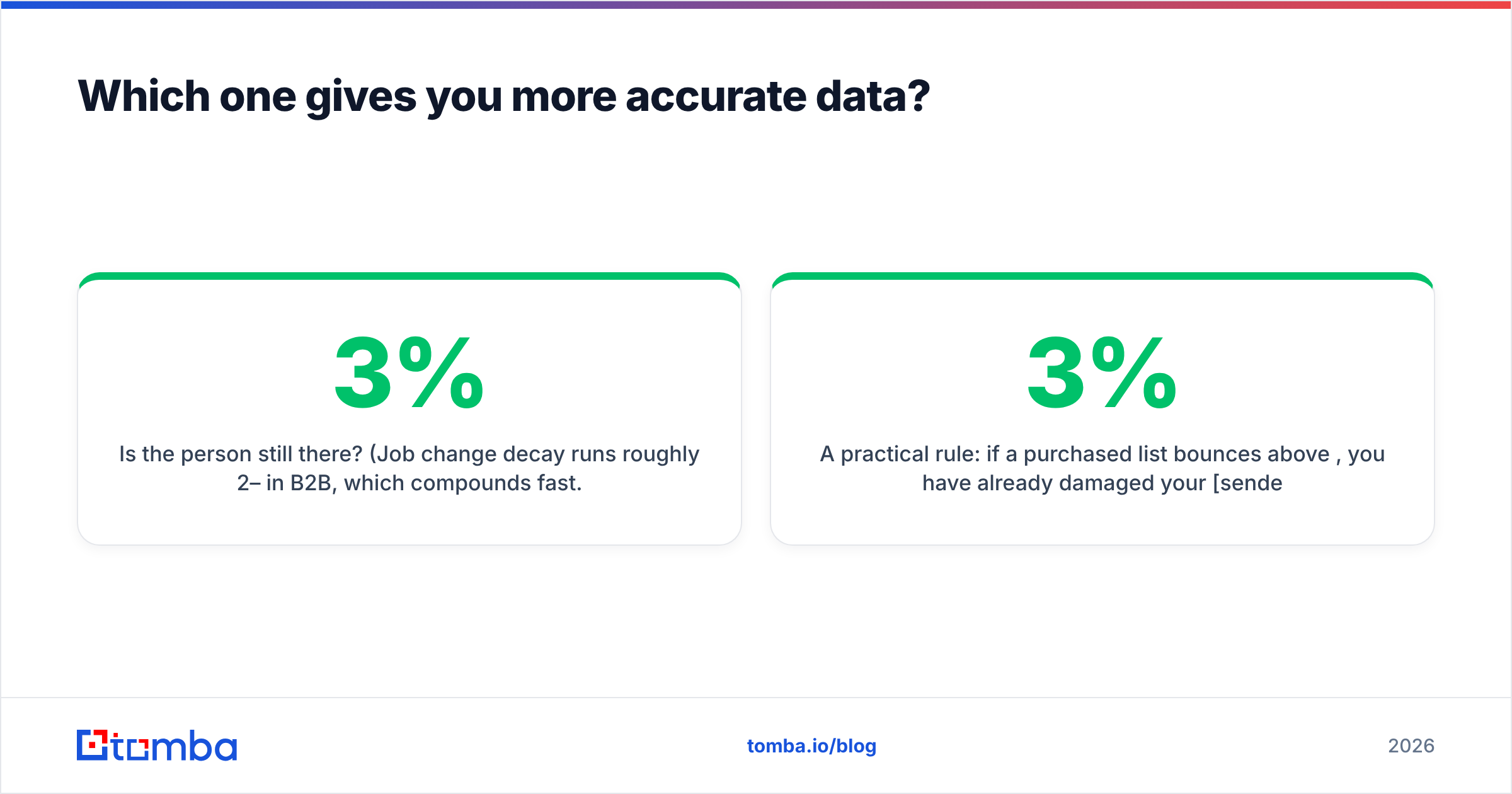
- Is the person still there? Job changes run about 2–3% a month in B2B, and that adds up fast.
- Is the match right? Is this really Sara Chen at Acme, or a guessed pattern that happens to resolve?
FinalScout answers the second question well by design, because you are looking at a live profile. It markets strong deliverability. But every vendor measures its headline accuracy on its own sample, not yours. Treat those numbers as marketing, not as a benchmark.

Go4database is harder to check. When you buy a compiled list, you cannot see when each record was collected or where it came from. That is not a knock on this vendor. It is true of every list broker, including well-regarded ones like BookYourData, which is open about its verification and is a fine choice if a bought list is what you need.
Your protection is the same either way. Run the file through an email verifier before it touches your sending domain. Then park anything flagged catch-all in its own risk bucket with a catch-all verifier.
A practical rule: if a bought list bounces above 3%, it has already cost you more sender reputation than it was worth. Google and Microsoft both tightened their bulk-sender rules. Google's postmaster documentation is blunt about keeping spam complaints under 0.3%. One bad 20,000-record import can undo a quarter of warmup.
How does pricing actually work for each?#
Most people ask "which is cheaper per email?" That is the wrong question. The right one is cost per contact that replies.
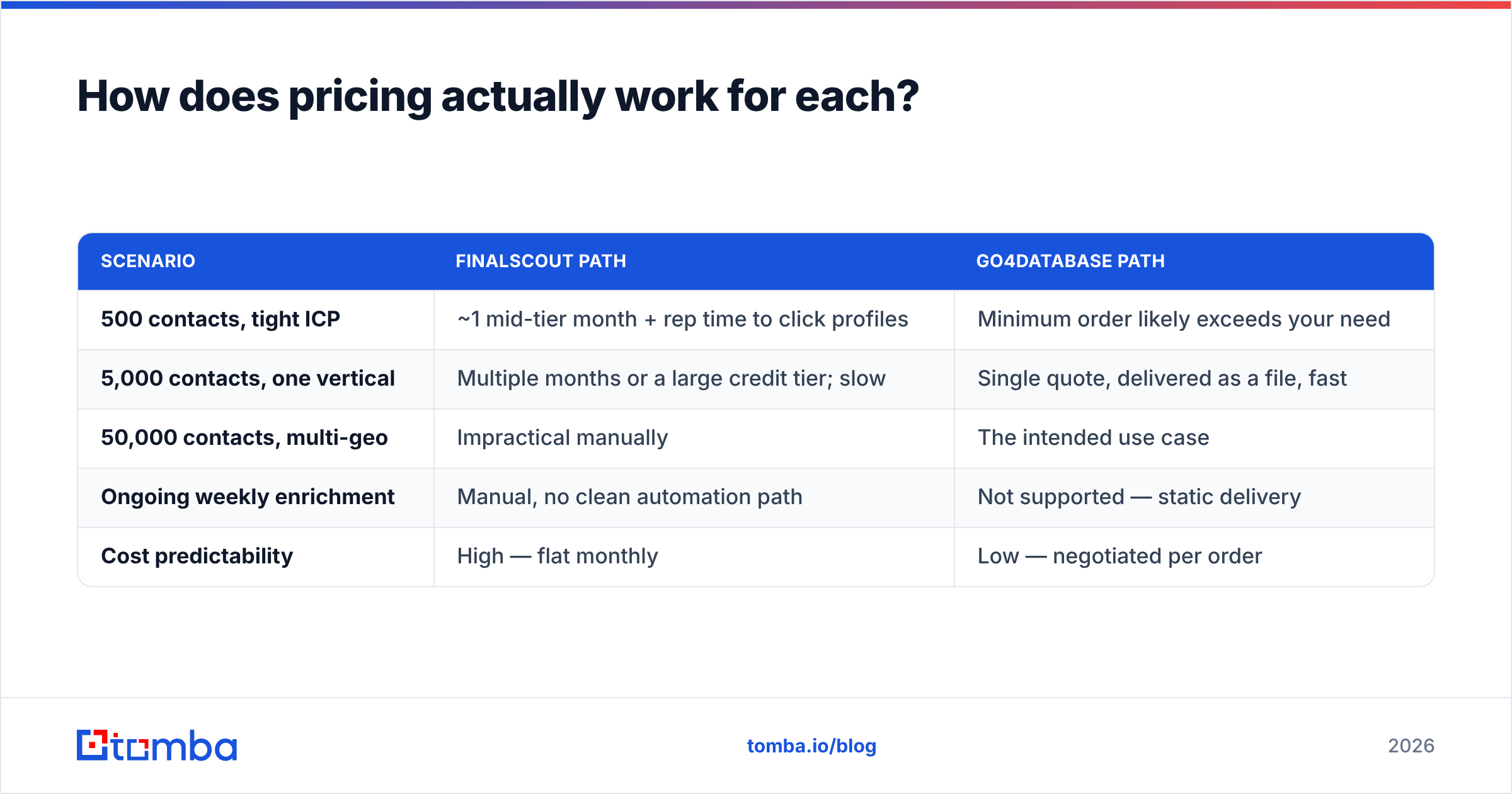
| Scenario | FinalScout path | Go4database path |
|---|---|---|
| 500 contacts, tight ICP | ~1 mid-tier month + rep time to click profiles | Minimum order likely exceeds your need |
| 5,000 contacts, one vertical | Multiple months or a large credit tier; slow | Single quote, delivered as a file, fast |
| 50,000 contacts, multi-geo | Impractical manually | The intended use case |
| Ongoing weekly enrichment | Manual, no clean automation path | Not supported — static delivery |
| Cost predictability | High — flat monthly | Low — negotiated per order |
Two hidden costs get missed in nearly every evaluation.
For FinalScout: labor. Say a rep resolves 40 profiles an hour and you need 4,000 contacts. That is 100 hours. At a loaded $35 an hour, you just spent $3,500 in payroll to save on tooling. That is the real number to compare.
For Go4database: waste. Buy 50,000 records at $0.03 each and you spend $1,500. If 22% come back invalid or role-based, $330 of that is garbage — and you find out live, in your bounce report. Verifying the whole file costs a fraction of that. So bulk verify belongs before the first send, not after it.

Who should choose FinalScout?#
Pick FinalScout if most of these are true:
- Your buyers live on LinkedIn. SaaS, agencies, recruiting, professional services. If you sell to independent plumbers or regional manufacturers, the tool has little to read.
- You prospect in small batches. Under a few hundred contacts a month, where the rep really is qualifying each name.
- You want drafting in the same window. The AI writer saves time for reps who stall on the first line. It is not better than good human copy. It is faster than a blank box.
- You don't need an API. If nothing downstream has to call the finder in code, the extension model is fine.
Skip it if you need volume, need automation, or need contacts outside LinkedIn. For a LinkedIn-centric workflow that also exposes an API, a LinkedIn finder does the same job without the browser clicks.
Who should choose Go4database?#
Pick a list vendor like Go4database when:
- You need scale in a narrow vertical, right now. Event marketing, a regional launch, a one-off ABM push into 8,000 dental practices.
- Your targets are hard to find on professional networks. Trades, local services, SMB owners, or markets where LinkedIn use is low.
- You have a verification budget and a warmed domain. Buying a list without both is how domains get burned.
- You can live with unknown sourcing. Ask for the compilation date, the source, and the consent basis in writing. A vendor that answers clearly is worth more than one that quotes 20% cheaper.
Skip it if you run precision outbound to 50 named accounts. You cannot buy a target list of 50. You research it.
What are the better alternatives for most teams?#
The verdict: neither tool is wrong, but most B2B teams need a third shape — programmatic lookup with verification built in.
The FinalScout vs Go4database choice is really a question about workflow. Modern outbound is not "get a list, then send." It is a loop: a new account lands in the CRM, you enrich it, verify it, route it, and sequence it. FinalScout cannot join that loop, because it needs a human at a browser. A bought file cannot join it either, because it is frozen.
An API-first finder sits right in the middle. With Tomba you would:
- Use domain search to pull every discoverable contact at a target company, with role and seniority attached.
- Resolve specific people by name with the email finder when you already know who you want.
- Push everything through verification, catch-all handling included, before it enters a sequence.
- Trigger the whole chain from HubSpot, Sheets, Zapier, or your own code. No clicking required.
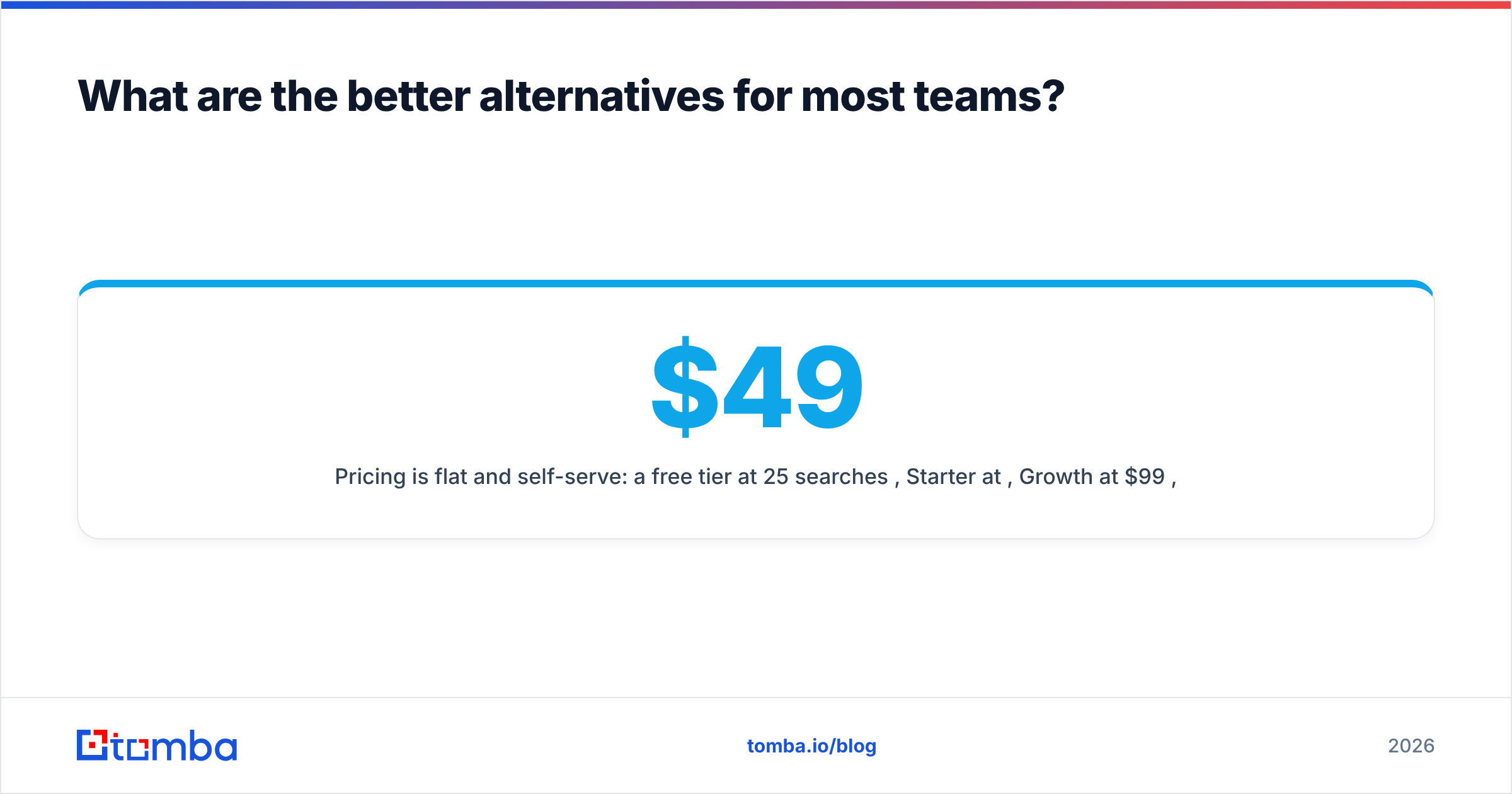
Pricing is flat and self-serve: a free tier at 25 searches a month, Starter at $49/mo, Growth at $99/mo, Pro at $249/mo, and Enterprise by negotiation. Full details sit on the Tomba pricing page. The data sources page documents where records come from — the one question you cannot get answered about a bought list.
For a neutral field check before you commit, G2's lead intelligence category shows how buyers rate each vendor's data quality in practice.
What should you actually do next?#
Run a 100-record bake-off. It costs almost nothing and settles the argument in an afternoon:
- Pick 100 companies from your real ICP, not a convenient sample.
- Pull contacts for the same 100 from each tool you are weighing. Use free tiers where they exist.
- Verify every output with the same independent verifier, so the scoring stays neutral.
- Score three things: coverage (how many resolved), validity (how many passed), and time-to-100 (wall-clock, rep labor included).
- Divide total cost by valid contacts. That number is your answer, not the sticker price.
Nine times out of ten, the winner is the tool that fits how your team already works — not the one with the biggest database claim.
Ready to run that test? Start with the Tomba Email Finder free tier — 25 searches a month, no card required. Put it head to head against whatever list or extension you are weighing. Every result comes back with a confidence score and verification status, so you can measure cost per valid contact from day one instead of learning it from your bounce report.
Related guides#
Ready to find emails that actually work?
Join 150,000+ professionals who stopped guessing and started sending. Free credits on signup — no credit card required.
Get the Tomba newsletter
Practical outbound tactics and product updates — once every two weeks.
About the author