FinalScout vs LeadEngineAI: Honest 2026 Tool Comparison
FinalScout and LeadEngineAI both promise verified B2B emails from LinkedIn profiles, but they get there very differently. Here is how coverage, credits, exports, and real cost-per-verified-contact stack up in 2026.
TL;DR
- FinalScout is a LinkedIn-first email finder: you work from profiles, search results, or Sales Navigator lists, and it exports contacts with an AI email writer bolted on. Its ceiling is LinkedIn itself.
- LeadEngineAI positions as an AI-first prospecting layer — enrichment, intent-style scoring, and generated outreach copy — with email finding as one feature among several rather than the core engine.
- Neither tool publishes an independently audited accuracy number. Treat every "98% accurate" claim, including Tomba's own marketing, as a hypothesis you test on 200 of your contacts.
- Credit math matters more than sticker price. A $49 plan that burns credits on failed lookups can cost more per verified contact than a $99 plan that doesn't.
- If your workflow is API-driven, bulk, or non-LinkedIn (domains, authors, catch-all domains), a dedicated email-finding platform usually beats either of these browser-centric tools.
What are FinalScout and LeadEngineAI?#
They solve the same job — turn a person you found online into a mailbox that accepts your message — from two different starting points.
FinalScout is built around LinkedIn as the source of truth. You install the Chrome extension, browse a profile or a search result page, and pull emails for the people you see. It layers an AI writing assistant on top so you can generate a first-touch message without leaving the tab. The pitch is speed for one-person or small sales teams who already live in LinkedIn all day. Check the current feature set on finalscout.com before you buy — extension-based tools ship changes fast.
LeadEngineAI sits in the newer "AI GTM assistant" bucket. Instead of positioning as a lookup utility, it frames itself as a system that identifies accounts, enriches contacts, scores them, and drafts outreach. Email finding is a step inside that pipeline. The pitch is fewer tools in the stack: one subscription instead of a finder plus an enricher plus a copy tool.
That difference in framing predicts almost everything else. FinalScout optimizes for this profile, right now. LeadEngineAI optimizes for this list, this quarter. Which one wins depends entirely on how your pipeline is built.
How do FinalScout and LeadEngineAI actually find emails?#
Under the marketing, every email finder in this category runs some mix of the same five techniques. Knowing which mix a tool leans on tells you where it will fail.
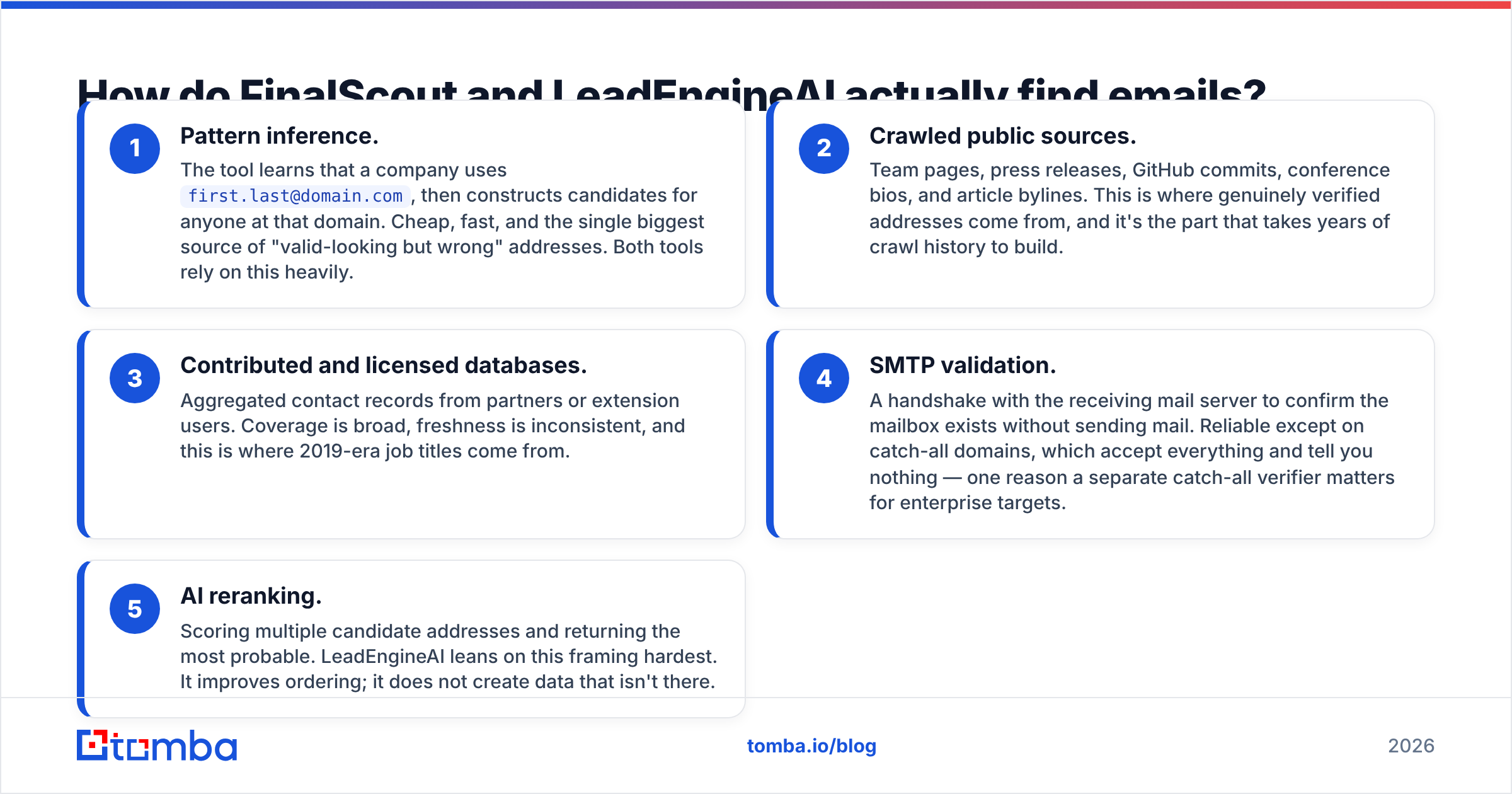
- Pattern inference. The tool learns that a company uses
first.last@domain.com, then constructs candidates for anyone at that domain. Cheap, fast, and the single biggest source of "valid-looking but wrong" addresses. Both tools rely on this heavily. - Crawled public sources. Team pages, press releases, GitHub commits, conference bios, and article bylines. This is where genuinely verified addresses come from, and it's the part that takes years of crawl history to build.
- Contributed and licensed databases. Aggregated contact records from partners or extension users. Coverage is broad, freshness is inconsistent, and this is where 2019-era job titles come from.
- SMTP validation. A handshake with the receiving mail server to confirm the mailbox exists without sending mail. Reliable except on catch-all domains, which accept everything and tell you nothing — one reason a separate catch-all verifier matters for enterprise targets.
- AI reranking. Scoring multiple candidate addresses and returning the most probable. LeadEngineAI leans on this framing hardest. It improves ordering; it does not create data that isn't there.
The practical consequence: a tool that scores high on pattern inference and low on crawled sources will show you a high "found rate" and a disappointing delivery rate. Found is not the same as deliverable, and neither is the same as the person still works there.

Which tool is more accurate?#
Neither vendor has published a third-party audit, so anyone quoting a hard winner is guessing. What you can compare is how each one behaves when it isn't sure.
FinalScout, like most extension-first tools, tends to return a best-guess address with a confidence label. That's the right call for a rep manually reviewing 20 profiles — you can eyeball the result. It's the wrong call for a 5,000-row export, because guesses at scale become bounces at scale.
LeadEngineAI's AI-scoring approach theoretically suppresses low-confidence results, but suppression cuts both ways: fewer bad emails, fewer emails overall. If your ICP is mid-market SaaS in North America, both tools will feel fine. If you're prospecting into European manufacturing, regional agencies, or companies under 50 employees, expect coverage on either to drop hard.

Run this test before committing to an annual plan:
- Pull 200 contacts you already have confirmed emails for (past customers, webinar registrants, closed-lost deals).
- Strip the emails, keep names and domains.
- Run the list through each tool's trial.
- Score three numbers separately: found rate (returned anything), match rate (matched your known-good address), and bounce rate on the ones it found that you couldn't confirm.
Match rate is the only number that matters. A tool with 90% found and 60% match is worse than one with 65% found and 95% match, because the first one is quietly poisoning your sender reputation.
Then push whatever survives through an independent email verifier before it touches a sequence. Never let the tool that found the address be the only tool that grades it — that's a vendor marking its own homework.
How do FinalScout and LeadEngineAI compare on features and pricing?#
Both vendors adjust plans frequently, and LeadEngineAI is the younger product with the less stable pricing page. Verify current numbers on the vendors' own sites and cross-check reviews on G2 before you sign anything annual. The table below reflects published positioning at the time of writing and how a dedicated email-finding platform compares.
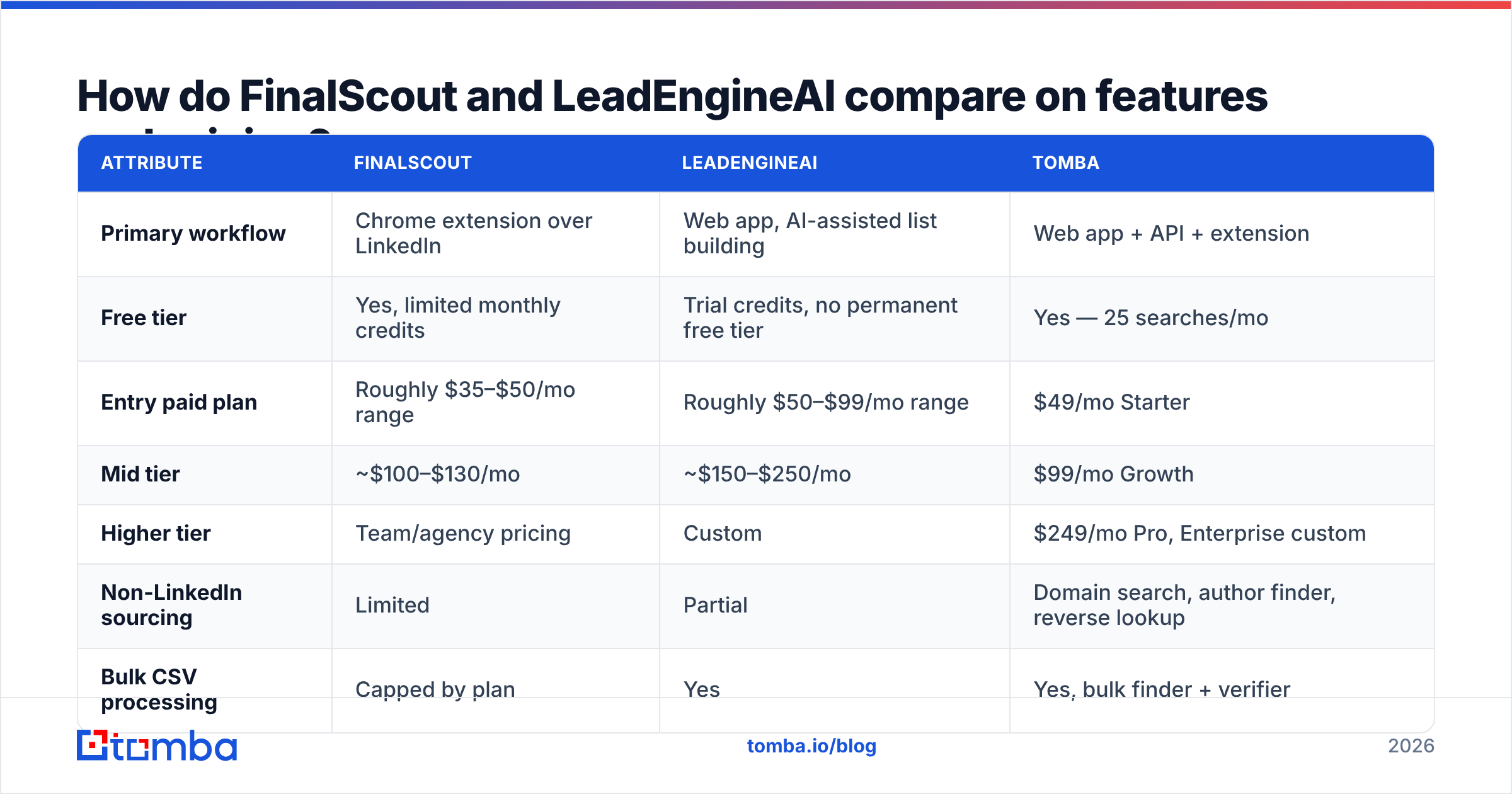
| Attribute | FinalScout | LeadEngineAI | Tomba |
|---|---|---|---|
| Primary workflow | Chrome extension over LinkedIn | Web app, AI-assisted list building | Web app + API + extension |
| Free tier | Yes, limited monthly credits | Trial credits, no permanent free tier | Yes — 25 searches/mo |
| Entry paid plan | Roughly $35–$50/mo range | Roughly $50–$99/mo range | $49/mo Starter |
| Mid tier | ~$100–$130/mo | ~$150–$250/mo | $99/mo Growth |
| Higher tier | Team/agency pricing | Custom | $249/mo Pro, Enterprise custom |
| Non-LinkedIn sourcing | Limited | Partial | Domain search, author finder, reverse lookup |
| Bulk CSV processing | Capped by plan | Yes | Yes, bulk finder + verifier |
| Public REST API | Limited / higher tiers | Varies by plan | Yes, on all paid plans |
| Built-in verification | Basic | Basic | Dedicated verifier + catch-all handling |
| AI outreach copy | Yes, core feature | Yes, core feature | Separate free tools |
| Phone numbers | No | Limited | Yes, phone finder |

Two things fall out of that table.
First, the AI copywriting features are not a real differentiator in 2026. Any model can write a passable cold email now, and free tools do it without a subscription. Paying a premium for generated copy inside a finder is paying twice for a commodity. Judge these tools on data, not prose.
Second, the API line is the fork in the road. If you ever plan to enrich inside a CRM workflow, a Clay-style table, or your own product, extension-first tooling becomes a manual bottleneck. That's where an email finder API changes the economics — the same lookup that costs a rep 40 seconds of clicking costs a script 300 milliseconds.
What does each tool actually cost per verified contact?#
Sticker price is the wrong metric. Here's the arithmetic that matters, with realistic assumptions:
- Scenario: you need 1,000 verified, deliverable contacts this month.
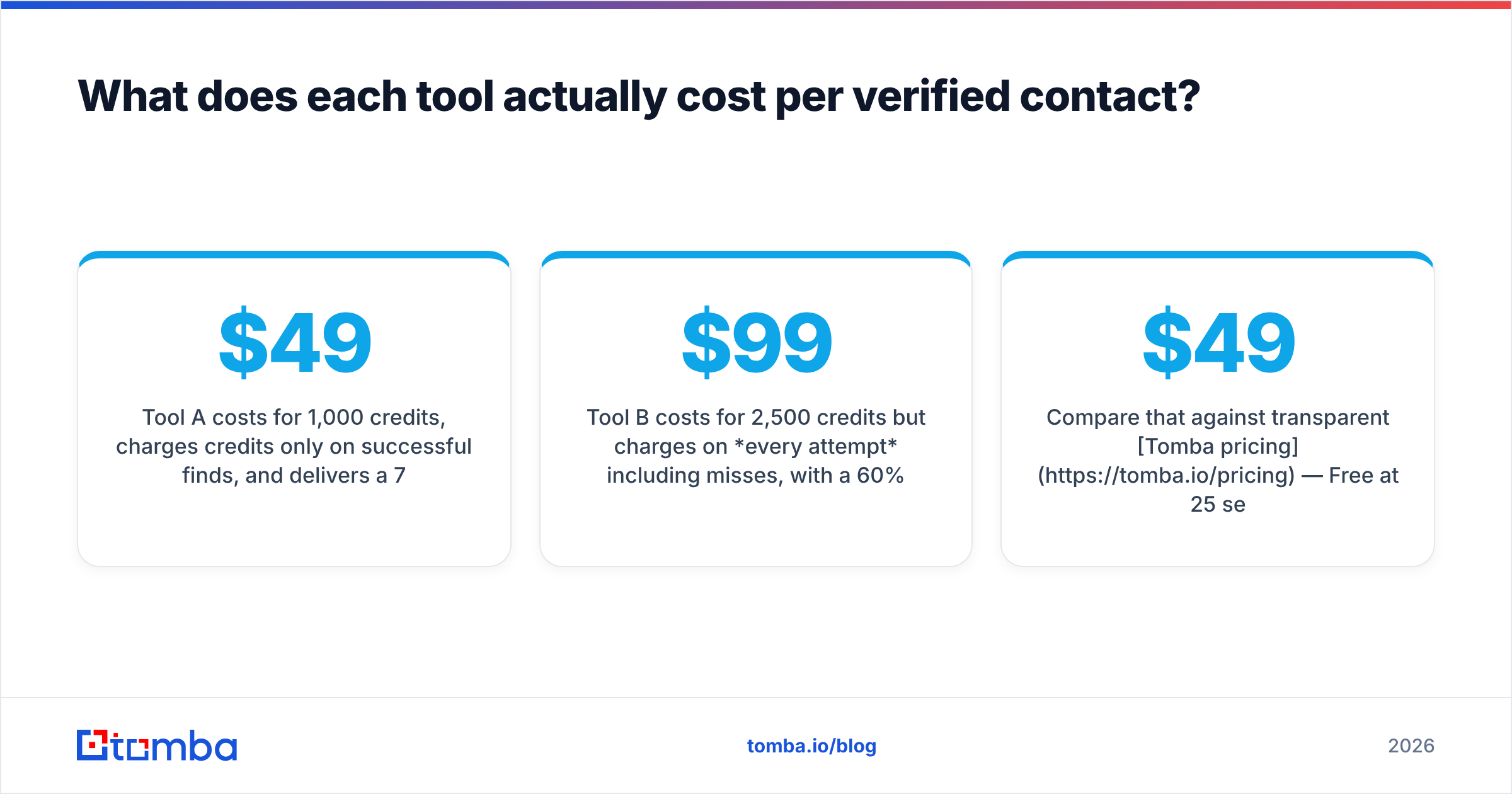
- Tool A costs $49/mo for 1,000 credits, charges credits only on successful finds, and delivers a 70% match rate. You get 700 usable contacts. You need ~1,430 credits, so you're on the next tier up. Real cost per verified contact: roughly $0.10–$0.14.
- Tool B costs $99/mo for 2,500 credits but charges on every attempt including misses, with a 60% found rate and an 80% match rate on what it finds. 2,500 attempts yield 1,500 found, 1,200 matched. Cost per verified contact: about $0.08.
The cheaper subscription lost. This is the single most common budgeting mistake in outbound tooling, and it's why you should always ask a vendor one question in writing: do you charge credits for failed lookups? If the answer is yes or evasive, model your cost at the found rate, not the credit count.
Compare that against transparent Tomba pricing — Free at 25 searches/mo, Starter $49/mo, Growth $99/mo, Pro $249/mo — where credit behaviour is documented rather than discovered on your third invoice.

Which one should you pick — and when should you pick neither?#
Choose FinalScout if you're a solo founder or two-person team, LinkedIn is where 90% of your prospecting happens, and you rarely need more than 100 contacts a week. The extension workflow is genuinely fast for that motion, and you'll never touch an API.
Choose LeadEngineAI if you want list-building, enrichment, and copy in one subscription, you're replacing three tools, and you're comfortable being an earlier customer of a younger product. Ask hard questions about data refresh cadence and get the credit-rollover policy in writing.
Choose neither if any of these are true:
- You need non-LinkedIn sources. Authors, technical hiring managers, agency contacts, and long-tail SMBs are frequently invisible on LinkedIn or hidden behind a profile you can't view. Domain search and author finder reach people extension tools cannot.
- You process lists, not profiles. A bulk email finder that takes a 10,000-row CSV and returns scored results beats any per-profile clicking workflow by an order of magnitude.
- You're building enrichment into a product or automation. You need a documented REST API with stable rate limits, not a browser extension.
- Compliance is a live concern. Scraping profile data at volume sits uneasily with LinkedIn's user agreement, and GDPR obligations around legitimate interest and data provenance don't disappear because a vendor's UI is convenient. Ask any vendor where its data comes from and whether it can document it.
- You need phone numbers too. Multi-channel sequences need a phone finder, and neither of these tools leads with that.
What should you check before you sign an annual contract?#
Run this checklist against whichever tool you shortlist. It takes an afternoon and saves a year of regret.
- Credit policy in writing. Charged on failed lookups? Do unused credits roll over? What happens at overage — hard stop or auto-charge?
- Match-rate test on your own ICP. 200 known contacts, three metrics, no vendor-supplied sample lists.
- Data freshness. Ask for the median age of records for your target segment. "We refresh continuously" is not an answer.
- Export ownership. Can you export everything you paid for on cancellation, including enriched fields? Some tools gate exports behind the active subscription.
- Catch-all handling. What does the tool return on a catch-all domain — a confident-looking guess, or an honest "unknown"? Honest is better.
- Seat pricing. Per-seat models can triple cost as the team grows. Confirm whether credits pool across seats.
Frequently asked questions#
Is FinalScout better than LeadEngineAI? For LinkedIn-only, low-volume manual prospecting, FinalScout's workflow is tighter. For list-based enrichment across a broader account set, LeadEngineAI's model fits better. Neither is a clear winner on data quality — that's a question your own 200-contact test answers, not a blog post.
Can either tool replace a dedicated verifier? No. Both include basic validation, but neither is built to grade a list you sourced elsewhere. Keep verification as a separate, independent step.
Are their free tiers enough to evaluate properly? Barely. Both cap free credits low enough that you'll burn them on setup. Plan to pay for one month of each, run the test, and cancel the loser — that's a far cheaper experiment than an annual commitment.
Do I still need LinkedIn Sales Navigator? If you use FinalScout seriously, probably yes, which adds meaningfully to your true monthly cost. Include it in the comparison.
The bottom line#
FinalScout and LeadEngineAI are both reasonable tools for the specific motions they were designed around, and both are easy to over-buy. FinalScout is a fast manual assistant that stops working the moment you leave LinkedIn. LeadEngineAI is a broader system whose email data is one component rather than its core competency. Neither should be evaluated on its AI copywriting, and neither should be trusted as its own verifier.
The tools that survive in a stack for years are the ones with transparent credit rules, coverage beyond a single platform, and an API you can automate against.
If that's what you're optimizing for, start with the Tomba Email Finder. The free tier gives you 25 searches a month to run a real match-rate test on your own ICP — no card, no annual commitment. Bring your 200 known-good contacts, score the results honestly, and let the numbers pick your vendor instead of the landing page.
Related guides#
Ready to find emails that actually work?
Join 150,000+ professionals who stopped guessing and started sending. Free credits on signup — no credit card required.
Get the Tomba newsletter
Practical outbound tactics and product updates — once every two weeks.
About the author