FinalScout vs LeadFuze: Which Email Finder Wins in 2026?
FinalScout scrapes LinkedIn profiles. LeadFuze builds lists from a database. They solve different halves of the same problem — and the pricing gap between them is bigger than either site admits.
FinalScout vs LeadFuze comes down to one question: do you already know who to contact? One tool pulls emails off LinkedIn profiles you pick. The other hands you the list in the first place. Here is the short answer, then the numbers.
TL;DR
- FinalScout is a LinkedIn-first extractor. You browse profiles or search results, it pulls emails and writes AI outreach copy on top. No standalone database to query.
- LeadFuze is a list builder. You set filters (role, industry, headcount, tech stack), it returns contact records in bulk. You never touch LinkedIn.
- Price gap is the real story. FinalScout's paid tiers start in the tens of dollars; LeadFuze's entry paid plan is listed at $147/mo for 500 leads. That's roughly $0.29 per lead before you verify anything.
- Neither includes serious verification. Both hand you addresses; neither replaces a dedicated email verifier if you care about bounce rate.
- Best combined play: use a database or LinkedIn tool for discovery, then run every address through a separate verification pass before it reaches your sequencer.
What are FinalScout and LeadFuze, actually?#
They get compared constantly, but they sit at opposite ends of the prospecting workflow.
FinalScout is a Chrome extension plus web app built around LinkedIn. You open a profile, a Sales Navigator search, a group, or an event attendee list. FinalScout then pulls the contacts and tries to resolve a work email for each one. It layers an AI writer on top that drafts personalized emails from the scraped profile text. Its marketing leans hard on a "98% deliverability" claim and GDPR/CCPA compliance.
LeadFuze is a searchable B2B contact database with a workflow engine called Fuzebot. You define an ideal customer profile — job title, industry, employee count, revenue band, technologies installed, ad spend — and LeadFuze returns matching people with email and sometimes phone. Fuzebot then adds new matches to your list on its own. It also skips contacts you already downloaded or already have in your CRM.
The practical difference: FinalScout requires you to already know where to look. LeadFuze tells you where to look.
That single distinction decides most purchase decisions. If your ICP lives in a LinkedIn Sales Navigator search you've already refined over months, a scraper is the cheaper path. If you're staring at a blank page and need "VPs of Engineering at 200-1000 person SaaS companies using Snowflake," you need a database.

FinalScout vs LeadFuze: how do they differ at a glance?#
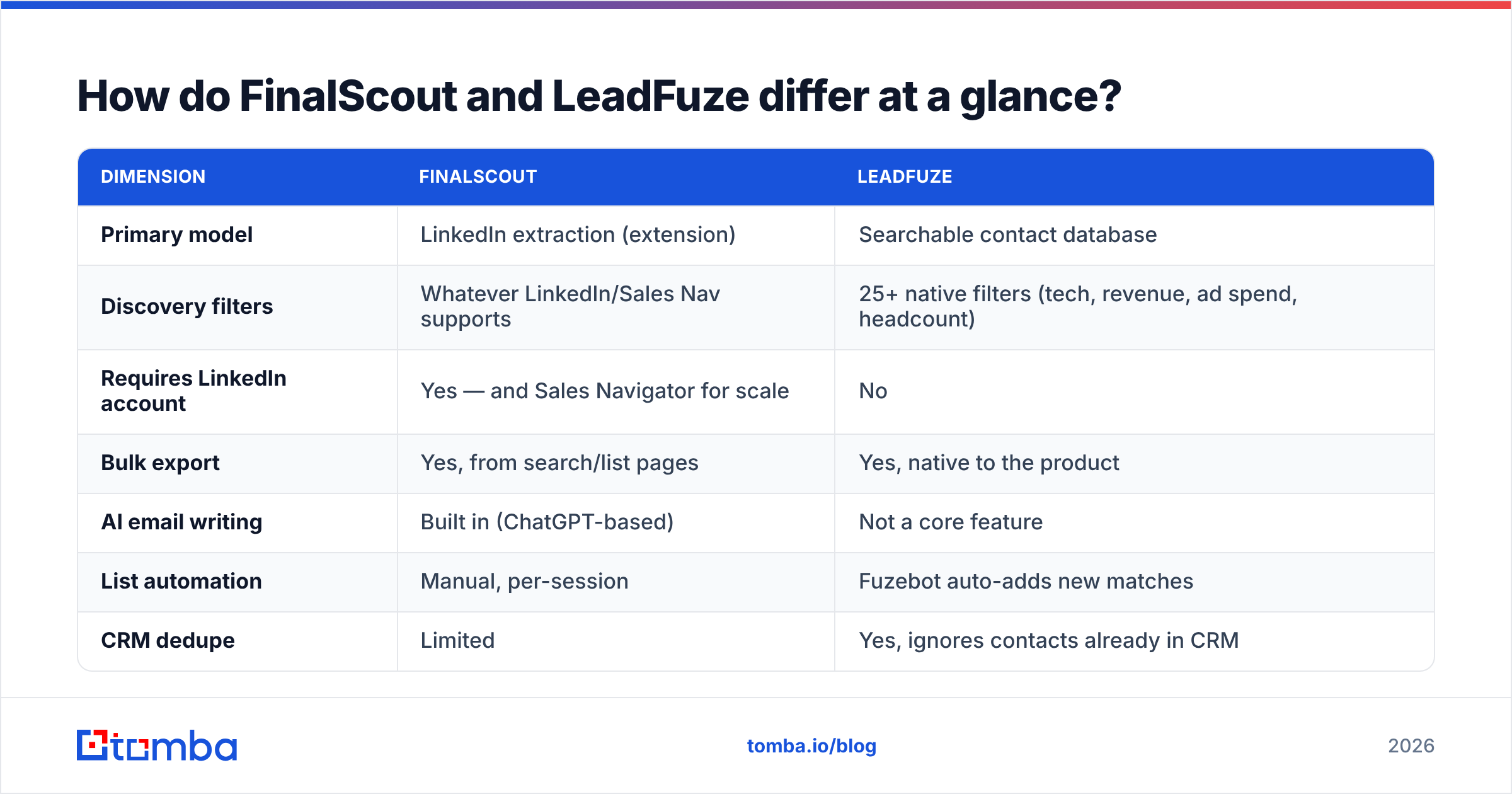
| Dimension | FinalScout | LeadFuze |
|---|---|---|
| Primary model | LinkedIn extraction (extension) | Searchable contact database |
| Discovery filters | Whatever LinkedIn/Sales Nav supports | 25+ native filters (tech, revenue, ad spend, headcount) |
| Requires LinkedIn account | Yes — and Sales Navigator for scale | No |
| Bulk export | Yes, from search/list pages | Yes, native to the product |
| AI email writing | Built in (ChatGPT-based) | Not a core feature |
| List automation | Manual, per-session | Fuzebot auto-adds new matches |
| CRM dedupe | Limited | Yes, ignores contacts already in CRM |
| Phone numbers | Limited | Available on some records |
| Entry paid price | ~$35–45/mo range | $147/mo (500 leads) |
| Free tier | Yes, small credit allowance | Trial credits only |
| Best for | Solo AEs, recruiters, agency SDRs working LinkedIn | Teams needing repeatable ICP list builds |
Two things in that table matter more than the rest.
First, the LinkedIn dependency. FinalScout's ceiling is your LinkedIn account's ceiling. LinkedIn enforces weekly search and view limits, and aggressive extension use is a known account-risk vector. If you get restricted, your prospecting stops. LeadFuze has no such coupling — but its data is only as fresh as its database refresh cycle, which you can't inspect.
Second, Fuzebot. Automated list-building that dedupes against your CRM is genuinely the strongest thing LeadFuze ships. If you run the same ICP quarter after quarter, it removes real manual work. If you run one-off campaigns against varied targets, you'll never touch it and you're paying for it anyway.
How accurate is the data from each tool?#
This is where vendor claims get slippery, so read the fine print on both sites.
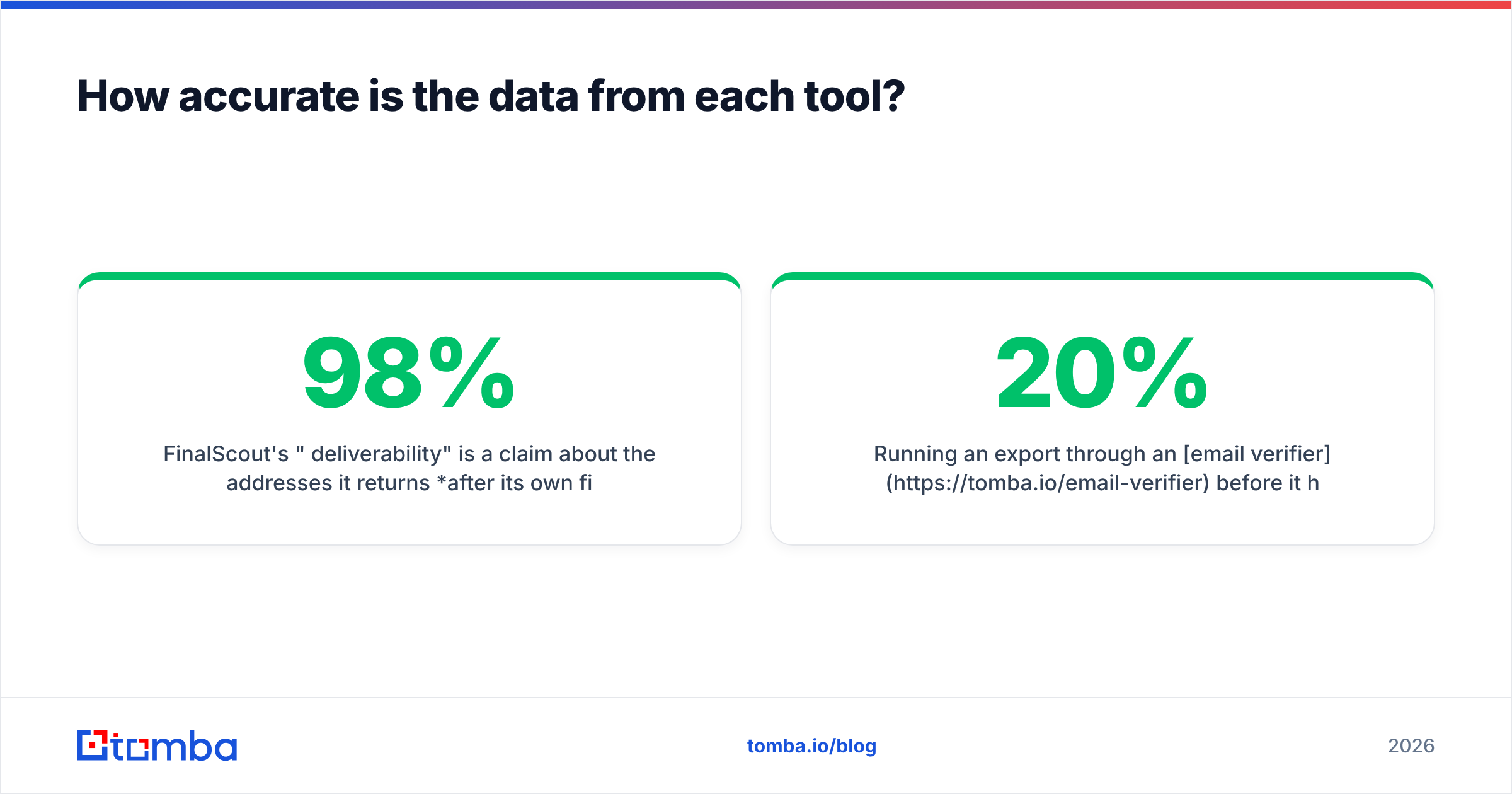
FinalScout's "98% deliverability" is a claim about the addresses it returns after its own filtering — not a claim that it finds an email for 98% of profiles you scrape. Those are wildly different numbers. In practice, LinkedIn-based finders resolve a work email for somewhere between 40% and 70% of profiles depending on seniority and company size. Enterprise contacts at large firms resolve well. Founders at 5-person startups using custom domains resolve badly.
LeadFuze doesn't publish a comparable headline accuracy figure, which is arguably more honest. Database products decay: a record accurate in March is wrong by November if the person changed jobs. Independent reviews on G2 for both categories consistently flag stale titles and role changes as the top complaint against database vendors — not fabricated emails, but outdated ones.

The operational takeaway is the same either way: treat every exported address as unverified until you prove otherwise.
Four failure modes cost you the most money:
- Catch-all domains. The mail server accepts everything, so a standard SMTP check returns "valid" for an address that doesn't exist. You need a dedicated catch-all verifier to score these, not a green checkmark from your list tool.
- Role accounts.
info@,sales@,support@inflate your export count and destroy reply rate. Filter them before import. - Job changers. The address is technically valid but routes to a mailbox nobody reads, or bounces after the company's grace period ends. Cross-check LinkedIn currency on high-value accounts.
- Pattern guesses presented as finds. Some tools infer
first.last@domain.comand ship it without confirmation. It's a coin flip. If a tool won't tell you its confidence score, assume the worst.
Running an export through an email verifier before it hits your sequencer typically strips 8–20% of a raw LinkedIn scrape. That's the difference between a 2% bounce rate and a 12% one — and the second number is what gets your domain throttled.
What does FinalScout cost versus LeadFuze?#
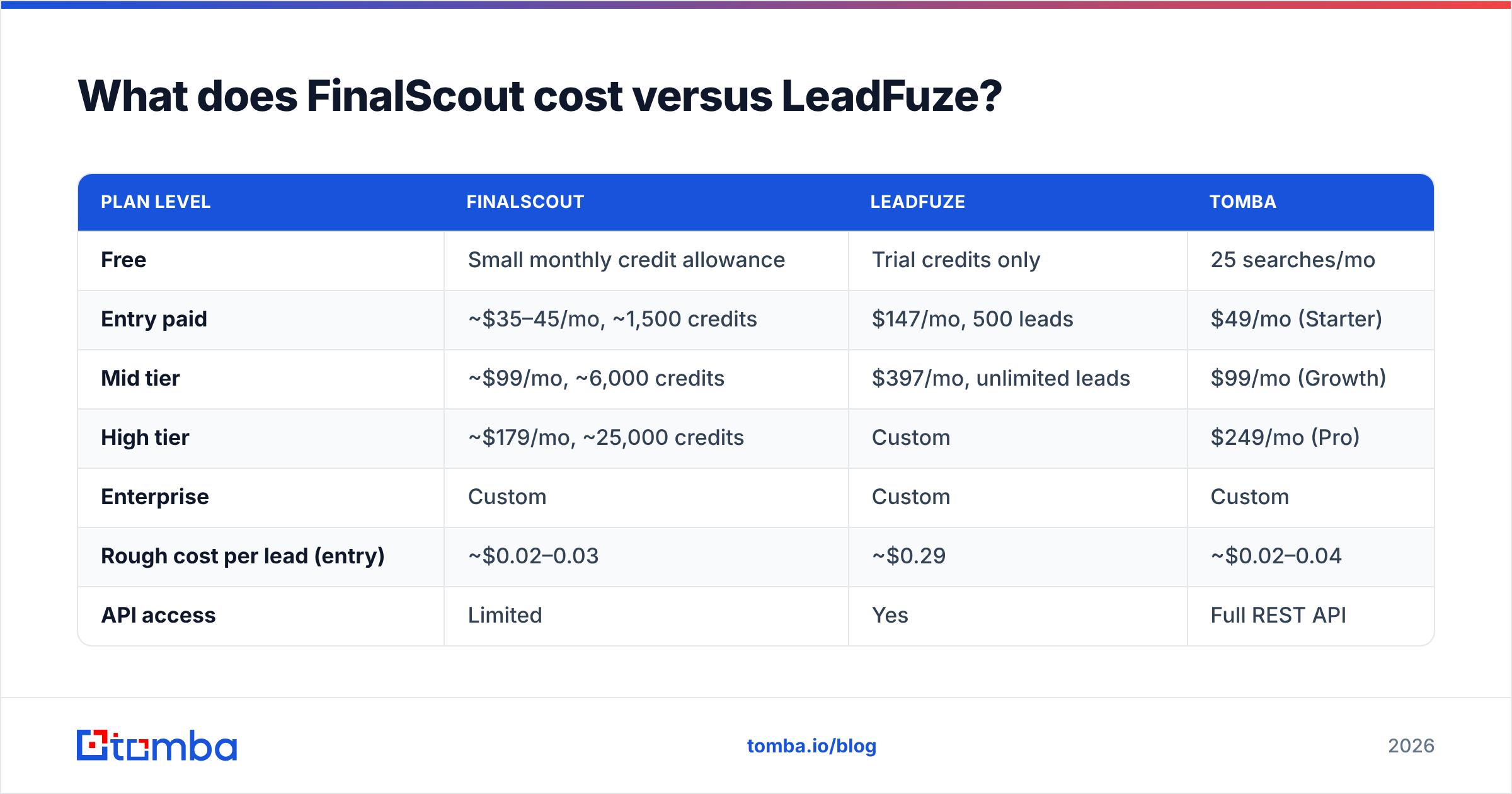
Pricing is where the two products stop being comparable and start being different budget categories entirely. Check both vendor pages before you commit — tiers move — but the structural gap has been stable.
| Plan level | FinalScout | LeadFuze | Tomba |
|---|---|---|---|
| Free | Small monthly credit allowance | Trial credits only | 25 searches/mo |
| Entry paid | ~$35–45/mo, ~1,500 credits | $147/mo, 500 leads | $49/mo (Starter) |
| Mid tier | ~$99/mo, ~6,000 credits | $397/mo, unlimited leads | $99/mo (Growth) |
| High tier | ~$179/mo, ~25,000 credits | Custom | $249/mo (Pro) |
| Enterprise | Custom | Custom | Custom |
| Rough cost per lead (entry) | ~$0.02–0.03 | ~$0.29 | ~$0.02–0.04 |
| API access | Limited | Yes | Full REST API |
| Verification included | Basic | Basic | Native verifier + catch-all scoring |
Do the arithmetic on the entry tiers. LeadFuze's $147/mo for 500 leads is roughly ten times the per-contact cost of a credit-based finder. You're not paying for the email — you're paying for the filtering, the database, and Fuzebot. Whether that premium is worth it depends entirely on how much time you'd otherwise spend building the same list by hand.
For a two-person startup doing 300 touches a month, LeadFuze's entry plan is hard to justify. For a five-SDR team where each rep burns four hours a week on list building, $147/mo is cheaper than one afternoon of salary.
FinalScout's credit model looks generous until you remember credits burn on attempts, not successes on every plan variant. Scrape 1,000 profiles, resolve 600 emails, and your effective cost per usable contact is nearly double the sticker rate. Read the credit consumption policy carefully — it's the single most misread line on any email finder's pricing page.

Which should you pick for your use case?#
Neither tool is broadly better. Match the tool to the motion.
- You live in Sales Navigator already. FinalScout. Your targeting is already done; you just need addresses out of profiles you've curated. Paying $147/mo for database filters you won't use makes no sense.
- You need repeatable ICP lists across quarters. LeadFuze. Fuzebot plus CRM dedupe is the actual product here, and no LinkedIn scraper replicates it.
- You're recruiting. FinalScout, with caveats. Candidate sourcing is inherently profile-driven, and the AI writer is genuinely useful for the volume of personalized notes recruiting requires.
Three more cases come up often, and two of them point away from both tools.
- You need technographic targeting. LeadFuze. Filtering by installed technology is a first-class feature there and absent from LinkedIn-based tools.
- You need programmatic enrichment inside your own app or workflow. Neither, really. Both are UI-first products. If you're enriching records at scale from code, you want a proper email-finding API with predictable rate limits and per-request confidence scores.
- Budget is the binding constraint. Start with a free tier and a credit-based finder, add a database later once you know your ICP converts.
There's also a middle path most comparison posts skip: decouple discovery from resolution. Use LinkedIn, a database, a conference attendee list, or a scraped directory for discovery — whatever's cheapest for your segment — then resolve and verify addresses through a single dedicated provider. That keeps your data quality consistent no matter where the names came from, and it stops you from paying database prices for the trivial part of the job.
Where does Tomba fit in this comparison?#
Honestly: it competes with the email resolution half, not the whole workflow.

Tomba's email finder takes a name plus a domain and returns a scored address. Domain search does the inverse — hand it a company domain and get back every discoverable contact with role and department. The LinkedIn finder covers the profile-URL-to-email path that overlaps directly with what FinalScout does, and the bulk email finder handles CSV uploads when you've sourced names elsewhere.
What it doesn't do is replace LeadFuze's discovery filters. There's no "companies using Snowflake with 200-1000 employees" query. If technographic targeting is your bottleneck, a database product is the right buy and Tomba slots in behind it as the verification layer.
Where the comparison does favor Tomba: verification is native rather than bolted on, catch-all domains get an actual confidence score instead of a shrug, and Tomba pricing starts at $49/mo for Starter with a free tier at 25 searches monthly so you can benchmark accuracy against your own list before paying anything. Other credible options in the space — including database-first vendors like BookYourData — are worth evaluating on the same terms: run your own 100-contact sample through each and measure real bounce rate rather than trusting anyone's headline percentage.
What's the fastest way to decide?#
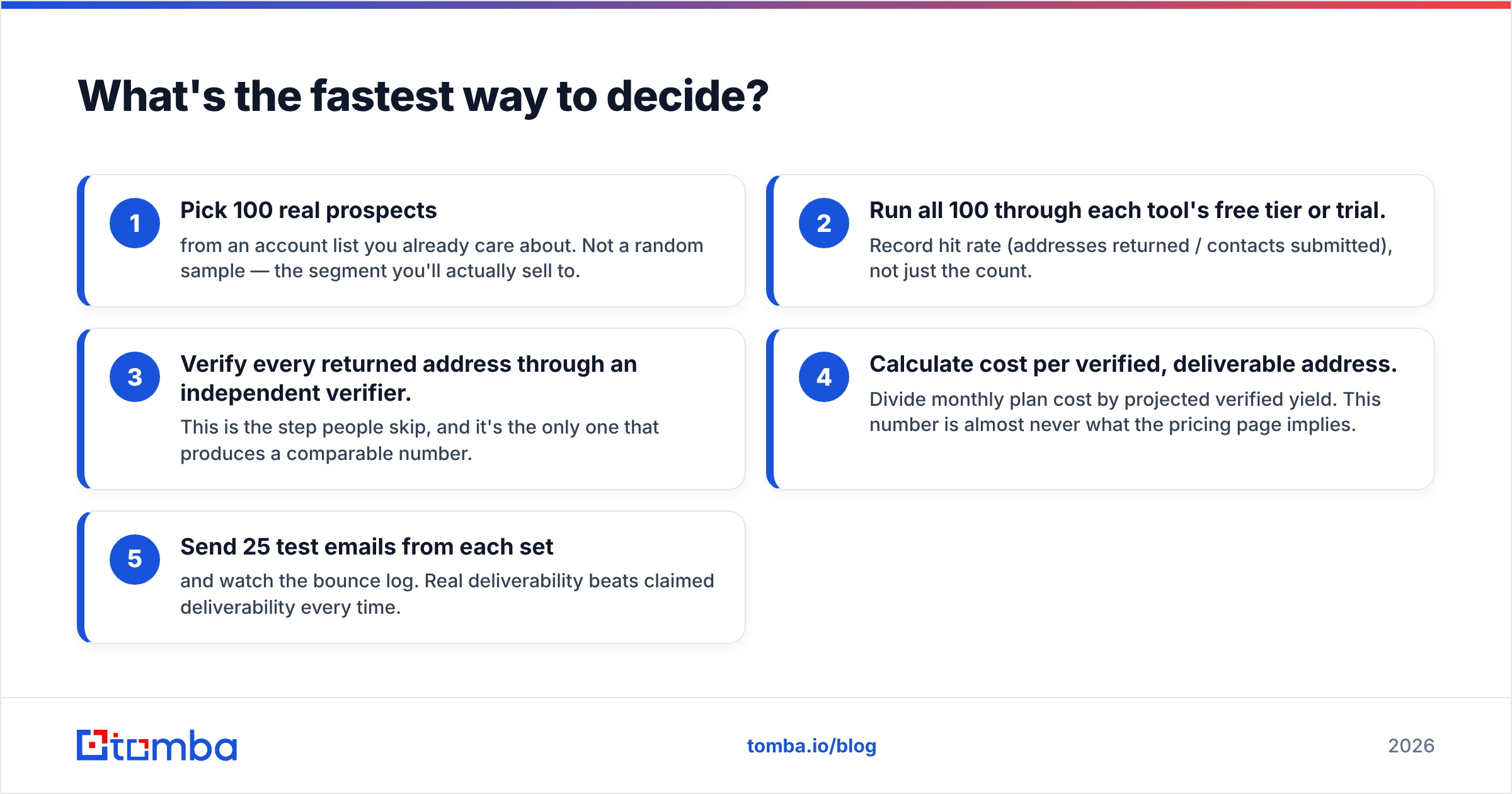
Run a controlled bake-off. It takes an afternoon.
- Pick 100 real prospects from an account list you already care about. Not a random sample — the segment you'll actually sell to.
- Run all 100 through each tool's free tier or trial. Record hit rate (addresses returned / contacts submitted), not just the count.
- Verify every returned address through an independent verifier. This is the step people skip, and it's the only one that produces a comparable number.
- Calculate cost per verified, deliverable address. Divide monthly plan cost by projected verified yield. This number is almost never what the pricing page implies.
- Send 25 test emails from each set and watch the bounce log. Real deliverability beats claimed deliverability every time.
Whatever the spreadsheet says at the end of step 4 is your answer — not a FinalScout vs LeadFuze verdict from anyone else, including this post. It will differ by segment. A tool that wins on US mid-market SaaS may lose badly on European manufacturing, and no blog post can predict that for your list.
Ready to test the resolution layer?#
Before you commit $147/mo to a database or tie your pipeline to a LinkedIn extension's account risk, benchmark the part that actually determines your bounce rate. Run your next 25 prospects through the Tomba Email Finder free — no card, no credit burn on failed lookups — and compare the verified-deliverable count against whatever FinalScout or LeadFuze returns for the same names. If Tomba wins on your list, Starter is $49/mo. If it doesn't, you've lost nothing but an afternoon and gained a real number to negotiate with.
Related guides#
Ready to find emails that actually work?
Join 150,000+ professionals who stopped guessing and started sending. Free credits on signup — no credit card required.
Get the Tomba newsletter
Practical outbound tactics and product updates — once every two weeks.
About the author