FinalScout vs LFBBD Lead For Business: 2026 Comparison
FinalScout scrapes LinkedIn profiles into emails. LFBBD Lead For Business sells you a prebuilt B2B list. We break down accuracy, pricing, export limits, and which one actually belongs in your 2026 stack.
FinalScout vs LFBBD comes down to one choice: scrape LinkedIn profiles one at a time, or buy a prebuilt list in bulk. Both end in the same place — a work email you can send to. The route there changes your cost, your data freshness, and how much verification work you inherit.
TL;DR
- FinalScout is a LinkedIn-first email finder. It predicts and validates the work email, then drafts AI outreach copy. Its ceiling is LinkedIn itself.
- LFBBD (Lead For Business) is the opposite: a prebuilt contact database you filter and export. Faster to a CSV, harder to audit.
- Neither fits API-first enrichment inside a CRM or product. Both are UI-bound by design.
- Costs diverge on credit burn for failed lookups. Paying for "not found" results quietly doubles your cost per verified contact.
- If you prospect from a domain or company list, a domain-search tool like Tomba Email Finder covers more ground per dollar.
What are FinalScout and LFBBD Lead For Business?#
They solve the same end problem — get a work email you can send to — from opposite directions.
FinalScout is built around LinkedIn. You install the Chrome extension, open a profile, a Sales Navigator list, or a group, and it extracts contacts and resolves emails. It layers ChatGPT-based message drafting on top, so the pitch is "find the person and write the email in one pass." Its claimed accuracy figures sit in the high 90s. That is standard marketing language across this category — every vendor quotes a number in that range, and almost none publish the test method behind it.
LFBBD Lead For Business is the database model. Instead of sourcing contacts profile by profile, you filter a stored dataset by industry, geography, company size, or role, and export what matches. That's the same shape as Apollo, Cognism, or BookYourData — a respected operator in the prebuilt-list space with published bounce guarantees and a pay-as-you-go structure. Judge any list vendor against that bar: transparent sourcing, a written bounce guarantee, and a refund or credit-back policy for bad records.
The honest caveat on LFBBD: public information is limited compared to vendors with hundreds of verified reviews on G2. Before committing budget, ask for a sample export of 100 records in your exact ICP. Run it through an independent email verifier. That single test tells you more than any feature page.
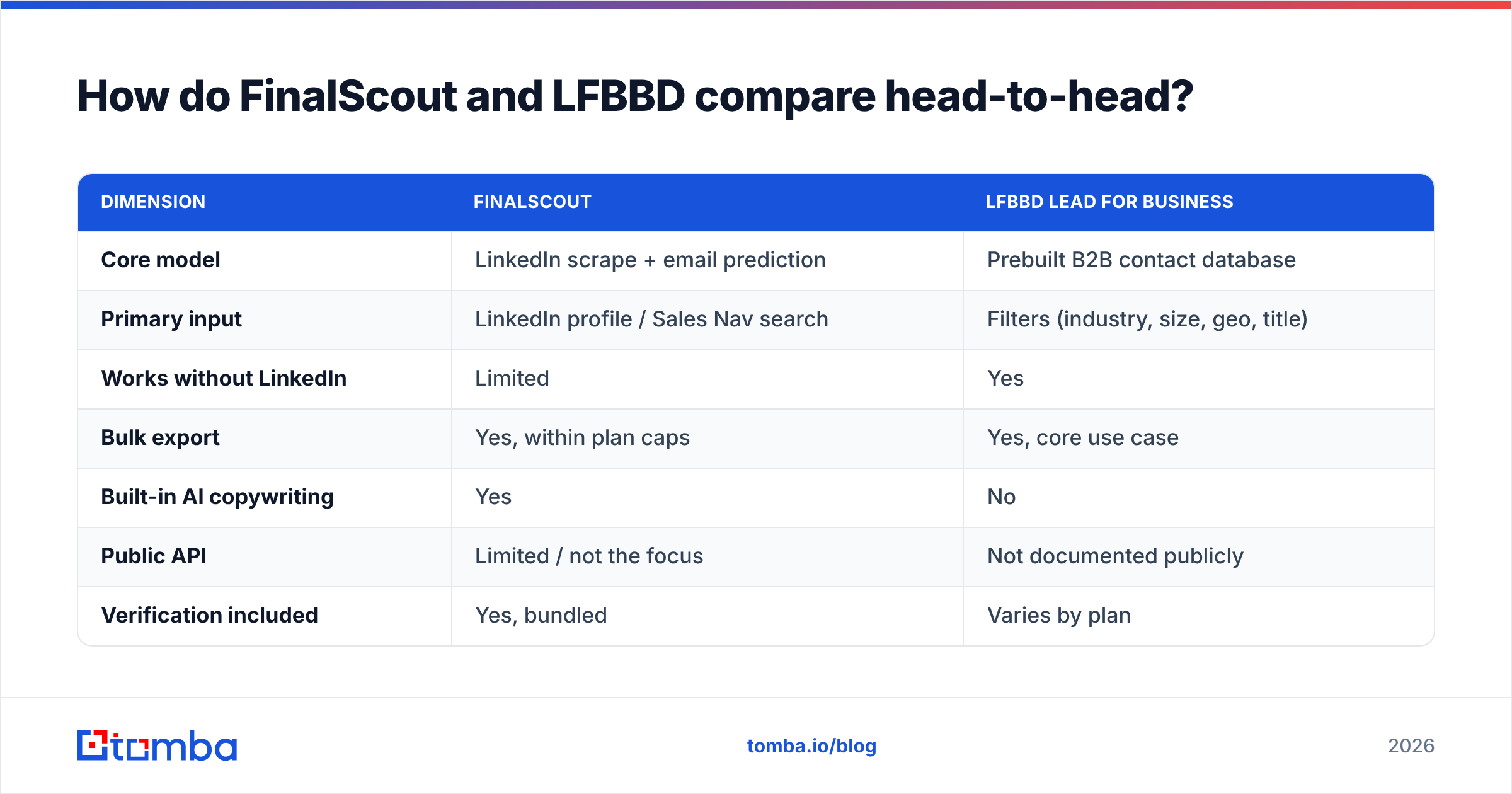
FinalScout vs LFBBD: how do they compare head-to-head?#
| Dimension | FinalScout | LFBBD Lead For Business |
|---|---|---|
| Core model | LinkedIn scrape + email prediction | Prebuilt B2B contact database |
| Primary input | LinkedIn profile / Sales Nav search | Filters (industry, size, geo, title) |
| Works without LinkedIn | Limited | Yes |
| Bulk export | Yes, within plan caps | Yes, core use case |
| Built-in AI copywriting | Yes | No |
| Public API | Limited / not the focus | Not documented publicly |
| Verification included | Yes, bundled | Varies by plan |
| Phone numbers | Not the focus | Sometimes, tier-dependent |
| Data freshness | High — pulled at request time | Depends on last refresh cycle |
| Best for | SDRs living inside LinkedIn | Bulk list-building for broad TAM |
The table exposes the real trade-off. FinalScout gives you freshness — it resolves the contact the moment you ask, against a profile the person maintains themselves. LFBBD gives you volume — thousands of rows in one export without touching a browser.
Freshness matters more than most teams assume. B2B contact data decays at roughly 20–30% per year through job changes alone. A stored record that was accurate at last refresh may be dead by the time you email it. A six-month-old export is not a 95% accurate list anymore, no matter what the dashboard claimed on the day it was built.

How accurate is the data from each tool?#
Any FinalScout vs LFBBD accuracy claim is close to meaningless unless you define the denominator. Three different numbers get marketed as "accuracy":
- Deliverability rate — of the emails delivered, how many bounced. Easiest to inflate, because catch-all domains often don't bounce even when the mailbox doesn't exist.
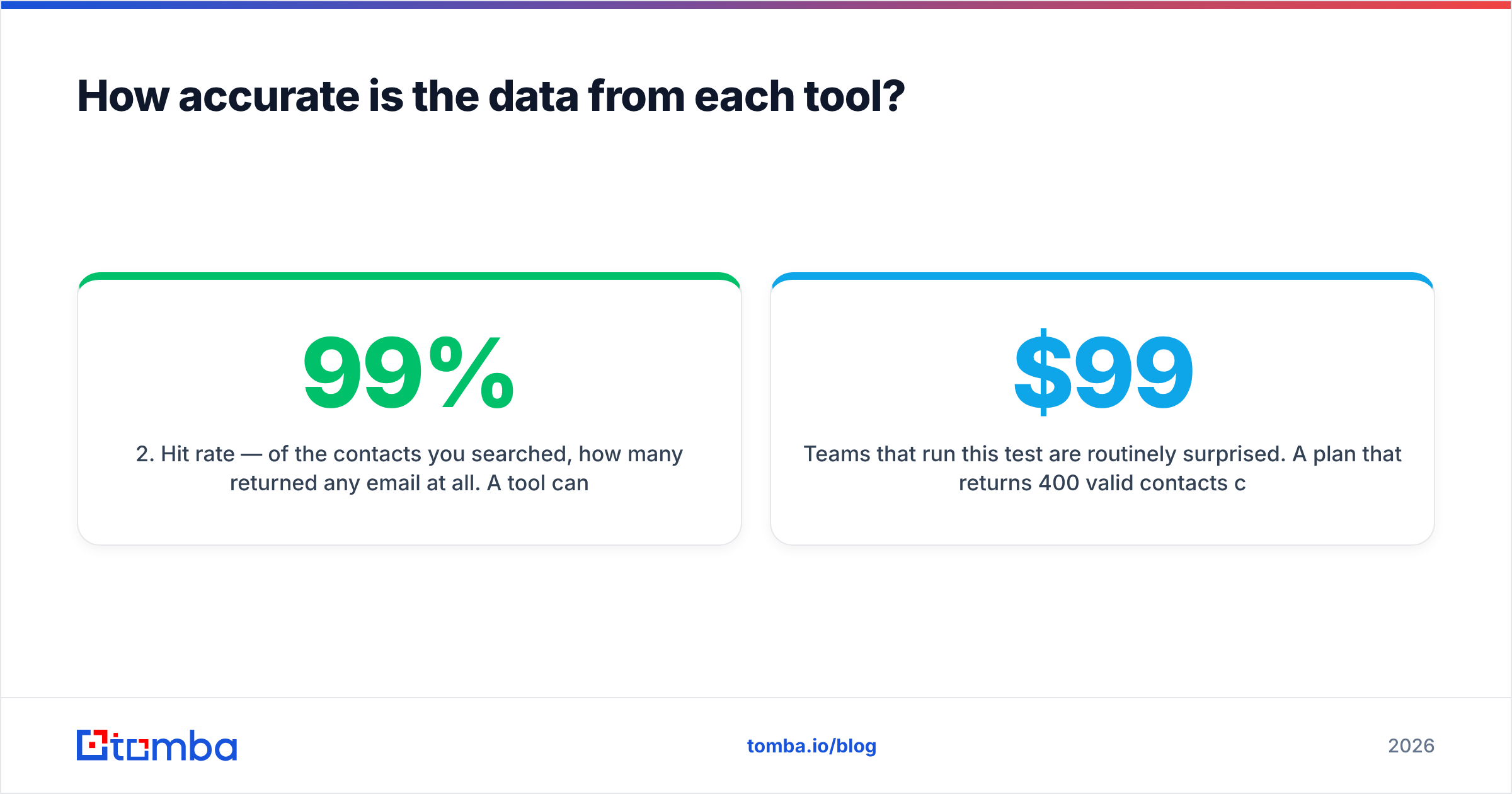
- Hit rate — of the contacts you searched, how many returned any email at all. A tool can post a 99% deliverability rate on a 40% hit rate and it means very little.
- Person-match accuracy — is this specific email actually the specific human you asked for. Almost nobody publishes this, and it's the number that determines reply rate.

FinalScout's LinkedIn-anchored approach scores well on person-match accuracy, because the identity anchor is strong. You're looking at one named human at one named employer. Where it degrades is pattern-guessing at companies with unusual or mixed email formats, and at catch-all domains where SMTP validation can't confirm anything. That's a structural limit, not a FinalScout flaw. Every prediction engine hits it.
Database exports invert the risk. Person-match is usually fine at export time. The failure mode is temporal — the record is stale. So never send to a bulk export without re-verifying it, whatever the vendor's guarantee says. Run every list through a catch-all verifier before it touches your sending domain. Catch-all records are exactly where a "verified" list hides its dead weight.
A practical benchmark to run yourself, on both tools, before you buy:
- Pull 100 contacts in your exact ICP from each tool.
- De-duplicate across the two lists so you're testing unique records.
- Verify independently with a third-party checker, not the vendor's own validator.
- Count three buckets: valid, catch-all/unknown, invalid.
- Divide your monthly cost by the count of valid-only records. That's your real cost per usable contact.
Teams that run this test are routinely surprised. A $99/month plan that returns 400 valid contacts costs more per lead than a $249/month plan returning 2,000.
What does each one cost in practice?#
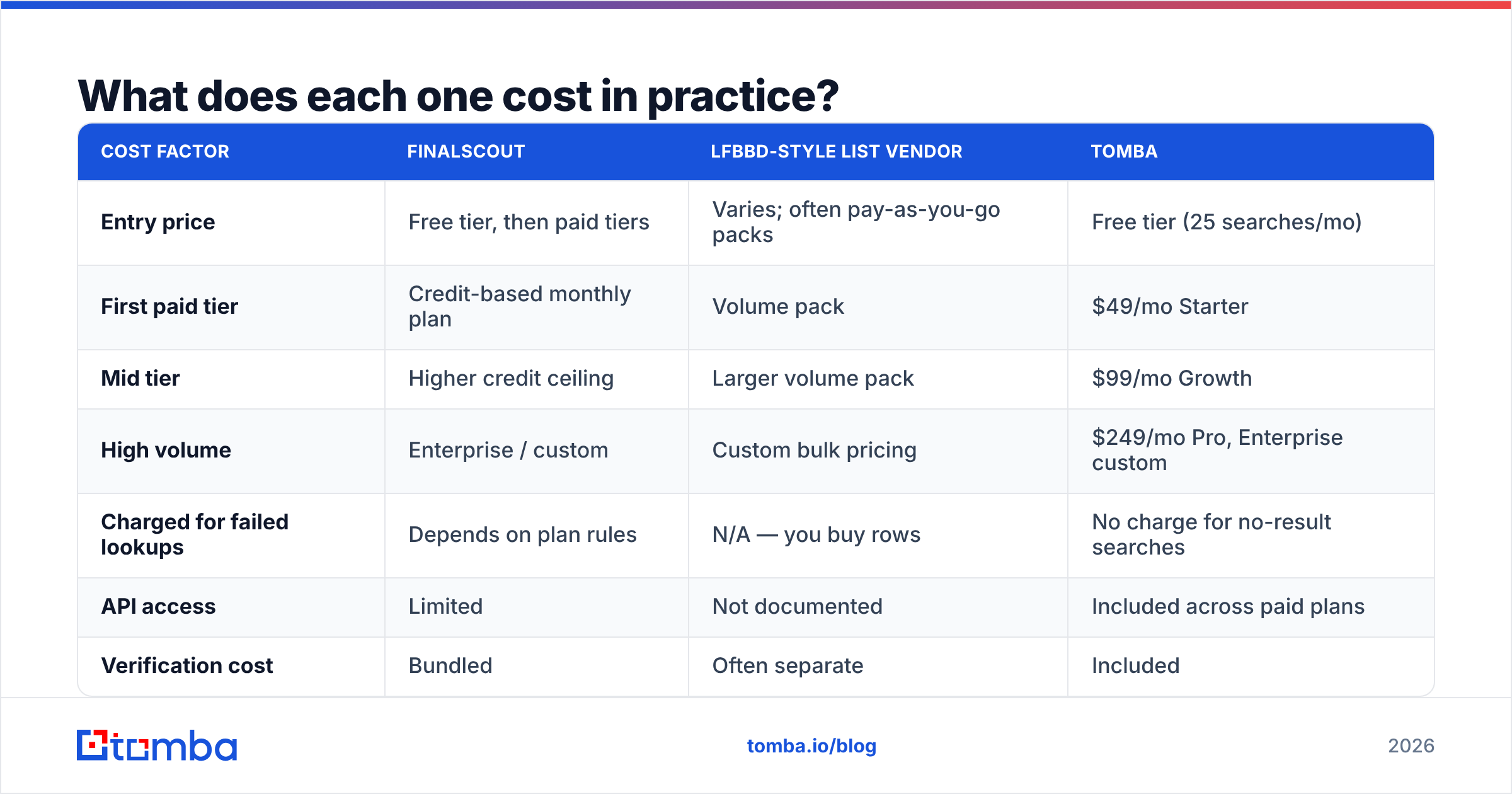
Both vendors adjust pricing often. Treat published tiers as directional and confirm on their own sites. The structural difference is what you should plan around. FinalScout charges per credit used in a UI-driven workflow. List vendors like LFBBD charge for the volume of rows you export.
| Cost factor | FinalScout | LFBBD-style list vendor | Tomba |
|---|---|---|---|
| Entry price | Free tier, then paid tiers | Varies; often pay-as-you-go packs | Free tier (25 searches/mo) |
| First paid tier | Credit-based monthly plan | Volume pack | $49/mo Starter |
| Mid tier | Higher credit ceiling | Larger volume pack | $99/mo Growth |
| High volume | Enterprise / custom | Custom bulk pricing | $249/mo Pro, Enterprise custom |
| Charged for failed lookups | Depends on plan rules | N/A — you buy rows | No charge for no-result searches |
| API access | Limited | Not documented | Included across paid plans |
| Verification cost | Bundled | Often separate | Included |
The line that matters most is "charged for failed lookups." If a tool debits a credit whether or not it returns a usable email, a nominal 5,000-credit plan might yield 2,000 sendable contacts. Read the credit policy before the feature list. You can sanity-check the arithmetic against published Tomba pricing. A free tier plus a $49/mo Starter is a useful reference point when a vendor's per-record math looks suspiciously cheap.
Two more cost traps worth naming:
- Seat-based multipliers. A $79/month tool for a five-rep team is a $395/month tool.
- Export caps. Some plans cap CSV rows per export or per day, which turns a "unlimited-ish" plan into a throttled one right when a campaign needs volume.
Which tool fits which workflow?#
Pick based on where your prospecting actually starts.
- You live in LinkedIn Sales Navigator — FinalScout is the natural fit. The extension sits where you already work, and the AI drafting removes a context switch. If your motion is 30 hand-picked accounts a week, this is the lower-friction option.
- You need 5,000 rows for a broad ABM push — a database vendor wins on pure throughput. Filter, export, verify, load. Just budget the verification step as non-optional.
- You start from a company or domain list — neither tool is ideal. This is domain search territory: give it a domain, get every discoverable public email at that company plus the format pattern, then predict the specific people you want.
- You need enrichment inside a product or CRM — you want an API, not a UI. If contacts arrive from form fills, website visitors, or a sync job, a UI-first tool becomes a manual bottleneck within a month.
- You're building lists at scale on a schedule — look at bulk email finder workflows and spreadsheet integrations rather than click-by-click extraction.

Where do both tools fall short?#
FinalScout's ceiling is LinkedIn's rules. LinkedIn's User Agreement restricts automated scraping and data extraction, and enforcement changes without notice. Any tool whose core dependency is browser-based extraction carries platform risk you don't control — rate limits, account restrictions, or a UI change that breaks the extension mid-campaign. That risk is manageable, not disqualifying. But price it in when you choose a system of record for prospecting.
LFBBD's ceiling is transparency. With any lower-profile list vendor, the questions to answer before paying are: where does the data originate, how often is it refreshed, is there a written bounce guarantee, and what's the compliance posture for GDPR and CCPA? Established vendors publish this. When a vendor doesn't, the burden shifts to you — which is exactly why the 100-record sample test above is worth the hour it takes.
Both share a third limitation: they stop at the email. Modern outbound needs the email, the verification status, the phone number, firmographic context, and a way to push all of it into your CRM automatically. Stitching that together from two point tools plus a separate verifier plus a Zapier chain is how prospecting stacks quietly reach $600/month for a three-person team.

Is there a better third option?#
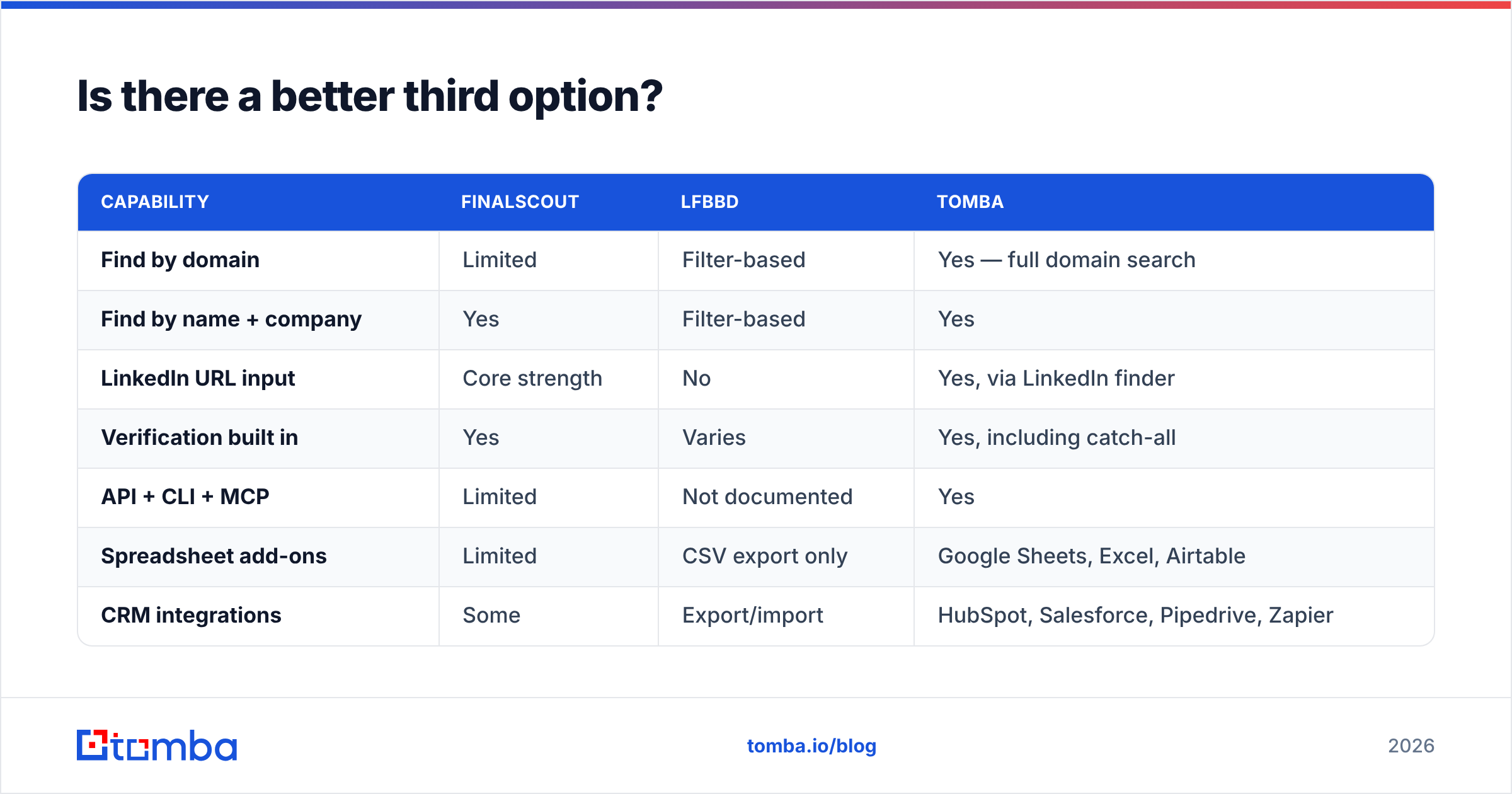
For most teams, the answer is a finder that treats email discovery as infrastructure rather than a browser plugin.
| Capability | FinalScout | LFBBD | Tomba |
|---|---|---|---|
| Find by domain | Limited | Filter-based | Yes — full domain search |
| Find by name + company | Yes | Filter-based | Yes |
| LinkedIn URL input | Core strength | No | Yes, via LinkedIn finder |
| Verification built in | Yes | Varies | Yes, including catch-all |
| API + CLI + MCP | Limited | Not documented | Yes |
| Spreadsheet add-ons | Limited | CSV export only | Google Sheets, Excel, Airtable |
| CRM integrations | Some | Export/import | HubSpot, Salesforce, Pipedrive, Zapier |
| Free tier | Yes | Varies | 25 searches/mo |
| Entry paid price | Credit plan | Volume pack | $49/mo |
The practical difference shows up when a workflow changes. If your team pivots from LinkedIn-sourced prospecting to inbound enrichment, a LinkedIn-bound tool doesn't come with you. An email finder API does — same credits, same account, new workflow.
None of this makes FinalScout a bad product. For a solo founder or an SDR whose entire day is Sales Navigator, its single-screen loop is genuinely efficient, and the bundled copywriting saves real minutes. A well-run list vendor is the right call when you need scale in one export and you're disciplined about re-verification. The mistake is buying either one as your permanent contact-data layer without checking whether it can be automated later.
How should you decide?#
FinalScout vs LFBBD is not a spec-sheet question. Run a two-week bake-off instead of reading feature pages.
- Week 1: pull 100 contacts from each candidate in your real ICP. No cherry-picking.
- Verify independently. Use a neutral checker so no vendor grades its own homework.
- Send to 50 from each. Track bounce rate, reply rate, and how many were the wrong person.
- Compute cost per reply, not cost per credit. That number ends the debate.
- Test the escape hatch. Ask each vendor for an API key or export their data into your CRM. Whatever breaks here will break worse at scale.
Most teams find that raw hit rates between reputable tools are close. Workflow fit and credit policy differ far more. The tool that skips charges for empty results, and plugs into the systems you already run, usually wins on total cost — even at a higher headline price.
Ready to test the alternative?#
If your prospecting starts from company domains, uploaded lists, or CRM records rather than one LinkedIn tab at a time, run the same 100-contact test against Tomba Email Finder. The free tier gives you 25 searches a month with no card. Verification is bundled rather than billed separately, and no-result lookups don't burn credits. So the cost per valid contact is the number you can actually plan a quarter around. Start free, run your own benchmark, and let the bounce rate pick the winner.
Related guides#
Ready to find emails that actually work?
Join 150,000+ professionals who stopped guessing and started sending. Free credits on signup — no credit card required.
Get the Tomba newsletter
Practical outbound tactics and product updates — once every two weeks.
About the author