FinalScout vs LimeLeads: Which B2B Lead Tool Wins in 2026?
FinalScout scrapes LinkedIn profiles into emails. LimeLeads sells you a pre-built US contact list. They solve different problems — and only one of them fits how your team actually prospects.
FinalScout vs LimeLeads is an odd matchup. One tool reads LinkedIn profiles. The other sells you a ready-made US contact list. Both get filed under "B2B lead tools," yet they solve different jobs. Here is how they split on data, price and fit.
TL;DR — what's the short answer?#
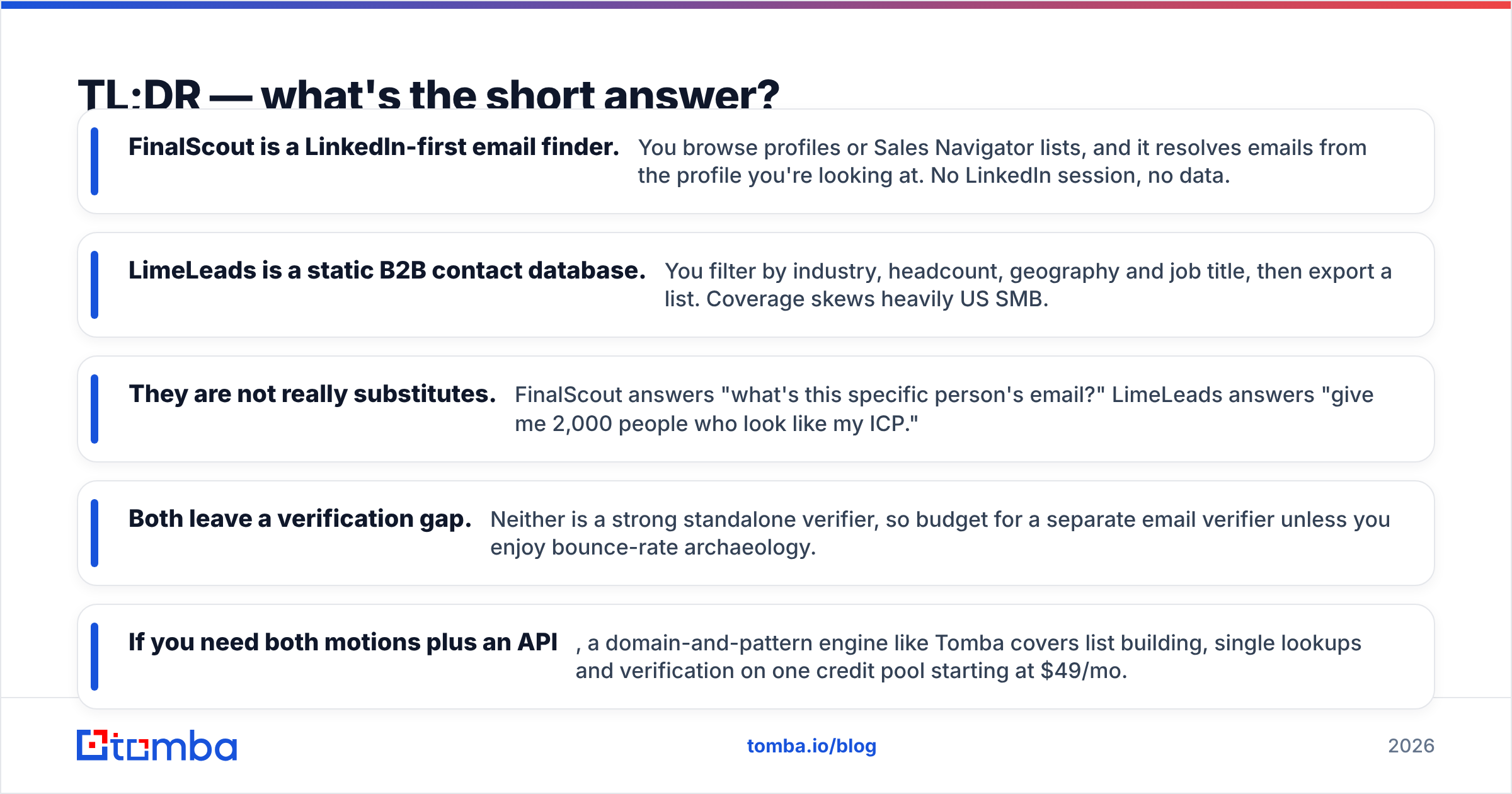
- FinalScout is a LinkedIn-first email finder. You browse profiles or Sales Navigator lists. It resolves an email from the profile in front of you. No LinkedIn session, no data.
- LimeLeads is a static B2B contact database. You filter by industry, headcount, geography and job title. Then you export a list. Coverage skews US SMB.
- They are not real substitutes. FinalScout answers "what is this person's email?" LimeLeads answers "give me 2,000 people who match my ICP."
- Both leave a verification gap. Neither one is a strong verifier. Budget for a separate email verifier unless you enjoy bounce-rate archaeology.
- Need both motions plus an API? A domain-and-pattern engine like Tomba covers list building, single lookups and verification on one credit pool from $49/mo.
What exactly are FinalScout and LimeLeads?#
They get lumped together in "B2B lead tool" listicles. They were built from opposite ends of the problem.
FinalScout is a Chrome extension plus a web app. It turns LinkedIn activity into contact data. Open a profile, a search page, a group member list or a Sales Navigator list, and FinalScout pulls out the person and tries to resolve a work email. It also ships an AI email writer that drafts outreach copy from the profile. That is the feature it markets hardest.
LimeLeads is a searchable database. No browser extension. No LinkedIn account. You log in and apply filters: industry, company size, revenue band, state, job function, technology. You preview matching contacts, then spend credits to unlock and export them. It is an old-school list vendor with a modern filter UI on top.
That gap drives everything else: pricing, data freshness, compliance risk, and who on your team can actually use it.

FinalScout vs LimeLeads: how do they compare feature by feature?#
Here is the head-to-head on the attributes that change your workflow. Prices reflect published list pricing at the time of writing. Both vendors revise tiers, so check their sites before you commit budget.
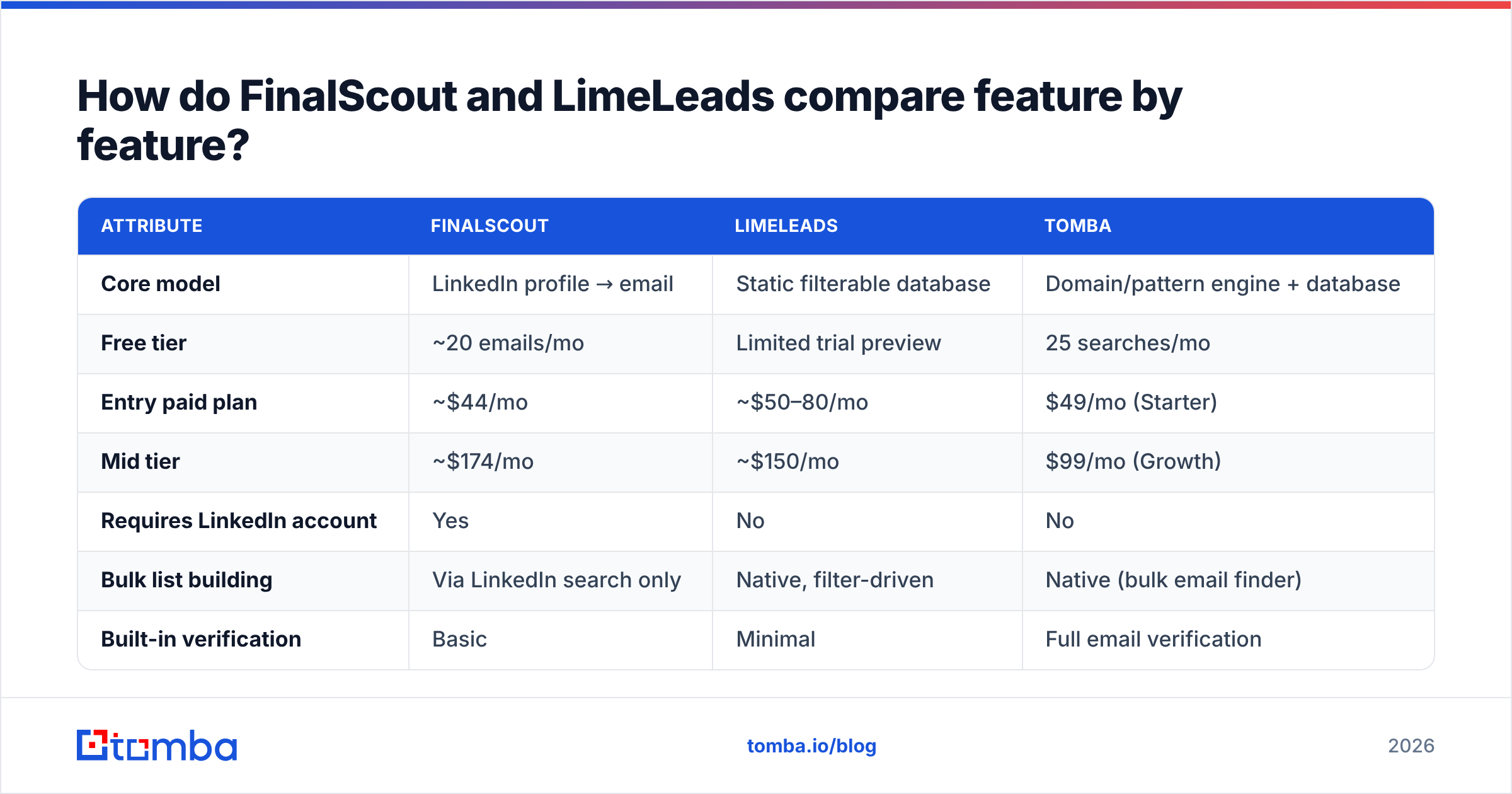
| Attribute | FinalScout | LimeLeads | Tomba |
|---|---|---|---|
| Core model | LinkedIn profile → email | Static filterable database | Domain/pattern engine + database |
| Free tier | ~20 emails/mo | Limited trial preview | 25 searches/mo |
| Entry paid plan | ~$44/mo | ~$50–80/mo | $49/mo (Starter) |
| Mid tier | ~$174/mo | ~$150/mo | $99/mo (Growth) |
| Requires LinkedIn account | Yes | No | No |
| Bulk list building | Via LinkedIn search only | Native, filter-driven | Native (bulk email finder) |
| Built-in verification | Basic | Minimal | Full email verification |
| Public API | Limited | No documented public API | Yes (Tomba API) |
| Geographic strength | Global (LinkedIn-bound) | Heavily US | Global |
| AI email drafting | Yes (headline feature) | No | Via free cold email AI |
The row that matters most is "requires LinkedIn account." FinalScout's ceiling is your LinkedIn plan's ceiling. A free LinkedIn account caps your searches. Sales Navigator lifts the cap, but it adds about $99/mo to the real cost. People who call FinalScout cheap rarely count that line.
Which one has better data accuracy?#
Neither vendor publishes an audited accuracy number. Treat the claims — including FinalScout's "98% deliverability" — as a target, not a measurement.
You can still reason about how each one goes wrong.
FinalScout fails on stale profiles. LinkedIn profiles are self-reported. Someone who left in March may not update the headline until October. FinalScout resolves an email at the company it thinks they still work for. You send it, and it bounces. The profile looks perfect. The mailbox is gone.
LimeLeads fails on database decay. Static B2B databases lose 22–30% of records to job changes every year. That is an industry problem, not a LimeLeads quirk. If a slice of the index is old, you pay full price for it and learn the truth from your bounce report.

The defense is the same for both tools: never send to an unverified export. Run every list through a verifier that does SMTP-level checks. It should flag catch-all domains on their own, because catch-all servers accept any address at the gateway and bounce later. A catch-all verifier tells you the difference between "valid" and "the server says yes to anything."
Which tool fits which team?#
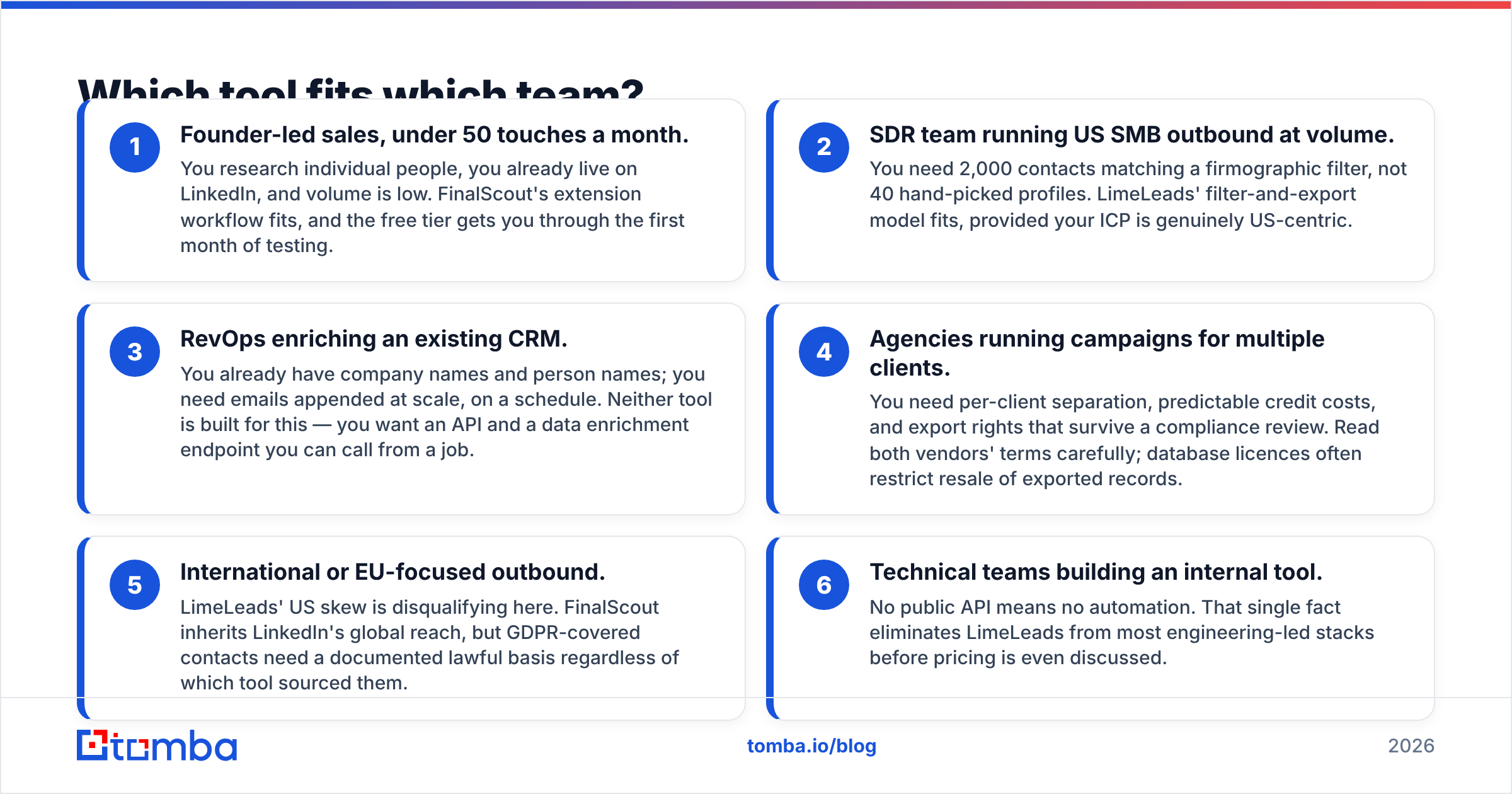
Skip the generic winner. Match the tool to how you prospect. Three cases first:
- Founder-led sales, under 50 touches a month. You research people one at a time. You already live on LinkedIn. Volume is low. FinalScout's extension fits, and the free tier covers a first month of testing.
- SDR team running US SMB outbound at volume. You need 2,000 contacts that match a firmographic filter, not 40 hand-picked profiles. LimeLeads fits, as long as your ICP really is US-centric.
- RevOps enriching an existing CRM. You have company and person names already. You need emails appended at scale, on a schedule. Neither tool is built for that. You want an API and a data enrichment endpoint you can call from a job.
Three more cases where neither tool is a clean fit:
- Agencies running campaigns for several clients. You need per-client separation, predictable credit costs, and export rights that survive a compliance review. Read both contracts. Database licences often bar resale of exported records.
- International or EU-focused outbound. LimeLeads' US skew rules it out. FinalScout inherits LinkedIn's global reach, but GDPR contacts still need a documented lawful basis.
- Technical teams building an internal tool. No public API means no automation. That one fact drops LimeLeads before you reach pricing.
How do the pricing models actually differ?#
FinalScout charges per email revealed, in monthly tiers. Unused credits usually do not roll over. LimeLeads charges per contact unlocked, also in tiers. The models look alike. The cost per usable contact is not alike.
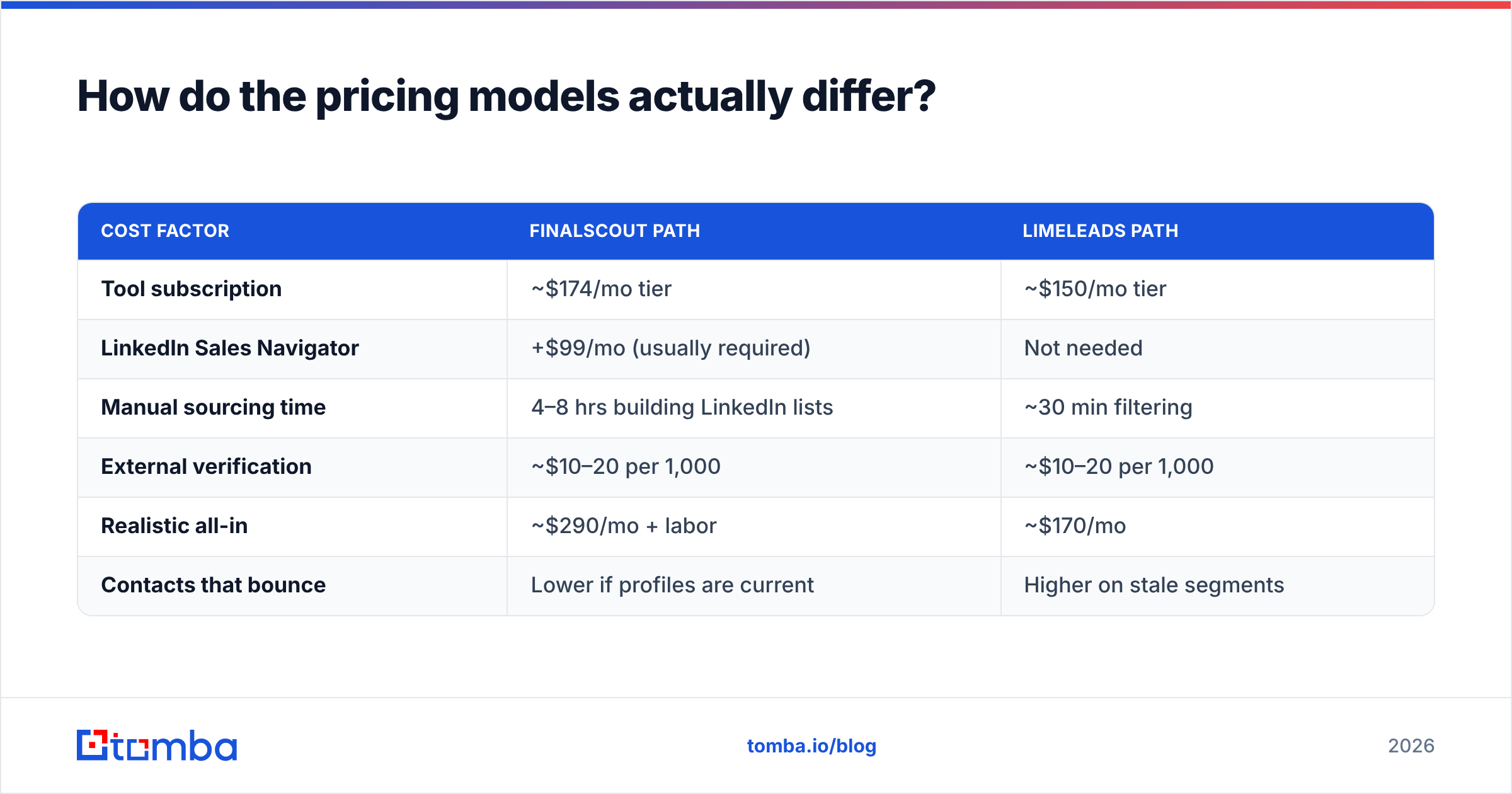
Run the math on 1,000 contacts:
| Cost factor | FinalScout path | LimeLeads path |
|---|---|---|
| Tool subscription | ~$174/mo tier | ~$150/mo tier |
| LinkedIn Sales Navigator | +$99/mo (usually required) | Not needed |
| Manual sourcing time | 4–8 hrs building LinkedIn lists | ~30 min filtering |
| External verification | ~$10–20 per 1,000 | ~$10–20 per 1,000 |
| Realistic all-in | ~$290/mo + labor | ~$170/mo |
| Contacts that bounce | Lower if profiles are current | Higher on stale segments |
LimeLeads looks cheaper on paper, because it needs no LinkedIn subscription. FinalScout looks more accurate, because it works from a live profile. Both claims hold only under conditions. LimeLeads is cheaper if your ICP sits inside its US index. FinalScout is more accurate if the profiles you scrape are kept current.
Tomba pricing puts finding and verification on one credit pool: Free at 25 searches/mo, Starter at $49/mo, Growth at $99/mo, Pro at $249/mo. You do not pay two vendors for one job, and no LinkedIn subscription hides inside the real cost.

Is FinalScout's AI email writer worth the premium?#
Honestly? It is the weakest reason to pick either tool.
FinalScout's AI drafts a message from the profile: job title, company, recent posts. The output is competent and generic. That is the problem in 2026. Prospects have read thousands of "I noticed you're the VP of Engineering at [Company]" openers. Personalization that any tool can generate from a public profile is not personalization. It is mail merge with extra steps.
If AI drafting is a hard requirement, note that it is table stakes now. Free subject line generators and AI writers exist outside any data plan. Buying a data tool for its copy features means paying database prices for a text box.
Judge these two on data. That is what you are buying.
What are the compliance and export-rights differences?#
This section costs teams more than pricing does. Almost nobody reads it before signing.
LinkedIn scraping and the ToS. LinkedIn's User Agreement bans automated data extraction. FinalScout sits in the same grey zone as every LinkedIn extension. Enforcement is account-level and sporadic, and it lands on you, not the vendor. Restricted accounts do happen. If your LinkedIn profile is a core sales asset, weigh that risk. "Everyone does it" is not a defense.
Database licensing. Purchased contact databases are usually licensed for your own use only. Reselling an exported list, or handing it to a client as a deliverable, often breaks the agreement. Agencies get caught by this all the time.
GDPR and lawful basis. Neither tool gives you a lawful basis to email EU contacts. You need your own legitimate-interest assessment, a working opt-out, and honest source notes. No regulator has ever accepted "the vendor said it was compliant." Being open about data sources matters here. You should be able to say where a record came from.
Deliverability follow-through. Sourcing sits upstream of sending. A perfect list still dies against a weak sending setup. Check your SPF record, warm your domains, and cap daily volume. Reputation damage from one bad list outlives the tool that supplied it.
Are there better alternatives to both?#
It depends on which failure mode bothers you more.
If the LinkedIn dependency is the blocker, you want a tool that finds emails from a name and a domain, with no social login. Domain search returns every public address at a company from the domain alone. That is faster than scraping profiles one by one, and it leaves your LinkedIn account alone. If you still want LinkedIn coverage, a LinkedIn finder works straight from profile URLs.
If the US-only skew is the blocker, you need global coverage and live lookups instead of a pre-built index. Pattern-based discovery works anywhere a company has a public domain, which is close to everywhere.
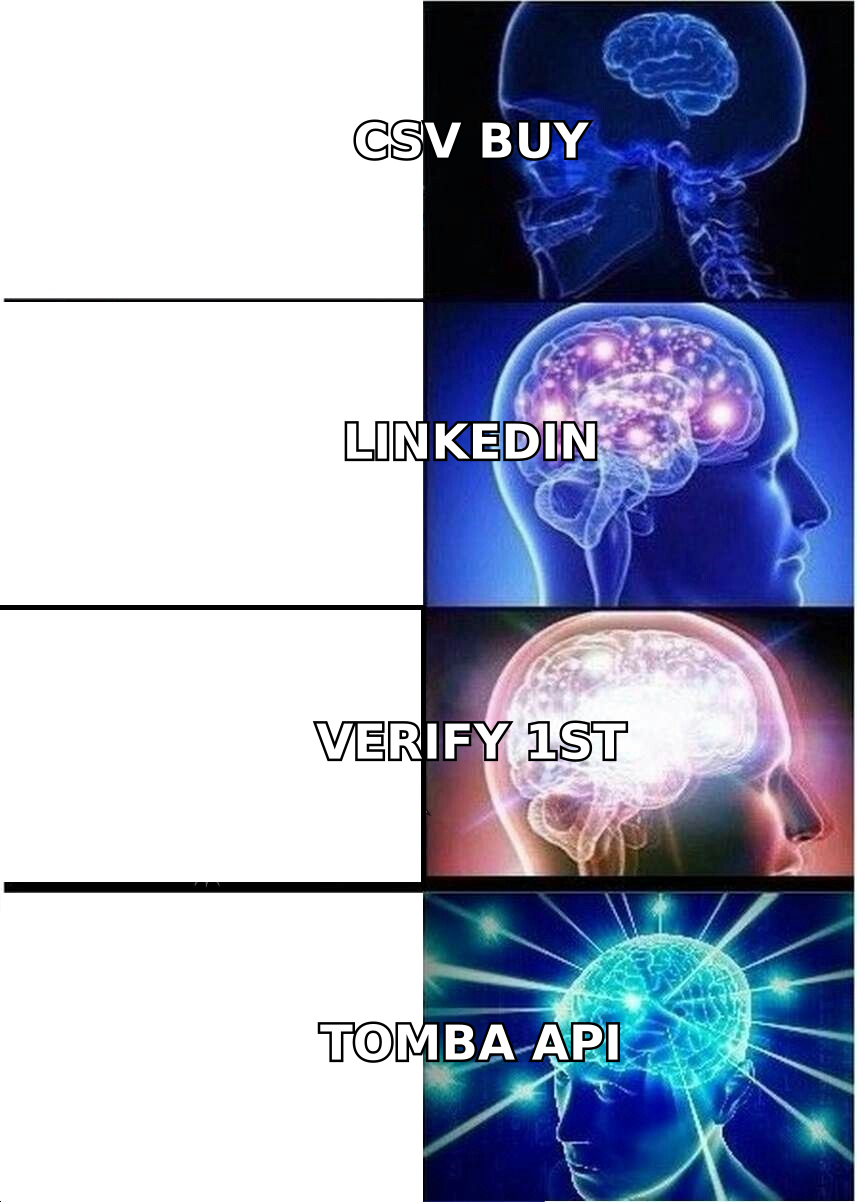
If you need both motions, one vendor is usually cheaper than two plus a verifier. That is the case for a single provider with an email finder API, bulk processing and verification on one plan.
Check peer reviews on G2 before you commit. Support quality and refund behavior show up there far more reliably than on any vendor comparison page, this one included.
So which should you pick?#
The FinalScout vs LimeLeads call comes down to where your leads start.
Pick FinalScout if LinkedIn is where your prospecting starts, your volume is low, and you already pay for Sales Navigator. The extension is smooth and the free tier makes testing cheap.
Pick LimeLeads if you sell to US SMBs, you need volume fast, you want firmographic filters, and you have no engineering needs. It is a plain list builder that does one job.
Pick neither if you need API access, non-US coverage, or built-in verification. At that point you are buying two tools plus a verifier to do one job.
Start with the free tier of each. Pull 25 contacts from your real ICP — not a demo segment — verify them with an outside checker, and compare hit rates. Two hours of testing beats six months of a subscription that never fit.
Ready to skip the two-vendor tax? The Tomba Email Finder finds professional emails by domain, name or company. It verifies them in the same workflow and exposes everything through a documented API. Coverage is global rather than US-only, and no LinkedIn session is required. Start free with 25 searches a month, or move to Starter at $49/mo when your pipeline needs the volume.
Related guides#
Ready to find emails that actually work?
Join 150,000+ professionals who stopped guessing and started sending. Free credits on signup — no credit card required.
Get the Tomba newsletter
Practical outbound tactics and product updates — once every two weeks.
About the author