FinalScout vs Market Location: Which B2B Data Tool Wins
FinalScout scrapes LinkedIn for emails. Market Location licenses UK business files. They solve different problems — and picking the wrong one wastes a quarter of pipeline. Here is the honest breakdown.
TL;DR
- FinalScout is a self-serve, LinkedIn-first email finder. You browse profiles or a Sales Navigator search, export contacts, and it predicts and validates business emails on the fly.
- Market Location is a UK-focused B2B data house. You buy or license a file of businesses — firmographics, telephone numbers, decision-maker names, postal data — usually through a salesperson and a contract, not a checkout page.
- They are not really competitors. FinalScout wins when your ICP lives on LinkedIn and you prospect person-by-person. Market Location wins when you need broad UK market coverage, SIC-code segmentation, or telemarketing and direct-mail data.
- Cost models differ more than features: FinalScout is a monthly credit subscription; Market Location is quote-based licensing with minimum order sizes and usage terms.
- If you want API-first email discovery that plugs into your own stack — no LinkedIn dependency, no annual licence — a general email finder like Tomba sits between the two and usually costs less than either.
What are FinalScout and Market Location?#
FinalScout (finalscout.com) is a browser-extension and web app built around LinkedIn. Its pitch is simple: find a person on LinkedIn, get their work email, and optionally have an AI assistant draft the outreach message. It exports from profiles, search results, Sales Navigator lists, group members, and event attendees. The company advertises high deliverability on the emails it returns, because it validates before it hands the address back.
Market Location (marketlocation.co.uk) comes from the opposite tradition. It is a long-established UK business data provider — the kind of company that has been compiling and telephone-verifying company records since before "sales tech" was a category. You specify a target universe (industry, region, turnover, employee band, decision-maker job function), they scope a count, and you licence the records for a defined period and use case.
One is a prospecting tool. The other is a data supply contract. That distinction drives almost every difference below.
How do FinalScout and Market Location source their data?#
The sourcing model tells you what the data will and won't do for you:
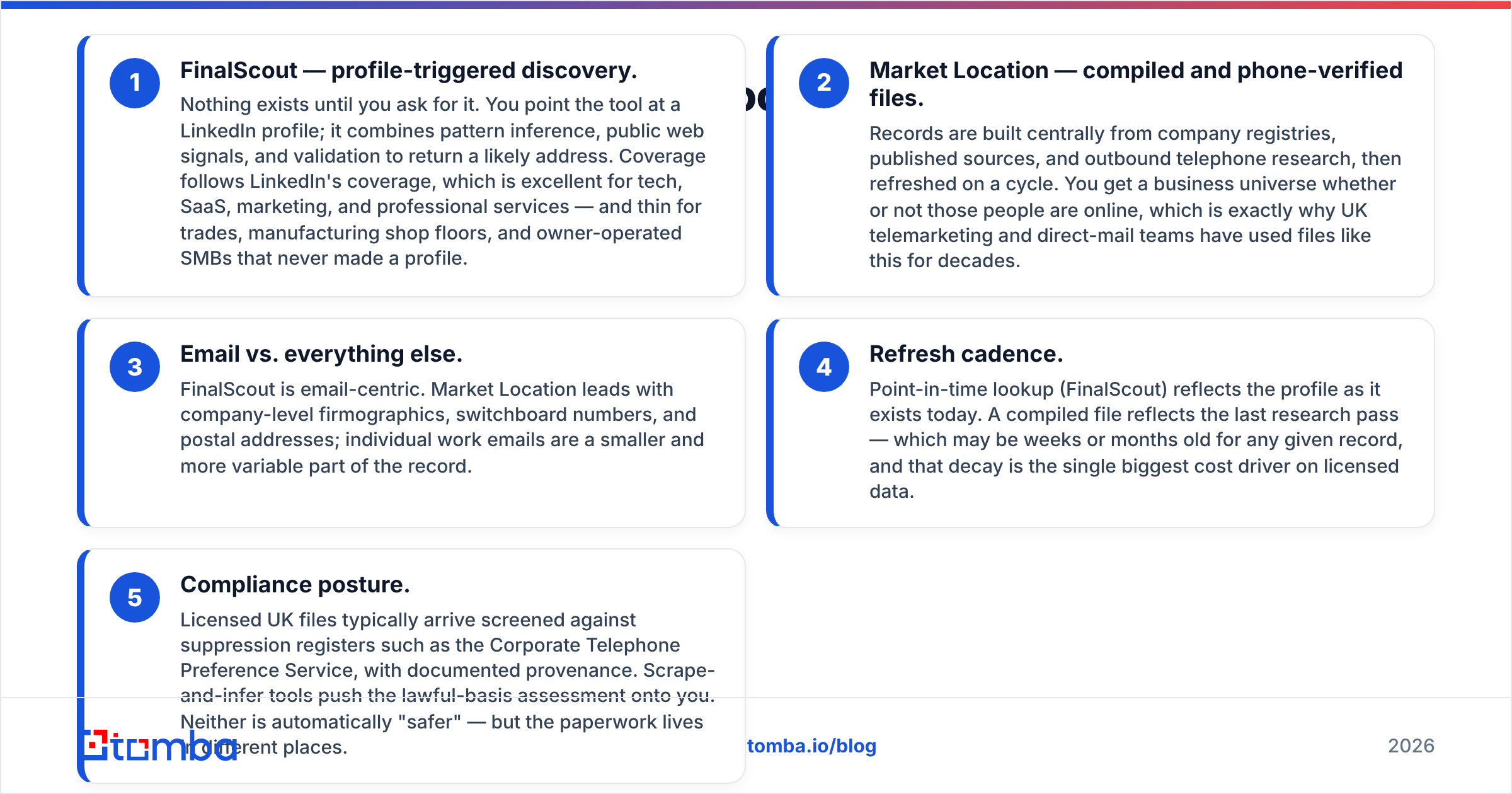
- FinalScout — profile-triggered discovery. Nothing exists until you ask for it. You point the tool at a LinkedIn profile; it combines pattern inference, public web signals, and validation to return a likely address. Coverage follows LinkedIn's coverage, which is excellent for tech, SaaS, marketing, and professional services — and thin for trades, manufacturing shop floors, and owner-operated SMBs that never made a profile.
- Market Location — compiled and phone-verified files. Records are built centrally from company registries, published sources, and outbound telephone research, then refreshed on a cycle. You get a business universe whether or not those people are online, which is exactly why UK telemarketing and direct-mail teams have used files like this for decades.
- Email vs. everything else. FinalScout is email-centric. Market Location leads with company-level firmographics, switchboard numbers, and postal addresses; individual work emails are a smaller and more variable part of the record.
- Refresh cadence. Point-in-time lookup (FinalScout) reflects the profile as it exists today. A compiled file reflects the last research pass — which may be weeks or months old for any given record, and that decay is the single biggest cost driver on licensed data.
- Compliance posture. Licensed UK files typically arrive screened against suppression registers such as the Corporate Telephone Preference Service, with documented provenance. Scrape-and-infer tools push the lawful-basis assessment onto you. Neither is automatically "safer" — but the paperwork lives in different places.

FinalScout vs Market Location: how do they compare head-to-head?#
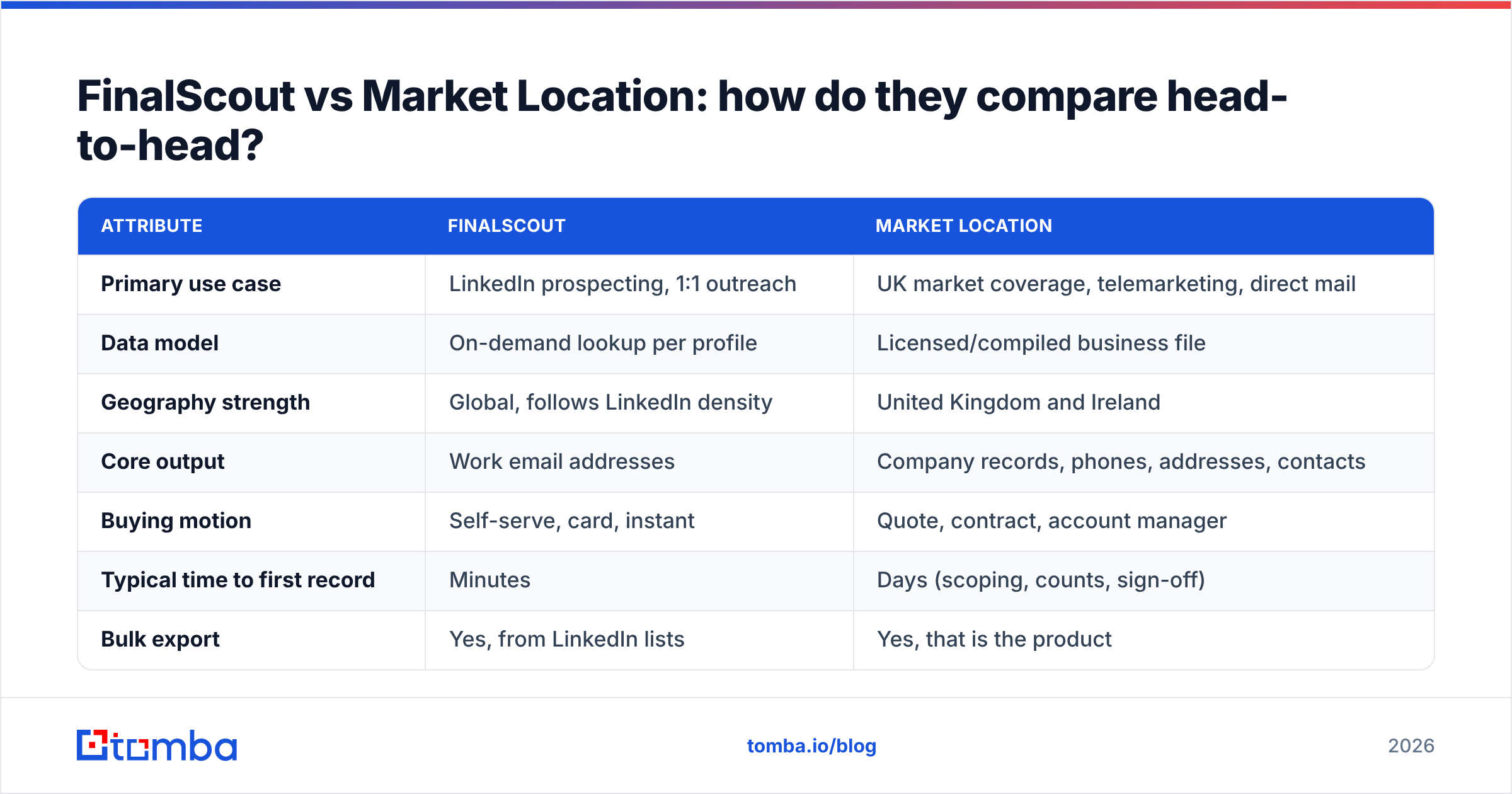
| Attribute | FinalScout | Market Location |
|---|---|---|
| Primary use case | LinkedIn prospecting, 1:1 outreach | UK market coverage, telemarketing, direct mail |
| Data model | On-demand lookup per profile | Licensed/compiled business file |
| Geography strength | Global, follows LinkedIn density | United Kingdom and Ireland |
| Core output | Work email addresses | Company records, phones, addresses, contacts |
| Buying motion | Self-serve, card, instant | Quote, contract, account manager |
| Typical time to first record | Minutes | Days (scoping, counts, sign-off) |
| Bulk export | Yes, from LinkedIn lists | Yes, that is the product |
| API | Limited | Available via data feed arrangements |
| Verification included | Yes, pre-delivery validation | Telephone-verified company data |
| Best for | SDRs, founders, recruiters | UK field sales, telesales, marketing ops |

The table hides one practical point worth stating plainly: FinalScout gives you names fast, Market Location gives you a market. If you cannot describe your target as "these 4,000 UK manufacturers with 50–250 staff in the Midlands", the licensed-file model gives you nothing you can't get faster elsewhere. If you can describe it exactly that way, LinkedIn scraping will take you weeks to approximate — and you will miss every business without a modern digital footprint.
Which one is more accurate?#
Accuracy means two different things here, and vendors exploit the ambiguity.
Deliverability accuracy is the share of returned emails that don't bounce. This is FinalScout's home turf, and any tool that validates before delivery will post a strong number — because it simply withholds the addresses it isn't confident about. Watch the metric underneath it: hit rate, the share of contacts you asked about that came back with any address at all. A tool with 97% deliverability and a 42% hit rate leaves more than half your list unworked.
Record accuracy is whether the person still holds that job, at that company, at that site. This is where compiled files lose ground fastest and where telephone-verified data earns its premium. UK B2B contact decay runs high — job changes, mergers, and site closures churn the file constantly — so a record researched nine months ago is materially worse than one researched last week, regardless of how it was sourced.

The defensible workflow, whichever vendor you pick, is to treat every acquired address as a candidate rather than a fact. Run a fresh email verification pass immediately before send, not at import time, and re-check anything older than 60 days. On domains that accept everything, a dedicated catch-all verifier is the only way to avoid either blind-sending or discarding perfectly good contacts. Both vendors' quality claims are measured at delivery; your bounce rate is measured at send. Those are not the same moment.
What do they cost in 2026?#
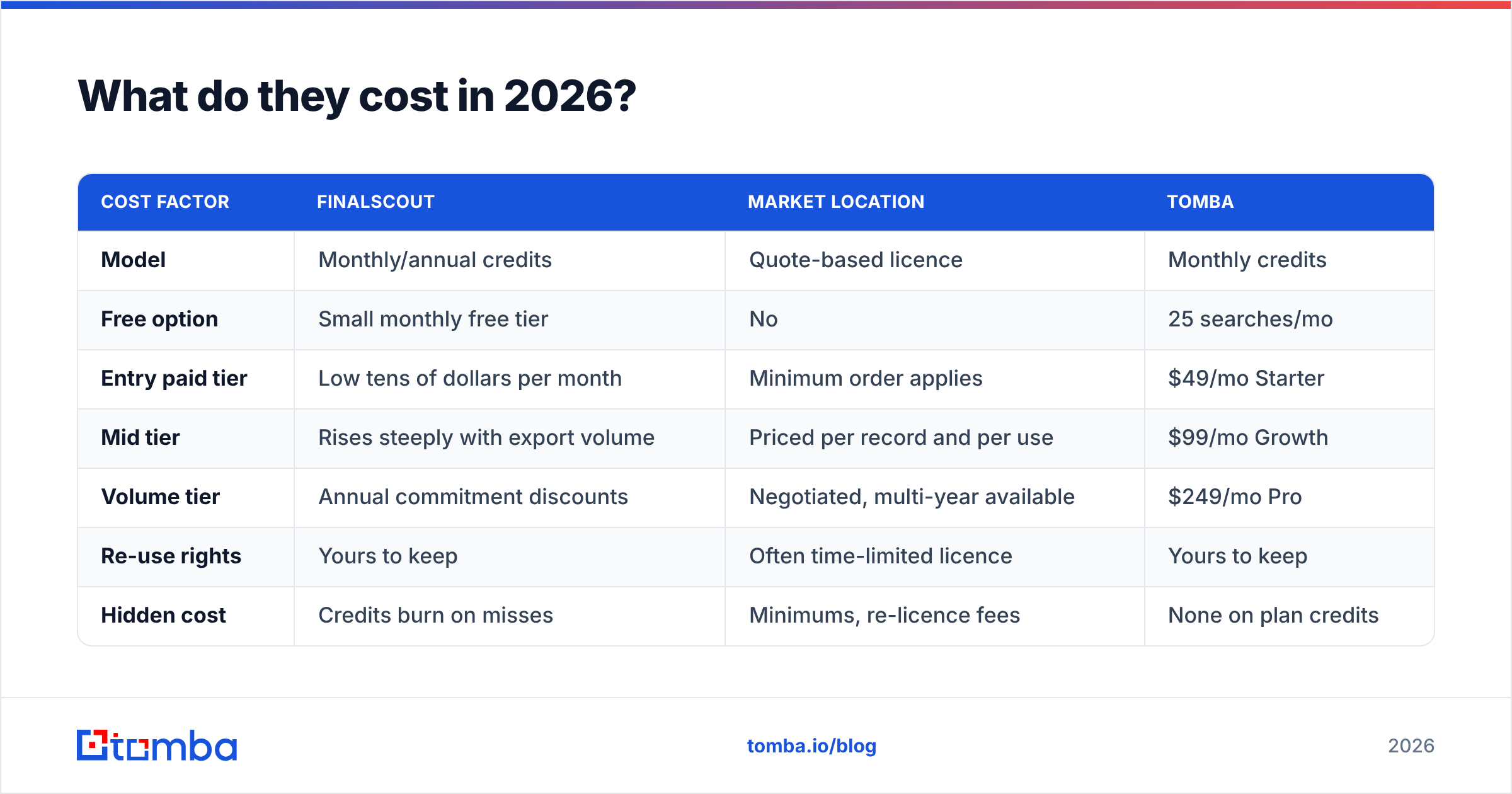
Pricing is the least comparable part of this matchup, so treat the shape of the model as more important than any single figure — and confirm current numbers on each vendor's own page before you commit.
| Cost factor | FinalScout | Market Location | Tomba |
|---|---|---|---|
| Model | Monthly/annual credits | Quote-based licence | Monthly credits |
| Free option | Small monthly free tier | No | 25 searches/mo |
| Entry paid tier | Low tens of dollars per month | Minimum order applies | $49/mo Starter |
| Mid tier | Rises steeply with export volume | Priced per record and per use | $99/mo Growth |
| Volume tier | Annual commitment discounts | Negotiated, multi-year available | $249/mo Pro |
| Re-use rights | Yours to keep | Often time-limited licence | Yours to keep |
| Hidden cost | Credits burn on misses | Minimums, re-licence fees | None on plan credits |
Two traps show up repeatedly in procurement reviews:
- Credit burn on failed lookups. Ask, in writing, whether a search that returns nothing consumes a credit. On a 45% hit rate, that single clause changes your real cost per usable email by more than double.
- Licence expiry on "purchased" data. Compiled UK files are frequently licensed for a fixed term or a fixed number of campaigns rather than sold outright. If you plan to load records permanently into your CRM, that has to be in the contract — retrospective re-licence fees are an unpleasant surprise. Compare that with straightforward Tomba pricing, where the contacts you find stay yours.
Which should you pick for your use case?#
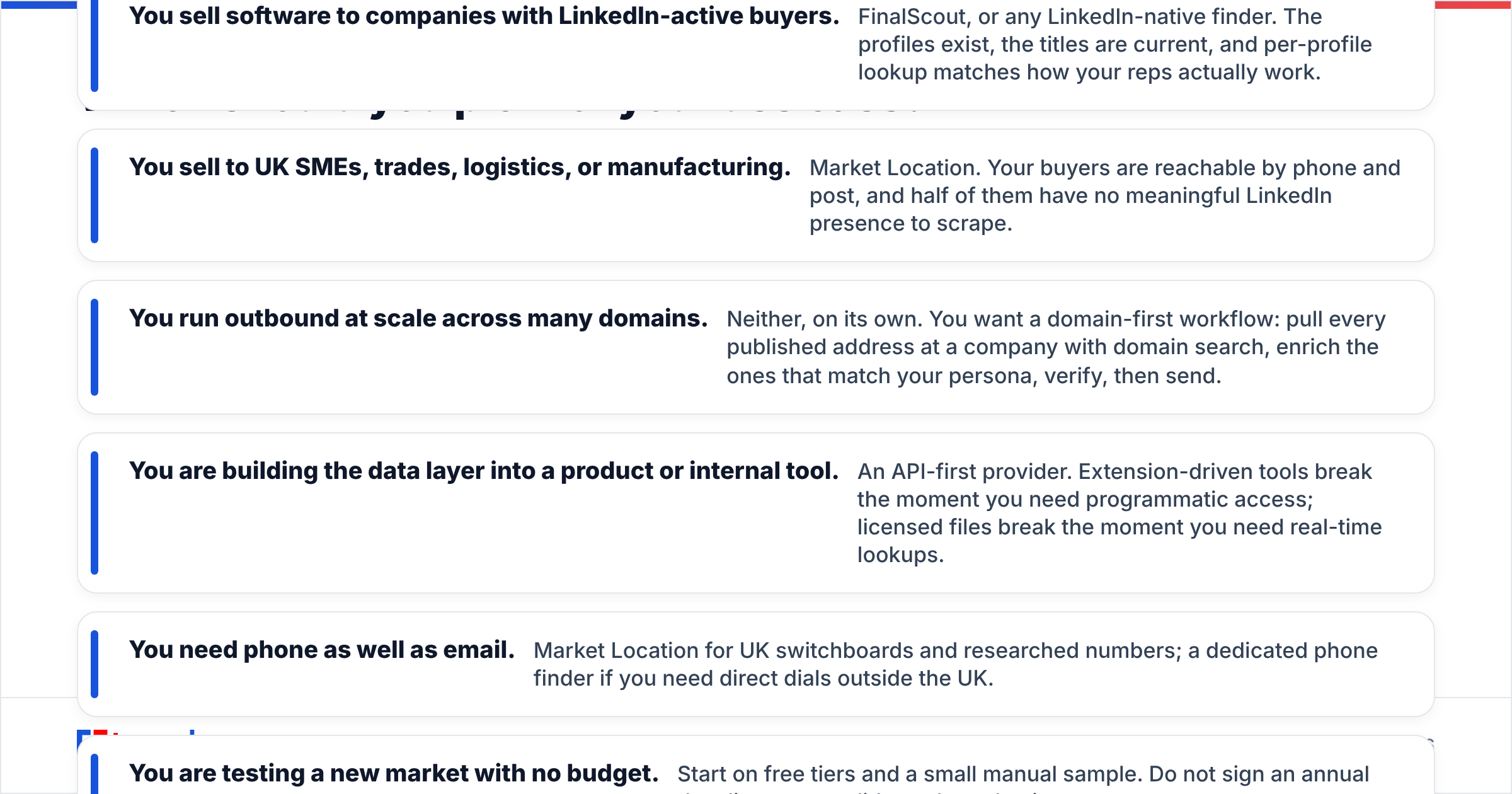
- You sell software to companies with LinkedIn-active buyers. FinalScout, or any LinkedIn-native finder. The profiles exist, the titles are current, and per-profile lookup matches how your reps actually work.
- You sell to UK SMEs, trades, logistics, or manufacturing. Market Location. Your buyers are reachable by phone and post, and half of them have no meaningful LinkedIn presence to scrape.
- You run outbound at scale across many domains. Neither, on its own. You want a domain-first workflow: pull every published address at a company with domain search, enrich the ones that match your persona, verify, then send.
- You are building the data layer into a product or internal tool. An API-first provider. Extension-driven tools break the moment you need programmatic access; licensed files break the moment you need real-time lookups.
- You need phone as well as email. Market Location for UK switchboards and researched numbers; a dedicated phone finder if you need direct dials outside the UK.
- You are testing a new market with no budget. Start on free tiers and a small manual sample. Do not sign an annual data licence to validate a hypothesis.

Where does Tomba fit between them?#
Tomba occupies the gap both vendors leave open: programmatic, global email discovery that isn't tied to a LinkedIn session or a regional file.
Practically, that means you can hit the email finder API from your own enrichment job, resolve a person from a company domain plus a name, verify the result in the same call chain, and store it permanently. There is no browser extension to babysit, no seat-based LinkedIn risk, and no minimum order. For teams that already bought a UK file, Tomba is often used as the repair layer — take the company records that came with no usable email and fill them in, rather than re-licensing a more expensive tier.
The honest limitations: Tomba won't reconstruct a UK SIC-coded market universe for you the way a compiled file does, and it won't write your outreach copy the way FinalScout's AI assistant will. Those are genuinely different products, and pretending otherwise helps no one.
What is the verdict?#
There is no single winner, because the two tools answer different questions.
Pick FinalScout if your prospecting starts with a person on LinkedIn and ends with an email you send yourself. It is fast, self-serve, and priced for individuals and small teams.
Pick Market Location if your prospecting starts with a market definition — "UK, this sector, this size band" — and you need reach into businesses that never went digital. Budget for the contract cycle and read the licence terms on data retention.
Pick a general email-finder API if the bottleneck is neither discovery inspiration nor market definition, but the plumbing: getting verified addresses into your CRM, your sequencer, and your product, at volume, without a per-seat extension or an annual licence. Check independent user reviews on G2 for each before you commit, and always run a live sample against 100 records you already know — vendor-published accuracy numbers are measured on their terms, not yours.
Whatever you choose, verify at send time. That single habit protects sender reputation more reliably than any vendor guarantee on a slide.
Ready to test it against your own list? Run 25 free searches through the Tomba Email Finder — no card, no sales call — and compare the hit rate and bounce rate directly against whatever FinalScout or Market Location returns for the same companies. Ten minutes of side-by-side testing beats ten pages of feature comparison, including this one.
Related guides#
Ready to find emails that actually work?
Join 150,000+ professionals who stopped guessing and started sending. Free credits on signup — no credit card required.
Get the Tomba newsletter
Practical outbound tactics and product updates — once every two weeks.
About the author