FinalScout vs ReachStream: Which B2B Data Tool Wins?
FinalScout scrapes LinkedIn profiles one at a time. ReachStream sells you a static contact list. They solve different problems badly if you pick the wrong one — here is the honest breakdown, plus what actually beats both.
TL;DR
- FinalScout is a LinkedIn-first extraction tool. You browse profiles or Sales Navigator lists, and it pulls emails from the people you already found. No LinkedIn session, no data.
- ReachStream is a static B2B database. You filter by industry, title, geography, and revenue, then export contacts. No browsing required, but no live verification at the moment of export either.
- They are not really competitors. One is a capture tool, the other is a list tool. Picking the wrong category costs you more than picking the wrong vendor.
- Both leak margin at scale. FinalScout ties throughput to a human clicking through LinkedIn; ReachStream ties accuracy to how fresh its last refresh cycle was.
- If your workflow is API-driven or domain-driven, a dedicated email finder with real-time SMTP verification usually beats both on cost per usable contact.
What are FinalScout and ReachStream?#
Different tools, different failure modes.
FinalScout is a Chrome extension plus web app built around LinkedIn. You install it, log into LinkedIn, and it surfaces email addresses for profiles, search results, group members, event attendees, and post engagers. It also bolts on AI email drafting, which is a pleasant extra but not the reason anyone buys it. The core value proposition is: you already know who you want; get me their inbox.
ReachStream is a contact database. You log into a web platform, apply filters — industry, job function, seniority, employee count, revenue band, location — and export a list of contacts with emails, phone numbers, and firmographics. The core value proposition is the opposite: I know the shape of my buyer; go find me a thousand of them.
That distinction drives everything downstream. FinalScout's ceiling is how many profiles a human can load. ReachStream's ceiling is how recently its records were refreshed. Neither problem is solvable by the other tool.

How does each tool actually find contact data?#
Here is the mechanical difference, which matters more than any feature list.
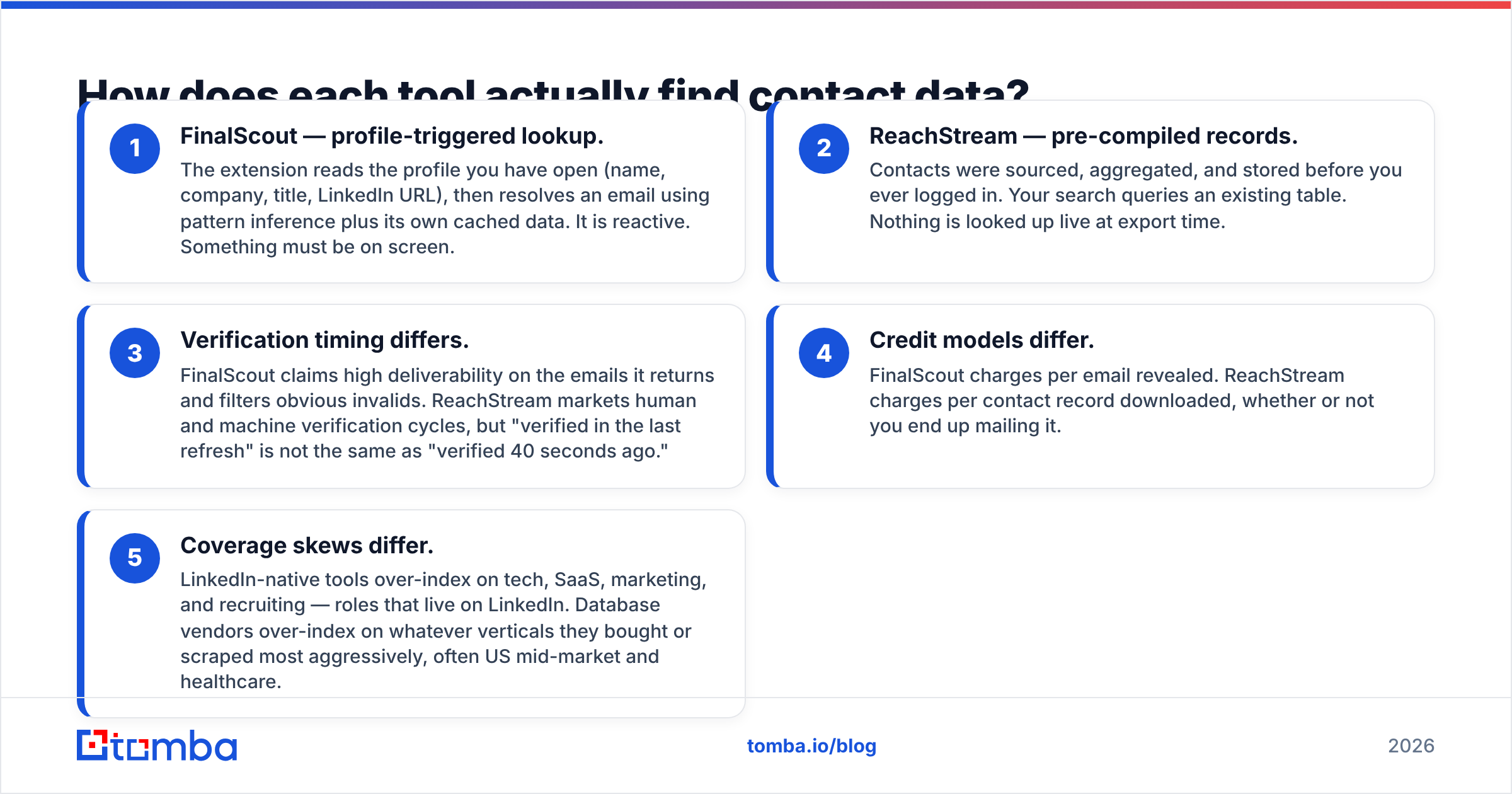
- FinalScout — profile-triggered lookup. The extension reads the profile you have open (name, company, title, LinkedIn URL), then resolves an email using pattern inference plus its own cached data. It is reactive. Something must be on screen.
- ReachStream — pre-compiled records. Contacts were sourced, aggregated, and stored before you ever logged in. Your search queries an existing table. Nothing is looked up live at export time.
- Verification timing differs. FinalScout claims high deliverability on the emails it returns and filters obvious invalids. ReachStream markets human and machine verification cycles, but "verified in the last refresh" is not the same as "verified 40 seconds ago."
- Credit models differ. FinalScout charges per email revealed. ReachStream charges per contact record downloaded, whether or not you end up mailing it.
- Coverage skews differ. LinkedIn-native tools over-index on tech, SaaS, marketing, and recruiting — roles that live on LinkedIn. Database vendors over-index on whatever verticals they bought or scraped most aggressively, often US mid-market and healthcare.
If you only take one thing from this section: a stale record and a missing record cost you the same amount of money, but only one of them looks like a win in your dashboard.
Which tool is more accurate?#
Accuracy claims from any vendor in this category should be read as marketing until you test them on your own ICP. Both companies publish high numbers. Both numbers are measured on samples that flatter them.

What actually determines accuracy in practice:
- Recency of the underlying record. B2B contact data decays roughly 2–3% per month as people change jobs. A database refreshed quarterly is, on average, several percent wrong the day you download it.
- Whether the tool verifies at request time. Pattern inference without an SMTP handshake produces plausible addresses, not deliverable ones. This is where a real-time email verifier earns its keep.
- Catch-all handling. Roughly a fifth of B2B domains accept every address at the gateway. Tools that mark those "valid" inflate their accuracy score and destroy your bounce rate. A dedicated catch-all verifier is the only honest way to handle them.
- Company size. Both tools do noticeably better on 200+ employee companies with predictable email conventions than on 8-person agencies with vanity domains.
Run the same 100-contact sample through both, mail it from a throwaway domain, and measure hard bounces. That test costs you an afternoon and settles the argument permanently.
How do FinalScout and ReachStream compare head to head?#
Pricing below reflects each vendor's published list pricing at the time of writing. Both change plans frequently — confirm on the vendor's own page before you commit.

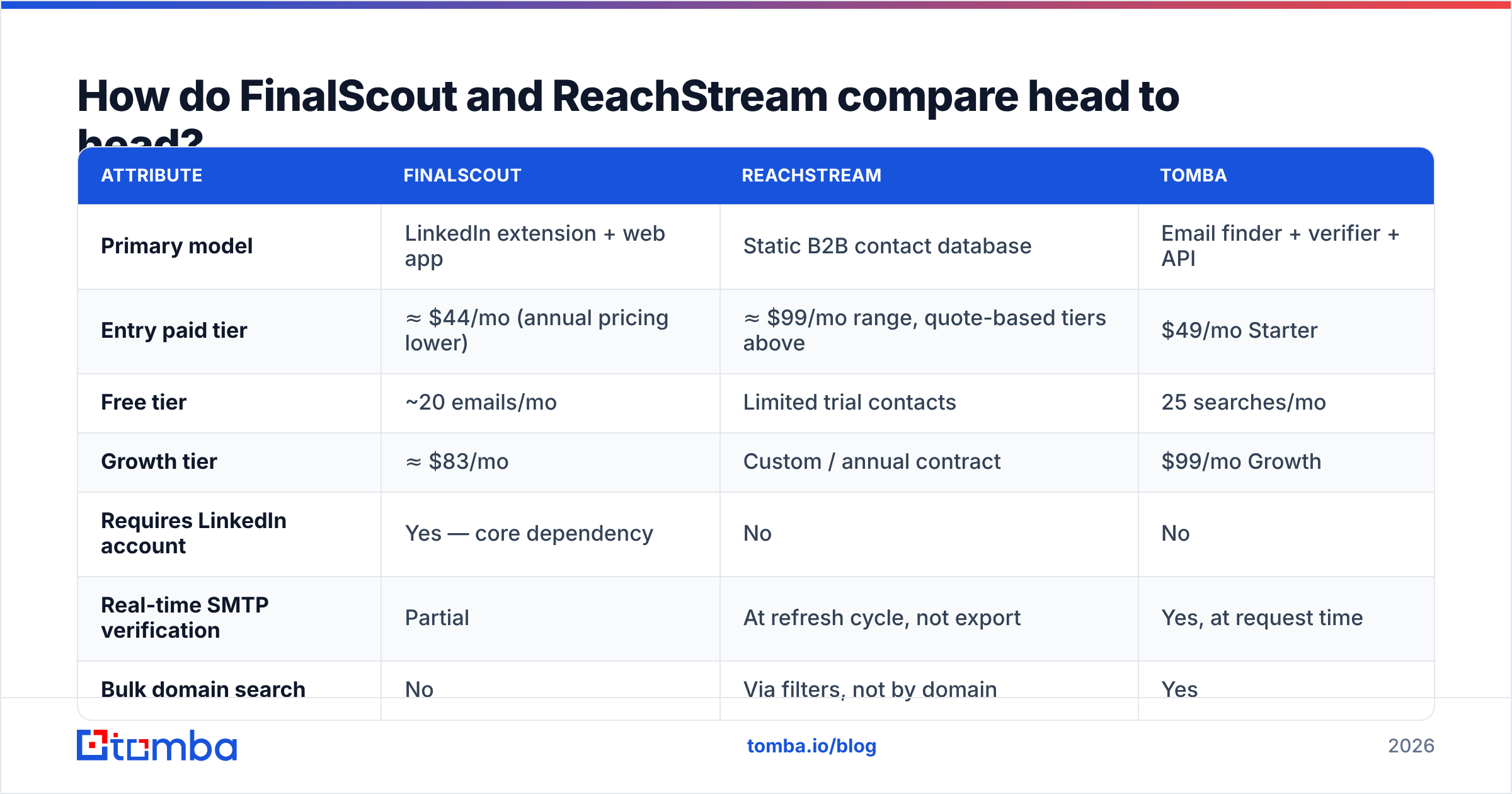
| Attribute | FinalScout | ReachStream | Tomba |
|---|---|---|---|
| Primary model | LinkedIn extension + web app | Static B2B contact database | Email finder + verifier + API |
| Entry paid tier | ≈ $44/mo (annual pricing lower) | ≈ $99/mo range, quote-based tiers above | $49/mo Starter |
| Free tier | ~20 emails/mo | Limited trial contacts | 25 searches/mo |
| Growth tier | ≈ $83/mo | Custom / annual contract | $99/mo Growth |
| Requires LinkedIn account | Yes — core dependency | No | No |
| Real-time SMTP verification | Partial | At refresh cycle, not export | Yes, at request time |
| Bulk domain search | No | Via filters, not by domain | Yes |
| Public API | Limited | Available on higher tiers | Yes, full REST API |
| Phone numbers | No | Yes | Yes |
| Best for | 1-to-1 LinkedIn prospecting | Buying a broad list fast | Programmatic, verified enrichment |
The pattern is visible immediately. FinalScout wins when your prospecting is manual and LinkedIn-shaped. ReachStream wins when you need volume without research. Neither is built for the workflow most modern GTM teams actually run — a pipeline that takes a domain or a name, resolves an address, verifies it, and writes it to the CRM without a human in the loop.
What are the hidden costs of each?#
FinalScout's hidden cost is human time and account risk. Every email costs a page load. A rep who sources 300 contacts a week is spending real hours scrolling. Worse, aggressive extension activity is the classic trigger for LinkedIn rate-limiting and account restrictions. If your team's LinkedIn accounts are also your social selling surface, that's an expensive thing to gamble.
ReachStream's hidden cost is waste. You pay per record downloaded. If 18% of a 5,000-contact export is dead, you paid for 900 bounces and then burned sender reputation proving it. The credits are gone whether the address works or not, and re-verification through a third party is an extra line item.
Both share a third cost: no clean re-enrichment loop. Contacts you pulled six months ago are silently rotting in your CRM. Neither tool is designed to re-check them on a schedule. That's a job for data enrichment running against your existing records, not a job for another one-time export.
Which one should you actually pick?#
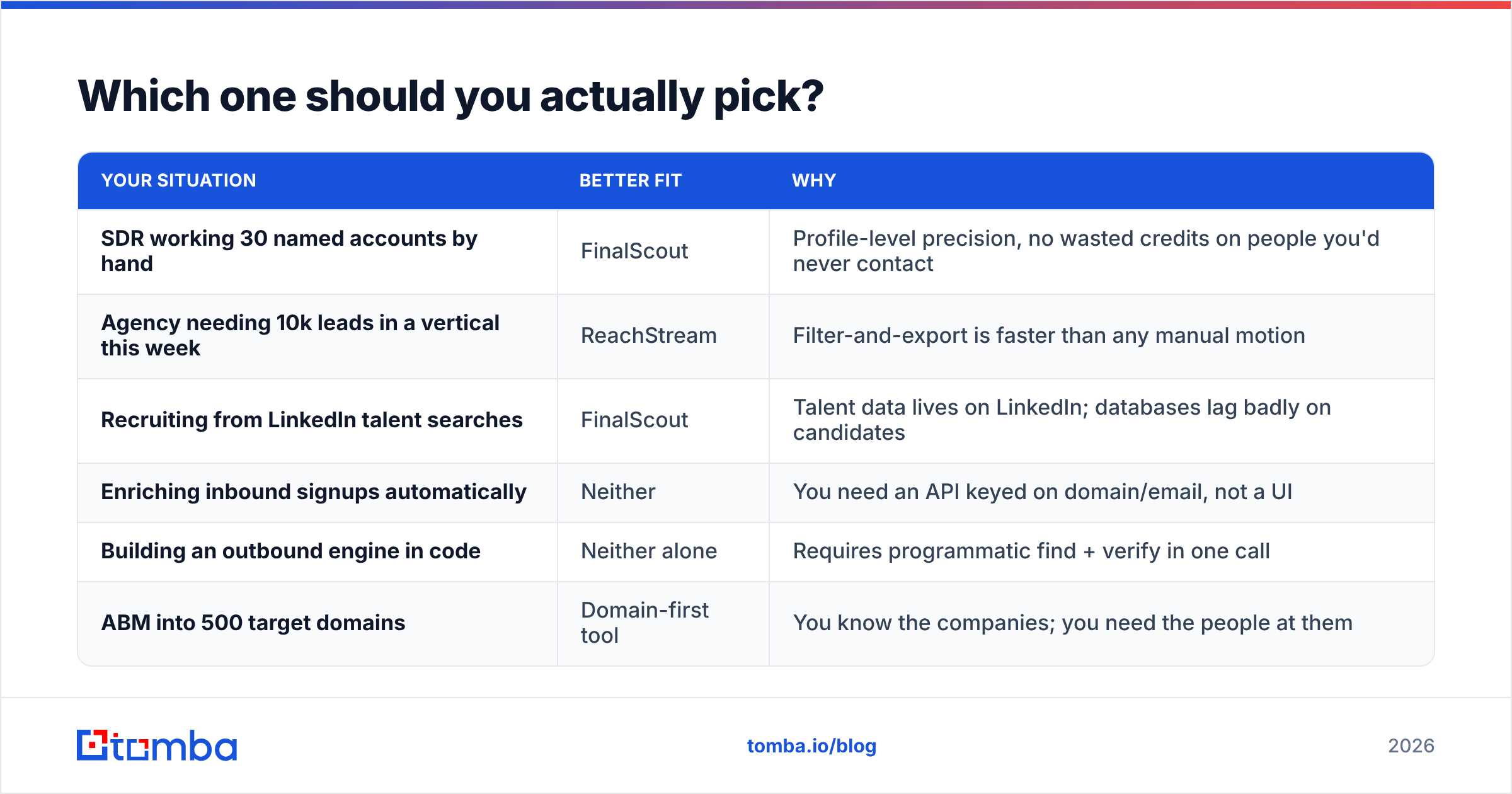
Match the tool to the motion, not the feature grid.
| Your situation | Better fit | Why |
|---|---|---|
| SDR working 30 named accounts by hand | FinalScout | Profile-level precision, no wasted credits on people you'd never contact |
| Agency needing 10k leads in a vertical this week | ReachStream | Filter-and-export is faster than any manual motion |
| Recruiting from LinkedIn talent searches | FinalScout | Talent data lives on LinkedIn; databases lag badly on candidates |
| Enriching inbound signups automatically | Neither | You need an API keyed on domain/email, not a UI |
| Building an outbound engine in code | Neither alone | Requires programmatic find + verify in one call |
| ABM into 500 target domains | Domain-first tool | You know the companies; you need the people at them |
The last three rows are where both tools run out of road. If your input is a domain and your output needs to be a verified, role-matched contact in Salesforce, a UI-first extension and a downloadable CSV are both the wrong shape. That's the case for domain search plus an email finder API that returns a confidence score with every result.
Is there a better alternative to both?#
For most teams reading a "FinalScout vs ReachStream" comparison, the honest answer is that the real decision is category, not vendor.
If you genuinely live inside LinkedIn all day and prospect one profile at a time, buy FinalScout and stop reading. It's competent at exactly that. If you need a bulk list for a broad campaign and you accept list-decay as a cost of doing business, ReachStream is a reasonable purchase — as are established list vendors like BookYourData, which competes in the same pay-per-record space and is worth a quote comparison before you sign anything.
But if either of these is true, you want a third category:
- You have a target account list already. You don't need discovery; you need resolution. Feed domains in, get verified contacts out.
- Your CRM or product needs contacts programmatically. No extension helps here. You need an endpoint, rate limits you can plan around, and a verification status field.
- Bounce rate is a board-level metric. Real-time verification at request time is not a nice-to-have once Google and Microsoft enforce bulk-sender thresholds on email deliverability.
Tomba sits in that third category. Pricing runs from a free tier at 25 searches per month to $49/mo Starter, $99/mo Growth, and $249/mo Pro, with enterprise quotes above that — so the entry cost is comparable to FinalScout's mid-tier and materially below most database contracts. The difference is what you get per credit: a lookup that runs live, returns a verification verdict, and can be called from an API, a CLI, Sheets, or a Chrome extension rather than only from a browser tab you have to keep open.
For an outside read on where each vendor lands with actual buyers, G2's category listings are more useful than any vendor comparison page, including this one — filter reviews by company size closest to yours.
What should you test before buying either?#
Run this checklist against a free tier or trial before any annual commitment:
- Pull 100 contacts from your real ICP, not a demo segment the vendor suggests.
- Verify them with an independent tool you don't buy from the same vendor. Disagreement rate is your true accuracy signal.
- Send a low-volume test from a warmed secondary domain and record hard bounces after 48 hours.
- Divide total spend by usable contacts. Not by credits. Not by exports. Usable, deliverable, correct-person contacts.
- Check the re-enrichment path. Ask each vendor how you refresh a record you bought last quarter. The answer tells you whether you're buying a tool or a subscription to repeated purchases.
Almost every team that runs step 4 honestly discovers their real cost per contact is 1.5–2x the sticker price. That number, not the plan page, is what you should compare across FinalScout, ReachStream, and anything else on your shortlist.
The bottom line#
FinalScout and ReachStream both work — for different jobs. FinalScout is the better buy for hands-on LinkedIn prospecting where precision beats volume. ReachStream is the better buy when you need list volume today and can absorb some decay. Neither is designed for automated, verification-first pipelines, and neither will re-enrich your existing CRM records on a schedule.
If your outbound is domain-driven, API-driven, or bounce-sensitive, start with the Tomba Email Finder. Give it a domain and a name, get back a verified address with a confidence score, and run the same lookup from the dashboard, a bulk upload, Google Sheets, or a single API call. The free tier gives you 25 searches a month — enough to run the 100-contact bake-off above against whatever FinalScout and ReachStream return, and settle this with your own data instead of anyone's marketing page.
Related guides#
Ready to find emails that actually work?
Join 150,000+ professionals who stopped guessing and started sending. Free credits on signup — no credit card required.
Get the Tomba newsletter
Practical outbound tactics and product updates — once every two weeks.
About the author