FinalScout vs Wiza (2026): Which Email Finder Wins?
FinalScout and Wiza both promise LinkedIn emails on demand, but they charge differently, verify differently, and fail differently. Here is the honest breakdown, plus what to use when neither fits.
FinalScout vs Wiza is really one question: do you hunt one profile at a time, or export lists by the thousand? Both pull work emails from LinkedIn. But they price, verify, and fail in different ways. Here is the short version first.
TL;DR
- FinalScout is a LinkedIn-first Chrome extension with AI email drafting bolted on. It is cheaper at entry level and better suited to one-rep, low-volume prospecting.
- Wiza is built around bulk export from LinkedIn Sales Navigator and Recruiter lists, with phone numbers on the higher tier. It costs a lot more per month.
- Both charge you in credits, and both burn credits on results you may not be able to email. Read the credit-refund policy before you buy either one.
- Neither tool is a general-purpose data provider: point them away from LinkedIn and coverage collapses. If your ICP lives on company sites, in press pages, or in a CRM export, you need a domain-based finder instead.
- For most outbound teams, the cheapest correct answer is a LinkedIn finder plus a real verifier — which is why a $49/mo stack often beats a $166/mo one.
What are FinalScout and Wiza, exactly?#
Both tools solve the same narrow problem: you are looking at a LinkedIn profile or a Sales Navigator list, and you want work email addresses you can actually send to.
FinalScout is a browser extension plus web app. You install it, browse LinkedIn, and it surfaces an email for the profile you are on or exports the profiles in a search result. It also writes for you. The AI layer drafts a personalised cold email from the prospect's profile, in the same tab. FinalScout markets a high deliverability rate on found emails. Treat any vendor number as a marketing claim until you test it on your own list.
Wiza started as a Sales Navigator scraper and still shows that heritage. Its best workflow is simple. Build a search in Sales Navigator. Hand Wiza the URL. Come back to a CSV with emails, job titles, company data, and — on the higher plan — mobile numbers. It also ships a Chrome extension and a CRM push, but the list export is where the product is genuinely good.
The practical difference: FinalScout is a per-profile tool that also does lists. Wiza is a list tool that also does per-profile. That distinction drives almost every other trade-off below.
FinalScout vs Wiza: how they compare head to head#
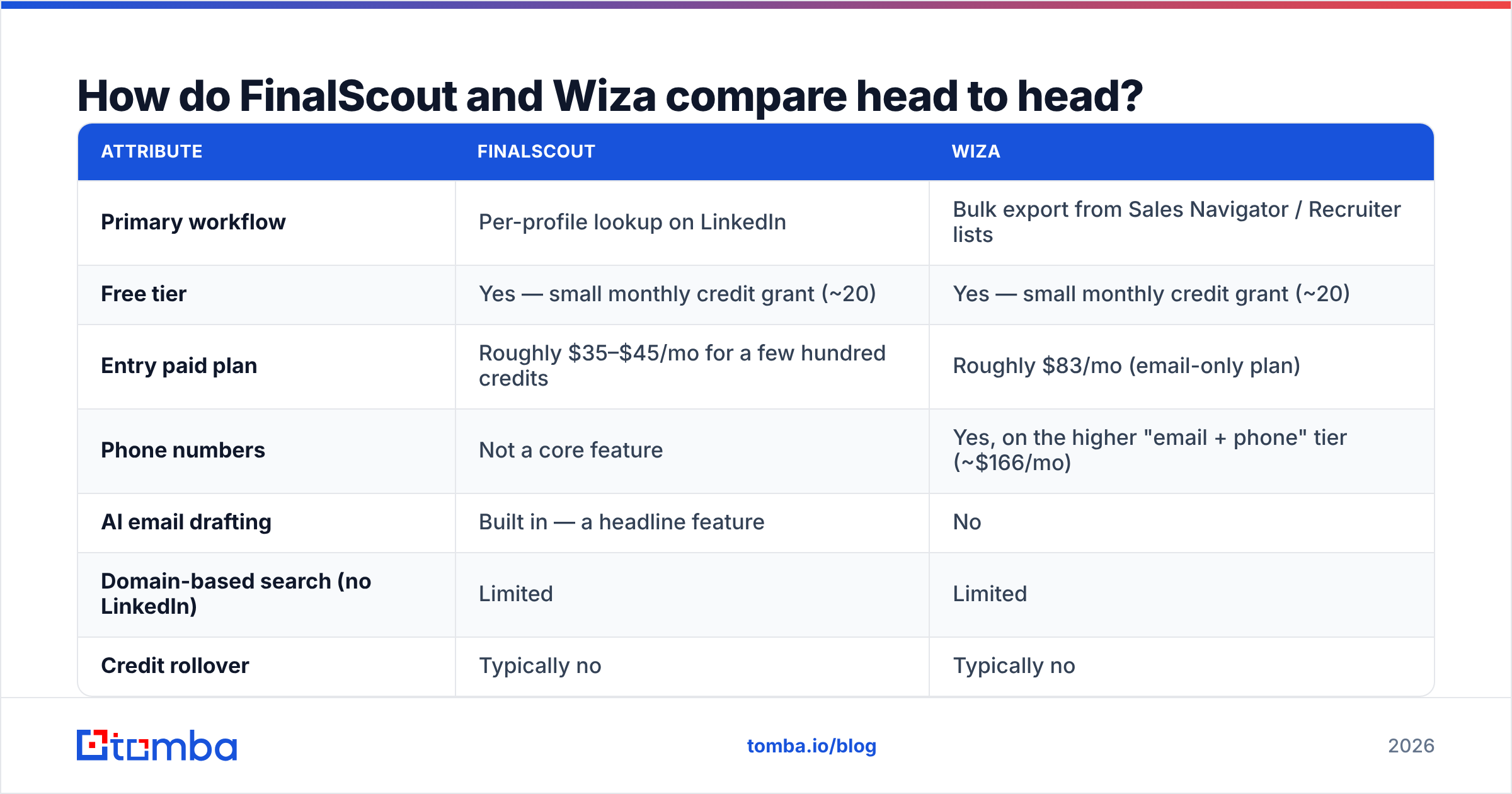
Prices change often, and both vendors run annual discounts. Check the current numbers on the vendor pages before you commit. The shape of the pricing, though, has been stable for a while.
| Attribute | FinalScout | Wiza |
|---|---|---|
| Primary workflow | Per-profile lookup on LinkedIn | Bulk export from Sales Navigator / Recruiter lists |
| Free tier | Yes — small monthly credit grant (~20) | Yes — small monthly credit grant (~20) |
| Entry paid plan | Roughly $35–$45/mo for a few hundred credits | Roughly $83/mo (email-only plan) |
| Phone numbers | Not a core feature | Yes, on the higher "email + phone" tier (~$166/mo) |
| AI email drafting | Built in — a headline feature | No |
| Domain-based search (no LinkedIn) | Limited | Limited |
| Credit rollover | Typically no | Typically no |
| Native CRM push | Basic exports + integrations | HubSpot, Salesforce, Outreach, Salesloft |
| API access | Limited | Available on higher tiers |
| Best for | Solo AEs, founders, recruiters doing 50–300 lookups/mo | Teams exporting thousands of Sales Navigator rows |

Read that table with one thing in mind: the monthly price is not the cost. The cost is price divided by usable contacts. A $35 plan that returns 40% catch-all guesses is more expensive than an $83 plan that returns 70% verified sends. That is why the next section matters more than this one.
Which one actually finds more valid emails?#
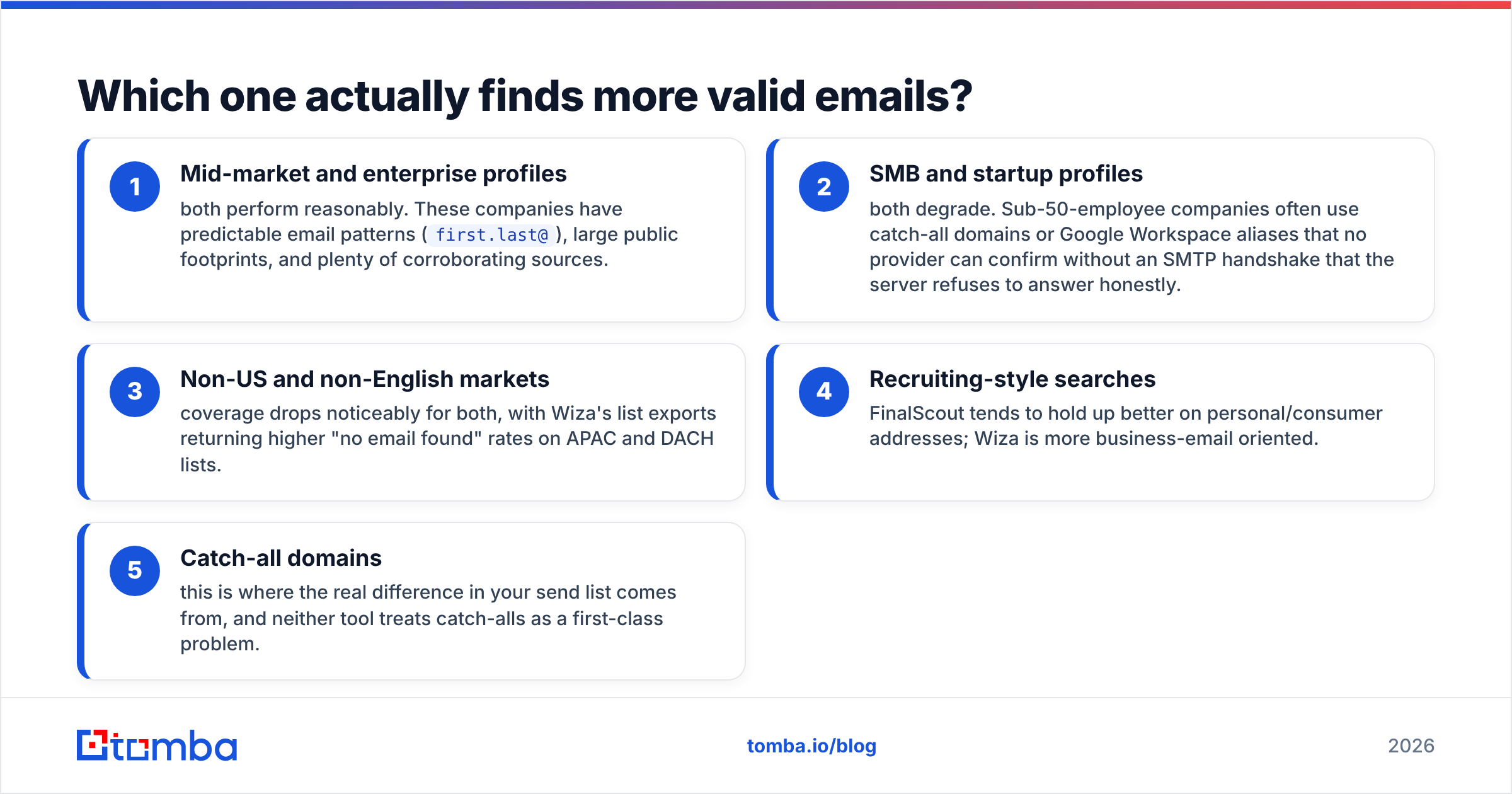
Nobody wins the FinalScout vs Wiza accuracy fight outright. Any blog that calls one tool always more accurate is guessing. What is consistent across tests is where each tool wins:
- Mid-market and enterprise profiles — both perform reasonably. These companies have predictable email patterns (
first.last@), large public footprints, and plenty of matching sources. - SMB and startup profiles — both degrade. Small companies often use catch-all domains or Google Workspace aliases. No provider can confirm those without an honest SMTP answer, and the server rarely gives one.
- Non-US and non-English markets — coverage drops for both. Wiza's list exports return higher "no email found" rates on APAC and DACH lists.
- Recruiting-style searches — FinalScout tends to hold up better on personal addresses; Wiza is more business-email oriented.
- Catch-all domains — this is where the real difference in your send list comes from, and neither tool treats catch-alls as a first-class problem.

That last point deserves attention. When a domain accepts every address, an email finder cannot prove the mailbox exists — it can only prove the server won't say no. Tools that count these as "found" inflate their hit rate and deflate your deliverability. A dedicated catch-all verifier sorts out many of these. It uses pattern confidence and secondary signals instead of shipping the risk to your sequencer unlabelled.
Run a quick test before you buy either one. Take 100 profiles you already have verified emails for. Run them through the trial credits of each tool. Then score three numbers: found rate, exact-match rate, and bounce rate on a small live send. That 30 minutes tells you more than every review page combined.
What does each tool really cost per usable lead?#
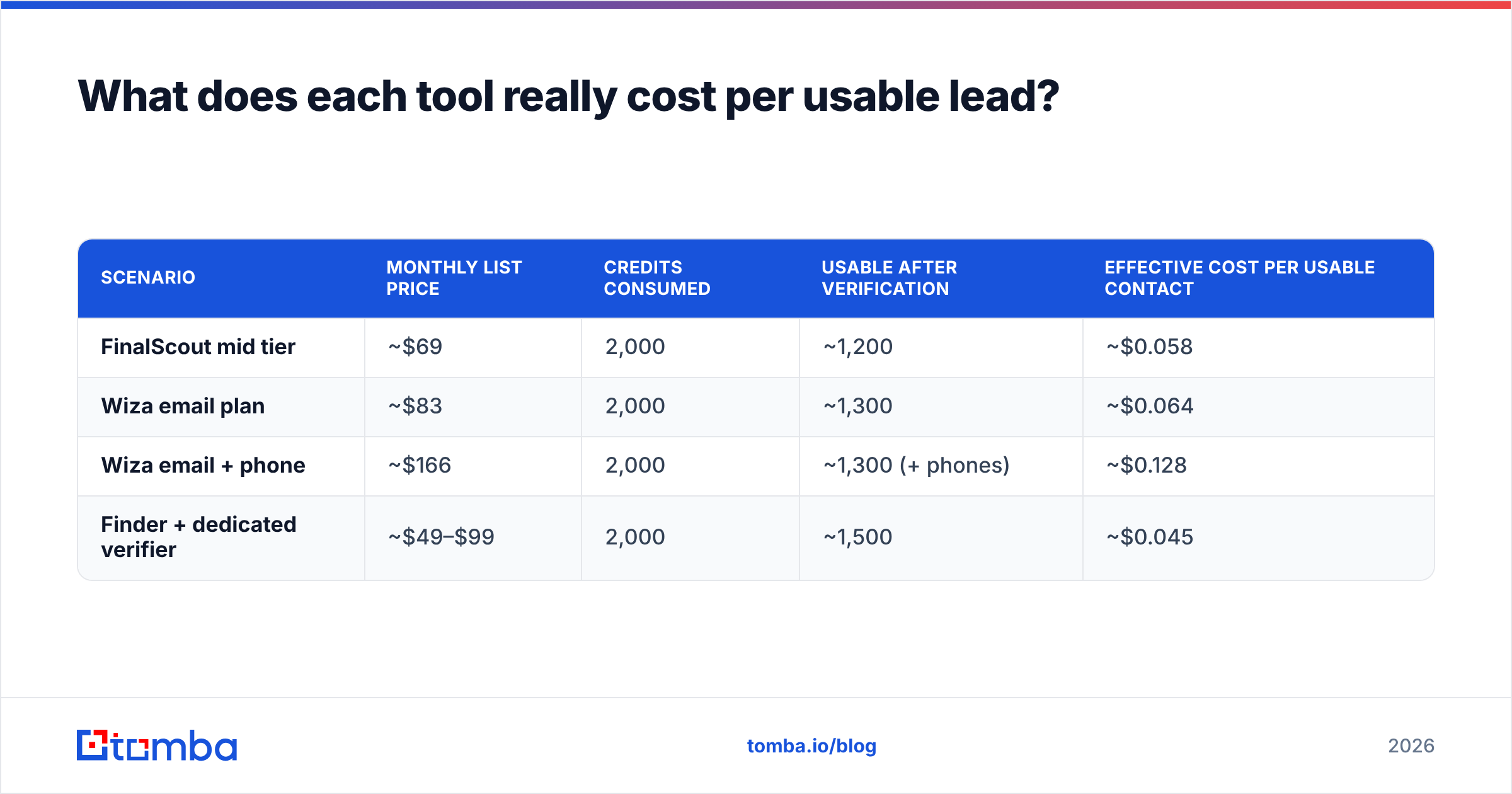
Here is the arithmetic most teams skip. Assume you need 2,000 emailable contacts a month.
| Scenario | Monthly list price | Credits consumed | Usable after verification | Effective cost per usable contact |
|---|---|---|---|---|
| FinalScout mid tier | ~$69 | 2,000 | ~1,200 | ~$0.058 |
| Wiza email plan | ~$83 | 2,000 | ~1,300 | ~$0.064 |
| Wiza email + phone | ~$166 | 2,000 | ~1,300 (+ phones) | ~$0.128 |
| Finder + dedicated verifier | ~$49–$99 | 2,000 | ~1,500 | ~$0.045 |
The usable-after-verification column is the one that moves. Those figures are illustrative, not measured. Your ICP will change them by 20 points in either direction. But the ranking holds: spending a little on verification is cheaper than spending a lot on finding. Burning 800 credits to generate 800 bounces costs you twice, once in credits and once in sender reputation.

Also check the credit policy specifically. Questions worth asking support before you pay:
- Does a "no email found" result consume a credit?
- Are catch-all results charged at full price?
- Do unused credits roll over, or reset monthly?
- Is there an overage rate, or do you hard-stop mid-campaign?
- Does exporting the same contact twice charge twice?
Answers vary between these two tools and change with plan tier. Getting them in writing takes five minutes and routinely saves a few hundred dollars a quarter.
Is FinalScout better than Wiza for LinkedIn prospecting?#
Choose FinalScout if: you are one to three people, you prospect by browsing rather than by list, and your monthly volume is under a few hundred lookups. The AI drafting is genuinely handy for founder-led sales, where nobody wants to open a second tool. It is also the cheaper entry point by a wide margin.
Choose Wiza if: you live in Sales Navigator, you export in the thousands, you need phone numbers alongside emails, and you push straight into Outreach or Salesloft. The export reliability and the CRM integrations are worth the premium at that volume. On G2, reviewers praise Wiza's export completeness and flag the price. That is a fair summary of the product.
Choose neither if: your prospecting is not LinkedIn-shaped. If you work from conference exhibitor lists, job boards, review-site directories, podcast guest pages, or a stale CRM export, both tools are the wrong instrument. Those workflows start from a domain or a name plus company, not a profile URL. That is a different job, and a domain search is built for it.

Where do both FinalScout and Wiza fall short?#
Four limitations apply to both, and they matter more than the feature-by-feature differences.
Platform risk and verification gaps:
- LinkedIn dependency is a single point of failure. Both tools rely on your LinkedIn session and on LinkedIn's tolerance for extraction. Rate limits, session warnings, and account bans are a real risk on heavy export volumes. Neither vendor can protect you from that.
- No native verification worth the name. Both do some validation. Neither replaces a real verification pass that separates valid, invalid, catch-all, role-based, and disposable addresses. If your list goes straight from export to sequencer, you are gambling with your domain.
Data freshness and cost shape:
- Data is a snapshot, not a stream. A contact exported in January is roughly 25–30% wrong by December, per most B2B data-decay estimates. Neither tool re-enriches your existing records. You need a separate data enrichment pass on a schedule.
- Credits, not seats, are the constraint. Both price on volume, so a bigger team means a much bigger bill. Teams usually discover this in month two.
What are the best FinalScout and Wiza alternatives in 2026?#
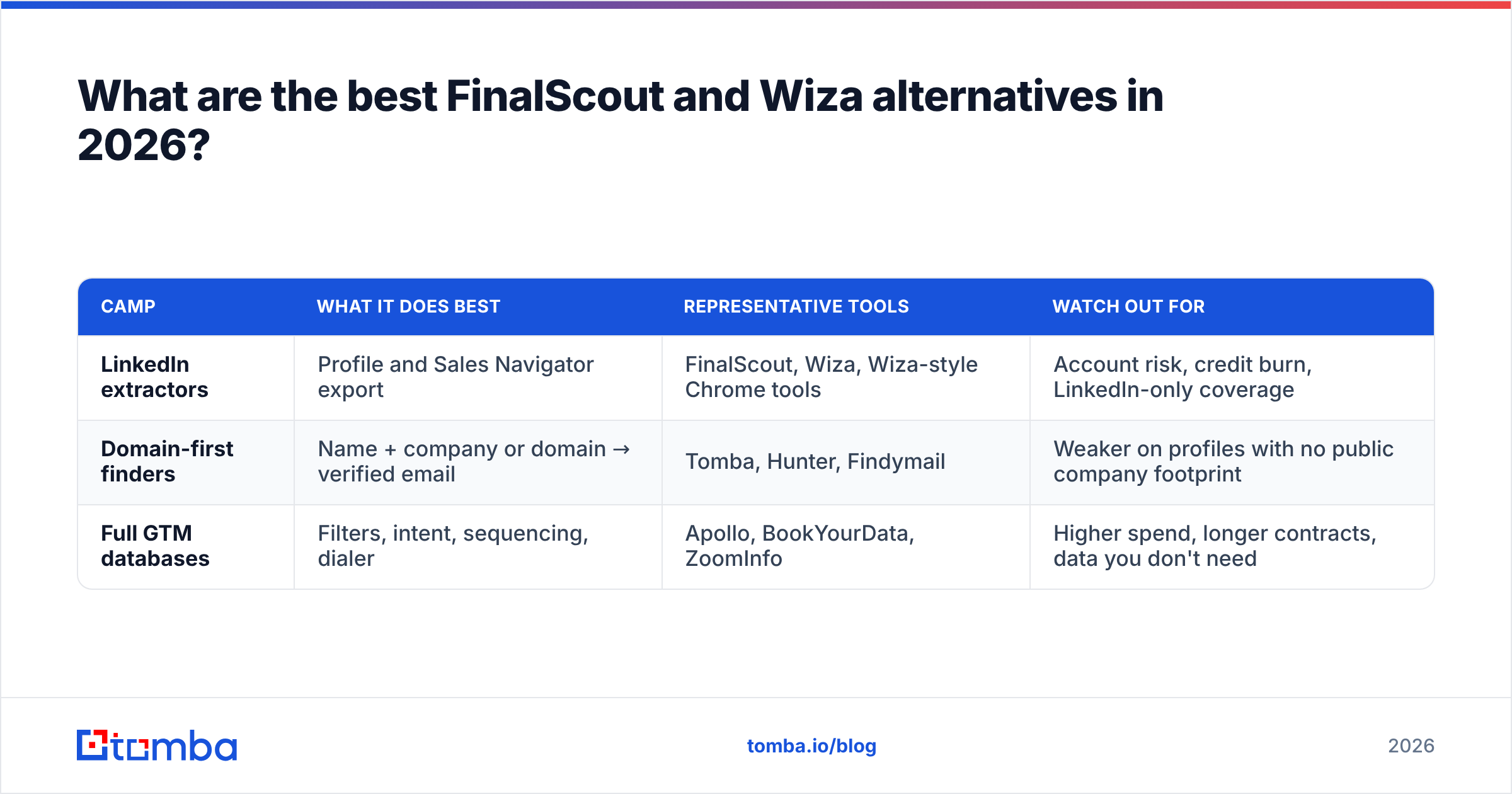
The alternatives split into three camps, and the right camp depends on where your prospect data originates.
| Camp | What it does best | Representative tools | Watch out for |
|---|---|---|---|
| LinkedIn extractors | Profile and Sales Navigator export | FinalScout, Wiza, Wiza-style Chrome tools | Account risk, credit burn, LinkedIn-only coverage |
| Domain-first finders | Name + company or domain → verified email | Tomba, Hunter, Findymail | Weaker on profiles with no public company footprint |
| Full GTM databases | Filters, intent, sequencing, dialer | Apollo, BookYourData, ZoomInfo | Higher spend, longer contracts, data you don't need |
BookYourData is worth a look if you want purchased, pre-verified lists rather than on-demand lookups. It is a different buying model, and it suits teams who prefer one clean file over a recurring credit meter.
For the domain-first camp, the workflow looks different in a way that suits most outbound motions better. Instead of "find profile → extract email → hope", you run "company domain → all public mailboxes → verified" in one pass. Then you use the LinkedIn finder only for the profiles that need it. That inverts the cost curve: your bulk work happens on the cheap channel, and your expensive channel handles exceptions.
Tomba prices that stack at Free (25 searches/mo), $49/mo Starter, $99/mo Growth, and $249/mo Pro — see the full Tomba pricing breakdown for credit allocations. The right comparison is not $49 versus $83. It is a $49 plan that includes finding and email verification against an $83 plan where verification is still your problem.
How should you decide between them?#
Run this sequence rather than reading more reviews:
- Audit your last 500 prospects. Where did they come from? If 80%+ originated on LinkedIn, a LinkedIn extractor is right. If not, stop reading about FinalScout and Wiza entirely.
- Pick your volume band. Under 300 lookups/mo → FinalScout. Over 2,000/mo with Sales Navigator → Wiza. Between the two → test both free tiers on the same 100 profiles.
- Score on exact-match, not found-rate. A tool that returns 90 addresses of which 55 are guesses loses to one that returns 70 of which 65 are real.
- Send 50 emails before buying annual. Bounce rate on a small real send is the only accuracy metric nobody can spin.
- Budget for verification separately. Whichever you choose, assume you will add a verifier. Price the pair, not the tool.
- Re-check in 90 days. Both vendors change pricing and credit rules more often than their comparison pages get updated — including this one.
Which should you actually buy?#
The FinalScout vs Wiza answer, in one line: FinalScout for solo, low-volume, browse-driven prospecting; Wiza for team-scale Sales Navigator exports with phone coverage. Both are legitimate products doing an honest job inside a narrow lane. Both also cost more per usable contact than buyers expect, because you still pay for verification yourself.
If your prospecting is broader than LinkedIn — company sites, directories, CRM backfill, or bulk domain work — a domain-first finder covers more of your list at a lower blended cost. Start with the Tomba Email Finder on the free tier. Run the same 100-contact test you would run on FinalScout and Wiza, then compare exact-match rate and bounce rate side by side. Twenty-five free searches is enough to settle the argument with your own data.
Related guides#
Ready to find emails that actually work?
Join 150,000+ professionals who stopped guessing and started sending. Free credits on signup — no credit card required.
Get the Tomba newsletter
Practical outbound tactics and product updates — once every two weeks.
About the author