How to Find Corporate Email Addresses in 2026: A Practical Guide
Corporate inboxes are harder to reach than ever. Here's the 2026 playbook for finding verified work emails at scale — the methods that still work, the ones that burn your domain, and what each one actually costs.
TL;DR
- Corporate email discovery in 2026 is a two-step job: find the pattern, then prove the mailbox exists. Skipping step two is why most cold campaigns bounce.
- Roughly 60-70% of B2B domains follow one of four naming patterns. The remaining 30% is where cheap tools quietly fail and charge you anyway.
- Catch-all domains now account for a large slice of enterprise mail servers, which makes standard SMTP verification return "unknown" instead of a clean yes/no.
- Manual methods (site scraping, Google operators, permutators) are free and fine for 10 contacts. Past 100 they cost more in hours than any paid tool costs in dollars.
- Budget roughly $0.01-$0.05 per verified corporate email. Anything advertised far below that is usually recycled data or unverified guesses.
What Is a Corporate Email Address, and Why Is It Harder to Find in 2026?#
A corporate email address is a mailbox hosted on a company's own domain — sarah.chen@acmecorp.com, not sarahchen91@gmail.com. It's the address that routes into a work inbox, sits behind the company's security stack, and is the only realistic target for B2B outreach.
Finding these got harder for three concrete reasons.
First, privacy regulation reshaped public directories. GDPR enforcement and similar state-level US laws pushed a lot of companies to strip staff directories from their websites. The "Meet the Team" page with 40 addresses is now usually 40 headshots and a generic contact form.
Second, Google and Microsoft tightened bulk-sender rules. Since the 2024 sender requirements rolled out, bounce rates above ~2% trigger throttling for anyone sending more than 5,000 messages a day. That turned email accuracy from a nice-to-have into a hard gate on whether your mail lands at all. Google's own sender guidelines spell out the thresholds.
Third, catch-all configurations spread. A catch-all domain accepts mail to every address, valid or not, so the classic SMTP handshake that verification tools rely on returns nothing useful. You get "accept_all" and have to decide whether to risk the send.
The practical consequence: a workflow that was "guess the pattern, hit send" in 2019 now needs a verification layer, or your email deliverability degrades within a week.
What Are the Main Methods to Find Corporate Email Addresses?#
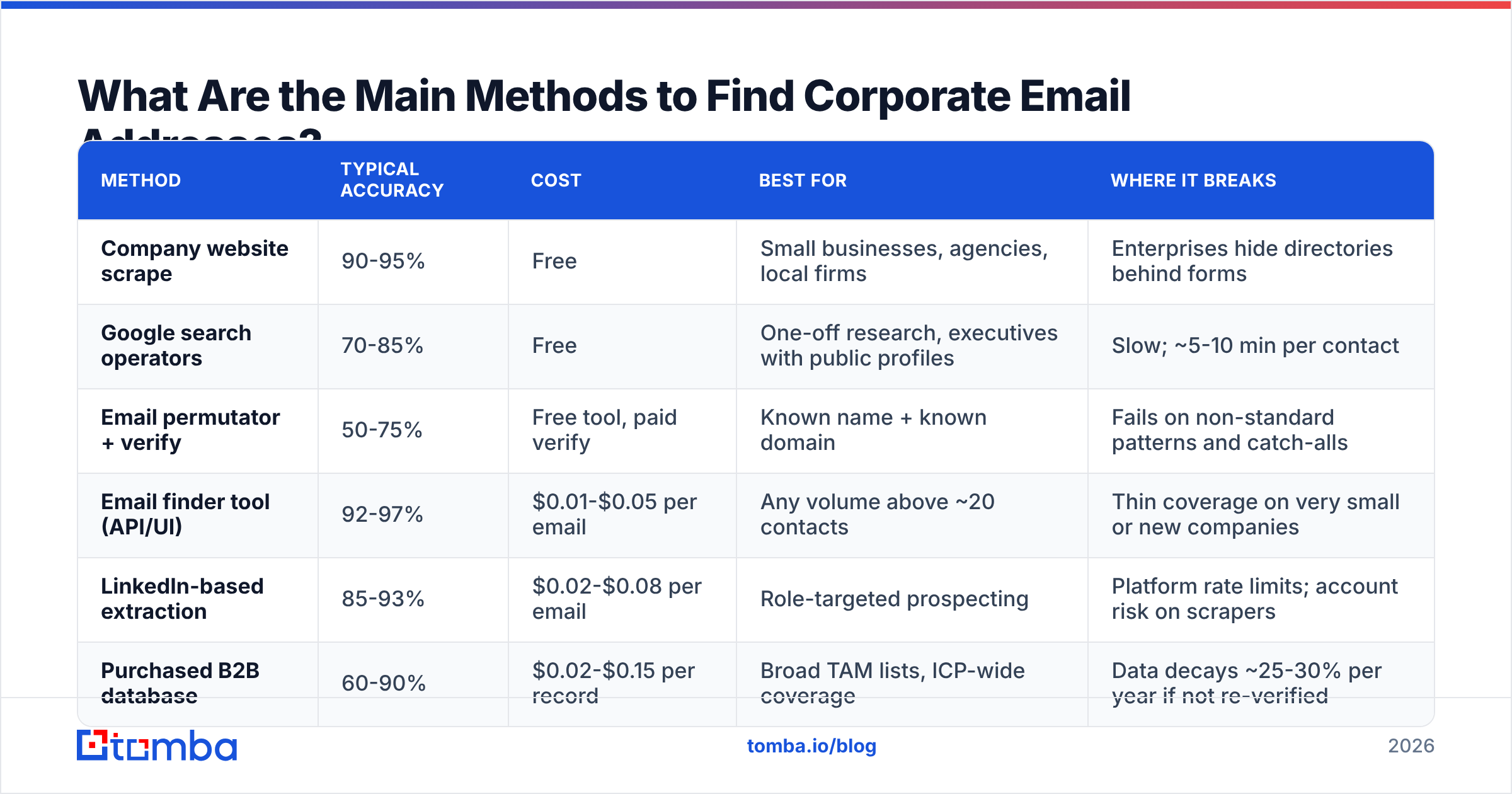
There are six methods that actually produce results. Here's how they compare on the dimensions that matter — speed, accuracy, cost, and where each one breaks.
| Method | Typical accuracy | Cost | Best for | Where it breaks |
|---|---|---|---|---|
| Company website scrape | 90-95% | Free | Small businesses, agencies, local firms | Enterprises hide directories behind forms |
| Google search operators | 70-85% | Free | One-off research, executives with public profiles | Slow; ~5-10 min per contact |
| Email permutator + verify | 50-75% | Free tool, paid verify | Known name + known domain | Fails on non-standard patterns and catch-alls |
| Email finder tool (API/UI) | 92-97% | $0.01-$0.05 per email | Any volume above ~20 contacts | Thin coverage on very small or new companies |
| LinkedIn-based extraction | 85-93% | $0.02-$0.08 per email | Role-targeted prospecting | Platform rate limits; account risk on scrapers |
| Purchased B2B database | 60-90% | $0.02-$0.15 per record | Broad TAM lists, ICP-wide coverage | Data decays ~25-30% per year if not re-verified |
Notice the gap between "found" and "verified." A permutator will hand you eight plausible addresses for one person. Seven of them bounce. That's the entire cost difference between the free row and the paid rows in that table.

The four patterns that cover most of B2B#
Before you reach for any tool, understand the underlying structure. Corporate email naming is not random — it's an IT policy decision, applied uniformly across a domain.
first.last@domain.com— the dominant pattern in North America and Western Europe. Roughly 40-45% of B2B domains. Preferred by mid-market and enterprise because it scales without collisions.first@domain.com— common at startups and companies under ~50 people. Breaks down as soon as they hire a second Sarah.flast@domain.comorfirstl@domain.com— the initial-plus-surname family. Heavily used in finance, legal, and older enterprises with legacy Exchange deployments.first_last@domain.comandfirstlast@domain.com— the underscore and concatenated variants, more common in APAC and in tech companies that grew out of a Unix-flavored IT culture.- Non-standard / department aliases —
sarah.c@,s.chen@,schen2@, or role addresses likesales@. This is the ~10-15% tail that every automated tool struggles with. - Subdomain routing —
name@mail.company.comor country-specific subdomains at large multinationals. Rare but nearly invisible if you're only checking the root domain.
Once you know a domain's pattern, every other contact at that company becomes a fill-in-the-blank exercise. That's why domain search — pulling every known address on a company domain at once — is usually more efficient than looking up people one at a time. You learn the pattern and get the contacts in the same call.
How Do You Find Corporate Emails Manually?#
If you're working ten accounts, manual is genuinely fine. Here's the sequence that wastes the least time.
Start with the source of truth. Check /contact, /team, /about, and /press on the company site. Press pages are underrated — PR contacts are published deliberately and almost always follow the house pattern. Find one published address and you've solved the pattern for the whole domain.
Then use search operators. In Google, run:
site:company.com "@company.com"
"firstname lastname" "@company.com"
site:linkedin.com/in "Head of Marketing" "Acme Corp"
The first two surface addresses indexed anywhere on the web or in PDFs. Conference decks, whitepapers, and job postings leak corporate addresses constantly.
Check GitHub if the company ships software. Commit metadata includes the author's email, and developers routinely commit with their work address. git log on a public repo is a directory nobody thinks to lock down.
Look at the press-release wire. Corporate announcements on newswire services list a media contact with a direct address, and it's almost always the standard pattern.
Then permutate and verify. Generate the candidate list with an email permutator, then run each candidate through verification. Do not skip the verification step — the entire point of permutation is that you're producing wrong answers on purpose and filtering them out.
The honest math: this takes 5-12 minutes per contact if you're fast. At 100 contacts that's a full working day and a half. Which is exactly the point where tools stop being optional.
What Should You Look for in an Email Finder Tool?#
Most email finders demo identically. The differences show up at scale, in four places.
| Criterion | What to check | Red flag |
|---|---|---|
| Verification depth | Does it do SMTP + MX + syntax + catch-all detection? | Only regex/syntax validation |
| Credit model | Are failed lookups charged? Do credits roll over? | Charging for "not found" results |
| Catch-all handling | Does it flag catch-all separately or lump it in "valid"? | Reporting catch-all as valid |
| Coverage source | First-party crawling vs. resold third-party lists | Vague or absent data-source docs |
| API + bulk | Real API, batch upload, rate limits published | UI-only, no programmatic access |
| Compliance | GDPR/CCPA posture, opt-out handling documented | No DPA available |
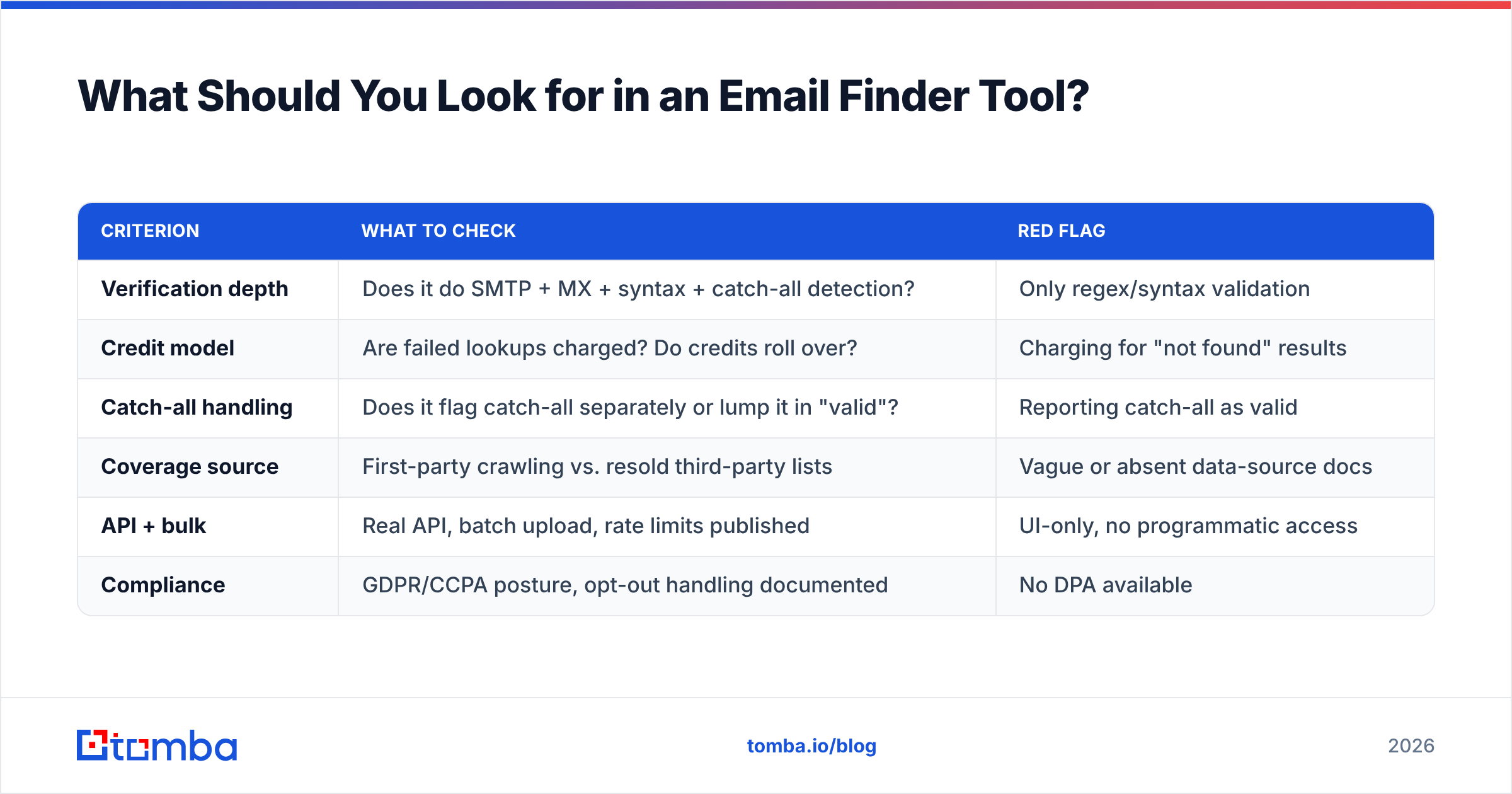
The credit model deserves special attention. A tool at $49/mo with 1,000 credits that charges for misses is more expensive than a tool at $79/mo with 1,000 credits that only charges on hits — if its hit rate is 70%, your real cost per email is $0.07, not $0.049.

Accuracy claims are also worth interrogating. Vendors measure "accuracy" differently: some report the percentage of returned emails that are deliverable (which flatters tools that return fewer results), others report coverage across a test list (which flatters tools that guess aggressively). Ask which number you're looking at. A tool with 97% accuracy on 40% coverage is worse for your pipeline than 93% accuracy on 80% coverage.
How Do the Main Corporate Email Finders Compare?#
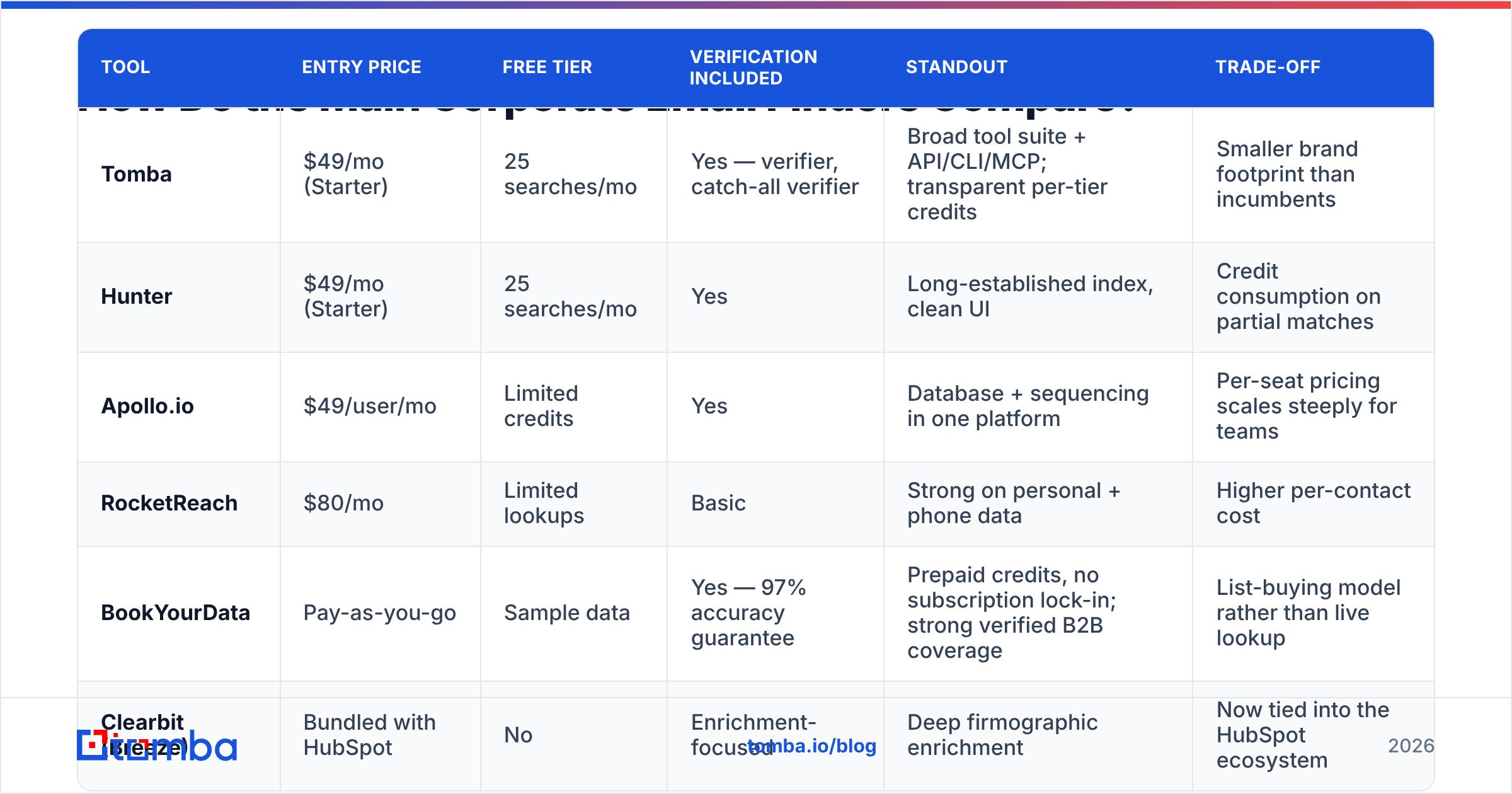
Here's how the widely used options stack up in 2026. Pricing is list price for the entry paid tier; check each vendor for current figures.
| Tool | Entry price | Free tier | Verification included | Standout | Trade-off |
|---|---|---|---|---|---|
| Tomba | $49/mo (Starter) | 25 searches/mo | Yes — verifier, catch-all verifier | Broad tool suite + API/CLI/MCP; transparent per-tier credits | Smaller brand footprint than incumbents |
| Hunter | $49/mo (Starter) | 25 searches/mo | Yes | Long-established index, clean UI | Credit consumption on partial matches |
| Apollo.io | $49/user/mo | Limited credits | Yes | Database + sequencing in one platform | Per-seat pricing scales steeply for teams |
| RocketReach | $80/mo | Limited lookups | Basic | Strong on personal + phone data | Higher per-contact cost |
| BookYourData | Pay-as-you-go | Sample data | Yes — 97% accuracy guarantee | Prepaid credits, no subscription lock-in; strong verified B2B coverage | List-buying model rather than live lookup |
| Clearbit (Breeze) | Bundled with HubSpot | No | Enrichment-focused | Deep firmographic enrichment | Now tied into the HubSpot ecosystem |

Two structural distinctions matter more than any feature list.
Live lookup vs. database lookup. Live-lookup tools (Tomba, Hunter) resolve the address at query time by crawling and pattern-matching against the domain, then verifying. Database tools (Apollo, BookYourData) return a record from a maintained store. Live lookup wins on freshness for a specific named person; databases win when you want to build a list from filters — industry, headcount, title — without knowing names in advance. Serious teams run both: filter a database to build the target list, then live-verify before the send.
Bundled vs. unbundled. Apollo and HubSpot's Breeze bundle finding with sequencing and CRM. That's convenient until you want to swap one layer. Unbundled finders plug into whatever stack you already have — check the integrations list against your CRM before committing.

How Do You Handle Catch-All Domains and Verification?#
This is where most workflows leak money.
A catch-all domain — configured on a meaningful share of enterprise mail servers — accepts every message addressed to it, then routes unknown recipients to a trash folder or a human. Standard SMTP verification asks the server "does this mailbox exist?" and a catch-all answers "yes" to everything. So your verifier returns accept_all or unknown, and you're left guessing.
Three ways to handle it, in order of preference:
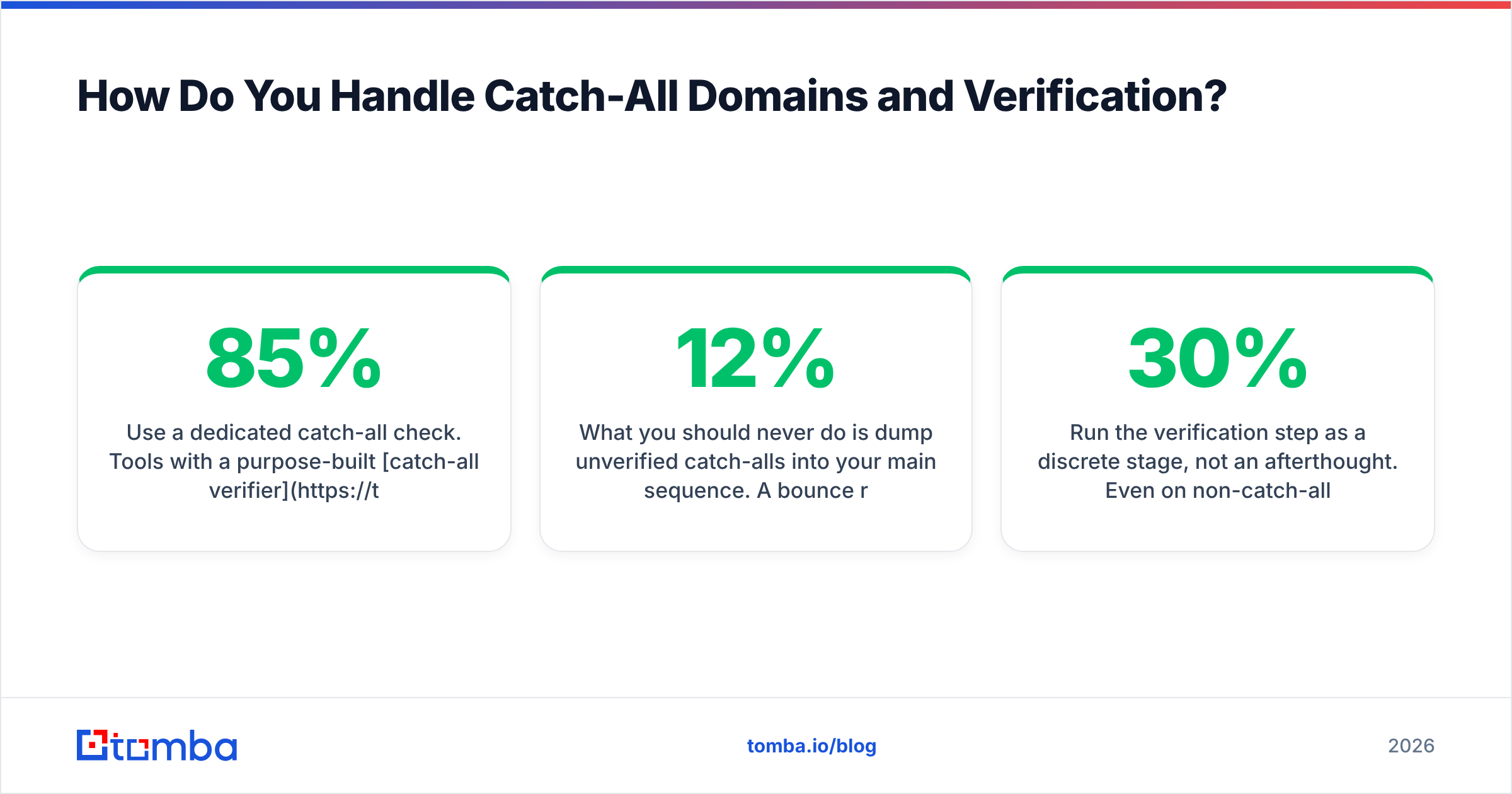
- Use a dedicated catch-all check. Tools with a purpose-built catch-all verifier apply additional signals — historical engagement data, pattern confidence, MX-provider behavior — to produce a probability rather than a binary. That's the difference between sending blind and sending at 85% confidence.
- Cross-reference a second signal. If the address appears in a public source (GitHub commit, conference PDF, press release), the mailbox existed at some point. Combine that with pattern confidence and you have a reasonable send.
- Segment your sends. Put catch-all addresses in a separate campaign on a separate sending domain. If the bounce rate spikes, it doesn't contaminate your primary sender reputation.
What you should never do is dump unverified catch-alls into your main sequence. A 12% bounce rate on one campaign can suppress deliverability for your whole domain for weeks. The G2 category listings for verification tools are a decent starting point if you want to see how vendors describe their catch-all handling before you trial them.
Run the verification step as a discrete stage, not an afterthought. Even on non-catch-all domains, a proper email verifier pass catches typos, role addresses, disposable domains, and mailboxes that were deactivated after your data was collected. Corporate data decays fast — a widely cited estimate puts B2B contact decay around 25-30% annually as people change jobs, which means a list you bought in January is meaningfully wrong by autumn.
What Does a Scalable Workflow Actually Look Like?#
Here's the sequence that holds up at 1,000+ contacts a month.
- Define the target list by company, not by person. Build your account list first — industry, headcount, tech stack, funding stage. This keeps you from wasting lookups on people at companies that were never a fit.
- Resolve the domain pattern once per company. One domain search returns the pattern plus every known address. You've now solved 20 contacts with one call instead of 20.
- Fill gaps with targeted finds. For named people not returned by the domain search, run individual lookups using name + domain.
- Verify everything, in bulk. Push the full list through verification as a single batch job. Split the output into three buckets: valid, catch-all, invalid. Discard invalid.
- Enrich the valid bucket. Add title, company size, and location so your sequencing tool has merge fields worth using. Thin enrichment produces generic emails, and generic emails get ignored.
- Re-verify before every send. If a list is older than 60 days, re-run verification. This is cheap, takes minutes, and prevents the single most common cause of sudden deliverability collapse.
For volume work, do this through an API rather than a UI. A bulk email finder or a direct email finder API call from your enrichment pipeline removes the CSV shuffle entirely and lets you re-verify on a schedule instead of when someone remembers to.
Is It Legal to Find and Email Corporate Addresses?#
Short answer: in most jurisdictions, yes, with conditions — and this is not legal advice.
Under GDPR, a business email address tied to a named individual is personal data. Sending cold B2B email is generally handled under "legitimate interest" rather than consent, which requires that your outreach is relevant to the recipient's professional role, that you can document your reasoning, and that you honor opt-outs immediately. The ICO's guidance on direct marketing is the readable primary source.
In the US, CAN-SPAM permits cold commercial email but requires accurate headers, a real physical address, a clear opt-out mechanism, and honoring unsubscribes within 10 business days.
Practical compliance checklist:
- Keep a record of where each contact came from and why they fit your ICP.
- Include a one-click unsubscribe and a physical address in every message.
- Process deletion requests within 30 days and suppress permanently.
- Use vendors that publish their data-collection methodology and offer a DPA. Check the data sources page of any tool before you buy.
- Never email role addresses like
info@orlegal@with personalized sequences — it's low-yield and raises complaint risk.
Which Method Should You Choose?#
Match the method to your volume, not to what the loudest vendor says.
- Under 20 contacts a month: manual research plus a free tier. Any paid subscription is dead weight.
- 20-200 contacts: an email finder on a starter plan with built-in verification. This is the range where a $49/mo tool pays for itself in the first week of saved hours.
- 200-2,000 contacts: finder + verifier + bulk processing, run on a growth-tier plan with API access.
- 2,000+ contacts: database for list-building, live lookup for named targets, API-driven verification on a schedule, and enrichment feeding your CRM automatically.
Compare Tomba pricing tiers against your actual monthly volume rather than your aspirational one. Free covers 25 searches a month, Starter is $49/mo, Growth is $99/mo, and Pro is $249/mo — most teams find the honest answer one tier lower than they expected.
The single highest-leverage change for most teams isn't switching tools at all. It's adding a verification stage they currently skip. Bounce rate drops, sender reputation stabilizes, reply rates go up because more mail reaches the inbox, and every downstream metric improves without touching your copy.
Ready to stop guessing? Start with the Tomba Email Finder — find corporate email addresses by name, company, or domain, with verification built into the same lookup. The free tier gives you 25 searches a month with no card required, which is enough to test your actual target accounts before you commit to a plan. If you're working at volume, the API and bulk endpoints run the same pipeline against thousands of contacts without the CSV shuffle.
Related guides#
Ready to find emails that actually work?
Join 150,000+ professionals who stopped guessing and started sending. Free credits on signup — no credit card required.
Get the Tomba newsletter
Practical outbound tactics and product updates — once every two weeks.
About the author