How to Find Email Address and Phone Number for Any B2B Lead
A practical 2026 guide to finding a verified work email and a direct dial for any B2B contact — the exact waterfall, the tools that hit, and the accuracy numbers nobody publishes.
TL;DR
- To find email address and phone number data for one B2B contact, you need two separate pipelines. Email runs on pattern inference plus checks. Phone runs on directories and company data. Few vendors are good at both.
- Realistic 2026 hit rates: 85-95% for verified work email at firms with 20+ staff. Direct dials land at 30-55%. Anyone promising 90% mobile coverage is selling you recycled data.
Three more rules before you buy:
- Never send to an address you have not checked. One 5% bounce run costs more than the credits you saved.
- The cheapest stack starts with domain search ($49-$99/mo). Add a phone provider only for accounts that clear a fit bar.
- Rules differ by channel. GDPR, CCPA, and TCPA treat email and phone as separate risks. Calling a scraped mobile is far riskier than emailing a work address.
Why is it harder to find email address and phone number data in 2026?#
Three things changed.
First, LinkedIn tightened its scraping defences. That wiped out a whole class of browser extensions that rode on session cookies.
Second, Google and Yahoo set new bulk-sender rules. Go above a 0.3% bounce rate and they push you to spam. Spraying pattern guesses now burns your own domain.
Third, buyouts thinned the market. A dozen vendors resell the same two or three phone pools.
So the old habit fails. You guess first.last@company.com, drop it in a sequencer, and dial whatever number sits in the CRM. It costs more and returns less.
Use a waterfall instead. Try the cheapest, safest source first. Step down only when it misses. Check every address before it leaves your outbox.
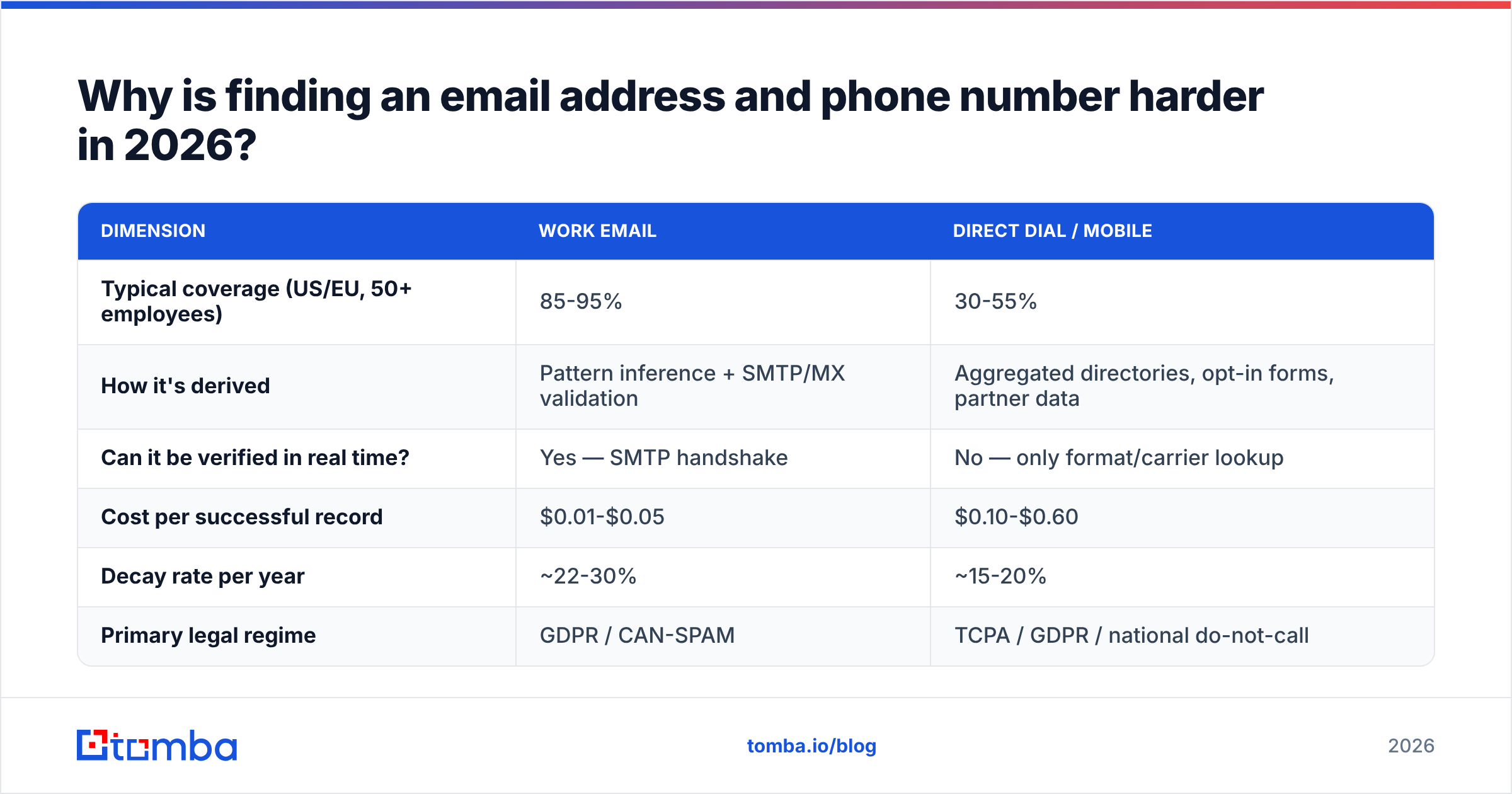
Here is the honest split between the two data types.
| Dimension | Work email | Direct dial / mobile |
|---|---|---|
| Typical coverage (US/EU, 50+ employees) | 85-95% | 30-55% |
| How it's derived | Pattern inference + SMTP/MX checks | Directories, opt-in forms, partner data |
| Can it be checked in real time? | Yes — SMTP handshake | No — only format and carrier lookup |
| Cost per successful record | $0.01-$0.05 | $0.10-$0.60 |
| Decay rate per year | ~22-30% | ~15-20% |
| Primary legal regime | GDPR / CAN-SPAM | TCPA / GDPR / national do-not-call |
Read that table twice before you buy. Email data is cheap and you can test it. Phone data is a guess, and it costs ten times as much. If a pricing page charges one credit for both, one side is paying for the other.
What does the email waterfall actually look like?#
A waterfall is an ordered list of attempts with a stop rule. Run it in this order.
- Start in your own CRM. The best record you will ever hold is one a human replied from. Dedupe before you spend a credit. A remove duplicates pass often cuts 8-15% of rows.
- Search the company domain. Pull every known address at the domain before you hunt one person. A domain search returns the dominant pattern (
{first}.{last},{f}{last}) plus real, observed addresses. Once you know the pattern, every later lookup at that company is close to free. - Look the person up by name. Give an email finder a first name, last name, and domain. It applies the confirmed pattern and checks the result. Most of your hits land here.
Steps one to three cover most of a list. The next three handle the leftovers.
- Guess, then check. If the person is in no database, build candidates with an email permutator and test each one. Expect 2-6 candidates and one survivor.
- Score the catch-alls. About one domain in five accepts everything, so normal checks return "unknown". A catch-all verifier scores these on other signals: past engagement, pattern confidence, and mailbox provider behaviour.
- Check at export, not at import. Even a database hit goes stale. Run every address through an email verifier on the way out. The gap between import and send is where bounces live.

That order is dull on purpose. Most teams skip step two. They jump straight to named lookups without learning the company pattern. At any account with more than a few targets, that triples the cost per contact.

How do you find a phone number without burning your budget?#
Phone is where discipline pays. Each record costs 10-20x an email, and the hit rate is half. Three rules.
Rule 1 — gate phone lookups behind a fit check. Never enrich a whole list. Enrich only accounts that passed a filter: headcount, tech stack, funding stage, ICP score, or a clear intent signal. A 2,000-row list costs $600+ to enrich in full. You get maybe 800 usable numbers, and most are switchboards.
Rule 2 — split switchboard, direct dial, and mobile. Vendors blur the three on purpose. A main line is worth little in outbound. You get a gatekeeper or a menu. A direct dial reaches the desk. A mobile reaches the person, and carries the sharpest legal limits. Ask each vendor what share of returned numbers are mobiles. If they dodge the question, the share is low.
Rule 3 — check the line before you dial. Line-type and carrier lookup is cheap. It catches dead numbers, ported lines, and VoIP spam traps. Run a phone validator before a dialer session and your connect rate stays honest. If you source numbers yourself, a phone finder that returns line type saves a second call.
Do not run phone and email apart. Here is the order that works. Send email one. Wait 48 hours. Call. Then send email two and mention the call. Calling cold, with no email first, converts worse. The prospect has no idea who you are.
Which tools find both email addresses and phone numbers?#
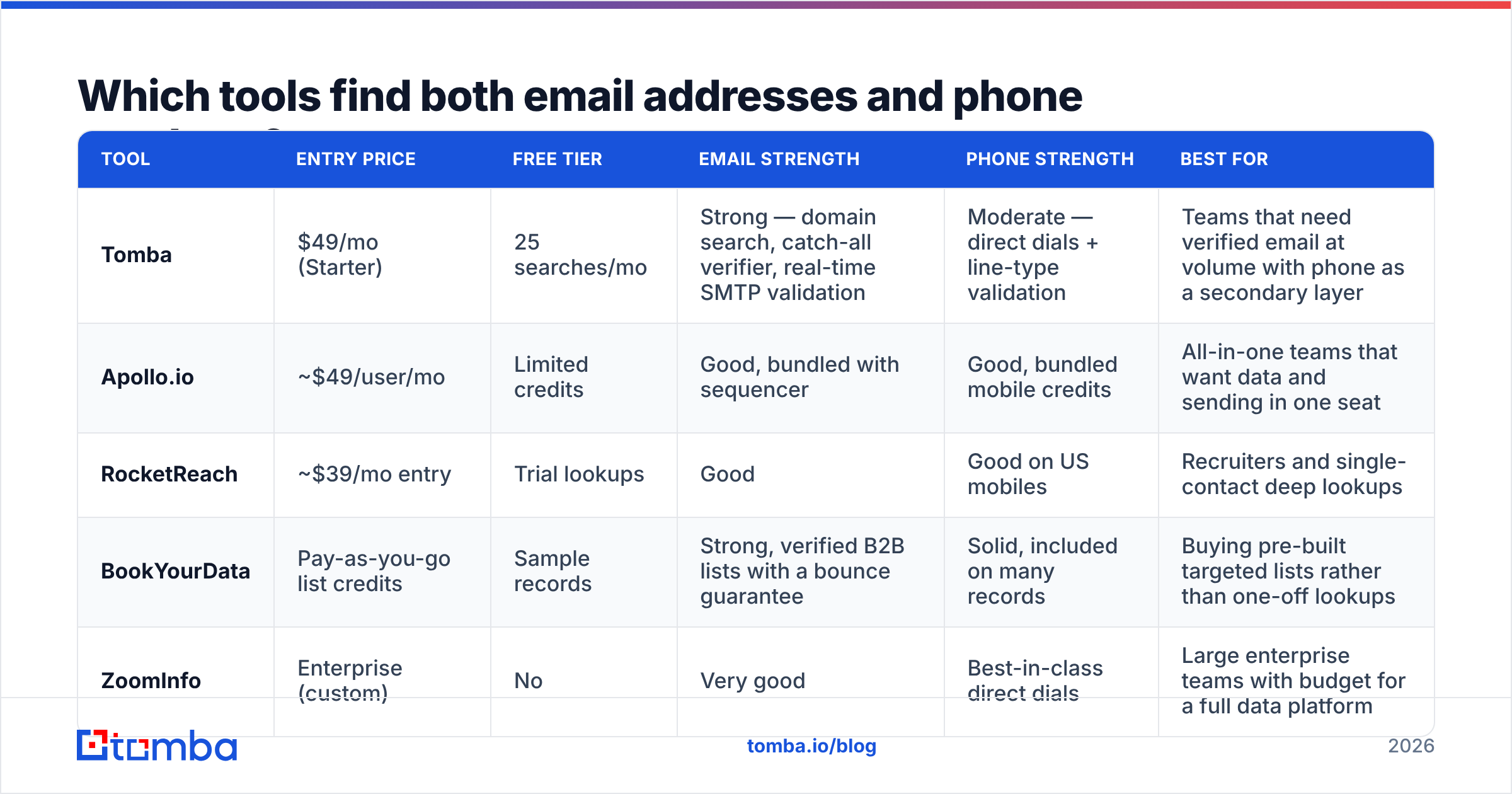
The market splits three ways. Email-first specialists that bolted on phone. Phone-first databases that bolted on email. All-in-one platforms that bundle sequencing. Here is a like-for-like view of entry pricing.

| Tool | Entry price | Free tier | Email strength | Phone strength | Best for |
|---|---|---|---|---|---|
| Tomba | $49/mo (Starter) | 25 searches/mo | Strong — domain search, catch-all verifier, live SMTP checks | Moderate — direct dials plus line-type checks | Teams that need verified email at volume |
| Apollo.io | ~$49/user/mo | Limited credits | Good, bundled with sequencer | Good, bundled mobile credits | Teams that want data and sending in one seat |
| RocketReach | ~$39/mo entry | Trial lookups | Good | Good on US mobiles | Recruiters and deep single-contact lookups |
| BookYourData | Pay-as-you-go credits | Sample records | Strong, with a bounce guarantee | Solid on many records | Buying pre-built lists, not one-off lookups |
| ZoomInfo | Enterprise (custom) | No | Very good | Best-in-class direct dials | Large teams with a full data budget |
A few honest notes. Apollo's per-seat model gets costly once you add seats that only need the odd lookup. RocketReach suits one-at-a-time recruiter work, not bulk API pipelines. BookYourData works a different way. You buy a filtered, pre-checked list instead of running lookups. That fits campaign teams who want a clean file today. ZoomInfo has the deepest direct-dial coverage in North America, and the price shows it.
Say you need verified email, with phone as an add-on. Then an email-first tool is far cheaper than a seat-based platform. Tomba pricing runs Free (25 searches/mo), Starter $49/mo, Growth $99/mo, and Pro $249/mo. The Tomba API also means you skip paying for a UI your engineers will never open.
How do you check accuracy claims before you buy?#
Every vendor claims 95%+ accuracy. The claim means little, because nobody states the denominator. Run this test instead. It takes about an hour.
- Build a 100-row control list from companies where you already hold verified contacts. Mix the sizes: 30 rows under 50 staff, 40 rows at 50-500, 30 rows above 500.
- Run the same list through each trial. Track three numbers apart: found rate, valid rate, and correct rate. Correct means it matched your known-good record.
- Check with a third party. Never test a vendor's output with that same vendor's checker. Use an independent free email checker or a rival provider.
The last two steps matter most, because they measure real sends.
- Measure small-company coverage on its own. Almost every tool does well on Fortune 5000 domains. The real test is the 15-person agency and the 40-person maker. That is where your ICP tends to sit.
- Send a real 200-email test. Live bounce rate is the only number that pays your bills. Under 2% is fine. Over 5% means the data or the check step failed.
Found rate and valid rate usually differ by 10-20 points. That gap is the vendor's real quality score.

Is it legal to find email address and phone number data?#
Short answer: emailing a work address for a real business reason is legal in most places, if you follow the rules. Cold-calling a mobile you pulled from a database is far riskier. Do not treat the two as one workflow.
Under GDPR (EU/UK), B2B outreach usually leans on legitimate interest. That needs a written balancing test, a clear opt-out in every message, and fast erasure. You must also be able to say where the data came from. That is why provenance matters. Read a vendor's data sources page before you sign.
Under CAN-SPAM (US), cold email is allowed. You need accurate headers, a postal address, a working unsubscribe, and no misleading subject lines. B2B email needs no prior consent.
Under the TCPA (US), calls and texts to mobiles from auto-dialers carry damages per violation. Scrub against the national Do Not Call registry. Skip auto-dialers for cold mobiles. Keep your call records. The FTC's guidance on telemarketing is the main reference, and it is worth reading in full.
Practical stance: email broadly and with care, call narrowly and by hand. That gap is not a limit. It is how you keep your domain and your legal risk clean while still reaching people.
How should you build the workflow end to end?#
Here is a stack that works for five SDRs running about 3,000 contacts a month.
- Source the account list from your CRM, an intent tool, or a filtered export. Do not source people yet. Source companies.
- Map each company's email pattern with a bulk domain pass. One call per company, not one per person. This is the biggest cost lever in the pipeline.
- Resolve people to emails with a bulk email finder run that applies those patterns. Send catch-all domains to their own queue.
The next three steps decide what actually reaches a person.
- Check everything right before export. Drop anything scored risky. Park catch-alls in a low-priority segment and open with plain text.
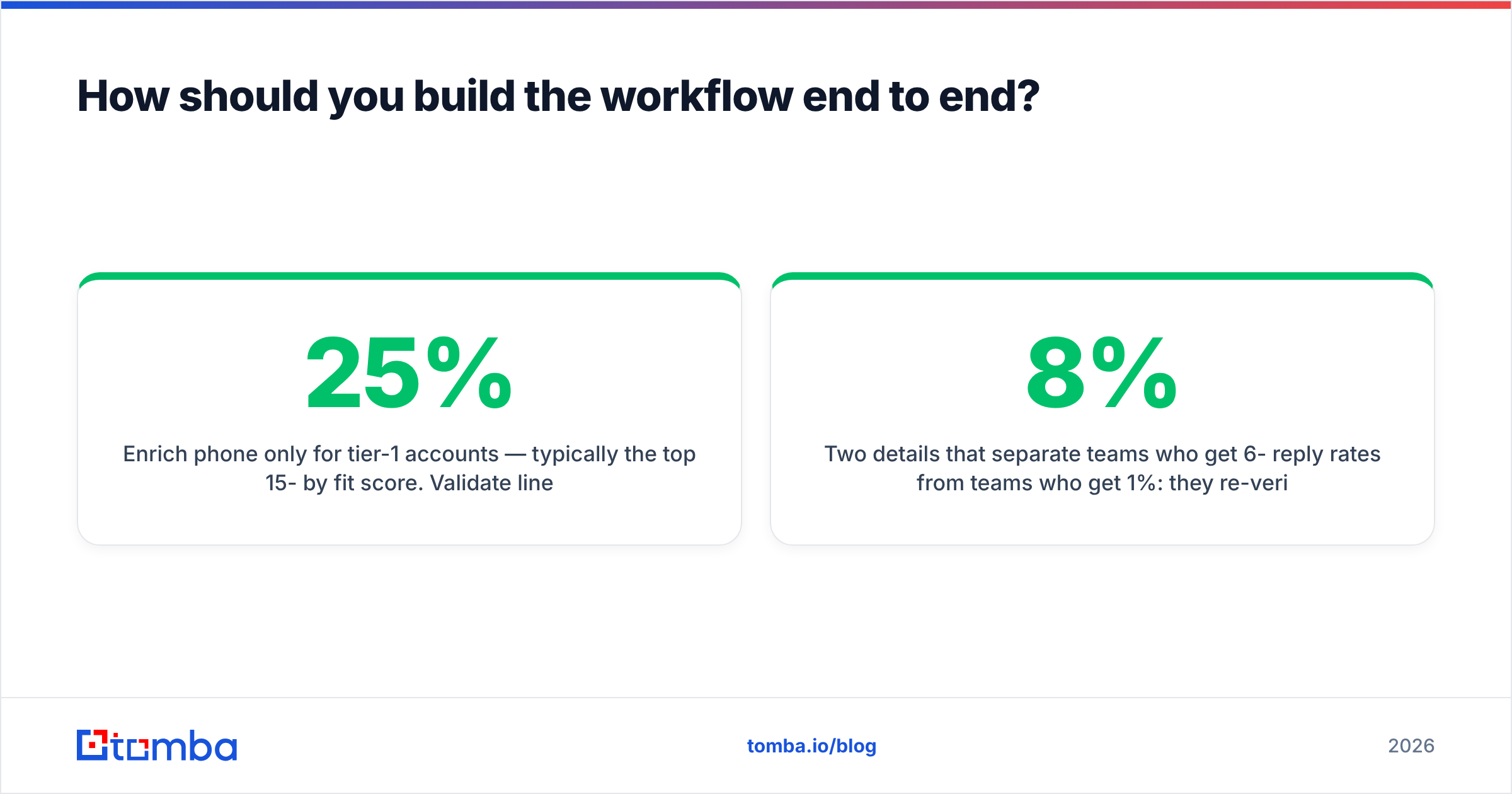
- Enrich phone only for tier-1 accounts — usually the top 15-25% by fit score. Check line type, then hand off to the dialer.
- Push to CRM with source and confidence intact. If your HubSpot or Salesforce record has no "verified on" date, you will re-buy the same stale data in nine months. A native HubSpot integration or a scheduled API sync keeps that field honest.
Two habits separate teams at 6-8% reply rates from teams at 1%. They re-check anything older than 90 days before a resend. And they never mix catch-all addresses into the same sending domain as verified ones. Segment by data confidence, not just by persona.
Delivery is its own job. Treat email deliverability as a separate discipline with its own warmup, auth setup, and volume ramp. Perfect data on a cold domain still lands in spam. Google's bulk sender guidelines set the current baseline.
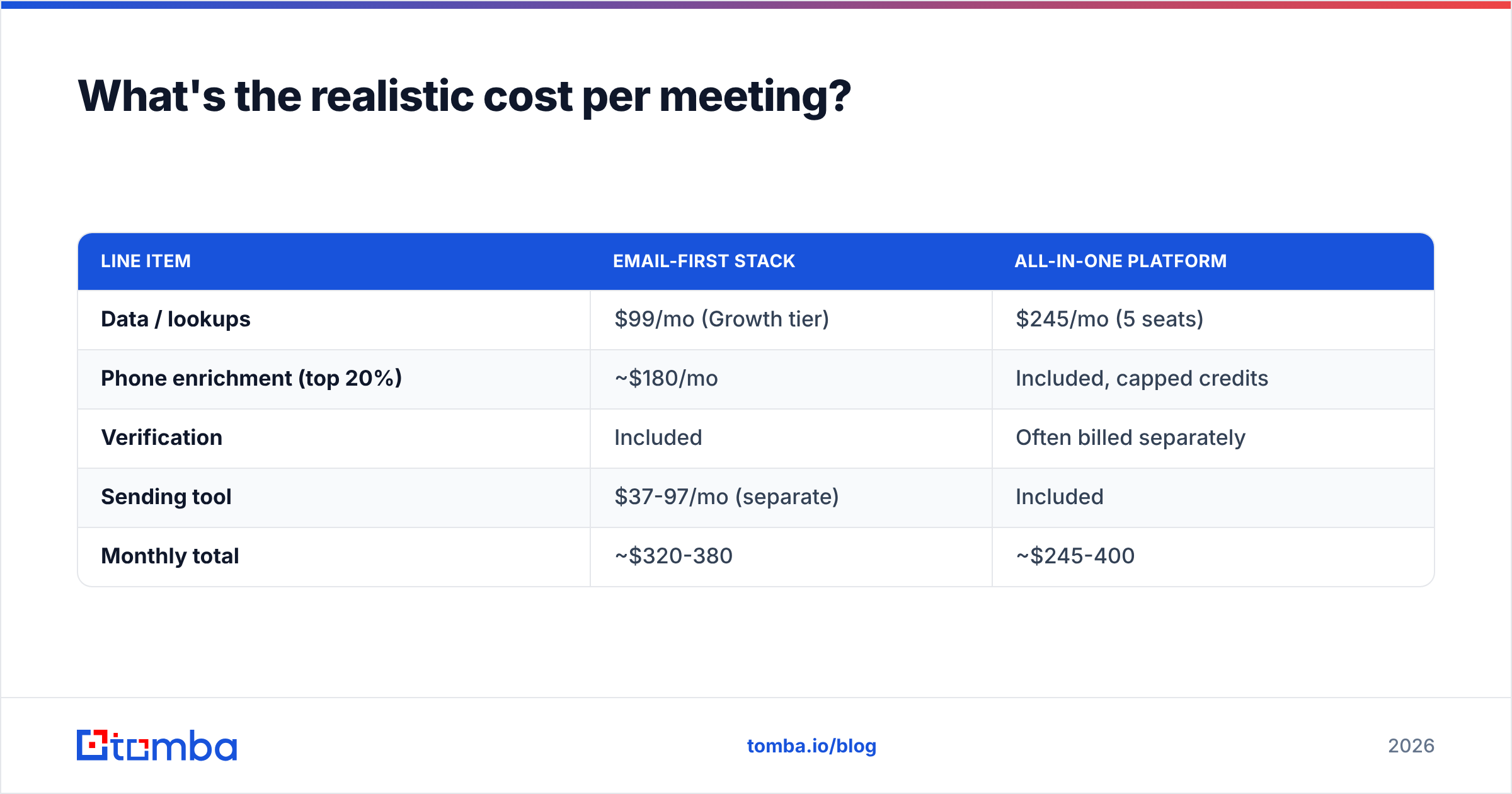
What's the realistic cost per meeting?#
Run the math before you commit. At 3,000 contacts a month:
| Line item | Email-first stack | All-in-one platform |
|---|---|---|
| Data / lookups | $99/mo (Growth tier) | $245/mo (5 seats) |
| Phone enrichment (top 20%) | ~$180/mo | Included, capped credits |
| Verification | Included | Often billed separately |
| Sending tool | $37-97/mo (separate) | Included |
| Monthly total | ~$320-380 | ~$245-400 |
The totals meet in the middle, which is the point. The choice is not price. It is fit. Need sequencing, reports, and dialing in one place across five or more seats? An all-in-one wins on simplicity. Have engineers, a sequencer you like, or fewer seats than lookups? An API-first provider at $49-$99/mo is far cheaper per record, and your contact data stays out of someone else's sending platform.
Watch cost per verified, reachable contact. Not cost per contact. A $0.02 record that bounces 40% of the time costs more than a $0.05 record that lands, once you price in the damage to your domain.
Where should you start?#
Start with one company you know well. Run a domain search. Confirm the pattern matches the addresses you already hold. Then find and check five people you have never contacted. If the pattern holds and the checks pass, you have a repeatable way to find email address and phone number data. Scale it with the API and stop touching spreadsheets.
Want the fastest path from a name and a company to a deliverable address? Start with the Tomba Email Finder. The free tier gives you 25 searches a month. Starter runs $49/mo. Every result comes back with a confidence score and a check status, not a bare string you have to trust. Test it against your own control list. That is the only benchmark that counts.
Related guides#
Ready to find emails that actually work?
Join 150,000+ professionals who stopped guessing and started sending. Free credits on signup — no credit card required.
Get the Tomba newsletter
Practical outbound tactics and product updates — once every two weeks.
About the author