How to Find Leads Manually in 2026: A Practical Playbook
Manual prospecting still beats bulk-buying lists on reply rate — if you do it right. Here's the exact workflow, the time cost per lead, and when to stop doing it by hand.
TL;DR — how to find leads manually in 2026
- When you find leads manually, you build the list one company and one person at a time — from LinkedIn, company sites, job boards, review platforms, and communities. You don't export 10,000 rows from a database.
- Manual lists routinely reply at 3–8% versus 0.5–2% for bulk-purchased lists, because the research itself produces the personalization.
- The real cost is time: 4–8 minutes per fully-researched contact. At 6 minutes, a 200-lead list is a 20-hour week.
- The winning setup is hybrid. Research the account by hand, then automate the mechanical part — email discovery, verification, enrichment — so you stop guessing addresses.
- Stop trying to find leads manually end to end once your ICP is proven and you need more than ~150 new contacts a month.
What does it actually mean to find leads manually?#
When you find leads manually, a human researches one account at a time. The decision about whether a prospect belongs on the list happens before the contact ever enters your CRM.
Think of it like grocery shopping versus a meal-kit subscription. The subscription drops a box on your porch every week — fast, predictable, and full of things you didn't ask for. Shopping yourself takes an hour, but everything in the bag is something you'll actually cook. Manual prospecting is the shopping trip.
Concretely, a manual workflow looks like this:
- Define a trigger, not a title. "VP Marketing at a SaaS company" is a filter. "VP Marketing at a SaaS company that just posted a demand-gen role and switched to HubSpot last quarter" is a trigger. Triggers are what manual research is uniquely good at finding.
- Build the account list first. 40–80 companies that match the trigger, sourced from job boards, funding announcements, G2 category pages, conference attendee lists, or podcast guest rosters.
- Identify the right person per account. Usually one primary and one backup — the economic buyer and the person who feels the pain daily.
Then finish the record:
- Find and verify the contact details. This is the part you should never do by hand; more on that below.
- Capture one specific research note per lead. A sentence you could not have written about any other prospect. If you can't write it, the lead isn't researched.
- Log it with the source. Six weeks later you will want to know where the lead came from and which trigger produced replies.
Steps 1, 2, 3, and 5 are irreplaceably human. Step 4 is mechanical, and doing it by hand is where most reps burn their week.

Is manual prospecting better than buying a list?#
Better on quality, worse on volume. That trade only pays off when your offer needs context to land. Teams that find leads manually are buying relevance with hours.
Bought lists are fine for high-volume, low-consideration products where the message barely changes. They fall apart for complex B2B sales, where the difference between a 1% and a 5% reply rate is whether the first line proves you understand the account.
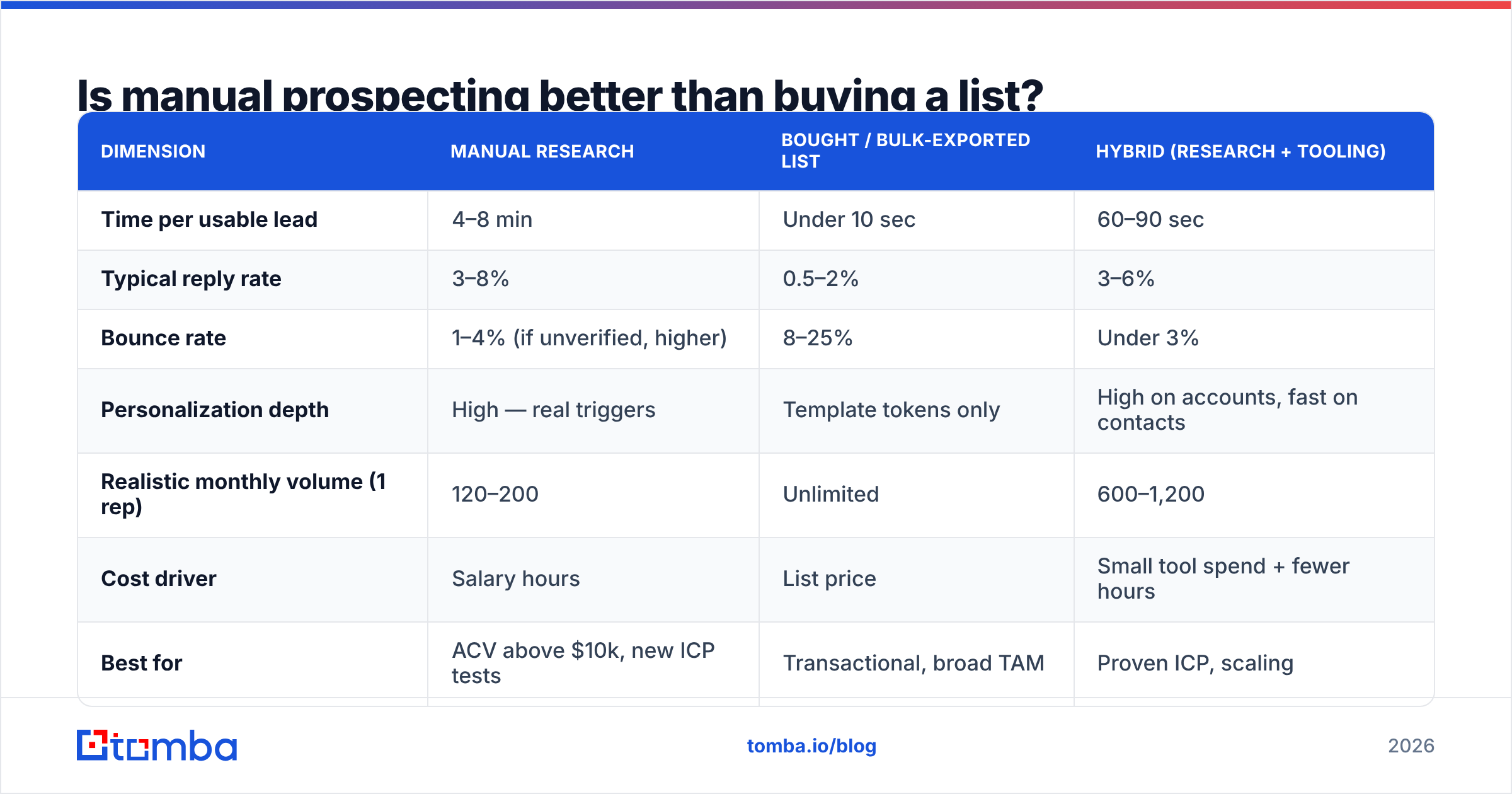
| Dimension | Manual research | Bought / bulk-exported list | Hybrid (research + tooling) |
|---|---|---|---|
| Time per usable lead | 4–8 min | Under 10 sec | 60–90 sec |
| Typical reply rate | 3–8% | 0.5–2% | 3–6% |
| Bounce rate | 1–4% (if unverified, higher) | 8–25% | Under 3% |
| Personalization depth | High — real triggers | Template tokens only | High on accounts, fast on contacts |
| Realistic monthly volume (1 rep) | 120–200 | Unlimited | 600–1,200 |
| Cost driver | Salary hours | List price | Small tool spend + fewer hours |
| Best for | ACV above $10k, new ICP tests | Transactional, broad TAM | Proven ICP, scaling |
| Data decay risk | Low (fresh at capture) | High (often 12–24 mo old) | Low |
The row that decides it for most teams is the bounce rate. B2B contact data decays at roughly 25–30% per year as people change jobs. The number is widely cited across the data-vendor space, and you can see it in any CRM you've owned for two years. A list bought in 2024 and mailed in 2026 is mostly archaeology. When you find leads manually, you capture the contact at the moment it's true. The catch: "true today" only holds if you verify before sending.
Where do you actually find leads manually in 2026?#
These are the places to find leads manually today, ranked by signal quality rather than volume.
LinkedIn (Sales Navigator or free). Still the backbone. The underused moves are saved-search alerts on job changes, "posted in the last 30 days" content filters, and the follower lists of your competitors' company pages. Free-tier LinkedIn plus disciplined boolean search gets you 80% of the way; Navigator mostly buys you speed. If you work primarily off profiles, a LinkedIn finder turns a profile URL into a contact without manual guesswork.
Job boards. A company hiring an SDR manager is buying sales tools in the next two quarters. A company hiring three data engineers has a data problem you may solve. Job posts also leak the tech stack in the requirements section — free technographics.
Review sites. G2 and Capterra category pages are ICP lists someone else compiled. Read the 3-star reviews of the incumbent tool you displace; those reviewers are pre-qualified, publicly, by name and title.
Company websites. Team pages, press releases, and case studies name the exact humans you want. Blog bylines are especially useful for content and marketing personas — an author finder pulls the writer's contact straight from the article URL.
Communities and events. Slack groups, subreddits, Discord servers, conference speaker lists, and podcast guest rosters. Low volume, extremely high intent, and almost nobody works these because they don't export cleanly.
Funding and news databases. Crunchbase, TechCrunch, and regional business journals. A Series A closed last month means budget exists and headcount is about to move.
Your own site traffic. The highest-intent source you already own. Anonymous companies browsing your pricing page are further along than anyone on a cold list — website visitor reveal turns that traffic into named accounts you can research manually.
What's the fastest manual workflow that still finds real emails?#
The honest answer: don't find the email manually. Find the person manually, then let software resolve the address.
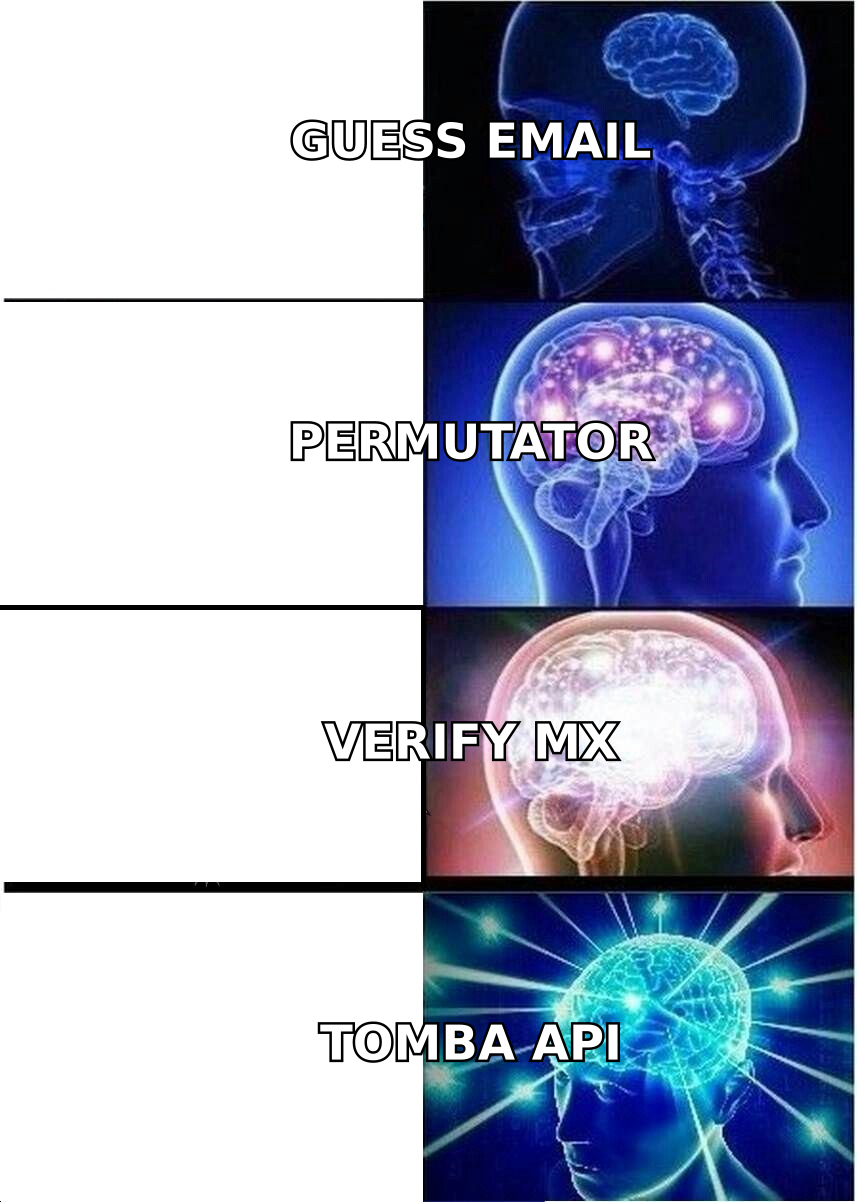
Guessing email formats by hand is the single biggest time sink when you find leads manually, and it's also where accuracy collapses. A rep eyeballing first.last@company.com is right maybe 60% of the time across a mixed list. Every miss is a bounce that damages your sender reputation.
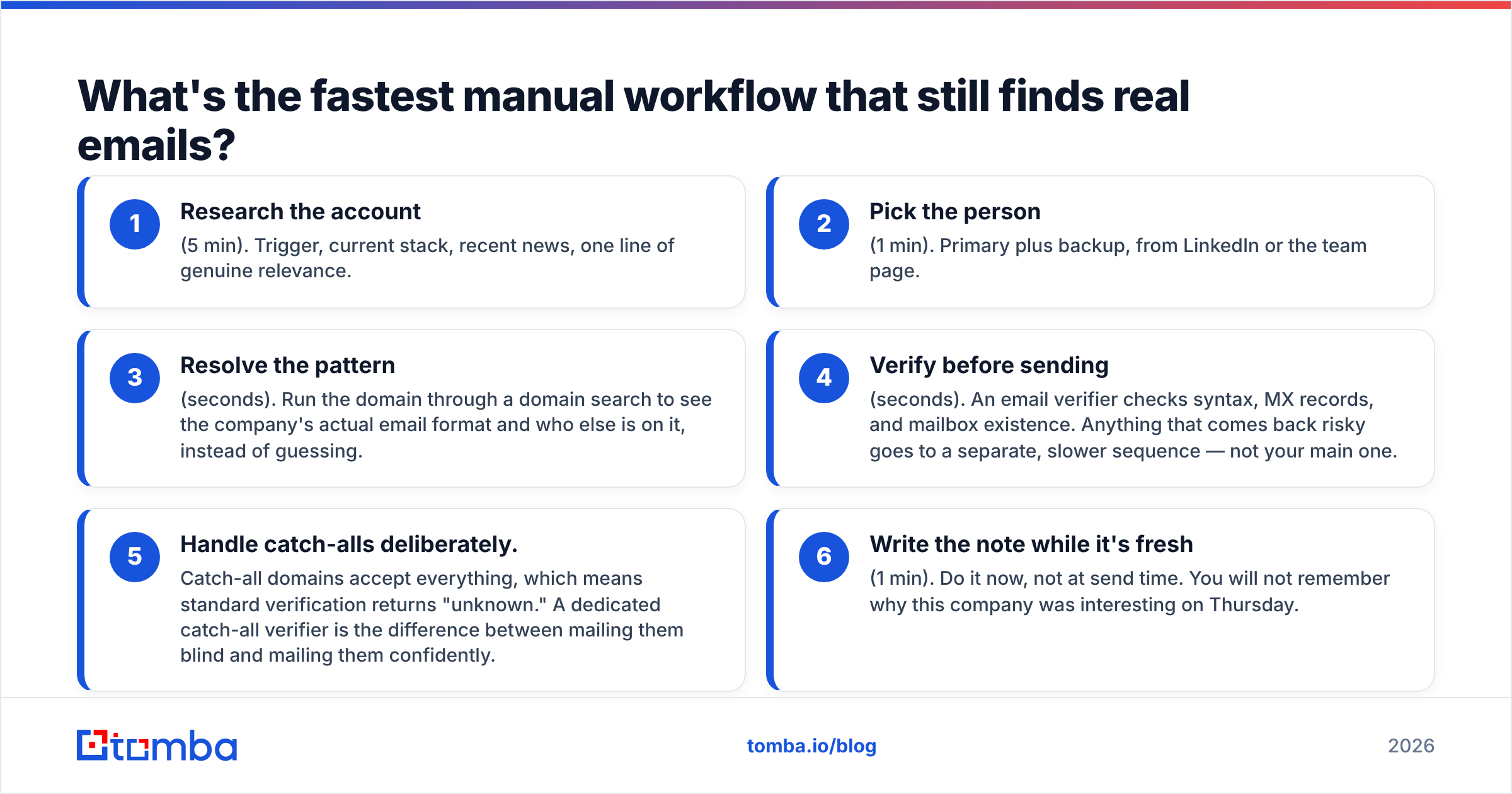
Here's the sequence that keeps the research human and the plumbing automatic:
- Research the account (5 min). Trigger, current stack, recent news, one line of genuine relevance.
- Pick the person (1 min). Primary plus backup, from LinkedIn or the team page.
- Resolve the pattern (seconds). Run the domain through a domain search to see the company's actual email format and who else is on it, instead of guessing.
- Verify before sending (seconds). An email verifier checks syntax, MX records, and mailbox existence. Anything that comes back risky goes to a separate, slower sequence — not your main one.
- Handle catch-alls deliberately. Catch-all domains accept everything, so standard verification returns "unknown." A dedicated catch-all verifier is the difference between mailing them blind and mailing them confidently.
- Write the note while it's fresh (1 min). Do it now, not at send time. You will not remember why this company was interesting on Thursday.
That's roughly 7 minutes, of which 6 are judgment and 1 is mechanics. That's the correct ratio. The inverted version, where a rep spends 5 minutes hunting an address and 2 minutes on research, is how manual prospecting earned its bad reputation.
How much does it cost to find leads manually?#
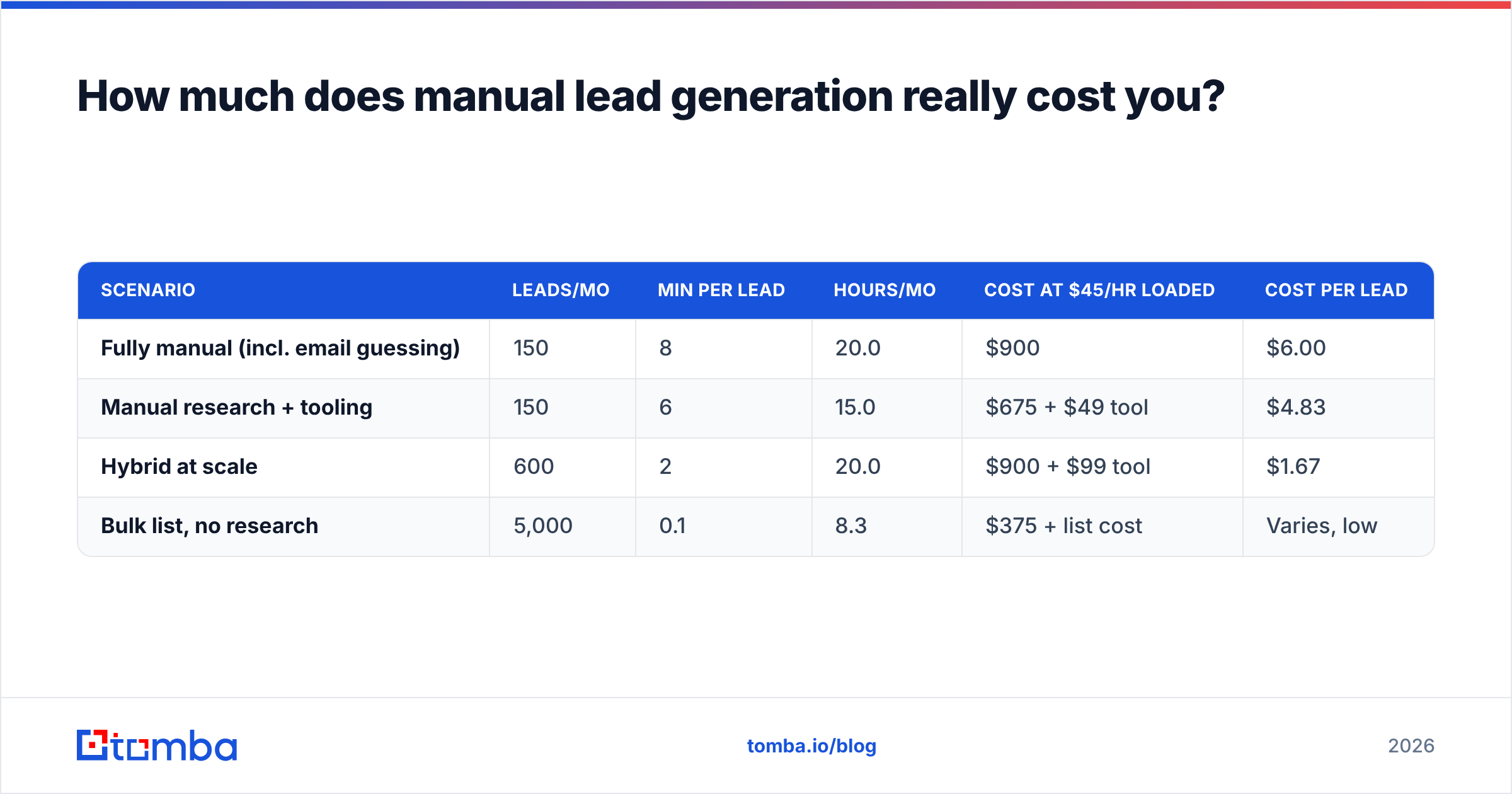
Price it in loaded hourly rate, not in tool spend. The math usually surprises people.
| Scenario | Leads/mo | Min per lead | Hours/mo | Cost at $45/hr loaded | Cost per lead |
|---|---|---|---|---|---|
| Fully manual (incl. email guessing) | 150 | 8 | 20.0 | $900 | $6.00 |
| Manual research + tooling | 150 | 6 | 15.0 | $675 + $49 tool | $4.83 |
| Hybrid at scale | 600 | 2 | 20.0 | $900 + $99 tool | $1.67 |
| Bulk list, no research | 5,000 | 0.1 | 8.3 | $375 + list cost | Varies, low |
The comparison that matters isn't manual-versus-automated. It's what your rep does with the 5 hours they get back. Five hours is roughly 50 more researched accounts, or 25 more follow-up touches on people who already replied. Neither of those is something a list purchase can buy you.
One caveat on the bottom row. Cheap per-lead cost on unresearched lists is real, but it's measured before bounces, spam complaints, and the domain damage that follows. Factor a 15% bounce rate into a cold-send program and the effective cost per delivered contact climbs fast. You may also spend a month rebuilding email deliverability you didn't need to lose.
When should you stop trying to find leads manually?#
Four signals, any one of which means it's time to change the mix.
Your ICP is proven. If three straight months of manual outreach show a consistent winning segment, you've already extracted the learning that manual research exists to produce. Keep manual work for new segment tests; automate the proven one.
You need more than 150 new contacts a month per rep. Past that, manual research stops being thorough and becomes a checkbox. Half-researched leads perform like unresearched leads and cost like researched ones — the worst square in the matrix.
Your reps are doing data entry, not selling. If time-tracking shows more than 30% of the week in spreadsheets and browser tabs, the bottleneck is tooling, not effort.
Bounce rates climb above 5%. That's a data-hygiene failure, and manual effort can't fix it. Verification and enrichment can. Google and Microsoft both tightened bulk-sender rules in 2024 — Google's own sender guidelines put a hard spam-complaint ceiling on bulk senders — so a sloppy list is now a deliverability problem, not just a conversion one.
The counter-signal: keep going by hand when you're selling a new product, entering a new vertical, targeting fewer than 300 total accounts, or chasing deals large enough that one meeting justifies a day of research. Enterprise ABM teams find leads manually on purpose, forever, and they're right to.
How do you scale manual prospecting without losing quality?#
Split the work by what only a human can do.
Tier your accounts. The top 50 accounts get full manual treatment — 15 minutes each, custom first line, multi-threaded across three contacts. The next 200 get 3-minute treatment with a segment-level angle. The long tail gets a clean, verified, well-targeted template. Not every lead deserves the same investment, and pretending otherwise is why manual programs stall.
Templatize the research, not the email. Build a five-field research checklist (trigger, stack, recent news, competitor, personal hook). Reps fill fields, not paragraphs. The email writes itself from filled fields, and quality stops depending on who did the research.
Batch by activity, not by account. Do 40 accounts of company research, then 40 rounds of contact identification, then one bulk pass for emails. Switching between research mode and data-entry mode is what makes 6 minutes become 12. A bulk email finder turns that last pass into a single upload rather than 40 lookups.
Push everything into the CRM automatically. Research that lives in a spreadsheet is research you'll redo in six months. Connect discovery to your stack — a HubSpot integration or Zapier integration means the lead lands enriched, deduplicated, and attributed without anyone retyping it.
Measure per-source reply rate, not per-source volume. Track which source you find leads manually from — job boards, review sites, communities, site traffic — actually produced meetings. After 60 days you'll usually find two sources doing most of the work, and you can drop the rest. If you'd rather compare options on price first, Tomba pricing starts free at 25 searches a month, with Starter at $49/mo and Growth at $99/mo.
Buy where buying is honest. If you need pre-built B2B lists for a specific geography or industry to seed the account layer, dedicated providers like BookYourData do that job well. Use the purchased data as an account-discovery input, and keep the person-level research and verification as your own quality gate. Bought breadth, manual depth, automated hygiene beats either extreme.
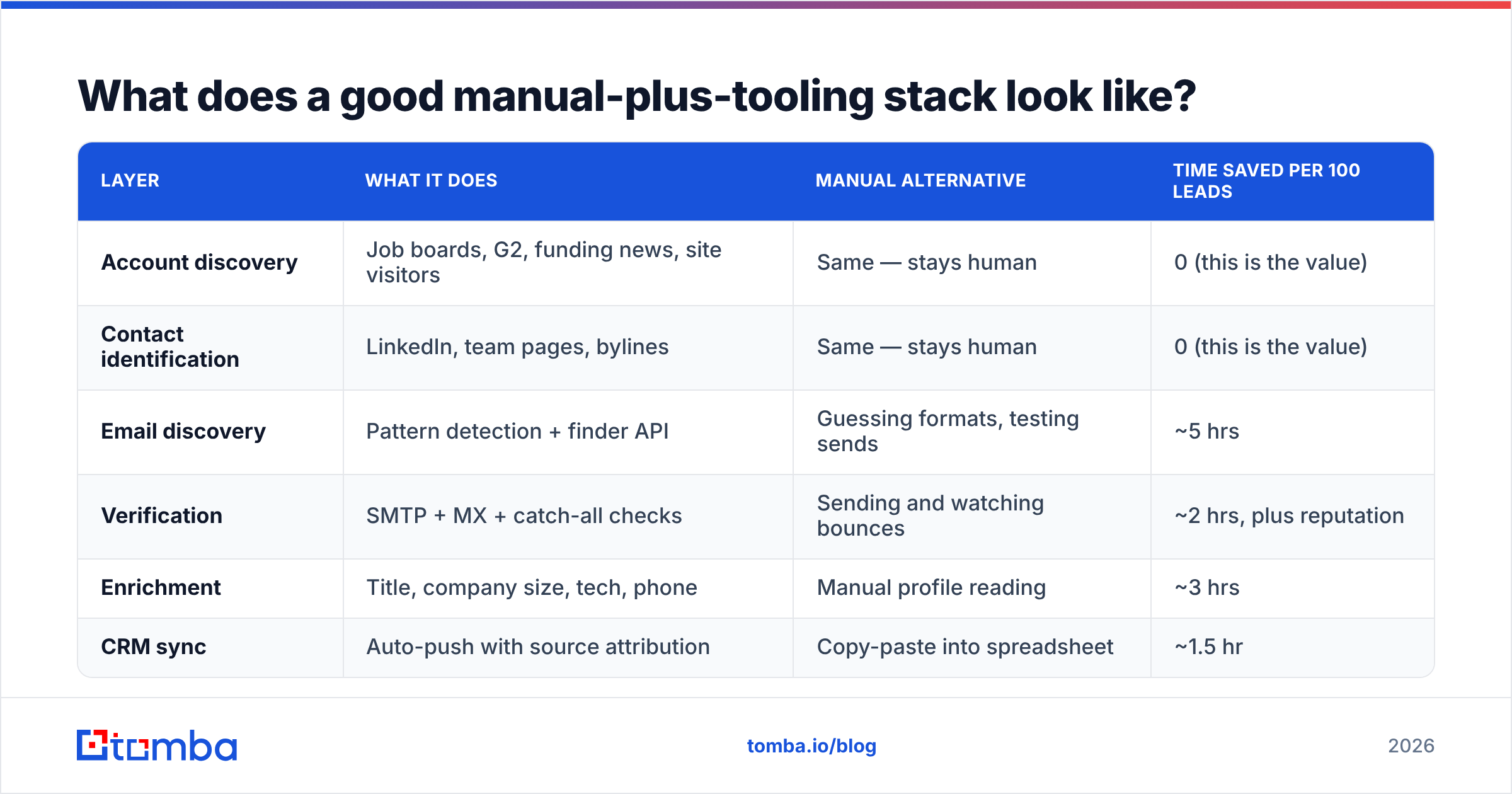
What does a good manual-plus-tooling stack look like?#
| Layer | What it does | Manual alternative | Time saved per 100 leads |
|---|---|---|---|
| Account discovery | Job boards, G2, funding news, site visitors | Same — stays human | 0 (this is the value) |
| Contact identification | LinkedIn, team pages, bylines | Same — stays human | 0 (this is the value) |
| Email discovery | Pattern detection + finder API | Guessing formats, testing sends | ~5 hrs |
| Verification | SMTP + MX + catch-all checks | Sending and watching bounces | ~2 hrs, plus reputation |
| Enrichment | Title, company size, tech, phone | Manual profile reading | ~3 hrs |
| CRM sync | Auto-push with source attribution | Copy-paste into spreadsheet | ~1.5 hr |
Note what stays manual: the two rows that decide whether the lead is worth contacting at all. Automation belongs strictly below that line. Teams that automate account selection end up with big lists and small pipelines. Teams that automate only the plumbing end up with small lists and real conversations.
For the enrichment layer, data enrichment fills in the firmographic and technographic fields your research checklist calls for, and a phone finder gives multi-channel reps a second path when email goes quiet. If your team lives in spreadsheets, the Google Sheets add-on keeps the manual list-building workflow intact while resolving addresses in place.
Frequently asked questions#
Is it still worth it to find leads manually in 2026? Yes, for the research half. AI-generated outreach flooded inboxes, which raised the bar on what counts as relevant. The specific, verifiable observation a human makes about an account is exactly what generic automation can't produce.
How many leads can one person find manually per day? With full research and no tooling, 10–15 quality leads. With tooling handling email discovery and verification, 30–50 at the same research depth.
Does manual prospecting reduce bounce rates? Only if you verify. Manual research means the person is current, but a hand-guessed address bounces just as hard as a purchased one. Run every address through verification before it enters a sequence.
Is scraping LinkedIn a good manual method? Reading LinkedIn to identify people is fine and normal. Automated scraping violates LinkedIn's terms of service and risks account bans. Identify people there, then resolve contact data through a compliant provider.
Start with the research, automate the rest#
It pays to find leads manually in exactly two places: deciding which accounts matter, and writing the one sentence that proves you looked. Everything after that — finding the address, verifying it exists, enriching the record, pushing it to your CRM — is machine work that should cost you seconds, not hours.
If you're spending your week guessing email formats instead of researching accounts, that's the piece to fix first. The Tomba Email Finder resolves a name and domain into a verified professional address, with a free tier at 25 searches a month so you can test it against your current manual list before paying anything. Keep the research human. Give the plumbing to software.
Related guides#
Ready to find emails that actually work?
Join 150,000+ professionals who stopped guessing and started sending. Free credits on signup — no credit card required.
Get the Tomba newsletter
Practical outbound tactics and product updates — once every two weeks.
About the author