How to Find Someone's Email by Name: 2026 Working Guide
Nine reliable ways to find someone's email by name in 2026 — from free permutation tricks to paid finders — plus the verification step that keeps your bounce rate under 2%.
TL;DR
- You can find someone's email by name if you know one more thing: their company domain. Name alone is a dead end; name plus domain is a solvable problem.
- Roughly 80% of B2B addresses follow five patterns (
first.last@,first@,flast@,firstl@,f.last@). Detect the company's pattern once and every other contact there becomes cheap. - Free methods — Google operators, GitHub commit logs, the site's own press page — work, but they're slow and cap out around 40-60% coverage on small companies.
- Paid finders trade time for coverage: expect 65-85% hit rates on real B2B lists, not the 95%+ vendors advertise.
- Never send to an unverified guess. Run every result through SMTP verification first, or your bounce rate torches your sender reputation inside a week.
Why is finding someone's email by name so hard?#
Because a name isn't an identifier. "James Chen" matches thousands of people. What makes an email address findable is the pair: a person and an organization.
Think of it like finding an apartment. The person's name is useless on its own — you need the building address first. Once you have the building, the mailbox layout is predictable: apartment numbers follow a scheme, and you only need to figure out which unit belongs to which resident.
Email works identically. @stripe.com is the building. Stripe's naming convention is the mailbox layout. Once you know both, james.chen@stripe.com is a two-second inference rather than a research project.
So every method below is really answering one of three questions:
- What domain does this person work at? (LinkedIn, company site, news mentions)
- What email pattern does that domain use? (pattern lookup, public addresses, GitHub commits)
- Does the resulting address actually exist? (SMTP verification)
Skip step 3 and you're not prospecting — you're gambling with your domain reputation.

What are the free ways to find someone's email by name?#
These cost nothing but time. Use them for one-off lookups, not for building a list of 500.
1. Google search operators. The workhorse. Combine the name with the domain and force an email-shaped result:
"james chen" "@stripe.com"
site:stripe.com "james chen" email
"james chen" (email OR contact) "stripe"
Add filetype:pdf to surface conference programs, investor decks, and press kits — these leak addresses constantly.
2. The company's own site. Press pages, team pages, "contact sales" forms, and job listings often expose a real address. Even one public address is enough: it reveals the pattern for the whole domain. If sarah.miller@acme.com is on the press page, then james.chen@acme.com is a strong bet.
3. GitHub commit history. For anyone technical, this is the highest-yield free source. Every git commit carries an author email. Open a repo the person contributed to, append .patch to any commit URL, and read the From: header. Engineers, DevRel, and CTOs are frequently exposed this way.
4. Twitter/X and personal sites. People still list contact addresses in bios and on personal portfolios — often obfuscated as "james [at] domain [dot] com". Personal-site contact pages are among the most reliable free finds.
5. Newsletter and Substack archives. Reply-to headers on newsletters are real addresses at real domains, and they surface the pattern instantly.
6. Pattern generation. Once you know the domain and the person's name, generate the candidates yourself with an email permutator, then verify each one. This is the free version of what paid tools automate.
The catch: free methods scale terribly. Ten minutes per contact is fine for one prospect and untenable for fifty.
Which email pattern does a company use?#
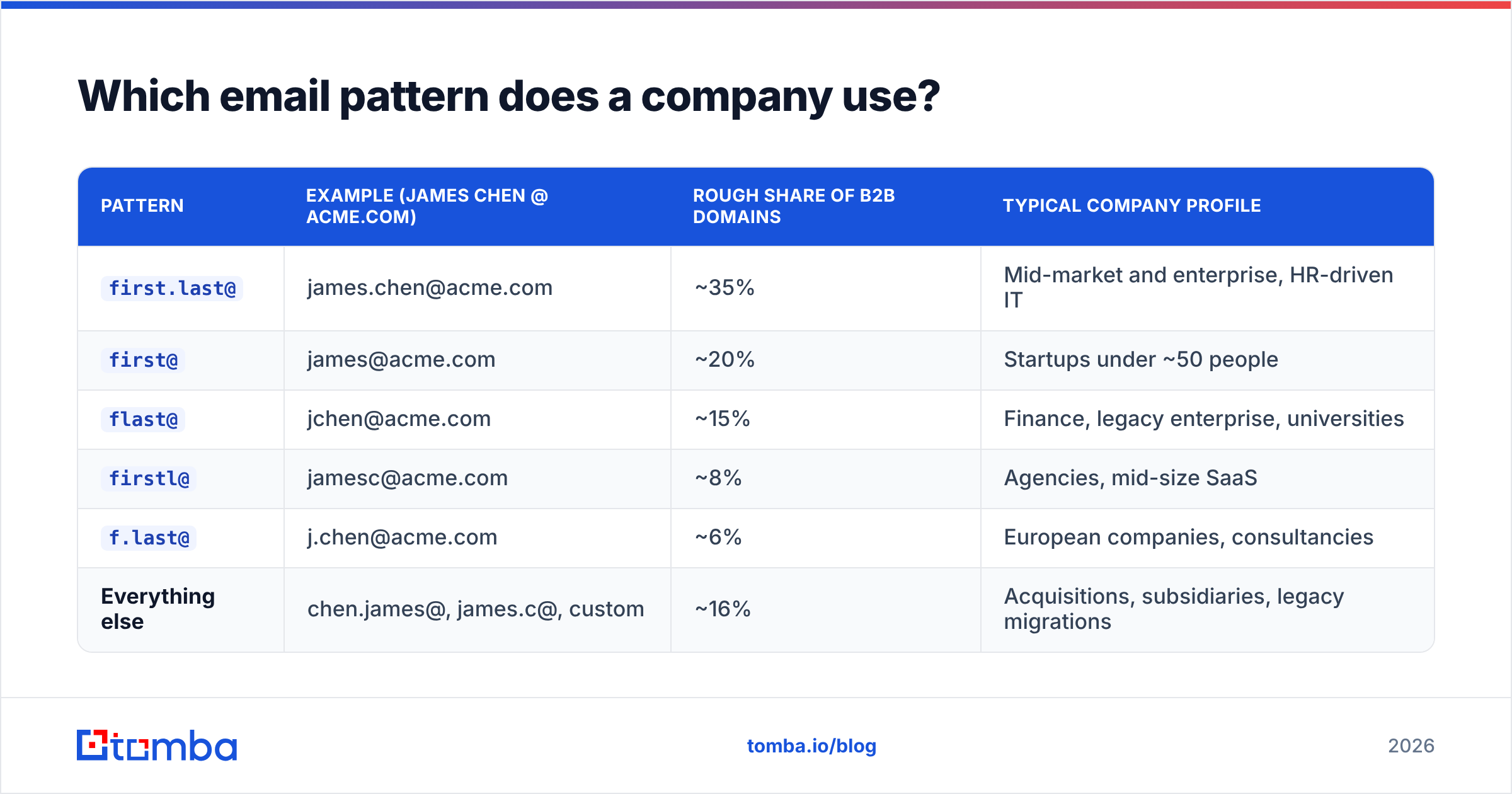
Five patterns cover the overwhelming majority of B2B domains. Here's how they break down and where each tends to show up:
| Pattern | Example (James Chen @ acme.com) | Rough share of B2B domains | Typical company profile |
|---|---|---|---|
first.last@ |
james.chen@acme.com | ~35% | Mid-market and enterprise, HR-driven IT |
first@ |
james@acme.com | ~20% | Startups under ~50 people |
flast@ |
jchen@acme.com | ~15% | Finance, legacy enterprise, universities |
firstl@ |
jamesc@acme.com | ~8% | Agencies, mid-size SaaS |
f.last@ |
j.chen@acme.com | ~6% | European companies, consultancies |
| Everything else | chen.james@, james.c@, custom | ~16% | Acquisitions, subsidiaries, legacy migrations |
Two practical rules follow from that table.
First, if you have to guess blind, guess first.last@ — then first@ if the company looks small. That single heuristic gets you above coin-flip odds.
Second, never guess twice at the same domain. Confirm the pattern once using a known public address or a company email pattern lookup, then apply it to everyone else there. A domain search does this at scale — it returns every address discovered at a domain along with the dominant pattern, which is far more efficient than one-name-at-a-time lookups.
How do paid email finders compare?#
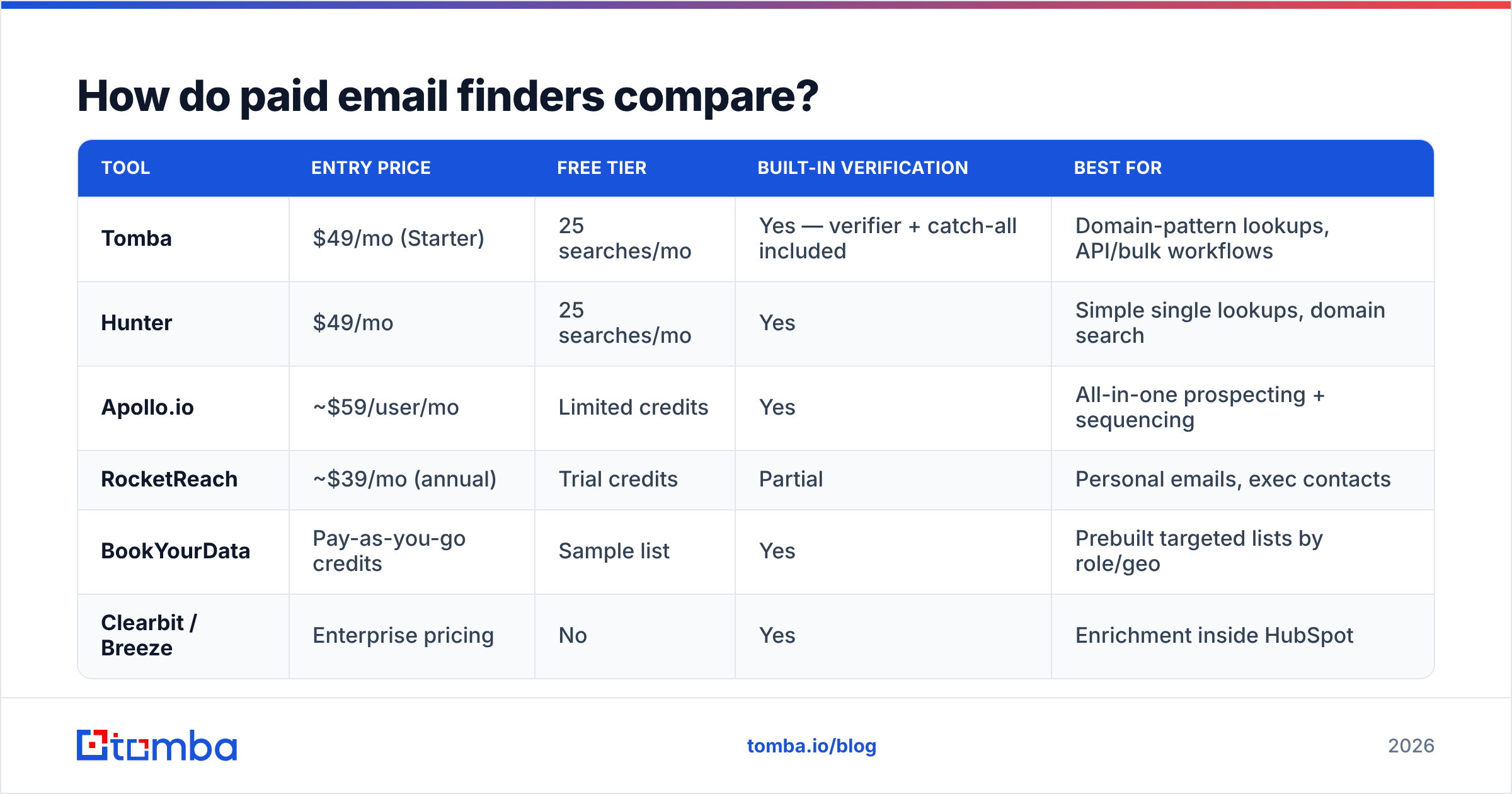
Paid tools do three things free methods can't: they cover domains with no public footprint, they verify in the same call, and they run in bulk. The trade-off is cost per contact and honest accuracy that's lower than the marketing claims.

A word on accuracy claims. When a vendor advertises "99% accuracy," read the fine print: that figure almost always describes verification accuracy (of the emails we return, this share are valid) — not coverage (of the names you submit, this share get an address back). Those are different numbers and the gap is wide. On a typical mixed B2B list, expect 65-85% coverage from a good tool, with verification accuracy in the 95%+ range on whatever it does return.
Here's how the main options stack up for name-to-email lookups:

| Tool | Entry price | Free tier | Built-in verification | Best for |
|---|---|---|---|---|
| Tomba | $49/mo (Starter) | 25 searches/mo | Yes — verifier + catch-all included | Domain-pattern lookups, API/bulk workflows |
| Hunter | $49/mo | 25 searches/mo | Yes | Simple single lookups, domain search |
| Apollo.io | ~$59/user/mo | Limited credits | Yes | All-in-one prospecting + sequencing |
| RocketReach | ~$39/mo (annual) | Trial credits | Partial | Personal emails, exec contacts |
| BookYourData | Pay-as-you-go credits | Sample list | Yes | Prebuilt targeted lists by role/geo |
| Clearbit / Breeze | Enterprise pricing | No | Yes | Enrichment inside HubSpot |
Notes on picking:
- Pay-as-you-go beats subscriptions if your volume is spiky. BookYourData's credit model, for example, suits teams that build a list once a quarter rather than running continuous outbound.
- Subscriptions beat credits if you're enriching continuously — a $49/mo plan amortizes fast at a few hundred lookups a month. See Tomba pricing for the tier breakdown.
- All-in-one platforms (Apollo, Outreach) bundle sending with finding. That's convenient until you want to swap one component; standalone finders with an API keep you flexible.
What's the fastest workflow for finding an email by name?#
Here's the sequence that gets a verified address in under a minute, ordered by cost-to-effort:
- Confirm the domain. Find the person on LinkedIn or the company site and note the exact working domain — not the marketing domain. Many companies send from
@acme.combut market at@getacme.com. - Run a domain search first, not a name search. Pull every known address at the domain. If your target is already in there, you're done — and you've learned the pattern for free. The Tomba Email Finder does name-plus-domain lookups directly when the domain search comes up empty.
- Apply the pattern if the person isn't listed. Build the candidate from the confirmed pattern rather than testing five permutations.
- Verify before you send. Run the address through an email verifier for an SMTP-level check. Valid, invalid, or catch-all — treat "catch-all" as its own bucket, not as valid.
- Handle catch-all domains separately. A catch-all domain accepts every address, so standard verification returns "unknown." A dedicated catch-all verifier uses secondary signals to score whether the mailbox is real. Send to catch-alls at lower volume and watch reply behavior.
- Log the pattern. Store the confirmed pattern against the domain in your CRM. The next contact at that company costs you zero lookups.
For bulk work, invert the order: upload the whole list to a bulk email finder, let it resolve patterns per domain, then export only the verified rows.

Is guessing an email address safe to send to?#
No — and this is the part most guides skip.
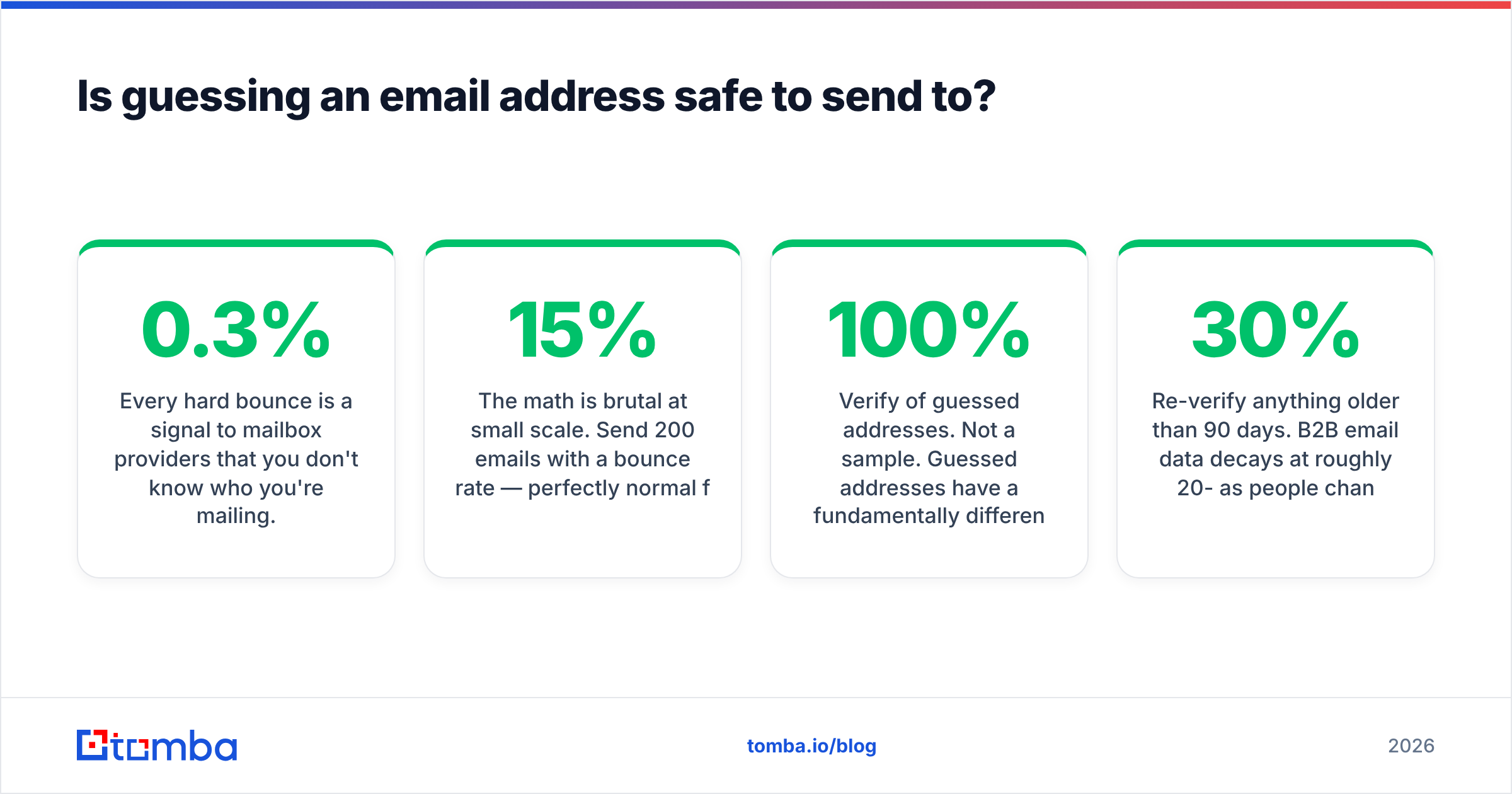
Every hard bounce is a signal to mailbox providers that you don't know who you're mailing. Google and Microsoft both tightened bulk-sender requirements in 2024, and the spam-complaint threshold is now explicit: Google's sender guidelines require staying under a 0.3% spam rate, with 0.1% as the practical safe target. Bounce rates aren't published as a hard number, but sustained bounces above ~2-3% will visibly degrade inbox placement.
The math is brutal at small scale. Send 200 emails with a 15% bounce rate — perfectly normal for unverified guesses — and you've just told Gmail that 30 of your recipients don't exist. That's enough to push a new domain into the spam folder for weeks.
Three rules to keep email deliverability intact:
- Verify 100% of guessed addresses. Not a sample. Guessed addresses have a fundamentally different risk profile than opt-in list addresses.
- Never send to role addresses (
info@,sales@,support@) in cold outreach. They inflate complaint rates and rarely reach a decision-maker. - Re-verify anything older than 90 days. B2B email data decays at roughly 20-30% per year as people change jobs. A verified address from last year is a coin flip today.
What about finding a personal email instead of a work email?#
Different problem, worse ethics, lower success rate.
Work emails are legitimate business contact data. In the EU, B2B outreach to a work address at a company you have a plausible business interest in is generally defensible under GDPR's legitimate-interest basis — provided you identify yourself and honor opt-outs. Personal Gmail addresses are a different category: they're personal data with no business-context justification, and consent expectations are much stricter.
Practically, personal addresses are also harder to find and less likely to get a reply. Someone's @gmail.com gets buried under newsletters; their work inbox is where they actually do business. Unless you're recruiting — the one use case where personal email genuinely outperforms — stick to work addresses.
If you already have an address and want to know who's behind it, that's the inverse operation: a reverse email lookup resolves an address back to a name, company, and role.
How do you verify the email you found?#
Verification runs in layers, and each one filters out a different class of bad address:
- Syntax check. Malformed addresses, illegal characters, missing TLD. Free and instant.
- Domain and MX record check. Does the domain exist and accept mail at all? Kills typo'd and parked domains.
- Disposable-domain check. Flags temporary inbox services that will never reply.
- SMTP handshake. Opens a connection to the receiving server and asks whether the mailbox exists — without sending anything. This is the check that actually matters.
- Catch-all detection. Determines whether the server accepts everything, which invalidates step 4's answer.
- Role-address flagging. Marks
info@,admin@,hello@so you can exclude them from cold sequences.
Any credible verifier runs all six. If a tool only does syntax and MX, it's a spell-checker, not a verifier — and it will happily pass a well-formed address to a mailbox that doesn't exist. You can spot-check a single address with a free email checker before committing credits to a bulk run.
One more signal worth watching: your own sending domain's health. Before a campaign, confirm your SPF record, DKIM, and DMARC are all passing. Perfect list hygiene doesn't help if your authentication is broken — G2's email deliverability category is full of reviews from teams who learned that in the wrong order.
Which method should you actually use?#
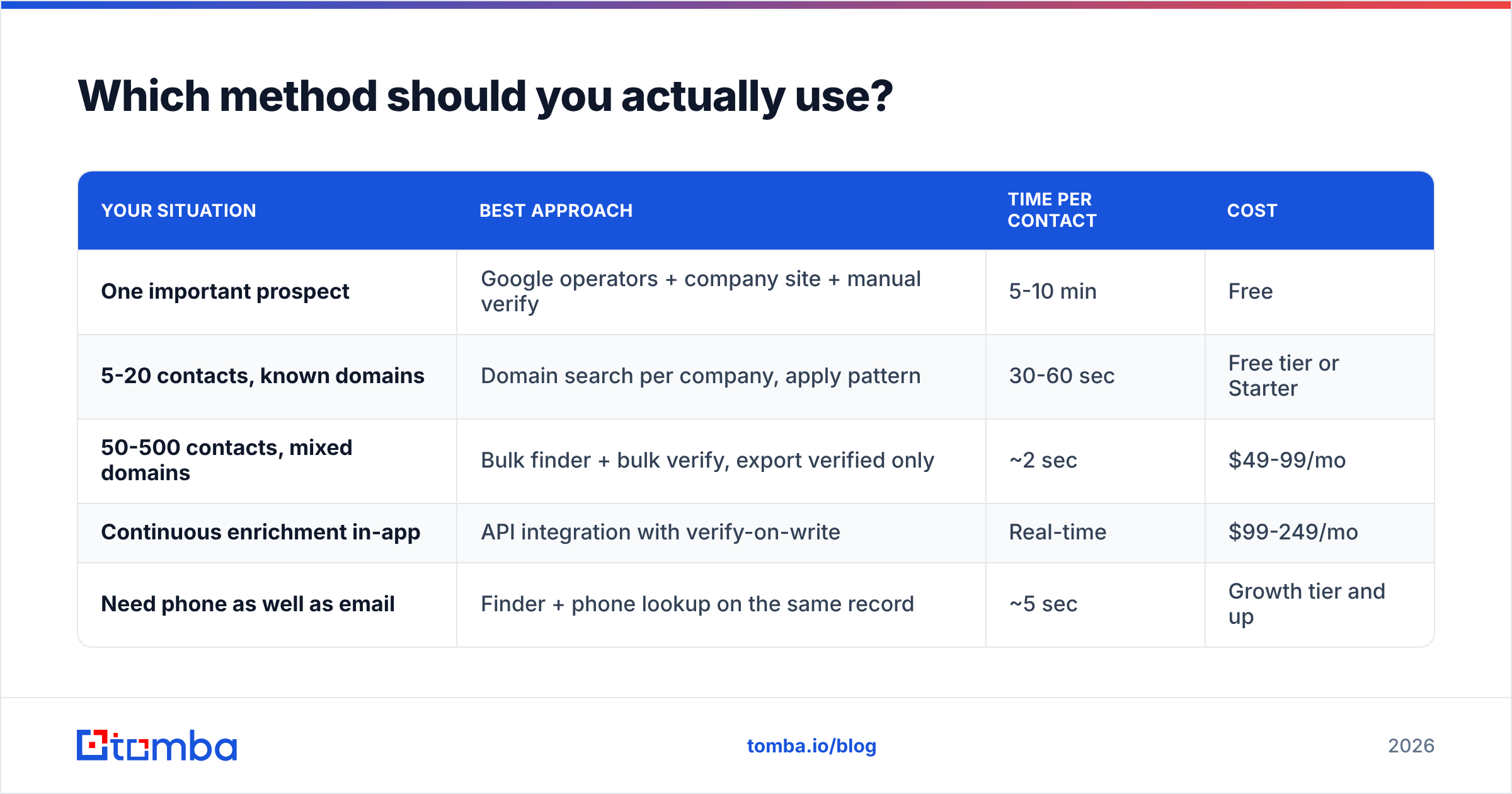
Match the method to the volume:
| Your situation | Best approach | Time per contact | Cost |
|---|---|---|---|
| One important prospect | Google operators + company site + manual verify | 5-10 min | Free |
| 5-20 contacts, known domains | Domain search per company, apply pattern | 30-60 sec | Free tier or Starter |
| 50-500 contacts, mixed domains | Bulk finder + bulk verify, export verified only | ~2 sec | $49-99/mo |
| Continuous enrichment in-app | API integration with verify-on-write | Real-time | $99-249/mo |
| Need phone as well as email | Finder + phone lookup on the same record | ~5 sec | Growth tier and up |
The pattern across all five rows: verification is non-negotiable regardless of how you found the address. The finding method changes with volume; the verification step never drops out.
If you're running enrichment inside your own product or CRM sync, the Tomba API exposes finder and verifier as separate endpoints so you can find-then-verify in a single write path — no manual export/import loop.
Ready to stop guessing?#
Start with the domain, not the name. Pull every known address at the company, confirm the pattern, apply it to your target, and verify before a single email leaves your outbox. That order turns email-finding from a guessing game into a repeatable process — and it's why teams with a boring, disciplined workflow consistently out-deliver teams with a bigger list.
The Tomba Email Finder handles the whole chain: name plus domain in, pattern-matched and SMTP-verified address out, with catch-all scoring on domains that would otherwise return "unknown." The free tier gives you 25 searches a month to test it against contacts you already know the answer for — which is exactly how you should evaluate any email finder before paying for it. Starter is $49/mo when you're ready to scale past the free tier.
Related guides#
Ready to find emails that actually work?
Join 150,000+ professionals who stopped guessing and started sending. Free credits on signup — no credit card required.
Get the Tomba newsletter
Practical outbound tactics and product updates — once every two weeks.
About the author