FindEmails.com Toofr Pricing 2026: Reviews, Pros and Cons
FindEmails.com (formerly Toofr) is one of the oldest email finders still running. Here's what its plans really cost per usable contact, what reviewers complain about, and when a different tool wins.
TL;DR — what FindEmails.com Toofr pricing actually costs per usable contact:
- FindEmails.com is Toofr rebranded — an email finder from 2013. One credit buys one email.
- Plans run from about $29/month to about $99/month. What matters is cost per verified, deliverable contact, not cost per credit.
- Reviews split hard. Buyers praise the price and the plain CSV workflow. They fault the hit rate on small domains, the dated UI, and slow support.
- There is no real verification layer, no catch-all handling, and only a basic API. Most teams pay a second vendor to clean the output.
- Need to find and verify at scale? A finder with a full verification stack (Tomba, or BookYourData for ready-made lists) usually costs less per usable contact.
What is FindEmails.com (Toofr)?#
FindEmails.com is an email lookup service that started life as Toofr, built by Ryan Buckley around 2013. It was one of the first tools to sell "give me a name and a company, get an email back" as a standalone product, years before that became a crowded category. The rebrand to FindEmails.com kept the underlying engine and swapped the name for something more searchable.
The product does three things:
- Single lookup — type a first name, last name, and domain; get the most likely email address plus a confidence score.
- Bulk CSV upload — drop in a spreadsheet of names and companies, get a file back with emails appended.
- Basic verification — a syntax and SMTP-level check that flags obviously dead addresses.
That's the whole product. There's no sequencer, no CRM sync worth the name, no intent data, no Chrome extension ecosystem to speak of. For some buyers that minimalism is the selling point. For others it's the reason they churned after two months.
The scoring model is the interesting part. FindEmails doesn't claim a binary "this is the email." It returns a confidence percentage built from pattern matching plus whatever public signal it has. You decide whether a 70% score is worth burning a send on. That honesty is refreshing — but it also means you do the quality control yourself.
How does FindEmails.com Toofr pricing work?#
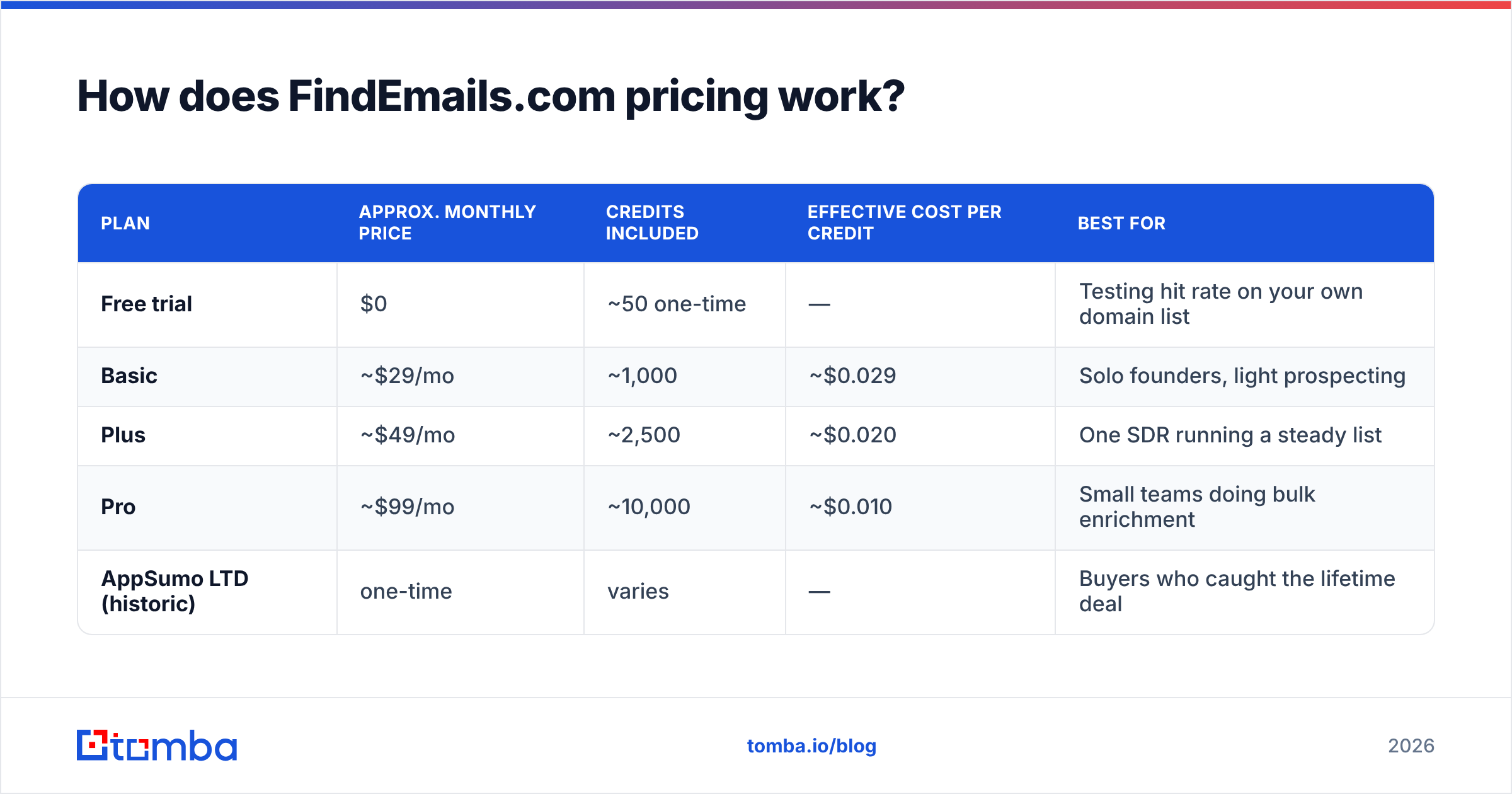
FindEmails uses straight credit blocks with monthly renewal. One credit buys one returned email. You generally aren't charged for a lookup that returns nothing, which is the fair way to do it.
Listed pricing at the time of writing looks like this. Always confirm on the vendor's own page before you buy — small email-finder vendors change tiers quietly and often.
| Plan | Approx. monthly price | Credits included | Effective cost per credit | Best for |
|---|---|---|---|---|
| Free trial | $0 | ~50 one-time | — | Testing hit rate on your own domain list |
| Basic | ~$29/mo | ~1,000 | ~$0.029 | Solo founders, light prospecting |
| Plus | ~$49/mo | ~2,500 | ~$0.020 | One SDR running a steady list |
| Pro | ~$99/mo | ~10,000 | ~$0.010 | Small teams doing bulk enrichment |
| AppSumo LTD (historic) | one-time | varies | — | Buyers who caught the lifetime deal |
Two things about this table matter more than the numbers themselves.
First: unused credits typically don't roll over. Buy 10,000 and use 3,000 in a slow month, and you paid $99 for 3,000 credits. That's an effective $0.033 each, worse than the entry tier. Credit blocks punish uneven demand, and outbound demand is almost always uneven.
Second: a credit is not a contact. A 60%-confidence email that bounces still costs you a credit. It also costs you a slice of your email deliverability. The honest unit of cost is dollars per contact you can actually send to. Divide your credit price by your real deliverable rate. At 85% deliverable, $0.010 per credit becomes $0.012 per usable contact. At 60%, it becomes $0.017. And that is before you pay a verification vendor to find out which is which.

How accurate is FindEmails.com in practice?#
This is where the reviews diverge hardest. Run your own test rather than trust anyone's numbers — including ours.
FindEmails performs best on what the category calls easy domains: US-based companies of 50+ employees, with a consistent public email pattern (first.last@, first@, flast@) and enough web footprint to have leaked that pattern somewhere crawlable. On that profile, buyers routinely report hit rates in the 60-80% range with acceptable accuracy.
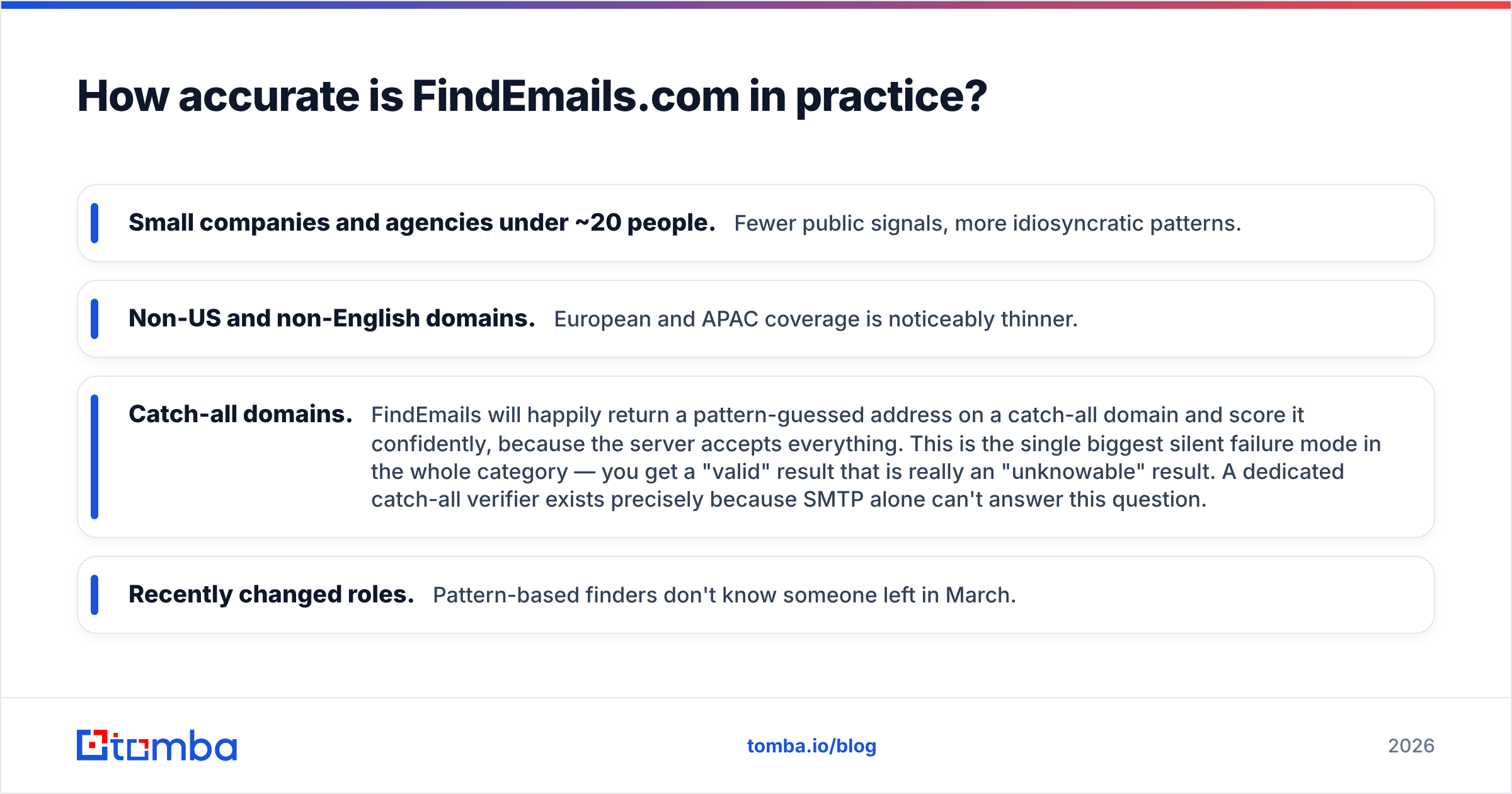
Where it degrades:
- Small companies and agencies under ~20 people. Fewer public signals, more idiosyncratic patterns.
- Non-US and non-English domains. European and APAC coverage is noticeably thinner.
- Catch-all domains. FindEmails will happily return a pattern-guessed address on a catch-all domain and score it confidently, because the server accepts everything. This is the single biggest silent failure mode in the whole category — you get a "valid" result that is really an "unknowable" result. A dedicated catch-all verifier exists precisely because SMTP alone can't answer this question.
- Recently changed roles. Pattern-based finders don't know someone left in March.

The practical implication: whatever you find, verify it somewhere. The built-in check is a syntax-and-SMTP pass. It catches malformed and hard-dead addresses, but nothing subtler. Teams running real volume pair it with a standalone email verifier — a second line item on the invoice that never shows up in the pricing comparison.
What do FindEmails.com reviews actually say?#
Pull the pattern out of user reviews on G2 and Capterra and the same themes repeat.
What reviewers consistently praise:
- Price transparency. No "contact sales" wall, no seat minimums, no annual lock-in required. For a category full of quote-gated enterprise pricing, that's genuinely differentiated.
- Bulk CSV workflow. Upload, wait, download. It's unglamorous and it works, and it doesn't force you into a proprietary UI to see your own data.
- Confidence scoring. Being told "we're 55% sure" beats being told "verified" by a tool that guessed.
- Longevity. A decade-plus of operation in a category where tools vanish yearly counts for something.
What reviewers consistently criticise:
- Hit rate on hard lists. The most common complaint by volume — "worked great for enterprise, useless for my SMB list."
- Dated interface. Functional, not pleasant. Several reviews describe it as feeling frozen in 2016.
- Support responsiveness. Small team, slow replies. Fine when nothing breaks; painful when a bulk job fails at 90%.
- Limited integrations. No deep CRM sync, no rich extension ecosystem, an API that's serviceable but not built for engineering teams to lean on. If you want an email finder API as infrastructure rather than a convenience, this isn't it.
- Credit expiry. Recurring frustration among users with lumpy monthly usage.
One more signal worth reading: FindEmails ran AppSumo lifetime deals. Those deals are great for buyers. They also tend to signal a company chasing cash and volume over enterprise-grade roadmap investment. Neither good nor bad — just information about what you're buying into.
What are the real pros and cons of FindEmails.com?#
Pros
- Cheapest realistic entry point. ~$29/month is genuinely low for the category.
- No contract friction. Month-to-month, cancel whenever.
- Honest scoring. Doesn't overclaim certainty.
- Simple mental model. One credit, one email. No credit-multiplier games where a phone number costs 10x an email.
- Does not upsell you into a suite. You buy lookups, not a "revenue platform."
Cons
- Verification is a stub, not a product. You will pay someone else for real verification.
- Catch-all handling is weak. Silent false positives are the expensive kind.
- Thin non-US coverage.
- No serious enrichment. No job title, company size, tech stack, or phone appended. If you need data enrichment you're buying a second tool.
- Credits don't roll over.
- Slow product velocity. Compare its changelog to any of the 2022+ entrants.
How does FindEmails.com compare to the alternatives?#
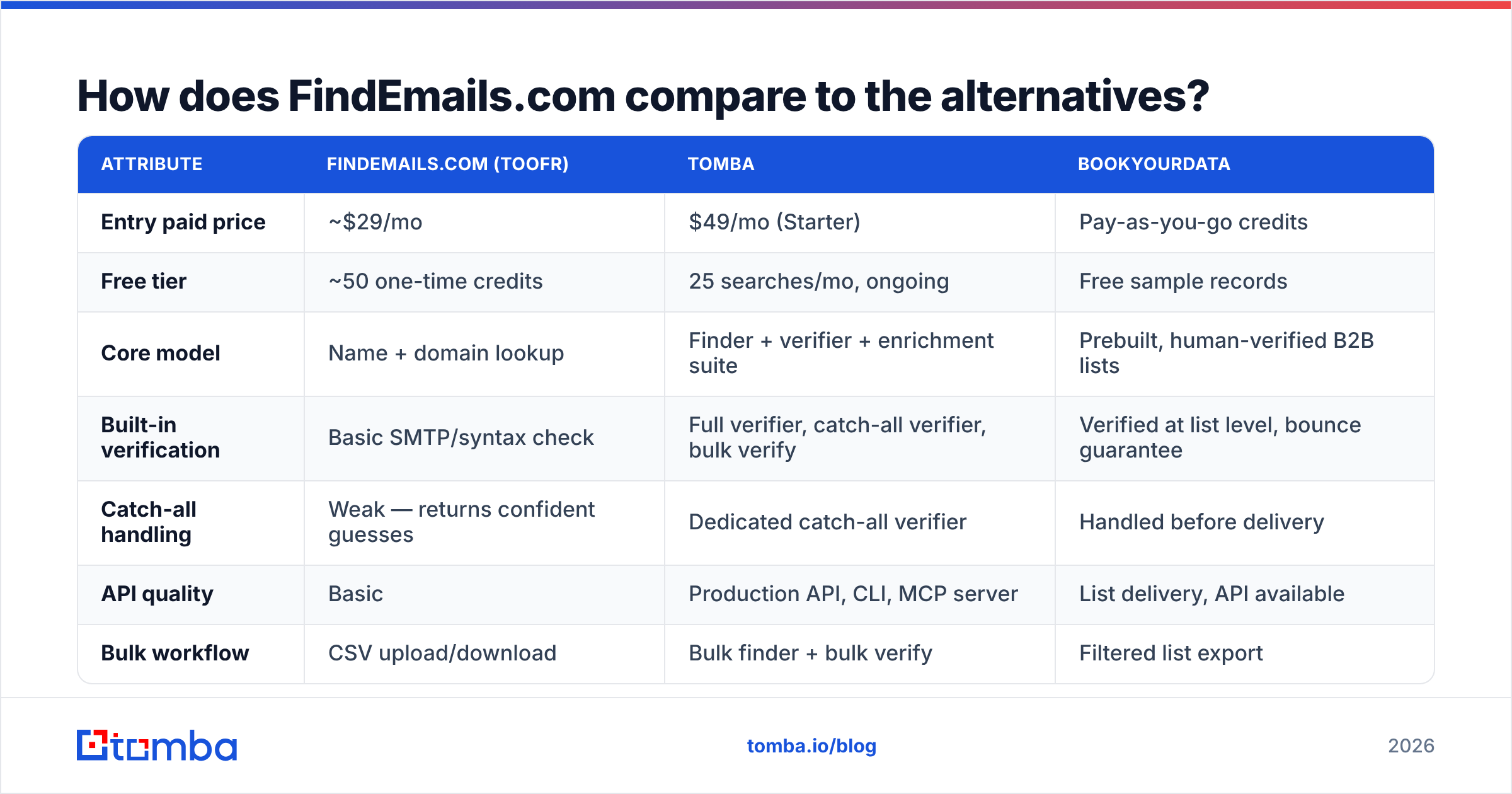
Sticker price is the wrong comparison axis. Here's the same set of tools compared on what actually drives cost per usable contact.

| Attribute | FindEmails.com (Toofr) | Tomba | BookYourData |
|---|---|---|---|
| Entry paid price | ~$29/mo | $49/mo (Starter) | Pay-as-you-go credits |
| Free tier | ~50 one-time credits | 25 searches/mo, ongoing | Free sample records |
| Core model | Name + domain lookup | Finder + verifier + enrichment suite | Prebuilt, human-verified B2B lists |
| Built-in verification | Basic SMTP/syntax check | Full verifier, catch-all verifier, bulk verify | Verified at list level, bounce guarantee |
| Catch-all handling | Weak — returns confident guesses | Dedicated catch-all verifier | Handled before delivery |
| API quality | Basic | Production API, CLI, MCP server | List delivery, API available |
| Bulk workflow | CSV upload/download | Bulk finder + bulk verify | Filtered list export |
| Enrichment (title, phone, socials) | Minimal | Yes — phone finder, socials, company data | Yes, included in records |
| Integrations | Limited | Sheets, Excel, HubSpot, Salesforce, Pipedrive, Zapier, Airtable | CRM-ready exports |
| Best fit | Solo prospector on a tight budget | Teams needing find + verify in one stack | Buyers who want a ready-made targeted list, no build |
BookYourData deserves a specific note, because it solves a different problem well. If you don't want to build a list at all, buying a filtered, pre-verified one with a bounce guarantee removes the whole find-and-verify loop. That's a legitimate strategy, especially for a first campaign into a new segment where you don't yet know your ICP's domain patterns.
Tomba sits in the middle. You build the list yourself, but the finding, verifying, catch-all checking, and enrichment happen in one place and on one bill. Tomba pricing starts at $49/month for Starter, $99/month for Growth, and $249/month for Pro. The free tier gives you 25 searches per month, and it renews — so you can pressure-test hit rate on your actual target domains before paying anyone.
Who should actually buy FindEmails.com?#
Buy it if:
- You're a solo founder or consultant doing under ~1,000 lookups a month.
- Your targets are mid-size to large US companies with predictable email patterns.
- You already own a verification tool and just need a cheap finding layer.
- You want month-to-month with no sales call.
Skip it if:
- Your list is heavy on SMBs, agencies, or non-US companies.
- You need catch-all resolution rather than catch-all guessing.
- You want enrichment — titles, phones, LinkedIn — alongside emails.
- You're building automation and need an API you can depend on.
- Your monthly volume is uneven and expiring credits would bite.
How should you test any email finder before paying?#
Run the same 100-row test against every candidate. This takes an afternoon and saves months of wrong-vendor cost.
- Build a control list. 100 contacts you already have confirmed, correct emails for — from your CRM, from replied threads. Strip the email column.
- Run it through each tool's free tier. FindEmails' one-time trial, Tomba's 25/month free tier, whatever the others offer.
- Score three numbers: hit rate (rows returned), accuracy (returned email matches your known-good one), and catch-all rate (rows flagged unknown or silently guessed).
- Verify the winners independently. Push all returned addresses through a separate verifier — a free email checker works for a spot test — and see how many "confident" results fail.
- Divide. Total monthly cost ÷ contacts that survived step 4 = your real cost per usable contact. Compare that, not the pricing page.
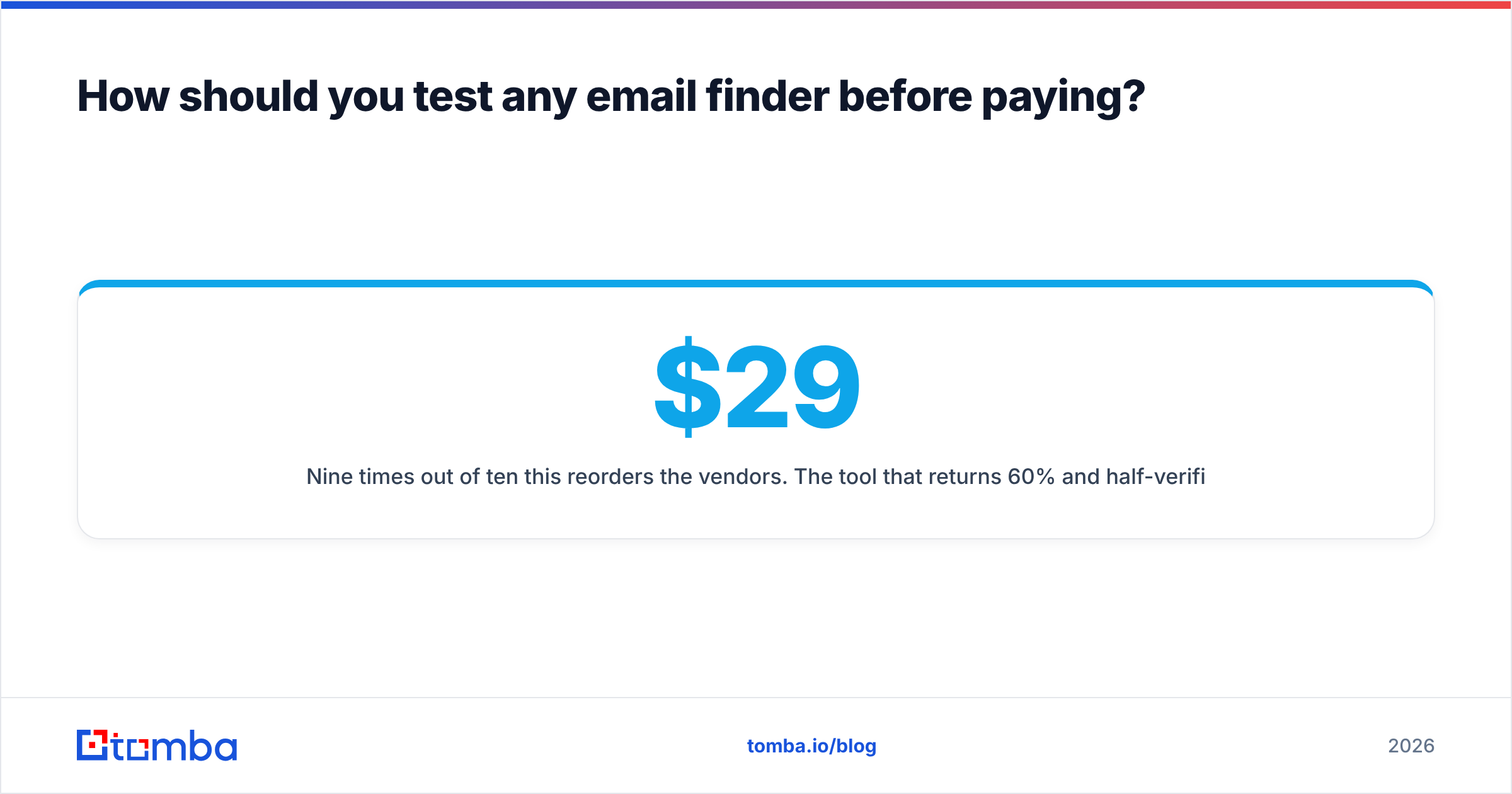
Nine times out of ten this reorders the vendors. A $29 tool that returns 60% and half-verifies costs more per usable contact than a $49 tool returning 80% pre-verified. The gap widens as volume grows, because bounced sends damage sender reputation in a way no plan prices in.
The bottom line on FindEmails.com Toofr pricing#
FindEmails.com Toofr pricing buys you a competent, honest, aging tool at a low price. It earns its place for solo operators on easy domains who already run a verification workflow. It stops making sense the moment you need scale, coverage outside the US, catch-all certainty, enrichment, or an API you'd let production depend on. At that point the cheap sticker price is propped up by a second vendor and a worse bounce rate.
If you want the finding, verifying, and catch-all layers on one bill, start with the Tomba Email Finder. Run your 100-row control list against the free tier — 25 searches a month, renewing, no card. Then compare cost per deliverable contact rather than cost per credit. That single number is the only fair way to decide, and it's the one every pricing page is designed to hide.
Related guides#
Ready to find emails that actually work?
Join 150,000+ professionals who stopped guessing and started sending. Free credits on signup — no credit card required.
Get the Tomba newsletter
Practical outbound tactics and product updates — once every two weeks.
About the author