FindEmails Toofr vs UpLead: The Honest 2026 Comparison
FindEmails Toofr vs UpLead, compared honestly. FindEmails sells cheap bulk credits. UpLead sells a filtered B2B database with live verification. Here is how they compare on price, accuracy, and workflow in 2026 — and where each one breaks.
FindEmails Toofr vs UpLead comes down to one question: do you have a list, or do you need one? FindEmails finds addresses for names you already own. UpLead builds the list first, then sells you the contacts. Here is the short version.
TL;DR
- FindEmails.com (once known as Toofr) is a cheap, credit-heavy email finder. You bring the names and domains. It guesses the address, checks it, and charges very little per lookup.
- UpLead is a prospecting database first and an email finder second. You filter a pool of contacts by industry, title, tech, and intent. Then you export verified records at a much higher price each.
- They are not really substitutes. FindEmails wins on cost per lookup for lists you already have. UpLead wins when you don't know who to contact yet.
- Neither is strong for developers. FindEmails' API is thin. UpLead's API is locked to higher tiers. Both charge you again for checks you may already run elsewhere.
- Want accuracy per dollar and a real API? Run the same 100-row test list through a third option before you sign an annual contract.
What are FindEmails.com and UpLead?#
FindEmails.com started life as Toofr, a small bootstrapped tool that was later rebranded. The core idea never changed. You feed it a first name, last name, and domain. It returns the most likely email address with a confidence score. It also runs domain searches and bulk CSV jobs. The pitch has always been price: thousands of credits for what one enterprise seat costs. You can see the current product at findemails.com.
UpLead is a different animal. It is a B2B contact database with tens of millions of records and a filter-driven search. You pick "VP of Marketing, SaaS, 50–200 employees, US, uses HubSpot," get a list, and export it. Its headline feature is real-time email checking at export, so you only pay for addresses that pass. Plans live at uplead.com.
The distinction matters more than any feature table:
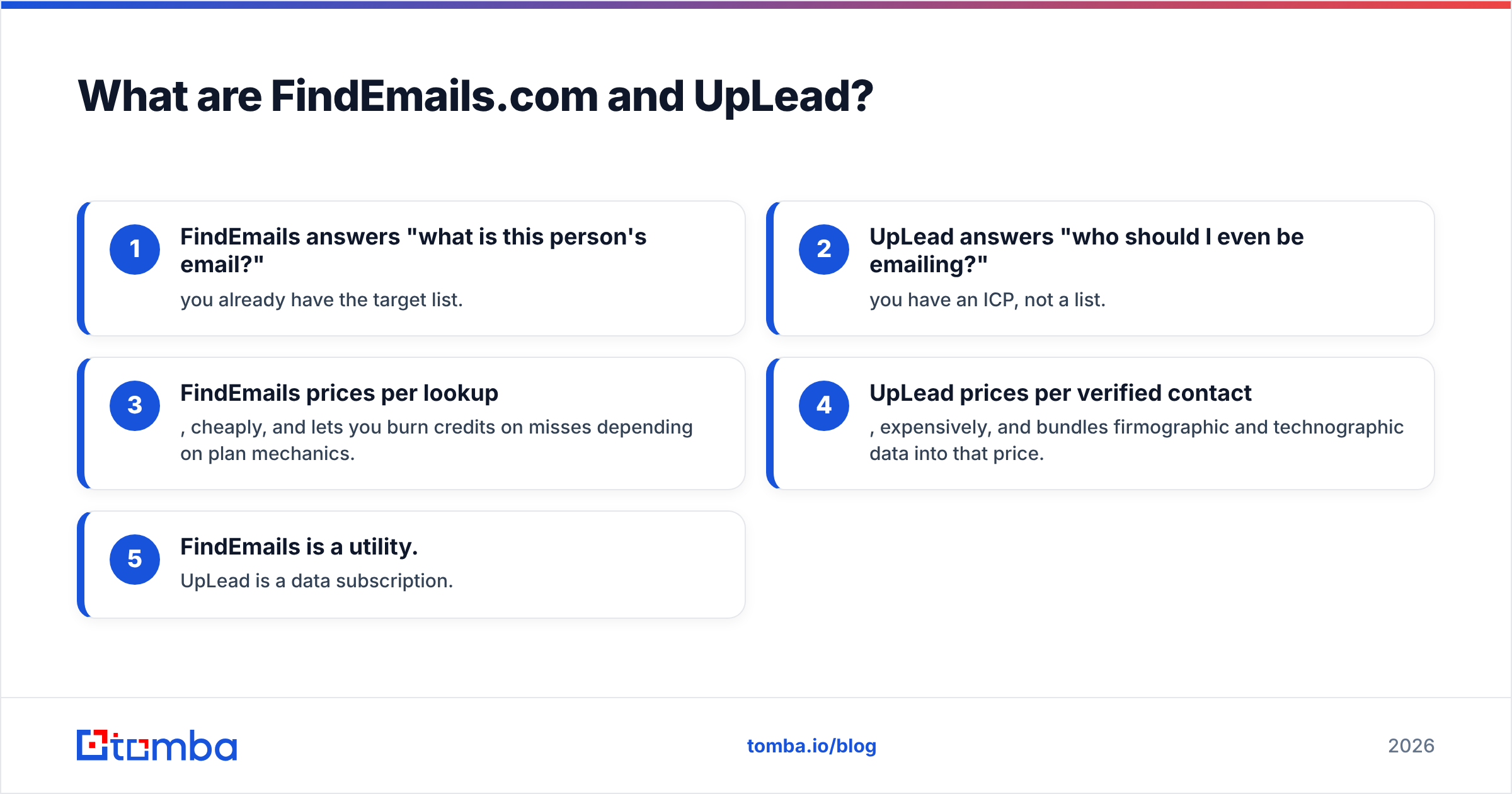
- FindEmails answers "what is this person's email?" You already have the target list.
- UpLead answers "who should I even be emailing?" You have an ICP, not a list.
- FindEmails prices per lookup. It is cheap, and some plans still burn credits on misses.
- UpLead prices per verified contact. It is costly, but company and tech data come with it.
- FindEmails is a utility. UpLead is a data subscription.
Skip that question and you can end up paying $1,200 a year for a tool nobody opens by month three.

FindEmails Toofr vs UpLead: how does the pricing compare?#
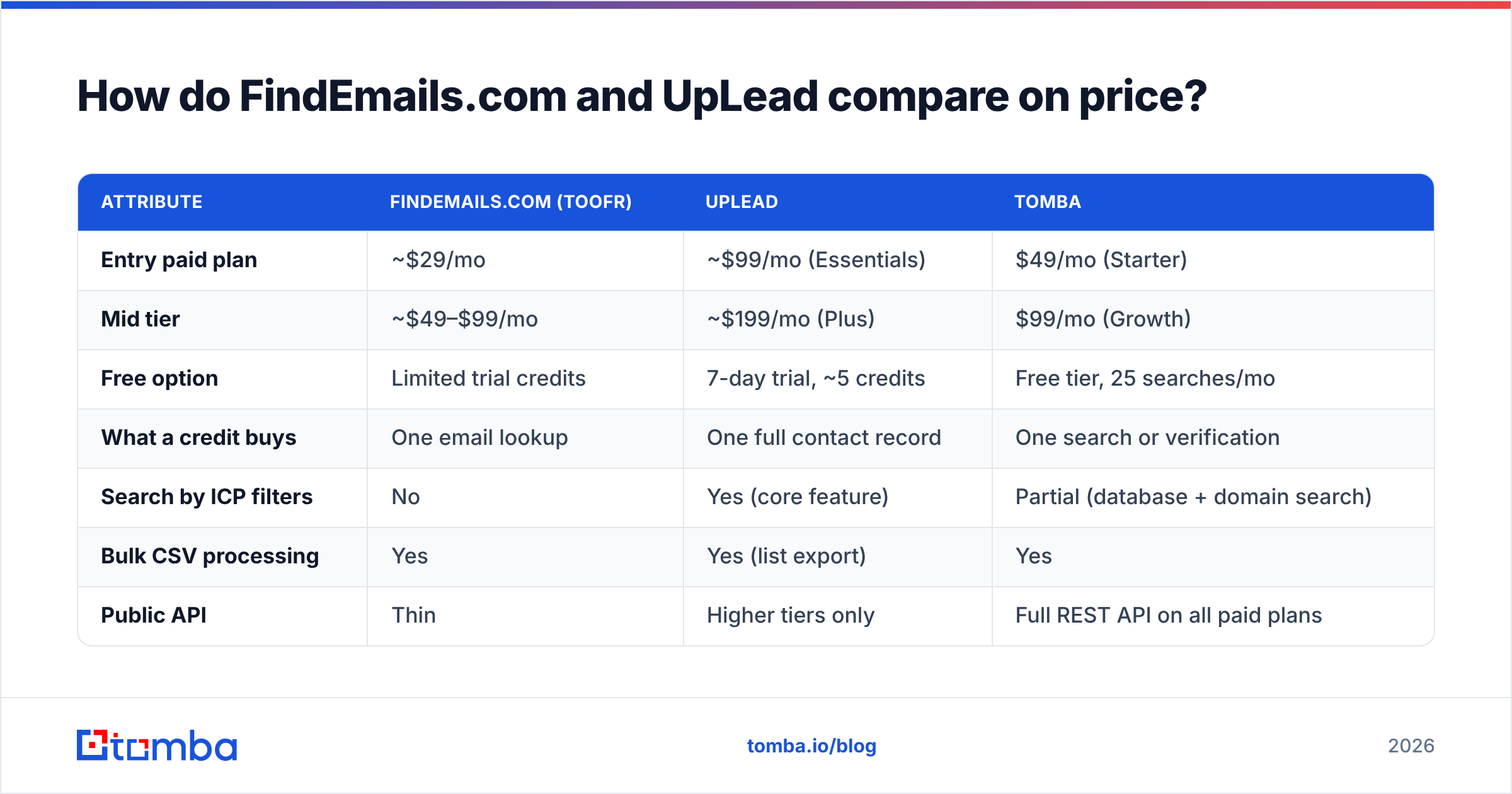
Pricing is where the two split hardest. It is also where most comparison posts mislead you. They count "credits" as if both tools sold the same unit. They don't. An UpLead credit unlocks a full contact record: email, sometimes a phone, plus company and tech data. A FindEmails credit buys one email lookup.
The figures below reflect published list pricing in early 2026. Both vendors change plans quietly, so treat this as a snapshot. Check their pricing pages before you buy.
| Attribute | FindEmails.com (Toofr) | UpLead | Tomba |
|---|---|---|---|
| Entry paid plan | ~$29/mo | ~$99/mo (Essentials) | $49/mo (Starter) |
| Mid tier | ~$49–$99/mo | ~$199/mo (Plus) | $99/mo (Growth) |
| Free option | Limited trial credits | 7-day trial, ~5 credits | Free tier, 25 searches/mo |
| What a credit buys | One email lookup | One full contact record | One search or verification |
| Search by ICP filters | No | Yes (core feature) | Partial (database + domain search) |
| Bulk CSV processing | Yes | Yes (list export) | Yes |
| Public API | Thin | Higher tiers only | Full REST API on all paid plans |
| Verification included | Basic | Real-time at export | Dedicated verifier + catch-all handling |
| Best for | Cheap enrichment of known lists | Net-new ICP discovery | Accuracy per dollar + automation |

The honest read: if you run 10,000 lookups a month against lists you already own, FindEmails is far cheaper. Nothing else here changes that. If you need 300 net-new contacts a month, and you have to find them by persona, UpLead starts to look fair. The alternative is paying a researcher to build the list by hand.
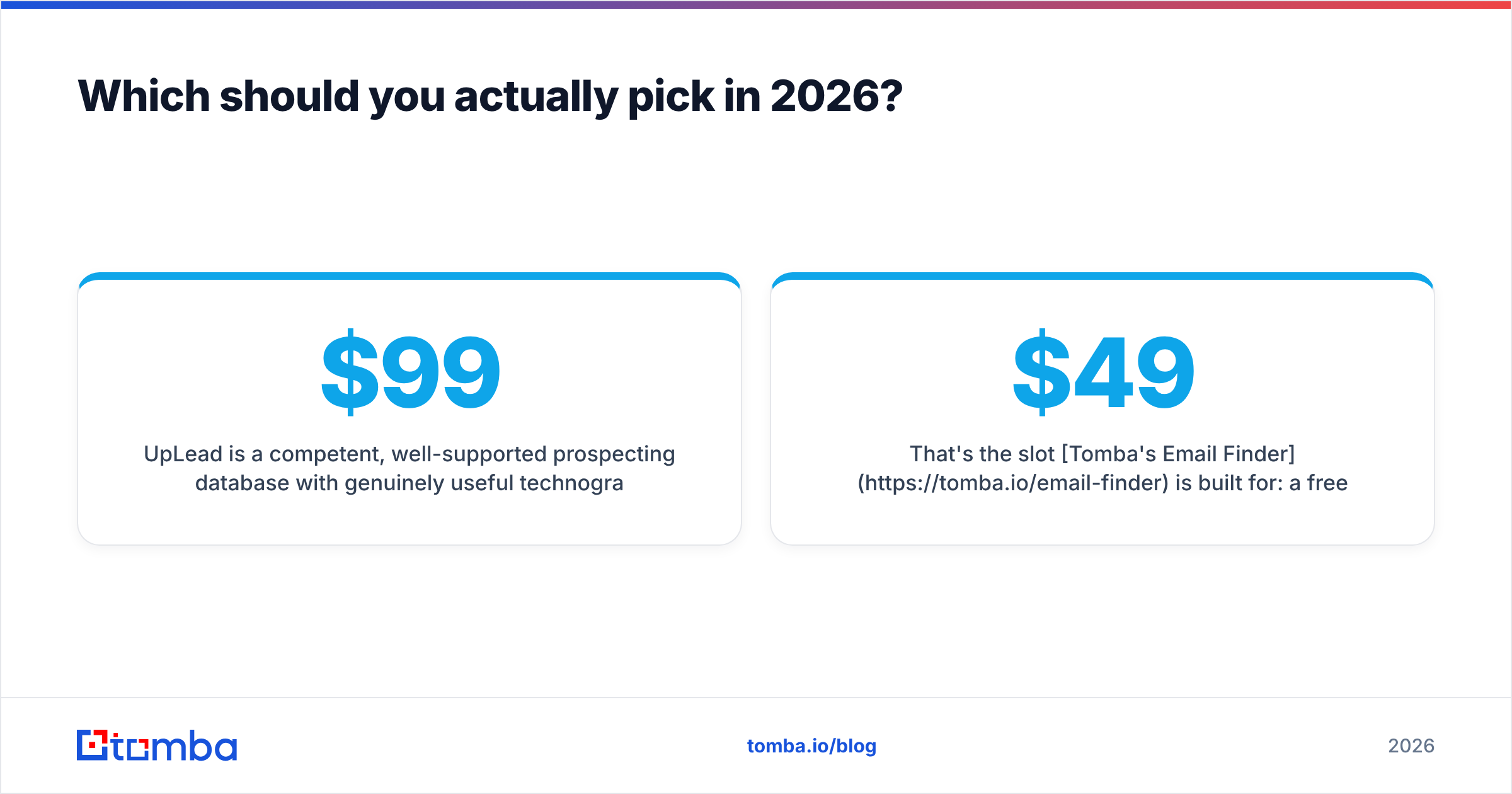
Both get expensive in the middle case. You need a few thousand lookups a month, plus discovery and solid verification. In that band, a mid-priced finder with a real API usually wins on total cost. Tomba pricing sits there on purpose: Starter at $49/mo, Growth at $99/mo.
Which one has better data accuracy?#
Accuracy is the real battleground in FindEmails Toofr vs UpLead. Neither vendor publishes an audited number. Be wary of any post — this one included — that hands you a precise percentage without showing the test set. What you can judge is method. Method tells you where each tool will fail.
FindEmails/Toofr leans on pattern guessing. It learns that acme.com uses first.last@, builds the address, then runs a check. That works well for mid-size firms with one clear pattern. It breaks down on:
- Companies with several patterns at once (merged orgs are the worst)
- Catch-all domains, where the mail server says yes to any address
- Personal-brand domains and small agencies with no public email trail
UpLead leans on a maintained database plus a check at export. That flips the failure mode. You rarely get a made-up address. You often get a stale one. The contact left in Q3, but the record still says Director of Ops. The live check proves the mailbox exists. It does not prove the person still works there. Any database-first tool has that limit. It hits hardest in high-churn roles like SDR management and demand gen.

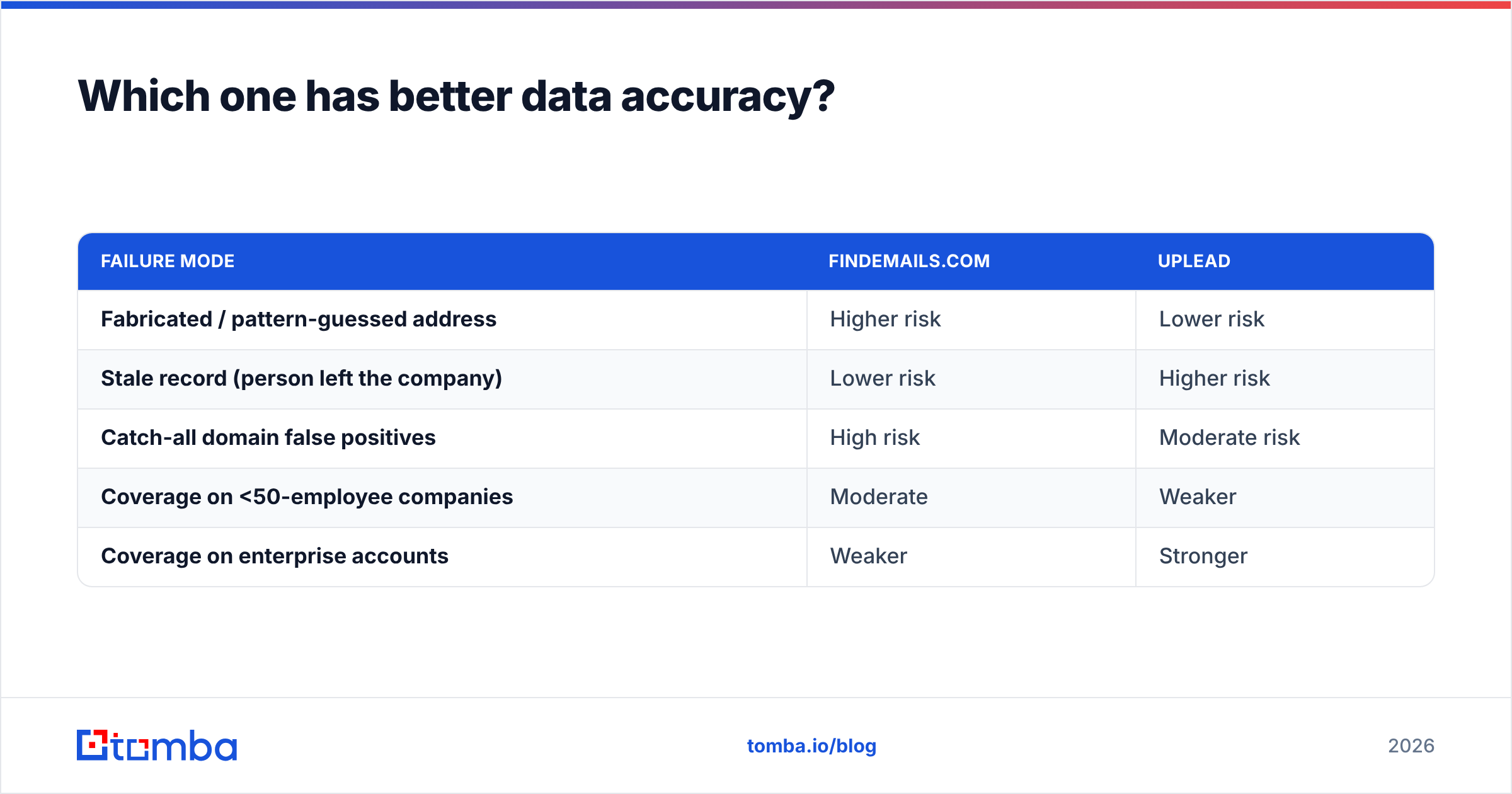
The practical consequence for your bounce rate:
| Failure mode | FindEmails.com | UpLead |
|---|---|---|
| Fabricated / pattern-guessed address | Higher risk | Lower risk |
| Stale record (person left the company) | Lower risk | Higher risk |
| Catch-all domain false positives | High risk | Moderate risk |
| Coverage on <50-employee companies | Moderate | Weaker |
| Coverage on enterprise accounts | Weaker | Stronger |
Catch-all domains deserve extra attention, because they hurt both tools. About one in five B2B domains accepts mail to any address. A standard check returns green either way. Are you sending to a catch-all-heavy segment, such as agencies, schools, or hospital groups? Then you need a tool that flags catch-all status out loud instead of calling it "valid." A dedicated catch-all verifier does that. A simple pass/fail check does not.
What does the day-to-day workflow look like?#
This is where most buyers get surprised. Here is the concrete loop for each.
FindEmails.com workflow:
- Build the list elsewhere. Sales Navigator, a scraper, a conference page, a partner sheet.
- Format the CSV. First name, last name, domain. Bad formatting is the top cause of low match rates.
- Upload and wait. Bulk jobs run in the background, and big files take a while.
- Download and sort by confidence. Send anything below your threshold to a separate check, not to your sequencer.
- Push to CRM by hand. Integrations are limited, so this is often a second CSV trip.
UpLead workflow:
- Set the ICP filter. Industry, headcount, geography, title, tech stack.
- Preview the result set. You see counts before you spend credits, which helps with market sizing.
- Select and export. Credits drop per revealed contact, and the live check runs right then.
- Push to CRM. UpLead's HubSpot, Salesforce, and Pipedrive links beat FindEmails' by a clear margin.
- Re-run monthly. The database refreshes, so you re-query for new matches. That is where credit burn adds up.
Notice what neither one does. Neither sits inside an automated pipeline, where a signal — a form fill, a site visit, a funding round — triggers a lookup in real time. FindEmails has an API, but it is minimal. UpLead's API is a higher-tier upsell. If your GTM motion runs on code, that gap costs more than the price difference. An email finder API on every paid tier removes the problem. So does a proper bulk email finder for the batch half of the job.

Is UpLead worth 3x the price of FindEmails?#
Sometimes. Here is the decision framework, in plain terms.
Choose UpLead when:
- You have no target list and need ICP-driven discovery
- You target companies by the tech they run
- Your deal size is big enough that $2–3 per contact is rounding error
- You want company data in the same record, instead of a second vendor
Choose FindEmails.com when:
- You already have thousands of names and domains
- Cost per lookup is the number your finance team asks about
- You accept a separate verification pass before you send
- You don't need CRM automation or deep integrations
Choose neither when:
- You need discovery and finding, at mid volume, with an API
- You are building enrichment into a product or internal tool
- Catch-all accuracy drives a big part of your bounce problem
- You want to skip an annual contract while you still test channels
That last bucket is bigger than either vendor admits. Plenty of teams start with UpLead for discovery. Their credits run out fast. So they bolt on a cheap finder for the long tail. Now they pay for two tools and live with two data-quality standards. One tool with a free tier, a fair mid tier, and both domain search and an email verifier under one roof is usually cheaper.
How should you test them before buying?#
Do not judge FindEmails Toofr vs UpLead on a vendor demo list. Build your own, and make it hard.
- Take 100 real contacts you can check yourself. People you have emailed before, across a mix of company sizes.
- Include at least 15 catch-all domains. This subset reveals the most, and most trials skip it.
- Include 10 small companies (under 25 staff). Database tools crater here. Pattern tools sometimes shine.
- Include 10 recent job-changers. This tests stale data, which is UpLead's weak spot.
- Measure three numbers, not one. Match rate, accuracy rate, and cost per correct email. The third one is what matters, and no pricing page shows it.
Run the same file through every tool on the same day. Coverage shifts month to month. A benchmark from a 2024 review tells you little about 2026. Peer reviews on G2 help with support and billing complaints. They help less with accuracy, since reviewers rarely control for segment.
Check one more thing during the trial: what happens on a failed lookup. Does the tool charge you? Some plans do, some don't. At 10,000 lookups a month, that rule matters more than the headline price.
What about deliverability after you get the list?#
Finding the address is half the job. The other half is protecting your sending domain.
A clean list still needs the basics before you send at volume. Set up SPF, DKIM, and DMARC. Warm a sending domain that is not your main one. Keep bounces under 2%. Mailbox providers tightened the rules over the last two years. A 5% bounce rate on a cold sequence now damages your sender reputation within days, not weeks.
The order of operations that actually works:
- Find the addresses (FindEmails, UpLead, or an alternative)
- Verify them with a tool that flags catch-all separately from valid
- Segment out catch-alls into a low-volume test batch
- Send to the confirmed-valid tier first
- Only expand to catch-alls once your reputation metrics hold steady
Skipping step 2 because "the finder already checked it" is the most common self-inflicted deliverability wound in outbound. A finder's check is built to return as many results as it can. A dedicated verifier is built to avoid false positives. Those are different goals, and you want both.
FindEmails Toofr vs UpLead: which should you pick in 2026?#
Short answer: FindEmails.com if you have lists and no budget. UpLead if you have budget and no lists. A third option if you have both problems at once.
FindEmails.com is still a good deal for high-volume, low-complexity work. It is not trying to be a platform, and that focus keeps the price honest. Its weak points — thin API, few integrations, catch-all blind spots — are the price of that focus.
UpLead is a solid prospecting database with useful tech filters and the better CRM links of the two. Its weak point is arithmetic. At about $99/mo for a few hundred credits, the cost per contact only works for big-ticket deals. Teams doing volume outbound to small accounts burn a month of credits in an afternoon.
The gap between them is mid-volume, API-first, accuracy-weighted, and free of annual lock-in. That is where a modern finder should sit.
That slot is what Tomba's Email Finder is built for. A free tier of 25 searches a month lets you run the 100-row test above without a sales call. Starter is $49/mo and Growth is $99/mo. Every paid plan includes the full REST API. Catch-alls are flagged on their own, so "valid" means valid. Run your own hard test list through all three, compare cost per correct email, and let the numbers pick the winner.
Related guides#
Ready to find emails that actually work?
Join 150,000+ professionals who stopped guessing and started sending. Free credits on signup — no credit card required.
Get the Tomba newsletter
Practical outbound tactics and product updates — once every two weeks.
About the author