Finder.io vs GrowMeOrganic: Which B2B Lead Tool Wins in 2026?
Finder.io bundles email lookup into a 50-app suite. GrowMeOrganic bolts LinkedIn scraping onto a cold-email sender. We compare accuracy, credits, seat costs, and API depth to show which one actually fits your outbound motion.
Finder.io vs GrowMeOrganic is a choice between two very different tools. One is a cheap lookup app inside a large software bundle. The other is a LinkedIn scraper with a built-in email sender. This guide compares Finder.io vs GrowMeOrganic on match rate, credits, seat pricing, and API access — and shows where both fall short.
TL;DR
- Finder.io is an email-finding module inside 500apps' bundled suite. You pay one low per-user price and get ~50 apps, of which you'll realistically use two or three. Data depth is thin compared to standalone finders.
- GrowMeOrganic is a LinkedIn-first prospecting tool with a built-in cold-email sender. It's strongest when your entire pipeline starts on LinkedIn Sales Navigator and ends in a drip sequence.
- Neither tool is a serious verification engine. Both push unverified or "guessed" patterns into your list, and both handle catch-all domains poorly — which is where bounce rates go bad.
- Pricing looks similar on the surface, but the models are opposite: Finder.io charges per seat forever, GrowMeOrganic charges per plan with credit caps. Add three SDRs and the ranking flips.
- If your bottleneck is data quality rather than sequencing, a dedicated finder-plus-verifier stack (Tomba, or a comparable specialist) beats either bundle on cost-per-usable-contact.
Finder.io vs GrowMeOrganic: what are these tools?#
They solve overlapping problems from opposite directions.
Finder.io is one app in the 500apps ecosystem. The pitch is bundling. You pay one flat per-user fee and get the whole catalogue — email finder, CRM, helpdesk, form builder, and more. Finder.io itself does email lookup by name and domain, bulk search from a CSV, and basic verification. It's a competent utility, not a data company.
GrowMeOrganic came at it from the outreach side. It began as a Chrome extension that scrapes LinkedIn and Sales Navigator results. It then enriches those rows with emails and drops them into a sequence you send from your own mailbox. It also carries a B2B database and a Google Maps scraper for local-business prospecting.
So the honest framing of Finder.io vs GrowMeOrganic isn't "which finder is better." It's: do you want a cheap lookup utility attached to a software bundle, or a LinkedIn-to-inbox pipeline in one tab?

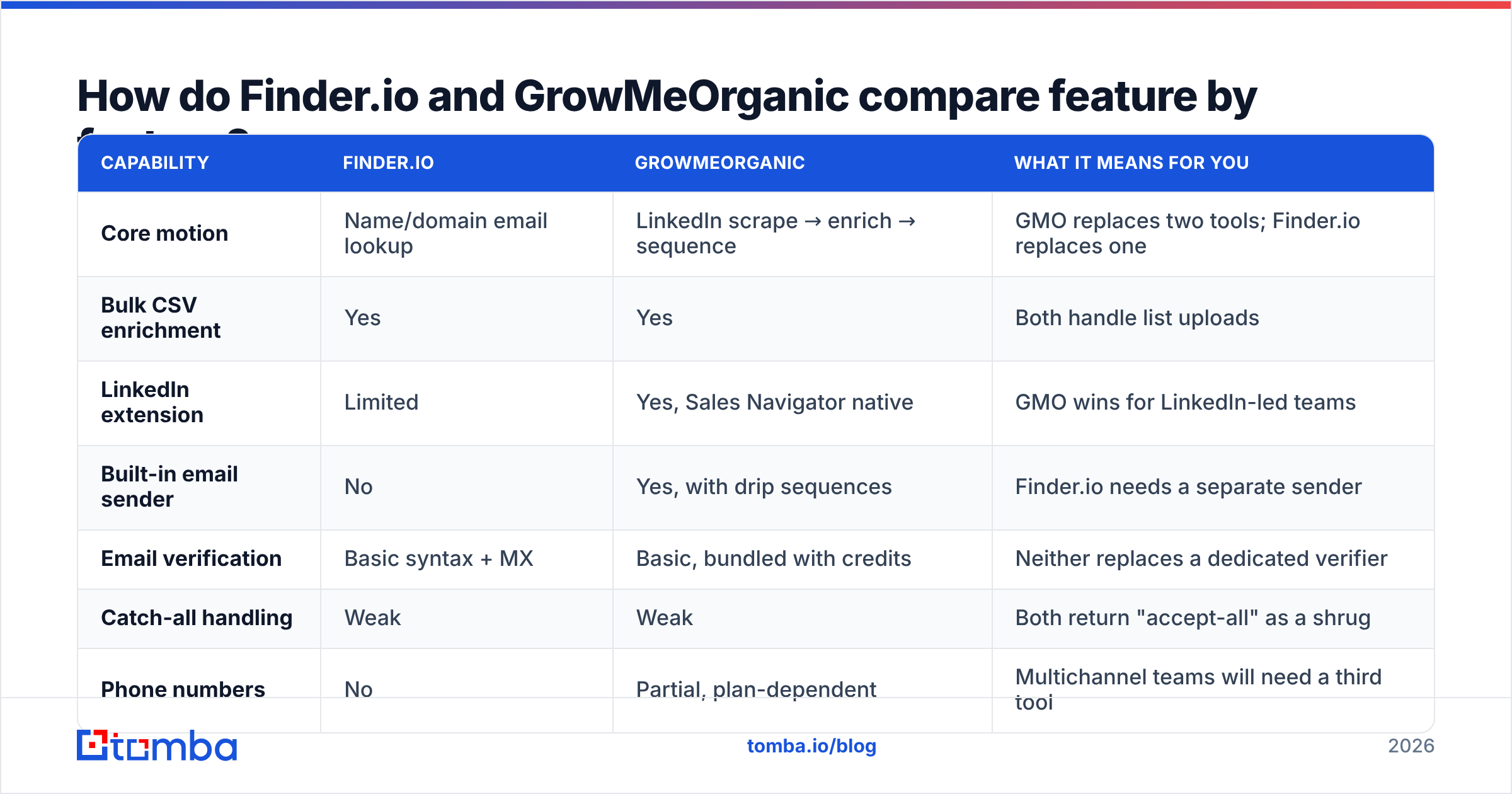
Finder.io vs GrowMeOrganic: feature-by-feature comparison#
| Capability | Finder.io | GrowMeOrganic | What it means for you |
|---|---|---|---|
| Core motion | Name/domain email lookup | LinkedIn scrape → enrich → sequence | GMO replaces two tools; Finder.io replaces one |
| Bulk CSV enrichment | Yes | Yes | Both handle list uploads |
| LinkedIn extension | Limited | Yes, Sales Navigator native | GMO wins for LinkedIn-led teams |
| Built-in email sender | No | Yes, with drip sequences | Finder.io needs a separate sender |
| Email verification | Basic syntax + MX | Basic, bundled with credits | Neither replaces a dedicated verifier |
| Catch-all handling | Weak | Weak | Both return "accept-all" as a shrug |
| Phone numbers | No | Partial, plan-dependent | Multichannel teams will need a third tool |
| Public API | Yes, limited endpoints | Yes, higher tiers only | Check tier gating before you build |
| Google Maps / local scraping | No | Yes | Useful for agencies selling to SMBs |
| Suite lock-in | High — 500apps ecosystem | Low — standalone | Bundles are cheap until you want to leave |
Two rows deserve expansion.
The sender. GrowMeOrganic includes a sequencer, and that is a real cost saving. You are not also paying $60–$100 a month for Instantly or Smartlead. The trade-off is deliverability. There is no serious warmup network, and inbox rotation is thin. Sending 50 emails a day from one domain is fine. Running 15 mailboxes is not.
The suite. Finder.io's per-user price covers apps you didn't ask for. That is good value for a five-person startup that also needs a CRM and a support desk. It is noise if you already run HubSpot. G2 reviewers of the 500apps suite flag the same pattern: strong pricing, uneven per-app depth.
Finder.io vs GrowMeOrganic: which returns more usable emails?#
This is where both tools show their limits. The honest answer is uncomfortable: neither publishes a verified match rate you can audit.
Here's how to test it yourself in an afternoon, which is worth more than any vendor claim:
- Build a 200-row control list. Pull real contacts from a segment you actually sell to — not a random Fortune 500 sample, which every tool covers well.
- Run the same list through both tools. Record the raw match rate: how many rows came back with any email at all.
- Verify the output with a neutral third tool. Run both result sets through an independent email verifier so you're scoring the same way.
- Compute the real number. Usable rate = verified-valid emails ÷ 200. Not the vendor's "found" count.
- Segment the failures. Split the misses into no-result, catch-all, and invalid. That tells you which tool is guessing patterns versus actually holding data.
- Price it per usable contact. Divide monthly cost by verified-valid results. This is the only number that survives a budget review.
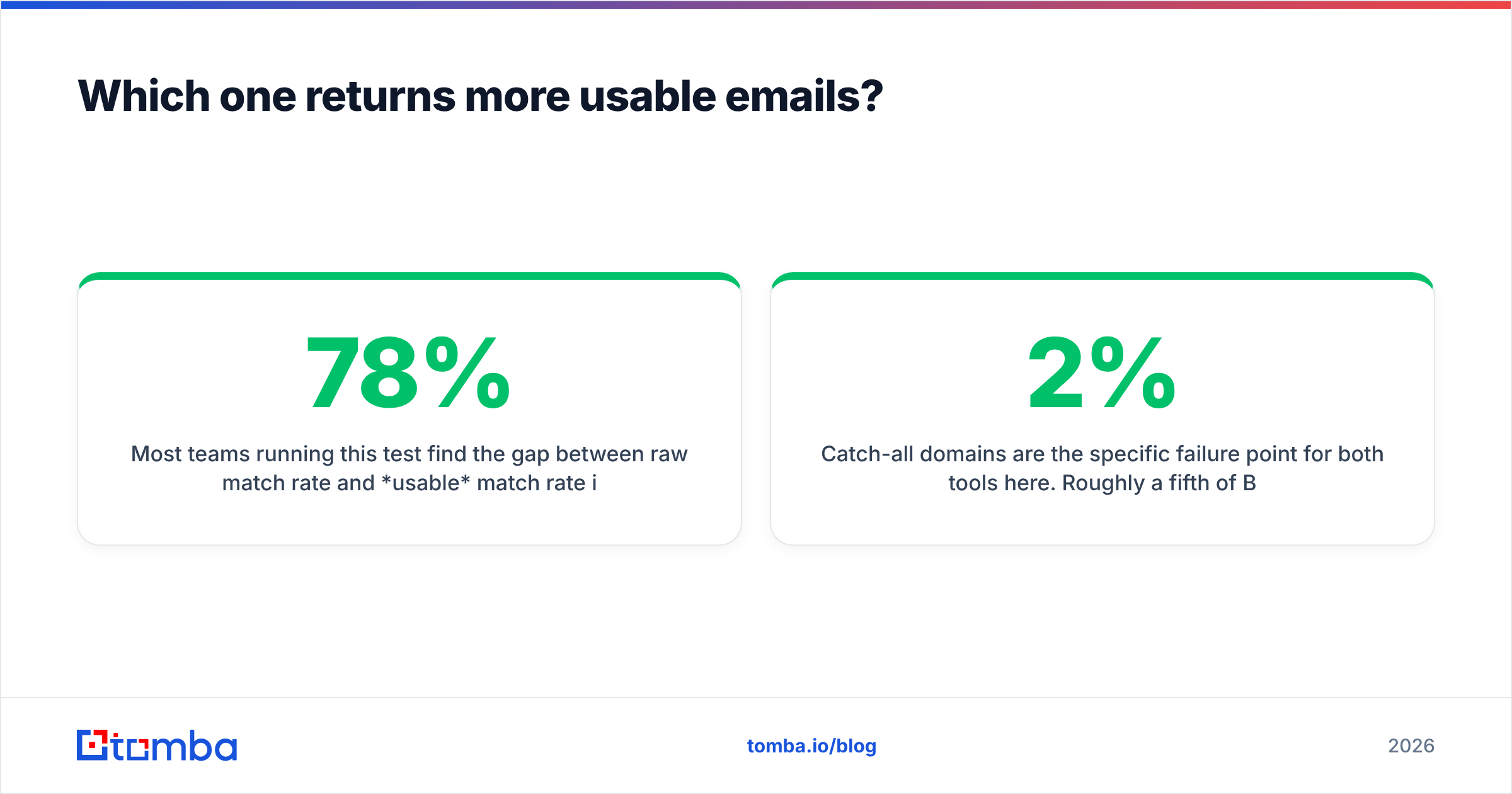
Most teams find a 15–30 point gap between the raw match rate and the usable one. A tool that "finds" 78% of your list but ships 20% catch-alls and 8% invalids is really running at ~50%.

Catch-all domains are the main failure point for both tools. About a fifth of B2B domains accept mail for any address. A naive SMTP check then returns "valid" for asdfgh@company.com. Finder.io and GrowMeOrganic both punt on this. They mark the address accept-all and hand you the risk. A dedicated catch-all verifier is what separates a 2% bounce rate from a 9% one, and a 9% bounce rate is how domains get burned.
Finder.io vs GrowMeOrganic pricing: what do they cost?#
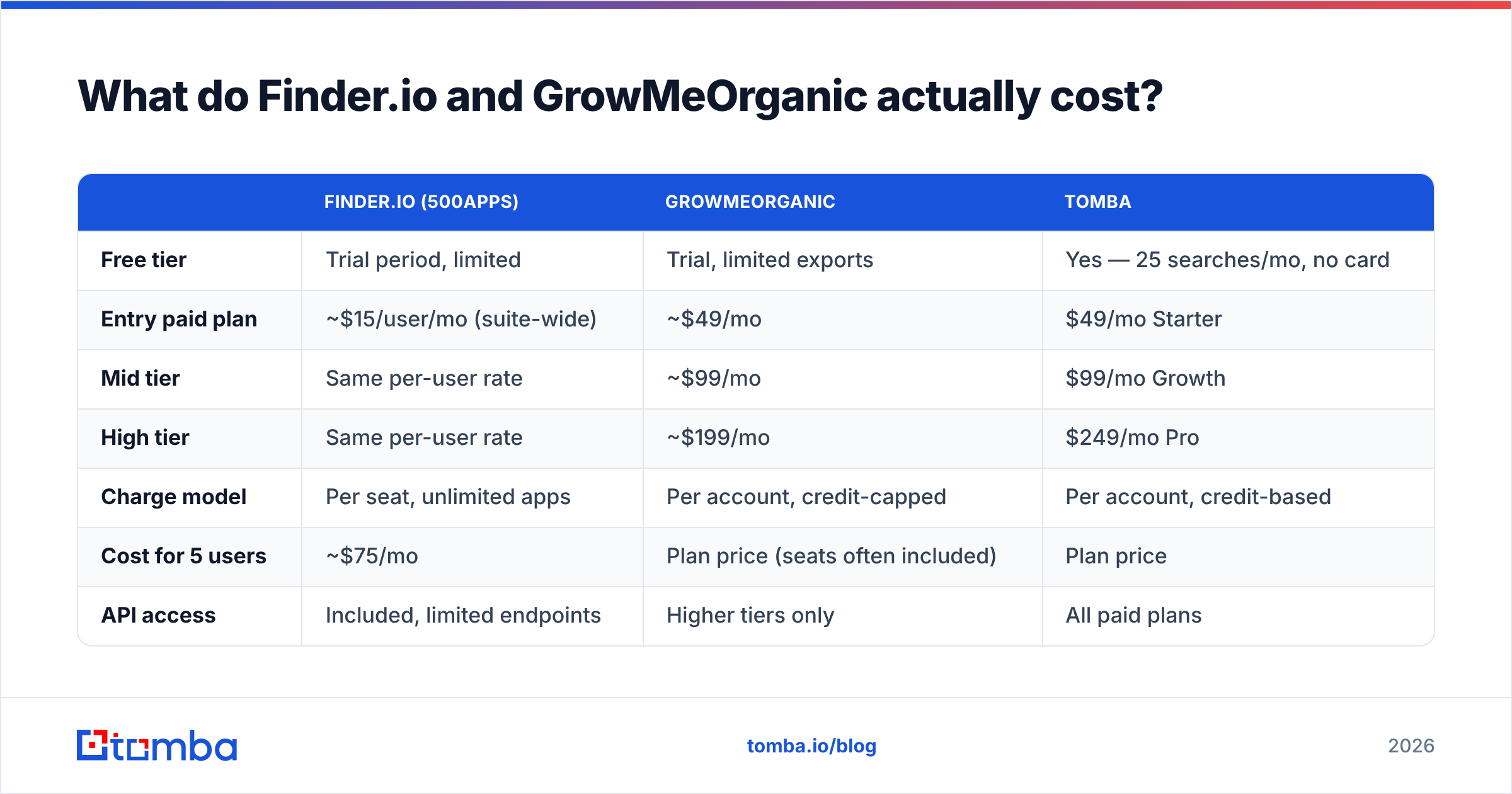
Both vendors adjust pricing regularly, so treat these as directional and confirm on their pages before you buy.
| Finder.io (500apps) | GrowMeOrganic | Tomba | |
|---|---|---|---|
| Free tier | Trial period, limited | Trial, limited exports | Yes — 25 searches/mo, no card |
| Entry paid plan | ~$15/user/mo (suite-wide) | ~$49/mo | $49/mo Starter |
| Mid tier | Same per-user rate | ~$99/mo | $99/mo Growth |
| High tier | Same per-user rate | ~$199/mo | $249/mo Pro |
| Charge model | Per seat, unlimited apps | Per account, credit-capped | Per account, credit-based |
| Cost for 5 users | ~$75/mo | Plan price (seats often included) | Plan price |
| API access | Included, limited endpoints | Higher tiers only | All paid plans |
| Verification included | Basic | Basic | Full verifier + catch-all |
The Finder.io vs GrowMeOrganic pricing gap is about shape, not sticker price.
Finder.io gets more expensive as your team grows — every SDR is another seat, forever, whether or not they open the other 49 apps. Five reps and you're at roughly $75/month for what is functionally one email finder.
GrowMeOrganic gets more expensive as your volume grows. Credits are the constraint, not headcount. An agency running 20 client campaigns will blow through a mid-tier credit pool by week three and end up on the top plan or buying overage.
Tomba's model is credit-based like GrowMeOrganic but decouples seats. Full Tomba pricing runs Free (25 searches/mo), $49 Starter, $99 Growth, $249 Pro, with Enterprise custom. The Tomba API is available on every paid tier rather than gated to the top plan, which matters if you're piping enrichment into your own systems.

The scenario that catches teams out: you pick the cheap per-seat tool at three reps, hire seven more, and the "cheapest option" quietly becomes the most expensive line item — while still not solving verification.
Who should pick Finder.io?#
Choose Finder.io when the bundle is the product.
- You're an early-stage team under 10 people who needs a CRM, a helpdesk, a form builder, and occasional email lookup. The suite math genuinely works.
- Your lookup volume is low and bursty — a few hundred contacts a month, not tens of thousands.
- You already have a sender. Finder.io does not send email. If you're on Instantly, Smartlead, or Lemlist, that gap doesn't matter.
- Budget is the hard constraint and you can accept a lower match rate in exchange for a low monthly floor.
Skip it if data accuracy is your actual bottleneck. A cheap finder that returns pattern guesses isn't cheap once you count the bounces.
Who should pick GrowMeOrganic?#
Choose GrowMeOrganic when LinkedIn is where your pipeline lives.
- Sales Navigator is your primary sourcing surface. The extension pulling a 2,500-result search into an enriched, sequenced list is a real workflow win, not a demo trick.
- You want one tool for find + send. Consolidation reduces both cost and the number of CSV handoffs where data goes stale.
- You sell to local businesses. The Google Maps scraper is a genuine differentiator that neither Finder.io nor most pure email finders offer.
- You're an agency or solo founder running a handful of campaigns and don't want to assemble a five-tool stack.
Skip it if you need serious deliverability infrastructure, high-volume API enrichment, or reliable catch-all resolution. Also skip it if you're allergic to LinkedIn scraping. It operates in a gray area against LinkedIn's terms of service, and account restrictions are a real risk you should price in.
Where do both tools leave gaps?#
Three, consistently.
Verification depth. Both treat verification as a checkbox bundled with search credits. A specialist verifier grades each signal on its own: SMTP handshake, role accounts, disposable domains, greylisting retries, catch-all probes. That detail is what lets you split a list into "send now," "send carefully," and "don't send." Neither tool gives you that.
Data provenance. Where does the data come from? Tomba publishes its data sources; most bundled tools don't. Under GDPR that matters. If a prospect files a subject access request, "our vendor scraped it" is a weak answer. The ICO's guidance on lawful basis puts the duty on you, the sender, not the tool.
Bulk and API ceilings. Both cap you sooner than you expect. If you're enriching a 50,000-row database or running enrichment on signup, you want a bulk email finder and an API without tier gating. Finder.io's API is shallow; GrowMeOrganic reserves API access for upper plans.

Finder.io vs GrowMeOrganic: which one wins in 2026?#
Verdict: GrowMeOrganic wins for LinkedIn-led outbound teams. Finder.io wins only if you'll genuinely use the 500apps bundle. Neither wins on data quality — and for most teams, data quality is the actual constraint.
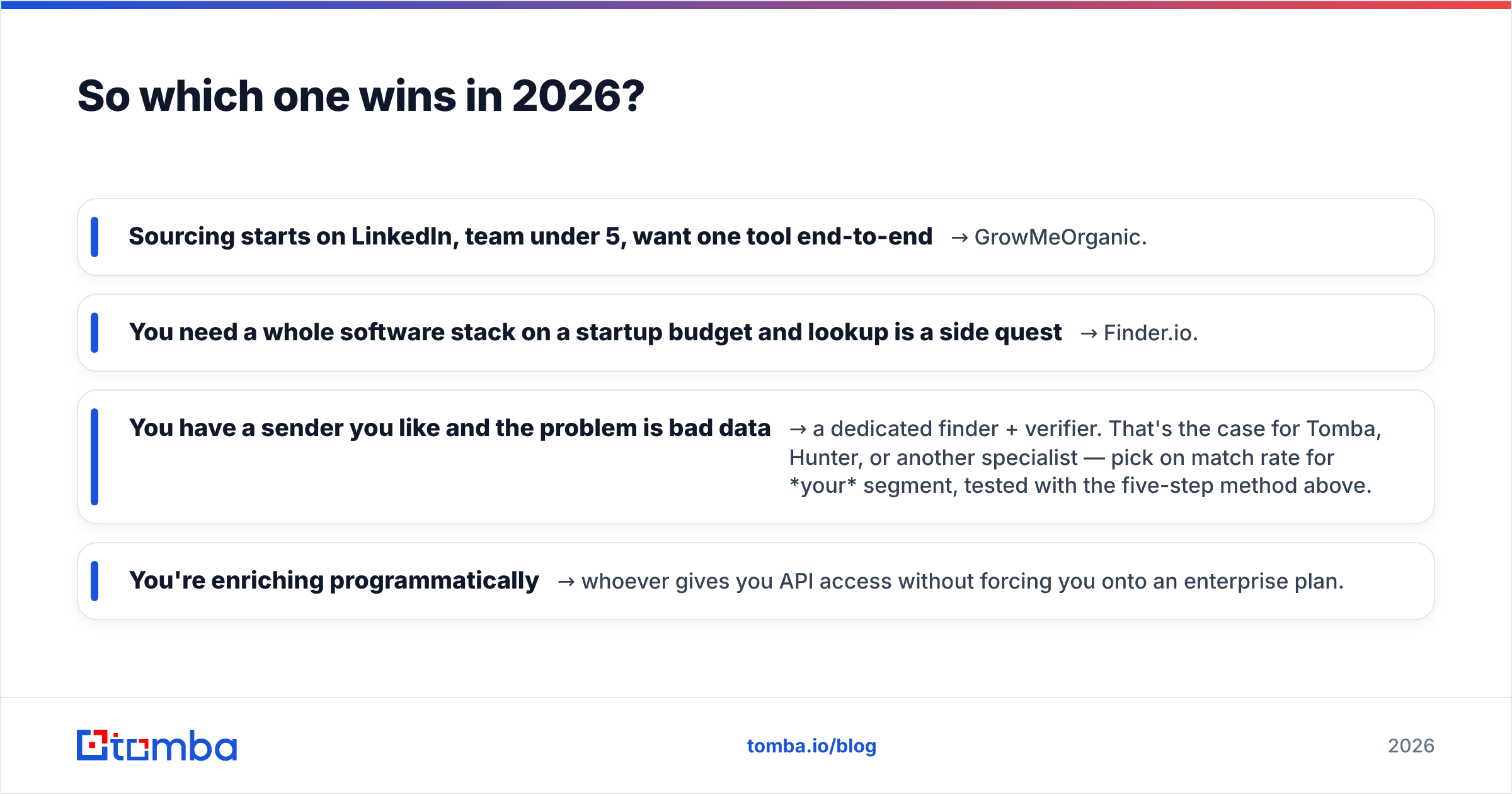
Run it as a decision tree:
- Sourcing starts on LinkedIn, team under 5, want one tool end-to-end → GrowMeOrganic.
- You need a whole software stack on a startup budget and lookup is a side quest → Finder.io.
- You have a sender you like and the problem is bad data → a dedicated finder + verifier. That's the case for Tomba, Hunter, or another specialist — pick on match rate for your segment, tested with the five-step method above.
- You're enriching programmatically → whoever gives you API access without forcing you onto an enterprise plan.
Don't let a bundle decide your data quality. Run the 200-row test. The tool that ships the most verified emails per dollar is the one that wins, and that ranking rarely matches the marketing pages.
Test it against your own list. Tomba's Email Finder gives you 25 free searches a month with no card. That is enough to settle Finder.io vs GrowMeOrganic on contacts you actually care about. Pair it with the catch-all verifier before you send, and you'll see your real cost-per-usable-contact instead of a vendor's match-rate claim.
Related guides#
Ready to find emails that actually work?
Join 150,000+ professionals who stopped guessing and started sending. Free credits on signup — no credit card required.
Get the Tomba newsletter
Practical outbound tactics and product updates — once every two weeks.
About the author