Finderio vs LeadIQ (2026): Which Email Finder Wins?
Finderio bundles an email finder into a 50-app suite. LeadIQ sells seats to sales teams who live in LinkedIn. We compare accuracy, credits, per-seat cost and export limits — and name the better pick for each buyer.
Finderio vs LeadIQ is a mismatched fight. One is a cheap module inside a 50-app bundle. The other is a per-seat tool for reps who work LinkedIn all day. This guide compares them on accuracy, credits, price and export limits. Then it names the better pick for each buyer.
TL;DR
- Finderio (part of the 500apps bundle) is the cheap-per-seat option. You get an email finder, a verifier and a pile of unrelated apps for one low monthly price. Data depth is thinner, and support is bundle-grade.
- LeadIQ is a sales-team tool, not a data tool. Its value is the LinkedIn capture workflow, the CRM push and the sequence handoff. You pay per seat, so unused seats hurt.
- Neither wins on raw email discovery at volume. Finderio caps out on quality. LeadIQ caps out on per-seat economics.
The rest of the Finderio vs LeadIQ call comes down to money and math:
- Price on cost per verified, deliverable contact. Ignore the sticker price and the credit count. A $39 plan with a 45% verified rate is worse than a $49 plan at 80%.
- Tomba sits in the middle: $49/mo Starter, one flat account, no per-seat tax. A separate email verifier lets you measure hit rate yourself before you commit.
What are Finderio and LeadIQ, exactly?#
They solve different problems and get compared anyway, which is why buyers end up disappointed.
Finderio is the email-finding module inside 500apps, a suite that sells roughly 50 business apps under one subscription. You search by domain or by name + company, get back a pattern-based guess with a confidence indicator, and can verify addresses in the same interface. The pitch is bundling: if you already want a CRM, a helpdesk and a form builder, the email finder is effectively free.
LeadIQ is a prospecting platform aimed at SDR teams. Its center of gravity is the browser extension. You're on a LinkedIn Sales Navigator list, you click, and LeadIQ captures the contact and enriches it with an email — plus a mobile number on higher tiers. It then pushes the record straight into Salesforce, HubSpot or Outreach. It also ships an AI email writer and "Scribe" messaging features. You buy seats, and each seat gets a credit allowance.
The distinction that matters: Finderio sells lookups. LeadIQ sells a workflow around lookups. If your reps don't live in LinkedIn all day, you are paying for a workflow you won't use.
Finderio vs LeadIQ: how do they compare head to head?#
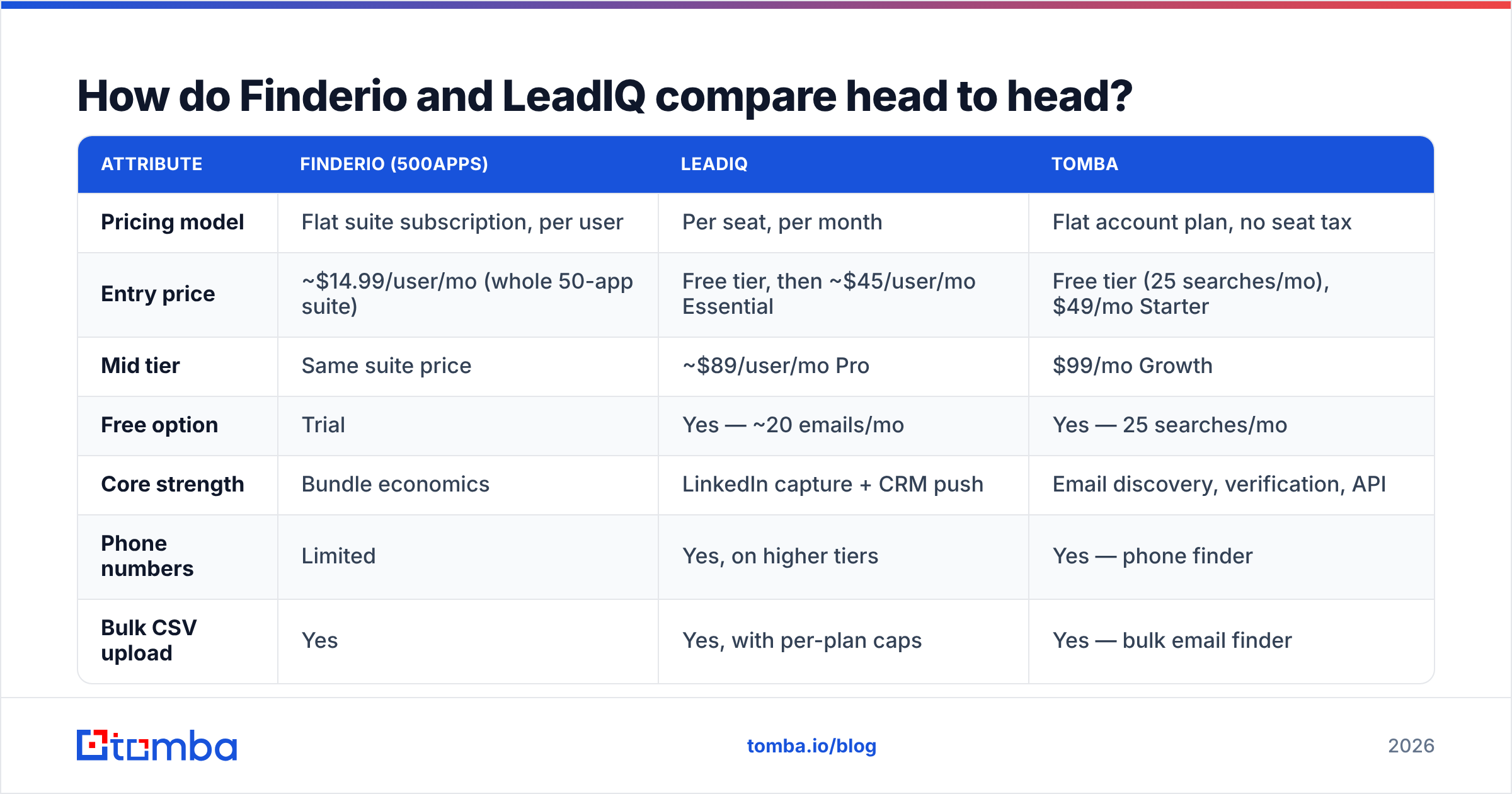
Pricing changes often on both sides — check LeadIQ's pricing page and the 500apps site before you buy. The shape of the offer is what's stable.
| Attribute | Finderio (500apps) | LeadIQ | Tomba |
|---|---|---|---|
| Pricing model | Flat suite subscription, per user | Per seat, per month | Flat account plan, no seat tax |
| Entry price | ~$14.99/user/mo (whole 50-app suite) | Free tier, then ~$45/user/mo Essential | Free tier (25 searches/mo), $49/mo Starter |
| Mid tier | Same suite price | ~$89/user/mo Pro | $99/mo Growth |
| Free option | Trial | Yes — ~20 emails/mo | Yes — 25 searches/mo |
| Core strength | Bundle economics | LinkedIn capture + CRM push | Email discovery, verification, API |
| Phone numbers | Limited | Yes, on higher tiers | Yes — phone finder |
| Bulk CSV upload | Yes | Yes, with per-plan caps | Yes — bulk email finder |
| Public API | Limited | Yes, higher tiers / add-on | Yes — Tomba API on all paid plans |
| Catch-all handling | Basic | Flags, limited resolution | Dedicated catch-all verifier |
| Best for | Budget teams who want the suite | SDR teams in Sales Navigator | Data ops, agencies, developers |
Two lines in that table decide most deals. The first is per-seat vs flat. A five-person team on LeadIQ Pro is a very different annual number than a five-person team sharing one Tomba or Finderio account. The second is API access. The moment you want enrichment inside your own workflow — a Clay table, an n8n run, a nightly CRM cleanup — a UI-only tool becomes a bottleneck.

Which one is more accurate?#
Accuracy is where Finderio vs LeadIQ actually splits. It is the only number that survives the demo, and the one vendors report least honestly.
Three distinct things get labeled "accuracy":
- Hit rate — of 100 names you submit, how many return any email at all. Vendors love this number because pattern-guessing inflates it for free.
- Verified rate — of those returned emails, how many pass SMTP validation as deliverable. This is the number that maps to your bounce rate.
- Correctness — whether the deliverable address actually belongs to the person you asked about. A valid
info@returned for a named VP is a hit, a pass, and a total failure. - Catch-all share — what portion of results sit on domains that accept everything, where verification can't give you a clean answer without deeper probing.

In practice, LeadIQ tends to do better on correctness for LinkedIn-sourced contacts. It starts from a real profile rather than a name string, so you know the person exists and works there today. Finderio leans harder on pattern inference from the domain. That produces a high hit rate and a weaker verified rate, especially on SMBs with odd formats and on Google Workspace domains set up as catch-all.
Neither publishes an audited benchmark, and you shouldn't trust ours or anyone else's on your specific market. Run the test in the last section instead. If most of your ICP is on catch-all domains, prioritize a tool with a real catch-all verifier over one with the biggest claimed database.
Is Finderio cheap enough to justify the tradeoffs?#
Yes — if you actually use the other apps. No — if you're buying a suite to get one module.
The 500apps proposition is genuinely strong on paper. Roughly $15 per user per month for dozens of tools undercuts almost every point solution. But bundles have a predictable failure mode: each app is built to be adequate, not best. For an email finder, adequate means:
- Thinner data refresh cycles. Contact data decays around 25–30% a year as people change jobs. A bundled module rarely gets the crawl-and-refresh investment a standalone data company puts in.
- Support that's spread across 50 products. When a lookup returns wrong data, you're filing a ticket into a queue that also handles helpdesk and project-management bugs.
- Limited API surface. Bundle apps tend to expose enough API to satisfy a checkbox, not enough to build a pipeline on.
- Migration friction. Once your CRM, forms and email finder all live in one suite, replacing the weak module means untangling three integrations.
If your monthly need is a few hundred lookups and a bounce here or there costs you nothing, Finderio is defensible. If email discovery is load-bearing for revenue, buying it as a bundle side-dish is a false economy.
Is LeadIQ worth the per-seat price?#
It depends entirely on whether your motion is LinkedIn-first.
LeadIQ earns its money when a rep is already in Sales Navigator, building a list of 40 accounts, and needs those contacts in Outreach within the hour. The capture-to-sequence path is genuinely fast, the CRM field mapping is mature, and duplicate detection against existing Salesforce records saves real cleanup time. Teams on G2 consistently rate that workflow highly.
It stops earning its money in three situations:
- Non-LinkedIn sourcing. If your leads come from a conference list, a directory scrape, or inbound form fills, you're paying seat prices for a browser extension nobody opens.
- Uneven usage. Seats are billed whether or not a rep pulls a single contact. Two power users and six occasional users is the worst possible shape for per-seat billing.
- Programmatic enrichment. Backfilling 40,000 stale CRM rows is an API job, not a click job. Per-seat tools price API access as a premium add-on precisely because it breaks the seat model.
There's also the credit question. Per-seat allowances sound generous until you count attempts, not successes. Ask both vendors one direct question: does a lookup that returns nothing consume a credit? On some platforms it does, and that quietly raises your cost per contact by 20–40%.

What is the real cost per verified contact?#
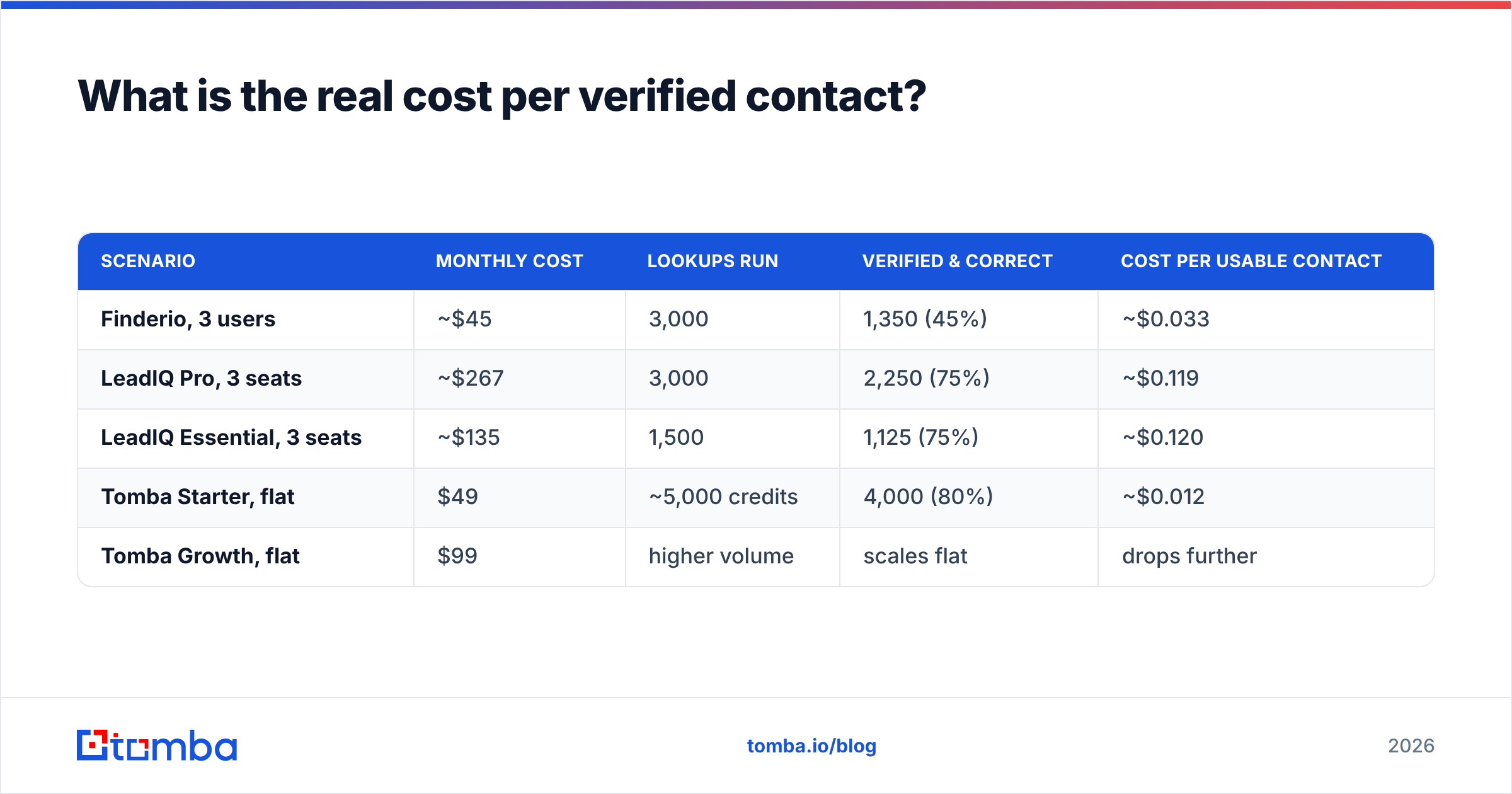
In a Finderio vs LeadIQ cost check, sticker price is theater. Here's the arithmetic that matters. The numbers below are illustrative — replace them with your own test results.
| Scenario | Monthly cost | Lookups run | Verified & correct | Cost per usable contact |
|---|---|---|---|---|
| Finderio, 3 users | ~$45 | 3,000 | 1,350 (45%) | ~$0.033 |
| LeadIQ Pro, 3 seats | ~$267 | 3,000 | 2,250 (75%) | ~$0.119 |
| LeadIQ Essential, 3 seats | ~$135 | 1,500 | 1,125 (75%) | ~$0.120 |
| Tomba Starter, flat | $49 | ~5,000 credits | 4,000 (80%) | ~$0.012 |
| Tomba Growth, flat | $99 | higher volume | scales flat | drops further |
Read that table carefully, because it argues against a lazy conclusion. Finderio is cheap per contact — bundle economics are real. LeadIQ is expensive per contact, and that's fine when the seat buys workflow, not data. The mistake is comparing them as if they're the same purchase.
The second thing to notice: per-seat plans get worse as you grow, and flat plans get better. At three seats LeadIQ is manageable. At fifteen it's a line item finance asks about. If your team is scaling and your usage is bursty, look hard at Tomba pricing or any flat-rate model before you sign an annual seat commitment.
How do the two compare against the wider market?#
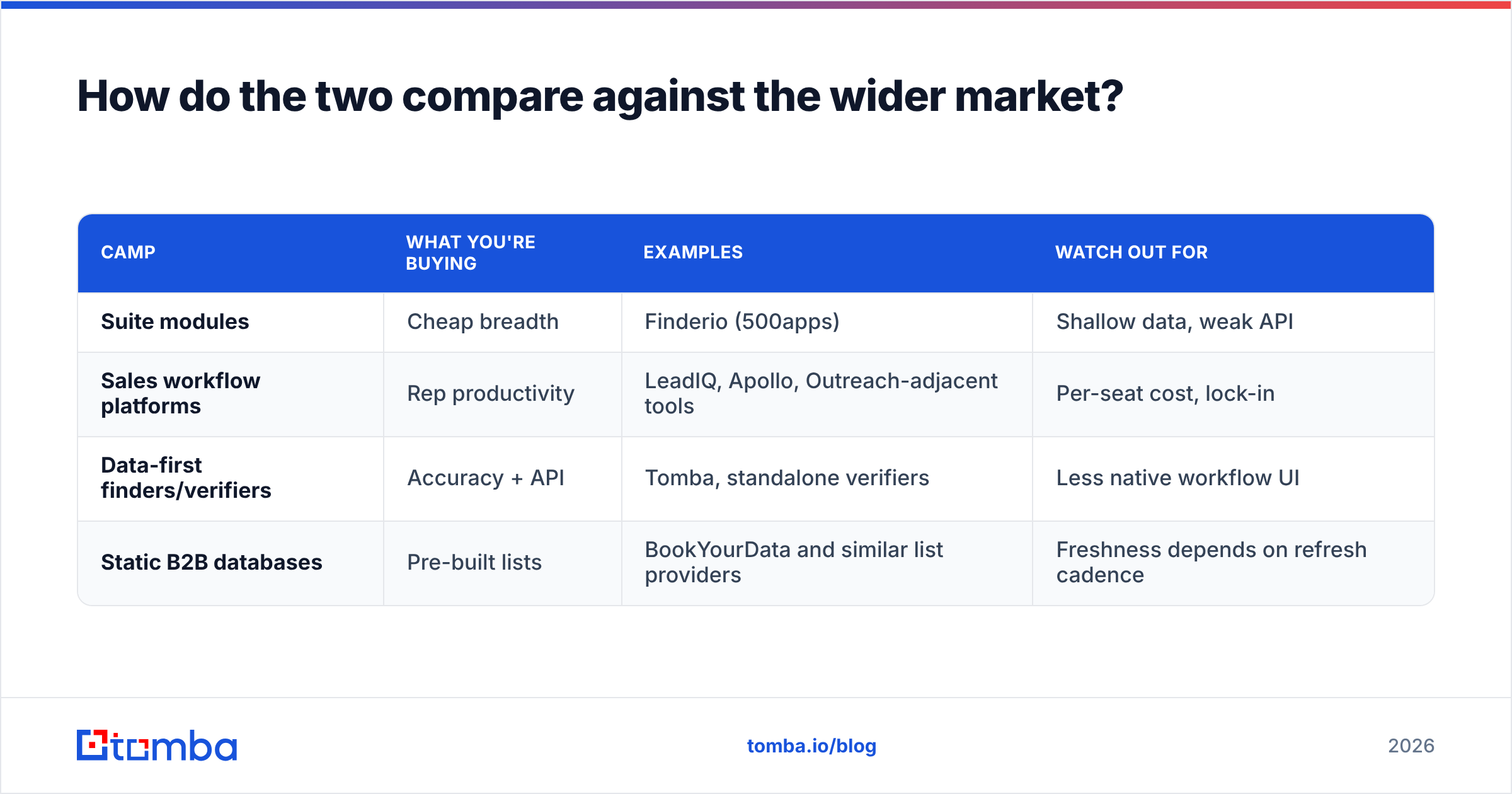
Neither tool exists in a vacuum. The category splits into three camps, and knowing which camp you're shopping in prevents most bad purchases.

| Camp | What you're buying | Examples | Watch out for |
|---|---|---|---|
| Suite modules | Cheap breadth | Finderio (500apps) | Shallow data, weak API |
| Sales workflow platforms | Rep productivity | LeadIQ, Apollo, Outreach-adjacent tools | Per-seat cost, lock-in |
| Data-first finders/verifiers | Accuracy + API | Tomba, standalone verifiers | Less native workflow UI |
| Static B2B databases | Pre-built lists | BookYourData and similar list providers | Freshness depends on refresh cadence |
Static list providers deserve a fair note here. Buying a pre-verified list is often the fastest path when you need 5,000 contacts in a defined segment tomorrow, and reputable providers like BookYourData publish accuracy guarantees you can hold them to. The tradeoff is targeting precision: a list is a snapshot, a finder is on-demand.
If you're specifically replacing LeadIQ, the honest short list is a data-first finder plus your existing sequencer. That combination usually beats a bundled platform on both price and accuracy. It's the reasoning behind most LeadIQ alternative evaluations we see: teams keep Outreach or Instantly for sending, and swap the contact layer for something flat-priced with an API.
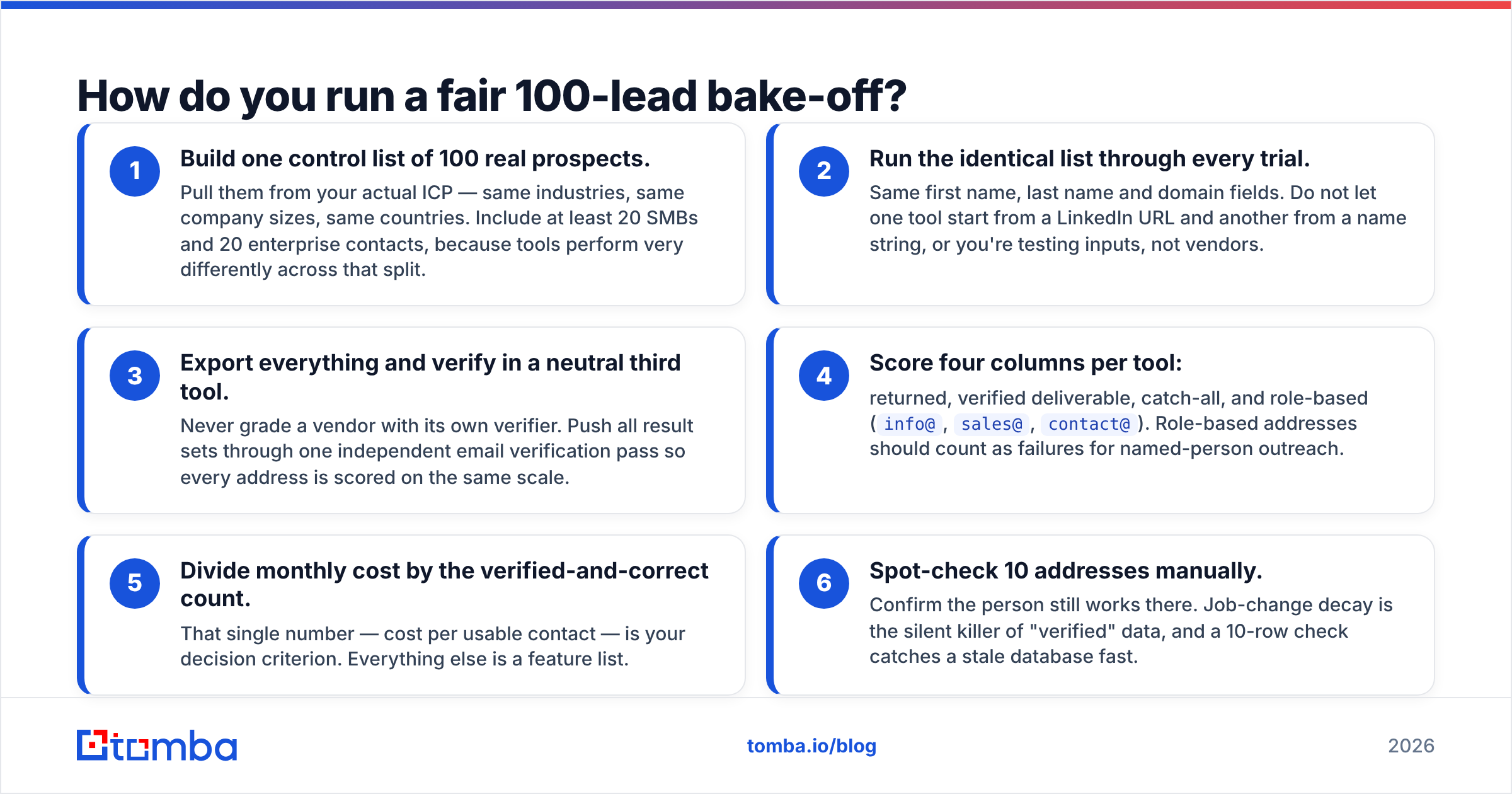
How do you run a fair 100-lead bake-off?#
Do this before you sign anything. It takes about ninety minutes. It settles the argument with evidence instead of opinions.
- Build one control list of 100 real prospects. Pull them from your actual ICP — same industries, same company sizes, same countries. Include at least 20 SMBs and 20 enterprise contacts, because tools perform very differently across that split.
- Run the identical list through every trial. Use the same first name, last name and domain fields. If one tool starts from a LinkedIn URL and another from a name string, you're testing inputs, not vendors.
- Export everything and verify in a neutral third tool. Never grade a vendor with its own verifier. Push all result sets through one independent email verification pass, so every address is scored on the same scale.
Now do the scoring. This is where the winner shows up:
- Score four columns per tool: returned, verified deliverable, catch-all, and role-based (
info@,sales@,contact@). Count role-based addresses as failures for named-person outreach. - Divide monthly cost by the verified-and-correct count. That single number — cost per usable contact — is your decision criterion. Everything else is a feature list.
- Spot-check 10 addresses by hand. Confirm the person still works there. Job-change decay is the silent killer of "verified" data, and a 10-row check catches a stale database fast.
Teams that run this test are frequently surprised. The tool with the highest hit rate is rarely the tool with the lowest cost per usable contact. The most expensive tool is rarely the most accurate either — it's usually the most integrated, which is a different thing you may or may not need.
So which should you choose?#
The Finderio vs LeadIQ choice comes down to three cases.
Choose Finderio if you're a small team already buying into the 500apps ecosystem, your lookup volume is modest, and a 40–50% verified rate is acceptable because your outreach volume is low and your list is warm.
Choose LeadIQ if you run a LinkedIn-first SDR motion, every rep has a seat they'll genuinely use daily, and the capture-to-CRM-to-sequence workflow saves more rep hours than the seat price costs. That's a real ROI case. Just be honest about seat utilization before you sign annually.
Choose neither if your bottleneck is volume, verification quality, or programmatic enrichment. That's a data-layer problem, and both of these tools solve adjacent problems instead.
If you're in that third bucket, start with Tomba's email finder. The free tier gives you 25 searches to run against your own control list. The Starter plan is $49/mo flat, with no per-seat multiplier. Every paid plan includes API access, so the same lookups work from your CRM, your spreadsheet, or your pipeline scripts. Run the 100-lead test above, compare the cost-per-usable-contact column honestly, and let the numbers pick your winner.
Related guides#
Ready to find emails that actually work?
Join 150,000+ professionals who stopped guessing and started sending. Free credits on signup — no credit card required.
Get the Tomba newsletter
Practical outbound tactics and product updates — once every two weeks.
About the author