Finderio vs Mattermark: Which B2B Data Tool Wins in 2026?
Finderio finds contact emails. Mattermark scores companies. They solve different halves of the same problem — and picking the wrong half costs you a quarter of pipeline. Here's the honest breakdown.
TL;DR
- Finderio (finder.io, part of the 500apps suite) is a contact-level tool: give it a domain or a name, get an email address back. Mattermark is a company-level tool: give it a market, get a ranked list of firms with funding, headcount and growth signals.
- They are not really substitutes. Comparing them head-to-head only makes sense if you are asking "which layer of my prospecting stack do I buy first?"
- Finderio's pull is price — it ships inside a bundled all-in-one subscription, so the per-app cost looks tiny. The catch is that bundled tools rarely lead their category on match rate or verification depth.
- Mattermark's pull is targeting — it tells you which accounts deserve outreach. It will not hand you a verified inbox to send to.
- If your bottleneck is "I know who to contact but can't reach them," a dedicated email finder with a real verification layer beats both. If your bottleneck is "I don't know which 200 companies to work," account intelligence wins.
Most "Finderio vs Mattermark" searches come from someone building a prospecting stack from scratch and trying to figure out which subscription to sign first. That is the actual question worth answering, so this post treats it that way instead of pretending the two tools compete feature-for-feature.
What are Finderio and Mattermark, exactly?#
Finderio (finder.io) is an email finder and verifier sold by 500apps as one product inside a large bundled suite. You feed it a company domain or a first name, last name and domain, and it returns a likely business email plus a confidence indicator. It also offers bulk uploads and a browser extension. Its positioning is unapologetically value-first: you are buying a whole toolbox and this is one drawer in it.
Mattermark (mattermark.com) came out of the startup-data world and made its name scoring private companies on growth signals — funding rounds, employee count trajectory, web traffic momentum, mindshare. It has changed hands more than once since its 2017 acquisition by FullContact, so verify the current plan structure and data refresh cadence directly with the vendor before you commit budget. The core promise has stayed consistent: help you find and rank companies worth caring about.
Put simply: Mattermark answers "who should I sell to?" and Finderio answers "what's their email address?" One is a targeting tool, the other is a contact tool.
How do Finderio and Mattermark compare head-to-head?#
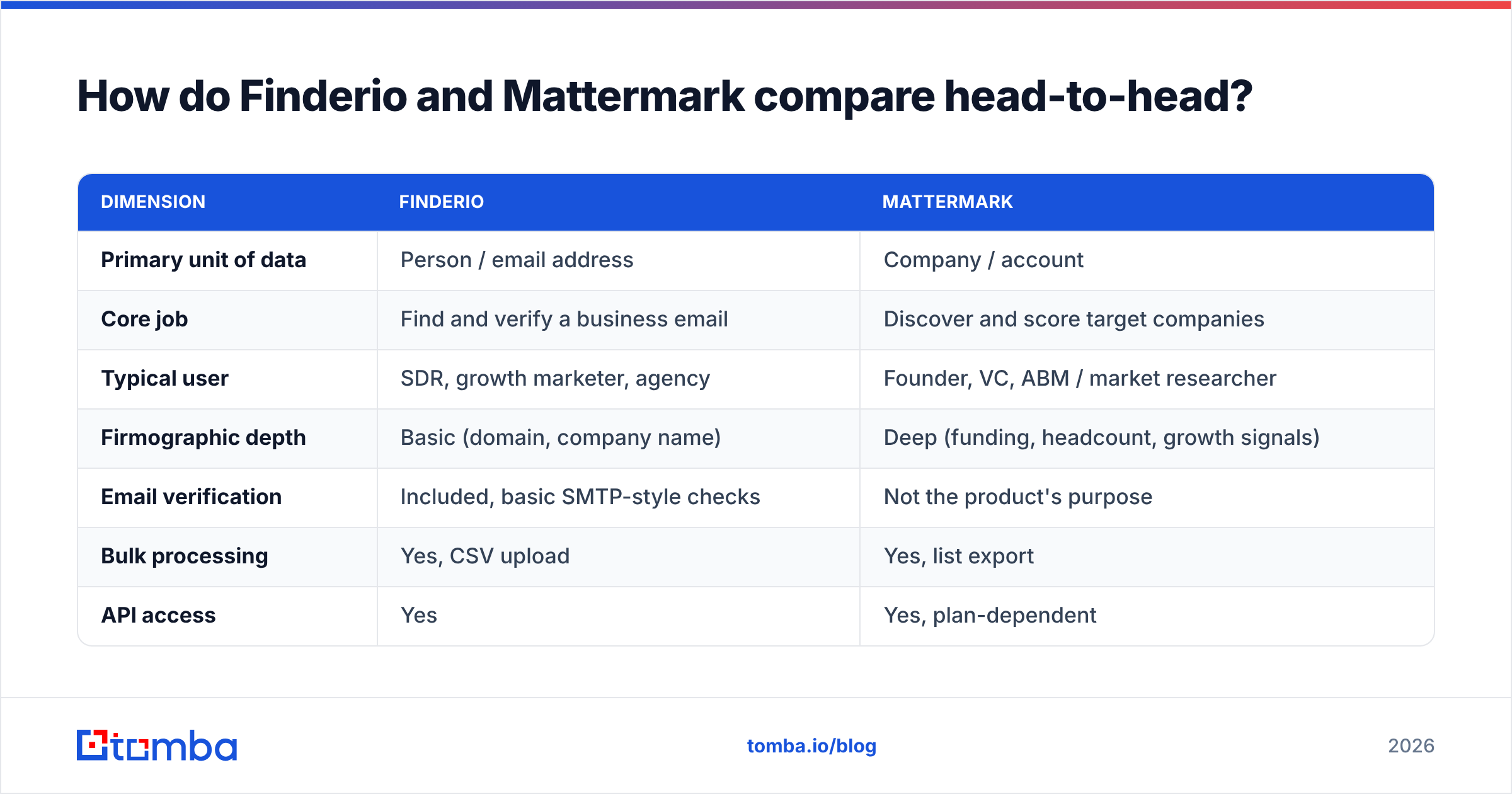
| Dimension | Finderio | Mattermark |
|---|---|---|
| Primary unit of data | Person / email address | Company / account |
| Core job | Find and verify a business email | Discover and score target companies |
| Typical user | SDR, growth marketer, agency | Founder, VC, ABM / market researcher |
| Firmographic depth | Basic (domain, company name) | Deep (funding, headcount, growth signals) |
| Email verification | Included, basic SMTP-style checks | Not the product's purpose |
| Bulk processing | Yes, CSV upload | Yes, list export |
| API access | Yes | Yes, plan-dependent |
| Sold as | Part of a bundled all-in-one suite | Standalone intelligence platform |
| Best for | Filling in contact gaps cheaply | Building a target account list |
The table makes the split obvious. If you tried to run outbound on Mattermark alone, you would end up hand-guessing email formats. If you tried to run it on Finderio alone, you would be emailing whatever companies happened to cross your mind that week.

Which one finds more usable email addresses?#
This is not a fair fight, and the fair version of the question is more useful: how good is Finderio compared to the category, and does Mattermark contribute anything to email discovery at all?
Mattermark's contribution to email discovery is indirect. You get company records and sometimes key-people names; converting those names into deliverable inboxes is a separate step you have to solve elsewhere. That is by design, not a defect.
Finderio does attempt the whole job. In practice, bundled email finders tend to lag specialists on three measurable things:
- Match rate on mid-market and non-US domains. Pattern-guessing works fine for
firstname.lastname@bigco.com. It degrades fast on 40-person companies with idiosyncratic formats, and on domains outside the English-speaking web. - Catch-all handling. A domain that accepts every address will return "valid" to a naive SMTP check and then bounce or blackhole in production. Specialist tools run a separate catch-all verifier path; bundled tools frequently do not.
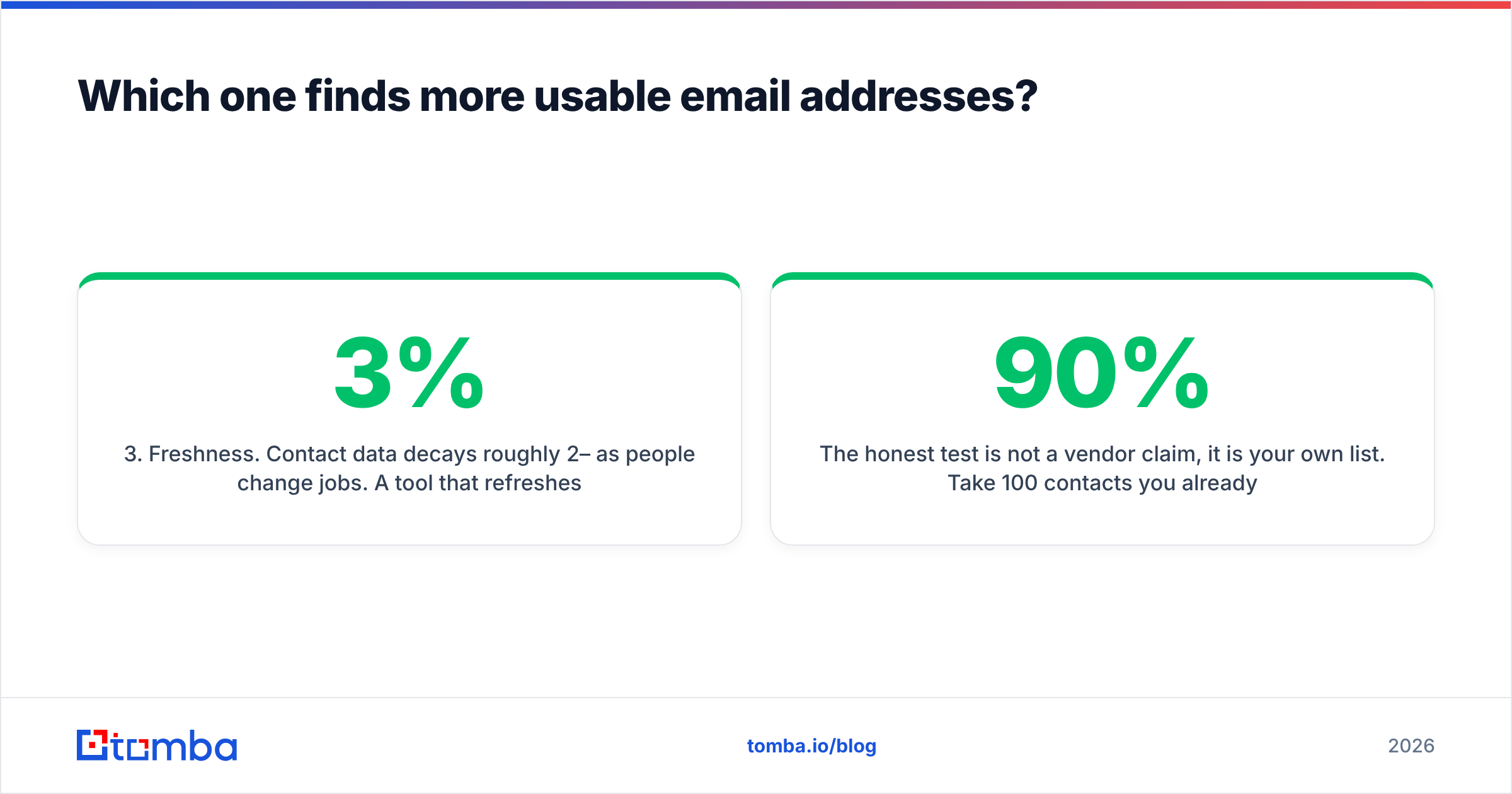
- Freshness. Contact data decays roughly 2–3% per month as people change jobs. A tool that refreshes quarterly and one that refreshes continuously will look identical on a 20-row test and diverge badly on a 20,000-row campaign.
The honest test is not a vendor claim, it is your own list. Take 100 contacts you already know are real — from closed-won deals, from your CRM, from LinkedIn connections — and run them through each tool. Score match rate and bounce rate separately. A tool that returns an address for 90% of rows but bounces on 12% is worse than one that returns 70% with a 1% bounce rate, because bounces damage sender reputation and match rate does not.
What does each tool actually cost in 2026?#
Pricing on both sides moves, and Mattermark in particular has changed packaging under different ownership. Treat the shape below as a framework and confirm the numbers on the vendors' own pages before you buy.
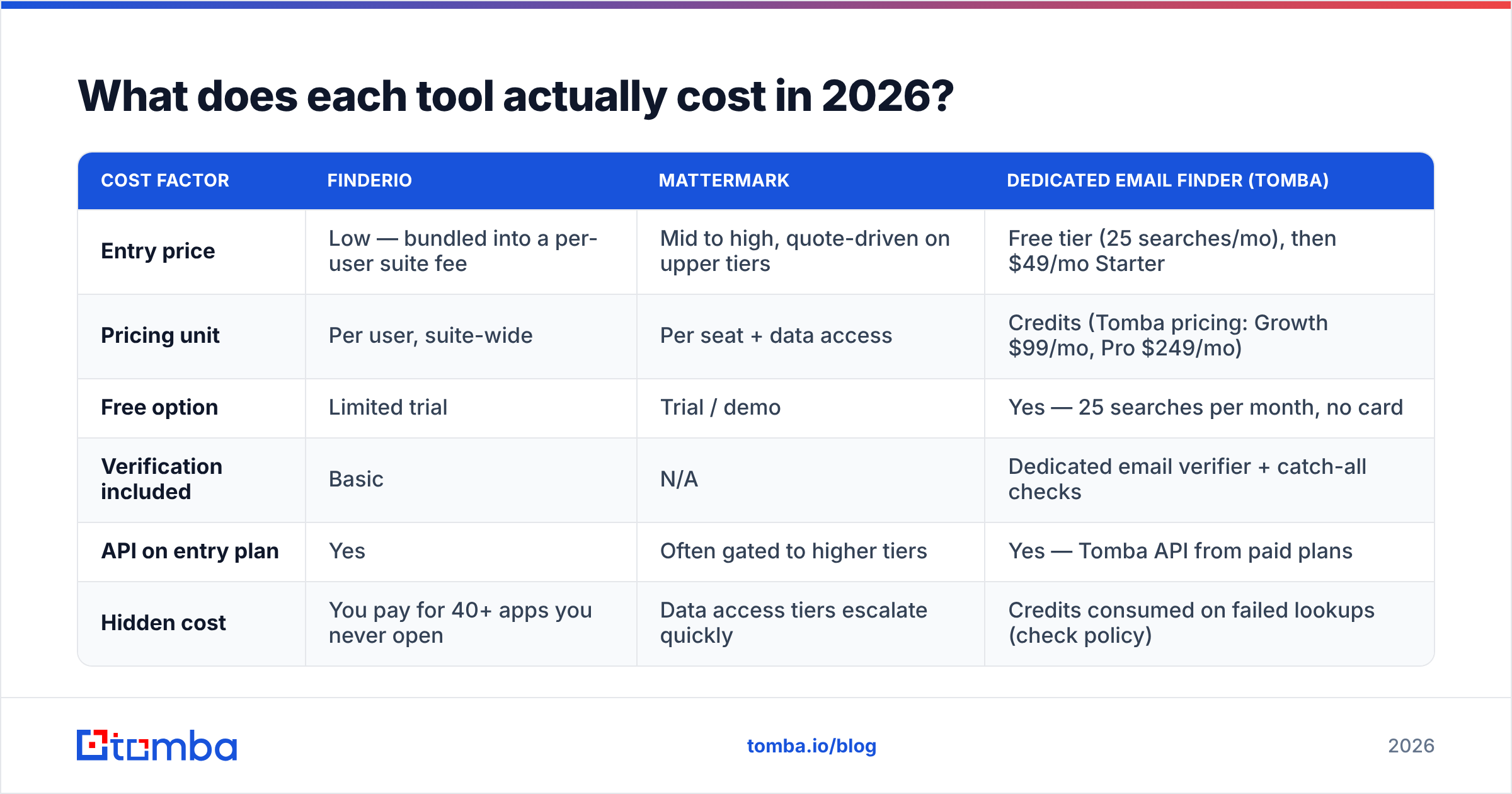
| Cost factor | Finderio | Mattermark | Dedicated email finder (Tomba) |
|---|---|---|---|
| Entry price | Low — bundled into a per-user suite fee | Mid to high, quote-driven on upper tiers | Free tier (25 searches/mo), then $49/mo Starter |
| Pricing unit | Per user, suite-wide | Per seat + data access | Credits (Tomba pricing: Growth $99/mo, Pro $249/mo) |
| Free option | Limited trial | Trial / demo | Yes — 25 searches per month, no card |
| Verification included | Basic | N/A | Dedicated email verifier + catch-all checks |
| API on entry plan | Yes | Often gated to higher tiers | Yes — Tomba API from paid plans |
| Hidden cost | You pay for 40+ apps you never open | Data access tiers escalate quickly | Credits consumed on failed lookups (check policy) |
The bundling question deserves a straight answer. A suite subscription is genuinely cheap if you use six or seven of the apps. If you only ever open the email finder, you are paying a suite price for a single-tool outcome and accepting single-tool quality that was never the suite's differentiator. Bundle economics reward breadth, not depth — and email finding is a depth problem.
Mattermark's cost logic is different: you are buying a research shortcut. If it saves an analyst ten hours a month building target lists by hand, the math works at surprisingly high price points. If you are a two-person team selling into a market you already know cold, it will not.
Who should pick Mattermark, and who should pick Finderio?#
Pick Mattermark if:
- You sell into venture-backed or high-growth private companies and funding events are a real buying trigger.
- Your GTM motion is account-based — you work 100 named accounts hard rather than 10,000 contacts lightly.
- You have an analyst or founder who will actually query the data, not just export it once.
- You already have a contact-finding solution and the gap is targeting.
Pick Finderio if:
- You are already paying for the 500apps suite for other reasons and marginal cost is effectively zero.
- Your volume is modest — a few hundred lookups a month, not tens of thousands.
- Your ICP skews toward larger companies with predictable email conventions.
- Budget constraints outrank data quality in your current stage.
Pick neither if your core problem is deliverable contact data at volume across messy, mid-market, international domains. That is a specialist job, and the specialists have spent years on the exact edge cases a bundled tool treats as acceptable losses.

What are the hidden costs nobody mentions in either tool?#
- Bounce damage compounds. A 10% bounce rate does not just waste 10% of your sends — it drags inbox placement down for the other 90%. Google and Microsoft both treat bounce rate as a reputation signal, and the recovery curve is measured in weeks, not days. Read Google's bulk sender guidelines if you want the primary source rather than a vendor's summary.
- Seat inflation on suite pricing. "Cheap per user" becomes expensive at 12 SDRs. Always model the fully loaded cost at your 12-month headcount, not today's.
- Export limits and re-lookups. Some plans meter exports separately from lookups. If your CRM sync re-queries the same contacts monthly, you may be paying twice for a record you already own.
- Data you cannot legally use. Coverage and compliance are different axes. Confirm the vendor's stance on GDPR lawful basis and CCPA opt-out handling before you load EU contacts. Tomba's data sources page is the kind of transparency to look for from any vendor here.
- Integration tax. If the tool does not connect natively to your CRM, someone on your team becomes a human ETL pipeline. Check the integrations list — HubSpot, Salesforce, Pipedrive, Zapier — before you assume the plumbing is free.
- Switching friction later. Bundled tools are stickiest by design. Migrating out of a suite means unpicking several workflows at once, which is exactly why the bundle is priced the way it is.
Is there a better option than either one for outbound?#
For the specific job of turning a name and a domain into a deliverable inbox, yes — a dedicated finder with a verification layer built into the same pipeline. That is the category Tomba, Hunter, Findymail and similar tools compete in, and it is where match rate and bounce rate are the headline metrics rather than a footnote.
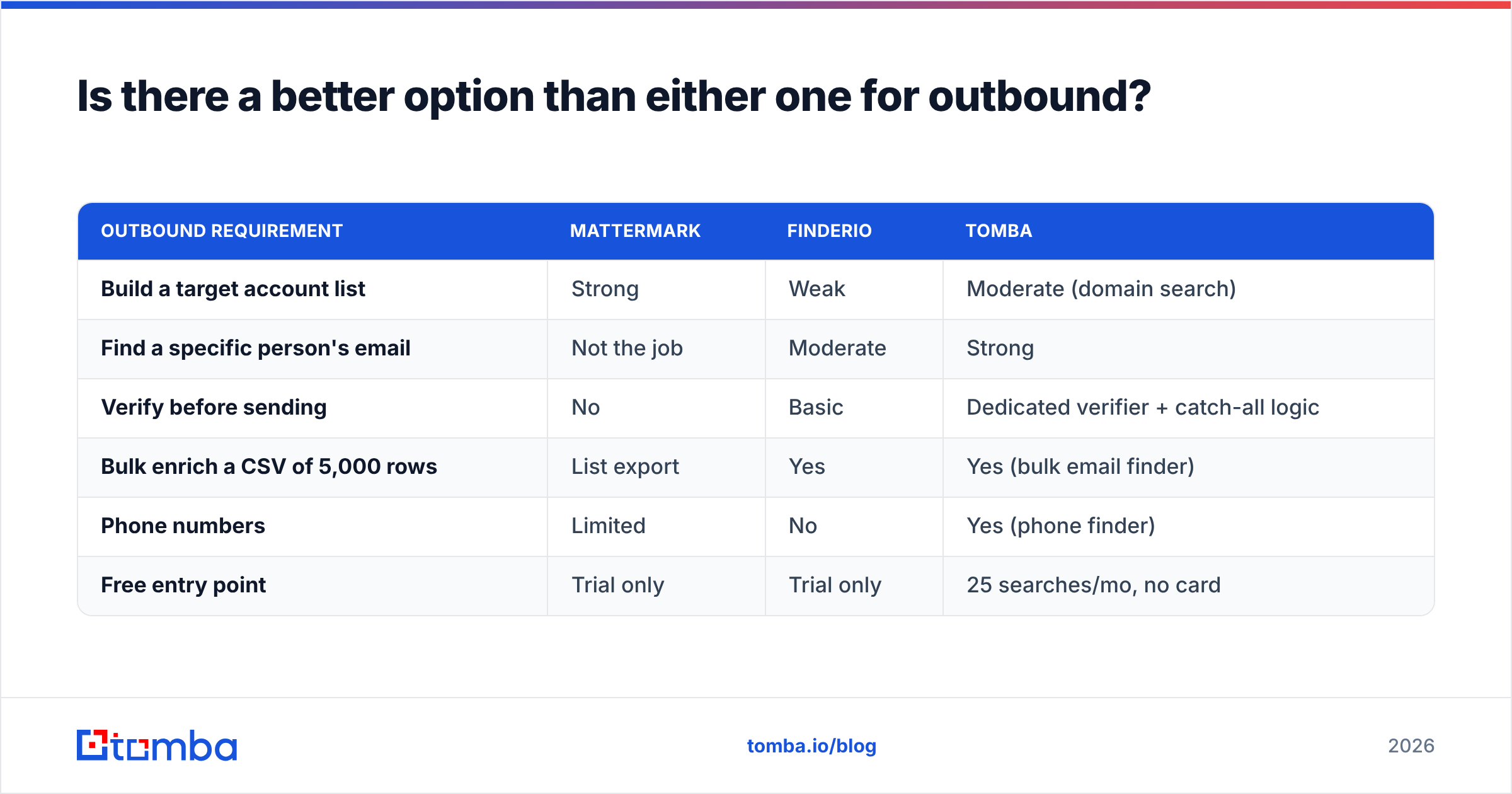
Here is how the three approaches line up on the outbound job specifically:
| Outbound requirement | Mattermark | Finderio | Tomba |
|---|---|---|---|
| Build a target account list | Strong | Weak | Moderate (domain search) |
| Find a specific person's email | Not the job | Moderate | Strong |
| Verify before sending | No | Basic | Dedicated verifier + catch-all logic |
| Bulk enrich a CSV of 5,000 rows | List export | Yes | Yes (bulk email finder) |
| Phone numbers | Limited | No | Yes (phone finder) |
| Free entry point | Trial only | Trial only | 25 searches/mo, no card |
Worth saying plainly: none of these tools is a scam, and the "best" one is genuinely situational. If you are a seed-stage VC mapping a market, Mattermark's growth signals are worth more to you than any email finder. If you are an agency running 30 client campaigns, the finder is the load-bearing wall. Cross-check both against current G2 reviews for your company size before signing — category leaders shift, and review filters by segment tell you more than an overall star rating.
How do you build a stack that uses both signals?#
The teams that win at outbound do not pick one layer. They chain them:
- Define the trigger. Funding round, headcount jump, new tech in the stack, hiring for a role you sell to. This is where account intelligence earns its keep.
- Build the account list. Filter to companies matching the trigger plus your firmographic ICP. Cap it — 200 well-researched accounts beat 5,000 skimmed ones.
- Map the buying committee. Two to four contacts per account, by role, not by whoever's email you can find first.
- Find and verify contacts. Run the names through an email finder, then verify before a single send. Segment catch-all domains into their own slower-cadence list rather than mixing them into a cold blast.
- Enrich for personalization. Job title, seniority, location and company context turn a generic template into a relevant one. Contact enrichment at this stage is what separates a 2% reply rate from a 9% one.
- Feed results back. Track which triggers actually produced meetings and tighten step one next quarter. Most stacks never close this loop, which is why they plateau.
Steps 1–3 are Mattermark's territory. Steps 4–5 are the email finder's. Nobody makes you buy both on day one — but knowing which step is actually blocking you tells you which invoice to sign first.
The bottom line#
Finderio and Mattermark are not competitors so much as neighbors. Mattermark tells you where to knock; Finderio tries to tell you which door. If your list-building is already solid and your problem is reaching the people on it, buy the depth, not the bundle.
Start with the free tier of the Tomba Email Finder — 25 searches a month, no card required — and run it against 100 contacts you can independently verify. Compare match rate and bounce rate against whatever you are using now. Twenty minutes of testing on your own data will settle this comparison more convincingly than any review page, including this one.
Related guides#
Ready to find emails that actually work?
Join 150,000+ professionals who stopped guessing and started sending. Free credits on signup — no credit card required.
Get the Tomba newsletter
Practical outbound tactics and product updates — once every two weeks.
About the author